[CVPR 2025] Prompt Depth Anything
See the codePrompting Depth Anything for 4K Resolution Accurate Metric Depth Estimation
Haotong Lin, Sida Peng, Jingxiao Chen, Songyou Peng, Jiaming Sun, Minghuan Liu, Hujun Bao, Jiashi Feng, Xiaowei Zhou, Bingyi Kang
CVPR 2025
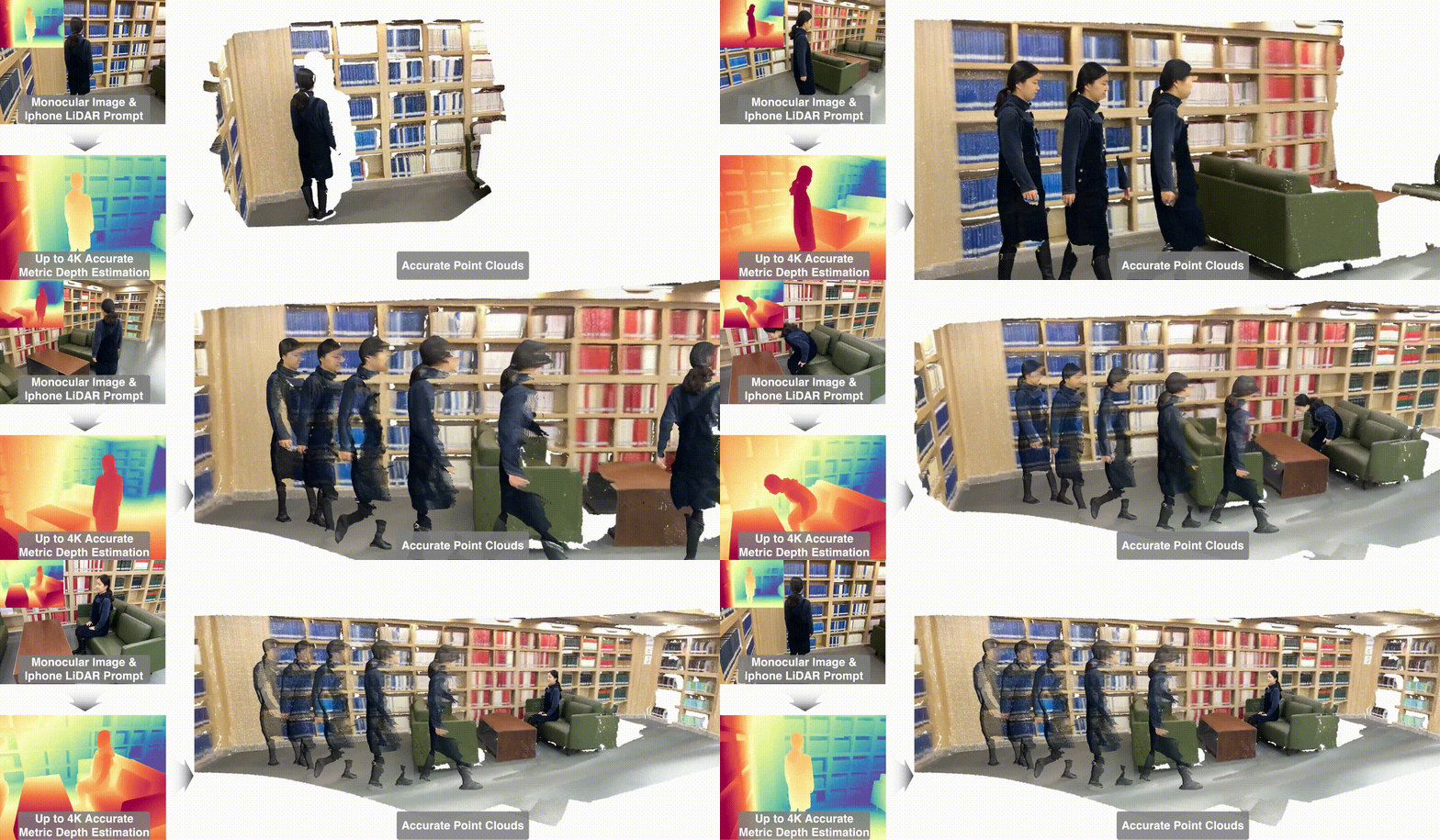
git clone https://github.com/DepthAnything/PromptDA.git
cd PromptDA
pip install -r requirements.txt
pip install -e .
sudo apt install ffmpeg  # for video generation
| Model | Params | Checkpoint |
|---|---|---|
| Prompt-Depth-Anything-Large | 340M | Download |
| Prompt-Depth-Anything-Small | 25.1M | Download |
| Prompt-Depth-Anything-Small-Transparent | 25.1M | Download |
Only Prompt-Depth-Anything-Large is used to benchmark in our paper. Prompt-Depth-Anything-Small-Transparent is further fine-tuned 10K steps with hammer dataset with our iPhone lidar simulation method to improve the performance on transparent objects.
from promptda.promptda import PromptDA
from promptda.utils.io_wrapper import load_image, load_depth, save_depth

DEVICE = 'cuda'
image_path = "assets/example_images/image.jpg"
prompt_depth_path = "assets/example_images/arkit_depth.png"
image = load_image(image_path).to(DEVICE)
prompt_depth = load_depth(prompt_depth_path).to(DEVICE) # 192x256, ARKit LiDAR depth in meters

model = PromptDA.from_pretrained("depth-anything/prompt-depth-anything-vitl").to(DEVICE).eval()
depth = model.predict(image, prompt_depth) # HxW, depth in meters

save_depth(depth, prompt_depth=prompt_depth, image=image)
You can use Stray Scanner App to capture your own data, which requires iPhone 12 Pro or later Pro models, iPad 2020 Pro or later Pro models. We setup a Hugging Face Space for you to quickly test our model. If you want to obtain video results, please follow the following steps.
export PATH_TO_ZIP_FILE=data/8b98276b0a.zip # Replace with your own zip file path
export PATH_TO_SAVE_FOLDER=data/8b98276b0a_results # Replace with your own save folder path
python3 -m promptda.scripts.infer_stray_scan --input_path ${PATH_TO_ZIP_FILE} --output_path ${PATH_TO_SAVE_FOLDER}
python3 -m promptda.scripts.generate_video process_stray_scan --input_path ${PATH_TO_ZIP_FILE} --result_path ${PATH_TO_SAVE_FOLDER}
ffmpeg -framerate 60 -i ${PATH_TO_SAVE_FOLDER}/%06d_smooth.jpg  -c:v libx264 -pix_fmt yuv420p ${PATH_TO_SAVE_FOLDER}.mp4
We thank the generous support from Prof. Weinan Zhang for robot experiments, including the space, objects and the Unitree H1 robot. We also thank Zhengbang Zhu, Jiahang Cao, Xinyao Li, Wentao Dong for their help in setting up the robot platform and collecting robot data.
If you find this code useful for your research, please use the following BibTeX entry
@inproceedings{lin2024promptda,
  title={Prompting Depth Anything for 4K Resolution Accurate Metric Depth Estimation},
  author={Lin, Haotong and Peng, Sida and Chen, Jingxiao and Peng, Songyou and Sun, Jiaming and Liu, Minghuan and Bao, Hujun and Feng, Jiashi and Zhou, Xiaowei and Kang, Bingyi},
  journal={arXiv},
  year={2024}
}
887 followers · starred Jan 2025
499 followers · starred Dec 2024
309 followers · starred Dec 2024
2,064 followers · starred Mar 2025
[CVPR 2025] Prompt Depth Anything
See the codePrompting Depth Anything for 4K Resolution Accurate Metric Depth Estimation
Haotong Lin, Sida Peng, Jingxiao Chen, Songyou Peng, Jiaming Sun, Minghuan Liu, Hujun Bao, Jiashi Feng, Xiaowei Zhou, Bingyi Kang
CVPR 2025
git clone https://github.com/DepthAnything/PromptDA.git
cd PromptDA
pip install -r requirements.txt
pip install -e .
sudo apt install ffmpeg  # for video generation
| Model | Params | Checkpoint |
|---|---|---|
| Prompt-Depth-Anything-Large | 340M | Download |
| Prompt-Depth-Anything-Small | 25.1M | Download |
| Prompt-Depth-Anything-Small-Transparent | 25.1M | Download |
Only Prompt-Depth-Anything-Large is used to benchmark in our paper. Prompt-Depth-Anything-Small-Transparent is further fine-tuned 10K steps with hammer dataset with our iPhone lidar simulation method to improve the performance on transparent objects.
from promptda.promptda import PromptDA
from promptda.utils.io_wrapper import load_image, load_depth, save_depth

DEVICE = 'cuda'
image_path = "assets/example_images/image.jpg"
prompt_depth_path = "assets/example_images/arkit_depth.png"
image = load_image(image_path).to(DEVICE)
prompt_depth = load_depth(prompt_depth_path).to(DEVICE) # 192x256, ARKit LiDAR depth in meters

model = PromptDA.from_pretrained("depth-anything/prompt-depth-anything-vitl").to(DEVICE).eval()
depth = model.predict(image, prompt_depth) # HxW, depth in meters

save_depth(depth, prompt_depth=prompt_depth, image=image)
You can use Stray Scanner App to capture your own data, which requires iPhone 12 Pro or later Pro models, iPad 2020 Pro or later Pro models. We setup a Hugging Face Space for you to quickly test our model. If you want to obtain video results, please follow the following steps.
export PATH_TO_ZIP_FILE=data/8b98276b0a.zip # Replace with your own zip file path
export PATH_TO_SAVE_FOLDER=data/8b98276b0a_results # Replace with your own save folder path
python3 -m promptda.scripts.infer_stray_scan --input_path ${PATH_TO_ZIP_FILE} --output_path ${PATH_TO_SAVE_FOLDER}
python3 -m promptda.scripts.generate_video process_stray_scan --input_path ${PATH_TO_ZIP_FILE} --result_path ${PATH_TO_SAVE_FOLDER}
ffmpeg -framerate 60 -i ${PATH_TO_SAVE_FOLDER}/%06d_smooth.jpg  -c:v libx264 -pix_fmt yuv420p ${PATH_TO_SAVE_FOLDER}.mp4
We thank the generous support from Prof. Weinan Zhang for robot experiments, including the space, objects and the Unitree H1 robot. We also thank Zhengbang Zhu, Jiahang Cao, Xinyao Li, Wentao Dong for their help in setting up the robot platform and collecting robot data.
If you find this code useful for your research, please use the following BibTeX entry
@inproceedings{lin2024promptda,
  title={Prompting Depth Anything for 4K Resolution Accurate Metric Depth Estimation},
  author={Lin, Haotong and Peng, Sida and Chen, Jingxiao and Peng, Songyou and Sun, Jiaming and Liu, Minghuan and Bao, Hujun and Feng, Jiashi and Zhou, Xiaowei and Kang, Bingyi},
  journal={arXiv},
  year={2024}
}
887 followers · starred Jan 2025
499 followers · starred Dec 2024
309 followers · starred Dec 2024
2,064 followers · starred Mar 2025