Your infinite canvas workspace for agents, tasks, knowledge, and research. An infinite canvas for Claude Code, Codex, terminals, tasks, and notes.
TypeScript
1,612
581 commits
updated Oct 16, 2026
An infinite canvas for Claude Code, Codex, terminals, tasks, and notes.



Keep every agent, terminal, task, and note on one infinite canvas.
See parallel work at a glance, keep context visible, and resume exactly where you left off.
Download the latest builds · Read the Chinese README
OpenCove 0.4.0 brings the Pixel workspace, desktop-style collapsed windows, and independently installable plugins and themes. Explore extensions in Settings, or start creating your own with opencove plugin guide.
OpenCove is a spatial development workspace for people who work with AI coding agents every day.
Instead of burying work inside tabs, sidebars, and long chat threads, OpenCove puts your AI agents, terminals, tasks, and notes on the same infinite 2D canvas, so the full state of your work stays visible.
It is built for workflows like:
Claude Code or Codex sessions side by side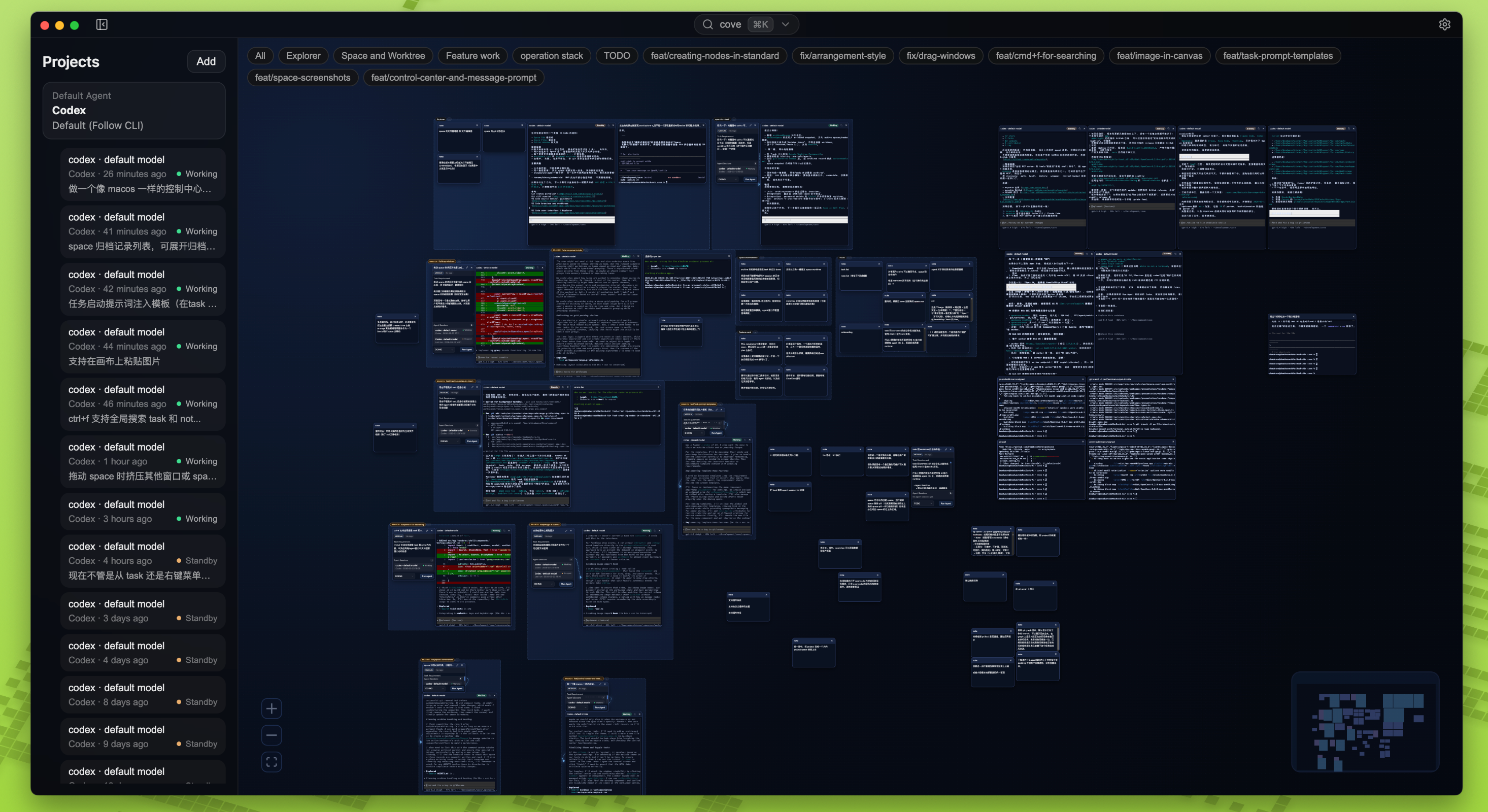
Claude Code, Codex, and similar terminal-native agent workflows.OpenCove is designed around a simple idea: agent workflows are easier to reason about when context is spatial, not hidden.
| Pain Point (Traditional) | The OpenCove Workspace |
|---|---|
| Linear amnesia: context disappears into long chat histories. | Spatial context: important tasks, notes, and execution stay visible on the canvas. |
| Single-pane bottlenecks: tabs and split panes force constant context switching. | Parallel execution: compare and monitor multiple agents without losing your place. |
| Opaque automation: background agent work feels like a black box. | Transparent actions: terminals and side effects stay visible while work is happening. |
OpenCove is currently in Alpha. We recommend it for early adopters and power users who want to explore spatial AI workflows.
OpenCove 0.3.0 stable and newer builds are available on the GitHub Releases page for macOS, Windows, and Linux. Nightly prereleases remain available for early testing; they contain newer changes and may have rough edges.
⚠️ macOS note Current macOS builds are not signed or notarized with an Apple Developer ID. If Gatekeeper blocks the app, run this in your terminal:
xattr -dr com.apple.quarantine /Applications/OpenCove.app
You now have two supported ways to install the opencove CLI:
opencove-server-*) plus release-specific installer assets such as
opencove-install-v<tag>.sh / opencove-install-v<tag>.ps1. Stable releases also
publish the generic opencove-install.sh / opencove-install.ps1 aliases, which
always target the latest stable release.If releases/latest/download/opencove-install.sh returns 404, the latest stable release
has not published the standalone installer yet. In that case, use the Desktop installer for
now or wait for a release that includes those assets.
For the latest stable release, install on macOS / Linux with:
curl -fsSL https://github.com/DeadWaveWave/opencove/releases/latest/download/opencove-install.sh | sh
On Windows, use PowerShell:
powershell -NoProfile -ExecutionPolicy Bypass -Command "Invoke-RestMethod https://github.com/DeadWaveWave/opencove/releases/latest/download/opencove-install.ps1 | Invoke-Expression"
For a nightly or any specific tagged release, use the versioned installer asset from that release page:
curl -fsSL https://github.com/DeadWaveWave/opencove/releases/download/v<version>/opencove-install-v<version>.sh | sh
powershell -NoProfile -ExecutionPolicy Bypass -Command "Invoke-RestMethod https://github.com/DeadWaveWave/opencove/releases/download/v<version>/opencove-install-v<version>.ps1 | Invoke-Expression"
The standalone installer verifies the downloaded runtime against the release's SHA256SUMS.txt before extracting it.
For a headless server that hosts the Web UI, start the worker directly after install:
opencove worker start --hostname 0.0.0.0 --web-ui-password 'change-me'
This prints the Web UI URL and enables password login for browser access. Keep the password set whenever you expose the Web UI beyond localhost.
>= 22.12.09.6.0Claude Code or Codex to experience full agent workflows.# 1. Clone the repository
git clone https://github.com/DeadWaveWave/opencove.git
cd opencove
# 2. Install dependencies
pnpm install
# 3. Start the dev environment
pnpm dev
See RELEASING.md for more packager and build documentation.
OpenCove includes an experimental Worker-hosted Web UI so you can open the canvas from a browser (including other devices on your LAN).
127.0.0.1). For LAN access, enable LAN Access and set a Web UI password.out/renderer bundle (no HMR). Run pnpm build after UI changes.More details:
docs/architecture/CONTROL_SURFACE.mddocs/runtime/WEB_UI_TROUBLESHOOTING.mdOpenCove is built with modern, high-performance web standards:
electron-vite)@xyflow/react for buttery smooth infinite canvas interactions.xterm.js and node-pty powering full-fledged PTY runtimes.Vitest and Playwright for robust unit and E2E regression testing.OpenCove is open source. We need your help to define what the IDE of the AI intelligence era should look like. Read our guidelines below:
Scan the QR code below to join the OpenCove community group and chat with other users.
Redefining dev environments for the modern web.
Built with ❤️ by the OpenCove Team.

1,691 followers · starred Apr 2026
4,849 followers · starred Apr 2026
325 followers · starred Mar 2026
366 followers · starred Mar 2026
Your infinite canvas workspace for agents, tasks, knowledge, and research. An infinite canvas for Claude Code, Codex, terminals, tasks, and notes.
TypeScript
1,612
581 commits
updated Oct 16, 2026
An infinite canvas for Claude Code, Codex, terminals, tasks, and notes.
Keep every agent, terminal, task, and note on one infinite canvas.
See parallel work at a glance, keep context visible, and resume exactly where you left off.
Download the latest builds · Read the Chinese README
OpenCove 0.4.0 brings the Pixel workspace, desktop-style collapsed windows, and independently installable plugins and themes. Explore extensions in Settings, or start creating your own with opencove plugin guide.
OpenCove is a spatial development workspace for people who work with AI coding agents every day.
Instead of burying work inside tabs, sidebars, and long chat threads, OpenCove puts your AI agents, terminals, tasks, and notes on the same infinite 2D canvas, so the full state of your work stays visible.
It is built for workflows like:
Claude Code or Codex sessions side by side
Claude Code, Codex, and similar terminal-native agent workflows.OpenCove is designed around a simple idea: agent workflows are easier to reason about when context is spatial, not hidden.
| Pain Point (Traditional) | The OpenCove Workspace |
|---|---|
| Linear amnesia: context disappears into long chat histories. | Spatial context: important tasks, notes, and execution stay visible on the canvas. |
| Single-pane bottlenecks: tabs and split panes force constant context switching. | Parallel execution: compare and monitor multiple agents without losing your place. |
| Opaque automation: background agent work feels like a black box. | Transparent actions: terminals and side effects stay visible while work is happening. |
OpenCove is currently in Alpha. We recommend it for early adopters and power users who want to explore spatial AI workflows.
OpenCove 0.3.0 stable and newer builds are available on the GitHub Releases page for macOS, Windows, and Linux. Nightly prereleases remain available for early testing; they contain newer changes and may have rough edges.
⚠️ macOS note Current macOS builds are not signed or notarized with an Apple Developer ID. If Gatekeeper blocks the app, run this in your terminal:
xattr -dr com.apple.quarantine /Applications/OpenCove.app
You now have two supported ways to install the opencove CLI:
opencove-server-*) plus release-specific installer assets such as
opencove-install-v<tag>.sh / opencove-install-v<tag>.ps1. Stable releases also
publish the generic opencove-install.sh / opencove-install.ps1 aliases, which
always target the latest stable release.If releases/latest/download/opencove-install.sh returns 404, the latest stable release
has not published the standalone installer yet. In that case, use the Desktop installer for
now or wait for a release that includes those assets.
For the latest stable release, install on macOS / Linux with:
curl -fsSL https://github.com/DeadWaveWave/opencove/releases/latest/download/opencove-install.sh | sh
On Windows, use PowerShell:
powershell -NoProfile -ExecutionPolicy Bypass -Command "Invoke-RestMethod https://github.com/DeadWaveWave/opencove/releases/latest/download/opencove-install.ps1 | Invoke-Expression"
For a nightly or any specific tagged release, use the versioned installer asset from that release page:
curl -fsSL https://github.com/DeadWaveWave/opencove/releases/download/v<version>/opencove-install-v<version>.sh | sh
powershell -NoProfile -ExecutionPolicy Bypass -Command "Invoke-RestMethod https://github.com/DeadWaveWave/opencove/releases/download/v<version>/opencove-install-v<version>.ps1 | Invoke-Expression"
The standalone installer verifies the downloaded runtime against the release's SHA256SUMS.txt before extracting it.
For a headless server that hosts the Web UI, start the worker directly after install:
opencove worker start --hostname 0.0.0.0 --web-ui-password 'change-me'
This prints the Web UI URL and enables password login for browser access. Keep the password set whenever you expose the Web UI beyond localhost.
>= 22.12.09.6.0Claude Code or Codex to experience full agent workflows.# 1. Clone the repository
git clone https://github.com/DeadWaveWave/opencove.git
cd opencove
# 2. Install dependencies
pnpm install
# 3. Start the dev environment
pnpm dev
See RELEASING.md for more packager and build documentation.
OpenCove includes an experimental Worker-hosted Web UI so you can open the canvas from a browser (including other devices on your LAN).
127.0.0.1). For LAN access, enable LAN Access and set a Web UI password.out/renderer bundle (no HMR). Run pnpm build after UI changes.More details:
docs/architecture/CONTROL_SURFACE.mddocs/runtime/WEB_UI_TROUBLESHOOTING.mdOpenCove is built with modern, high-performance web standards:
electron-vite)@xyflow/react for buttery smooth infinite canvas interactions.xterm.js and node-pty powering full-fledged PTY runtimes.Vitest and Playwright for robust unit and E2E regression testing.OpenCove is open source. We need your help to define what the IDE of the AI intelligence era should look like. Read our guidelines below:
Scan the QR code below to join the OpenCove community group and chat with other users.
Redefining dev environments for the modern web.
Built with ❤️ by the OpenCove Team.
1,691 followers · starred Apr 2026
4,849 followers · starred Apr 2026
325 followers · starred Mar 2026
366 followers · starred Mar 2026





