Pure Swift iOS download framework with background downloads, relaunch recovery, resumable transfers, and task management.
See the code
English | 简体中文





Tiercel is a production-oriented iOS download framework in pure Swift for background downloads, relaunch recovery, resumable transfers, and URLSession-based task orchestration.
Indexed on Swift Package Index and featured in awesome-swift and awesome-ios.
If Tiercel helps your team ship reliable downloads, consider starring the repository.
URLSession behavior.SessionManager instances so different download domains stay isolated.URLSessionDownloadTask, while still using Apple's native stack underneath.| What you need | Raw URLSession only | Tiercel |
|---|---|---|
| Background downloads | Base primitives | Higher-level manager and task model |
| Relaunch recovery | App-specific persistence work | Built-in persisted task metadata and resume data |
| Batch operations | Manual orchestration | Multi-download helpers and manager-level controls |
| Download domain isolation | Custom architecture | Multiple isolated SessionManager instances |
| Progress and validation hooks | Hand-rolled callbacks | Built-in progress, speed, ETA, and validation APIs |
platform :ios, '12.0'
use_frameworks!

target 'YourTargetName' do
  pod 'Tiercel'
end
Then run:
pod install
In Xcode, choose File > Add Package Dependencies... and use:
https://github.com/Danie1s/Tiercel.git
Drag the Sources directory into your project and make sure the files are included in the desired target.
import Tiercel

var configuration = SessionConfiguration()
configuration.allowsCellularAccess = true
configuration.maxConcurrentTasksLimit = 3

let manager = SessionManager("downloads", configuration: configuration)

let task = manager.download("https://example.com/video.mp4")

task?.progress(onMainQueue: true) { task in
    print("progress:", task.progress.fractionCompleted)
}.success { task in
    print("saved to:", task.filePath)
}.failure { _ in
    print("download failed")
}
You can control downloads by URL or by task instance:
let url = "https://example.com/video.mp4"

manager.start(url)
manager.suspend(url)
manager.cancel(url)
manager.remove(url, completely: false)

if let task = task {
    manager.start(task)
    manager.suspend(task)
    manager.cancel(task)
    manager.remove(task, completely: false)
}
Tiercel also supports batch creation and start:
let urls = [
    "https://example.com/episode-1.mp4",
    "https://example.com/episode-2.mp4"
]

let tasks = manager.multiDownload(urls)
print(tasks.count)
Tiercel persists task state and resume data to disk, so downloads can be restored after the app relaunches. If the user force-quits the app, iOS stops background execution until the next launch; once the app is opened again, Tiercel can recover eligible downloads and continue from stored state.
To support native background session callbacks, wire the completion handler from AppDelegate to the matching SessionManager:
let downloadManagers = [managerA, managerB]

func application(_ application: UIApplication,
                 handleEventsForBackgroundURLSession identifier: String,
                 completionHandler: @escaping () -> Void) {
    for manager in downloadManagers where manager.identifier == identifier {
        manager.completionHandler = completionHandler
        break
    }
}
SessionConfiguration lets you tune network behavior for different products or environments:
var configuration = SessionConfiguration()
configuration.maxConcurrentTasksLimit = 3
configuration.allowsCellularAccess = true
configuration.allowsConstrainedNetworkAccess = true
configuration.allowsExpensiveNetworkAccess = true

let manager = SessionManager("downloads", configuration: configuration)
You can also validate downloaded files when integrity matters:
task?.validateFile(code: "9e2a3650530b563da297c9246acaad5c",
                   type: .md5,
                   onMainQueue: true) { task in
    if task.validation == .correct {
        print("file is valid")
    } else {
        print("file is invalid")
    }
}
iOS 12.0+Swift 5.0+Open Demo/Tiercel-Demo.xcodeproj to explore:
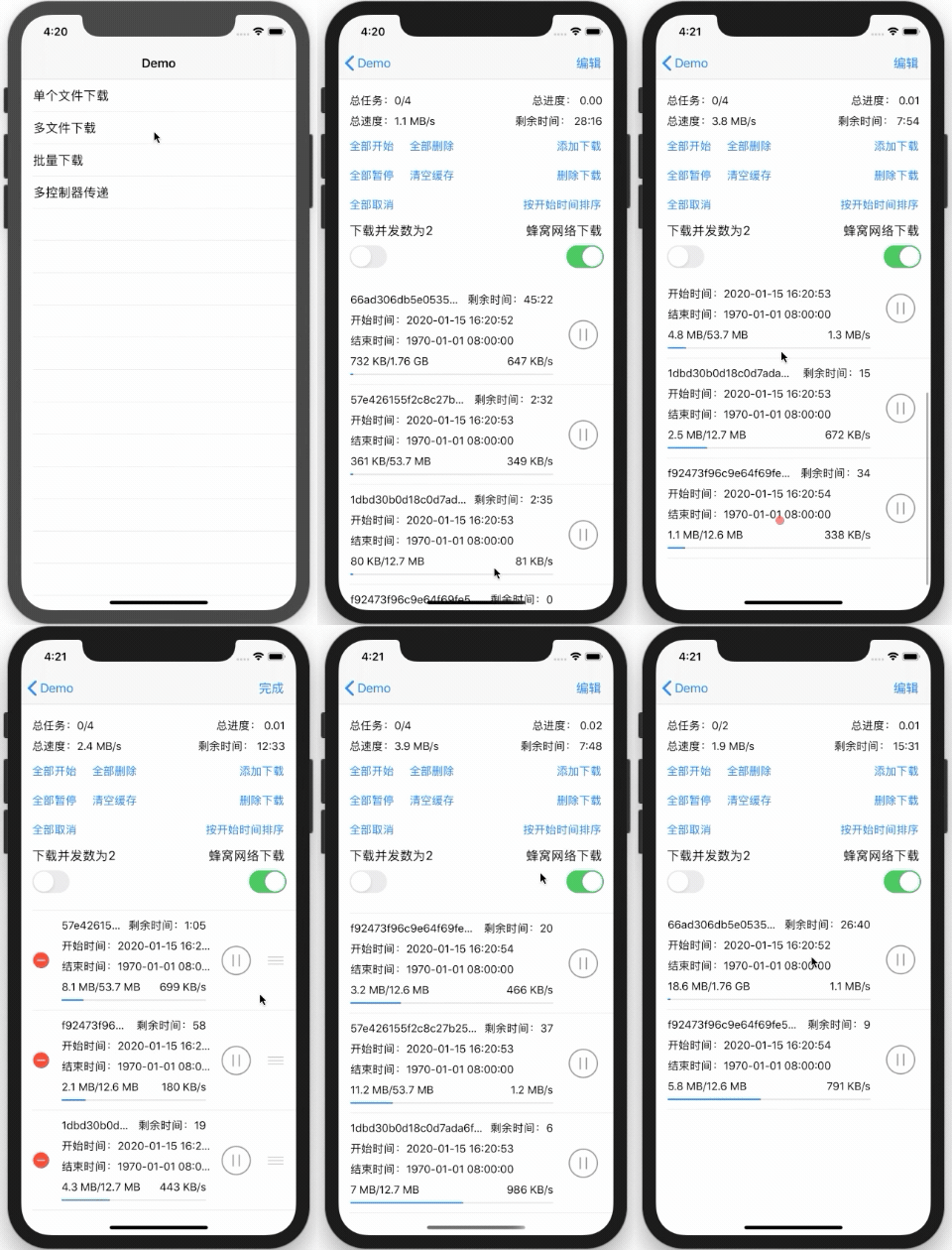
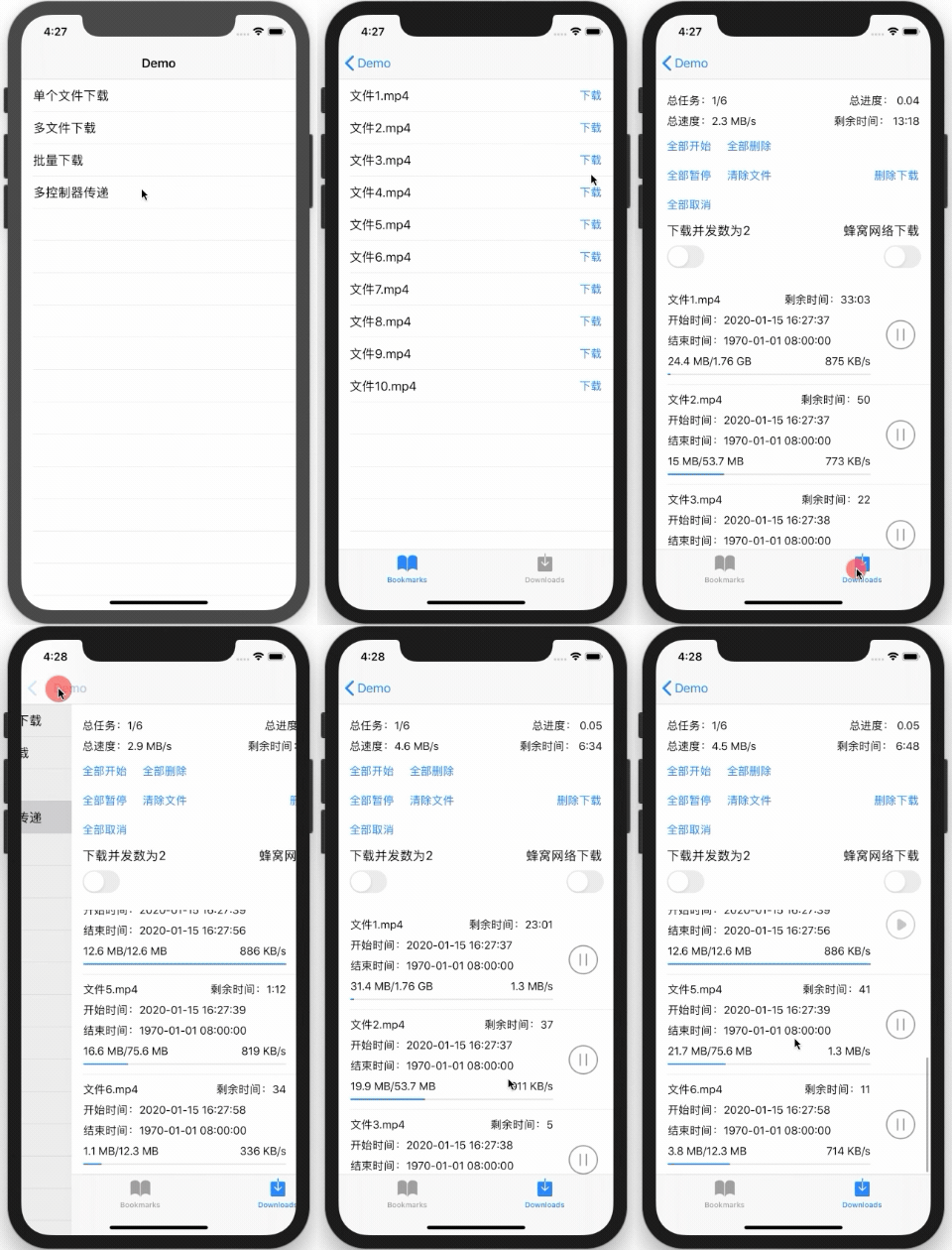
Sources/General: core session, task, cache, and status-management logicSources/Extensions: lightweight helpers used across the frameworkSources/Utility: checksum and resume-data utilitiesDemo: sample iOS app for evaluation and manual testingTiercel is available under the MIT license. See LICENSE for details.
9,448 followers · starred Mar 2026
332 followers · starred Oct 2026
574 followers · starred Mar 2026
22 followers · starred Jan 2022
Pure Swift iOS download framework with background downloads, relaunch recovery, resumable transfers, and task management.
See the code
English | 简体中文
Tiercel is a production-oriented iOS download framework in pure Swift for background downloads, relaunch recovery, resumable transfers, and URLSession-based task orchestration.
Indexed on Swift Package Index and featured in awesome-swift and awesome-ios.
If Tiercel helps your team ship reliable downloads, consider starring the repository.
URLSession behavior.SessionManager instances so different download domains stay isolated.URLSessionDownloadTask, while still using Apple's native stack underneath.| What you need | Raw URLSession only | Tiercel |
|---|---|---|
| Background downloads | Base primitives | Higher-level manager and task model |
| Relaunch recovery | App-specific persistence work | Built-in persisted task metadata and resume data |
| Batch operations | Manual orchestration | Multi-download helpers and manager-level controls |
| Download domain isolation | Custom architecture | Multiple isolated SessionManager instances |
| Progress and validation hooks | Hand-rolled callbacks | Built-in progress, speed, ETA, and validation APIs |
platform :ios, '12.0'
use_frameworks!

target 'YourTargetName' do
  pod 'Tiercel'
end
Then run:
pod install
In Xcode, choose File > Add Package Dependencies... and use:
https://github.com/Danie1s/Tiercel.git
Drag the Sources directory into your project and make sure the files are included in the desired target.
import Tiercel

var configuration = SessionConfiguration()
configuration.allowsCellularAccess = true
configuration.maxConcurrentTasksLimit = 3

let manager = SessionManager("downloads", configuration: configuration)

let task = manager.download("https://example.com/video.mp4")

task?.progress(onMainQueue: true) { task in
    print("progress:", task.progress.fractionCompleted)
}.success { task in
    print("saved to:", task.filePath)
}.failure { _ in
    print("download failed")
}
You can control downloads by URL or by task instance:
let url = "https://example.com/video.mp4"

manager.start(url)
manager.suspend(url)
manager.cancel(url)
manager.remove(url, completely: false)

if let task = task {
    manager.start(task)
    manager.suspend(task)
    manager.cancel(task)
    manager.remove(task, completely: false)
}
Tiercel also supports batch creation and start:
let urls = [
    "https://example.com/episode-1.mp4",
    "https://example.com/episode-2.mp4"
]

let tasks = manager.multiDownload(urls)
print(tasks.count)
Tiercel persists task state and resume data to disk, so downloads can be restored after the app relaunches. If the user force-quits the app, iOS stops background execution until the next launch; once the app is opened again, Tiercel can recover eligible downloads and continue from stored state.
To support native background session callbacks, wire the completion handler from AppDelegate to the matching SessionManager:
let downloadManagers = [managerA, managerB]

func application(_ application: UIApplication,
                 handleEventsForBackgroundURLSession identifier: String,
                 completionHandler: @escaping () -> Void) {
    for manager in downloadManagers where manager.identifier == identifier {
        manager.completionHandler = completionHandler
        break
    }
}
SessionConfiguration lets you tune network behavior for different products or environments:
var configuration = SessionConfiguration()
configuration.maxConcurrentTasksLimit = 3
configuration.allowsCellularAccess = true
configuration.allowsConstrainedNetworkAccess = true
configuration.allowsExpensiveNetworkAccess = true

let manager = SessionManager("downloads", configuration: configuration)
You can also validate downloaded files when integrity matters:
task?.validateFile(code: "9e2a3650530b563da297c9246acaad5c",
                   type: .md5,
                   onMainQueue: true) { task in
    if task.validation == .correct {
        print("file is valid")
    } else {
        print("file is invalid")
    }
}
iOS 12.0+Swift 5.0+Open Demo/Tiercel-Demo.xcodeproj to explore:
Sources/General: core session, task, cache, and status-management logicSources/Extensions: lightweight helpers used across the frameworkSources/Utility: checksum and resume-data utilitiesDemo: sample iOS app for evaluation and manual testingTiercel is available under the MIT license. See LICENSE for details.
9,448 followers · starred Mar 2026
332 followers · starred Oct 2026
574 followers · starred Mar 2026
22 followers · starred Jan 2022