
A self-hosted reading companion for highlights, flashcards and other reading tools
Python
17
2,814 commits
updated Oct 3, 2026
See what people are saying
README
Crossbill


A self-hosted reading companion web app that helps you read more actively. Generate chapter summaries for skimming, organize your highlights, and make flashcards and notes from them. Inspired by the active reading method in Mortimer J. Adler's How to Read a Book.
Read EPUBs in the built-in web reader, or sync highlights from an e-reader with KOReader.
Features
- Upload EPUB files and read them in the web reader. KOReader is optional.
- Sync highlights from KOReader with automatic deduplication
- Organize highlights
- Jump from a highlight to its place in the book in the web reader, and make highlights that sync back to KOReader
- Create flash cards from your highlights and sync them to Anki or get AI suggestions from highlights.
- Create AI summaries from epub book chapters for review and skimming. Ollama, OpenAI, Anthropic and Gemini supported.
- Create notes and link them to the highlights, chapters etc.
- Semantic search over highlights, notes and chapter summaries. Finds them by meaning, across books and languages. Optional, requires an embedding provider (Ollama or OpenRouter).
- Browse a book by its own chapter structure and track what you have read chapter by chapter
- Reading statistics from your reading sessions in the web reader and KOReader: streaks, days read and total time read
- Book reflections based on Adler's four analytical-reading questions
- Self-hosted, so your data stays on your server
- Multi-user support
Screenshots
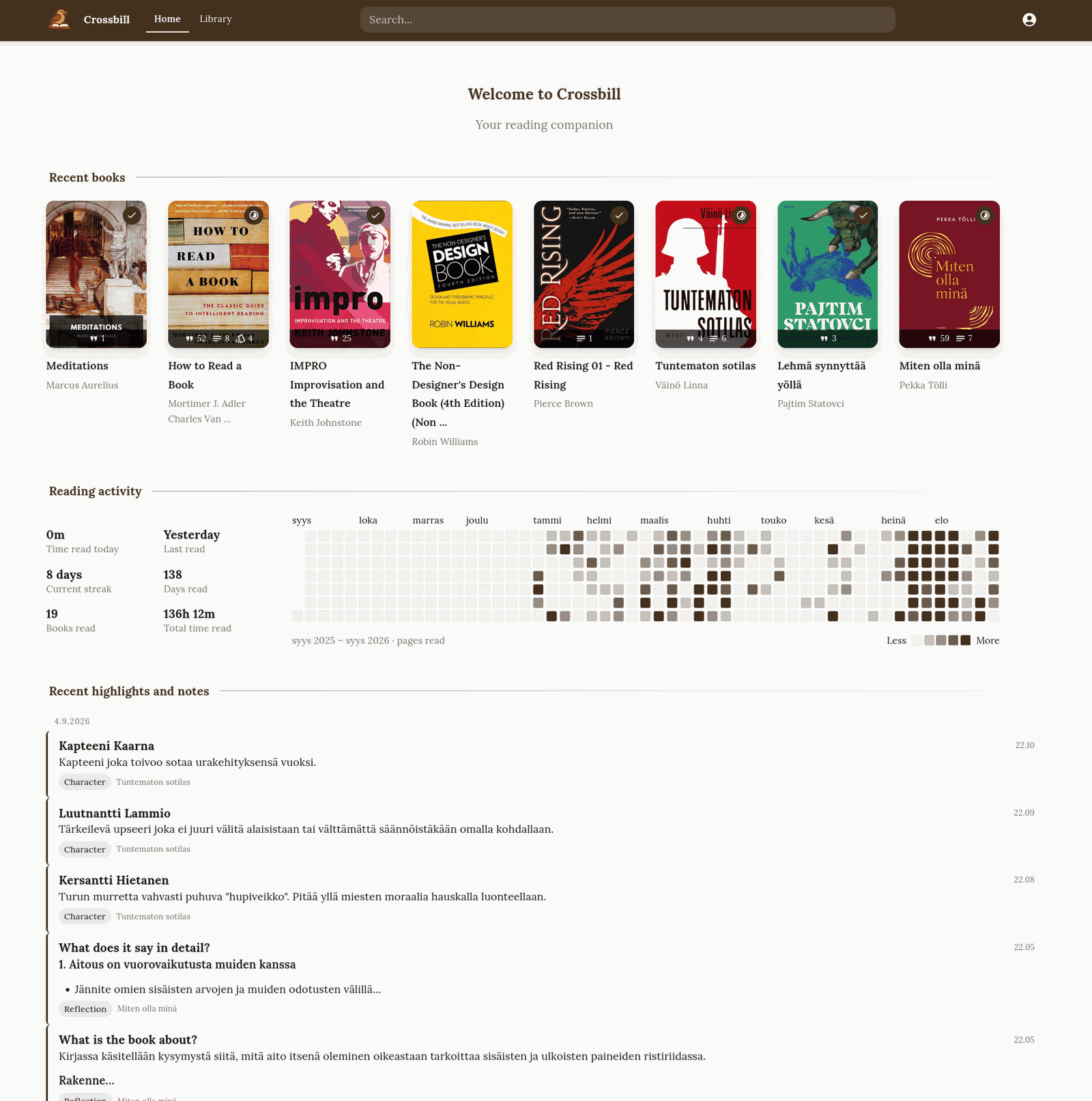
Home: the books you are reading, a year of reading activity, and your latest highlights and notes.

Every highlight from a book, grouped by chapter and filterable by tag, date or highlight style. |

The book's structure: what you have read, a one-line gist per chapter, and the highlights and notes of each chapter. |

A chapter digest: summary, key points and questions to think about, with your answers. |
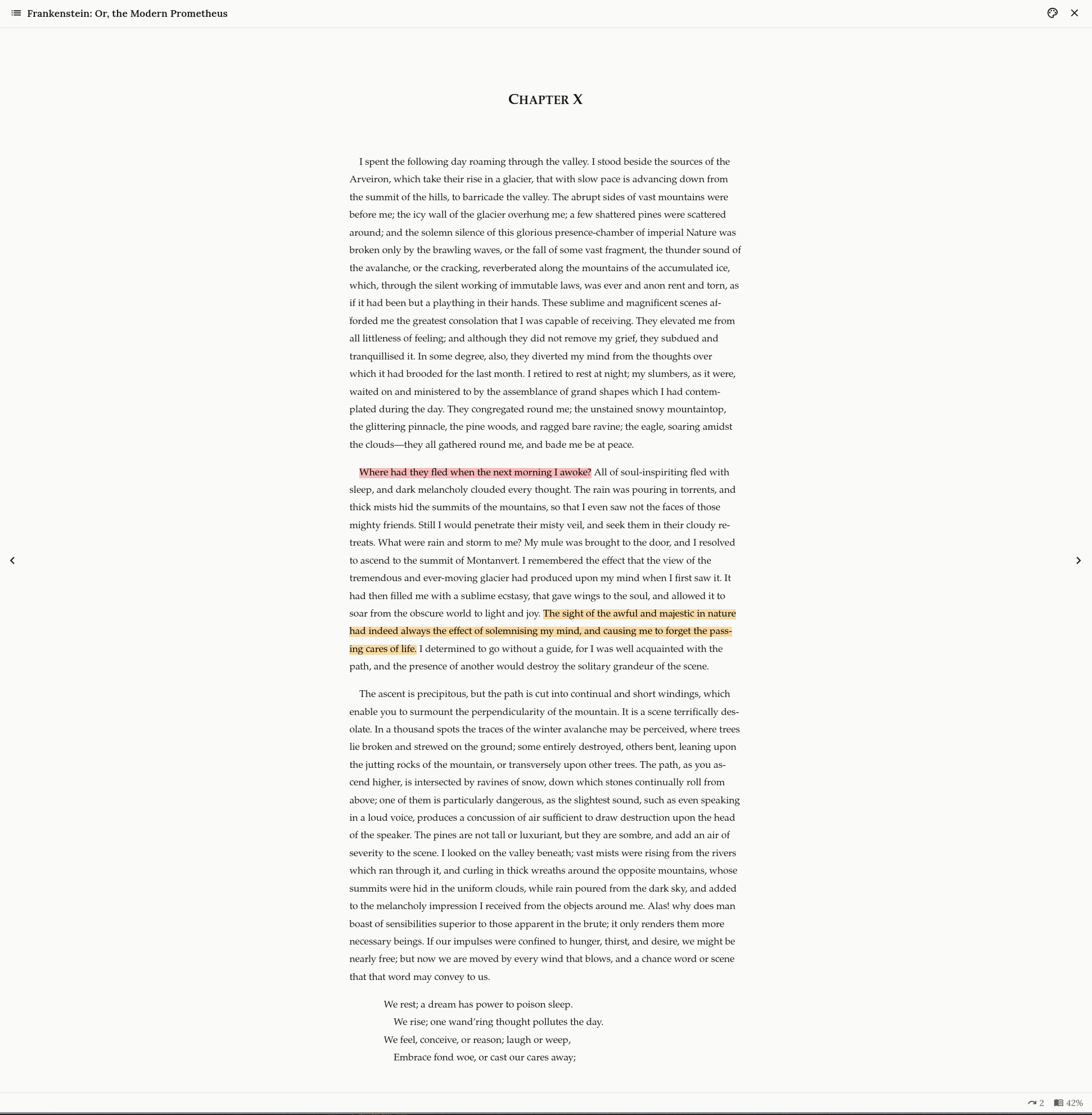
The web reader shows your highlights in their colours.
Overview of software components
- Backend API: FastAPI server with PostgreSQL database
- Web Frontend: React app for browsing, editing and organizing your highlights
- KOReader Plugin (optional): Syncs highlights directly from your KOReader e-reader
- Obsidian Plugin: Integrate highlights into your Obsidian notes
- Anki Plugin: Integrate highlights into your Anki flash cards
Installation
The easiest way to run Crossbill is with the sample docker-compose.yml at the top level of this repository.
- Copy the example environment file to the project root:
cp .env.example .env
-
Fill in the required values at the top of
.env:SECRET_KEY,REFRESH_TOKEN_SECRET_KEY,ADMIN_PASSWORDandPUBLIC_BASE_URL(http://localhost:8000for a local install). -
If you store book files on local disk (the default), change the
sourcepath of theappservice's volume indocker-compose.ymlto a folder on your host. Skip this if you use S3 storage. -
Start the services:
docker compose up -d
- Open
http://localhost:8000and log in with the usernameadminand yourADMIN_PASSWORD. To let others create accounts, setALLOW_USER_REGISTRATIONS=truein.envand rundocker compose up -dagain.
Then add your books. You can use one or both of these:
- Upload EPUBs in the browser. Use the upload button on the Library page, then read and highlight the book in the web reader.
- Sync from KOReader. Install the KOReader plugin on your e-reader.
If you upload a book and later sync the same EPUB from KOReader, the plugin adds to the uploaded book.
Background Worker
The background worker runs long jobs, such as generating chapter digests for a whole book and writing semantic search embeddings. By default the app runs it in its own process, so you do not need to set anything up.
To run the worker in a separate container instead, uncomment the worker service in docker-compose.yml, set EMBEDDED_WORKER=false in .env, and run docker compose up -d.
For AI jobs, the worker needs an AI provider (AI_PROVIDER and its API key). Set the number of jobs it runs at the same time with WORKER_CONCURRENCY (default: 2).
For development, run the worker separately:
make dev-worker
Semantic Search (Optional)
Semantic search stores embeddings of notes, highlights and chapter digests in a pgvector index, so you can find related content across books and languages. It is off until you set an embedding provider.
# Local development, via Ollama
EMBEDDING_PROVIDER=ollama
EMBEDDING_MODEL_NAME=bge-m3
EMBEDDING_BASE_URL=http://localhost:11434/v1

# Hosted, via OpenRouter (reuses OPENROUTER_API_KEY)
EMBEDDING_PROVIDER=openrouter
EMBEDDING_MODEL_NAME=baai/bge-m3
EMBEDDING_BASE_URL is required for ollama and optional for openrouter
(defaults to https://openrouter.ai/api/v1). EMBEDDING_MODEL_VERSION
(default 1) is stored with every vector. Increase it to re-embed everything on
the next backfill without a schema change.
The database column fixes the vector width at 1024, the size bge-m3 produces.
Switching to a model with a different size requires a migration and a full
re-embed.
Postgres needs the vector extension, version 0.8 or newer. Search uses
hnsw.iterative_scan. Without it, a query can return no results when another
user's vectors are closer in the index. The bundled pgvector/pgvector:pg18
image includes 0.8.6.
Background jobs write the embeddings. To index existing content, call
POST /api/v1/semantic/backfill. It also removes entries whose source was
deleted. You can follow its progress in the job-batch views.
S3-Compatible Storage (Optional)
By default, Crossbill stores ebook files and covers on the local filesystem. If the app and worker containers cannot share a filesystem, for example on Railway, use S3-compatible storage so both containers can read the same files.
To use S3 storage, set these environment variables in .env:
S3_ENDPOINT_URL=https://your-s3-endpoint.example.com
S3_ACCESS_KEY_ID=your-access-key
S3_SECRET_ACCESS_KEY=your-secret-key
S3_BUCKET_NAME=crossbill-files
S3_REGION=your-region
When these are set, Crossbill uses S3. Otherwise it stores files in the folder mounted at /app/book-files. Files already on local disk are not moved to S3.
For local development or a self-hosted server, you can use Garage as the S3-compatible server. The docker-compose.yml includes a garage service, which starts only when you name it. Start it and run the one-time setup script:
docker compose up -d garage
./scripts/setup_garage.sh
The script creates the bucket and API key, then prints the values to add to .env. When Crossbill runs in Docker, use S3_ENDPOINT_URL=http://garage:3900. When the backend runs on your machine for development, use http://localhost:3900. Then apply the settings with docker compose up -d. (docker restart does not read .env again.) Commands that act on all services skip Garage unless you add --profile s3, so stop everything with docker compose --profile s3 down. To run Garage in production, see the Garage documentation for the garage.toml settings.
Development
Each component has its own installation instructions for development:
- Backend: See backend/README.md
- Frontend: See frontend/README.md
In development, the API documentation is at <backend host>/api/v1/docs. It is turned off in production.
Contributions
Contributions are welcome. Few guide lines:
- Check if there is an issue you would like to work on and comment on it to discuss
- Add first issue about the feature etc. you'd like to see in the application (and work on if possible!)
- AI-assisted coding is welcome as long as you review your contributions before submitting them to the review.
Similar repos


Languages
Python
61.6%
TypeScript
36.3%
Shell
1.0%
A self-hosted reading companion for highlights, flashcards and other reading tools
Python
17
2,814 commits
updated Oct 3, 2026
See what people are saying
README
Crossbill
A self-hosted reading companion web app that helps you read more actively. Generate chapter summaries for skimming, organize your highlights, and make flashcards and notes from them. Inspired by the active reading method in Mortimer J. Adler's How to Read a Book.
Read EPUBs in the built-in web reader, or sync highlights from an e-reader with KOReader.
Features
- Upload EPUB files and read them in the web reader. KOReader is optional.
- Sync highlights from KOReader with automatic deduplication
- Organize highlights
- Jump from a highlight to its place in the book in the web reader, and make highlights that sync back to KOReader
- Create flash cards from your highlights and sync them to Anki or get AI suggestions from highlights.
- Create AI summaries from epub book chapters for review and skimming. Ollama, OpenAI, Anthropic and Gemini supported.
- Create notes and link them to the highlights, chapters etc.
- Semantic search over highlights, notes and chapter summaries. Finds them by meaning, across books and languages. Optional, requires an embedding provider (Ollama or OpenRouter).
- Browse a book by its own chapter structure and track what you have read chapter by chapter
- Reading statistics from your reading sessions in the web reader and KOReader: streaks, days read and total time read
- Book reflections based on Adler's four analytical-reading questions
- Self-hosted, so your data stays on your server
- Multi-user support
Screenshots
Home: the books you are reading, a year of reading activity, and your latest highlights and notes.
|
Every highlight from a book, grouped by chapter and filterable by tag, date or highlight style. |
The book's structure: what you have read, a one-line gist per chapter, and the highlights and notes of each chapter. |
A chapter digest: summary, key points and questions to think about, with your answers. |
The web reader shows your highlights in their colours.
Overview of software components
- Backend API: FastAPI server with PostgreSQL database
- Web Frontend: React app for browsing, editing and organizing your highlights
- KOReader Plugin (optional): Syncs highlights directly from your KOReader e-reader
- Obsidian Plugin: Integrate highlights into your Obsidian notes
- Anki Plugin: Integrate highlights into your Anki flash cards
Installation
The easiest way to run Crossbill is with the sample docker-compose.yml at the top level of this repository.
- Copy the example environment file to the project root:
cp .env.example .env
-
Fill in the required values at the top of
.env:SECRET_KEY,REFRESH_TOKEN_SECRET_KEY,ADMIN_PASSWORDandPUBLIC_BASE_URL(http://localhost:8000for a local install). -
If you store book files on local disk (the default), change the
sourcepath of theappservice's volume indocker-compose.ymlto a folder on your host. Skip this if you use S3 storage. -
Start the services:
docker compose up -d
- Open
http://localhost:8000and log in with the usernameadminand yourADMIN_PASSWORD. To let others create accounts, setALLOW_USER_REGISTRATIONS=truein.envand rundocker compose up -dagain.
Then add your books. You can use one or both of these:
- Upload EPUBs in the browser. Use the upload button on the Library page, then read and highlight the book in the web reader.
- Sync from KOReader. Install the KOReader plugin on your e-reader.
If you upload a book and later sync the same EPUB from KOReader, the plugin adds to the uploaded book.
Background Worker
The background worker runs long jobs, such as generating chapter digests for a whole book and writing semantic search embeddings. By default the app runs it in its own process, so you do not need to set anything up.
To run the worker in a separate container instead, uncomment the worker service in docker-compose.yml, set EMBEDDED_WORKER=false in .env, and run docker compose up -d.
For AI jobs, the worker needs an AI provider (AI_PROVIDER and its API key). Set the number of jobs it runs at the same time with WORKER_CONCURRENCY (default: 2).
For development, run the worker separately:
make dev-worker
Semantic Search (Optional)
Semantic search stores embeddings of notes, highlights and chapter digests in a pgvector index, so you can find related content across books and languages. It is off until you set an embedding provider.
# Local development, via Ollama
EMBEDDING_PROVIDER=ollama
EMBEDDING_MODEL_NAME=bge-m3
EMBEDDING_BASE_URL=http://localhost:11434/v1

# Hosted, via OpenRouter (reuses OPENROUTER_API_KEY)
EMBEDDING_PROVIDER=openrouter
EMBEDDING_MODEL_NAME=baai/bge-m3
EMBEDDING_BASE_URL is required for ollama and optional for openrouter
(defaults to https://openrouter.ai/api/v1). EMBEDDING_MODEL_VERSION
(default 1) is stored with every vector. Increase it to re-embed everything on
the next backfill without a schema change.
The database column fixes the vector width at 1024, the size bge-m3 produces.
Switching to a model with a different size requires a migration and a full
re-embed.
Postgres needs the vector extension, version 0.8 or newer. Search uses
hnsw.iterative_scan. Without it, a query can return no results when another
user's vectors are closer in the index. The bundled pgvector/pgvector:pg18
image includes 0.8.6.
Background jobs write the embeddings. To index existing content, call
POST /api/v1/semantic/backfill. It also removes entries whose source was
deleted. You can follow its progress in the job-batch views.
S3-Compatible Storage (Optional)
By default, Crossbill stores ebook files and covers on the local filesystem. If the app and worker containers cannot share a filesystem, for example on Railway, use S3-compatible storage so both containers can read the same files.
To use S3 storage, set these environment variables in .env:
S3_ENDPOINT_URL=https://your-s3-endpoint.example.com
S3_ACCESS_KEY_ID=your-access-key
S3_SECRET_ACCESS_KEY=your-secret-key
S3_BUCKET_NAME=crossbill-files
S3_REGION=your-region
When these are set, Crossbill uses S3. Otherwise it stores files in the folder mounted at /app/book-files. Files already on local disk are not moved to S3.
For local development or a self-hosted server, you can use Garage as the S3-compatible server. The docker-compose.yml includes a garage service, which starts only when you name it. Start it and run the one-time setup script:
docker compose up -d garage
./scripts/setup_garage.sh
The script creates the bucket and API key, then prints the values to add to .env. When Crossbill runs in Docker, use S3_ENDPOINT_URL=http://garage:3900. When the backend runs on your machine for development, use http://localhost:3900. Then apply the settings with docker compose up -d. (docker restart does not read .env again.) Commands that act on all services skip Garage unless you add --profile s3, so stop everything with docker compose --profile s3 down. To run Garage in production, see the Garage documentation for the garage.toml settings.
Development
Each component has its own installation instructions for development:
- Backend: See backend/README.md
- Frontend: See frontend/README.md
In development, the API documentation is at <backend host>/api/v1/docs. It is turned off in production.
Contributions
Contributions are welcome. Few guide lines:
- Check if there is an issue you would like to work on and comment on it to discuss
- Add first issue about the feature etc. you'd like to see in the application (and work on if possible!)
- AI-assisted coding is welcome as long as you review your contributions before submitting them to the review.
Similar repos
Languages
Python
61.6%
TypeScript
36.3%
Shell
1.0%