
Cortera Framework lets you define a single Action, input schema, permission, and handler, and get four things for free: a REST endpoint, an agent-callable MCP tool, an auto-generated UI form, and a fully traced audit log. No more hand-writing the same feature four times for humans, agents, and compliance. Built as a layer on Next.js.
TypeScript
1
103 commits
updated Sep 23, 2026
See what people are saying
README
Cortera Framework
Define once. Ship to humans and agents alike.
Why Cortera Framework
Modern apps increasingly need to be usable by both humans and AI agents, and both need to be observable and safe by default. Most frameworks bolt these concerns on after the fact — a separate APM vendor for tracing, a separate tool-schema layer for agent access, a separate audit log for compliance. Cortera Framework builds all three into its core primitive from day one.
- Observability-first — every request, mutation, and error automatically produces structured traces and events. No APM vendor required.
- Agent-native — every route/action is automatically exposed as both a UI trigger and a callable tool schema, with built-in permissions and audit logging.
- Safe by default — Blast Radius + Auto-Containment is the industry's first runtime defense against rogue agent chains.
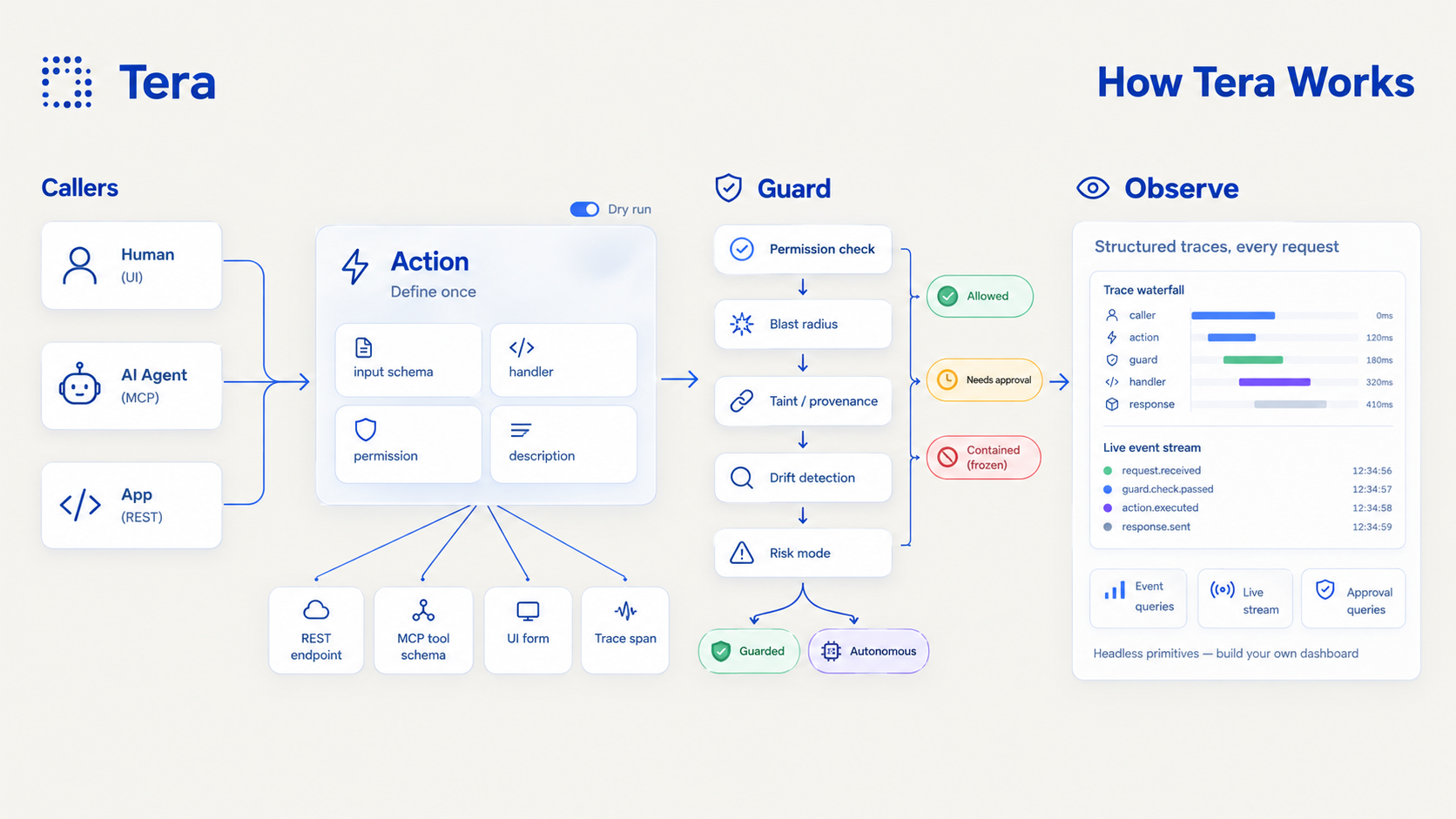
The Core Primitive: Action
Everything in Cortera Framework is built on the Action — a single definition that auto-generates:
- A REST endpoint (POST
/actions/:name) - An MCP tool schema (for agent calling via Model Context Protocol)
- A UI form/trigger (React component via
@cortera/ui) - A trace span (structured audit log entry in Postgres)
import { z } from "zod";
import { defineAction } from "@cortera/core";

export const createInvoiceAction = defineAction({
  name: "createInvoice",
  description: "Creates a new invoice for a customer",
  permission: "invoices:write",
  blastRadius: ["invoices:*", "notifications:send"],
  inputSchema: z.object({
    customerId: z.string().min(1),
    amount: z.number().positive(),
    dueDate: z.string().datetime(),
  }),
  handler: async (input, ctx) => {
    const invoice = await db.invoices.create(input);
    await db.notifications.send({ to: invoice.customerId, type: "invoice_created" });
    return invoice;
  },
});
Benchmark: Cortera Framework vs Raw Next.js vs tRPC+Zod
We built the same createInvoice feature three ways and measured the difference:
| Metric | Raw Next.js | tRPC + Zod | Cortera Framework |
|---|---|---|---|
| Implementation LOC | 606 | 565 | 124 |
| Implementation Files | 8 | 12 | 6 |
| Drift Test (files to edit for new field) | 5 | 5 | 1 |
| Audit Trail by Default | ❌ Manual | ❌ Manual | ✅ Automatic |
| Agent-Callability by Default | ❌ Manual | ❌ Manual | ✅ Automatic (MCP + OpenAPI) |
| Approx. Implementation Time | ~45 min | ~35 min | ~5 min |
The drift test is the key metric: adding a notes field required editing 5 files in both Raw Next.js and tRPC+Zod (types, DB, API route, form, OpenAPI), but only 1 file in Cortera Framework (the single defineAction call). Everything else — audit log, React form, MCP tool schema, OpenAPI — is generated automatically from that one Zod schema.
Quickstart
Prerequisites
- Node.js 20+
- PostgreSQL 14+ (or Supabase/Neon)
- A Next.js 14+ app (App Router)
1. Install
npm install @cortera/core @cortera/db @cortera/adapter-next @cortera/ui @cortera/mcp @cortera/auth
# or with pnpm
pnpm add @cortera/core @cortera/db @cortera/adapter-next @cortera/ui @cortera/mcp @cortera/auth
2. Configure Database
Create a .env.local with your database connection:
DATABASE_URL="postgresql://user:pass@localhost:5432/cortera"
3. Run Migrations
npx cortera migrate
This creates the action_events, action_approvals, actor_states, pending_delayed_actions, irreversible_confirmations, and api_keys tables.
4. Define Your First Action
Create src/actions/createInvoice.ts:
import { z } from "zod";
import { defineAction } from "@cortera/core";

export const createInvoiceAction = defineAction({
  name: "createInvoice",
  description: "Creates a new invoice for a customer",
  permission: "invoices:write",
  blastRadius: ["invoices:*", "notifications:send"],
  inputSchema: z.object({
    customerId: z.string().min(1),
    amount: z.number().positive(),
    dueDate: z.string().datetime(),
  }),
  handler: async (input, ctx) => {
    // Your business logic here
    const invoice = await db.invoices.create(input);
    return invoice;
  },
});
5. Register Actions & Configure Runtime
Create src/lib/registry.ts:
import { ActionRegistry, InMemoryPermissionEngine } from "@cortera/core";
import { PostgresDbClient } from "@cortera/db";
import { createInvoiceAction } from "@/actions/createInvoice";

export const registry = new ActionRegistry();
registry.register(createInvoiceAction);

export const dbClient = new PostgresDbClient({ connectionString: process.env.DATABASE_URL! });

export const permissionEngine = new InMemoryPermissionEngine();
permissionEngine.addRule({ actorType: "human", permissionKey: "invoices:write", result: "allow" });
permissionEngine.addRule({ actorType: "agent", permissionKey: "invoices:write", result: "allow" });

export const defaultWorkspaceId = "default-workspace";
6. Create the REST Endpoint
Create src/app/api/actions/[actionName]/route.ts:
import { NextRequest, NextResponse } from "next/server";
import { registry, dbClient, permissionEngine, defaultWorkspaceId } from "@/lib/registry";
import { createActionHandler, resolveActorFromRequest } from "@cortera/adapter-next";

const actionHandler = createActionHandler({
  registry,
  dbClient,
  permissionEngine,
  resolveActor: (req: NextRequest) => resolveActorFromRequest(req, { dbClient }),
  defaultWorkspaceId,
});

export async function POST(req: NextRequest, { params }: { params: { actionName: string } }) {
  return actionHandler(req, { params });
}

export async function GET(_req: NextRequest, { params }: { params: { actionName: string } }) {
  const action = registry.get(params.actionName);
  if (!action) return NextResponse.json({ error: "Not found" }, { status: 404 });
  return NextResponse.json({ name: action.name, description: action.description, permission: action.permission });
}
7. Call It
From a human (UI form):
// src/app/invoice/page.tsx
import { ActionForm } from "@cortera/ui";
import { createInvoiceAction } from "@/actions/createInvoice";

export default function InvoicePage() {
  return (
    <ActionForm action={createInvoiceAction} apiBaseUrl="/api/actions" />
  );
}
From an AI agent (MCP):
// src/app/api/mcp/route.ts
import { createMcpHandler } from "@mcp/server";
import { createMcpActionServer } from "@cortera/mcp";
import { registry, dbClient, permissionEngine, defaultWorkspaceId } from "@/lib/registry";

const mcpServer = createMcpActionServer({ registry, dbClient, permissionEngine, defaultWorkspaceId });
export const { GET, POST, DELETE } = createMcpHandler(mcpServer.factory);
From curl (REST):
curl -X POST http://localhost:3000/api/actions/createInvoice \
  -H "Content-Type: application/json" \
  -H "x-cortera-api-key: cortera_abc123..." \
  -d '{"customerId": "cust-1", "amount": 99.99, "dueDate": "2024-12-31T23:59:59Z"}'
Core Concepts
The Action Primitive
An Action is a TypeScript object created by defineAction. It contains:
| Field | Type | Required | Description |
|---|---|---|---|
name | string | ✅ | Unique identifier, used in URLs and MCP tool names |
description | string | ✅ | Human-authored; never auto-generated from name |
inputSchema | Zod schema | ✅ | Input validation + MCP/OpenAPI schema source |
permission | string | ✅ | Permission key (e.g., invoices:write) |
blastRadius | string[] | ⚠️ | Downstream permissions this action may touch |
handler | function | ✅ | Business logic; receives (input, ctx) |
riskTier | "instant" | "delayed" | "irreversible" | Reversibility tier (default: "instant") | |
delayWindowMs | number | Delay window for "delayed" tier (default: 5 min) | |
confirmationTtlMs | number | TTL for "irreversible" out-of-band confirmation (default: 15 min) | |
rollback | function | Rollback function for "delayed" tier | |
approvalTtlMs | number | Approval TTL when permission returns approval_required (default: 24h) |
Actor Model
Every invocation has an Actor:
interface Actor {
  actorType: "human" | "agent" | "system";
  actorId: string;
}
There are no separate code paths for human vs. agent callers. Permission checks and audit logging treat all actors uniformly.
The Four Generated Surfaces
| Surface | Package | How It's Generated |
|---|---|---|
| REST | @cortera/adapter-next | createActionHandler wraps action.execute() |
| MCP | @cortera/mcp | createMcpActionServer converts Zod → JSON Schema |
| UI Form | @cortera/ui | <ActionForm action={...} /> renders from Zod |
| Audit Log | @cortera/core | Automatic action_events row on every execution |
Signature Features
Blast Radius + Auto-Containment
Every Action declares a blastRadius — the set of downstream permissions it's allowed to touch:
blastRadius: ["invoices:*", "notifications:send"]
If a live action chain tries to exceed its declared scope, Cortera Framework freezes that actor — all future calls from that actor in that workspace auto-deny immediately until a human reviews and lifts containment.
Worked Example:
// Action A: blastRadius ["invoices:*"]
const createInvoiceAction = defineAction({
  name: "createInvoice",
  blastRadius: ["invoices:*"],
  handler: async (input) => { /* creates invoice */ },
});

// Action B: no blastRadius, permission "customers:delete"
const deleteAllCustomersAction = defineAction({
  name: "deleteAllCustomers",
  permission: "customers:delete",
  handler: async () => { /* deletes all customers */ },
});
When an agent calls createInvoice which internally calls deleteAllCustomers:
- Root action
createInvoicehasblastRadius: ["invoices:*"] deleteAllCustomersrequirescustomers:delete— not covered byinvoices:*- Violation detected: call denied, actor state →
"contained" - All future calls from this actor auto-deny with
ACTOR_CONTAINED
Risk Modes
Each agent/Action can be configured with a riskMode:
| Mode | Behavior |
|---|---|
guarded (default) | Three-tier gating based on riskTier |
autonomous | No action-level gating; runs at full speed, Blast Radius + Containment as backstop |
Guarded mode tiers:
| Tier | Use Case | Behavior |
|---|---|---|
instant | Read-only, reversible | Executes immediately |
delayed | Reversible with side effects | Schedules execution; cancelable window; auto-rollback on cancel |
irreversible | Destructive, non-reversible | Hard-blocks pending out-of-band confirmation (email/SMS to pre-registered workspace contact) |
const deleteWorkspaceAction = defineAction({
  name: "deleteWorkspace",
  permission: "workspaces:delete",
  riskTier: "irreversible",
  blastRadius: ["workspaces:*"],
  handler: async (input) => { /* actually deletes workspace */ },
});

// In autonomous mode, this runs immediately
await deleteWorkspaceAction.execute(input, ctx, db, perms, { riskMode: "autonomous" });
Dry Runs
Any Action can be invoked with dryRun: true to execute the full pre-execution pipeline without running the handler:
const result = await createInvoiceAction.execute(input, ctx, db, perms, { dryRun: true });
// { wouldSucceed: true, eventId: "..." } or same error shape as real failure
REST: POST /actions/createInvoice?dryRun=true
MCP: dryRun boolean automatically injected into every tool's input schema
API Reference
@cortera/core
| Export | Description |
|---|---|
defineAction(config) | Create an Action definition |
ActionRegistry | Register and lookup actions by name |
recordEvent(db, event) | Low-level event logging |
updateEvent(db, id, patch) | Update an event row |
InMemoryPermissionEngine | Simple rule-based permission engine |
resolveApproval(db, approvalId, decision) | Approve/reject a pending approval |
expirePendingApprovals(db) | Background job to expire old approvals |
checkActorContainment(db, actor, workspaceId, dryRun?) | Throws if actor is contained/revoked |
checkBlastRadius(db, ctx, action) | Validates chain stays within blast radius |
reviewContainedActor(db, actorId, workspaceId, decision, reviewerId) | Lift or revoke containment |
getActorState(db, actorId, workspaceId) | Get actor state |
cancelDelayedAction(db, pendingId, cancelingActorId) | Cancel a scheduled delayed action |
processPendingDelayedActions(db) | Background sweep to execute due delayed actions |
requestIrreversibleConfirmation(...) | Send out-of-band confirmation for irreversible actions |
confirmIrreversibleConfirmation(db, token) | Confirm an irreversible action |
rejectIrreversibleConfirmation(db, token) | Reject an irreversible action |
expirePendingIrreversibleConfirmations(db) | Expire old confirmations |
rollbackAction(db, eventId, actor) | Execute rollback for a delayed action |
InMemoryDbClient | In-memory DbClient for testing |
@cortera/db
| Export | Description |
|---|---|
PostgresDbClient | PostgreSQL implementation of DbClient |
PostgresDbClientOptions | { connectionString: string } |
@cortera/adapter-next
| Export | Description |
|---|---|
createActionHandler(options) | Creates a Next.js route handler for Actions |
CreateActionHandlerOptions | { registry, dbClient, permissionEngine, resolveActor, defaultWorkspaceId } |
resolveActorFromRequest(req, options?) | Extracts actor from API key or session cookie |
ResolveActorOptions | { dbClient } |
createApprovalRouteHandler | Route for POST /actions/approvals/:id |
createReviewRouteHandler | Route for POST /actors/:actorId/review |
createConfirmationRouteHandler | Route for irreversible confirmations |
createRollbackRouteHandler | Route for rollback execution |
createEventsRouteHandler | GET /cortera/events |
createEventChainRouteHandler | GET /cortera/events/:id/chain |
createContainedActorsRouteHandler | GET /cortera/actors/contained |
createPendingApprovalsRouteHandler | GET /cortera/approvals/pending |
createEventStreamRouteHandler | GET /cortera/events/stream (SSE) |
@cortera/ui
| Export | Description |
|---|---|
ActionForm | React component that renders a form from an Action's Zod schema |
ActionFormProps | { action, onSuccess?, onError?, basePath?, actorId?, actorType? } |
ActionButton | Button that triggers an Action via API |
zodToFormSchema(schema) | Converts Zod schema to form field descriptors |
@cortera/mcp
| Export | Description |
|---|---|
generateMcpToolSchema(action) | Converts an Action's Zod input to MCP tool schema |
generateMcpToolList(registry) | Generates tool list from all registered actions |
createMcpActionServer(options) | Creates an MCP server factory |
McpActionServerOptions | { registry, dbClient, permissionEngine, defaultWorkspaceId } |
@cortera/auth
| Export | Description |
|---|---|
createApiKey(db, actorId, workspaceId, name) | Creates API key, returns { key, keyId } |
validateApiKey(db, rawKey) | Validates key, returns { actorId, workspaceId, keyId } or null |
revokeApiKey(db, keyId) | Revokes an API key |
listApiKeys(db, workspaceId) | Lists all keys in a workspace |
@cortera/cli
| Command | Description |
|---|---|
cortera dev | Development server with hot reload |
cortera generate | Generate Action scaffolding |
cortera migrate | Run database migrations |
cortera check | Type-check all Actions |
cortera keys create <name> | Create API key |
cortera keys list | List API keys |
cortera keys revoke <keyId> | Revoke API key |
Building Your Own Dashboard
Cortera Framework does not ship a prebuilt admin dashboard. Instead, it exposes clean, headless, queryable/streamable APIs.
REST Query Endpoints
| Endpoint | Description |
|---|---|
GET /api/cortera/events | Paginated action events with filters |
GET /api/cortera/events/:id/chain | Full ancestor/descendant event tree |
GET /api/cortera/actors/contained | Currently contained/revoked actors |
GET /api/cortera/approvals/pending | Pending approvals with full context |
SSE Live Stream
| Endpoint | Description |
|---|---|
GET /api/cortera/events/stream | Server-Sent Events stream of new action_events |
Action Endpoints
| Endpoint | Description |
|---|---|
POST /api/actions/approvals/:id | Approve/reject a pending approval |
POST /api/actors/:actorId/review | Lift or revoke a contained actor |
See docs/building-a-dashboard.md for complete examples with curl and JavaScript.
Migration & Deployment
Environment Variables
DATABASE_URL="postgresql://user:pass@host:5432/db"  # Required
CORTERA_WORKSPACE_ID="default-workspace"               # Optional, defaults to "default-workspace"
Running Migrations in Production
# On deploy
npx cortera migrate --connection "$DATABASE_URL"
The migration system is idempotent — safe to run multiple times.
Real Auth Setup (Production)
Replace the placeholder resolveActorFromRequest with your auth integration:
// lib/auth.ts
import { getServerSession } from "next-auth";
import { authOptions } from "@/lib/auth-options";

export async function resolveActor(req: NextRequest) {
  const session = await getServerSession(authOptions);
  if (!session?.user) return null;

  return {
    actorType: session.user.role === "admin" ? "system" : "human",
    actorId: session.user.id,
  };
}
Then use it in your route handler:
const actionHandler = createActionHandler({
  registry,
  dbClient,
  permissionEngine,
  resolveActor: (req) => resolveActor(req),
  defaultWorkspaceId,
});
API Key Management
# Create key for an agent
npx cortera keys create "Production Agent" --workspace prod-ws

# List keys
npx cortera keys list --workspace prod-ws

# Revoke compromised key
npx cortera keys revoke key_abc123 --workspace prod-ws
License
MIT License — see LICENSE for details.
Contributors

103 commits
Similar repos


Languages
TypeScript
92.7%
Python
7.2%
Cortera Framework lets you define a single Action, input schema, permission, and handler, and get four things for free: a REST endpoint, an agent-callable MCP tool, an auto-generated UI form, and a fully traced audit log. No more hand-writing the same feature four times for humans, agents, and compliance. Built as a layer on Next.js.
TypeScript
1
103 commits
updated Sep 23, 2026
See what people are saying
README
Cortera Framework
Define once. Ship to humans and agents alike.
Why Cortera Framework
Modern apps increasingly need to be usable by both humans and AI agents, and both need to be observable and safe by default. Most frameworks bolt these concerns on after the fact — a separate APM vendor for tracing, a separate tool-schema layer for agent access, a separate audit log for compliance. Cortera Framework builds all three into its core primitive from day one.
- Observability-first — every request, mutation, and error automatically produces structured traces and events. No APM vendor required.
- Agent-native — every route/action is automatically exposed as both a UI trigger and a callable tool schema, with built-in permissions and audit logging.
- Safe by default — Blast Radius + Auto-Containment is the industry's first runtime defense against rogue agent chains.
The Core Primitive: Action
Everything in Cortera Framework is built on the Action — a single definition that auto-generates:
- A REST endpoint (POST
/actions/:name) - An MCP tool schema (for agent calling via Model Context Protocol)
- A UI form/trigger (React component via
@cortera/ui) - A trace span (structured audit log entry in Postgres)
import { z } from "zod";
import { defineAction } from "@cortera/core";

export const createInvoiceAction = defineAction({
  name: "createInvoice",
  description: "Creates a new invoice for a customer",
  permission: "invoices:write",
  blastRadius: ["invoices:*", "notifications:send"],
  inputSchema: z.object({
    customerId: z.string().min(1),
    amount: z.number().positive(),
    dueDate: z.string().datetime(),
  }),
  handler: async (input, ctx) => {
    const invoice = await db.invoices.create(input);
    await db.notifications.send({ to: invoice.customerId, type: "invoice_created" });
    return invoice;
  },
});
Benchmark: Cortera Framework vs Raw Next.js vs tRPC+Zod
We built the same createInvoice feature three ways and measured the difference:
| Metric | Raw Next.js | tRPC + Zod | Cortera Framework |
|---|---|---|---|
| Implementation LOC | 606 | 565 | 124 |
| Implementation Files | 8 | 12 | 6 |
| Drift Test (files to edit for new field) | 5 | 5 | 1 |
| Audit Trail by Default | ❌ Manual | ❌ Manual | ✅ Automatic |
| Agent-Callability by Default | ❌ Manual | ❌ Manual | ✅ Automatic (MCP + OpenAPI) |
| Approx. Implementation Time | ~45 min | ~35 min | ~5 min |
The drift test is the key metric: adding a notes field required editing 5 files in both Raw Next.js and tRPC+Zod (types, DB, API route, form, OpenAPI), but only 1 file in Cortera Framework (the single defineAction call). Everything else — audit log, React form, MCP tool schema, OpenAPI — is generated automatically from that one Zod schema.
Quickstart
Prerequisites
- Node.js 20+
- PostgreSQL 14+ (or Supabase/Neon)
- A Next.js 14+ app (App Router)
1. Install
npm install @cortera/core @cortera/db @cortera/adapter-next @cortera/ui @cortera/mcp @cortera/auth
# or with pnpm
pnpm add @cortera/core @cortera/db @cortera/adapter-next @cortera/ui @cortera/mcp @cortera/auth
2. Configure Database
Create a .env.local with your database connection:
DATABASE_URL="postgresql://user:pass@localhost:5432/cortera"
3. Run Migrations
npx cortera migrate
This creates the action_events, action_approvals, actor_states, pending_delayed_actions, irreversible_confirmations, and api_keys tables.
4. Define Your First Action
Create src/actions/createInvoice.ts:
import { z } from "zod";
import { defineAction } from "@cortera/core";

export const createInvoiceAction = defineAction({
  name: "createInvoice",
  description: "Creates a new invoice for a customer",
  permission: "invoices:write",
  blastRadius: ["invoices:*", "notifications:send"],
  inputSchema: z.object({
    customerId: z.string().min(1),
    amount: z.number().positive(),
    dueDate: z.string().datetime(),
  }),
  handler: async (input, ctx) => {
    // Your business logic here
    const invoice = await db.invoices.create(input);
    return invoice;
  },
});
5. Register Actions & Configure Runtime
Create src/lib/registry.ts:
import { ActionRegistry, InMemoryPermissionEngine } from "@cortera/core";
import { PostgresDbClient } from "@cortera/db";
import { createInvoiceAction } from "@/actions/createInvoice";

export const registry = new ActionRegistry();
registry.register(createInvoiceAction);

export const dbClient = new PostgresDbClient({ connectionString: process.env.DATABASE_URL! });

export const permissionEngine = new InMemoryPermissionEngine();
permissionEngine.addRule({ actorType: "human", permissionKey: "invoices:write", result: "allow" });
permissionEngine.addRule({ actorType: "agent", permissionKey: "invoices:write", result: "allow" });

export const defaultWorkspaceId = "default-workspace";
6. Create the REST Endpoint
Create src/app/api/actions/[actionName]/route.ts:
import { NextRequest, NextResponse } from "next/server";
import { registry, dbClient, permissionEngine, defaultWorkspaceId } from "@/lib/registry";
import { createActionHandler, resolveActorFromRequest } from "@cortera/adapter-next";

const actionHandler = createActionHandler({
  registry,
  dbClient,
  permissionEngine,
  resolveActor: (req: NextRequest) => resolveActorFromRequest(req, { dbClient }),
  defaultWorkspaceId,
});

export async function POST(req: NextRequest, { params }: { params: { actionName: string } }) {
  return actionHandler(req, { params });
}

export async function GET(_req: NextRequest, { params }: { params: { actionName: string } }) {
  const action = registry.get(params.actionName);
  if (!action) return NextResponse.json({ error: "Not found" }, { status: 404 });
  return NextResponse.json({ name: action.name, description: action.description, permission: action.permission });
}
7. Call It
From a human (UI form):
// src/app/invoice/page.tsx
import { ActionForm } from "@cortera/ui";
import { createInvoiceAction } from "@/actions/createInvoice";

export default function InvoicePage() {
  return (
    <ActionForm action={createInvoiceAction} apiBaseUrl="/api/actions" />
  );
}
From an AI agent (MCP):
// src/app/api/mcp/route.ts
import { createMcpHandler } from "@mcp/server";
import { createMcpActionServer } from "@cortera/mcp";
import { registry, dbClient, permissionEngine, defaultWorkspaceId } from "@/lib/registry";

const mcpServer = createMcpActionServer({ registry, dbClient, permissionEngine, defaultWorkspaceId });
export const { GET, POST, DELETE } = createMcpHandler(mcpServer.factory);
From curl (REST):
curl -X POST http://localhost:3000/api/actions/createInvoice \
  -H "Content-Type: application/json" \
  -H "x-cortera-api-key: cortera_abc123..." \
  -d '{"customerId": "cust-1", "amount": 99.99, "dueDate": "2024-12-31T23:59:59Z"}'
Core Concepts
The Action Primitive
An Action is a TypeScript object created by defineAction. It contains:
| Field | Type | Required | Description |
|---|---|---|---|
name | string | ✅ | Unique identifier, used in URLs and MCP tool names |
description | string | ✅ | Human-authored; never auto-generated from name |
inputSchema | Zod schema | ✅ | Input validation + MCP/OpenAPI schema source |
permission | string | ✅ | Permission key (e.g., invoices:write) |
blastRadius | string[] | ⚠️ | Downstream permissions this action may touch |
handler | function | ✅ | Business logic; receives (input, ctx) |
riskTier | "instant" | "delayed" | "irreversible" | Reversibility tier (default: "instant") | |
delayWindowMs | number | Delay window for "delayed" tier (default: 5 min) | |
confirmationTtlMs | number | TTL for "irreversible" out-of-band confirmation (default: 15 min) | |
rollback | function | Rollback function for "delayed" tier | |
approvalTtlMs | number | Approval TTL when permission returns approval_required (default: 24h) |
Actor Model
Every invocation has an Actor:
interface Actor {
  actorType: "human" | "agent" | "system";
  actorId: string;
}
There are no separate code paths for human vs. agent callers. Permission checks and audit logging treat all actors uniformly.
The Four Generated Surfaces
| Surface | Package | How It's Generated |
|---|---|---|
| REST | @cortera/adapter-next | createActionHandler wraps action.execute() |
| MCP | @cortera/mcp | createMcpActionServer converts Zod → JSON Schema |
| UI Form | @cortera/ui | <ActionForm action={...} /> renders from Zod |
| Audit Log | @cortera/core | Automatic action_events row on every execution |
Signature Features
Blast Radius + Auto-Containment
Every Action declares a blastRadius — the set of downstream permissions it's allowed to touch:
blastRadius: ["invoices:*", "notifications:send"]
If a live action chain tries to exceed its declared scope, Cortera Framework freezes that actor — all future calls from that actor in that workspace auto-deny immediately until a human reviews and lifts containment.
Worked Example:
// Action A: blastRadius ["invoices:*"]
const createInvoiceAction = defineAction({
  name: "createInvoice",
  blastRadius: ["invoices:*"],
  handler: async (input) => { /* creates invoice */ },
});

// Action B: no blastRadius, permission "customers:delete"
const deleteAllCustomersAction = defineAction({
  name: "deleteAllCustomers",
  permission: "customers:delete",
  handler: async () => { /* deletes all customers */ },
});
When an agent calls createInvoice which internally calls deleteAllCustomers:
- Root action
createInvoicehasblastRadius: ["invoices:*"] deleteAllCustomersrequirescustomers:delete— not covered byinvoices:*- Violation detected: call denied, actor state →
"contained" - All future calls from this actor auto-deny with
ACTOR_CONTAINED
Risk Modes
Each agent/Action can be configured with a riskMode:
| Mode | Behavior |
|---|---|
guarded (default) | Three-tier gating based on riskTier |
autonomous | No action-level gating; runs at full speed, Blast Radius + Containment as backstop |
Guarded mode tiers:
| Tier | Use Case | Behavior |
|---|---|---|
instant | Read-only, reversible | Executes immediately |
delayed | Reversible with side effects | Schedules execution; cancelable window; auto-rollback on cancel |
irreversible | Destructive, non-reversible | Hard-blocks pending out-of-band confirmation (email/SMS to pre-registered workspace contact) |
const deleteWorkspaceAction = defineAction({
  name: "deleteWorkspace",
  permission: "workspaces:delete",
  riskTier: "irreversible",
  blastRadius: ["workspaces:*"],
  handler: async (input) => { /* actually deletes workspace */ },
});

// In autonomous mode, this runs immediately
await deleteWorkspaceAction.execute(input, ctx, db, perms, { riskMode: "autonomous" });
Dry Runs
Any Action can be invoked with dryRun: true to execute the full pre-execution pipeline without running the handler:
const result = await createInvoiceAction.execute(input, ctx, db, perms, { dryRun: true });
// { wouldSucceed: true, eventId: "..." } or same error shape as real failure
REST: POST /actions/createInvoice?dryRun=true
MCP: dryRun boolean automatically injected into every tool's input schema
API Reference
@cortera/core
| Export | Description |
|---|---|
defineAction(config) | Create an Action definition |
ActionRegistry | Register and lookup actions by name |
recordEvent(db, event) | Low-level event logging |
updateEvent(db, id, patch) | Update an event row |
InMemoryPermissionEngine | Simple rule-based permission engine |
resolveApproval(db, approvalId, decision) | Approve/reject a pending approval |
expirePendingApprovals(db) | Background job to expire old approvals |
checkActorContainment(db, actor, workspaceId, dryRun?) | Throws if actor is contained/revoked |
checkBlastRadius(db, ctx, action) | Validates chain stays within blast radius |
reviewContainedActor(db, actorId, workspaceId, decision, reviewerId) | Lift or revoke containment |
getActorState(db, actorId, workspaceId) | Get actor state |
cancelDelayedAction(db, pendingId, cancelingActorId) | Cancel a scheduled delayed action |
processPendingDelayedActions(db) | Background sweep to execute due delayed actions |
requestIrreversibleConfirmation(...) | Send out-of-band confirmation for irreversible actions |
confirmIrreversibleConfirmation(db, token) | Confirm an irreversible action |
rejectIrreversibleConfirmation(db, token) | Reject an irreversible action |
expirePendingIrreversibleConfirmations(db) | Expire old confirmations |
rollbackAction(db, eventId, actor) | Execute rollback for a delayed action |
InMemoryDbClient | In-memory DbClient for testing |
@cortera/db
| Export | Description |
|---|---|
PostgresDbClient | PostgreSQL implementation of DbClient |
PostgresDbClientOptions | { connectionString: string } |
@cortera/adapter-next
| Export | Description |
|---|---|
createActionHandler(options) | Creates a Next.js route handler for Actions |
CreateActionHandlerOptions | { registry, dbClient, permissionEngine, resolveActor, defaultWorkspaceId } |
resolveActorFromRequest(req, options?) | Extracts actor from API key or session cookie |
ResolveActorOptions | { dbClient } |
createApprovalRouteHandler | Route for POST /actions/approvals/:id |
createReviewRouteHandler | Route for POST /actors/:actorId/review |
createConfirmationRouteHandler | Route for irreversible confirmations |
createRollbackRouteHandler | Route for rollback execution |
createEventsRouteHandler | GET /cortera/events |
createEventChainRouteHandler | GET /cortera/events/:id/chain |
createContainedActorsRouteHandler | GET /cortera/actors/contained |
createPendingApprovalsRouteHandler | GET /cortera/approvals/pending |
createEventStreamRouteHandler | GET /cortera/events/stream (SSE) |
@cortera/ui
| Export | Description |
|---|---|
ActionForm | React component that renders a form from an Action's Zod schema |
ActionFormProps | { action, onSuccess?, onError?, basePath?, actorId?, actorType? } |
ActionButton | Button that triggers an Action via API |
zodToFormSchema(schema) | Converts Zod schema to form field descriptors |
@cortera/mcp
| Export | Description |
|---|---|
generateMcpToolSchema(action) | Converts an Action's Zod input to MCP tool schema |
generateMcpToolList(registry) | Generates tool list from all registered actions |
createMcpActionServer(options) | Creates an MCP server factory |
McpActionServerOptions | { registry, dbClient, permissionEngine, defaultWorkspaceId } |
@cortera/auth
| Export | Description |
|---|---|
createApiKey(db, actorId, workspaceId, name) | Creates API key, returns { key, keyId } |
validateApiKey(db, rawKey) | Validates key, returns { actorId, workspaceId, keyId } or null |
revokeApiKey(db, keyId) | Revokes an API key |
listApiKeys(db, workspaceId) | Lists all keys in a workspace |
@cortera/cli
| Command | Description |
|---|---|
cortera dev | Development server with hot reload |
cortera generate | Generate Action scaffolding |
cortera migrate | Run database migrations |
cortera check | Type-check all Actions |
cortera keys create <name> | Create API key |
cortera keys list | List API keys |
cortera keys revoke <keyId> | Revoke API key |
Building Your Own Dashboard
Cortera Framework does not ship a prebuilt admin dashboard. Instead, it exposes clean, headless, queryable/streamable APIs.
REST Query Endpoints
| Endpoint | Description |
|---|---|
GET /api/cortera/events | Paginated action events with filters |
GET /api/cortera/events/:id/chain | Full ancestor/descendant event tree |
GET /api/cortera/actors/contained | Currently contained/revoked actors |
GET /api/cortera/approvals/pending | Pending approvals with full context |
SSE Live Stream
| Endpoint | Description |
|---|---|
GET /api/cortera/events/stream | Server-Sent Events stream of new action_events |
Action Endpoints
| Endpoint | Description |
|---|---|
POST /api/actions/approvals/:id | Approve/reject a pending approval |
POST /api/actors/:actorId/review | Lift or revoke a contained actor |
See docs/building-a-dashboard.md for complete examples with curl and JavaScript.
Migration & Deployment
Environment Variables
DATABASE_URL="postgresql://user:pass@host:5432/db"  # Required
CORTERA_WORKSPACE_ID="default-workspace"               # Optional, defaults to "default-workspace"
Running Migrations in Production
# On deploy
npx cortera migrate --connection "$DATABASE_URL"
The migration system is idempotent — safe to run multiple times.
Real Auth Setup (Production)
Replace the placeholder resolveActorFromRequest with your auth integration:
// lib/auth.ts
import { getServerSession } from "next-auth";
import { authOptions } from "@/lib/auth-options";

export async function resolveActor(req: NextRequest) {
  const session = await getServerSession(authOptions);
  if (!session?.user) return null;

  return {
    actorType: session.user.role === "admin" ? "system" : "human",
    actorId: session.user.id,
  };
}
Then use it in your route handler:
const actionHandler = createActionHandler({
  registry,
  dbClient,
  permissionEngine,
  resolveActor: (req) => resolveActor(req),
  defaultWorkspaceId,
});
API Key Management
# Create key for an agent
npx cortera keys create "Production Agent" --workspace prod-ws

# List keys
npx cortera keys list --workspace prod-ws

# Revoke compromised key
npx cortera keys revoke key_abc123 --workspace prod-ws
License
MIT License — see LICENSE for details.
Similar repos
Contributors
103 commits
Languages
TypeScript
92.7%
Python
7.2%