
Fork of JetBrains' ThinkRail: Claude Code as a first-class terminal agent, with an IDE bridge, session revival, and a pane that resolves the CLAUDE.md files chaos
TypeScript
0
420 commits
updated Sep 17, 2026
README
ThinkRail — CommanderTvis fork
A fork of JetBrains/thinkrail. Upstream is a desktop-and-mobile
client for the pi coding agent. This
fork turns it into a workbench for more than one agent: Claude Code runs in its terminals as a first-class
agent, with its own configuration pane, IDE bridge, hooks, launcher and the workspace's spec tools reachable
over MCP, and a plugin API lets further integrations live outside core. It also carries a stream of fixes
and features that are sent upstream one commit at a time.
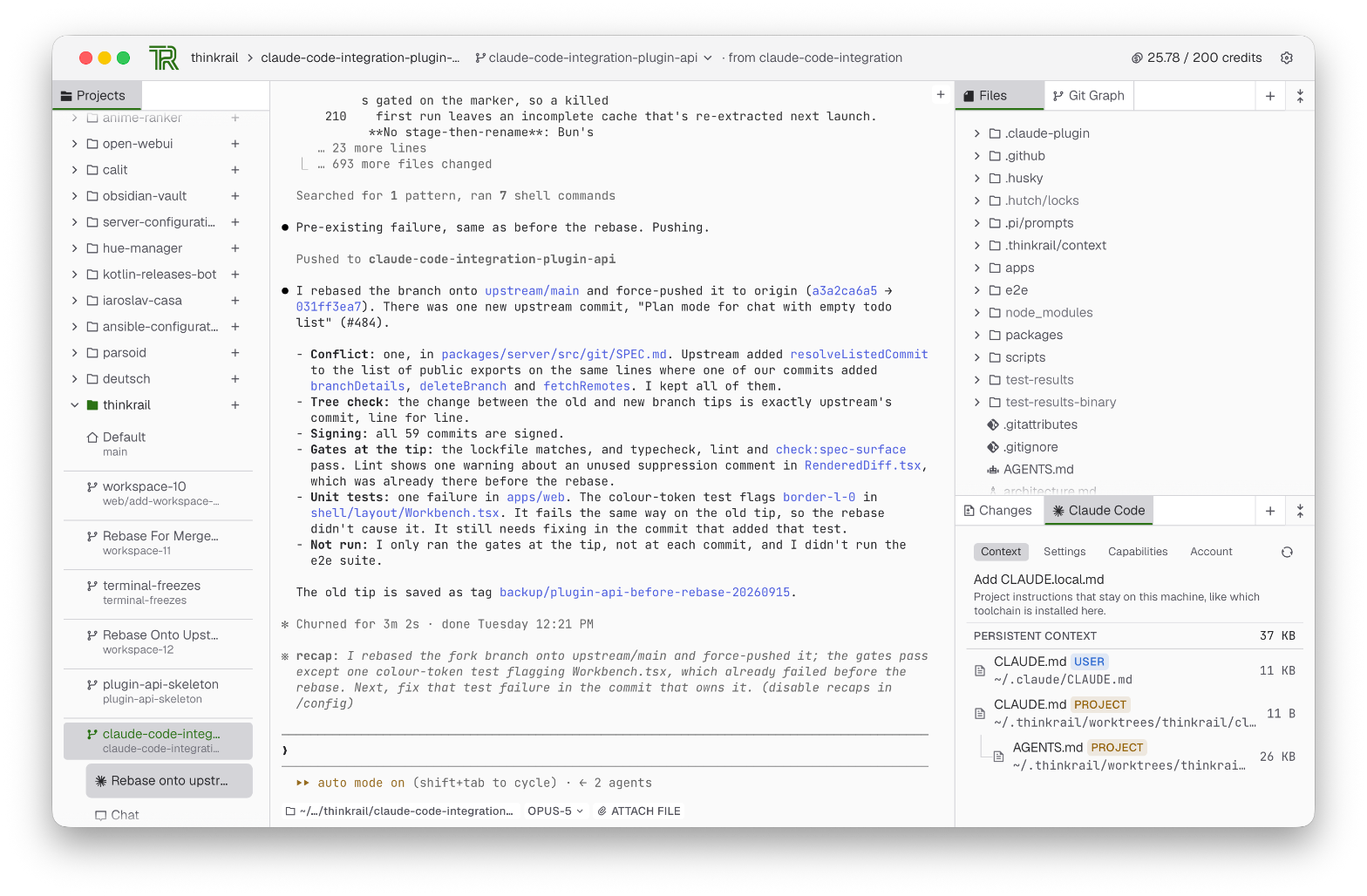
The workbench combines project and worktree navigation on the left, an embedded Claude Code terminal session in the center, and the workspace file tree alongside the Claude Code side panel on the right.
What the fork has that upstream does not
A plugin API. packages/plugin-api is the contract: a manifest, typed methods, channels and settings, a
pi-free tool definition for the agent and MCP surfaces, and host and web contexts. The server loads builtin
and external plugins, validates their wire traffic, serves their assets and feeds their pi resources into
every session; the web client loads a plugin's UI half, at build time for builtins or over the wire for an
external one. packages/plugin-ui is the shared UI kit plugins draw with. External plugins live under
~/.thinkrail/plugins/<id>/ or at the paths AppConfig.pluginPaths lists. See packages/plugin-api/SPEC.md and
packages/server/src/plugins/SPEC.md.
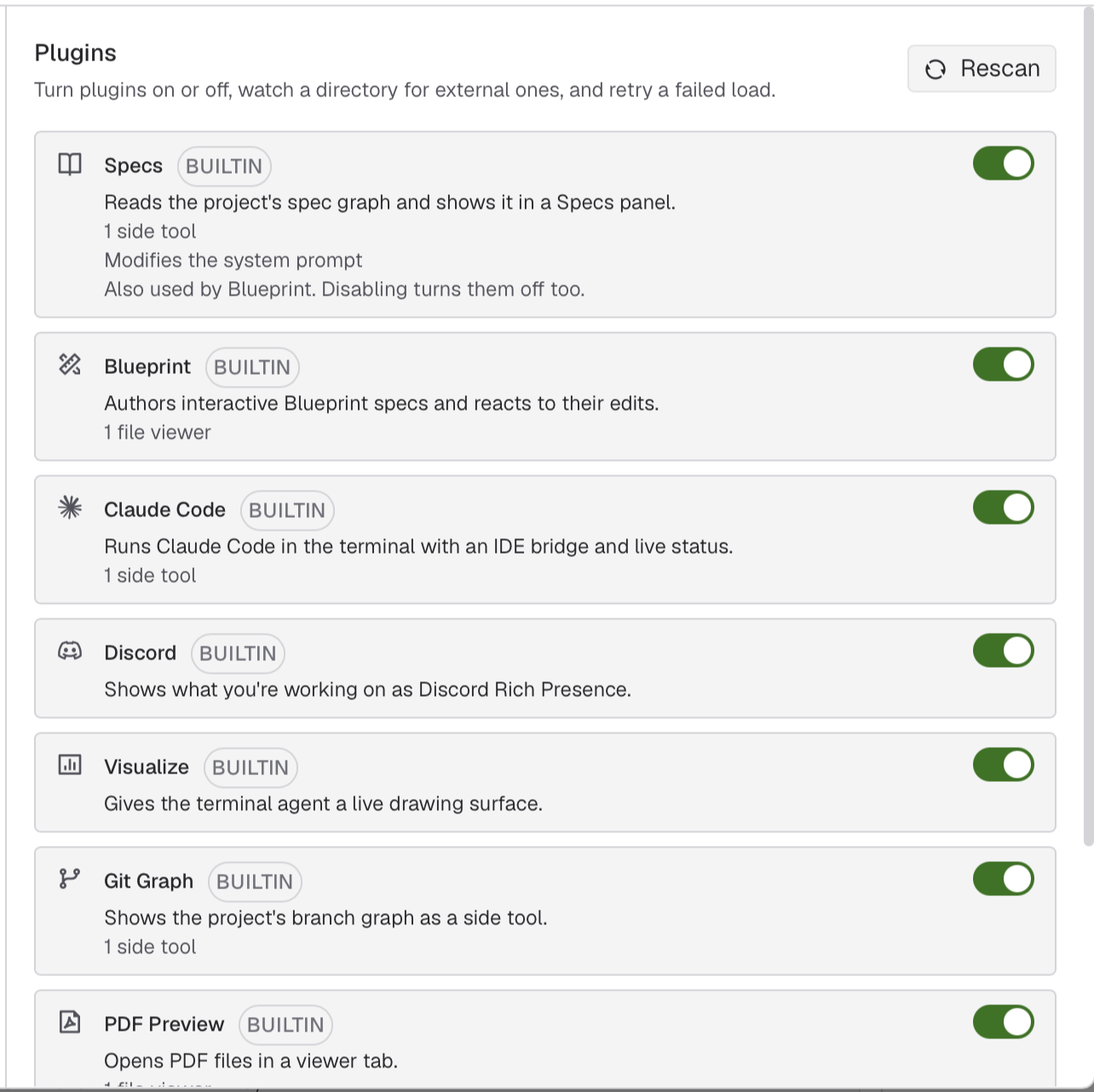
The plugin settings panel lists registered plugins, their origin (builtin or external), and their declared contributions: side tools, file viewers, and system prompt modifiers. Plugins can be toggled on or off individually.
Eight builtin plugins, each one commit, each extractable to its own repository. Claude Code is the one that changes what ThinkRail is; the others add a panel, a viewer or a presence:
| Plugin | What it adds |
|---|---|
plugin-spec-dialect | the spec-graph read, the Specs side tool and the spec_* tool renderers |
plugin-blueprint | the Blueprint interactive-spec format, its author and reactor |
plugin-claude-code | Claude Code as the terminal agent: config pane, IDE bridge, hook status, launcher, terminal facts and picker driving, the shipped Claude marketplace |
plugin-discord | Discord Rich Presence over local IPC |
plugin-pdf-preview | a PDF file viewer |
plugin-branch-graph | the project's Git Graph side tool |
plugin-visualize | the terminal agent's live drawing surface, surfaced as an MCP tool |
plugin-file-icons | material-icon-theme file-type glyphs |
Claude Code
The Claude Code plugin bridges terminal agent sessions to ThinkRail's workspace and UI. An IDE bridge feeds terminal events and facts into the app, drives terminal pickers from native UI controls, and manages context and capabilities:
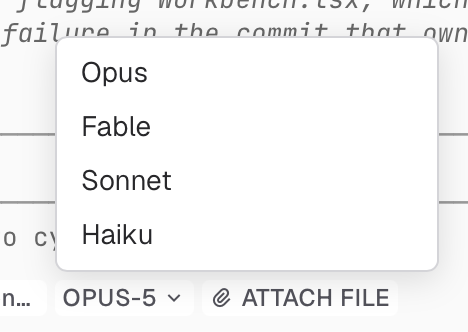
Terminal facts and picker driving: selecting a model or effort level from the terminal bar drives Claude Code's interactive /model picker behind the scenes. The adjacent Attach File button inserts workspace-relative @file paths directly into the prompt.
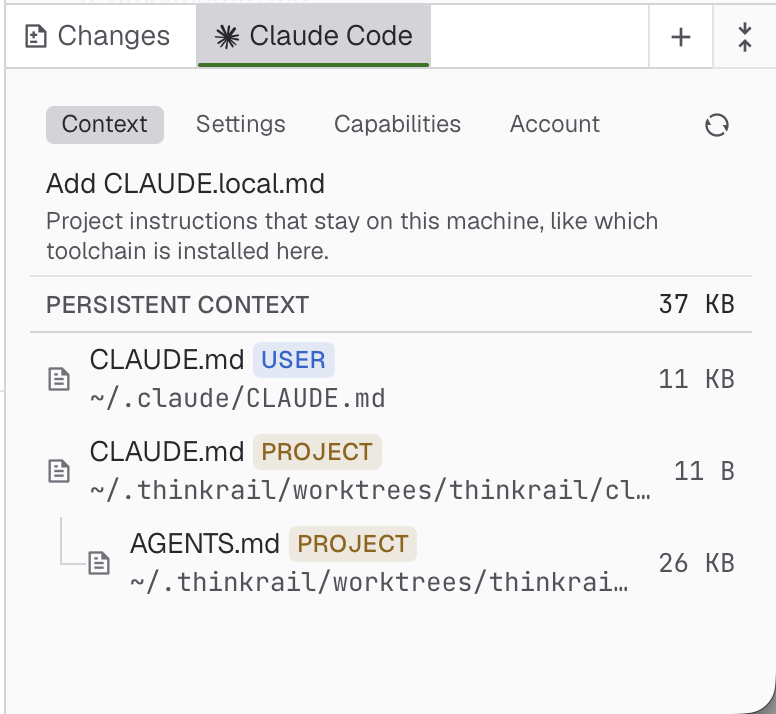
The Context tab displays active instructions across global ~/.claude/CLAUDE.md, project CLAUDE.md, and referenced AGENTS.md files with live size accounting, making context weight immediately visible.
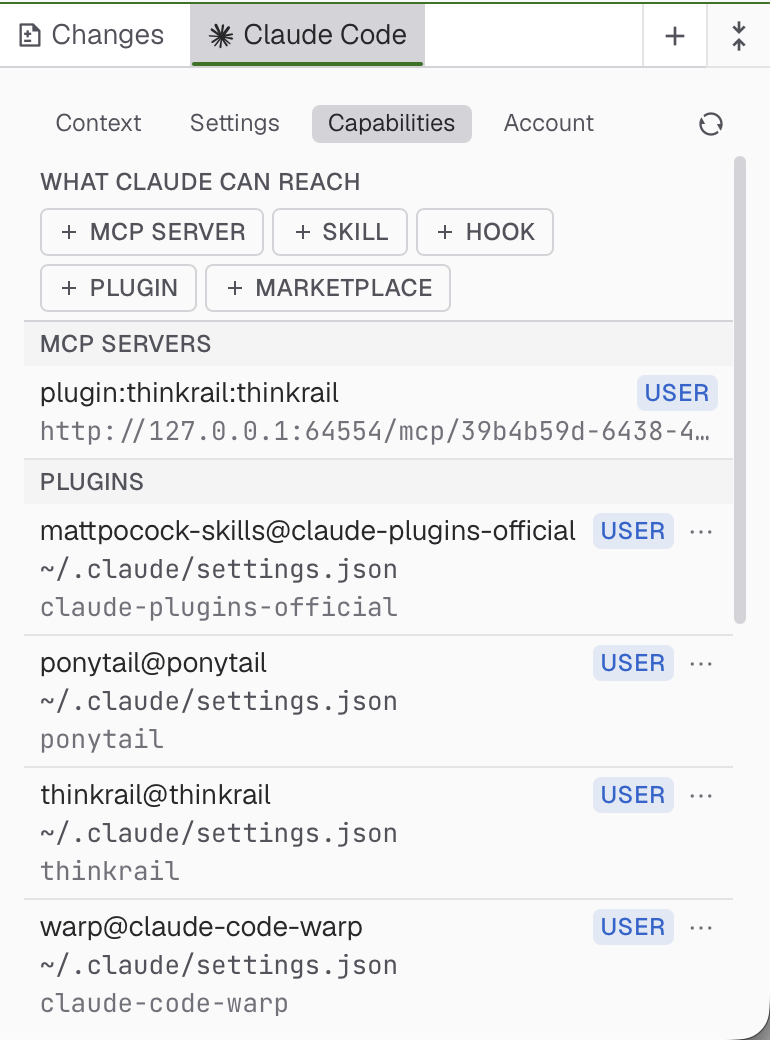
The Capabilities tab lists what Claude Code can reach: installed plugins, skills, hooks, and ThinkRail's loopback MCP server (plugin:thinkrail:thinkrail). The local MCP bridge exposes the workspace's spec tools directly to Claude Code.
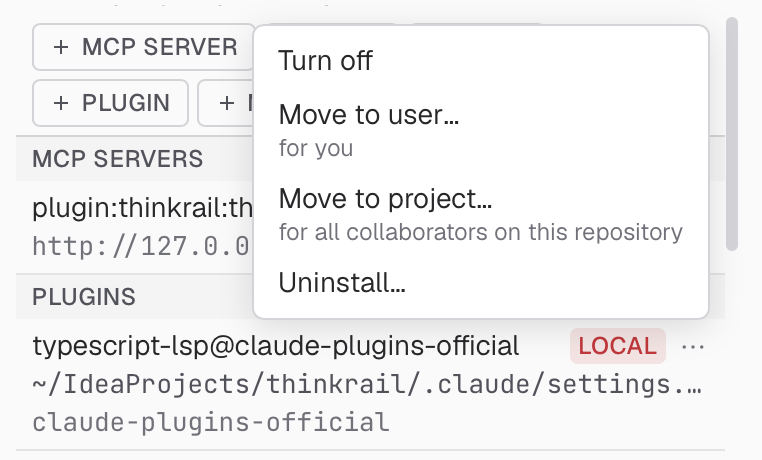
Scope management for plugins, skills, and MCP servers: switch, move, or promote any capability between User (global), Project (checked in for all collaborators), and Local (private to this repo) directly from the action menu.
Blueprint interactive specifications
The Blueprint plugin pairs agent authoring with an interactive spec viewer, for both terminal agents and regular pi chats:
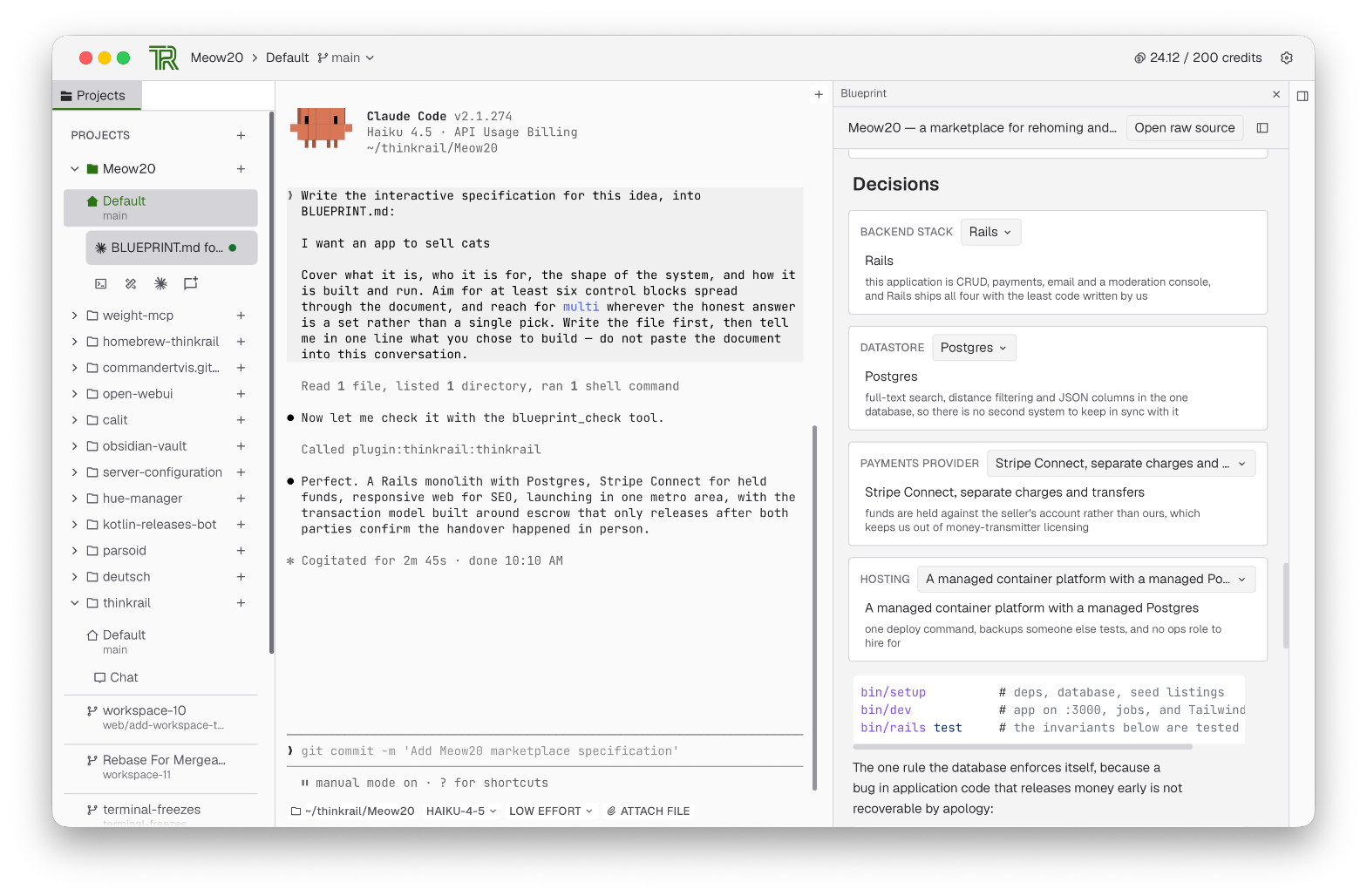
Claude Code or a pi chat writes and edits BLUEPRINT.md, verifying changes using ThinkRail's blueprint_check MCP tool. Side-by-side, the Blueprint viewer renders interactive decision cards, option selectors, and rationale blocks live.
Improvements that apply to upstream directly
Kept as atomic commits so each can become a pull request: open a plain folder as a project without git, clone a repository URL into a project, search the whole workspace from one popup, drag and trash files in the tree, send an editor selection into a pi chat, the spec tools reachable by any terminal agent over MCP, an outline column that drives preview and source, frontmatter as an Obsidian-style properties block, a code font of your choice with ligatures, Cmd+F in every preview, a terminal that thaws after a lost drain event, a pty that no longer inherits a stale utmpx user, and TypeScript 7.
Install
Nightly builds of the fork ship through the
CommanderTvis/homebrew-thinkrail tap:
brew trust --tap commandertvis/thinkrail   # Homebrew 7+ refuses untrusted taps
brew tap commandertvis/thinkrail
brew install --cask thinkrail-desktop   # the Electrobun desktop app (ThinkRail-canary.app)
brew install thinkrail                  # or: the CLI host, `thinkrail` opens the browser client
The builds are unsigned and not notarized; the cask strips the quarantine flag after install so Gatekeeper does not report the app as damaged. To run from source instead, see below.
Clone and run
The fork is developed and tested on macOS only. Other platforms build, but nothing here has been run on them.
Prerequisites: Bun 1.4, Node.js 22.19 or newer, git on PATH, and an authenticated pi provider. App
state lives under ~/.thinkrail.
git clone git@github.com:CommanderTvis/thinkrail.git
cd thinkrail
bun install
bun run desktop:dev
bun run desktop:dev packages the Electrobun desktop app with the host inside it and opens it. This is the
normal way to use the fork. Alternative:
bun run dev # host + web client in the browser, with hot reload
Updating
A Homebrew install updates with brew upgrade thinkrail / brew upgrade --cask thinkrail-desktop.
A checkout: the branch is force-pushed very often. A plain git pull will not fast-forward. Update by
taking the remote branch as it is:
git fetch origin
git reset --hard origin/claude-code-integration-plugin-api
bun install
bun run desktop:dev
Analytics & Privacy
Unchanged from upstream: basic usage events (launches, chat creation, accepted message sends, provider
connections) are always on; additional setup, run-outcome, task, review, and PR statistics require explicit
consent in the first-launch window and change later in Settings → Privacy. thinkrail --no-analytics or
THINKRAIL_NO_ANALYTICS=1 suppresses additional events for that run only. Upstream's README describes details.
Contributors


See what people are saying
Similar repos


Languages
TypeScript
97.0%
CSS
1.5%
Fork of JetBrains' ThinkRail: Claude Code as a first-class terminal agent, with an IDE bridge, session revival, and a pane that resolves the CLAUDE.md files chaos
TypeScript
0
420 commits
updated Sep 17, 2026
README
ThinkRail — CommanderTvis fork
A fork of JetBrains/thinkrail. Upstream is a desktop-and-mobile
client for the pi coding agent. This
fork turns it into a workbench for more than one agent: Claude Code runs in its terminals as a first-class
agent, with its own configuration pane, IDE bridge, hooks, launcher and the workspace's spec tools reachable
over MCP, and a plugin API lets further integrations live outside core. It also carries a stream of fixes
and features that are sent upstream one commit at a time.
The workbench combines project and worktree navigation on the left, an embedded Claude Code terminal session in the center, and the workspace file tree alongside the Claude Code side panel on the right.
What the fork has that upstream does not
A plugin API. packages/plugin-api is the contract: a manifest, typed methods, channels and settings, a
pi-free tool definition for the agent and MCP surfaces, and host and web contexts. The server loads builtin
and external plugins, validates their wire traffic, serves their assets and feeds their pi resources into
every session; the web client loads a plugin's UI half, at build time for builtins or over the wire for an
external one. packages/plugin-ui is the shared UI kit plugins draw with. External plugins live under
~/.thinkrail/plugins/<id>/ or at the paths AppConfig.pluginPaths lists. See packages/plugin-api/SPEC.md and
packages/server/src/plugins/SPEC.md.
The plugin settings panel lists registered plugins, their origin (builtin or external), and their declared contributions: side tools, file viewers, and system prompt modifiers. Plugins can be toggled on or off individually.
Eight builtin plugins, each one commit, each extractable to its own repository. Claude Code is the one that changes what ThinkRail is; the others add a panel, a viewer or a presence:
| Plugin | What it adds |
|---|---|
plugin-spec-dialect | the spec-graph read, the Specs side tool and the spec_* tool renderers |
plugin-blueprint | the Blueprint interactive-spec format, its author and reactor |
plugin-claude-code | Claude Code as the terminal agent: config pane, IDE bridge, hook status, launcher, terminal facts and picker driving, the shipped Claude marketplace |
plugin-discord | Discord Rich Presence over local IPC |
plugin-pdf-preview | a PDF file viewer |
plugin-branch-graph | the project's Git Graph side tool |
plugin-visualize | the terminal agent's live drawing surface, surfaced as an MCP tool |
plugin-file-icons | material-icon-theme file-type glyphs |
Claude Code
The Claude Code plugin bridges terminal agent sessions to ThinkRail's workspace and UI. An IDE bridge feeds terminal events and facts into the app, drives terminal pickers from native UI controls, and manages context and capabilities:
Terminal facts and picker driving: selecting a model or effort level from the terminal bar drives Claude Code's interactive /model picker behind the scenes. The adjacent Attach File button inserts workspace-relative @file paths directly into the prompt.
The Context tab displays active instructions across global ~/.claude/CLAUDE.md, project CLAUDE.md, and referenced AGENTS.md files with live size accounting, making context weight immediately visible.
The Capabilities tab lists what Claude Code can reach: installed plugins, skills, hooks, and ThinkRail's loopback MCP server (plugin:thinkrail:thinkrail). The local MCP bridge exposes the workspace's spec tools directly to Claude Code.
Scope management for plugins, skills, and MCP servers: switch, move, or promote any capability between User (global), Project (checked in for all collaborators), and Local (private to this repo) directly from the action menu.
Blueprint interactive specifications
The Blueprint plugin pairs agent authoring with an interactive spec viewer, for both terminal agents and regular pi chats:
Claude Code or a pi chat writes and edits BLUEPRINT.md, verifying changes using ThinkRail's blueprint_check MCP tool. Side-by-side, the Blueprint viewer renders interactive decision cards, option selectors, and rationale blocks live.
Improvements that apply to upstream directly
Kept as atomic commits so each can become a pull request: open a plain folder as a project without git, clone a repository URL into a project, search the whole workspace from one popup, drag and trash files in the tree, send an editor selection into a pi chat, the spec tools reachable by any terminal agent over MCP, an outline column that drives preview and source, frontmatter as an Obsidian-style properties block, a code font of your choice with ligatures, Cmd+F in every preview, a terminal that thaws after a lost drain event, a pty that no longer inherits a stale utmpx user, and TypeScript 7.
Install
Nightly builds of the fork ship through the
CommanderTvis/homebrew-thinkrail tap:
brew trust --tap commandertvis/thinkrail   # Homebrew 7+ refuses untrusted taps
brew tap commandertvis/thinkrail
brew install --cask thinkrail-desktop   # the Electrobun desktop app (ThinkRail-canary.app)
brew install thinkrail                  # or: the CLI host, `thinkrail` opens the browser client
The builds are unsigned and not notarized; the cask strips the quarantine flag after install so Gatekeeper does not report the app as damaged. To run from source instead, see below.
Clone and run
The fork is developed and tested on macOS only. Other platforms build, but nothing here has been run on them.
Prerequisites: Bun 1.4, Node.js 22.19 or newer, git on PATH, and an authenticated pi provider. App
state lives under ~/.thinkrail.
git clone git@github.com:CommanderTvis/thinkrail.git
cd thinkrail
bun install
bun run desktop:dev
bun run desktop:dev packages the Electrobun desktop app with the host inside it and opens it. This is the
normal way to use the fork. Alternative:
bun run dev # host + web client in the browser, with hot reload
Updating
A Homebrew install updates with brew upgrade thinkrail / brew upgrade --cask thinkrail-desktop.
A checkout: the branch is force-pushed very often. A plain git pull will not fast-forward. Update by
taking the remote branch as it is:
git fetch origin
git reset --hard origin/claude-code-integration-plugin-api
bun install
bun run desktop:dev
Analytics & Privacy
Unchanged from upstream: basic usage events (launches, chat creation, accepted message sends, provider
connections) are always on; additional setup, run-outcome, task, review, and PR statistics require explicit
consent in the first-launch window and change later in Settings → Privacy. thinkrail --no-analytics or
THINKRAIL_NO_ANALYTICS=1 suppresses additional events for that run only. Upstream's README describes details.
See what people are saying
Similar repos
Contributors
Languages
TypeScript
97.0%
CSS
1.5%