
Open-source, self-hosted alternative to Claude Managed Agents: run Claude Code, Codex, Hermes, DeepSeek Harness and Pi as managed Agents on your own infrastructure.
See the codeSee what people are saying
README

AstraBox
The open-source, self-hosted alternative to Claude Managed Agents.
Try AstraBox online →
No signup. Ask an Agent to write and run code with a free model.
Offline sandbox · Sessions last about 2 minutes.
Open source · Self-hosted · Apache-2.0




English · 简体中文
Turn the Agent programs you already use into cloud Agents that stay available 24/7. AstraBox runs Claude Code, Codex, Hermes, DeepSeek Harness and Pi on your own infrastructure, with any model. Conversations start and resume in seconds; Sessions, sandboxes, credentials and history stay under your control.
You do not have to turn an Agent program into a service yourself, manage sandbox lifecycle, or maintain long-lived connections. Deploy AstraBox, create an Agent in the web console, and start a Session. Complex tasks run in a cloud sandbox while results stream back in real time.
AstraBox runs the Agent programs you already use as cloud Agents that can be reached remotely, continue long-running work, and connect to your applications, automations, and messaging platforms. The web console, API, Session records, authentication, and sandboxes all run on infrastructure you control.
One platform for team Agents and personal Assistants. An Agent is a reusable cloud Agent for teams and automation, started from the web console, the API, schedules, webhooks, messaging platforms or an MCP client. An Assistant is one person's long-lived cloud workspace: all of its conversations share one workspace and the Agent program's state.
Core concepts
| Concept | Description | Analogy |
|---|---|---|
| Agent | A cloud Agent powered by an installed Agent program | "Cloud teammate" |
| Environment | The Agent program, sandbox, model connection, network access, and lifecycle used for a Session | "Desk and toolbox" |
| Session | One stateful Agent execution, including its messages, Events, and current state | "A specific piece of work" |
| Event | The real-time output and state changes produced by a Session | "Live progress feed" |
Through these resources, developers can run interactive or long-running tasks, connect remote or local MCP servers, Plugins, Skills, and repositories, trigger Agents from schedules, webhooks, APIs, and messaging platforms, and protect access with authentication, authorization, isolated sandboxes, and managed credentials.
Explore AstraBox capabilities →
Enterprise infrastructure included
One deployment brings up the pieces a team usually assembles by hand:
- Model gateway — LiteLLM is bundled and on by default: one route name per model, upstream keys held on the server, budgets and usage logs, and any Anthropic, OpenAI-compatible or local provider behind it. See Connect a model.
- Team login — Casdoor is
pre-integrated as the identity provider: OIDC, organizations and roles, and
sign-in through the identity providers an administrator adds in Casdoor, such
as Google, Microsoft Entra ID, Okta, GitHub, SAML or LDAP. The installer turns
it on with
ASTRABOX_INSTALL_TEAM_LOGIN=casdoor, and a clone with one Compose overlay; see Team login. - Isolated sandboxes — OpenSandbox on one Docker host or a Kubernetes cluster, with warm capacity so conversations start in seconds.
- Credentials outside the sandbox — Vault credentials are injected at the sandbox's egress boundary; the Agent only ever sees a placeholder.
- Channels and triggers — schedules, signed webhooks and messaging platforms through official Satori adapters.
Manage it from a terminal, or let a coding agent do it
The astrabox CLI configures and uses a local or remote deployment without the
web console. Its results can be printed as JSON, so a coding agent such as
Claude Code or Codex can run the same commands for you.
- Configuration as code —
astrabox init --from-deploymentexports a deployment's Environments and Agents toastrabox.yaml;astrabox diffpreviews an edit andastrabox applycreates or updates resources, never deleting any. - Tasks from the command line —
astrabox run <agent> "<task>"starts a Session, sends the task and streams the reply;--sessioncontinues an existing Session. - Output a program can read — with
--output jsona command prints one JSON object whether it succeeds or fails, and each kind of failure has its own exit code. - MCP tools —
astrabox mcp serveoffers schema, get, export, diff, apply, status and run as MCP tools over stdio. - Local or remote —
astrabox up,downandlogsrun the local Compose deployment from a source checkout; the other commands reach any deployment with--endpointand a bearer token or OAuth client credentials.
Install the CLI from a source checkout with make install. Deployments
(schedule, webhook and messaging triggers) and answers to an Agent's questions
are managed in the web console or the HTTP API. See the
CLI overview.
Included Agent programs
| Agent program | Sandbox image | Used for |
|---|---|---|
| Claude Code | ghcr.io/colton-z/astrabox-sandbox-claude-code | Agent |
| Codex | ghcr.io/colton-z/astrabox-sandbox-codex | Agent |
| DeepSeek Harness | ghcr.io/colton-z/astrabox-sandbox-deepseek-harness | Agent |
| pi | ghcr.io/colton-z/astrabox-sandbox-pi | Agent |
| Hermes Agent | ghcr.io/colton-z/astrabox-sandbox-hermes | Assistant |
Other Agent programs can be added with a compatible sandbox image. See Add an Agent program.
Built to extend
Each replaceable part of AstraBox is a Python interface with a plugin registration point. An installed package registers its implementation under the matching entry-point group, and AstraBox selects it by name; an unknown name fails with an error instead of falling back to a default.
| Extension point | Entry-point group | Built in |
|---|---|---|
| Agent program | astrabox.providers.engine | Every included Agent program |
| Sandbox backend | astrabox.providers.sandbox | OpenSandbox on Docker or Kubernetes |
| Model service | astrabox.providers.model | LiteLLM gateway |
| Messaging platform | astrabox.providers.channel | Messaging platform gateway, generic JSON webhook |
| Identity provider | astrabox.web.identity | Local mode, OIDC, verified JWT, trusted identity headers |
| Secret Store | astrabox.providers.secrets | Local encryption, AWS KMS |
| Data store | astrabox.providers.repository | PostgreSQL, MongoDB, SQLite |
| Workspace storage | astrabox.providers.storage | Mounted volume, Amazon EFS |
| Remote MCP server source | astrabox.providers.extensions | Administrator records in AstraBox, LiteLLM MCP gateway |
- Interface version — a plugin under
astrabox.providers.*can setseams_api_versionto the interface version it was built against; AstraBox refuses to load it when that differs from its own. - Conformance suites —
astrabox.testingships reusable test suites for sandbox backends, workspace storage, messaging platforms, Agent programs and data stores; bind one in the plugin's own tests. - Application extensions — entry points for API routes, middleware, lifespan hooks and service implementations extend the application itself.
See Add an Agent program, Add a messaging platform, Use AstraBox from a Python application and Extensions.
Workflow
- Deploy AstraBox — run the service and OpenSandbox on one Docker host, Kubernetes, or infrastructure you already operate.
- Configure an Environment — choose the Agent program, sandbox image, model connection, network access, and lifecycle.
- Create an Agent — select the Environment and model in the web console, then add a system prompt, MCP servers, Plugins, Skills, or a repository only when the Agent needs them.
- Start a Session — open the Agent and start a Session.
- Send messages and receive Events — follow live output, answer questions or approvals, and return later without keeping the original browser open.
Quickstart
Prerequisites
- A Linux host (or WSL 2) running Docker Engine 26.0 or later with the Compose plugin 2.17.0 or later, and a user that can use the Docker socket
- An API key for a model service: Anthropic, DeepSeek, or another Anthropic- or OpenAI-compatible service
Install the latest release with one command:
curl -fsSL https://raw.githubusercontent.com/Colton-z/AstraBox/main/scripts/install.sh | bash
The installer asks which model service your Agents use, installs the deployment
into ~/astrabox, pulls the published images, starts them, and prints the
console address once the console answers. Open http://127.0.0.1:8088. Select
an Environment, create an Agent, and start your first Session from the console.
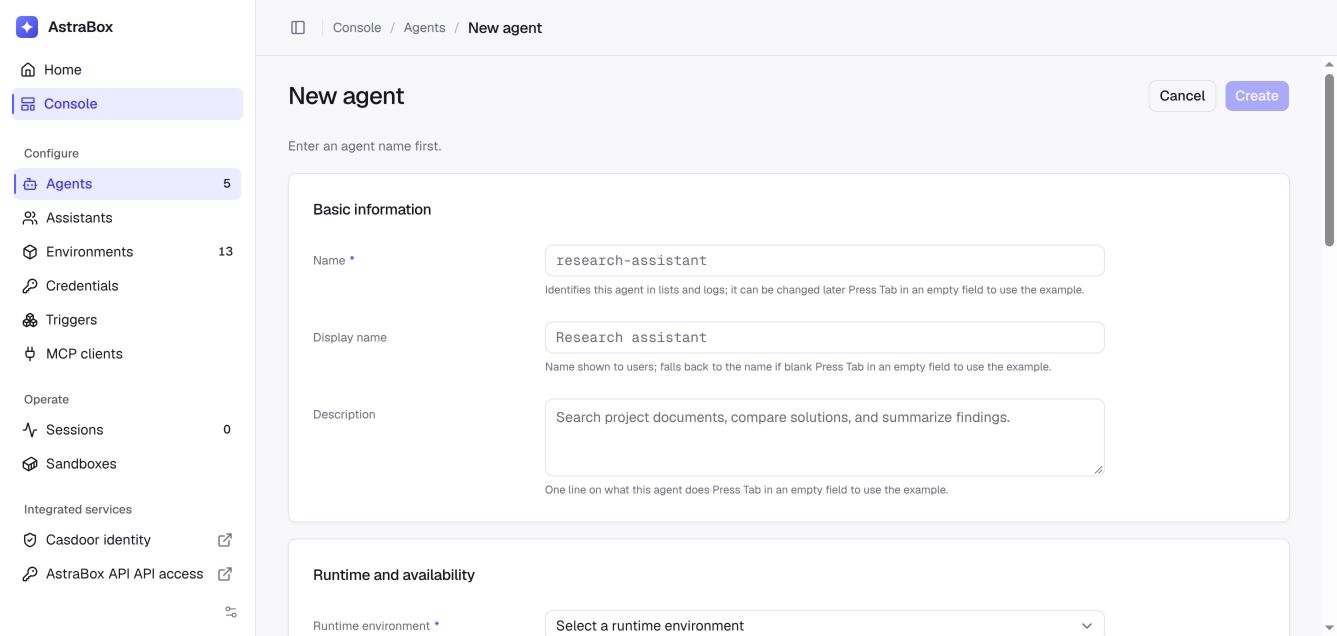
The local deployment listens on loopback and requires no login until you turn
on team login, which the installer does with ASTRABOX_INSTALL_TEAM_LOGIN=casdoor.
Before exposing it to another network, put it behind an HTTPS proxy as described
in Team login.
Run the installer again to upgrade: it installs the latest release over the current one and keeps your Sessions, credentials and settings.
Run from a clone
Building the images from a checkout takes longer and is the path for changing AstraBox itself:
git clone https://github.com/Colton-z/AstraBox.git
cd AstraBox

make build-agent-image

export ANTHROPIC_API_KEY="your-anthropic-api-key"
export ANTHROPIC_MODEL="your-model-name"
scripts/compose.sh up --build -d
For the complete setup and API alternative, see the Quickstart. For the installer settings, Kubernetes, or an existing OpenSandbox service, see Deploy AstraBox.
Prewarming prepares the Agent runtime before a Session claims it. New Agents have it on in the bundled deployments, and each one holds an idle prepared sandbox; see capacity planning. Native conversation state is stored in the platform database; a persistent workspace volume is optional and preserves task files separately. For multiple API replicas or sandbox nodes, see distributed deployment and workspace storage.
When to use AstraBox
- Long-running asynchronous tasks — let work continue after the developer's computer or browser disconnects.
- API integration — use an Agent from an application without building and operating a separate Agent runtime.
- Batch processing — run multiple Sessions for independent requests.
- Scheduled and event-driven work — start Agents from a schedule, webhook, external system, or messaging platform.
Local Agent programs remain the best fit for interactive development on one computer. AstraBox makes the same kind of Agent available remotely and to other systems; the two approaches complement each other.
Documentation
- Overview
- Quickstart
- Define an Agent
- Run a Session
- Connect MCP servers, Plugins, and Skills
- Automate Agent work
- Connect messaging platforms
- Deploy AstraBox
- HTTP API
Development
make install
make build-agent-image
make build-assistant-image
make dev
Open http://127.0.0.1:5173. See CONTRIBUTING.md for the maintained workflow.
Contributing
Issues and pull requests are welcome. Start with CONTRIBUTING.md.
Acknowledgements
AstraBox stands on the shoulders of these open-source projects: OpenSandbox, LiteLLM, Casdoor, Satori, DBOS Transact, mergerfs, AIO Sandbox, shadcn/ui, Vercel AI SDK and AI Elements and Docusaurus — and it runs the Agent programs Codex, Hermes Agent, DeepSeek Harness, Pi and Claude Code. NOTICE lists every attribution and license.
License
Apache License 2.0. See LICENSE.
Claude and Claude Code are trademarks of Anthropic; OpenAI and Codex are trademarks of OpenAI. AstraBox is an independent project, not affiliated with or endorsed by them. Claude Code is proprietary software used under Anthropic's terms; see NOTICE.
Contributors

5 commits
Similar repos


Languages
Python
65.6%
TypeScript
31.8%
Shell
1.2%
Open-source, self-hosted alternative to Claude Managed Agents: run Claude Code, Codex, Hermes, DeepSeek Harness and Pi as managed Agents on your own infrastructure.
See the codeSee what people are saying
README
AstraBox
The open-source, self-hosted alternative to Claude Managed Agents.
Try AstraBox online →
No signup. Ask an Agent to write and run code with a free model.
Offline sandbox · Sessions last about 2 minutes.
Open source · Self-hosted · Apache-2.0
English · 简体中文
Turn the Agent programs you already use into cloud Agents that stay available 24/7. AstraBox runs Claude Code, Codex, Hermes, DeepSeek Harness and Pi on your own infrastructure, with any model. Conversations start and resume in seconds; Sessions, sandboxes, credentials and history stay under your control.
You do not have to turn an Agent program into a service yourself, manage sandbox lifecycle, or maintain long-lived connections. Deploy AstraBox, create an Agent in the web console, and start a Session. Complex tasks run in a cloud sandbox while results stream back in real time.
AstraBox runs the Agent programs you already use as cloud Agents that can be reached remotely, continue long-running work, and connect to your applications, automations, and messaging platforms. The web console, API, Session records, authentication, and sandboxes all run on infrastructure you control.
One platform for team Agents and personal Assistants. An Agent is a reusable cloud Agent for teams and automation, started from the web console, the API, schedules, webhooks, messaging platforms or an MCP client. An Assistant is one person's long-lived cloud workspace: all of its conversations share one workspace and the Agent program's state.
Core concepts
| Concept | Description | Analogy |
|---|---|---|
| Agent | A cloud Agent powered by an installed Agent program | "Cloud teammate" |
| Environment | The Agent program, sandbox, model connection, network access, and lifecycle used for a Session | "Desk and toolbox" |
| Session | One stateful Agent execution, including its messages, Events, and current state | "A specific piece of work" |
| Event | The real-time output and state changes produced by a Session | "Live progress feed" |
Through these resources, developers can run interactive or long-running tasks, connect remote or local MCP servers, Plugins, Skills, and repositories, trigger Agents from schedules, webhooks, APIs, and messaging platforms, and protect access with authentication, authorization, isolated sandboxes, and managed credentials.
Explore AstraBox capabilities →
Enterprise infrastructure included
One deployment brings up the pieces a team usually assembles by hand:
- Model gateway — LiteLLM is bundled and on by default: one route name per model, upstream keys held on the server, budgets and usage logs, and any Anthropic, OpenAI-compatible or local provider behind it. See Connect a model.
- Team login — Casdoor is
pre-integrated as the identity provider: OIDC, organizations and roles, and
sign-in through the identity providers an administrator adds in Casdoor, such
as Google, Microsoft Entra ID, Okta, GitHub, SAML or LDAP. The installer turns
it on with
ASTRABOX_INSTALL_TEAM_LOGIN=casdoor, and a clone with one Compose overlay; see Team login. - Isolated sandboxes — OpenSandbox on one Docker host or a Kubernetes cluster, with warm capacity so conversations start in seconds.
- Credentials outside the sandbox — Vault credentials are injected at the sandbox's egress boundary; the Agent only ever sees a placeholder.
- Channels and triggers — schedules, signed webhooks and messaging platforms through official Satori adapters.
Manage it from a terminal, or let a coding agent do it
The astrabox CLI configures and uses a local or remote deployment without the
web console. Its results can be printed as JSON, so a coding agent such as
Claude Code or Codex can run the same commands for you.
- Configuration as code —
astrabox init --from-deploymentexports a deployment's Environments and Agents toastrabox.yaml;astrabox diffpreviews an edit andastrabox applycreates or updates resources, never deleting any. - Tasks from the command line —
astrabox run <agent> "<task>"starts a Session, sends the task and streams the reply;--sessioncontinues an existing Session. - Output a program can read — with
--output jsona command prints one JSON object whether it succeeds or fails, and each kind of failure has its own exit code. - MCP tools —
astrabox mcp serveoffers schema, get, export, diff, apply, status and run as MCP tools over stdio. - Local or remote —
astrabox up,downandlogsrun the local Compose deployment from a source checkout; the other commands reach any deployment with--endpointand a bearer token or OAuth client credentials.
Install the CLI from a source checkout with make install. Deployments
(schedule, webhook and messaging triggers) and answers to an Agent's questions
are managed in the web console or the HTTP API. See the
CLI overview.
Included Agent programs
| Agent program | Sandbox image | Used for |
|---|---|---|
| Claude Code | ghcr.io/colton-z/astrabox-sandbox-claude-code | Agent |
| Codex | ghcr.io/colton-z/astrabox-sandbox-codex | Agent |
| DeepSeek Harness | ghcr.io/colton-z/astrabox-sandbox-deepseek-harness | Agent |
| pi | ghcr.io/colton-z/astrabox-sandbox-pi | Agent |
| Hermes Agent | ghcr.io/colton-z/astrabox-sandbox-hermes | Assistant |
Other Agent programs can be added with a compatible sandbox image. See Add an Agent program.
Built to extend
Each replaceable part of AstraBox is a Python interface with a plugin registration point. An installed package registers its implementation under the matching entry-point group, and AstraBox selects it by name; an unknown name fails with an error instead of falling back to a default.
| Extension point | Entry-point group | Built in |
|---|---|---|
| Agent program | astrabox.providers.engine | Every included Agent program |
| Sandbox backend | astrabox.providers.sandbox | OpenSandbox on Docker or Kubernetes |
| Model service | astrabox.providers.model | LiteLLM gateway |
| Messaging platform | astrabox.providers.channel | Messaging platform gateway, generic JSON webhook |
| Identity provider | astrabox.web.identity | Local mode, OIDC, verified JWT, trusted identity headers |
| Secret Store | astrabox.providers.secrets | Local encryption, AWS KMS |
| Data store | astrabox.providers.repository | PostgreSQL, MongoDB, SQLite |
| Workspace storage | astrabox.providers.storage | Mounted volume, Amazon EFS |
| Remote MCP server source | astrabox.providers.extensions | Administrator records in AstraBox, LiteLLM MCP gateway |
- Interface version — a plugin under
astrabox.providers.*can setseams_api_versionto the interface version it was built against; AstraBox refuses to load it when that differs from its own. - Conformance suites —
astrabox.testingships reusable test suites for sandbox backends, workspace storage, messaging platforms, Agent programs and data stores; bind one in the plugin's own tests. - Application extensions — entry points for API routes, middleware, lifespan hooks and service implementations extend the application itself.
See Add an Agent program, Add a messaging platform, Use AstraBox from a Python application and Extensions.
Workflow
- Deploy AstraBox — run the service and OpenSandbox on one Docker host, Kubernetes, or infrastructure you already operate.
- Configure an Environment — choose the Agent program, sandbox image, model connection, network access, and lifecycle.
- Create an Agent — select the Environment and model in the web console, then add a system prompt, MCP servers, Plugins, Skills, or a repository only when the Agent needs them.
- Start a Session — open the Agent and start a Session.
- Send messages and receive Events — follow live output, answer questions or approvals, and return later without keeping the original browser open.
Quickstart
Prerequisites
- A Linux host (or WSL 2) running Docker Engine 26.0 or later with the Compose plugin 2.17.0 or later, and a user that can use the Docker socket
- An API key for a model service: Anthropic, DeepSeek, or another Anthropic- or OpenAI-compatible service
Install the latest release with one command:
curl -fsSL https://raw.githubusercontent.com/Colton-z/AstraBox/main/scripts/install.sh | bash
The installer asks which model service your Agents use, installs the deployment
into ~/astrabox, pulls the published images, starts them, and prints the
console address once the console answers. Open http://127.0.0.1:8088. Select
an Environment, create an Agent, and start your first Session from the console.
The local deployment listens on loopback and requires no login until you turn
on team login, which the installer does with ASTRABOX_INSTALL_TEAM_LOGIN=casdoor.
Before exposing it to another network, put it behind an HTTPS proxy as described
in Team login.
Run the installer again to upgrade: it installs the latest release over the current one and keeps your Sessions, credentials and settings.
Run from a clone
Building the images from a checkout takes longer and is the path for changing AstraBox itself:
git clone https://github.com/Colton-z/AstraBox.git
cd AstraBox

make build-agent-image

export ANTHROPIC_API_KEY="your-anthropic-api-key"
export ANTHROPIC_MODEL="your-model-name"
scripts/compose.sh up --build -d
For the complete setup and API alternative, see the Quickstart. For the installer settings, Kubernetes, or an existing OpenSandbox service, see Deploy AstraBox.
Prewarming prepares the Agent runtime before a Session claims it. New Agents have it on in the bundled deployments, and each one holds an idle prepared sandbox; see capacity planning. Native conversation state is stored in the platform database; a persistent workspace volume is optional and preserves task files separately. For multiple API replicas or sandbox nodes, see distributed deployment and workspace storage.
When to use AstraBox
- Long-running asynchronous tasks — let work continue after the developer's computer or browser disconnects.
- API integration — use an Agent from an application without building and operating a separate Agent runtime.
- Batch processing — run multiple Sessions for independent requests.
- Scheduled and event-driven work — start Agents from a schedule, webhook, external system, or messaging platform.
Local Agent programs remain the best fit for interactive development on one computer. AstraBox makes the same kind of Agent available remotely and to other systems; the two approaches complement each other.
Documentation
- Overview
- Quickstart
- Define an Agent
- Run a Session
- Connect MCP servers, Plugins, and Skills
- Automate Agent work
- Connect messaging platforms
- Deploy AstraBox
- HTTP API
Development
make install
make build-agent-image
make build-assistant-image
make dev
Open http://127.0.0.1:5173. See CONTRIBUTING.md for the maintained workflow.
Contributing
Issues and pull requests are welcome. Start with CONTRIBUTING.md.
Acknowledgements
AstraBox stands on the shoulders of these open-source projects: OpenSandbox, LiteLLM, Casdoor, Satori, DBOS Transact, mergerfs, AIO Sandbox, shadcn/ui, Vercel AI SDK and AI Elements and Docusaurus — and it runs the Agent programs Codex, Hermes Agent, DeepSeek Harness, Pi and Claude Code. NOTICE lists every attribution and license.
License
Apache License 2.0. See LICENSE.
Claude and Claude Code are trademarks of Anthropic; OpenAI and Codex are trademarks of OpenAI. AstraBox is an independent project, not affiliated with or endorsed by them. Claude Code is proprietary software used under Anthropic's terms; see NOTICE.
Similar repos
Contributors
5 commits
Languages
Python
65.6%
TypeScript
31.8%
Shell
1.2%