
Android phone & tablet companion to yuliskov/SmartTube (which targets TV). Upstream TV code merged unmodified for clean syncs.
See the codeREADME
SmarterTube
Ad-free YouTube for Android phones and tablets.
SmarterTube is not a patched YouTube app and not a wrapper — it is a native Android phone/tablet UI built on SmartTube's existing YouTube client engine.
It is a fork of SmartTube by yuliskov, and a companion to it, not a replacement: SmartTube is for Android TV and set-top boxes, SmarterTube is for touchscreen phones and tablets. It adds a native touch UI (portrait home, search, channel pages, a phone-style player, Shorts, settings, sign-in) on top of SmartTube's YouTube client engine, which is merged from upstream on every release. Because it is built on the SmartTube engine, you also get SmartTube's ad-free playback, SponsorBlock, Return YouTube Dislike, DeArrow, background play and more.
Beta. Core flows (Home, Search, channels, playback, Shorts, Settings, sign-in) work and have been checked on phones in portrait and landscape and on tablets. A few upstream options are still reachable only through the Settings screens, and some rows in the feature matrix haven't been re-verified yet. Unlike app-modifiers, these are real native Android screens, not a repackaged YouTube APK.
Earlier
31.xx-mobile-1.xbuilds were published as full1.xreleases too early. SmarterTube is now reset to a beta line with a clearer version scheme — see Versioning & releases.
Highlights
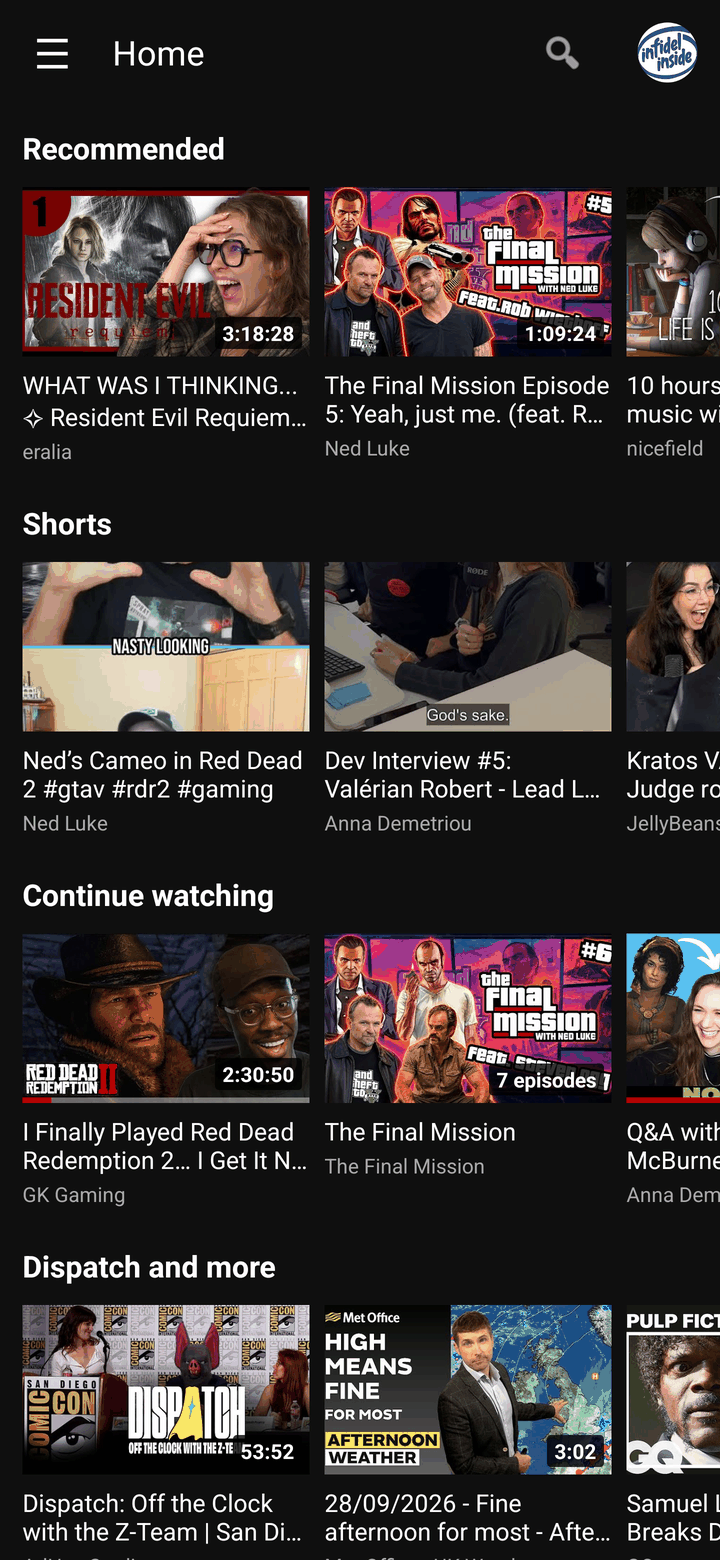
- Native phone & tablet UI: portrait home with a navigation drawer, search with voice input, and settings with touch-friendly pickers and sliders.
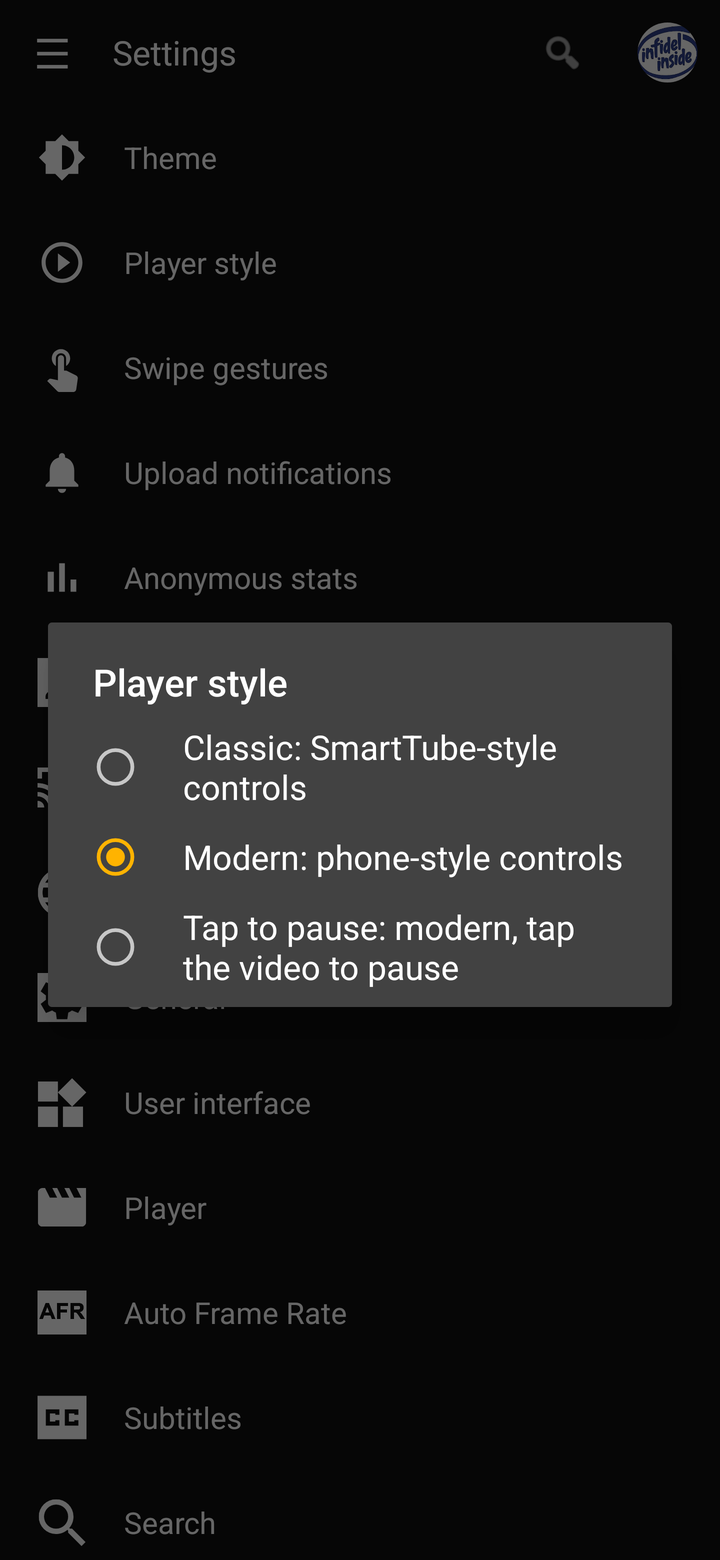
- Modern, Classic or Tap to pause player: phone-style controls by default, or SmartTube's original control rows. In landscape, swipe up/down to change volume (right side) or brightness (left side).
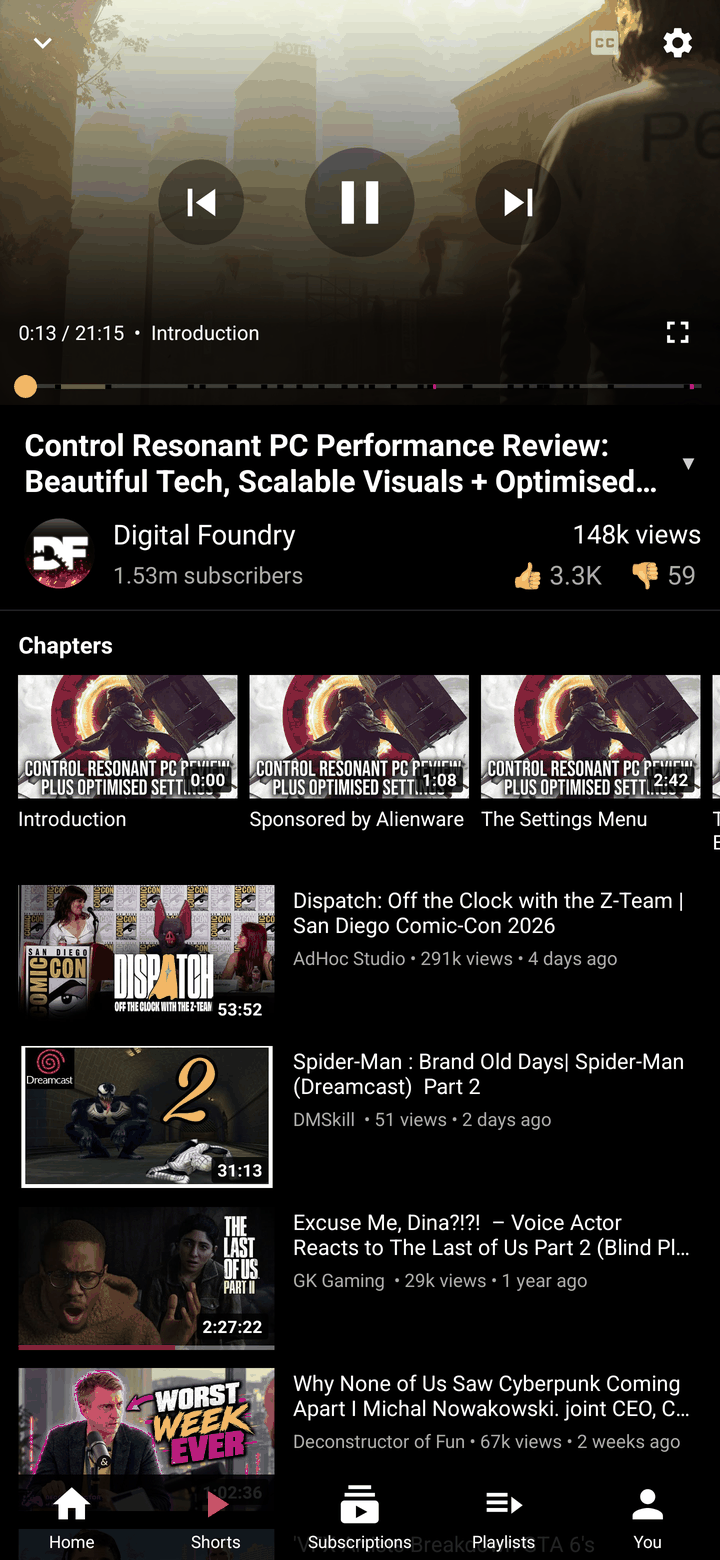
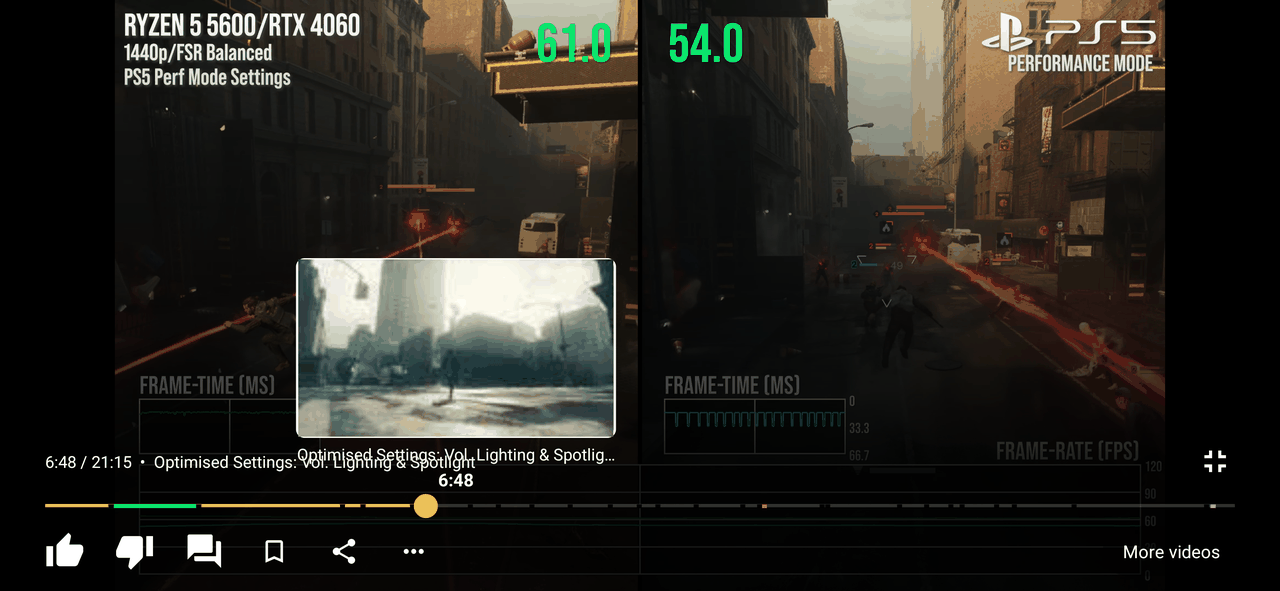
- Seek previews, SponsorBlock and chapters: drag the seek bar to see a preview frame with the chapter name. Sponsor segments and chapter marks show on the bar, and the chapters also appear as a strip above the up-next list.
- Portrait player with up-next list, in-panel comments (read-only) and Save to playlist.
- Shorts player: swipe up/down between Shorts, tap to pause, like/dislike/comments/channel on the side.
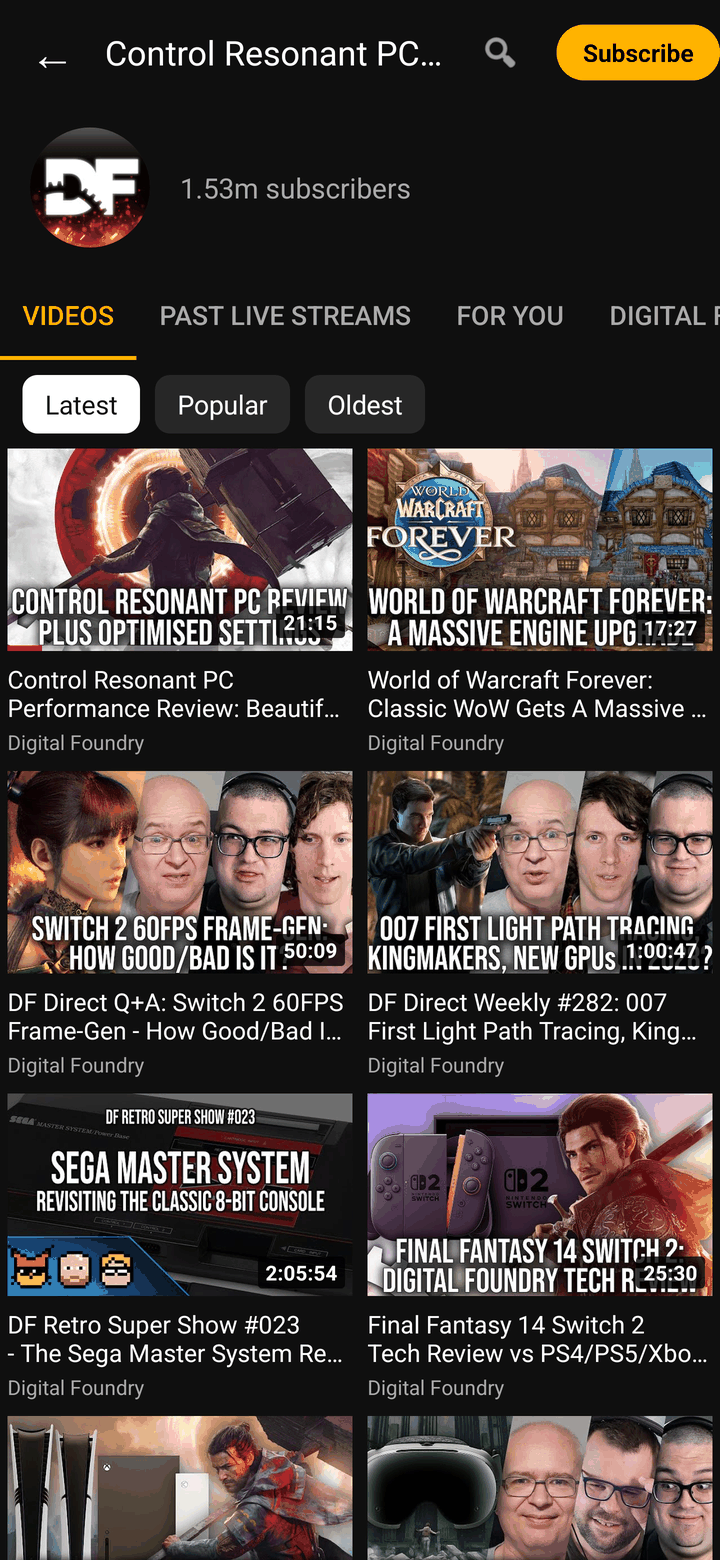
- Channel pages: Videos / Shorts / Live / Playlists tabs, Latest / Popular / Oldest sort, search inside a channel, and Subscribe + notification bell.
- Upload notifications for your subscriptions (opt-in), plus a Notifications tab.
- Ad-free, SponsorBlock, Return YouTube Dislike, DeArrow, background play, picture-in-picture, all from the SmartTube engine, with no Google Play Services needed.
- Easy to install and keep updated: GitHub Releases, Obtainium or SmarterTube's own F-Droid repo. The app tells you when a new release is out and shows what's new after you update.

Relationship to SmartTube
SmarterTube is an unofficial fork of yuliskov/SmartTube. The playback/client engine, ad blocking, SponsorBlock, Return YouTube Dislike and DeArrow integration — all the under-the-hood behaviour — come from upstream SmartTube, unchanged. This fork's job is to provide a native phone/tablet interface while keeping the upstream structure intact, so non-UI updates can be merged in regularly.
Versioning & releases
SmarterTube is currently beta. It uses its own product version and records the upstream SmartTube base separately:
v0.4.0-beta.1+st31.93
   |              |
   |              +-- upstream SmartTube base (metadata only)
   +-- SmarterTube product version (semver + release channel)
- The SmarterTube app version (
v0.4.0-beta.1) is tracked separately from the upstream SmartTube base (st31.93). - Earlier
31.xx-mobile-1.xreleases mixed those two numbers and were marked as full1.xreleases prematurely. They are superseded by this beta reset and are treated as legacy by the updater. - Public beta/stable releases normally track SmartTube stable. Upstream SmartTube beta/head is used only for SmarterTube alpha builds or emergency YouTube-breaking fixes (called out in the release notes).
Full policy: docs/VERSIONING.md · docs/RELEASE_PROCESS.md · docs/UPDATER_COMPATIBILITY.md. Per-release status lives in docs/FEATURE_MATRIX.md and docs/KNOWN_ISSUES.md.
Why this exists
Upstream SmartTube is built for Android TV — a leanback, 10-foot, D-pad interface. Phones and tablets need touch-native navigation instead. SmarterTube adds that UI while preserving upstream compatibility, so engine and feature updates keep flowing in from SmartTube.
| Project | Approach |
|---|---|
| SmartTube (upstream) | Android TV / leanback (10-foot) UI |
| SmarterTube (this fork) | Native phone/tablet touch UI on SmartTube's engine |
| App-patching tools | Patch or modify the official YouTube app itself |
Device compatibility
SmarterTube is for Android phones and tablets with a touchscreen, running Android 4.2 or newer. It is a companion to SmartTube, not a replacement: TV devices should run upstream SmartTube, and the app declares a touchscreen requirement so app stores don't offer it on TVs. It is not available for iPhone/iPad or desktop.
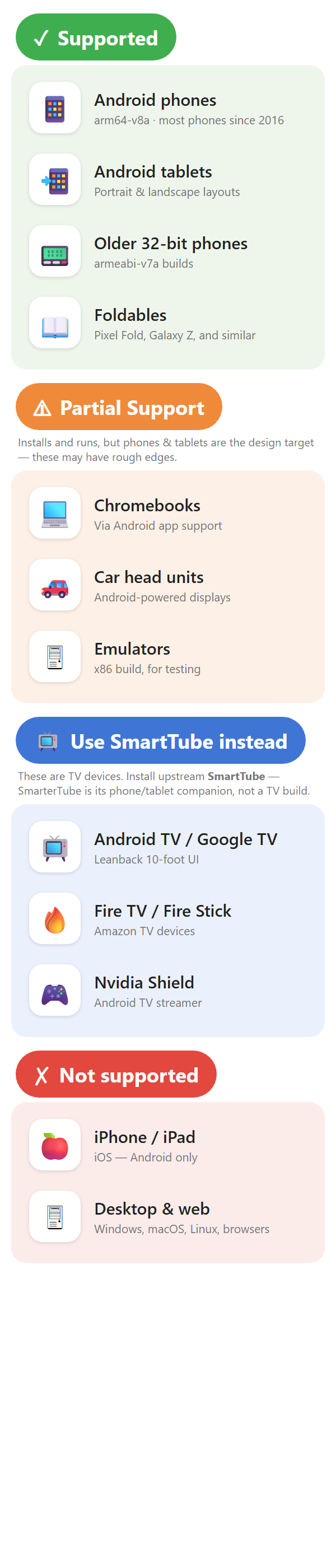
The chart's source is images/compatibility.html.
Download
Pick the APK for your device:
| ABI | Who needs it |
|---|---|
arm64-v8a | Most Android phones made after 2016 |
armeabi-v7a | Older 32-bit devices |
x86 | Emulators |
universal | Everything — larger file |
SmarterTube installs as com.codesculptor.smartertube and is co-installable with the upstream SmartTube TV build (app.smarttube). They do not conflict.
Upgrading from a build before this rename? Versions up to
v0.4.2-beta.8shipped under the old packageapp.smarttube.mobile. The new id is a separate app, so it installs alongside the old one rather than upgrading it — uninstall the old SmarterTube after installing this one. Settings and signed-in accounts do not carry over and need to be set up again (one-time).
Auto-updates via Obtainium
SmarterTube is not on any app store. Obtainium installs and auto-updates apps straight from their GitHub Releases — no store and no central repository involved:
- Install Obtainium (itself sideloaded from its own GitHub Releases).
- Add App → paste
https://github.com/CodeSculptor/SmarterTube. - Obtainium tracks each new release automatically; choose the
arm64-v8aasset (oruniversal) when prompted.
This is the easiest way to stay current.
Install via F-Droid (self-hosted repo)
SmarterTube runs its own F-Droid repository — the same APKs as GitHub Releases, signed with the same key, so installs upgrade in place. It is a self-hosted repo (not the official F-Droid index): you add it once in the F-Droid client and get auto-updates.
-
Install F-Droid (or a compatible client such as Droid-ify).
-
Settings → Repositories → Add this URL (fingerprint included so the client verifies it):
https://codesculptor.github.io/SmarterTube/fdroid/repo?fingerprint=C7AE86B0A3291B5D7396411BE185C60B298C9D25012172DDFC859B25B540A46B -
Refresh, search for SmarterTube, and install. Updates then arrive through F-Droid automatically.
The repo serves SmarterTube's own builds only; it is not affiliated with the official F-Droid repository or with upstream SmartTube.
Official builds are published only on this GitHub Releases page (and the SmarterTube F-Droid repo above) unless another source is explicitly linked here.
Verifying your download
Release APKs are named SmarterTube-<version>-st<base>-<arch>.apk (e.g. SmarterTube-v0.4.0-beta.1-st31.93-arm64-v8a.apk).
Every APK on the Releases page carries a SHA-256 digest, shown by GitHub next to the asset. After downloading, compare it against the file on your device:
# Linux/macOS
sha256sum SmarterTube-*.apk
# Windows (PowerShell)
Get-FileHash SmarterTube-*.apk -Algorithm SHA256
If the hash matches the one GitHub shows for that asset, the file is intact.
What works
Phone UI (this fork adds)
Browsing
- Portrait home screen with drawer navigation (Notifications, Home, Shorts, Kids, Sports, LIVE, Gaming, News, Music, Channels, Subscriptions, History, Playlists, My videos, Settings)
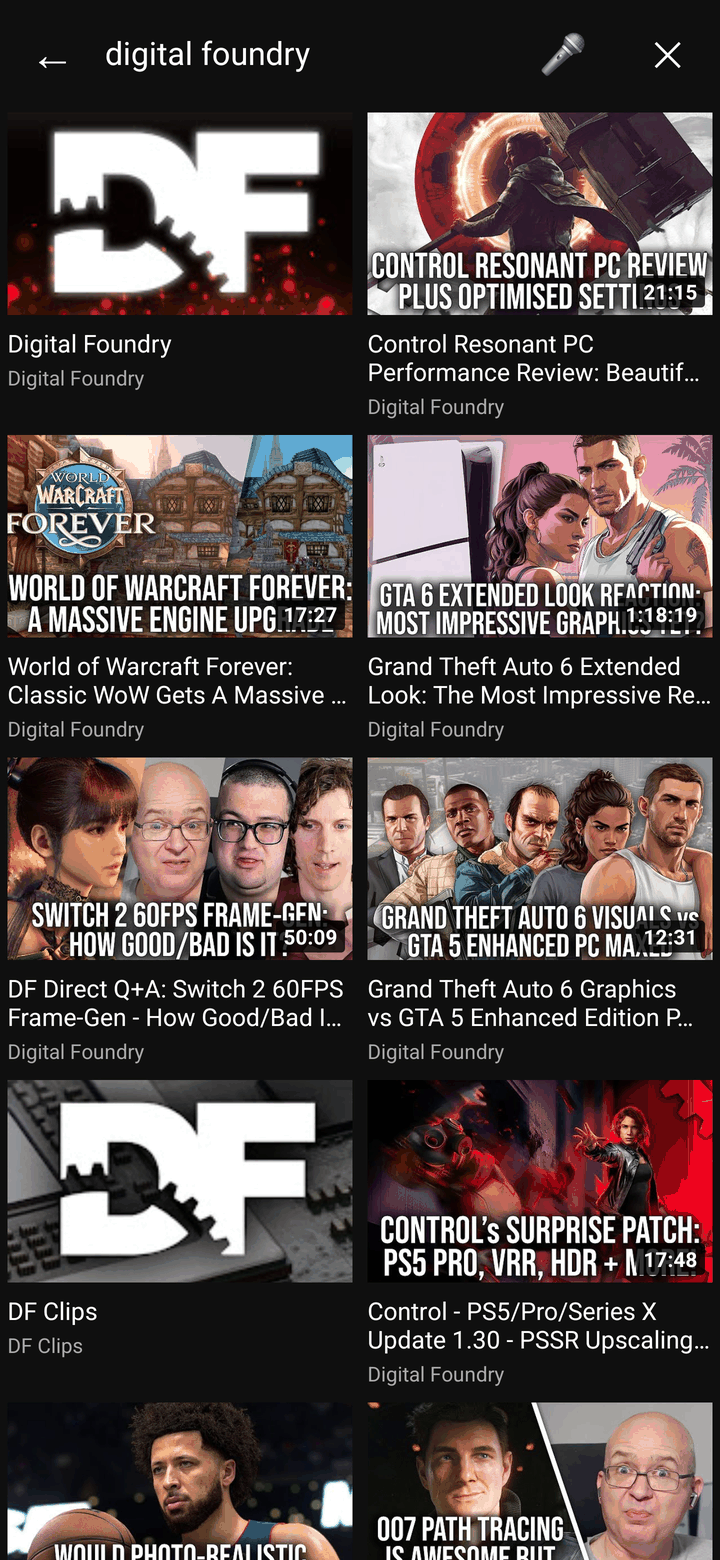
- Search with suggestions, a results grid and voice search
- Channel pages: avatar and subscriber count, Subscribe / Unsubscribe and notification bell, Videos / Shorts / Live / Playlists tabs, Latest / Popular / Oldest sort, search inside the channel, 9:16 Shorts cards and playlist cards with a video count
- Thumbnails show the video length and a red watched-progress bar
- Long-press a video for the SmartTube video menu (Home, search, channels and the up-next list)
Player
- Player style (Settings > Player style): Modern phone-style controls (default for new installs), Tap to pause (tap plays/pauses, double tap seeks), or Classic SmartTube control rows
- Modern seek bar: preview frames while dragging, SponsorBlock segments and chapter marks on the bar, and the current chapter next to the time
- Chapters strip at the top of the up-next list (portrait panel and landscape "More videos"); tap a chapter to jump to it
- Swipe gestures in the landscape player: up/down on the right for volume, on the left for brightness (Settings > Swipe gestures)
- Portrait player: video on top, with channel row, like/dislike, up-next list, in-panel comments (read-only) and a bottom bar with Save to playlist
- Rotate for full-screen landscape playback, or use the full-screen button
- Settings sheets (speed, quality, captions…) open as a bottom sheet over the video
- Shorts player: swipe up/down for the next Short, tap to pause, side rail with like/dislike/comments/channel, seek bar; fitted with side bars on tablets and foldables
- Picture-in-picture pop-up, and background audio with lock-screen media controls
Account & notifications
- Sign in / sign out with the OAuth device-code flow in an in-app browser tab. Switch between accounts with one tap on the toolbar avatar (long-press to manage accounts), or from Settings
- New-upload notifications from your subscriptions (opt-in; you're asked once after signing in), and a Notifications tab listing those uploads
Settings & app
- Settings built for touch: pickers in bottom sheets, sliders for numeric values, and long checkbox screens folded into sections
- Phone-only settings at the top: Theme, Player style, Swipe gestures, Upload notifications, Anonymous stats
- Update notice on launch when a new release is out, and a short "What's new" after you update
- Opt-in anonymous usage stats and crash reports (off unless you say yes; see PRIVACY.md). The totals are public: smartertube-stats.codesculptor.workers.dev
- Tablet layouts in portrait and landscape (more grid columns, Shorts fitted to the screen)
Built on the SmartTube engine, so you also get
- No ads
- SponsorBlock (skip or mark sponsor segments, per-channel exclusions)
- Return YouTube Dislike
- DeArrow
- Background play and picture-in-picture
- Voice search
- Adjustable playback speed
- Up to 8K / 60fps / HDR
- Remote control: link the YouTube app on another device to SmarterTube (Settings > Remote control)
- No Google Play Services required
Known limitations & risks
SmarterTube is a beta release. A few realities are worth knowing before you install:
- Some upstream options live only in Settings. The phone UI covers the core journey (Home, Search, channels, playback, Shorts, sign-in); a few SmartTube options have no button of their own and are only in the Settings screens.
- Upstream / YouTube breakage — YouTube changes its private APIs without warning, which can break playback at any time. Fixes depend on upstream SmartTube's cadence, then a re-merge here.
- Sideload only — not on any app store. Install the APK yourself from Releases, or use Obtainium to install and auto-update directly from GitHub.
- No guarantees — this is an independent fork with no affiliation to Google/YouTube or to upstream SmartTube's author.
Specific gaps:
- Comments are read-only — you can read comments in the player, but posting needs YouTube sign-in work that isn't done yet.
- No YouTube notification inbox — YouTube's own inbox isn't available to this client; the Notifications tab lists new uploads from your subscriptions instead.
- Updates install manually — the app tells you when a new release is out and opens the download, but you install the APK yourself (or let Obtainium / F-Droid do it).
- No seeking from the lock screen — background audio has lock-screen media controls, but they can't seek within the video.
- TV / leanback interface — install upstream SmartTube for Android TV boxes and sticks.
- Official F-Droid / IzzyOnDroid index — not listed there; instead use GitHub Releases, Obtainium, or SmarterTube's own F-Droid repo.
- Casting to a Chromecast — not supported, same as upstream SmartTube: sending to a Chromecast needs Google's Cast SDK, which requires Google Play Services, and SmartTube is deliberately built without them. The reverse works: under Settings > Remote control, the YouTube app on another device can link to SmarterTube and control playback.
Community & support
- Telegram: https://t.me/SmarterTubeApp
- Discord: https://discord.gg/kVCkEWvEjt
- Bug reports: https://github.com/CodeSculptor/SmarterTube/issues
Building
Requires JDK 17 and Android SDK.
# Debug
./gradlew :smarttubetv:assembleStmobileDebug

# Release (needs keystore.properties + smartertube-release.jks at repo root)
./gradlew :smarttubetv:assembleStmobileRelease
Output APKs land in smarttubetv/build/outputs/apk/stmobile/.
All phone-specific code lives under smarttubetv/src/stmobile/ — no changes to src/main (TV code) except bug fixes that benefit both targets, which are submitted upstream.
Upstream & maintenance
The YouTube client engine (MediaServiceCore, ExoPlayer, InnerTube API code) is upstream's work and is merged from yuliskov/SmartTube on every release. Bug fixes that apply to both the TV and phone targets are submitted upstream rather than kept here — see open PRs for current patches. (Code layout is described under Building.)
Licensed under MIT, same as upstream.
Privacy
See PRIVACY.md.
Similar repos


Languages
Java
98.8%
Android phone & tablet companion to yuliskov/SmartTube (which targets TV). Upstream TV code merged unmodified for clean syncs.
See the codeREADME
SmarterTube
Ad-free YouTube for Android phones and tablets.
SmarterTube is not a patched YouTube app and not a wrapper — it is a native Android phone/tablet UI built on SmartTube's existing YouTube client engine.
It is a fork of SmartTube by yuliskov, and a companion to it, not a replacement: SmartTube is for Android TV and set-top boxes, SmarterTube is for touchscreen phones and tablets. It adds a native touch UI (portrait home, search, channel pages, a phone-style player, Shorts, settings, sign-in) on top of SmartTube's YouTube client engine, which is merged from upstream on every release. Because it is built on the SmartTube engine, you also get SmartTube's ad-free playback, SponsorBlock, Return YouTube Dislike, DeArrow, background play and more.
Beta. Core flows (Home, Search, channels, playback, Shorts, Settings, sign-in) work and have been checked on phones in portrait and landscape and on tablets. A few upstream options are still reachable only through the Settings screens, and some rows in the feature matrix haven't been re-verified yet. Unlike app-modifiers, these are real native Android screens, not a repackaged YouTube APK.
Earlier
31.xx-mobile-1.xbuilds were published as full1.xreleases too early. SmarterTube is now reset to a beta line with a clearer version scheme — see Versioning & releases.
Highlights
- Native phone & tablet UI: portrait home with a navigation drawer, search with voice input, and settings with touch-friendly pickers and sliders.
- Modern, Classic or Tap to pause player: phone-style controls by default, or SmartTube's original control rows. In landscape, swipe up/down to change volume (right side) or brightness (left side).
- Seek previews, SponsorBlock and chapters: drag the seek bar to see a preview frame with the chapter name. Sponsor segments and chapter marks show on the bar, and the chapters also appear as a strip above the up-next list.
- Portrait player with up-next list, in-panel comments (read-only) and Save to playlist.
- Shorts player: swipe up/down between Shorts, tap to pause, like/dislike/comments/channel on the side.
- Channel pages: Videos / Shorts / Live / Playlists tabs, Latest / Popular / Oldest sort, search inside a channel, and Subscribe + notification bell.
- Upload notifications for your subscriptions (opt-in), plus a Notifications tab.
- Ad-free, SponsorBlock, Return YouTube Dislike, DeArrow, background play, picture-in-picture, all from the SmartTube engine, with no Google Play Services needed.
- Easy to install and keep updated: GitHub Releases, Obtainium or SmarterTube's own F-Droid repo. The app tells you when a new release is out and shows what's new after you update.
Relationship to SmartTube
SmarterTube is an unofficial fork of yuliskov/SmartTube. The playback/client engine, ad blocking, SponsorBlock, Return YouTube Dislike and DeArrow integration — all the under-the-hood behaviour — come from upstream SmartTube, unchanged. This fork's job is to provide a native phone/tablet interface while keeping the upstream structure intact, so non-UI updates can be merged in regularly.
Versioning & releases
SmarterTube is currently beta. It uses its own product version and records the upstream SmartTube base separately:
v0.4.0-beta.1+st31.93
   |              |
   |              +-- upstream SmartTube base (metadata only)
   +-- SmarterTube product version (semver + release channel)
- The SmarterTube app version (
v0.4.0-beta.1) is tracked separately from the upstream SmartTube base (st31.93). - Earlier
31.xx-mobile-1.xreleases mixed those two numbers and were marked as full1.xreleases prematurely. They are superseded by this beta reset and are treated as legacy by the updater. - Public beta/stable releases normally track SmartTube stable. Upstream SmartTube beta/head is used only for SmarterTube alpha builds or emergency YouTube-breaking fixes (called out in the release notes).
Full policy: docs/VERSIONING.md · docs/RELEASE_PROCESS.md · docs/UPDATER_COMPATIBILITY.md. Per-release status lives in docs/FEATURE_MATRIX.md and docs/KNOWN_ISSUES.md.
Why this exists
Upstream SmartTube is built for Android TV — a leanback, 10-foot, D-pad interface. Phones and tablets need touch-native navigation instead. SmarterTube adds that UI while preserving upstream compatibility, so engine and feature updates keep flowing in from SmartTube.
| Project | Approach |
|---|---|
| SmartTube (upstream) | Android TV / leanback (10-foot) UI |
| SmarterTube (this fork) | Native phone/tablet touch UI on SmartTube's engine |
| App-patching tools | Patch or modify the official YouTube app itself |
Device compatibility
SmarterTube is for Android phones and tablets with a touchscreen, running Android 4.2 or newer. It is a companion to SmartTube, not a replacement: TV devices should run upstream SmartTube, and the app declares a touchscreen requirement so app stores don't offer it on TVs. It is not available for iPhone/iPad or desktop.
The chart's source is images/compatibility.html.
Download
Pick the APK for your device:
| ABI | Who needs it |
|---|---|
arm64-v8a | Most Android phones made after 2016 |
armeabi-v7a | Older 32-bit devices |
x86 | Emulators |
universal | Everything — larger file |
SmarterTube installs as com.codesculptor.smartertube and is co-installable with the upstream SmartTube TV build (app.smarttube). They do not conflict.
Upgrading from a build before this rename? Versions up to
v0.4.2-beta.8shipped under the old packageapp.smarttube.mobile. The new id is a separate app, so it installs alongside the old one rather than upgrading it — uninstall the old SmarterTube after installing this one. Settings and signed-in accounts do not carry over and need to be set up again (one-time).
Auto-updates via Obtainium
SmarterTube is not on any app store. Obtainium installs and auto-updates apps straight from their GitHub Releases — no store and no central repository involved:
- Install Obtainium (itself sideloaded from its own GitHub Releases).
- Add App → paste
https://github.com/CodeSculptor/SmarterTube. - Obtainium tracks each new release automatically; choose the
arm64-v8aasset (oruniversal) when prompted.
This is the easiest way to stay current.
Install via F-Droid (self-hosted repo)
SmarterTube runs its own F-Droid repository — the same APKs as GitHub Releases, signed with the same key, so installs upgrade in place. It is a self-hosted repo (not the official F-Droid index): you add it once in the F-Droid client and get auto-updates.
-
Install F-Droid (or a compatible client such as Droid-ify).
-
Settings → Repositories → Add this URL (fingerprint included so the client verifies it):
https://codesculptor.github.io/SmarterTube/fdroid/repo?fingerprint=C7AE86B0A3291B5D7396411BE185C60B298C9D25012172DDFC859B25B540A46B -
Refresh, search for SmarterTube, and install. Updates then arrive through F-Droid automatically.
The repo serves SmarterTube's own builds only; it is not affiliated with the official F-Droid repository or with upstream SmartTube.
Official builds are published only on this GitHub Releases page (and the SmarterTube F-Droid repo above) unless another source is explicitly linked here.
Verifying your download
Release APKs are named SmarterTube-<version>-st<base>-<arch>.apk (e.g. SmarterTube-v0.4.0-beta.1-st31.93-arm64-v8a.apk).
Every APK on the Releases page carries a SHA-256 digest, shown by GitHub next to the asset. After downloading, compare it against the file on your device:
# Linux/macOS
sha256sum SmarterTube-*.apk
# Windows (PowerShell)
Get-FileHash SmarterTube-*.apk -Algorithm SHA256
If the hash matches the one GitHub shows for that asset, the file is intact.
What works
Phone UI (this fork adds)
Browsing
- Portrait home screen with drawer navigation (Notifications, Home, Shorts, Kids, Sports, LIVE, Gaming, News, Music, Channels, Subscriptions, History, Playlists, My videos, Settings)
- Search with suggestions, a results grid and voice search
- Channel pages: avatar and subscriber count, Subscribe / Unsubscribe and notification bell, Videos / Shorts / Live / Playlists tabs, Latest / Popular / Oldest sort, search inside the channel, 9:16 Shorts cards and playlist cards with a video count
- Thumbnails show the video length and a red watched-progress bar
- Long-press a video for the SmartTube video menu (Home, search, channels and the up-next list)
Player
- Player style (Settings > Player style): Modern phone-style controls (default for new installs), Tap to pause (tap plays/pauses, double tap seeks), or Classic SmartTube control rows
- Modern seek bar: preview frames while dragging, SponsorBlock segments and chapter marks on the bar, and the current chapter next to the time
- Chapters strip at the top of the up-next list (portrait panel and landscape "More videos"); tap a chapter to jump to it
- Swipe gestures in the landscape player: up/down on the right for volume, on the left for brightness (Settings > Swipe gestures)
- Portrait player: video on top, with channel row, like/dislike, up-next list, in-panel comments (read-only) and a bottom bar with Save to playlist
- Rotate for full-screen landscape playback, or use the full-screen button
- Settings sheets (speed, quality, captions…) open as a bottom sheet over the video
- Shorts player: swipe up/down for the next Short, tap to pause, side rail with like/dislike/comments/channel, seek bar; fitted with side bars on tablets and foldables
- Picture-in-picture pop-up, and background audio with lock-screen media controls
Account & notifications
- Sign in / sign out with the OAuth device-code flow in an in-app browser tab. Switch between accounts with one tap on the toolbar avatar (long-press to manage accounts), or from Settings
- New-upload notifications from your subscriptions (opt-in; you're asked once after signing in), and a Notifications tab listing those uploads
Settings & app
- Settings built for touch: pickers in bottom sheets, sliders for numeric values, and long checkbox screens folded into sections
- Phone-only settings at the top: Theme, Player style, Swipe gestures, Upload notifications, Anonymous stats
- Update notice on launch when a new release is out, and a short "What's new" after you update
- Opt-in anonymous usage stats and crash reports (off unless you say yes; see PRIVACY.md). The totals are public: smartertube-stats.codesculptor.workers.dev
- Tablet layouts in portrait and landscape (more grid columns, Shorts fitted to the screen)
Built on the SmartTube engine, so you also get
- No ads
- SponsorBlock (skip or mark sponsor segments, per-channel exclusions)
- Return YouTube Dislike
- DeArrow
- Background play and picture-in-picture
- Voice search
- Adjustable playback speed
- Up to 8K / 60fps / HDR
- Remote control: link the YouTube app on another device to SmarterTube (Settings > Remote control)
- No Google Play Services required
Known limitations & risks
SmarterTube is a beta release. A few realities are worth knowing before you install:
- Some upstream options live only in Settings. The phone UI covers the core journey (Home, Search, channels, playback, Shorts, sign-in); a few SmartTube options have no button of their own and are only in the Settings screens.
- Upstream / YouTube breakage — YouTube changes its private APIs without warning, which can break playback at any time. Fixes depend on upstream SmartTube's cadence, then a re-merge here.
- Sideload only — not on any app store. Install the APK yourself from Releases, or use Obtainium to install and auto-update directly from GitHub.
- No guarantees — this is an independent fork with no affiliation to Google/YouTube or to upstream SmartTube's author.
Specific gaps:
- Comments are read-only — you can read comments in the player, but posting needs YouTube sign-in work that isn't done yet.
- No YouTube notification inbox — YouTube's own inbox isn't available to this client; the Notifications tab lists new uploads from your subscriptions instead.
- Updates install manually — the app tells you when a new release is out and opens the download, but you install the APK yourself (or let Obtainium / F-Droid do it).
- No seeking from the lock screen — background audio has lock-screen media controls, but they can't seek within the video.
- TV / leanback interface — install upstream SmartTube for Android TV boxes and sticks.
- Official F-Droid / IzzyOnDroid index — not listed there; instead use GitHub Releases, Obtainium, or SmarterTube's own F-Droid repo.
- Casting to a Chromecast — not supported, same as upstream SmartTube: sending to a Chromecast needs Google's Cast SDK, which requires Google Play Services, and SmartTube is deliberately built without them. The reverse works: under Settings > Remote control, the YouTube app on another device can link to SmarterTube and control playback.
Community & support
- Telegram: https://t.me/SmarterTubeApp
- Discord: https://discord.gg/kVCkEWvEjt
- Bug reports: https://github.com/CodeSculptor/SmarterTube/issues
Building
Requires JDK 17 and Android SDK.
# Debug
./gradlew :smarttubetv:assembleStmobileDebug

# Release (needs keystore.properties + smartertube-release.jks at repo root)
./gradlew :smarttubetv:assembleStmobileRelease
Output APKs land in smarttubetv/build/outputs/apk/stmobile/.
All phone-specific code lives under smarttubetv/src/stmobile/ — no changes to src/main (TV code) except bug fixes that benefit both targets, which are submitted upstream.
Upstream & maintenance
The YouTube client engine (MediaServiceCore, ExoPlayer, InnerTube API code) is upstream's work and is merged from yuliskov/SmartTube on every release. Bug fixes that apply to both the TV and phone targets are submitted upstream rather than kept here — see open PRs for current patches. (Code layout is described under Building.)
Licensed under MIT, same as upstream.
Privacy
See PRIVACY.md.
Similar repos
Languages
Java
98.8%