Local-first LLM wiki — ingests your documents into a curated, citation-backed knowledge base you can read and chat with. Marimo + SQLite/FTS5, any OpenAI-compatible model, no cloud required.
Python
23
433 commits
updated Oct 15, 2026




English · Español
A personal, local-first wiki that ingests your documents, builds a structured knowledge base, and lets you read and chat with it — all on your machine, no cloud required.
Inspired by Karpathy's LLM Wiki idea.
The PDF-extraction and a few low-level ingestion pieces are adapted from Lucas Astorian's open-source LLM Wiki
(Apache-2.0); the rest is an independent local-first build on FastAPI, HTMX and SQLite. See NOTICE.
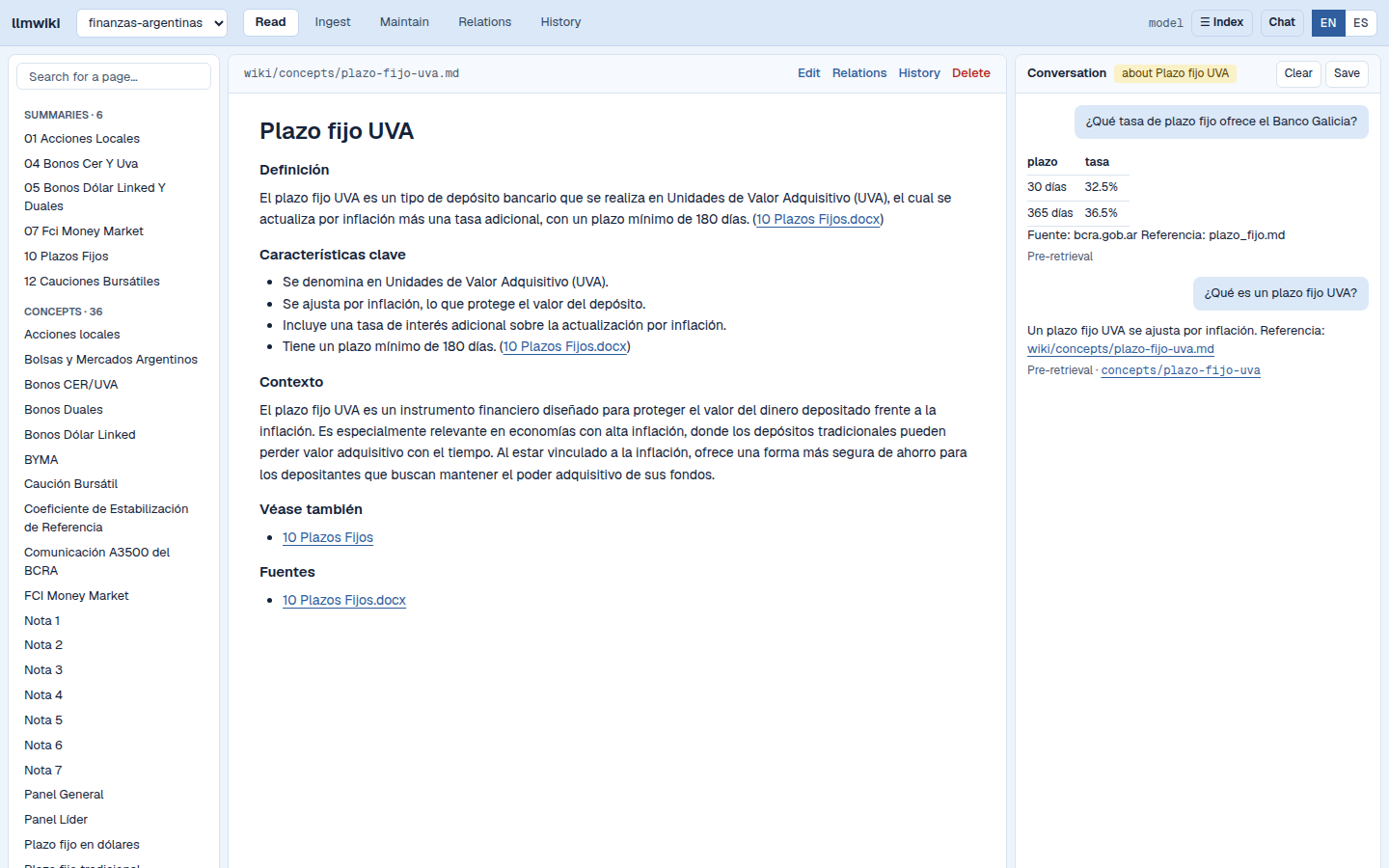
The Read tab on the finance example. The page index is on the left and the open page is in the middle. The conversation is on the right: under each answer, one line names the answering mode and the pages the answer cites. The mode selector under the question field has three values: Pre-retrieval (code retrieves first and refuses before the model is called), Strict (the answer is replaced by a refusal when the model did not consult the wiki) and No verification (the answer streams and is not checked) (which to pick, and why). The Save button turns the conversation into a wiki page only after you review the draft: the agent has no write tool.
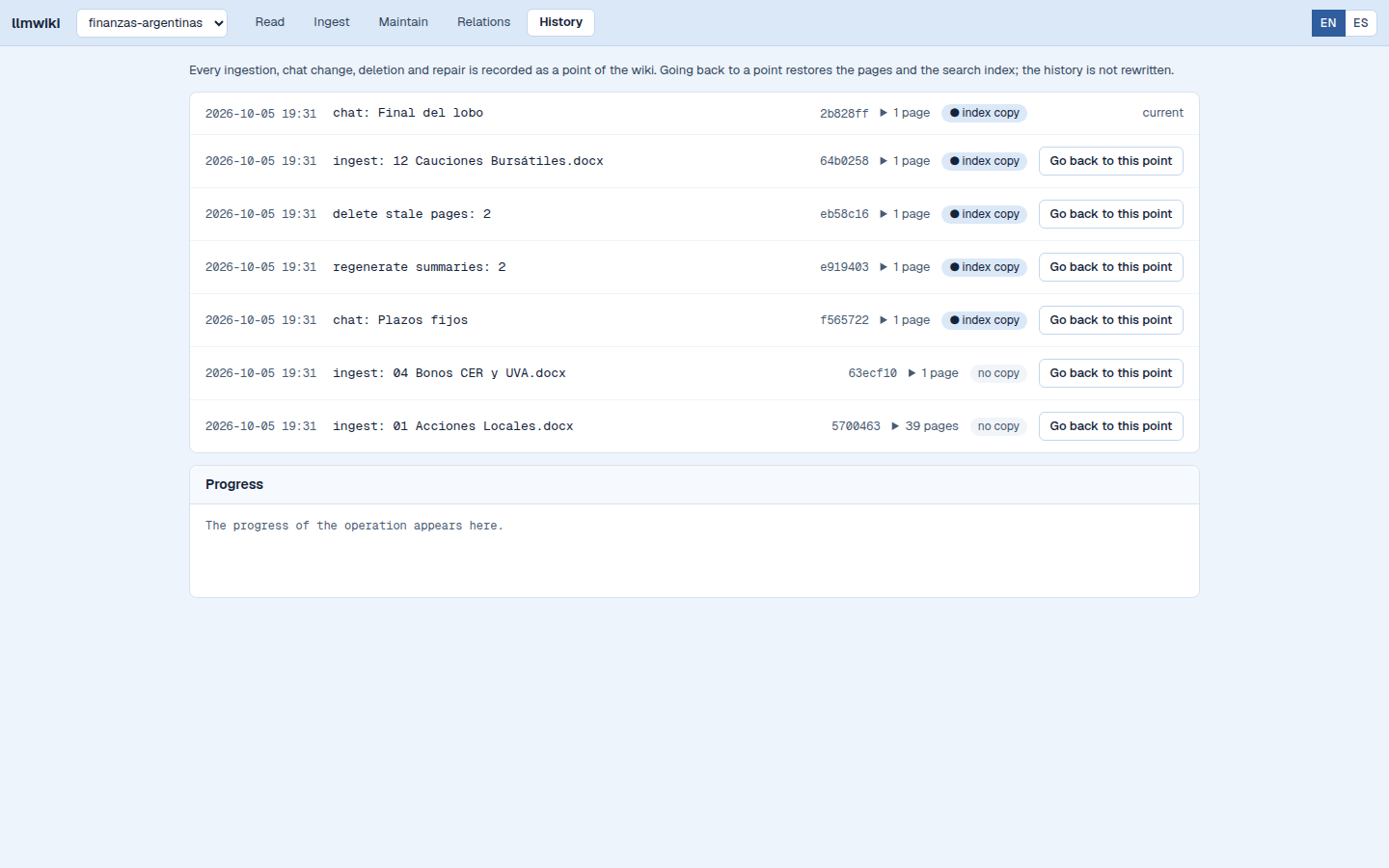
The History tab. Every ingestion, saved conversation, deletion and repair is one point of the wiki. A point marked "index copy" has a copy of the search index, so returning to it is immediate; for the others the index is rebuilt without calling the model. This capture was taken on the finance example with seven points added by the capture script.
▶ Watch the 1-minute demo — reading a generated wiki, then one cross-document answer citing a page for every claim (9s), then the same kind of question refused in 1.2s because the model was never called.
Why not just point Claude Code at a folder of notes? That is the honest question, and it has a long answer: From Idea to Product — seventeen ways the LLM-wiki idea leaks when a generic agent is pointed at it, each with a real example and what this project does about it — including the three where the answer is a deliberate trade rather than a fix.
A self-contained, agentic LLM-wiki. Most takes on Karpathy's idea point an external agent — Claude Desktop, Cursor, an MCP client — at an Obsidian vault. This one ships its own embedded agent: ingestion, agentic retrieval (the chat assistant decides when to read a page vs. search), self-maintenance, and a web interface are a single app, with no external agent or plugin host to wire up. The trade-off is honest — it's not an Obsidian plugin, so there is no plugin ecosystem (see Limitations). It does have its own relations graph, in the Relations tab.
Knowledge that also knows the numbers — beyond an encyclopedia. Most "chat
with your documents" tools — classic RAG, NotebookLM, even the original LLM-wiki
— handle only durable prose: they answer "what is X?" but go stale and
can't tell you the current numbers, let alone compute over them. This adds a
second, first-class kind of knowledge: alongside the distilled concept pages,
a wiki can carry live, structured datasets (rates, prices, stats) that are
refreshed, queried exactly, and computed over deterministically — and the
same grounded agent reasons across both, citing source and date for every
figure and refusing to invent or estimate the unknowable. The bundled example is
an Argentine personal-finance advisor (finance_argentina): ask "I have $X
I won't need for Y months — what are my options and what would I earn?" and it
ranks real alternatives with cited, dated figures, computes the gains in
deterministic code (never the LLM), and flags variable-return instruments
(equities, inflation- or FX-linked) as not estimable rather than guessing. The
data engine is domain-neutral (datasets, not "rates") — finance is just the
first overlay. An original synthesis: a local-first, fully-cited knowledge wiki
that also keeps live data and computes grounded advice over it.
AI / LLM engineering
datasets engine ingests structured, periodically-refreshed tables (rates/prices/stats) as a lane separate from the durable concept pages, exposed to the chat agent as a query_dataset tool; values are quoted verbatim with their as_of date, never recalled from memory.finance_argentina overlay computes "what would I earn" over those datasets in pure Python (effective-rate math, eligibility), lists every option ranked and cited, and refuses to estimate the non-deterministic (equities, inflation, FX) rather than fabricating a number.index.md → wiki FTS5 → raw source chunks as a fallback), so knowledge is compiled once and compounds instead of being re-retrieved per query.[wiki] language in wiki_config.toml), and the whole wiki — generated pages, section headers, and chat answers — is produced in that language, regardless of the source documents' language. Every prompt the model receives is a file per language in prompts/, so a Spanish wiki gets Spanish instructions. Run an English wiki and a Spanish wiki side by side; adding a third language is one Locale entry and one translated file per prompt.prompts/system_prompt.<lang>.md) embeds a worked, fully-cited example because testing proved that's what reliable cross-document citation took..env alone.Engineering quality
base/, exercised without a browser) — deterministic fake-LLM unit tests (no keys, no network); a frozen golden-corpus characterization regression that re-checks the real-ingest backbone without re-calling the model; and Playwright tests of the web interface that run in CI.base/domain/{ingestion,chat,eval,lint,repair,tools}; the web interface (web/) is only the UI at the edges, and it calls base/services/, so the engine is exercised by unit tests without a browser.web/static/.SECURITY.md.uv.lock for deterministic installs, zero ruff warnings, and no TODO/FIXME debt in the codebase.Transparency & docs
WIKI_TRACE=1) — emits an OpenTelemetry span per diagram node for every chat turn and ingest, written to spans.jsonl and rendered by scripts/render_trace.py.Classic RAG (and tools like NotebookLM or ChatGPT file uploads) re-discovers
knowledge from scratch on every question: it retrieves chunks at query time and
synthesises an answer that vanishes into chat history. Nothing accumulates.
LLM Wiki compiles knowledge once and keeps it current. Each ingested source
is read, summarised, and integrated into a persistent, interlinked set of
markdown pages — cross-references, contradictions, and synthesis are already
written down before you ask anything. The wiki is a compounding artifact that
gets richer with every document; the chat agent reads those curated pages first
and only falls back to raw chunks when needed.
Filing cabinet (SQLite + FTS5) vs. encyclopedia (human-readable markdown) —
this project maintains both, and the encyclopedia is the point.
.docx, .doc, .odt, .rtf), Markdown (.md) or plain-text (.txt) files and click Ingest, or copy files to sources/ and click Scan sources/ for changes. The pipeline extracts text page by page, chunks it with overlap, runs structured concept extraction, and creates / updates summary + concept pages plus the catalogue, overview, and timeline — then snapshots the result to the wiki's own git repo (optional; see What ends up on disk). The same tab lists the sources and deletes a source after a confirmation.The interface is in English and in Spanish: the EN | ES switch at the right of the header chooses the language (a cookie; without it, the browser's language; without that, English). This is the language of the labels and messages only. The language of the wiki content is set per wiki and is a different setting (see Wiki content language): a Spanish wiki can be read with the English interface, and the reverse.
From marimo to a web interface. Up to v0.4.0 the interface of this project was a set of marimo notebooks; that release is the one to install for them. marimo re-runs a whole cell whenever one of its widgets changes, which suits a notebook. The application came to need a conversation that survives moving between pages, progress streamed while an ingestion runs, and an address for every page and screen, so it moved to a server-rendered web interface (FastAPI and HTMX). The marimo apps stay in
marimo/until a separate change removes them; this documentation describes the web interface only.
For developers: the canonical reference is
docs/manual/programmer_manual.md— workflows, prompts,
entry points, gaps, and the pending-work roadmap. Earlier design notes are in
docs/archive/.Want the big picture first? The
Ingestion Walkthrough follows one small corpus
through its whole lifecycle — first document, second document, a no-op
re-ingest, an edited source, a deletion — showing exactly which wiki pages, DB
rows, citation edges and vocabulary entries each step produces. Its numbers
aren't hand-written: they come from a real run, and
scripts/capture_ingestion_walkthrough.pyregenerates them on demand. Its counterpart, the Query Walkthrough, does the same for the read side: seven questions, and the routing each one got — including the two the system refuses without ever calling the model.
YOUR_WIKI_PATH/
├── sources/                 # Uploaded files (created by the Ingest tab)
│   ├── paper.pdf
│   └── report.docx
├── wiki/                    # Generated by the LLM — you read it, the wiki writes it
│   ├── index.md             # Catalogue of every page
│   ├── overview.md          # Narrative synthesis (rewritten on each ingest)
│   ├── log.md               # Append-only timeline
│   ├── summaries/           # One per source document
│   │   ├── paper.md
│   │   └── report.md
│   └── concepts/            # Topic-centric, multi-source
│       └── interest-rates.md
├── wiki_config.toml         # The wiki's language and optional settings of the chat assistant
└── .llmwiki/
    ├── index.db             # SQLite: documents, chunks, FTS5 index, citation graph, verifications
    ├── aliases.generated.toml  # Aliases of the vocabulary, generated at ingestion
    └── cache/               # Extraction cache (rebuildable)
Source files are never modified. Rebuild the index in the Maintain tab rebuilds index.db from sources/ and wiki/ without calling the model; re-ingesting the sources also rebuilds it, but rewrites the pages.
Your WIKI_PATH workspace is its own git repo (a separate repo from this
project's). Each ingest commits the generated wiki/ as a labelled snapshot
(ingest: paper.pdf), giving you version history of the knowledge base for free.
It only ever stages wiki/, the .gitignore it creates and wiki_config.toml — never your sources/ or the database — and uses a
local LLM Wiki <llmwiki@local> identity, so your global git config is untouched.
Set WIKI_AUTOCOMMIT=0 in .env to turn this off and manage the wiki's git
yourself (then LLM Wiki runs no git init and no commits).
The wiki repo is local-only — nothing is pushed anywhere. It has no remote and stays entirely on your machine; LLM Wiki only ever commits locally, it never pushes. That's deliberate: your sources and the knowledge derived from them are private by default. If you want to back the wiki up or sync it across machines, add your own remote — and use a private repo, since it holds your personal knowledge:
cd "$WIKI_PATH"                                       # your wiki folder
git remote add origin [email protected]:you/my-wiki.git # a PRIVATE repo you own
git push -u origin HEAD
From then on, pushing is on you (git push whenever you like, or wire up your
own automation) — the app's job ends at the local commit.
Each wiki is a separate repo from this project and from your other wikis. So a wiki you back up to GitHub is its own private repo — not a folder inside
llmwiki-marimo, and nothing about your documents ever lands in the public project repo.
base/                   # Ingestion pipeline + chat agent (self-contained Python)
├── config.py              # pydantic-settings — reads .env
└── domain/
    ├── ingestion/         # PDF/office/md/txt → text → chunks → summary + concept pages
    ├── datasets/          # Generic engine for live, structured data (rates/prices/stats)
    ├── finance_argentina/ # Example domain overlay: deterministic, cited investment advisory
    ├── chat/              # PydanticAI agent + wiki/source/save/dataset tools + grounding guardrail
    ├── eval/              # Half-automated UAT: build a judge-ready eval packet
    ├── lint/              # Wiki health checks
    ├── repair/            # Auto-fixes for safe lint issues
    ├── verify/            # Sentence-level verification of pages and answers against their sources
    ├── rollback/          # Return of a wiki to an earlier point: pages and index together
    ├── text/              # Snowball stemming per wiki language
    ├── tools/             # Native CRUD: wiki_fs, search, references, deletion, reindex, git_ops, db
    ├── prompts.py         # load_prompt(): reads the files of prompts/
    └── wiki_registry.py   # Multi-wiki picker: discovery + recent list + path hygiene

prompts/                # Every prompt the model receives, one file per name and language (<name>.<lang>.md)

web/                    # The web interface: FastAPI + Jinja2 + HTMX (see web/README.md)
├── app.py                 # Application factory; `web.app:app` is what uvicorn loads
├── routes/                # picker, pages, chat, audit, ingest, history, relations, vocabulary, settings, lang
├── templates/             # Jinja2 templates (English message ids; the Spanish catalog is in locale/)
├── i18n.py                # Interface language: catalogs, choice of language, _() and ngettext()
├── locale/                # gettext catalogs, one per language but English
└── static/                # CSS, JavaScript, htmx, force-graph

base/services/          # The calls the web routes make: wiki, chat, ingest, verification, vocabulary, settings


marimo/                 # Marimo notebook apps — being retired, kept until their removal
├── ingest_app.py
├── read_app_tabs.py
└── read_app.py

database/
└── sqlite_schema.sql      # Canonical DB schema

docs/
├── manual/                # Canonical developer reference, one shared §-numbering
│   ├── programmer_manual.md          # §1 §2 §3 §10 §11 §13 — orientation, layers, glossary
│   ├── workflows.md                  # §6 — index: status table + write matrix
│   ├── workflows/                    # §6.1–§6.10, one file per workflow
│   ├── internals.md                  # §4 §5 §14 — schema, tool layer, tracing
│   └── apps.md                       # §7 §8 §9 §15 — apps, config, testing, datasets
├── ingestion_walkthrough.md          # One corpus, end to end — the narrative view
├── ingestion_walkthrough_appendix.md # Its artifact inventory (generated, regenerable)
├── query_walkthrough.md              # Seven questions, and how each was routed
├── query_walkthrough_appendix.md     # Its routing capture (generated, regenerable)
└── archive/               # Superseded design docs (historical)

examples/               # Pre-ingested demo wikis (used by quickstart.py)
├── fairy-tales/           # Browsable with no LLM; chat needs a model
├── cuentos-de-hadas/      # The same demo as a Spanish wiki
└── finanzas-argentinas/   # Spanish finance wiki with datasets; the screenshots above use it

tests/
├── unit/                  # Deterministic unit tests (FakeLLM, no network)
├── regression/            # Frozen golden-corpus tests (real ingest, no live model)
├── web/                   # Web interface: routes, rendering, design, Playwright flows (in CI)
│   └── e2e/               # Playwright flows over a copy of the finance example
├── e2e/                   # Playwright E2E on the marimo apps (live model; not in CI)
└── fixtures/              # Test PDFs + wiki config + golden corpus

quickstart.py           # One-command console installer (Python-only; see Quick start)
requirements.txt        # Hash-pinned deps exported from uv.lock (for the installer's pip path)
.docx, .doc,
.odt, .rtf): the text extractor (opendataloader-pdf) runs a bundled .jar
through the java command, and an office file is converted to PDF before that
same extractor reads it. .md and .txt files need no Java runtime.
Reading and chatting with a wiki that is already built need no Java runtime,
which is why the bundled demos open without one:
brew install --cask temurinsudo apt install default-jre (Fedora: sudo dnf install java-21-openjdk)winget install EclipseAdoptium.Temurin.21.JRE.docx, .doc, .odt, .rtf); not for PDF, .md or .txt:
brew install --cask libreofficesudo apt install libreoffice (Fedora: sudo dnf install libreoffice)winget install TheDocumentFoundation.LibreOfficeWIKI_AUTOCOMMIT=0 to opt out.The fastest way to see it running — all you need is Python 3.12+ and git
(no uv, no manual .env; the demo wiki ships pre-ingested, so no Java
runtime is needed to read it):
git clone --depth 1 https://github.com/Clod/llmwiki-marimo.git
cd llmwiki-marimo
python3 quickstart.py
quickstart.py is a dependency-free console installer. It checks your Python
version, drops in a pre-ingested demo wiki (browsable instantly — no LLM
needed just to read), runs a short provider wizard (local Ollama by default,
or any OpenAI-compatible endpoint such as LM Studio or OpenRouter), builds an
isolated virtualenv from a lock-pinned
requirements.txt (which includes the web interface's dependencies), runs an advisory grounding check on your model
(--no-eval skips it), offers to install the optional local sentence verifier (--with-verifier installs it without asking, --no-verifier skips it; --yes alone skips it), and launches the web interface with uvicorn on port 2720 (--port changes it). The browser opens on the wiki picker. It won't overwrite an existing
.env or demo without asking, and flags make it scriptable:
python3 quickstart.py --demo fairy-tales --provider ollama --yes --no-launch
The demo lives in
examples/; browsing its generated pages needs no model configured — only the chat assistant calls the LLM.
Prefer to wire it up yourself? The manual uv setup is below.
git clone https://github.com/Clod/llmwiki-marimo.git
cd llmwiki-marimo
uv sync --group web
Copy .env.example to .env and fill in:
WIKI_PATH=/path/to/your/wiki          # the wiki opened on launch (the default)

# Any OpenAI-compatible endpoint works. Example: Ollama (local, free).
LLM_BASE_URL=http://localhost:11434/v1
LLM_API_KEY=ollama                    # any non-empty string for Ollama
LLM_MODEL=llama3.2
WIKI_PATH is just the default — the web interface starts on a wiki picker, and the wiki selector in the header switches between wikis at runtime without editing .env. The picker lists
the wikis discovered next to WIKI_PATH and the recent ones, and opens any
other folder by its path. Set WIKI_HOME=/path/to/wikis to point discovery at a
specific folder instead of the parent of WIKI_PATH.
See LLM providers for Ollama and LM Studio config.
uv run --group web uvicorn web.app:app --port 8765
Open http://localhost:8765. The page lists the wikis; open one. The server listens on localhost and has no authentication: it is for one user on one machine. Without uv, use the python -m uvicorn web.app:app --port 8765 of an environment that has the web group installed.
The header of every wiki has seven tabs:
| Tab | What it does |
|---|---|
| Read | The page index, the open page (edit, relations, verify, history, delete) and the conversation, with its audit page. Documents are not added here. |
| Ingest | Add documents (Ingest), ingest the new or changed files of sources/ (Scan sources/ for changes), list the sources and delete one. |
| Maintain | Regenerate the summary pages, Verify all pages, Run Wiki Lint & Repair (lint and repair), delete stale pages, rebuild the index without the model. |
| Relations | The graph of pages and sources, with a page search, zoom buttons and the neighbourhood of one page. |
| Vocabulary | The names the wiki covers (read only, with a search field), their aliases, the rejected aliases and the blacklist; add, remove or reject an entry. Every change is a point of the history. |
| History | The points of the wiki, and the return to an earlier point. |
| Settings | The keys of wiki_config.toml: the system prompt, the pre-retrieval and the verification. The language of the wiki is shown read only. |
Add documents in Ingest first: a wiki with no sources has nothing to read. The sample wikis in examples/ are already ingested.
The environment variables are listed in web/README.md.
The stack uses the OpenAI-compatible API everywhere. Switch providers by changing .env only — no code changes needed.
Ollama (local, free):
LLM_BASE_URL=http://localhost:11434/v1
LLM_API_KEY=ollama
LLM_MODEL=llama3.2
LM Studio (local, free):
LLM_BASE_URL=http://localhost:1234/v1
LLM_API_KEY=lm-studio
LLM_MODEL=local-model-name
OpenRouter (cloud, hosted models):
LLM_BASE_URL=https://openrouter.ai/api/v1
LLM_API_KEY=sk-or-...
LLM_MODEL=anthropic/claude-haiku-5.5
Split config — use a cheap/local model for chat but a stronger model for wiki generation:
LLM_BASE_URL=http://localhost:11434/v1   # chat uses this
LLM_API_KEY=ollama
LLM_MODEL=llama3.2

WIKI_LLM_BASE_URL=https://openrouter.ai/api/v1   # ingest uses this
WIKI_LLM_API_KEY=sk-or-...
WIKI_LLM_MODEL=anthropic/claude-haiku-5.5
If WIKI_LLM_* are blank, ingestion falls back to LLM_*.
Don't use too small a model for ingestion. Summarisation, concept extraction, and contradiction-checking all lean on the model's reasoning, so a model that's underpowered for your documents yields thin summaries, weak citations, or hallucinated pages. What counts as "too small" depends on your corpus and your standards — judge it on the pages it actually produces. If wiki quality disappoints, raise the
WIKI_LLM_*(ingest) model before blaming the pipeline; the split config above lets you do that while keeping chat on a smaller local model.
Chat grounding & citations scale with the chat model, too. The chat agent's default prompt is strict — answer only from your wiki, and cite every fact — but a prompt is only a request; the model has to be capable of honouring it. A concrete example from testing on OpenRouter, same provider, same wiki, with the strict default prompt:
Question openai/gpt-4o-miniopenai/gpt-4o"What's the capital of France?" (off-corpus) sometimes answers "Paris" declines — outside the wiki "Who is Cinderella?" (single fact) answers, but cites the raw PDF or nothing cites the curated wiki page "What do Cinderella and Snow White have in common?" (synthesis) drops citations cites every point to its source pages Cross-document synthesis is the most demanding case — a weaker model gives up citations there first. Getting it cited reliably took both a capable model and a worked example of a fully-cited comparison, which is why that example is now baked into the default prompt. If chat answers arrive uncited or stray outside your documents, raise the chat model (
LLM_MODEL) before assuming the agent is broken. You can keep a cheap model for ingestion and a stronger one for chat (or vice versa) via the split config above.Not sure if a model clears the bar? Run
uv run python scripts/eval_chat_model.py— it asks the built-in sample wiki a few fixed questions and gives a PASS/FAIL on exactly these behaviours (off-corpus refusal, citations, cited synthesis). It verifies the model actually called a retrieval tool, not just that the answer looks cited — so a model that fabricates a citation from memory (zero tool calls) fails. Seedocs/uat_test_plan.mdPart C.A data point from local testing (LM Studio on an M2 Pro, Q4_K_M quants, chat agent pinned at
temperature=0). The strict retrieve-then-cite protocol is demanding, and local models under ~12B each broke it in a different way:
Model (local) eval_chat_model.pyHow it failed Qwen2.5-7B-Instruct2/3 skipped retrieval when it "knew" the answer; retrieved but then didn't cite Meta-Llama-3.1-8B-Instruct2/3 followed the protocol, but gave up on the synthesis question — wrongly claimed the content wasn't in the wiki when it was gemma-4-12b-it-qat(QAT)✗ inconsistent fabricated citations with zero tool calls; leaked a reasoning channel into the answer gemma-4-12b(non-QAT)3/3 — Takeaway: choose a model that passes 3/3, and for local models expect that to mean roughly 12B or larger. Smaller models each break the grounding contract in their own way — the eval is how you catch it before you trust the wiki's answers. (Temperature is pinned to 0 in the chat agent, so grounding is deterministic and a PASS is reproducible, not luck.)
The Settings tab edits the system prompt, the pre-retrieval and the verification of a
wiki, and the next question uses them without a restart. The same keys live in the file
wiki_config.toml of the wiki, which you can also edit by hand:
[assistant]
system_prompt = """
You are a personal investment wiki assistant.
Answer from the curated wiki first: read wiki/index.md, then search_wiki_fts;
only fall back to search_source_chunks when the wiki pages lack the detail.
Cite document name and page for specific facts.
"""

suggested_prompts = [
    "Summarize my investment portfolio",
    "What are the main risks?",
    "Which instruments offer the highest returns?",
]
Copy wiki_config.example.toml from the project root as a starting point (or wiki_config_es.example.toml for a Spanish wiki — same structure with language = "es" and Spanish prompts). Without a system_prompt, the wiki uses the default prompt of its language, the file prompts/system_prompt.<lang>.md; if the file wiki_config.toml is absent, every setting takes its default.
By default the model holds the search tools and decides what to call. A
[pre_retrieval] enabled = true section flips that: code retrieves before the
model is consulted and decides, in Python, whether this wiki covers the question
at all — refusing without spending a token when it does not.
It is a trade, not an upgrade. You gain a guarantee that retrieval happened and
a refusal you can predict; you lose reach, because coverage is derived from your
concept-page names, so a question naming no concept is turned away even when a
search would have found something. Leave it off for a wiki of prose; turn it on
when a wrong answer costs money, a dose or a legal date. The shipped demos
disagree on purpose — examples/fairy-tales off, examples/finanzas-argentinas
on — and docs/query_walkthrough.md walks both with
captured output from each. The template documents the section and the three
scope lists that go with it.
The language of a wiki is chosen when the wiki is created: the folder browser of the
picker asks it (English or Español), and the wiki stores it in the [wiki] section
of wiki_config.toml. The whole wiki — pages, structural headers and labels, and
chat answers — is generated in that language, regardless of the source documents'
language, and the model receives its instructions in that language (the files
prompts/<name>.<lang>.md):
[wiki]
language = "es"   # "en" (default) | "es"; extensible — add a Locale in base/domain/i18n.py
Language is a per-wiki property, so you can keep an English wiki and a Spanish
wiki side by side. A wiki created outside the picker sets it by hand before the
first ingest; an absent or unknown value falls back to English. The Settings tab
shows it read only, because the search index keeps the word stems of that language.
See docs/manual/apps.md §8.
| Format | Parser | Needs |
|---|---|---|
| opendataloader-pdf | A Java runtime. Text-heavy PDFs work well | |
| DOCX | LibreOffice → PDF → opendataloader-pdf | LibreOffice and a Java runtime |
| DOC | LibreOffice → PDF → opendataloader-pdf | LibreOffice and a Java runtime |
| ODT | LibreOffice → PDF → opendataloader-pdf | LibreOffice and a Java runtime |
| RTF | LibreOffice → PDF → opendataloader-pdf | LibreOffice and a Java runtime |
| MD | read directly | Nothing. Encoding UTF-8, UTF-8 with BOM or cp1252. Pages split at level-1/2 headings (about 4,000 characters per page, no paragraph cut); the front-matter block is not stored |
| TXT | read directly | Nothing. Same encodings; pages split at blank-line paragraph boundaries (about 4,000 characters per page) |
The list of formats is one place in the code, base/domain/ingestion/formats.py. LibreOffice needs its word processor component (Writer) to convert; the Maintain tab shows whether the installed LibreOffice converts a document.
Text-based PDFs only. Scanned / image-only PDFs are not OCR'd yet — they
ingest as empty or garbled text. OCR for scanned PDFs is on the roadmap
(see ROADMAP.md).
Three automated suites, fastest first, and one manual check. The first two are the ones CI runs.
1. Fast regression gate — deterministic, no LLM keys, no running server, finishes in about two minutes (1,426 tests, measured on an M2 Pro). Run it after any change:
uv run pytest tests/unit tests/regression -q
It asserts the structural invariants (DB integrity, FTS alignment, deletion cascade, save mechanics, lint logic, git snapshots) over fake-LLM unit tests plus a frozen real-ingest "golden corpus" — so the backbone is checked against a real ingest without re-calling the model.
2. Web interface — routes, rendering, the design checks (contrast, tokens) and
Playwright flows over a copy of examples/finanzas-argentinas. The agents are
simulated: no test calls a model, and none needs Java or LibreOffice.
uv run playwright install chromium                    # once
uv run --group web pytest -q tests/web                # everything, with the browser flows
uv run --group web pytest -q tests/web --ignore=tests/web/e2e   # without a browser
3. End-to-end on the marimo apps (live model) — drives the marimo apps with Playwright and needs a configured model. It is not in CI, and it goes away with the marimo apps:
HEADLESS=1 uv run pytest tests/e2e/test_ingest_app_v2.py -v -s  # ingest pipeline
HEADLESS=1 uv run pytest tests/e2e/test_read_app_tabs.py -v -s  # read app (uses the step-1 workspace)
What CI runs. .github/workflows/test.yml has two jobs on every push and pull request to master:
unit runs suite 1 and ruff check .; web installs the web and dev groups and Chromium and runs suite 2.
CI has no LibreOffice, so the tests that convert an office document skip there
(tests/unit/test_office_conversion.py).
4. Acceptance & model check (manual) — the human-judgment pass for the things
assertions can't grade. The full plan is docs/uat_test_plan.md,
a user-acceptance test in three parts:
Part A — the automated gate above.
Part B — a manual checklist: does the chat stay grounded and cite sources? do generated pages read like real entries? do lint findings make sense?
Part C — is the model you picked good enough? A one-command check of the chat model (no documents needed — it uses the built-in sample wiki):
uv run python scripts/eval_chat_model.py # PASS/FAIL for the chat model (LLM_MODEL)
Test PDFs live in tests/fixtures/pdfs/; the E2E workspace is gitignored and
rebuilt on each ingest run. Use the skills /test-ingest, /test-read, and
/test-all in Claude Code for self-testing.
Some behaviour simply can't be regression-tested — there's no deterministic "right answer" for is this chat reply well-grounded? or is this generated page faithful to its source? The output varies with the model and even run to run. The workaround is to move the judgement to an LLM, but keep it cheap and bias-resistant: generate a single self-contained markdown eval packet and paste it into one — or several — capable chat models (a free Gemini / ChatGPT / Claude tab) to score against a fixed 1–5 rubric.
uv run python scripts/build_eval_packet.py                 # benchmark sample wiki
uv run python scripts/build_eval_packet.py --wiki PATH      # an existing wiki
uv run python scripts/build_eval_packet.py --skip-ingestion # chat only (cheap)
The packet bundles everything a judge needs — the questions, the model's own answers,
the cited pages, and (per source) the original text next to the pages the engine
generated — plus the rubric and a blank scorecard. It covers chat quality and
ingestion quality, records the two models it measured and a corpus hash so packets
are comparable, and is written to a gitignored eval_reports/. Generation is
automated; judging stays human-in-the-loop (paste to as many judges as you like and
average), so it doubles as a way to compare the models your wiki engine uses. Details
in docs/manual/apps.md §9.
For a personal-sized wiki (tens to low-hundreds of documents) the pipeline stays comfortable — nothing here grows quadratically with the document count:
sources/ folder only re-processes what actually changed.The one cost that can grow is the contradiction lint check: it makes one LLM call per shared-source page pair, so a single source cited by many concept pages can make that (opt-in) check slow. It reports progress and never blocks ingestion — everything else stays roughly linear.
This is a working proof of concept of the LLM-Wiki pattern, not a finished
product. The core loop — ingest → build/maintain wiki → read → chat with
citations → lint → repair — is fully implemented. Some ideas from the original
concept are deliberately deferred for the PoC:
sources/WIKI_PATH/sources/ and click Scan sources/ for changes, which detectsSECURITY.md.document_references:The rationale for each cut and the revisit plan live in
ROADMAP.md.
Those are the deliberate omissions. For what is planned next, and for the
things that are built but known to be imperfect — measured rather than
suspected — see ROADMAP.md.
CONTRIBUTING.mdSECURITY.mdApache 2.0
129 followers · starred Jun 2026
Local-first LLM wiki — ingests your documents into a curated, citation-backed knowledge base you can read and chat with. Marimo + SQLite/FTS5, any OpenAI-compatible model, no cloud required.
Python
23
433 commits
updated Oct 15, 2026
English · Español
A personal, local-first wiki that ingests your documents, builds a structured knowledge base, and lets you read and chat with it — all on your machine, no cloud required.
Inspired by Karpathy's LLM Wiki idea.
The PDF-extraction and a few low-level ingestion pieces are adapted from Lucas Astorian's open-source LLM Wiki
(Apache-2.0); the rest is an independent local-first build on FastAPI, HTMX and SQLite. See NOTICE.
The Read tab on the finance example. The page index is on the left and the open page is in the middle. The conversation is on the right: under each answer, one line names the answering mode and the pages the answer cites. The mode selector under the question field has three values: Pre-retrieval (code retrieves first and refuses before the model is called), Strict (the answer is replaced by a refusal when the model did not consult the wiki) and No verification (the answer streams and is not checked) (which to pick, and why). The Save button turns the conversation into a wiki page only after you review the draft: the agent has no write tool.
The History tab. Every ingestion, saved conversation, deletion and repair is one point of the wiki. A point marked "index copy" has a copy of the search index, so returning to it is immediate; for the others the index is rebuilt without calling the model. This capture was taken on the finance example with seven points added by the capture script.
▶ Watch the 1-minute demo — reading a generated wiki, then one cross-document answer citing a page for every claim (9s), then the same kind of question refused in 1.2s because the model was never called.
Why not just point Claude Code at a folder of notes? That is the honest question, and it has a long answer: From Idea to Product — seventeen ways the LLM-wiki idea leaks when a generic agent is pointed at it, each with a real example and what this project does about it — including the three where the answer is a deliberate trade rather than a fix.
A self-contained, agentic LLM-wiki. Most takes on Karpathy's idea point an external agent — Claude Desktop, Cursor, an MCP client — at an Obsidian vault. This one ships its own embedded agent: ingestion, agentic retrieval (the chat assistant decides when to read a page vs. search), self-maintenance, and a web interface are a single app, with no external agent or plugin host to wire up. The trade-off is honest — it's not an Obsidian plugin, so there is no plugin ecosystem (see Limitations). It does have its own relations graph, in the Relations tab.
Knowledge that also knows the numbers — beyond an encyclopedia. Most "chat
with your documents" tools — classic RAG, NotebookLM, even the original LLM-wiki
— handle only durable prose: they answer "what is X?" but go stale and
can't tell you the current numbers, let alone compute over them. This adds a
second, first-class kind of knowledge: alongside the distilled concept pages,
a wiki can carry live, structured datasets (rates, prices, stats) that are
refreshed, queried exactly, and computed over deterministically — and the
same grounded agent reasons across both, citing source and date for every
figure and refusing to invent or estimate the unknowable. The bundled example is
an Argentine personal-finance advisor (finance_argentina): ask "I have $X
I won't need for Y months — what are my options and what would I earn?" and it
ranks real alternatives with cited, dated figures, computes the gains in
deterministic code (never the LLM), and flags variable-return instruments
(equities, inflation- or FX-linked) as not estimable rather than guessing. The
data engine is domain-neutral (datasets, not "rates") — finance is just the
first overlay. An original synthesis: a local-first, fully-cited knowledge wiki
that also keeps live data and computes grounded advice over it.
AI / LLM engineering
datasets engine ingests structured, periodically-refreshed tables (rates/prices/stats) as a lane separate from the durable concept pages, exposed to the chat agent as a query_dataset tool; values are quoted verbatim with their as_of date, never recalled from memory.finance_argentina overlay computes "what would I earn" over those datasets in pure Python (effective-rate math, eligibility), lists every option ranked and cited, and refuses to estimate the non-deterministic (equities, inflation, FX) rather than fabricating a number.index.md → wiki FTS5 → raw source chunks as a fallback), so knowledge is compiled once and compounds instead of being re-retrieved per query.[wiki] language in wiki_config.toml), and the whole wiki — generated pages, section headers, and chat answers — is produced in that language, regardless of the source documents' language. Every prompt the model receives is a file per language in prompts/, so a Spanish wiki gets Spanish instructions. Run an English wiki and a Spanish wiki side by side; adding a third language is one Locale entry and one translated file per prompt.prompts/system_prompt.<lang>.md) embeds a worked, fully-cited example because testing proved that's what reliable cross-document citation took..env alone.Engineering quality
base/, exercised without a browser) — deterministic fake-LLM unit tests (no keys, no network); a frozen golden-corpus characterization regression that re-checks the real-ingest backbone without re-calling the model; and Playwright tests of the web interface that run in CI.base/domain/{ingestion,chat,eval,lint,repair,tools}; the web interface (web/) is only the UI at the edges, and it calls base/services/, so the engine is exercised by unit tests without a browser.web/static/.SECURITY.md.uv.lock for deterministic installs, zero ruff warnings, and no TODO/FIXME debt in the codebase.Transparency & docs
WIKI_TRACE=1) — emits an OpenTelemetry span per diagram node for every chat turn and ingest, written to spans.jsonl and rendered by scripts/render_trace.py.Classic RAG (and tools like NotebookLM or ChatGPT file uploads) re-discovers
knowledge from scratch on every question: it retrieves chunks at query time and
synthesises an answer that vanishes into chat history. Nothing accumulates.
LLM Wiki compiles knowledge once and keeps it current. Each ingested source
is read, summarised, and integrated into a persistent, interlinked set of
markdown pages — cross-references, contradictions, and synthesis are already
written down before you ask anything. The wiki is a compounding artifact that
gets richer with every document; the chat agent reads those curated pages first
and only falls back to raw chunks when needed.
Filing cabinet (SQLite + FTS5) vs. encyclopedia (human-readable markdown) —
this project maintains both, and the encyclopedia is the point.
.docx, .doc, .odt, .rtf), Markdown (.md) or plain-text (.txt) files and click Ingest, or copy files to sources/ and click Scan sources/ for changes. The pipeline extracts text page by page, chunks it with overlap, runs structured concept extraction, and creates / updates summary + concept pages plus the catalogue, overview, and timeline — then snapshots the result to the wiki's own git repo (optional; see What ends up on disk). The same tab lists the sources and deletes a source after a confirmation.The interface is in English and in Spanish: the EN | ES switch at the right of the header chooses the language (a cookie; without it, the browser's language; without that, English). This is the language of the labels and messages only. The language of the wiki content is set per wiki and is a different setting (see Wiki content language): a Spanish wiki can be read with the English interface, and the reverse.
From marimo to a web interface. Up to v0.4.0 the interface of this project was a set of marimo notebooks; that release is the one to install for them. marimo re-runs a whole cell whenever one of its widgets changes, which suits a notebook. The application came to need a conversation that survives moving between pages, progress streamed while an ingestion runs, and an address for every page and screen, so it moved to a server-rendered web interface (FastAPI and HTMX). The marimo apps stay in
marimo/until a separate change removes them; this documentation describes the web interface only.
For developers: the canonical reference is
docs/manual/programmer_manual.md— workflows, prompts,
entry points, gaps, and the pending-work roadmap. Earlier design notes are in
docs/archive/.Want the big picture first? The
Ingestion Walkthrough follows one small corpus
through its whole lifecycle — first document, second document, a no-op
re-ingest, an edited source, a deletion — showing exactly which wiki pages, DB
rows, citation edges and vocabulary entries each step produces. Its numbers
aren't hand-written: they come from a real run, and
scripts/capture_ingestion_walkthrough.pyregenerates them on demand. Its counterpart, the Query Walkthrough, does the same for the read side: seven questions, and the routing each one got — including the two the system refuses without ever calling the model.
YOUR_WIKI_PATH/
├── sources/                 # Uploaded files (created by the Ingest tab)
│   ├── paper.pdf
│   └── report.docx
├── wiki/                    # Generated by the LLM — you read it, the wiki writes it
│   ├── index.md             # Catalogue of every page
│   ├── overview.md          # Narrative synthesis (rewritten on each ingest)
│   ├── log.md               # Append-only timeline
│   ├── summaries/           # One per source document
│   │   ├── paper.md
│   │   └── report.md
│   └── concepts/            # Topic-centric, multi-source
│       └── interest-rates.md
├── wiki_config.toml         # The wiki's language and optional settings of the chat assistant
└── .llmwiki/
    ├── index.db             # SQLite: documents, chunks, FTS5 index, citation graph, verifications
    ├── aliases.generated.toml  # Aliases of the vocabulary, generated at ingestion
    └── cache/               # Extraction cache (rebuildable)
Source files are never modified. Rebuild the index in the Maintain tab rebuilds index.db from sources/ and wiki/ without calling the model; re-ingesting the sources also rebuilds it, but rewrites the pages.
Your WIKI_PATH workspace is its own git repo (a separate repo from this
project's). Each ingest commits the generated wiki/ as a labelled snapshot
(ingest: paper.pdf), giving you version history of the knowledge base for free.
It only ever stages wiki/, the .gitignore it creates and wiki_config.toml — never your sources/ or the database — and uses a
local LLM Wiki <llmwiki@local> identity, so your global git config is untouched.
Set WIKI_AUTOCOMMIT=0 in .env to turn this off and manage the wiki's git
yourself (then LLM Wiki runs no git init and no commits).
The wiki repo is local-only — nothing is pushed anywhere. It has no remote and stays entirely on your machine; LLM Wiki only ever commits locally, it never pushes. That's deliberate: your sources and the knowledge derived from them are private by default. If you want to back the wiki up or sync it across machines, add your own remote — and use a private repo, since it holds your personal knowledge:
cd "$WIKI_PATH"                                       # your wiki folder
git remote add origin [email protected]:you/my-wiki.git # a PRIVATE repo you own
git push -u origin HEAD
From then on, pushing is on you (git push whenever you like, or wire up your
own automation) — the app's job ends at the local commit.
Each wiki is a separate repo from this project and from your other wikis. So a wiki you back up to GitHub is its own private repo — not a folder inside
llmwiki-marimo, and nothing about your documents ever lands in the public project repo.
base/                   # Ingestion pipeline + chat agent (self-contained Python)
├── config.py              # pydantic-settings — reads .env
└── domain/
    ├── ingestion/         # PDF/office/md/txt → text → chunks → summary + concept pages
    ├── datasets/          # Generic engine for live, structured data (rates/prices/stats)
    ├── finance_argentina/ # Example domain overlay: deterministic, cited investment advisory
    ├── chat/              # PydanticAI agent + wiki/source/save/dataset tools + grounding guardrail
    ├── eval/              # Half-automated UAT: build a judge-ready eval packet
    ├── lint/              # Wiki health checks
    ├── repair/            # Auto-fixes for safe lint issues
    ├── verify/            # Sentence-level verification of pages and answers against their sources
    ├── rollback/          # Return of a wiki to an earlier point: pages and index together
    ├── text/              # Snowball stemming per wiki language
    ├── tools/             # Native CRUD: wiki_fs, search, references, deletion, reindex, git_ops, db
    ├── prompts.py         # load_prompt(): reads the files of prompts/
    └── wiki_registry.py   # Multi-wiki picker: discovery + recent list + path hygiene

prompts/                # Every prompt the model receives, one file per name and language (<name>.<lang>.md)

web/                    # The web interface: FastAPI + Jinja2 + HTMX (see web/README.md)
├── app.py                 # Application factory; `web.app:app` is what uvicorn loads
├── routes/                # picker, pages, chat, audit, ingest, history, relations, vocabulary, settings, lang
├── templates/             # Jinja2 templates (English message ids; the Spanish catalog is in locale/)
├── i18n.py                # Interface language: catalogs, choice of language, _() and ngettext()
├── locale/                # gettext catalogs, one per language but English
└── static/                # CSS, JavaScript, htmx, force-graph

base/services/          # The calls the web routes make: wiki, chat, ingest, verification, vocabulary, settings


marimo/                 # Marimo notebook apps — being retired, kept until their removal
├── ingest_app.py
├── read_app_tabs.py
└── read_app.py

database/
└── sqlite_schema.sql      # Canonical DB schema

docs/
├── manual/                # Canonical developer reference, one shared §-numbering
│   ├── programmer_manual.md          # §1 §2 §3 §10 §11 §13 — orientation, layers, glossary
│   ├── workflows.md                  # §6 — index: status table + write matrix
│   ├── workflows/                    # §6.1–§6.10, one file per workflow
│   ├── internals.md                  # §4 §5 §14 — schema, tool layer, tracing
│   └── apps.md                       # §7 §8 §9 §15 — apps, config, testing, datasets
├── ingestion_walkthrough.md          # One corpus, end to end — the narrative view
├── ingestion_walkthrough_appendix.md # Its artifact inventory (generated, regenerable)
├── query_walkthrough.md              # Seven questions, and how each was routed
├── query_walkthrough_appendix.md     # Its routing capture (generated, regenerable)
└── archive/               # Superseded design docs (historical)

examples/               # Pre-ingested demo wikis (used by quickstart.py)
├── fairy-tales/           # Browsable with no LLM; chat needs a model
├── cuentos-de-hadas/      # The same demo as a Spanish wiki
└── finanzas-argentinas/   # Spanish finance wiki with datasets; the screenshots above use it

tests/
├── unit/                  # Deterministic unit tests (FakeLLM, no network)
├── regression/            # Frozen golden-corpus tests (real ingest, no live model)
├── web/                   # Web interface: routes, rendering, design, Playwright flows (in CI)
│   └── e2e/               # Playwright flows over a copy of the finance example
├── e2e/                   # Playwright E2E on the marimo apps (live model; not in CI)
└── fixtures/              # Test PDFs + wiki config + golden corpus

quickstart.py           # One-command console installer (Python-only; see Quick start)
requirements.txt        # Hash-pinned deps exported from uv.lock (for the installer's pip path)
.docx, .doc,
.odt, .rtf): the text extractor (opendataloader-pdf) runs a bundled .jar
through the java command, and an office file is converted to PDF before that
same extractor reads it. .md and .txt files need no Java runtime.
Reading and chatting with a wiki that is already built need no Java runtime,
which is why the bundled demos open without one:
brew install --cask temurinsudo apt install default-jre (Fedora: sudo dnf install java-21-openjdk)winget install EclipseAdoptium.Temurin.21.JRE.docx, .doc, .odt, .rtf); not for PDF, .md or .txt:
brew install --cask libreofficesudo apt install libreoffice (Fedora: sudo dnf install libreoffice)winget install TheDocumentFoundation.LibreOfficeWIKI_AUTOCOMMIT=0 to opt out.The fastest way to see it running — all you need is Python 3.12+ and git
(no uv, no manual .env; the demo wiki ships pre-ingested, so no Java
runtime is needed to read it):
git clone --depth 1 https://github.com/Clod/llmwiki-marimo.git
cd llmwiki-marimo
python3 quickstart.py
quickstart.py is a dependency-free console installer. It checks your Python
version, drops in a pre-ingested demo wiki (browsable instantly — no LLM
needed just to read), runs a short provider wizard (local Ollama by default,
or any OpenAI-compatible endpoint such as LM Studio or OpenRouter), builds an
isolated virtualenv from a lock-pinned
requirements.txt (which includes the web interface's dependencies), runs an advisory grounding check on your model
(--no-eval skips it), offers to install the optional local sentence verifier (--with-verifier installs it without asking, --no-verifier skips it; --yes alone skips it), and launches the web interface with uvicorn on port 2720 (--port changes it). The browser opens on the wiki picker. It won't overwrite an existing
.env or demo without asking, and flags make it scriptable:
python3 quickstart.py --demo fairy-tales --provider ollama --yes --no-launch
The demo lives in
examples/; browsing its generated pages needs no model configured — only the chat assistant calls the LLM.
Prefer to wire it up yourself? The manual uv setup is below.
git clone https://github.com/Clod/llmwiki-marimo.git
cd llmwiki-marimo
uv sync --group web
Copy .env.example to .env and fill in:
WIKI_PATH=/path/to/your/wiki          # the wiki opened on launch (the default)

# Any OpenAI-compatible endpoint works. Example: Ollama (local, free).
LLM_BASE_URL=http://localhost:11434/v1
LLM_API_KEY=ollama                    # any non-empty string for Ollama
LLM_MODEL=llama3.2
WIKI_PATH is just the default — the web interface starts on a wiki picker, and the wiki selector in the header switches between wikis at runtime without editing .env. The picker lists
the wikis discovered next to WIKI_PATH and the recent ones, and opens any
other folder by its path. Set WIKI_HOME=/path/to/wikis to point discovery at a
specific folder instead of the parent of WIKI_PATH.
See LLM providers for Ollama and LM Studio config.
uv run --group web uvicorn web.app:app --port 8765
Open http://localhost:8765. The page lists the wikis; open one. The server listens on localhost and has no authentication: it is for one user on one machine. Without uv, use the python -m uvicorn web.app:app --port 8765 of an environment that has the web group installed.
The header of every wiki has seven tabs:
| Tab | What it does |
|---|---|
| Read | The page index, the open page (edit, relations, verify, history, delete) and the conversation, with its audit page. Documents are not added here. |
| Ingest | Add documents (Ingest), ingest the new or changed files of sources/ (Scan sources/ for changes), list the sources and delete one. |
| Maintain | Regenerate the summary pages, Verify all pages, Run Wiki Lint & Repair (lint and repair), delete stale pages, rebuild the index without the model. |
| Relations | The graph of pages and sources, with a page search, zoom buttons and the neighbourhood of one page. |
| Vocabulary | The names the wiki covers (read only, with a search field), their aliases, the rejected aliases and the blacklist; add, remove or reject an entry. Every change is a point of the history. |
| History | The points of the wiki, and the return to an earlier point. |
| Settings | The keys of wiki_config.toml: the system prompt, the pre-retrieval and the verification. The language of the wiki is shown read only. |
Add documents in Ingest first: a wiki with no sources has nothing to read. The sample wikis in examples/ are already ingested.
The environment variables are listed in web/README.md.
The stack uses the OpenAI-compatible API everywhere. Switch providers by changing .env only — no code changes needed.
Ollama (local, free):
LLM_BASE_URL=http://localhost:11434/v1
LLM_API_KEY=ollama
LLM_MODEL=llama3.2
LM Studio (local, free):
LLM_BASE_URL=http://localhost:1234/v1
LLM_API_KEY=lm-studio
LLM_MODEL=local-model-name
OpenRouter (cloud, hosted models):
LLM_BASE_URL=https://openrouter.ai/api/v1
LLM_API_KEY=sk-or-...
LLM_MODEL=anthropic/claude-haiku-5.5
Split config — use a cheap/local model for chat but a stronger model for wiki generation:
LLM_BASE_URL=http://localhost:11434/v1   # chat uses this
LLM_API_KEY=ollama
LLM_MODEL=llama3.2

WIKI_LLM_BASE_URL=https://openrouter.ai/api/v1   # ingest uses this
WIKI_LLM_API_KEY=sk-or-...
WIKI_LLM_MODEL=anthropic/claude-haiku-5.5
If WIKI_LLM_* are blank, ingestion falls back to LLM_*.
Don't use too small a model for ingestion. Summarisation, concept extraction, and contradiction-checking all lean on the model's reasoning, so a model that's underpowered for your documents yields thin summaries, weak citations, or hallucinated pages. What counts as "too small" depends on your corpus and your standards — judge it on the pages it actually produces. If wiki quality disappoints, raise the
WIKI_LLM_*(ingest) model before blaming the pipeline; the split config above lets you do that while keeping chat on a smaller local model.
Chat grounding & citations scale with the chat model, too. The chat agent's default prompt is strict — answer only from your wiki, and cite every fact — but a prompt is only a request; the model has to be capable of honouring it. A concrete example from testing on OpenRouter, same provider, same wiki, with the strict default prompt:
Question openai/gpt-4o-miniopenai/gpt-4o"What's the capital of France?" (off-corpus) sometimes answers "Paris" declines — outside the wiki "Who is Cinderella?" (single fact) answers, but cites the raw PDF or nothing cites the curated wiki page "What do Cinderella and Snow White have in common?" (synthesis) drops citations cites every point to its source pages Cross-document synthesis is the most demanding case — a weaker model gives up citations there first. Getting it cited reliably took both a capable model and a worked example of a fully-cited comparison, which is why that example is now baked into the default prompt. If chat answers arrive uncited or stray outside your documents, raise the chat model (
LLM_MODEL) before assuming the agent is broken. You can keep a cheap model for ingestion and a stronger one for chat (or vice versa) via the split config above.Not sure if a model clears the bar? Run
uv run python scripts/eval_chat_model.py— it asks the built-in sample wiki a few fixed questions and gives a PASS/FAIL on exactly these behaviours (off-corpus refusal, citations, cited synthesis). It verifies the model actually called a retrieval tool, not just that the answer looks cited — so a model that fabricates a citation from memory (zero tool calls) fails. Seedocs/uat_test_plan.mdPart C.A data point from local testing (LM Studio on an M2 Pro, Q4_K_M quants, chat agent pinned at
temperature=0). The strict retrieve-then-cite protocol is demanding, and local models under ~12B each broke it in a different way:
Model (local) eval_chat_model.pyHow it failed Qwen2.5-7B-Instruct2/3 skipped retrieval when it "knew" the answer; retrieved but then didn't cite Meta-Llama-3.1-8B-Instruct2/3 followed the protocol, but gave up on the synthesis question — wrongly claimed the content wasn't in the wiki when it was gemma-4-12b-it-qat(QAT)✗ inconsistent fabricated citations with zero tool calls; leaked a reasoning channel into the answer gemma-4-12b(non-QAT)3/3 — Takeaway: choose a model that passes 3/3, and for local models expect that to mean roughly 12B or larger. Smaller models each break the grounding contract in their own way — the eval is how you catch it before you trust the wiki's answers. (Temperature is pinned to 0 in the chat agent, so grounding is deterministic and a PASS is reproducible, not luck.)
The Settings tab edits the system prompt, the pre-retrieval and the verification of a
wiki, and the next question uses them without a restart. The same keys live in the file
wiki_config.toml of the wiki, which you can also edit by hand:
[assistant]
system_prompt = """
You are a personal investment wiki assistant.
Answer from the curated wiki first: read wiki/index.md, then search_wiki_fts;
only fall back to search_source_chunks when the wiki pages lack the detail.
Cite document name and page for specific facts.
"""

suggested_prompts = [
    "Summarize my investment portfolio",
    "What are the main risks?",
    "Which instruments offer the highest returns?",
]
Copy wiki_config.example.toml from the project root as a starting point (or wiki_config_es.example.toml for a Spanish wiki — same structure with language = "es" and Spanish prompts). Without a system_prompt, the wiki uses the default prompt of its language, the file prompts/system_prompt.<lang>.md; if the file wiki_config.toml is absent, every setting takes its default.
By default the model holds the search tools and decides what to call. A
[pre_retrieval] enabled = true section flips that: code retrieves before the
model is consulted and decides, in Python, whether this wiki covers the question
at all — refusing without spending a token when it does not.
It is a trade, not an upgrade. You gain a guarantee that retrieval happened and
a refusal you can predict; you lose reach, because coverage is derived from your
concept-page names, so a question naming no concept is turned away even when a
search would have found something. Leave it off for a wiki of prose; turn it on
when a wrong answer costs money, a dose or a legal date. The shipped demos
disagree on purpose — examples/fairy-tales off, examples/finanzas-argentinas
on — and docs/query_walkthrough.md walks both with
captured output from each. The template documents the section and the three
scope lists that go with it.
The language of a wiki is chosen when the wiki is created: the folder browser of the
picker asks it (English or Español), and the wiki stores it in the [wiki] section
of wiki_config.toml. The whole wiki — pages, structural headers and labels, and
chat answers — is generated in that language, regardless of the source documents'
language, and the model receives its instructions in that language (the files
prompts/<name>.<lang>.md):
[wiki]
language = "es"   # "en" (default) | "es"; extensible — add a Locale in base/domain/i18n.py
Language is a per-wiki property, so you can keep an English wiki and a Spanish
wiki side by side. A wiki created outside the picker sets it by hand before the
first ingest; an absent or unknown value falls back to English. The Settings tab
shows it read only, because the search index keeps the word stems of that language.
See docs/manual/apps.md §8.
| Format | Parser | Needs |
|---|---|---|
| opendataloader-pdf | A Java runtime. Text-heavy PDFs work well | |
| DOCX | LibreOffice → PDF → opendataloader-pdf | LibreOffice and a Java runtime |
| DOC | LibreOffice → PDF → opendataloader-pdf | LibreOffice and a Java runtime |
| ODT | LibreOffice → PDF → opendataloader-pdf | LibreOffice and a Java runtime |
| RTF | LibreOffice → PDF → opendataloader-pdf | LibreOffice and a Java runtime |
| MD | read directly | Nothing. Encoding UTF-8, UTF-8 with BOM or cp1252. Pages split at level-1/2 headings (about 4,000 characters per page, no paragraph cut); the front-matter block is not stored |
| TXT | read directly | Nothing. Same encodings; pages split at blank-line paragraph boundaries (about 4,000 characters per page) |
The list of formats is one place in the code, base/domain/ingestion/formats.py. LibreOffice needs its word processor component (Writer) to convert; the Maintain tab shows whether the installed LibreOffice converts a document.
Text-based PDFs only. Scanned / image-only PDFs are not OCR'd yet — they
ingest as empty or garbled text. OCR for scanned PDFs is on the roadmap
(see ROADMAP.md).
Three automated suites, fastest first, and one manual check. The first two are the ones CI runs.
1. Fast regression gate — deterministic, no LLM keys, no running server, finishes in about two minutes (1,426 tests, measured on an M2 Pro). Run it after any change:
uv run pytest tests/unit tests/regression -q
It asserts the structural invariants (DB integrity, FTS alignment, deletion cascade, save mechanics, lint logic, git snapshots) over fake-LLM unit tests plus a frozen real-ingest "golden corpus" — so the backbone is checked against a real ingest without re-calling the model.
2. Web interface — routes, rendering, the design checks (contrast, tokens) and
Playwright flows over a copy of examples/finanzas-argentinas. The agents are
simulated: no test calls a model, and none needs Java or LibreOffice.
uv run playwright install chromium                    # once
uv run --group web pytest -q tests/web                # everything, with the browser flows
uv run --group web pytest -q tests/web --ignore=tests/web/e2e   # without a browser
3. End-to-end on the marimo apps (live model) — drives the marimo apps with Playwright and needs a configured model. It is not in CI, and it goes away with the marimo apps:
HEADLESS=1 uv run pytest tests/e2e/test_ingest_app_v2.py -v -s  # ingest pipeline
HEADLESS=1 uv run pytest tests/e2e/test_read_app_tabs.py -v -s  # read app (uses the step-1 workspace)
What CI runs. .github/workflows/test.yml has two jobs on every push and pull request to master:
unit runs suite 1 and ruff check .; web installs the web and dev groups and Chromium and runs suite 2.
CI has no LibreOffice, so the tests that convert an office document skip there
(tests/unit/test_office_conversion.py).
4. Acceptance & model check (manual) — the human-judgment pass for the things
assertions can't grade. The full plan is docs/uat_test_plan.md,
a user-acceptance test in three parts:
Part A — the automated gate above.
Part B — a manual checklist: does the chat stay grounded and cite sources? do generated pages read like real entries? do lint findings make sense?
Part C — is the model you picked good enough? A one-command check of the chat model (no documents needed — it uses the built-in sample wiki):
uv run python scripts/eval_chat_model.py # PASS/FAIL for the chat model (LLM_MODEL)
Test PDFs live in tests/fixtures/pdfs/; the E2E workspace is gitignored and
rebuilt on each ingest run. Use the skills /test-ingest, /test-read, and
/test-all in Claude Code for self-testing.
Some behaviour simply can't be regression-tested — there's no deterministic "right answer" for is this chat reply well-grounded? or is this generated page faithful to its source? The output varies with the model and even run to run. The workaround is to move the judgement to an LLM, but keep it cheap and bias-resistant: generate a single self-contained markdown eval packet and paste it into one — or several — capable chat models (a free Gemini / ChatGPT / Claude tab) to score against a fixed 1–5 rubric.
uv run python scripts/build_eval_packet.py                 # benchmark sample wiki
uv run python scripts/build_eval_packet.py --wiki PATH      # an existing wiki
uv run python scripts/build_eval_packet.py --skip-ingestion # chat only (cheap)
The packet bundles everything a judge needs — the questions, the model's own answers,
the cited pages, and (per source) the original text next to the pages the engine
generated — plus the rubric and a blank scorecard. It covers chat quality and
ingestion quality, records the two models it measured and a corpus hash so packets
are comparable, and is written to a gitignored eval_reports/. Generation is
automated; judging stays human-in-the-loop (paste to as many judges as you like and
average), so it doubles as a way to compare the models your wiki engine uses. Details
in docs/manual/apps.md §9.
For a personal-sized wiki (tens to low-hundreds of documents) the pipeline stays comfortable — nothing here grows quadratically with the document count:
sources/ folder only re-processes what actually changed.The one cost that can grow is the contradiction lint check: it makes one LLM call per shared-source page pair, so a single source cited by many concept pages can make that (opt-in) check slow. It reports progress and never blocks ingestion — everything else stays roughly linear.
This is a working proof of concept of the LLM-Wiki pattern, not a finished
product. The core loop — ingest → build/maintain wiki → read → chat with
citations → lint → repair — is fully implemented. Some ideas from the original
concept are deliberately deferred for the PoC:
sources/WIKI_PATH/sources/ and click Scan sources/ for changes, which detectsSECURITY.md.document_references:The rationale for each cut and the revisit plan live in
ROADMAP.md.
Those are the deliberate omissions. For what is planned next, and for the
things that are built but known to be imperfect — measured rather than
suspected — see ROADMAP.md.
CONTRIBUTING.mdSECURITY.mdApache 2.0
129 followers · starred Jun 2026



