
README

PostgreSQL + ClickHouse = The Open Source Unified Data Stack
This repository provides a ready-to-use open source data stack that combines PostgreSQL and ClickHouse to handle transactional and analytical workloads.
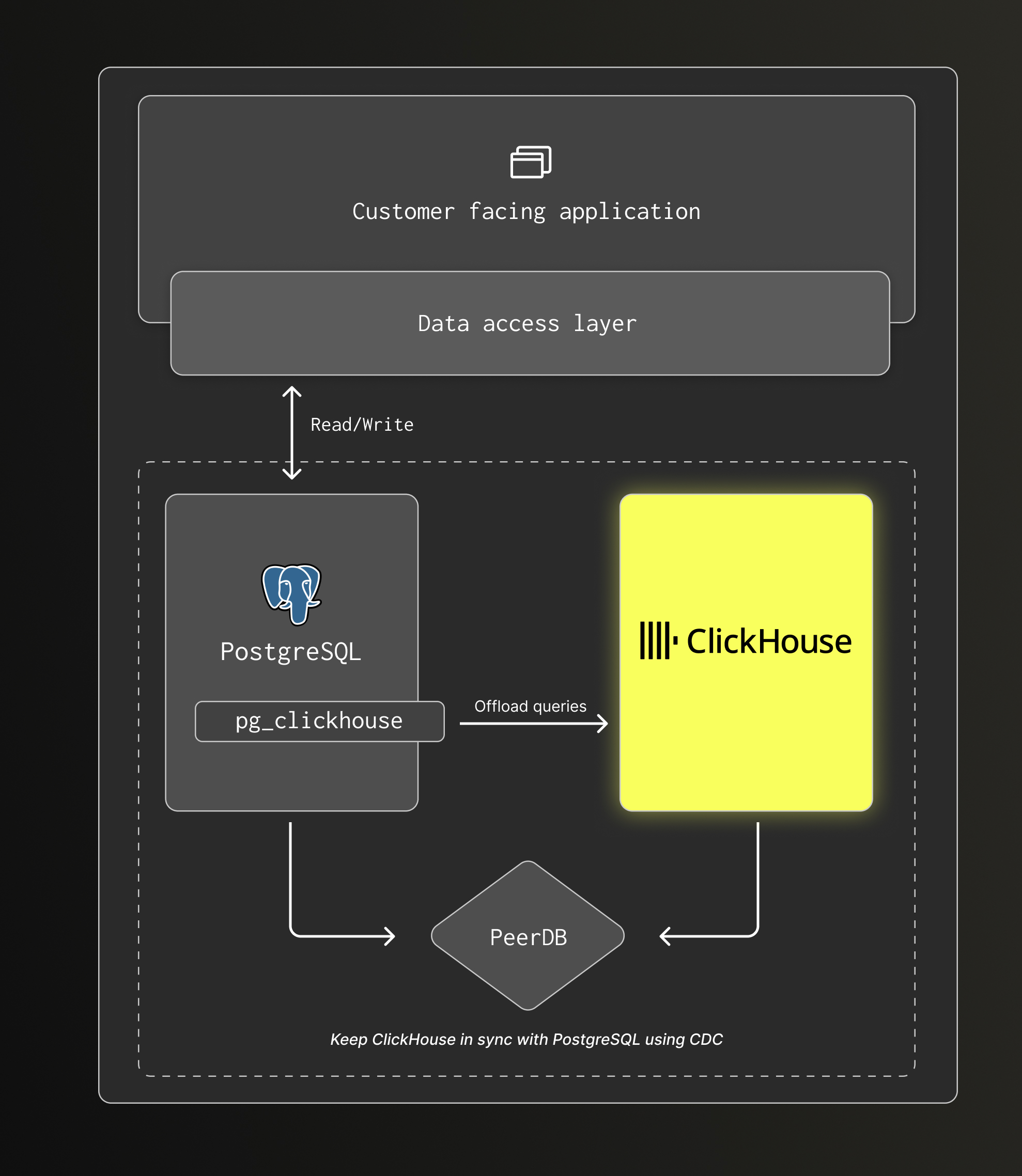
PostgreSQL remains the primary database for transactional workloads and acts as the source of truth for application data. PeerDB streams data changes to ClickHouse using CDC, keeping it in sync near real time for analytics. The included pg_clickhouse extension allows PostgreSQL to transparently offload analytical queries to ClickHouse.
This data stack is intended for applications built on PostgreSQL that need scalable, low-latency analytics as data volume grows, without rewriting application code or building custom pipelines.
What this stack includes
PostgreSQL
- OLTP database
- Source of truth for application data
- Comes with the pg_clickhouse extension pre-installed
ClickHouse
- OLAP database
- Optimized for large-scale aggregations and reporting queries
PeerDB
- CDC-based replication from PostgreSQL to ClickHouse
Getting started
Pre-requisites
Required
- Docker
- Bash
Clone this repository
git clone git@github.com:ClickHouse/postgres-clickhouse-stack.git
cd postgres-clickhouse-stack
Start the Stack
./run.sh start
This will start the following services:
- PostgreSQL (port 15432)
- ClickHouse (ports 19000, 18123)
- PeerDB UI (port 13000)
- Sample expense app (port 18080)
Stop the stack
./run.sh stop
Access the services
- PeerDB UI: http://localhost:13000
- ClickHouse UI: http://localhost:18123/play
- ClickHouse Client:
./run.sh clickhouse - PostgreSQL:
./run.sh psql
Why this setup
PostgreSQL is an excellent choice as a primary database for an application, but analytical queries such as dashboards, reports, and ad-hoc exploration become slower and more expensive as data volumes increase. Using a purpose-built analytical database such as ClickHouse is a better fit for these use cases.
This stack separates concerns:
- PostgreSQL handles transactions, writes, and point queries.
- ClickHouse handles aggregations and analytical workloads.
- PeerDB keeps both systems in sync in near real time.
- pg_clickhouse allows PostgreSQL to transparently offload eligible queries to ClickHouse.
The result is a simple architecture that scales analytics without disrupting the application.
Typical workflow
- An application writes all data to PostgreSQL.
- PeerDB streams changes from PostgreSQL to ClickHouse using CDC.
- Analytical tables are maintained in ClickHouse.
- Reporting and analytics queries run on ClickHouse.
- When using pg_clickhouse, some analytical queries issued to PostgreSQL are automatically offloaded to ClickHouse.
From the application’s point of view, PostgreSQL remains the primary interface.
Architecture
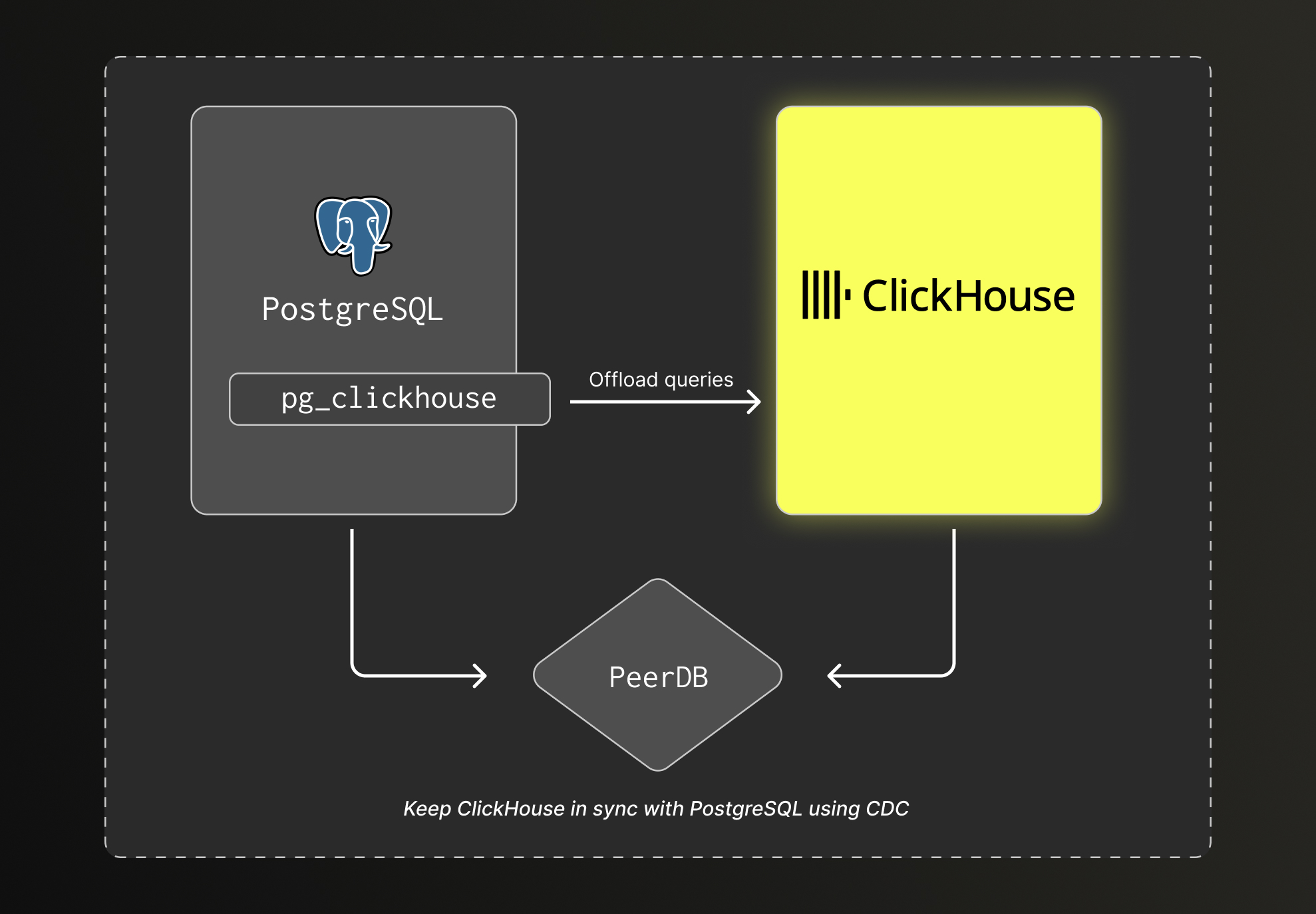
- PostgreSQL: Source of truth for transactional data
- PeerDB: CDC pipeline for real-time replication
- ClickHouse: Analytical store for fast aggregations
- pg_clickhouse: Transparent query offloading from PostgreSQL to ClickHouse
How to use the stack
Using the stack with your own application is very simple.
Assuming PostgreSQL is the primary database of your application, start by connecting it to the PostgreSQL instance running in the container.
Next, identify the tables most commonly used for analytical queries and replicate them to ClickHouse using PeerDB. Finally, configure the ClickHouse foreign data wrapper with pg_clickhouse to offload analytical queries from PostgreSQL to ClickHouse.
Connect to PostgreSQL
The first step is to connect to the PostgreSQL instance running in the container.
Configure your application to connect to the PostgreSQL instance using this configuration:
- Host: localhost
- Port: 15432
- Username: admin
- Password: password
- Database: postgres
Create the ClickHouse database
The next step is to create the ClickHouse database where the replicated tables will be stored.
./run.sh clickhouse --query "CREATE DATABASE IF NOT EXISTS mydb"
Replicate data from PostgreSQL to ClickHouse
PeerDB documentation provides a detailed guide on how to configure peers to replicate data from PostgreSQL to ClickHouse.
First start by creating two peers, one for PostgreSQL and one for ClickHouse.
This can be done using the PeerDB UI or the PeerDB API.
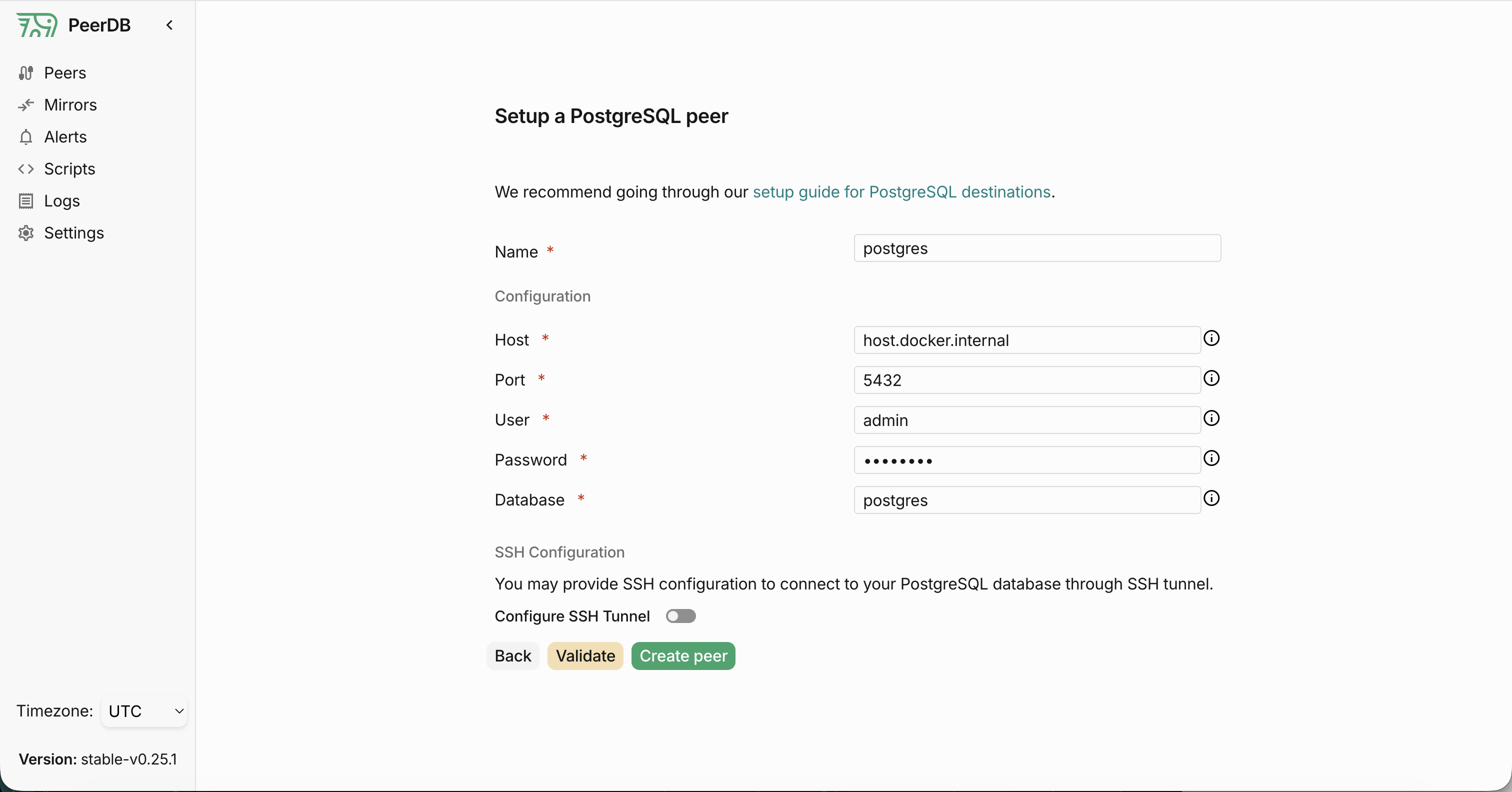
PostgreSQL Peer
To configure the PostgreSQL peer, use the following information:
- Name:
postgres - Host:
host.docker.internal - Port:
5432 - User:
admin - Password:
password - Database:
postgres
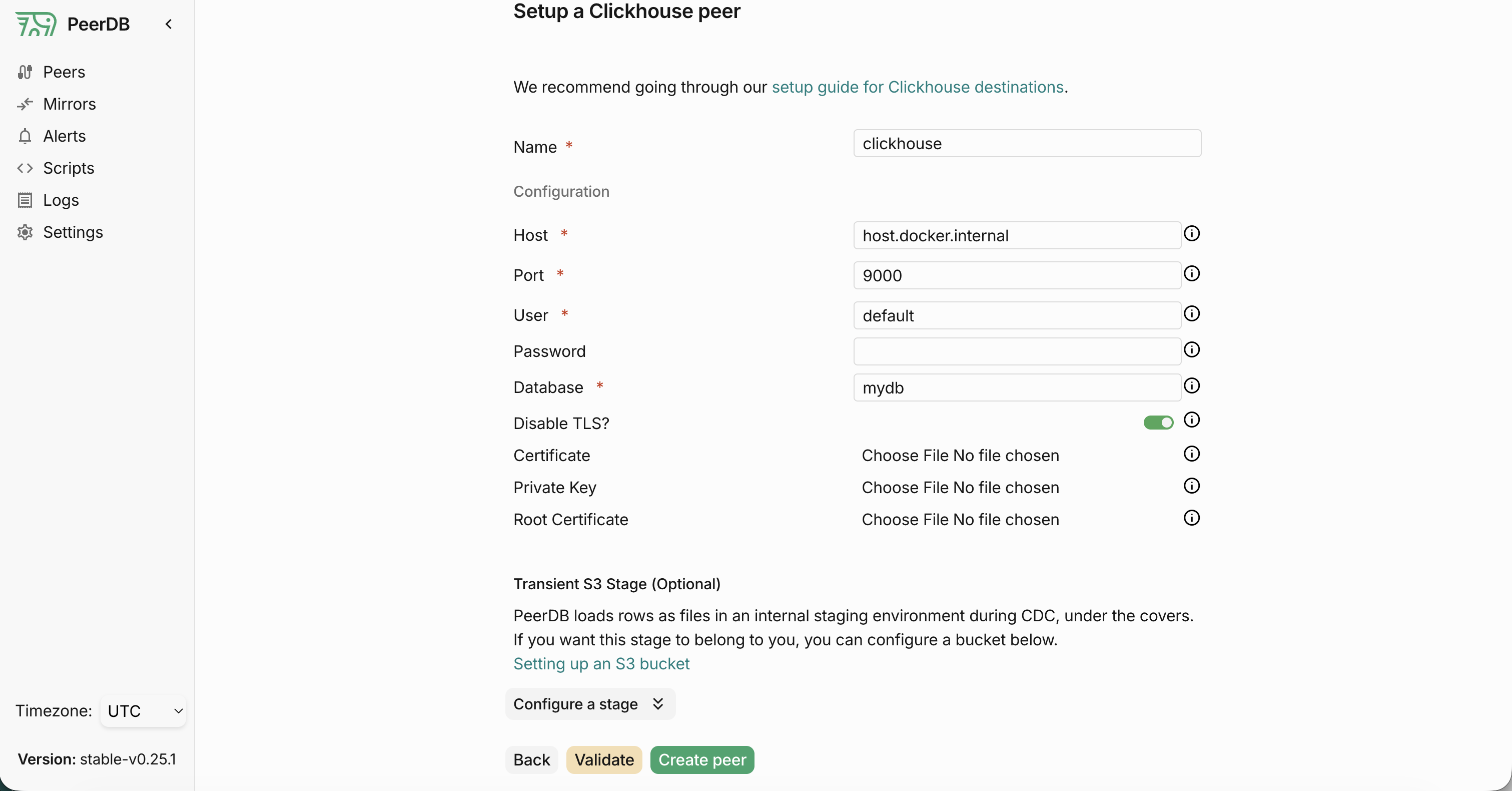
ClickHouse Peer
To configure the ClickHouse peer, use the following information:
- Name:
clickhouse - Host:
host.docker.internal - Port:
9000 - User:
default - Password:
clickhouse - Database:
mydb
Configure Mirror replication
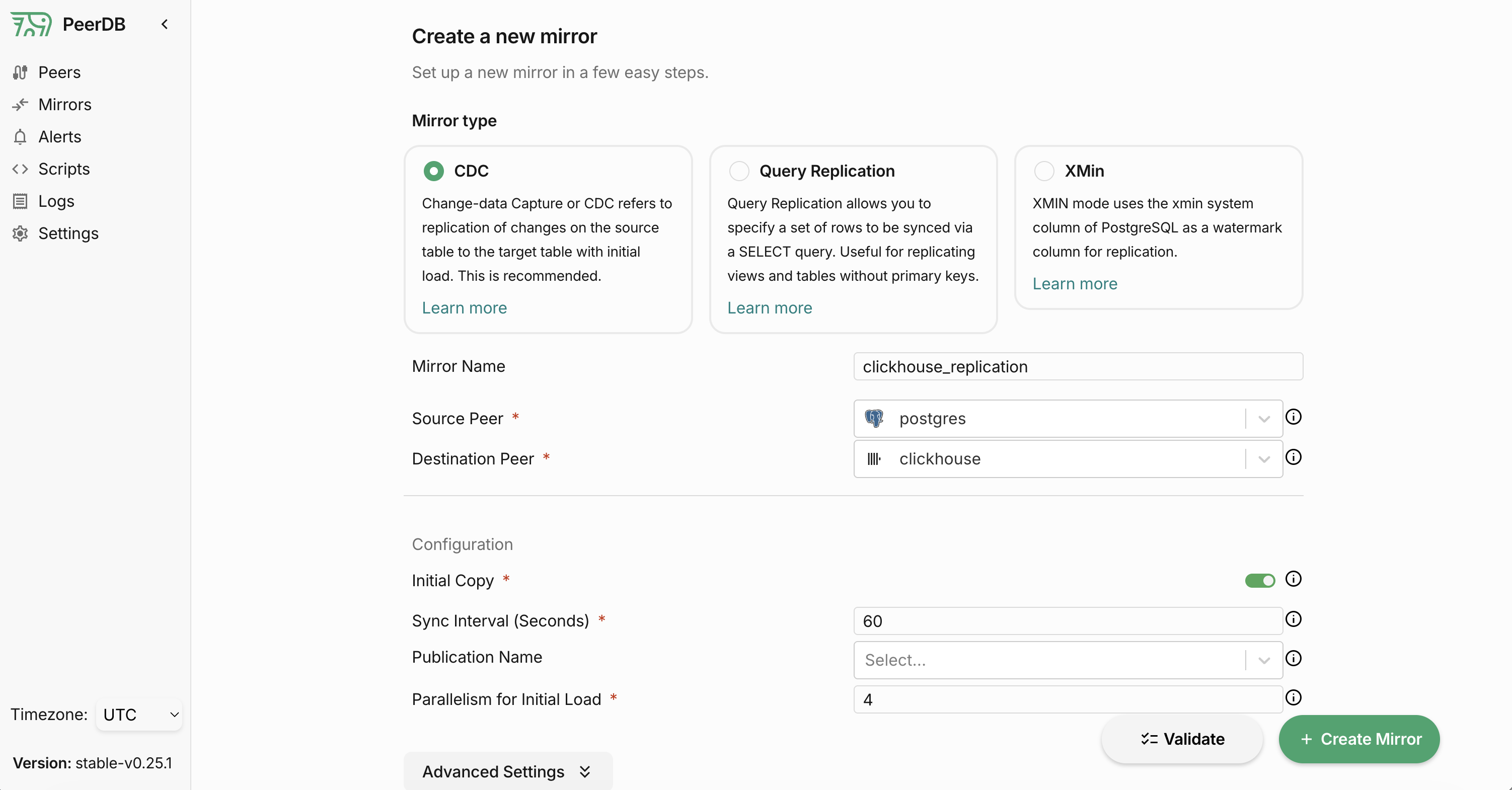
Once the peers are created, you can configure the mirror replication. You have the choice between different replication strategies. When replicating from PostgreSQL to ClickHouse, we recommend using the CDC replication strategy.
You will need the following informations to configure the mirror replication:
- Name: 'clickhouse_replication'
- Source Peer:
postgres - Target Peer:
clickhouse - Replication Strategy:
CDC
Then select the tables you want to replicate from PostgreSQL to ClickHouse. Check the target table name in ClickHouse, it's best if it matches the source table name so we can leverage the schema import feature of pg_clickhouse.
Configure ClickHouse Foreign Data Wrapper
pg_clickhouse documentation provides a detailed guide on how to configure the ClickHouse foreign data wrapper with pg_clickhouse to offload analytical queries from PostgreSQL to ClickHouse.
Below is an example of how you would configure pg_clickhouse in PostgreSQL to offload analytical queries to ClickHouse for the database mydb.
CREATE EXTENSION IF NOT EXISTS pg_clickhouse;
CREATE SERVER clickhouse_svr FOREIGN DATA WRAPPER clickhouse_fdw OPTIONS(dbname 'mydb', host 'host.docker.internal');
CREATE USER MAPPING FOR CURRENT_USER SERVER clickhouse_svr OPTIONS (user 'default', password 'clickhouse');
CREATE SCHEMA IF NOT EXISTS mydb_ch;
IMPORT FOREIGN SCHEMA mydb FROM SERVER clickhouse_svr INTO mydb_ch;
Configure application to use ClickHouse for analytical queries
Once data is replicated from PostgreSQL to ClickHouse, the application can be configured to route analytical queries to ClickHouse. This is done by querying a dedicated PostgreSQL schema backed by pg_clickhouse.
The PostgreSQL client can be configured to use this schema by setting the search_path option in the connection string. In this project, the DB_SCHEMA environment variable is used to control this behavior.
In this example, DB_SCHEMA is set to mydb_ch.
const pool = new Pool({
  user: process.env.DB_USER || 'admin',
  host: process.env.DB_HOST || 'localhost',
  database: process.env.DB_NAME || 'postgres',
  password: process.env.DB_PASSWORD || 'password',
  port: parseInt(process.env.DB_PORT || '15432'),
  options: process.env.DB_SCHEMA
    ? `-c search_path=${process.env.DB_SCHEMA},public`
    : undefined,
});
Connect directly to ClickHouse
If you want the application to talk to ClickHouse directly, you can use any of the available ClickHouse client libraries. Changes on the application side should still be fairly simple as ClickHouse supports SQL queries that are compatible with PostgreSQL.
At a high level, the resulting architecture looks like this:
Sample application
The project includes a sample expense-tracking application to demonstrate the stack.
The application is built with Next.js and uses PostgreSQL as its primary database. It allows you to create expenses and view an analytics dashboard.
Initially, the analytics dashboard queries PostgreSQL directly and takes several seconds to load. Using this stack, data can be synchronized from PostgreSQL to ClickHouse via PeerDB, and analytical queries offloaded from PostgreSQL to ClickHouse using pg_clickhouse, reducing dashboard load times to milliseconds.
Using the sample application
The sample app starts automatically with ./run.sh start and is available at http://localhost:18080.
Seed the database
Load sample data into PostgreSQL. This can take several minutes.
./run.sh seed
To change the number of rows (default 10 million):
./run.sh seed 100000000
Set up data replication
Run the migration script to replicate data from PostgreSQL to ClickHouse using PeerDB and configure the ClickHouse Foreign Data Wrapper to offload queries using pg_clickhouse.
./run.sh migrate
This will:
- Create the ClickHouse database
- Configure PeerDB peers
- Start data synchronization from PostgreSQL to ClickHouse
- Configure the ClickHouse Foreign Data Wrapper
Refresh the analytics dashboard and you should see the load time drop from several seconds to milliseconds.
To switch between backends, use the toggle on the analytics page or:
./run.sh use-postgres     # switch back to PostgreSQL
./run.sh use-clickhouse   # switch to ClickHouse
With 10 million rows, the gap between PostgreSQL and ClickHouse is not very noticeable. On a typical setup, query time drops from around 2 seconds to about 300 ms, though exact numbers depend on your environment. To see a more significant difference, try increasing SEED_EXPENSE_ROWS to at least 100 million.
Similar repos

Languages
Shell
100.0%
README
PostgreSQL + ClickHouse = The Open Source Unified Data Stack
This repository provides a ready-to-use open source data stack that combines PostgreSQL and ClickHouse to handle transactional and analytical workloads.
PostgreSQL remains the primary database for transactional workloads and acts as the source of truth for application data. PeerDB streams data changes to ClickHouse using CDC, keeping it in sync near real time for analytics. The included pg_clickhouse extension allows PostgreSQL to transparently offload analytical queries to ClickHouse.
This data stack is intended for applications built on PostgreSQL that need scalable, low-latency analytics as data volume grows, without rewriting application code or building custom pipelines.
What this stack includes
PostgreSQL
- OLTP database
- Source of truth for application data
- Comes with the pg_clickhouse extension pre-installed
ClickHouse
- OLAP database
- Optimized for large-scale aggregations and reporting queries
PeerDB
- CDC-based replication from PostgreSQL to ClickHouse
Getting started
Pre-requisites
Required
- Docker
- Bash
Clone this repository
git clone git@github.com:ClickHouse/postgres-clickhouse-stack.git
cd postgres-clickhouse-stack
Start the Stack
./run.sh start
This will start the following services:
- PostgreSQL (port 15432)
- ClickHouse (ports 19000, 18123)
- PeerDB UI (port 13000)
- Sample expense app (port 18080)
Stop the stack
./run.sh stop
Access the services
- PeerDB UI: http://localhost:13000
- ClickHouse UI: http://localhost:18123/play
- ClickHouse Client:
./run.sh clickhouse - PostgreSQL:
./run.sh psql
Why this setup
PostgreSQL is an excellent choice as a primary database for an application, but analytical queries such as dashboards, reports, and ad-hoc exploration become slower and more expensive as data volumes increase. Using a purpose-built analytical database such as ClickHouse is a better fit for these use cases.
This stack separates concerns:
- PostgreSQL handles transactions, writes, and point queries.
- ClickHouse handles aggregations and analytical workloads.
- PeerDB keeps both systems in sync in near real time.
- pg_clickhouse allows PostgreSQL to transparently offload eligible queries to ClickHouse.
The result is a simple architecture that scales analytics without disrupting the application.
Typical workflow
- An application writes all data to PostgreSQL.
- PeerDB streams changes from PostgreSQL to ClickHouse using CDC.
- Analytical tables are maintained in ClickHouse.
- Reporting and analytics queries run on ClickHouse.
- When using pg_clickhouse, some analytical queries issued to PostgreSQL are automatically offloaded to ClickHouse.
From the application’s point of view, PostgreSQL remains the primary interface.
Architecture
- PostgreSQL: Source of truth for transactional data
- PeerDB: CDC pipeline for real-time replication
- ClickHouse: Analytical store for fast aggregations
- pg_clickhouse: Transparent query offloading from PostgreSQL to ClickHouse
How to use the stack
Using the stack with your own application is very simple.
Assuming PostgreSQL is the primary database of your application, start by connecting it to the PostgreSQL instance running in the container.
Next, identify the tables most commonly used for analytical queries and replicate them to ClickHouse using PeerDB. Finally, configure the ClickHouse foreign data wrapper with pg_clickhouse to offload analytical queries from PostgreSQL to ClickHouse.
Connect to PostgreSQL
The first step is to connect to the PostgreSQL instance running in the container.
Configure your application to connect to the PostgreSQL instance using this configuration:
- Host: localhost
- Port: 15432
- Username: admin
- Password: password
- Database: postgres
Create the ClickHouse database
The next step is to create the ClickHouse database where the replicated tables will be stored.
./run.sh clickhouse --query "CREATE DATABASE IF NOT EXISTS mydb"
Replicate data from PostgreSQL to ClickHouse
PeerDB documentation provides a detailed guide on how to configure peers to replicate data from PostgreSQL to ClickHouse.
First start by creating two peers, one for PostgreSQL and one for ClickHouse.
This can be done using the PeerDB UI or the PeerDB API.
PostgreSQL Peer
To configure the PostgreSQL peer, use the following information:
- Name:
postgres - Host:
host.docker.internal - Port:
5432 - User:
admin - Password:
password - Database:
postgres
ClickHouse Peer
To configure the ClickHouse peer, use the following information:
- Name:
clickhouse - Host:
host.docker.internal - Port:
9000 - User:
default - Password:
clickhouse - Database:
mydb
Configure Mirror replication
Once the peers are created, you can configure the mirror replication. You have the choice between different replication strategies. When replicating from PostgreSQL to ClickHouse, we recommend using the CDC replication strategy.
You will need the following informations to configure the mirror replication:
- Name: 'clickhouse_replication'
- Source Peer:
postgres - Target Peer:
clickhouse - Replication Strategy:
CDC
Then select the tables you want to replicate from PostgreSQL to ClickHouse. Check the target table name in ClickHouse, it's best if it matches the source table name so we can leverage the schema import feature of pg_clickhouse.
Configure ClickHouse Foreign Data Wrapper
pg_clickhouse documentation provides a detailed guide on how to configure the ClickHouse foreign data wrapper with pg_clickhouse to offload analytical queries from PostgreSQL to ClickHouse.
Below is an example of how you would configure pg_clickhouse in PostgreSQL to offload analytical queries to ClickHouse for the database mydb.
CREATE EXTENSION IF NOT EXISTS pg_clickhouse;
CREATE SERVER clickhouse_svr FOREIGN DATA WRAPPER clickhouse_fdw OPTIONS(dbname 'mydb', host 'host.docker.internal');
CREATE USER MAPPING FOR CURRENT_USER SERVER clickhouse_svr OPTIONS (user 'default', password 'clickhouse');
CREATE SCHEMA IF NOT EXISTS mydb_ch;
IMPORT FOREIGN SCHEMA mydb FROM SERVER clickhouse_svr INTO mydb_ch;
Configure application to use ClickHouse for analytical queries
Once data is replicated from PostgreSQL to ClickHouse, the application can be configured to route analytical queries to ClickHouse. This is done by querying a dedicated PostgreSQL schema backed by pg_clickhouse.
The PostgreSQL client can be configured to use this schema by setting the search_path option in the connection string. In this project, the DB_SCHEMA environment variable is used to control this behavior.
In this example, DB_SCHEMA is set to mydb_ch.
const pool = new Pool({
  user: process.env.DB_USER || 'admin',
  host: process.env.DB_HOST || 'localhost',
  database: process.env.DB_NAME || 'postgres',
  password: process.env.DB_PASSWORD || 'password',
  port: parseInt(process.env.DB_PORT || '15432'),
  options: process.env.DB_SCHEMA
    ? `-c search_path=${process.env.DB_SCHEMA},public`
    : undefined,
});
Connect directly to ClickHouse
If you want the application to talk to ClickHouse directly, you can use any of the available ClickHouse client libraries. Changes on the application side should still be fairly simple as ClickHouse supports SQL queries that are compatible with PostgreSQL.
At a high level, the resulting architecture looks like this:
Sample application
The project includes a sample expense-tracking application to demonstrate the stack.
The application is built with Next.js and uses PostgreSQL as its primary database. It allows you to create expenses and view an analytics dashboard.
Initially, the analytics dashboard queries PostgreSQL directly and takes several seconds to load. Using this stack, data can be synchronized from PostgreSQL to ClickHouse via PeerDB, and analytical queries offloaded from PostgreSQL to ClickHouse using pg_clickhouse, reducing dashboard load times to milliseconds.
Using the sample application
The sample app starts automatically with ./run.sh start and is available at http://localhost:18080.
Seed the database
Load sample data into PostgreSQL. This can take several minutes.
./run.sh seed
To change the number of rows (default 10 million):
./run.sh seed 100000000
Set up data replication
Run the migration script to replicate data from PostgreSQL to ClickHouse using PeerDB and configure the ClickHouse Foreign Data Wrapper to offload queries using pg_clickhouse.
./run.sh migrate
This will:
- Create the ClickHouse database
- Configure PeerDB peers
- Start data synchronization from PostgreSQL to ClickHouse
- Configure the ClickHouse Foreign Data Wrapper
Refresh the analytics dashboard and you should see the load time drop from several seconds to milliseconds.
To switch between backends, use the toggle on the analytics page or:
./run.sh use-postgres     # switch back to PostgreSQL
./run.sh use-clickhouse   # switch to ClickHouse
With 10 million rows, the gap between PostgreSQL and ClickHouse is not very noticeable. On a typical setup, query time drops from around 2 seconds to about 300 ms, though exact numbers depend on your environment. To see a more significant difference, try increasing SEED_EXPENSE_ROWS to at least 100 million.
Similar repos
Languages
Shell
100.0%