The official implementation of our work SQLFixAgent: Towards Semantic-Accurate Text-to-SQL Parsing via Consistency-Enhanced Multi-Agent Collaboration in AAAI 2025
Python
28
4 commits
updated May 2, 2025
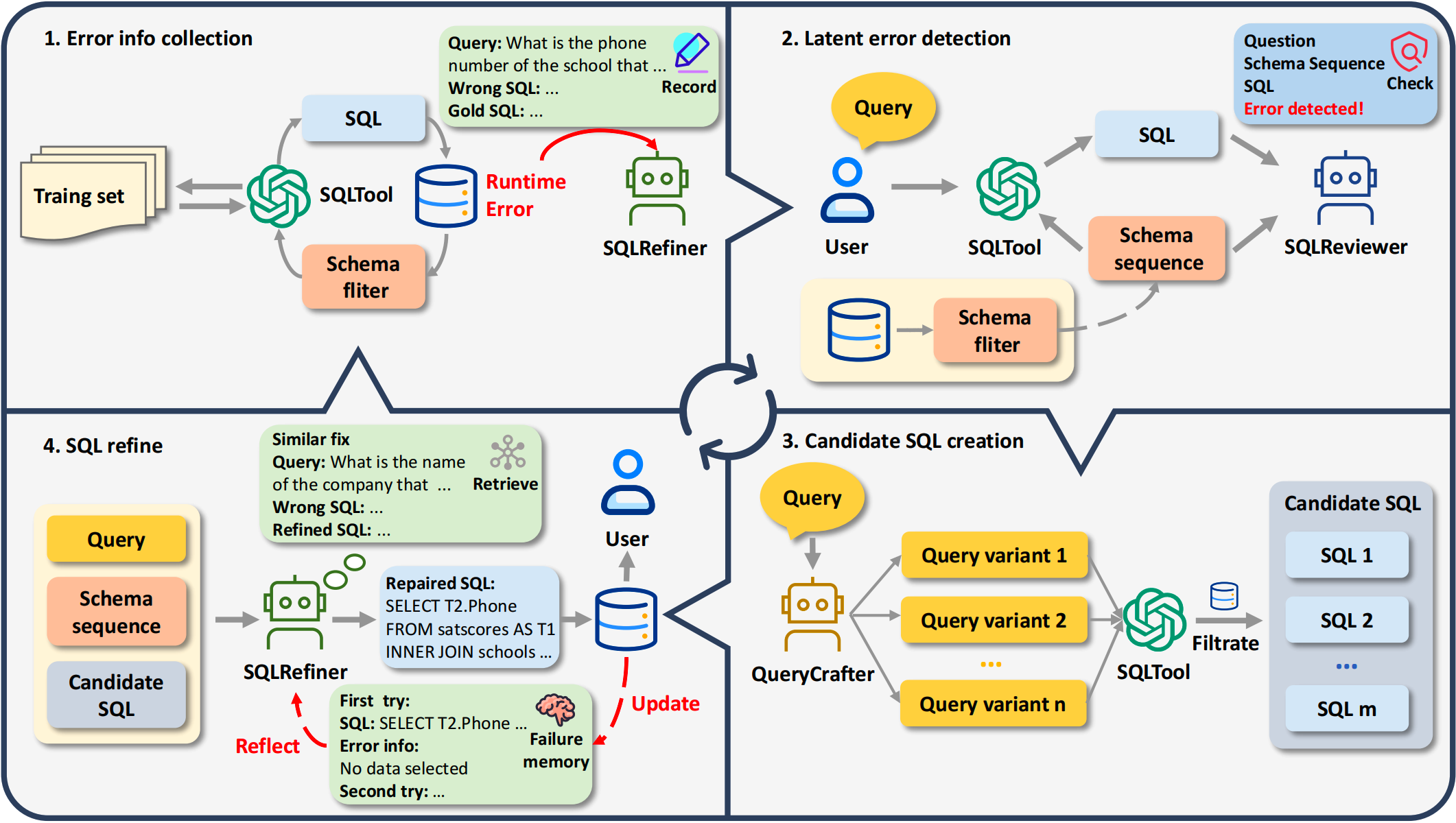 This is the official implementation of the paper "SQLFixAgent: Towards Semantic-Accurate Text-to-SQL Parsing via Consistency-Enhanced Multi-Agent Collaboration" (AAAI 2025).
If this repository could help you, please cite the following paper:
@inproceedings{cen2025sqlfixagent,
  author = {Jipeng Cen and Jiaxin Liu and Zhixu Li and Jingjing Wang},
  title = "SQLFixAgent: Towards Semantic-Accurate Text-to-SQL Parsing via Consistency-Enhanced Multi-Agent Collaboration",
  booktitle = "AAAI",
  year = "2025"
}
Our experiments are conducted in the following environments:
Create a new Anaconda environment and install the required modules:
conda create -n sqlfixagent python=3.8.5
conda activate sqlfixagent
conda install pytorch==1.13.1 pytorch-cuda=11.7 -c pytorch -c nvidia
pip install -r requirements.txt
git clone https://github.com/lihaoyang-ruc/SimCSE.git
cd SimCSE-main
python setup.py install
cd ..
vim ./core/api_config.py
a. Download the necessary datasets data.zip, the schema item classifier checkpoints sic_ckpts.zip. Then, unzip them using the following commands:
unzip data.zip
unzip sic_ckpts.zip
b. Download SFT-LLM checkpoints to be evaluated: codes-3b-bird-with-evidence, codes-7b-bird-with-evidence, codes-3b-spider, codes-7b-spiderand place them under the ./model folder.
c. Download simsce model and place it under the ./model folder.
You can skip this step as the pre-processed datasets are already included in the aforementioned data.zip file. However, if you wish to reproduce our data pre-processing procedure, you can install Java :
apt-get update
apt-get install -y openjdk-11-jdk
Then, execute the following two Python scripts:
# build BM25 index for each database
python -u build_contents_index.py
# pre-process dataset
python -u prepare_sft_datasets.py
Please note that this process may take a considerable amount of time (approximately 1-2 hours).
bash run.sh
run.sh includes two script:
run_sqltool.py uses CodeS to generate SQL
run_fix.py uses a LLM API and CodeS to detect and fix errors from the previous stage.
The program will save the filtered schema to ./data/temp if it is not exist, delete it for full running of code.
Besides, the program will save the SQLTool error log to ./core/memory if it is not exist, by using codes-3b to simulate runtime error collection on the training set, which can be time-consuming.
We would thanks to official team of Bird for their help in evaluating our method on Bird's test set. We would also thanks to MAC-SQL (paper, code), Codes (paper, code), Bird (paper, dataset), Spider (paper, dataset), Spider-DK (paper, dataset), Spider-Syn (paper, dataset), Spider-Realistic (paper, dataset) for their interesting work and open-sourced code and dataset.
The official implementation of our work SQLFixAgent: Towards Semantic-Accurate Text-to-SQL Parsing via Consistency-Enhanced Multi-Agent Collaboration in AAAI 2025
Python
28
4 commits
updated May 2, 2025
This is the official implementation of the paper "SQLFixAgent: Towards Semantic-Accurate Text-to-SQL Parsing via Consistency-Enhanced Multi-Agent Collaboration" (AAAI 2025).
If this repository could help you, please cite the following paper:
@inproceedings{cen2025sqlfixagent,
  author = {Jipeng Cen and Jiaxin Liu and Zhixu Li and Jingjing Wang},
  title = "SQLFixAgent: Towards Semantic-Accurate Text-to-SQL Parsing via Consistency-Enhanced Multi-Agent Collaboration",
  booktitle = "AAAI",
  year = "2025"
}
Our experiments are conducted in the following environments:
Create a new Anaconda environment and install the required modules:
conda create -n sqlfixagent python=3.8.5
conda activate sqlfixagent
conda install pytorch==1.13.1 pytorch-cuda=11.7 -c pytorch -c nvidia
pip install -r requirements.txt
git clone https://github.com/lihaoyang-ruc/SimCSE.git
cd SimCSE-main
python setup.py install
cd ..
vim ./core/api_config.py
a. Download the necessary datasets data.zip, the schema item classifier checkpoints sic_ckpts.zip. Then, unzip them using the following commands:
unzip data.zip
unzip sic_ckpts.zip
b. Download SFT-LLM checkpoints to be evaluated: codes-3b-bird-with-evidence, codes-7b-bird-with-evidence, codes-3b-spider, codes-7b-spiderand place them under the ./model folder.
c. Download simsce model and place it under the ./model folder.
You can skip this step as the pre-processed datasets are already included in the aforementioned data.zip file. However, if you wish to reproduce our data pre-processing procedure, you can install Java :
apt-get update
apt-get install -y openjdk-11-jdk
Then, execute the following two Python scripts:
# build BM25 index for each database
python -u build_contents_index.py
# pre-process dataset
python -u prepare_sft_datasets.py
Please note that this process may take a considerable amount of time (approximately 1-2 hours).
bash run.sh
run.sh includes two script:
run_sqltool.py uses CodeS to generate SQL
run_fix.py uses a LLM API and CodeS to detect and fix errors from the previous stage.
The program will save the filtered schema to ./data/temp if it is not exist, delete it for full running of code.
Besides, the program will save the SQLTool error log to ./core/memory if it is not exist, by using codes-3b to simulate runtime error collection on the training set, which can be time-consuming.
We would thanks to official team of Bird for their help in evaluating our method on Bird's test set. We would also thanks to MAC-SQL (paper, code), Codes (paper, code), Bird (paper, dataset), Spider (paper, dataset), Spider-DK (paper, dataset), Spider-Syn (paper, dataset), Spider-Realistic (paper, dataset) for their interesting work and open-sourced code and dataset.



