
Talk to Claude Code while it works. A full-duplex voice companion powered by GPT Live 1.
TypeScript
5
83 commits
updated Sep 28, 2026
See what people are saying
README

Full-Duplex Code
Talk to Claude Code or Codex while it works.
▶ Watch it in action: I Coded From the Shower Without Looking at Claude Code
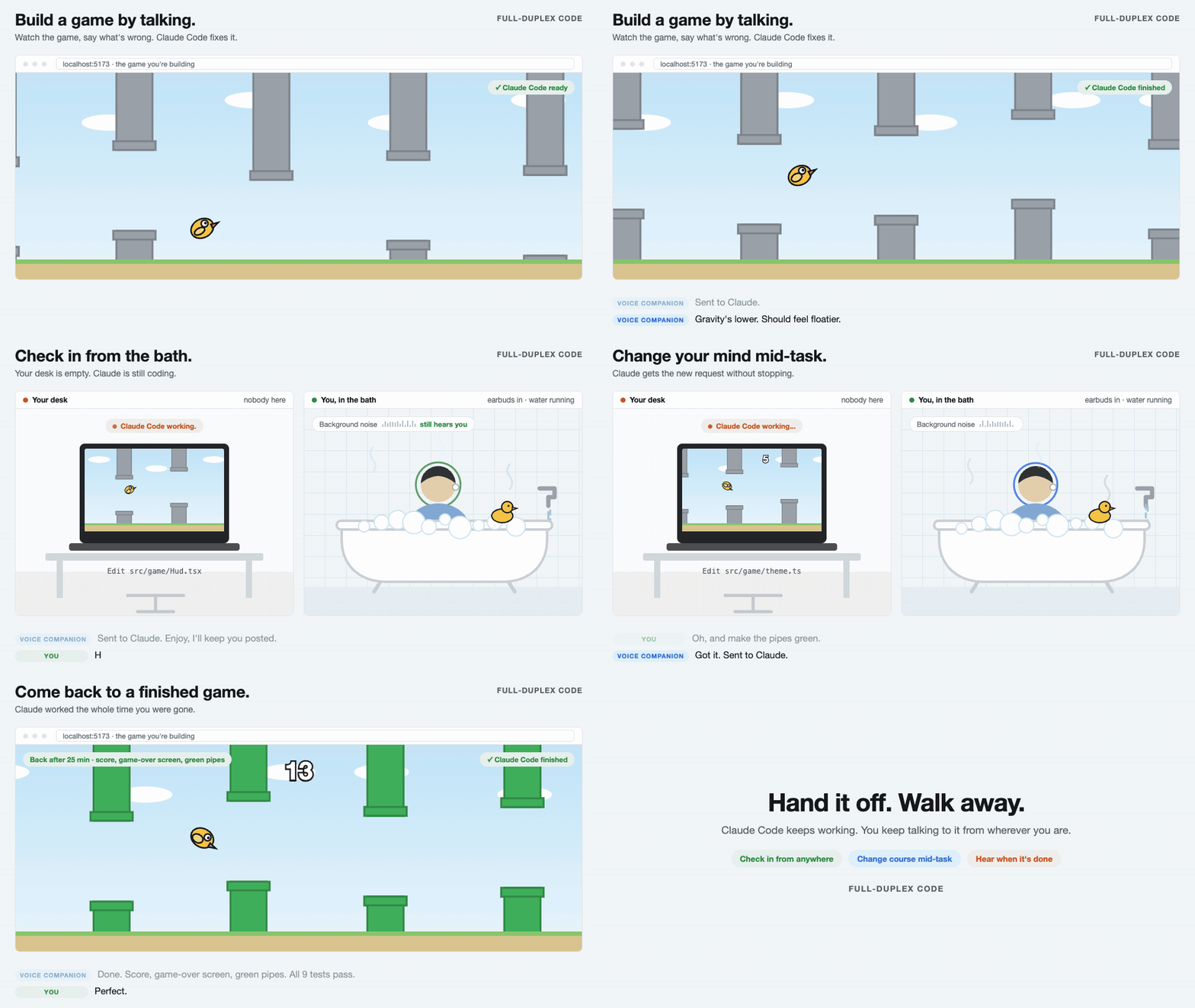
Full-Duplex Code adds a voice companion to the coding agent you already use. The agent keeps its normal terminal, typing included. In the browser, a companion powered by GPT Live 1 follows what the agent does: its messages, edits, commands and tool results. It answers your questions from that, and passes your requests to the agent, even in the middle of a turn.
You don't have to stay at your desk. Hand off a task, go do something else, and keep talking to your agent from wherever you are: check in, change your mind, and hear when it's done.
Quickstart
You need macOS (the tested setup), Node.js 22.18 or newer, Chrome, a microphone, Claude Code or Codex 0.155 or newer, installed and signed in, and an OpenAI API key with access to GPT Live 1.
1. Install
git clone https://github.com/CakeCrusher/full_duplex_code.git
cd full_duplex_code
npm ci
npm link                                    # puts the fdc command on your PATH
echo 'OPENAI_API_KEY=your-key-here' >> .env
fdc doctor                                  # checks the setup; spends nothing
2. Start your agent through fdc
In your project's folder, put fdc in front of the command you normally run. Everything after the agent's name reaches it unchanged.
cd /path/to/your/project
fdc claude          # or: fdc claude --dangerously-skip-permissions
fdc codex           # or: fdc codex --model gpt-5.5
3. Connect and talk
- Open the link
fdcprints in Chrome. - Press Enter in the terminal to start the agent. Claude Code asks you to confirm its development channel; choose I am using this for local development.
- Click Start voice and allow the microphone.
- Talk: "Ask Claude to add a dark mode." "What is it doing right now?" "Actually, use SQLite."
You can keep typing to the agent too, and ask the companion about it: "What did I just tell Claude?"
4. Stop
- End voice closes the voice connection and its billing, about $0.05 a minute. The agent keeps working.
- Exiting the agent stops everything:
/exitin Claude Code, Ctrl-C twice in Codex.
From your phone
Install cloudflared once (brew install cloudflared), then add --public:
fdc --public claude
The launcher prints a phone link and a QR code once the link works. Open the page on your computer and your phone, in any order. Voice runs in one of them, and Move voice here brings it to the other. Keep the link private: anyone who has it can direct your agent.
Everyday commands
| Command | What it does |
|---|---|
fdc claude --resume SESSION_ID | Resume a Claude Code conversation |
fdc codex resume SESSION_ID | Resume a Codex session |
fdc --public codex | Also reach the companion from your phone |
fdc --voice cedar claude | Pick the GPT Live voice (default marin) |
fdc doctor | Check the setup without API spending |
fdc usage | Show recorded voice usage and its cost |
fdc --help | All options |
How it works
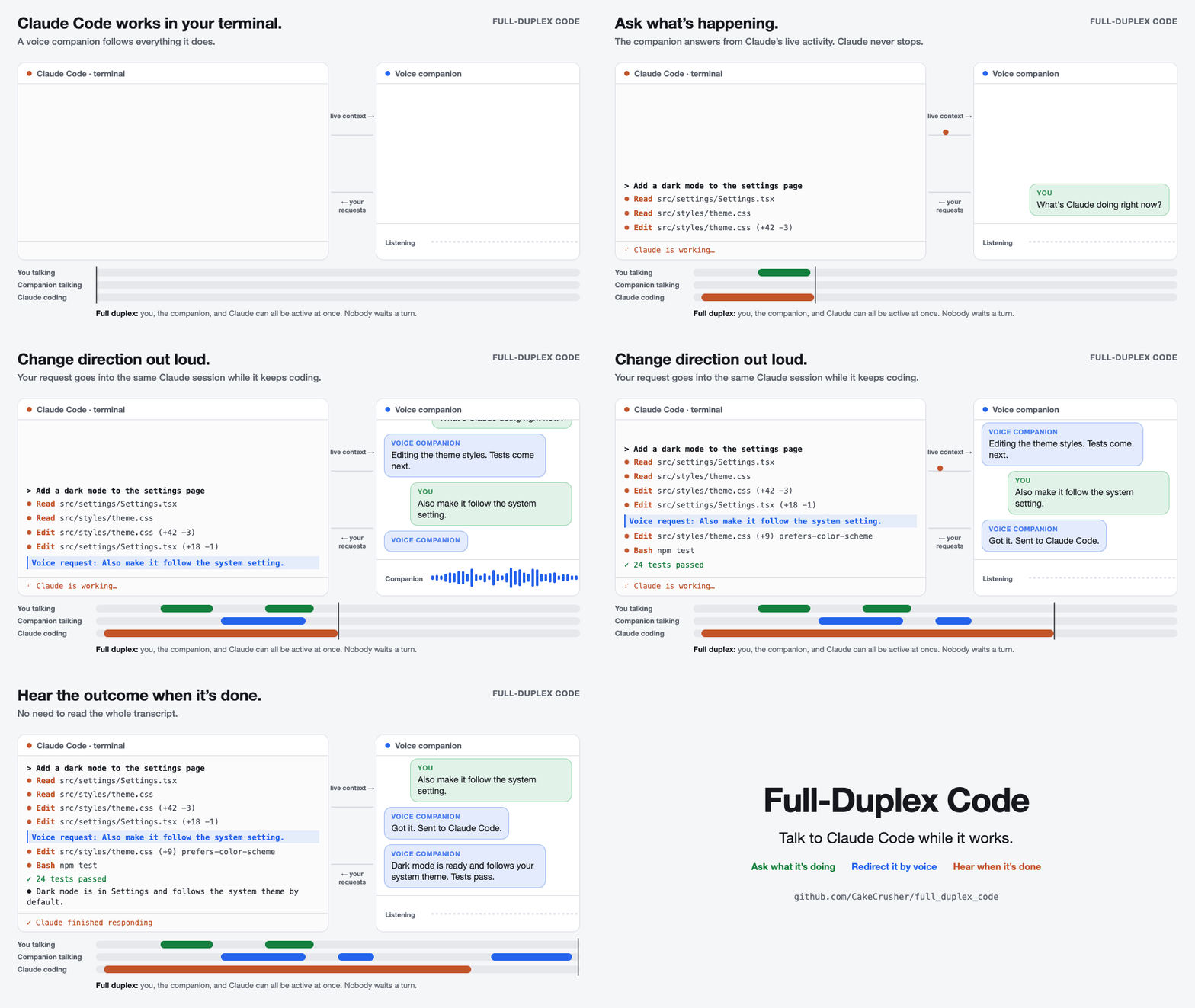
fdcstarts a small bridge on this computer, then your agent's own command in the terminal.- The agent's hooks report what it does. The bridge turns that into context for GPT Live.
- Your voice goes from the browser straight to OpenAI. Requests reach the agent through Claude Code's channel or Codex's app server, even mid-turn.
Learn more
- User guide: the page and its timeline, what the companion follows, resuming, costs and troubleshooting.
- Contributing: support another coding agent, and how changes are reviewed.
License
PolyForm Noncommercial 1.0.0: free for noncommercial use; commercial use is not granted. Built by Sebastian Sosa (Noemica).
Similar repos


Languages
TypeScript
97.9%
HTML
2.1%
Talk to Claude Code while it works. A full-duplex voice companion powered by GPT Live 1.
TypeScript
5
83 commits
updated Sep 28, 2026
See what people are saying
README
Full-Duplex Code
Talk to Claude Code or Codex while it works.
▶ Watch it in action: I Coded From the Shower Without Looking at Claude Code
Full-Duplex Code adds a voice companion to the coding agent you already use. The agent keeps its normal terminal, typing included. In the browser, a companion powered by GPT Live 1 follows what the agent does: its messages, edits, commands and tool results. It answers your questions from that, and passes your requests to the agent, even in the middle of a turn.
You don't have to stay at your desk. Hand off a task, go do something else, and keep talking to your agent from wherever you are: check in, change your mind, and hear when it's done.
Quickstart
You need macOS (the tested setup), Node.js 22.18 or newer, Chrome, a microphone, Claude Code or Codex 0.155 or newer, installed and signed in, and an OpenAI API key with access to GPT Live 1.
1. Install
git clone https://github.com/CakeCrusher/full_duplex_code.git
cd full_duplex_code
npm ci
npm link                                    # puts the fdc command on your PATH
echo 'OPENAI_API_KEY=your-key-here' >> .env
fdc doctor                                  # checks the setup; spends nothing
2. Start your agent through fdc
In your project's folder, put fdc in front of the command you normally run. Everything after the agent's name reaches it unchanged.
cd /path/to/your/project
fdc claude          # or: fdc claude --dangerously-skip-permissions
fdc codex           # or: fdc codex --model gpt-5.5
3. Connect and talk
- Open the link
fdcprints in Chrome. - Press Enter in the terminal to start the agent. Claude Code asks you to confirm its development channel; choose I am using this for local development.
- Click Start voice and allow the microphone.
- Talk: "Ask Claude to add a dark mode." "What is it doing right now?" "Actually, use SQLite."
You can keep typing to the agent too, and ask the companion about it: "What did I just tell Claude?"
4. Stop
- End voice closes the voice connection and its billing, about $0.05 a minute. The agent keeps working.
- Exiting the agent stops everything:
/exitin Claude Code, Ctrl-C twice in Codex.
From your phone
Install cloudflared once (brew install cloudflared), then add --public:
fdc --public claude
The launcher prints a phone link and a QR code once the link works. Open the page on your computer and your phone, in any order. Voice runs in one of them, and Move voice here brings it to the other. Keep the link private: anyone who has it can direct your agent.
Everyday commands
| Command | What it does |
|---|---|
fdc claude --resume SESSION_ID | Resume a Claude Code conversation |
fdc codex resume SESSION_ID | Resume a Codex session |
fdc --public codex | Also reach the companion from your phone |
fdc --voice cedar claude | Pick the GPT Live voice (default marin) |
fdc doctor | Check the setup without API spending |
fdc usage | Show recorded voice usage and its cost |
fdc --help | All options |
How it works
fdcstarts a small bridge on this computer, then your agent's own command in the terminal.- The agent's hooks report what it does. The bridge turns that into context for GPT Live.
- Your voice goes from the browser straight to OpenAI. Requests reach the agent through Claude Code's channel or Codex's app server, even mid-turn.
Learn more
- User guide: the page and its timeline, what the companion follows, resuming, costs and troubleshooting.
- Contributing: support another coding agent, and how changes are reviewed.
License
PolyForm Noncommercial 1.0.0: free for noncommercial use; commercial use is not granted. Built by Sebastian Sosa (Noemica).
Similar repos
Languages
TypeScript
97.9%
HTML
2.1%