
High-performance, token-based structured data engine for .NET. A core component of REX, the technology behind CAPCOM's next-generation game engine.
C#
386
23 commits
updated Oct 1, 2026
See what people are saying
README
RE:Dox
1. What is RE:Dox?
RE:Dox is a high-performance, token-based structured data engine for .NET, developed as one of the core components of 'REX' Technology for CAPCOM's next-generation game engine.
RE:Dox is not just a JSON serializer. It parses structured data into a compact, fixed-size token DOM / IR, then uses that structural index for reading, editing, format conversion, serialization, deserialization, and automatic parallel deserialization.
JSON / JSON5 / CBOR / MessagePack / TOML / XML / HTML / CSV / INI / DOX
        ↓
Compact token DOM / IR
        ↓
Reader / Writer / Serializer / Deserializer
        ↓
.NET objects, JSON, CBOR, MessagePack, TOML, XML, HTML, DOX, ...
The same token representation acts as both a compact parsed document model and a common structural layer shared by serializers, converters, and supported formats.
2. Why should I care?
RE:Dox combines three goals that usually conflict:
- the parse speed of a tape DOM (
System.Text.Json.JsonDocument), - the editability of a node DOM (
System.Text.Json.Nodes.JsonNode), - the flexibility of
Newtonsoft.Json(position-independent$type,$id/$ref, out-of-order constructor binding).
What you get:
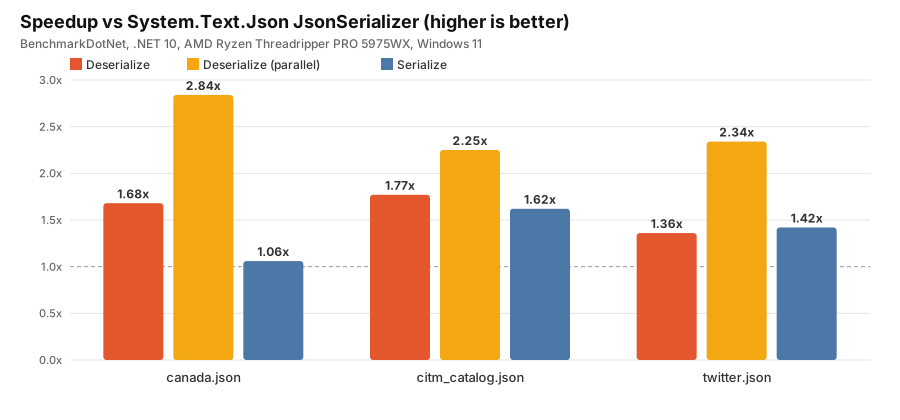
- High-performance serialization and deserialization — on the benchmark datasets below, up to ~1.8x faster sequential deserialization, up to ~2.8x faster automatic parallel deserialization, and up to ~1.6x faster serialization than System.Text.Json.
- Lower allocation on tested workloads — for example,
canada.jsondeserializes with about 2.56 MB allocated by RE:Dox versus about 8.53 MB by System.Text.Json. JSON, JSON5, CBOR, MessagePack, INI, and DOX are integrated with the core model; TOML, XML, HTML, and CSV are currently preview components. - One converter model across formats —
DataConverter<T>targets the format-agnosticDataReader/DataWriterabstractions instead of a specific wire format. - Mutable token DOM — edit objects and arrays without replacing the document with a heavyweight managed object tree.
- Trivia-preserving JSON5 editing — comments and other preserved trivia can survive document edits and re-encoding.
- Compatibility layers for System.Text.Json, Newtonsoft.Json, and DataContractJsonSerializer.
- Apache-2.0 licensed.
3. 30-second example
Install the core package:
dotnet add package CAPCOM.REDox
Serialize, deserialize, parse, and edit through the same API surface:
using REDox.Json;

var player = new Player
{
    Name = "Leon",
    Level = 42,
    Items = ["Handgun", "Green Herb"]
};

// Serialize / deserialize
var json = JsonSerializer.Serialize(player);
var restored = JsonSerializer.Deserialize<Player>(json);

// Parse into a token DOM and edit it in place
using var doc = JsonDocument.Parse(json);

var root = doc.RootElement.AsObject();
root["Name"] = "Claire";            // replace
root.Add("Hp", 100);                // add
root.Remove("Level");               // remove

var items = root["Items"].AsArray();
items.Add("First Aid Spray");       // append
items.Insert(0, "Knife");           // insert
items.RemoveAt(1);                  // remove by index

var edited = doc.RootElement.ToJsonString();

public sealed class Player
{
    public string? Name { get; set; }
    public int Level { get; set; }
    public string[] Items { get; set; } = [];
}
4. Performance
Environment: BenchmarkDotNet, .NET 10 (X64 RyuJIT x86-64-v3), AMD Ryzen Threadripper PRO 5975WX, Windows 11.
Summary: speedup vs System.Text.Json JsonSerializer
| Dataset | Deserialize | Deserialize (parallel) | Serialize |
|---|---|---|---|
canada.json | 1.68x | 2.84x | 1.06x |
citm_catalog.json | 1.77x | 2.25x | 1.62x |
twitter.json | 1.36x | 2.34x | 1.42x |
These ratios describe the benchmark datasets shown below; they are not universal performance guarantees.
Deserialize: canada.json (numeric-heavy, ~2.2 MB)
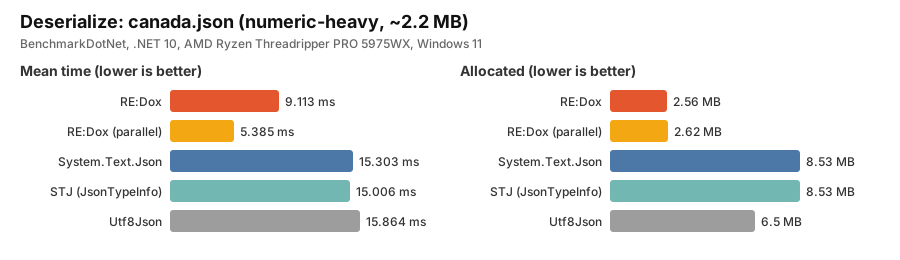
Deserialize: Mean / Allocated
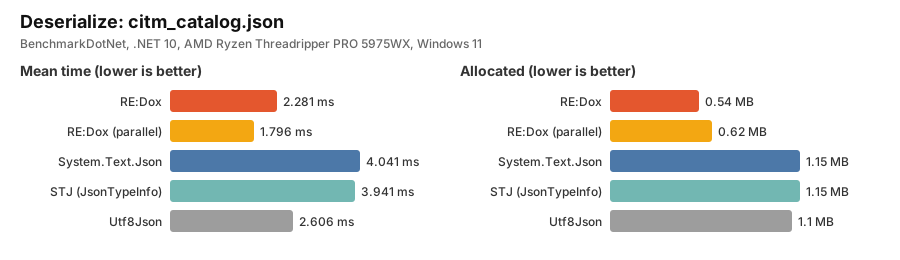
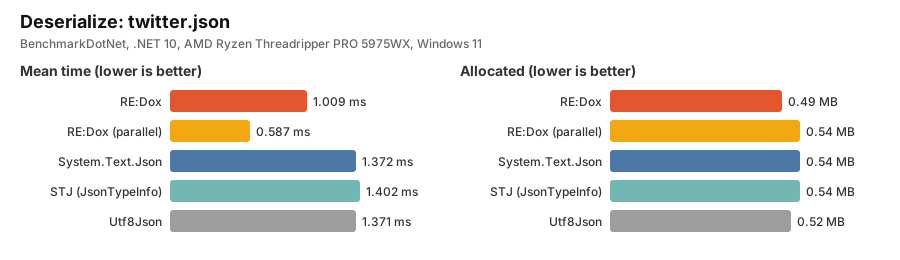
| Dataset | RE:Dox | RE:Dox (parallel) | System.Text.Json | STJ (JsonTypeInfo) | Utf8Json |
|---|---|---|---|---|---|
canada.json | 9,113.0 us / 2,619.92 KB | 5,384.6 us / 2,685.11 KB | 15,303.1 us / 8,734.66 KB | 15,005.9 us / 8,734.59 KB | 15,864.0 us / 6,655.67 KB |
citm_catalog.json | 2,280.5 us / 553.55 KB | 1,795.8 us / 631.87 KB | 4,041.1 us / 1,175.38 KB | 3,940.8 us / 1,175.38 KB | 2,605.5 us / 1,124.13 KB |
twitter.json | 1,008.8 us / 504.91 KB | 587.4 us / 555.84 KB | 1,371.6 us / 557.09 KB | 1,401.6 us / 557.09 KB | 1,370.6 us / 530.05 KB |
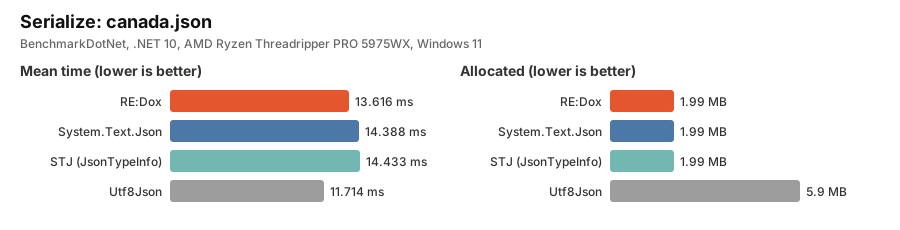
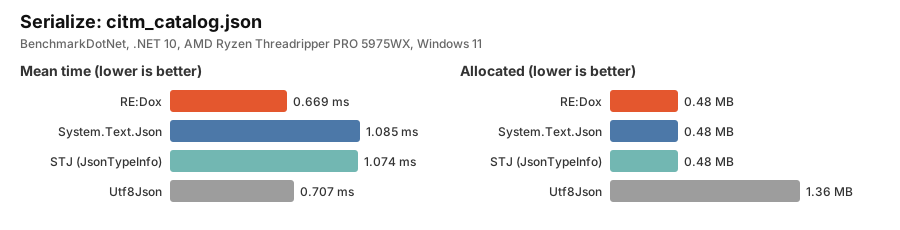
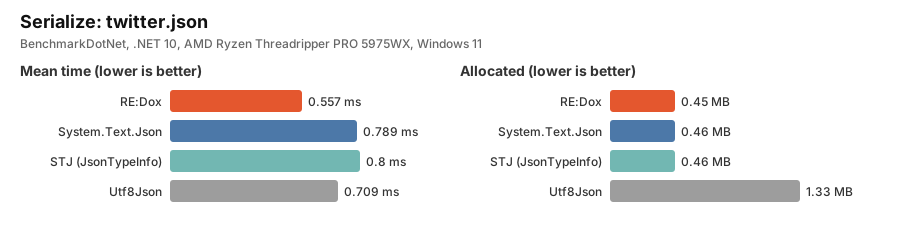
Serialize: Mean / Allocated
| Dataset | RE:Dox | System.Text.Json | STJ (JsonTypeInfo) | Utf8Json |
|---|---|---|---|---|
canada.json | 13,615.5 us / 2,041.41 KB | 14,388.3 us / 2,042.85 KB | 14,433.1 us / 2,042.85 KB | 11,714.2 us / 6,042.21 KB |
citm_catalog.json | 668.7 us / 494.41 KB | 1,085.4 us / 494.85 KB | 1,073.8 us / 494.87 KB | 707.3 us / 1,389.64 KB |
twitter.json | 557.3 us / 465.15 KB | 789.0 us / 467.95 KB | 800.3 us / 467.91 KB | 709.4 us / 1,361.37 KB |
Reproduce with:
dotnet run -c Release --project benchmarks/REDox.Json.Benchmarks
Benchmark results depend on data shape, target type, runtime, CPU, and serializer options. Always benchmark with your own workload.
5. Architecture
A 64-bit dual-mode token at the core
Every value is described by a fixed-size 64-bit token. An extension bit selects how the payload is interpreted:
extension bit = 0  →  payload interpretation is delegated to the document/format layer
                      (source-backed, format-specific payload; many formats, one token shape)

extension bit = 1  →  payload interpretation is fixed by RE:Dox, and control tokens enable
                      format-agnostic editing (insert / remove / replace)
This allows one token structure to represent both a source-backed view of format data and a RE:Dox-owned editable DOM. Where the document/format layer can retain the original payload, unchanged values can continue to reuse source slices instead of being eagerly materialized.
A token can represent null, boolean, integer, floating point, string, binary, timestamp, big number, array, map/object, trivia (comment/whitespace), or format-specific extension data. It may store inline data, a source offset/length, a container count, link information, or an extension id.
Asymmetric read/write design
Reading and writing have different information requirements, so RE:Dox uses different paths for each direction:
Serialize    : DataWriter, one pass, written directly to the output buffer
               (information is known → no look-ahead, no intermediate DOM)

Deserialize  : DataReader over the token DOM, random access by token id
               (information is unknown → look-ahead, out-of-order, context lookup)
On the write path the value is already known, so RE:Dox writes straight to the buffer using bulk (WriteValues) and fused-property (WriteProperty*) helpers — no intermediate object tree is built.
On the read path the structure is unknown, so RE:Dox first builds a compact token DOM. Because the structure is then fully addressable, RE:Dox can:
- pre-size arrays and collections;
- know each element's token id before materialization;
- resolve
$typeregardless of where it appears in the object; - collect constructor arguments out of order and bind them once (records and primary constructors);
- resolve
$id/$refcycles using the whole-document context; - choose sequential or parallel deserialization automatically;
- decode strings and numbers only when requested;
- reuse raw source slices for unchanged values.
Lazy decoding and on-demand materialization
Tokens can store offsets and lengths into the original source buffer. Strings, numbers, timestamps, and binary values are decoded only when requested. Elements are lightweight handles over a document and token id, while object and array views are materialized only when needed.
Mutable tape DOM
A tape DOM is normally read-only because its logical structure is represented by a flat token sequence. RE:Dox adds indirection at container views: DArray, DObject, and DMap keep value slots that can be re-linked, a free list reuses emptied token slots, and extension/control tokens carry edit state.
This preserves the cache-friendly characteristics of a sequential token representation while providing node-like operations such as insert, remove, and replace without rebuilding the entire document for each edit.
Unified converters
Converters (DataConverter<T>) are written against the format-agnostic DataReader / DataWriter abstractions rather than a specific format implementation.
Conceptually:
                 DataConverter<T>
                        │
               DataReader / Writer
                /       |        \
             JSON      CBOR    MessagePack   ...
This allows converter logic to be shared by formats that participate in the common reader/writer model. Instead of duplicating equivalent conversion logic for each type-format pair, RE:Dox can reuse one converter implementation across those formats — also providing a foundation for future AOT / source-generator support.
6. Formats/packages
NuGet package IDs use the CAPCOM.REDox.* prefix. C# namespaces use REDox.*.
| Package | Status | Description |
|---|---|---|
CAPCOM.REDox | Public | Core + JSON + JSON5 + DOX + common serializer infrastructure |
CAPCOM.REDox.Cbor | Public | CBOR parser/writer integration |
CAPCOM.REDox.MessagePack | Public | MessagePack parser/writer integration |
CAPCOM.REDox.Dynamic | Public | dynamic access to the token DOM |
CAPCOM.REDox.Serialization.SystemTextJson | Preview | System.Text.Json compatibility layer |
CAPCOM.REDox.Serialization.NewtonsoftJson | Preview | Newtonsoft.Json compatibility layer |
CAPCOM.REDox.Serialization.DataContractJson | Public | DataContractJsonSerializer compatibility layer |
CAPCOM.REDox.Toml | Preview | TOML parser/writer with comment-aware token DOM integration |
CAPCOM.REDox.Xml | Preview | XML structural parser/writer |
CAPCOM.REDox.Html | Preview | Practical HTML structural parser/writer |
CAPCOM.REDox.Ini | Public | INI support |
CAPCOM.REDox.Csv | Preview | CSV support |
Preview packages use NuGet pre-release versions such as 0.1.0-preview.1; the package name itself does not include -preview. Preview components may change API behavior before stable release.
Install public packages:
dotnet add package CAPCOM.REDox
dotnet add package CAPCOM.REDox.Cbor
dotnet add package CAPCOM.REDox.MessagePack
dotnet add package CAPCOM.REDox.Dynamic
dotnet add package CAPCOM.REDox.Serialization.DataContractJson
dotnet add package CAPCOM.REDox.Ini
Install preview packages with --prerelease:
dotnet add package CAPCOM.REDox.Serialization.SystemTextJson --prerelease
dotnet add package CAPCOM.REDox.Serialization.NewtonsoftJson --prerelease
dotnet add package CAPCOM.REDox.Toml --prerelease
dotnet add package CAPCOM.REDox.Xml --prerelease
dotnet add package CAPCOM.REDox.Html --prerelease
dotnet add package CAPCOM.REDox.Csv --prerelease
CBOR
using REDox.Cbor;

byte[] cbor = CborSerializer.Serialize(new Player
{
    Name = "Jill",
    Level = 30,
    Items = ["Lockpick"]
});

var player = CborSerializer.Deserialize<Player>(cbor);

// Parse into the token DOM and re-encode
using var doc = CborDocument.Parse(cbor);
byte[] encoded = CborDocument.Encode(doc.RootElement);
MessagePack
using REDox.MessagePack;

byte[] msgpack = MessagePackSerializer.Serialize(new Player
{
    Name = "Chris",
    Level = 35,
    Items = ["Knife", "First Aid Spray"]
});

var player = MessagePackSerializer.Deserialize<Player>(msgpack);

using var doc = MessagePackDocument.Parse(msgpack);
byte[] encoded = MessagePackDocument.Encode(doc.RootElement);
Dynamic
using REDox;
using REDox.Dynamic;
using REDox.Json;

using var doc = JsonDocument.Parse("""{"name":"Leon","level":40,"stats":{"alive":true}}""");

var player = doc.RootElement.AsDynamic()!;
var name = (string)player.name;
var level = (int)player.level;
var alive = (bool)player["stats"]["alive"];

// Build a new object dynamically
var obj = new DObject().AsDynamic();
obj.Name = "Ada";
obj.Items = new[] { "Hookshot" };

string json = JsonSerializer.Serialize(obj); // {"Name":"Ada","Items":["Hookshot"]}
Cross-format conversion
Formats that share the common token IR can be converted through the document model:
using REDox.Cbor;
using REDox.Json;

using var doc = JsonDocument.Parse(json);
byte[] cbor = CborDocument.Encode(doc.RootElement);
JSON5  → token IR → JSON
JSON   → token IR → CBOR
CBOR   → token IR → MessagePack
TOML   → token IR → JSON
XML    → token IR → JSON-like structural representation
Formats with different native data models may use a structural projection rather than a lossless semantic round-trip.
7. Advanced features
Automatic parallel deserialization
The deserializer inspects each array's element count and token range before materializing objects. When an array is large enough, element token ids are collected and each element is deserialized into its corresponding index in parallel. Small arrays stay sequential to avoid parallel scheduling overhead.
using REDox;
using REDox.Json;
using REDox.Serialization;

var settings = new DoxSerializerSettings
{
    ParallelOptions = new ParallelDeserializeOptions
    {
        ParallelDeserializeEnabled = true,
        MinimumNumberOfElements = 1024,
        MinimumNumberOfTokens = 4096
    }
};

var players = JsonSerializer.Deserialize<Player[]>(json, settings);
JSON5 with comment and trivia preservation
using REDox.Json;

var json5 = """
{
  // Player name
  name: 'Leon',

  // Inventory
  items: [
    'Handgun',
    'Green Herb',
  ],
}
""";

using var doc = Json5Document.Parse(json5, options: new Json5DocumentOptions
{
    PreserveTrivia = true,
    EnableValueValidation = true
});

var root = doc.RootElement.AsObject();
root["name"] = "Claire";

var output = Json5Document.EncodeToString(doc.RootElement, new Json5WriteOptions
{
    PreserveTrivia = true
});
Async streaming of NDJSON / JSON sequences
JsonSequence reads a stream of JSON values (NDJSON / JSON Lines, or a large top-level array) asynchronously, one value at a time, without loading the whole input into memory. For NDJSON, enable UseNewlineDelimitedFormat in JsonDocumentOptions.
using REDox.Json;

var options = new JsonDocumentOptions { UseNewlineDelimitedFormat = true };

await using var stream = File.OpenRead("players.ndjson");

// Deserialize each line into a .NET object
await foreach (var player in JsonSequence.DeserializeAsync<Player>(stream, options: options, cancellationToken: ct))
{
    Console.WriteLine(player?.Name);
}
To work with the token DOM directly, use ParseAsync. Without UseNewlineDelimitedFormat, a top-level JSON array is streamed element by element. The yielded DElement is backed by a reused document and is valid only until the next iteration; call Clone() or convert it with To<T>() if it must be retained.
using REDox;
using REDox.Json;

await using var stream = File.OpenRead("events.json"); // [ { "level": "info", ... }, { "level": "error", ... }, ... ]

var errors = new List<DElement>();

await foreach (var element in JsonSequence.ParseAsync(stream, cancellationToken: ct))
{
    if (element.TryGetProperty("level", out var level) && level.GetString() == "error")
    {
        errors.Add(element.Clone());
    }
}
DOX format and deep clone
DOX is a binary layout designed to mirror the in-memory token array closely. Constructing a document from DOX requires little structural reconstruction, which also makes DOX suitable for serialization-based deep clone: the result is an independent, editable copy rather than a shared read-only view.
using REDox;

byte[] dox = DoxSerializer.Serialize(player);
var clone = DoxSerializer.Deserialize<Player>(dox);
Compatibility layers
Compatibility packages allow existing serializer options to be adapted to RE:Dox.
System.Text.Json
using REDox.Serialization.SystemTextJson;

var stjSettings = new SystemTextJsonSerializerSettings(new System.Text.Json.JsonSerializerOptions
{
    PropertyNamingPolicy = System.Text.Json.JsonNamingPolicy.CamelCase
});
Newtonsoft.Json
using Newtonsoft.Json;
using REDox.Serialization.NewtonsoftJson;

var nsjSettings = new NewtonsoftJsonSerializerSettings(new JsonSerializerSettings
{
    NullValueHandling = NullValueHandling.Ignore
});
DataContractJsonSerializer
using REDox.Serialization.DataContractJson;

var dcjSettings = new DataContractJsonSerializerSettings(
    new System.Runtime.Serialization.Json.DataContractJsonSerializerSettings());
Requirements
- .NET 10 or later.
How to build
1. Clone with submodules
Test and benchmark data (simdjson-data, JSONTestSuite, json5-tests, toml-test) live under external/ as git submodules.
git clone --recurse-submodules https://github.com/CAPCOM-TD-OSS/REDox.git
cd REDox
If you already cloned without submodules:
git submodule update --init --recursive
2. Build
dotnet build REDox.slnx -c Release
3. Run tests
dotnet test REDox.slnx -c Release
4. Run benchmarks
Benchmarks use BenchmarkDotNet and must be run in Release configuration.
dotnet run -c Release --project benchmarks/REDox.Json.Benchmarks
Third-party components
The RE:Dox library packages do not bundle third-party code. The following third-party projects are referenced by tests and benchmarks. Each is distributed under its own license.
Test
| Repository | Used for | License |
|---|---|---|
| simdjson/simdjson-data | Benchmark datasets (canada.json, citm_catalog.json, twitter.json, ...) | See repository |
| nst/JSONTestSuite | JSON conformance tests | MIT |
| json5/json5-tests | JSON5 conformance tests | MIT |
| toml-lang/toml-test | TOML conformance tests | MIT |
License
RE:Dox is released under the Apache License 2.0.
Status
RE:Dox is under active development. APIs, package boundaries, and preview format support may evolve before the first stable public release.
RE:Dox is developed as part of 'REX' Technology for CAPCOM's next-generation game engine.
Similar repos


Languages
C#
99.9%
High-performance, token-based structured data engine for .NET. A core component of REX, the technology behind CAPCOM's next-generation game engine.
C#
386
23 commits
updated Oct 1, 2026
See what people are saying
README
RE:Dox
1. What is RE:Dox?
RE:Dox is a high-performance, token-based structured data engine for .NET, developed as one of the core components of 'REX' Technology for CAPCOM's next-generation game engine.
RE:Dox is not just a JSON serializer. It parses structured data into a compact, fixed-size token DOM / IR, then uses that structural index for reading, editing, format conversion, serialization, deserialization, and automatic parallel deserialization.
JSON / JSON5 / CBOR / MessagePack / TOML / XML / HTML / CSV / INI / DOX
        ↓
Compact token DOM / IR
        ↓
Reader / Writer / Serializer / Deserializer
        ↓
.NET objects, JSON, CBOR, MessagePack, TOML, XML, HTML, DOX, ...
The same token representation acts as both a compact parsed document model and a common structural layer shared by serializers, converters, and supported formats.
2. Why should I care?
RE:Dox combines three goals that usually conflict:
- the parse speed of a tape DOM (
System.Text.Json.JsonDocument), - the editability of a node DOM (
System.Text.Json.Nodes.JsonNode), - the flexibility of
Newtonsoft.Json(position-independent$type,$id/$ref, out-of-order constructor binding).
What you get:
- High-performance serialization and deserialization — on the benchmark datasets below, up to ~1.8x faster sequential deserialization, up to ~2.8x faster automatic parallel deserialization, and up to ~1.6x faster serialization than System.Text.Json.
- Lower allocation on tested workloads — for example,
canada.jsondeserializes with about 2.56 MB allocated by RE:Dox versus about 8.53 MB by System.Text.Json. JSON, JSON5, CBOR, MessagePack, INI, and DOX are integrated with the core model; TOML, XML, HTML, and CSV are currently preview components. - One converter model across formats —
DataConverter<T>targets the format-agnosticDataReader/DataWriterabstractions instead of a specific wire format. - Mutable token DOM — edit objects and arrays without replacing the document with a heavyweight managed object tree.
- Trivia-preserving JSON5 editing — comments and other preserved trivia can survive document edits and re-encoding.
- Compatibility layers for System.Text.Json, Newtonsoft.Json, and DataContractJsonSerializer.
- Apache-2.0 licensed.
3. 30-second example
Install the core package:
dotnet add package CAPCOM.REDox
Serialize, deserialize, parse, and edit through the same API surface:
using REDox.Json;

var player = new Player
{
    Name = "Leon",
    Level = 42,
    Items = ["Handgun", "Green Herb"]
};

// Serialize / deserialize
var json = JsonSerializer.Serialize(player);
var restored = JsonSerializer.Deserialize<Player>(json);

// Parse into a token DOM and edit it in place
using var doc = JsonDocument.Parse(json);

var root = doc.RootElement.AsObject();
root["Name"] = "Claire";            // replace
root.Add("Hp", 100);                // add
root.Remove("Level");               // remove

var items = root["Items"].AsArray();
items.Add("First Aid Spray");       // append
items.Insert(0, "Knife");           // insert
items.RemoveAt(1);                  // remove by index

var edited = doc.RootElement.ToJsonString();

public sealed class Player
{
    public string? Name { get; set; }
    public int Level { get; set; }
    public string[] Items { get; set; } = [];
}
4. Performance
Environment: BenchmarkDotNet, .NET 10 (X64 RyuJIT x86-64-v3), AMD Ryzen Threadripper PRO 5975WX, Windows 11.
Summary: speedup vs System.Text.Json JsonSerializer
| Dataset | Deserialize | Deserialize (parallel) | Serialize |
|---|---|---|---|
canada.json | 1.68x | 2.84x | 1.06x |
citm_catalog.json | 1.77x | 2.25x | 1.62x |
twitter.json | 1.36x | 2.34x | 1.42x |
These ratios describe the benchmark datasets shown below; they are not universal performance guarantees.
Deserialize: canada.json (numeric-heavy, ~2.2 MB)
Deserialize: Mean / Allocated
| Dataset | RE:Dox | RE:Dox (parallel) | System.Text.Json | STJ (JsonTypeInfo) | Utf8Json |
|---|---|---|---|---|---|
canada.json | 9,113.0 us / 2,619.92 KB | 5,384.6 us / 2,685.11 KB | 15,303.1 us / 8,734.66 KB | 15,005.9 us / 8,734.59 KB | 15,864.0 us / 6,655.67 KB |
citm_catalog.json | 2,280.5 us / 553.55 KB | 1,795.8 us / 631.87 KB | 4,041.1 us / 1,175.38 KB | 3,940.8 us / 1,175.38 KB | 2,605.5 us / 1,124.13 KB |
twitter.json | 1,008.8 us / 504.91 KB | 587.4 us / 555.84 KB | 1,371.6 us / 557.09 KB | 1,401.6 us / 557.09 KB | 1,370.6 us / 530.05 KB |
Serialize: Mean / Allocated
| Dataset | RE:Dox | System.Text.Json | STJ (JsonTypeInfo) | Utf8Json |
|---|---|---|---|---|
canada.json | 13,615.5 us / 2,041.41 KB | 14,388.3 us / 2,042.85 KB | 14,433.1 us / 2,042.85 KB | 11,714.2 us / 6,042.21 KB |
citm_catalog.json | 668.7 us / 494.41 KB | 1,085.4 us / 494.85 KB | 1,073.8 us / 494.87 KB | 707.3 us / 1,389.64 KB |
twitter.json | 557.3 us / 465.15 KB | 789.0 us / 467.95 KB | 800.3 us / 467.91 KB | 709.4 us / 1,361.37 KB |
Reproduce with:
dotnet run -c Release --project benchmarks/REDox.Json.Benchmarks
Benchmark results depend on data shape, target type, runtime, CPU, and serializer options. Always benchmark with your own workload.
5. Architecture
A 64-bit dual-mode token at the core
Every value is described by a fixed-size 64-bit token. An extension bit selects how the payload is interpreted:
extension bit = 0  →  payload interpretation is delegated to the document/format layer
                      (source-backed, format-specific payload; many formats, one token shape)

extension bit = 1  →  payload interpretation is fixed by RE:Dox, and control tokens enable
                      format-agnostic editing (insert / remove / replace)
This allows one token structure to represent both a source-backed view of format data and a RE:Dox-owned editable DOM. Where the document/format layer can retain the original payload, unchanged values can continue to reuse source slices instead of being eagerly materialized.
A token can represent null, boolean, integer, floating point, string, binary, timestamp, big number, array, map/object, trivia (comment/whitespace), or format-specific extension data. It may store inline data, a source offset/length, a container count, link information, or an extension id.
Asymmetric read/write design
Reading and writing have different information requirements, so RE:Dox uses different paths for each direction:
Serialize    : DataWriter, one pass, written directly to the output buffer
               (information is known → no look-ahead, no intermediate DOM)

Deserialize  : DataReader over the token DOM, random access by token id
               (information is unknown → look-ahead, out-of-order, context lookup)
On the write path the value is already known, so RE:Dox writes straight to the buffer using bulk (WriteValues) and fused-property (WriteProperty*) helpers — no intermediate object tree is built.
On the read path the structure is unknown, so RE:Dox first builds a compact token DOM. Because the structure is then fully addressable, RE:Dox can:
- pre-size arrays and collections;
- know each element's token id before materialization;
- resolve
$typeregardless of where it appears in the object; - collect constructor arguments out of order and bind them once (records and primary constructors);
- resolve
$id/$refcycles using the whole-document context; - choose sequential or parallel deserialization automatically;
- decode strings and numbers only when requested;
- reuse raw source slices for unchanged values.
Lazy decoding and on-demand materialization
Tokens can store offsets and lengths into the original source buffer. Strings, numbers, timestamps, and binary values are decoded only when requested. Elements are lightweight handles over a document and token id, while object and array views are materialized only when needed.
Mutable tape DOM
A tape DOM is normally read-only because its logical structure is represented by a flat token sequence. RE:Dox adds indirection at container views: DArray, DObject, and DMap keep value slots that can be re-linked, a free list reuses emptied token slots, and extension/control tokens carry edit state.
This preserves the cache-friendly characteristics of a sequential token representation while providing node-like operations such as insert, remove, and replace without rebuilding the entire document for each edit.
Unified converters
Converters (DataConverter<T>) are written against the format-agnostic DataReader / DataWriter abstractions rather than a specific format implementation.
Conceptually:
                 DataConverter<T>
                        │
               DataReader / Writer
                /       |        \
             JSON      CBOR    MessagePack   ...
This allows converter logic to be shared by formats that participate in the common reader/writer model. Instead of duplicating equivalent conversion logic for each type-format pair, RE:Dox can reuse one converter implementation across those formats — also providing a foundation for future AOT / source-generator support.
6. Formats/packages
NuGet package IDs use the CAPCOM.REDox.* prefix. C# namespaces use REDox.*.
| Package | Status | Description |
|---|---|---|
CAPCOM.REDox | Public | Core + JSON + JSON5 + DOX + common serializer infrastructure |
CAPCOM.REDox.Cbor | Public | CBOR parser/writer integration |
CAPCOM.REDox.MessagePack | Public | MessagePack parser/writer integration |
CAPCOM.REDox.Dynamic | Public | dynamic access to the token DOM |
CAPCOM.REDox.Serialization.SystemTextJson | Preview | System.Text.Json compatibility layer |
CAPCOM.REDox.Serialization.NewtonsoftJson | Preview | Newtonsoft.Json compatibility layer |
CAPCOM.REDox.Serialization.DataContractJson | Public | DataContractJsonSerializer compatibility layer |
CAPCOM.REDox.Toml | Preview | TOML parser/writer with comment-aware token DOM integration |
CAPCOM.REDox.Xml | Preview | XML structural parser/writer |
CAPCOM.REDox.Html | Preview | Practical HTML structural parser/writer |
CAPCOM.REDox.Ini | Public | INI support |
CAPCOM.REDox.Csv | Preview | CSV support |
Preview packages use NuGet pre-release versions such as 0.1.0-preview.1; the package name itself does not include -preview. Preview components may change API behavior before stable release.
Install public packages:
dotnet add package CAPCOM.REDox
dotnet add package CAPCOM.REDox.Cbor
dotnet add package CAPCOM.REDox.MessagePack
dotnet add package CAPCOM.REDox.Dynamic
dotnet add package CAPCOM.REDox.Serialization.DataContractJson
dotnet add package CAPCOM.REDox.Ini
Install preview packages with --prerelease:
dotnet add package CAPCOM.REDox.Serialization.SystemTextJson --prerelease
dotnet add package CAPCOM.REDox.Serialization.NewtonsoftJson --prerelease
dotnet add package CAPCOM.REDox.Toml --prerelease
dotnet add package CAPCOM.REDox.Xml --prerelease
dotnet add package CAPCOM.REDox.Html --prerelease
dotnet add package CAPCOM.REDox.Csv --prerelease
CBOR
using REDox.Cbor;

byte[] cbor = CborSerializer.Serialize(new Player
{
    Name = "Jill",
    Level = 30,
    Items = ["Lockpick"]
});

var player = CborSerializer.Deserialize<Player>(cbor);

// Parse into the token DOM and re-encode
using var doc = CborDocument.Parse(cbor);
byte[] encoded = CborDocument.Encode(doc.RootElement);
MessagePack
using REDox.MessagePack;

byte[] msgpack = MessagePackSerializer.Serialize(new Player
{
    Name = "Chris",
    Level = 35,
    Items = ["Knife", "First Aid Spray"]
});

var player = MessagePackSerializer.Deserialize<Player>(msgpack);

using var doc = MessagePackDocument.Parse(msgpack);
byte[] encoded = MessagePackDocument.Encode(doc.RootElement);
Dynamic
using REDox;
using REDox.Dynamic;
using REDox.Json;

using var doc = JsonDocument.Parse("""{"name":"Leon","level":40,"stats":{"alive":true}}""");

var player = doc.RootElement.AsDynamic()!;
var name = (string)player.name;
var level = (int)player.level;
var alive = (bool)player["stats"]["alive"];

// Build a new object dynamically
var obj = new DObject().AsDynamic();
obj.Name = "Ada";
obj.Items = new[] { "Hookshot" };

string json = JsonSerializer.Serialize(obj); // {"Name":"Ada","Items":["Hookshot"]}
Cross-format conversion
Formats that share the common token IR can be converted through the document model:
using REDox.Cbor;
using REDox.Json;

using var doc = JsonDocument.Parse(json);
byte[] cbor = CborDocument.Encode(doc.RootElement);
JSON5  → token IR → JSON
JSON   → token IR → CBOR
CBOR   → token IR → MessagePack
TOML   → token IR → JSON
XML    → token IR → JSON-like structural representation
Formats with different native data models may use a structural projection rather than a lossless semantic round-trip.
7. Advanced features
Automatic parallel deserialization
The deserializer inspects each array's element count and token range before materializing objects. When an array is large enough, element token ids are collected and each element is deserialized into its corresponding index in parallel. Small arrays stay sequential to avoid parallel scheduling overhead.
using REDox;
using REDox.Json;
using REDox.Serialization;

var settings = new DoxSerializerSettings
{
    ParallelOptions = new ParallelDeserializeOptions
    {
        ParallelDeserializeEnabled = true,
        MinimumNumberOfElements = 1024,
        MinimumNumberOfTokens = 4096
    }
};

var players = JsonSerializer.Deserialize<Player[]>(json, settings);
JSON5 with comment and trivia preservation
using REDox.Json;

var json5 = """
{
  // Player name
  name: 'Leon',

  // Inventory
  items: [
    'Handgun',
    'Green Herb',
  ],
}
""";

using var doc = Json5Document.Parse(json5, options: new Json5DocumentOptions
{
    PreserveTrivia = true,
    EnableValueValidation = true
});

var root = doc.RootElement.AsObject();
root["name"] = "Claire";

var output = Json5Document.EncodeToString(doc.RootElement, new Json5WriteOptions
{
    PreserveTrivia = true
});
Async streaming of NDJSON / JSON sequences
JsonSequence reads a stream of JSON values (NDJSON / JSON Lines, or a large top-level array) asynchronously, one value at a time, without loading the whole input into memory. For NDJSON, enable UseNewlineDelimitedFormat in JsonDocumentOptions.
using REDox.Json;

var options = new JsonDocumentOptions { UseNewlineDelimitedFormat = true };

await using var stream = File.OpenRead("players.ndjson");

// Deserialize each line into a .NET object
await foreach (var player in JsonSequence.DeserializeAsync<Player>(stream, options: options, cancellationToken: ct))
{
    Console.WriteLine(player?.Name);
}
To work with the token DOM directly, use ParseAsync. Without UseNewlineDelimitedFormat, a top-level JSON array is streamed element by element. The yielded DElement is backed by a reused document and is valid only until the next iteration; call Clone() or convert it with To<T>() if it must be retained.
using REDox;
using REDox.Json;

await using var stream = File.OpenRead("events.json"); // [ { "level": "info", ... }, { "level": "error", ... }, ... ]

var errors = new List<DElement>();

await foreach (var element in JsonSequence.ParseAsync(stream, cancellationToken: ct))
{
    if (element.TryGetProperty("level", out var level) && level.GetString() == "error")
    {
        errors.Add(element.Clone());
    }
}
DOX format and deep clone
DOX is a binary layout designed to mirror the in-memory token array closely. Constructing a document from DOX requires little structural reconstruction, which also makes DOX suitable for serialization-based deep clone: the result is an independent, editable copy rather than a shared read-only view.
using REDox;

byte[] dox = DoxSerializer.Serialize(player);
var clone = DoxSerializer.Deserialize<Player>(dox);
Compatibility layers
Compatibility packages allow existing serializer options to be adapted to RE:Dox.
System.Text.Json
using REDox.Serialization.SystemTextJson;

var stjSettings = new SystemTextJsonSerializerSettings(new System.Text.Json.JsonSerializerOptions
{
    PropertyNamingPolicy = System.Text.Json.JsonNamingPolicy.CamelCase
});
Newtonsoft.Json
using Newtonsoft.Json;
using REDox.Serialization.NewtonsoftJson;

var nsjSettings = new NewtonsoftJsonSerializerSettings(new JsonSerializerSettings
{
    NullValueHandling = NullValueHandling.Ignore
});
DataContractJsonSerializer
using REDox.Serialization.DataContractJson;

var dcjSettings = new DataContractJsonSerializerSettings(
    new System.Runtime.Serialization.Json.DataContractJsonSerializerSettings());
Requirements
- .NET 10 or later.
How to build
1. Clone with submodules
Test and benchmark data (simdjson-data, JSONTestSuite, json5-tests, toml-test) live under external/ as git submodules.
git clone --recurse-submodules https://github.com/CAPCOM-TD-OSS/REDox.git
cd REDox
If you already cloned without submodules:
git submodule update --init --recursive
2. Build
dotnet build REDox.slnx -c Release
3. Run tests
dotnet test REDox.slnx -c Release
4. Run benchmarks
Benchmarks use BenchmarkDotNet and must be run in Release configuration.
dotnet run -c Release --project benchmarks/REDox.Json.Benchmarks
Third-party components
The RE:Dox library packages do not bundle third-party code. The following third-party projects are referenced by tests and benchmarks. Each is distributed under its own license.
Test
| Repository | Used for | License |
|---|---|---|
| simdjson/simdjson-data | Benchmark datasets (canada.json, citm_catalog.json, twitter.json, ...) | See repository |
| nst/JSONTestSuite | JSON conformance tests | MIT |
| json5/json5-tests | JSON5 conformance tests | MIT |
| toml-lang/toml-test | TOML conformance tests | MIT |
License
RE:Dox is released under the Apache License 2.0.
Status
RE:Dox is under active development. APIs, package boundaries, and preview format support may evolve before the first stable public release.
RE:Dox is developed as part of 'REX' Technology for CAPCOM's next-generation game engine.
Similar repos
Languages
C#
99.9%