Run Pi and Claude Code directly in Codex Desktop. 在 Codex Desktop 中直接运行 Pi 和 Claude Code。
TypeScript
2,853
1,697 commits
updated Oct 13, 2026
Run Pi and other Harnesses inside Codex Desktop
We believe Codex Desktop offers the best desktop development experience today.
But Codex isn't the only great Agent Harness — Claude Code and Pi are great too.
CodexHost lets you run other Harnesses natively inside Codex Desktop and have them work together.
⭐ If CodexHost is useful to you, please give it a star! ⭐


Download · Cross-Agent Collaboration · Remote · 微信交流群 · 简体中文 · 한국어
 | Thanks to 星链AI (Xinglian AI) for sponsoring this project! Xinglian AI provides a stable, efficient API relay service for AI coding tools such as Codex and CodexHost, with quick access to mainstream AI models: stable routes · fast responses · multi-model compatibility · ready to use out of the box. It cuts the cost of configuring and switching APIs, so you can focus on coding. Try it now → |
 | Thanks to VibeAPI for sponsoring this project! Built for power developers and teams, VibeAPI provides unified access to mainstream AI models, focusing on the Codex and Claude series with a self-managed, traceable account pool. It offers ultra-fast time to first token, 99.9% SLA availability, and cache hit rates of 95%+. Human technical support is available 24/7, with corporate invoicing and enterprise partnerships fully supported. Grab some cyber goodies → |

Scan with WeChat · Any amount is appreciated, and every bit of support means a lot.
CodexHost is free and open source. Sponsorship helps cover the real costs of keeping it going:
❤️ Thank you for your support ❤️
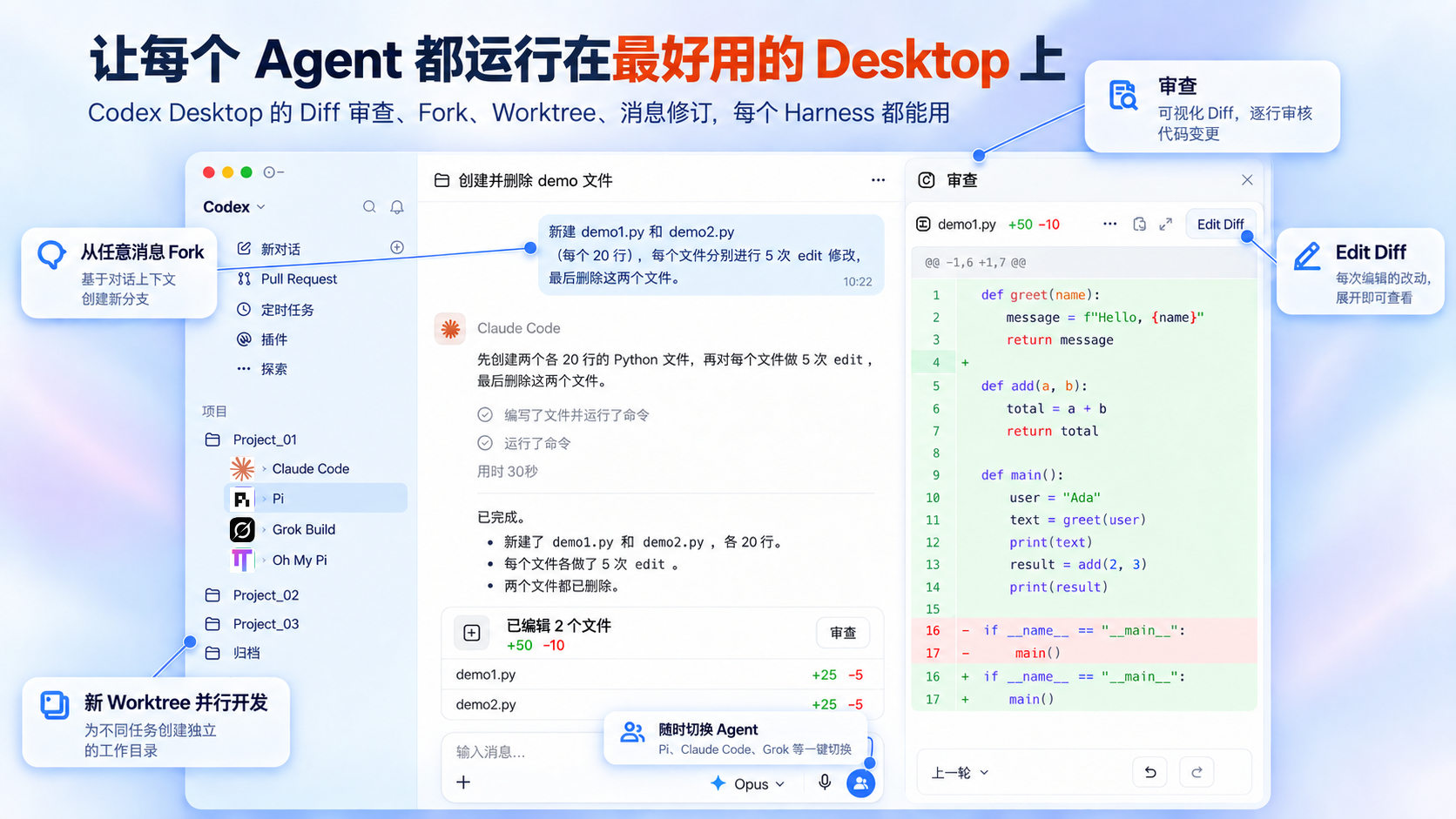
No more switching apps: Pi, Claude Code, Grok Build, and ten-plus other Harnesses all run right inside the same Codex Desktop window.
https://github.com/user-attachments/assets/c48192d7-23ff-4f6e-b61a-6345a655bb76
Option 1: npm (macOS / Windows / Linux)
npm install -g @codexhost/cli
codexhost
Option 2: Installer (macOS / Windows)
Grab the installer for your platform from Releases.
Linux is supported on x64 and ARM64. See the Linux guide.
Run codexhost update to check for the latest release and prepare an upgrade from your terminal. Quit Codex Desktop first if an upgrade is available. Once preparation completes, the background updater installs it and restarts codexhost. An up-to-date installation exits without changes.
codexhost does not start, or Codex opens without codexhost features
Run codexhost console (Windows: Start Menu → "codexhost console") to open the local console at http://127.0.0.1:4399/. It shows why the last start failed, the Codex Desktop version, Host Runtime logs, and can update codexhost while Codex is not running. It starts together with codexhost: installer launches open it in your browser, and terminal launches print its address.
macOS: "App can't be verified" on first launch
xattr -dr com.apple.quarantine /Applications/codexhost.app
Windows: using a portable Codex Desktop
Point CODEXHOST_INSTALL_ROOT at the folder where you extracted Codex Desktop:
[Environment]::SetEnvironmentVariable("CODEXHOST_INSTALL_ROOT", "D:\CodexPortable", "User")
Quit Codex Desktop completely, open a new terminal, and run codexhost.
|
Full workspace 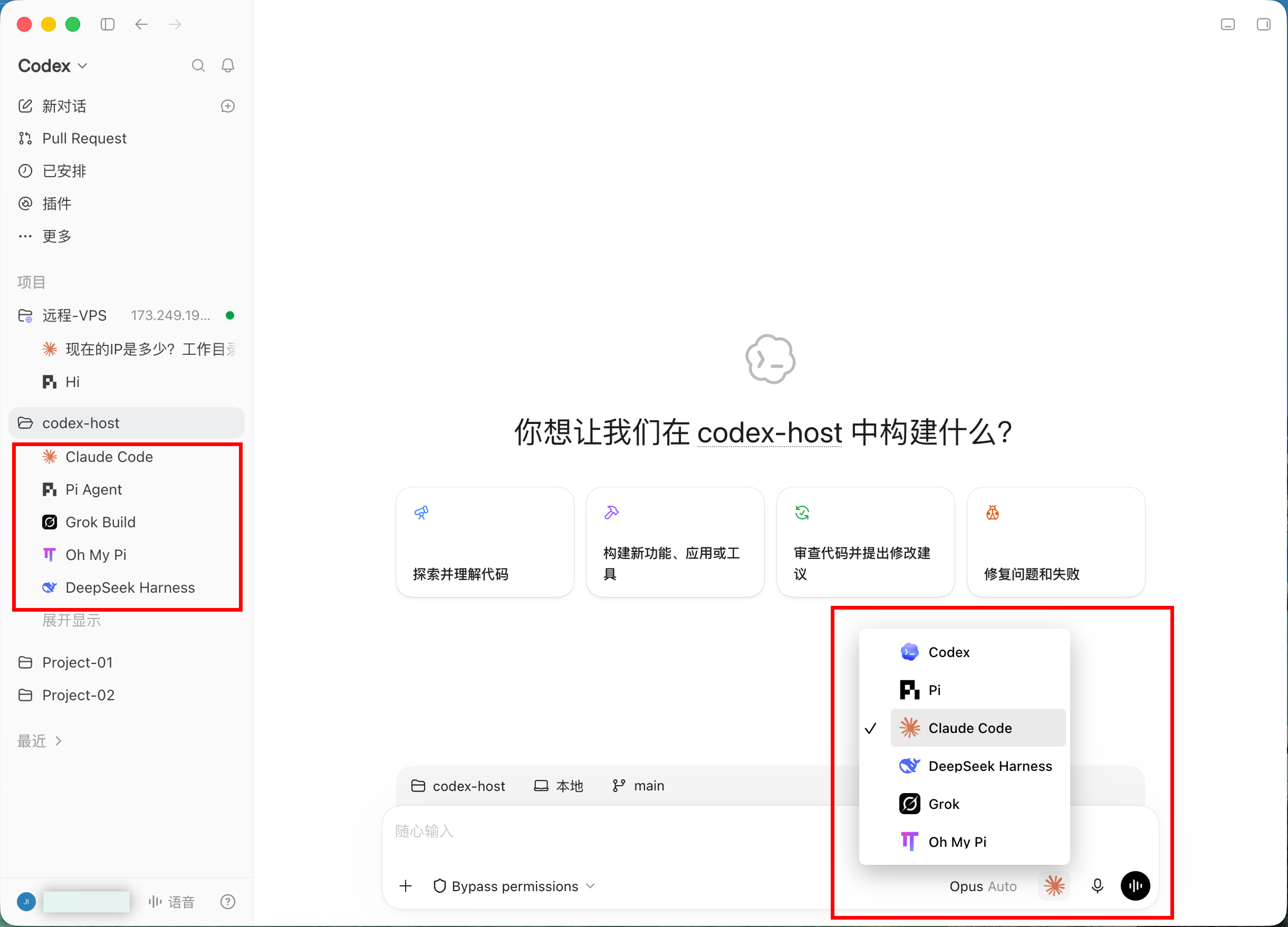
| |
|
Diff review panel 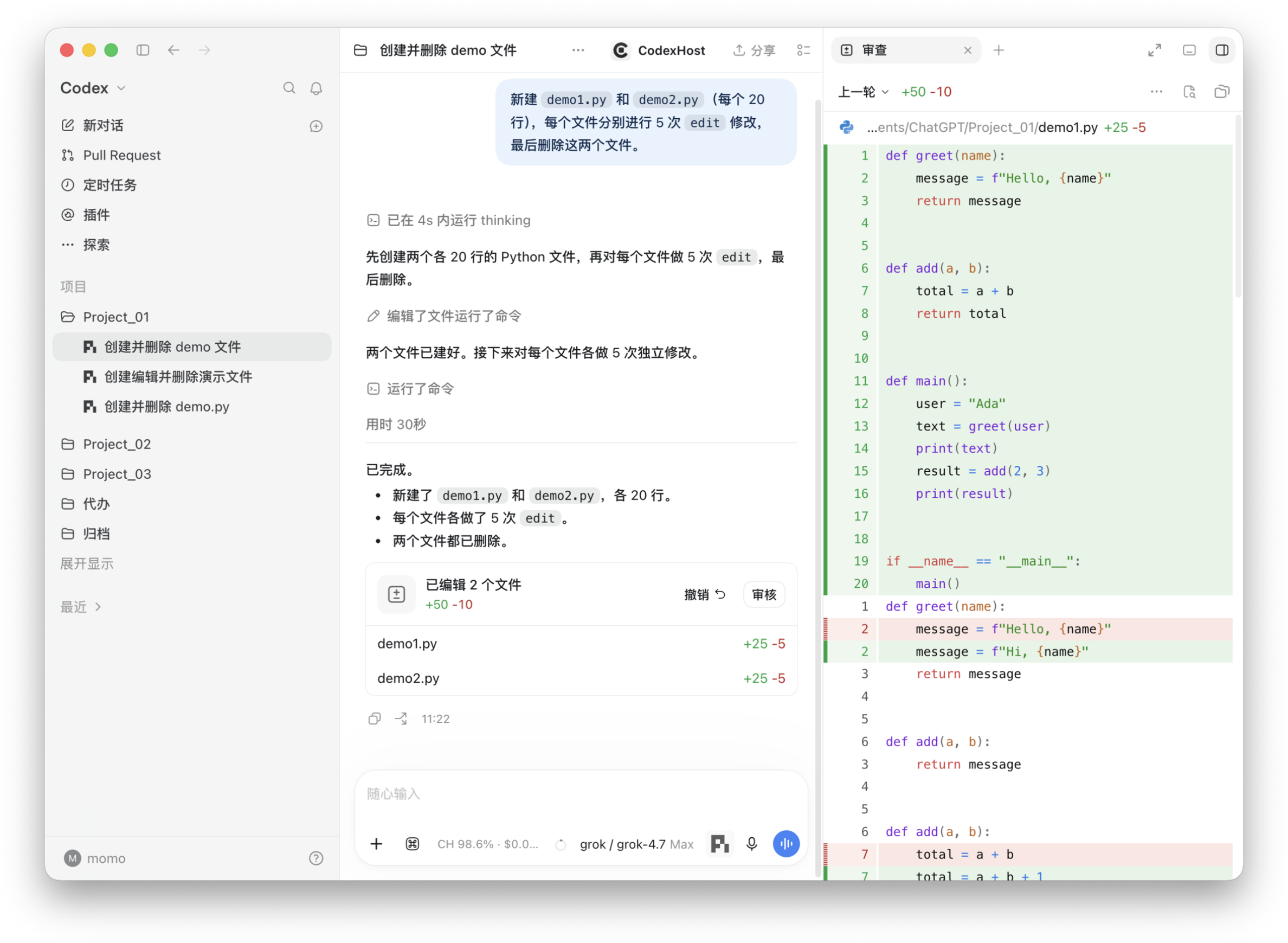
|
Fork from any message 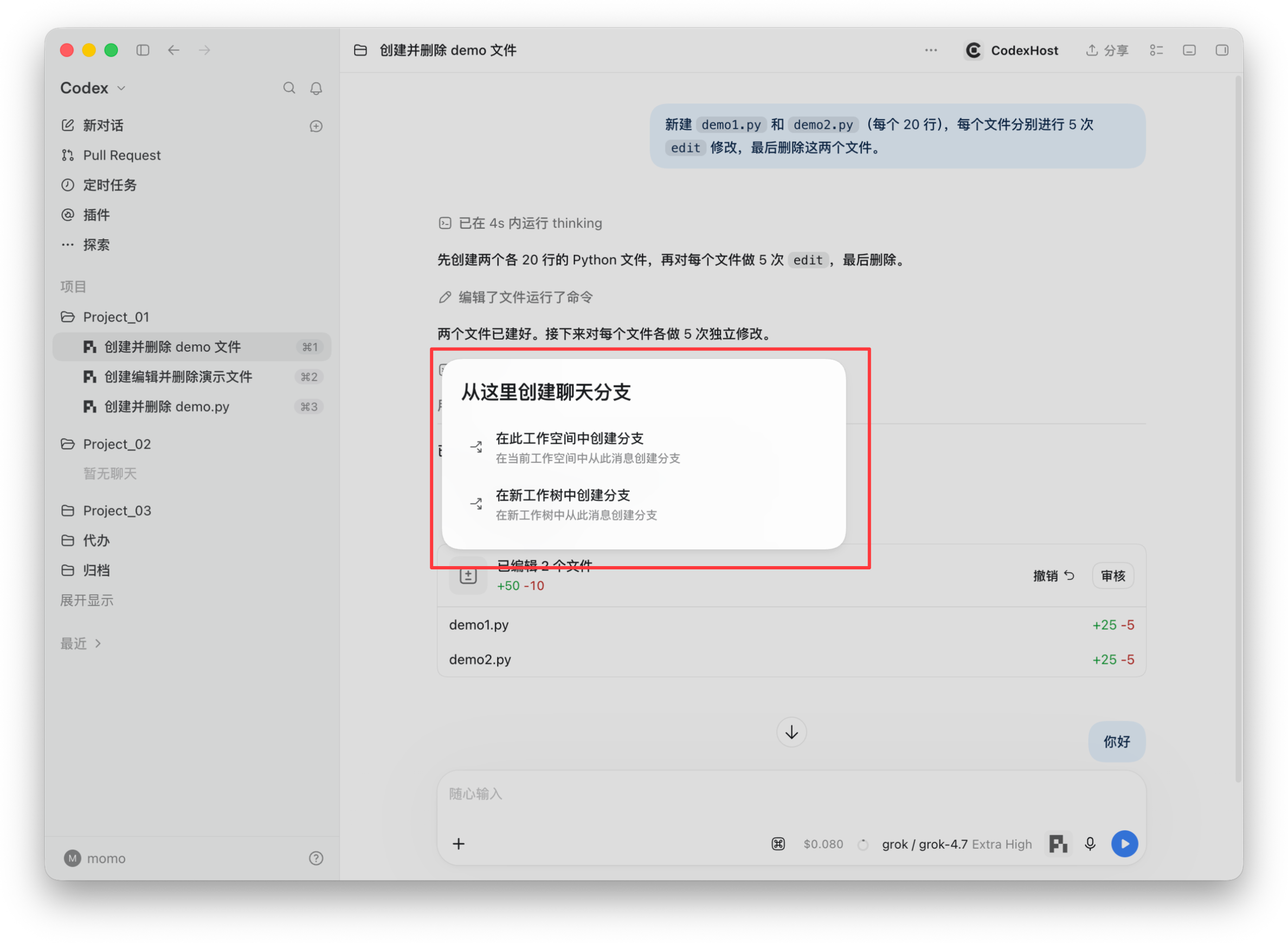
|
|
Delegate to other Agents with # 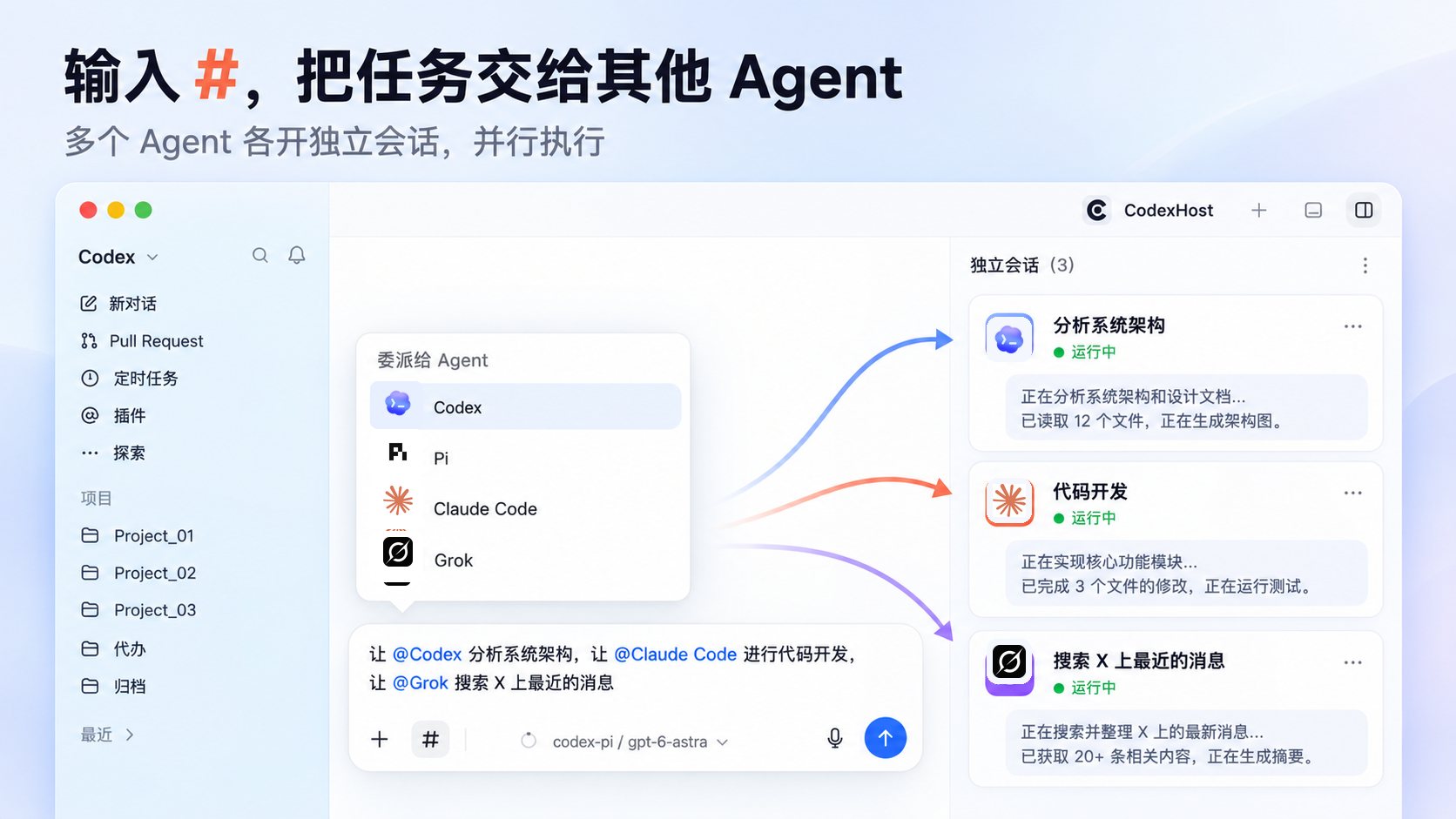
|
Tool calls and thinking 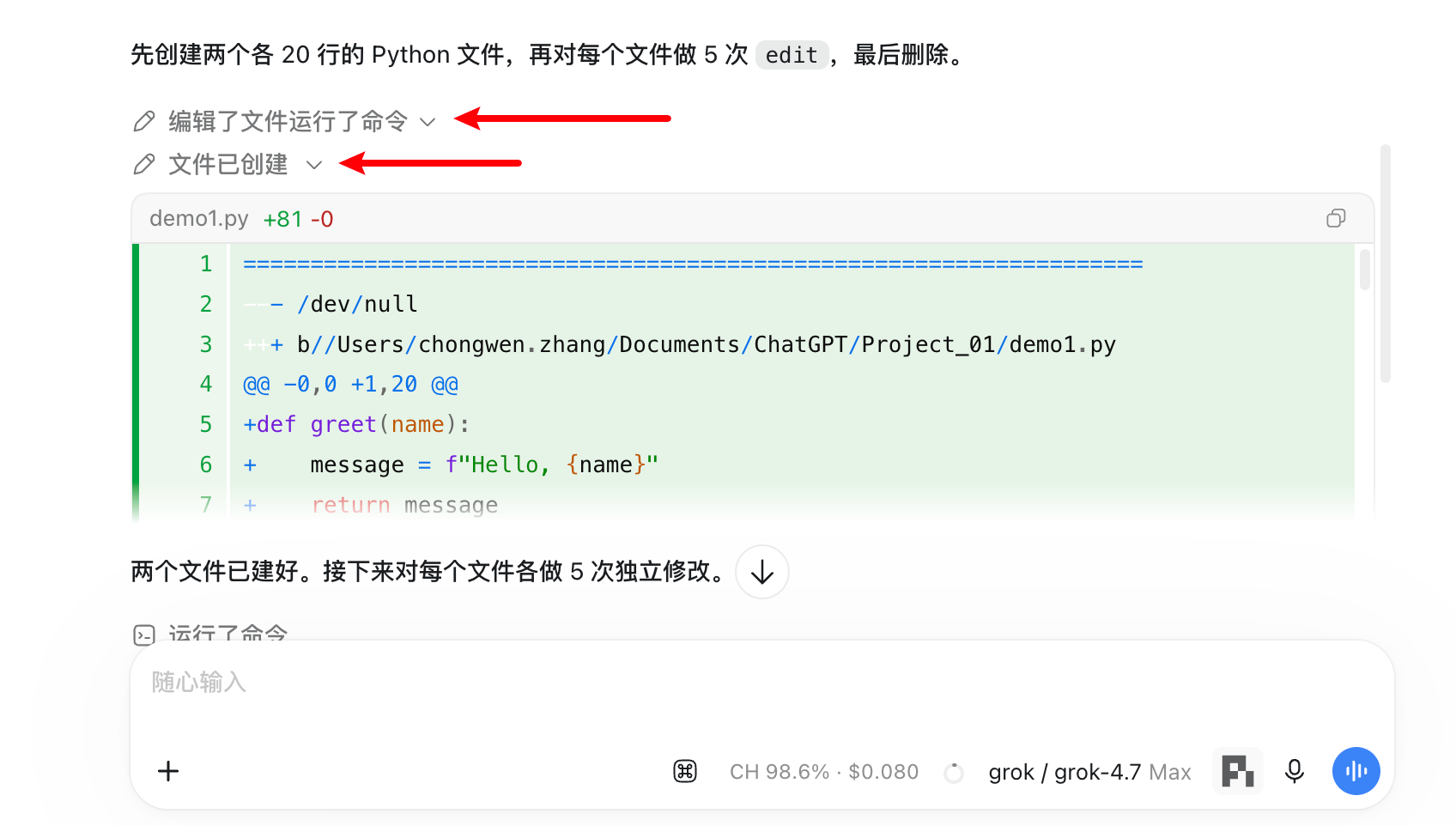
|
|
Visible Subagents 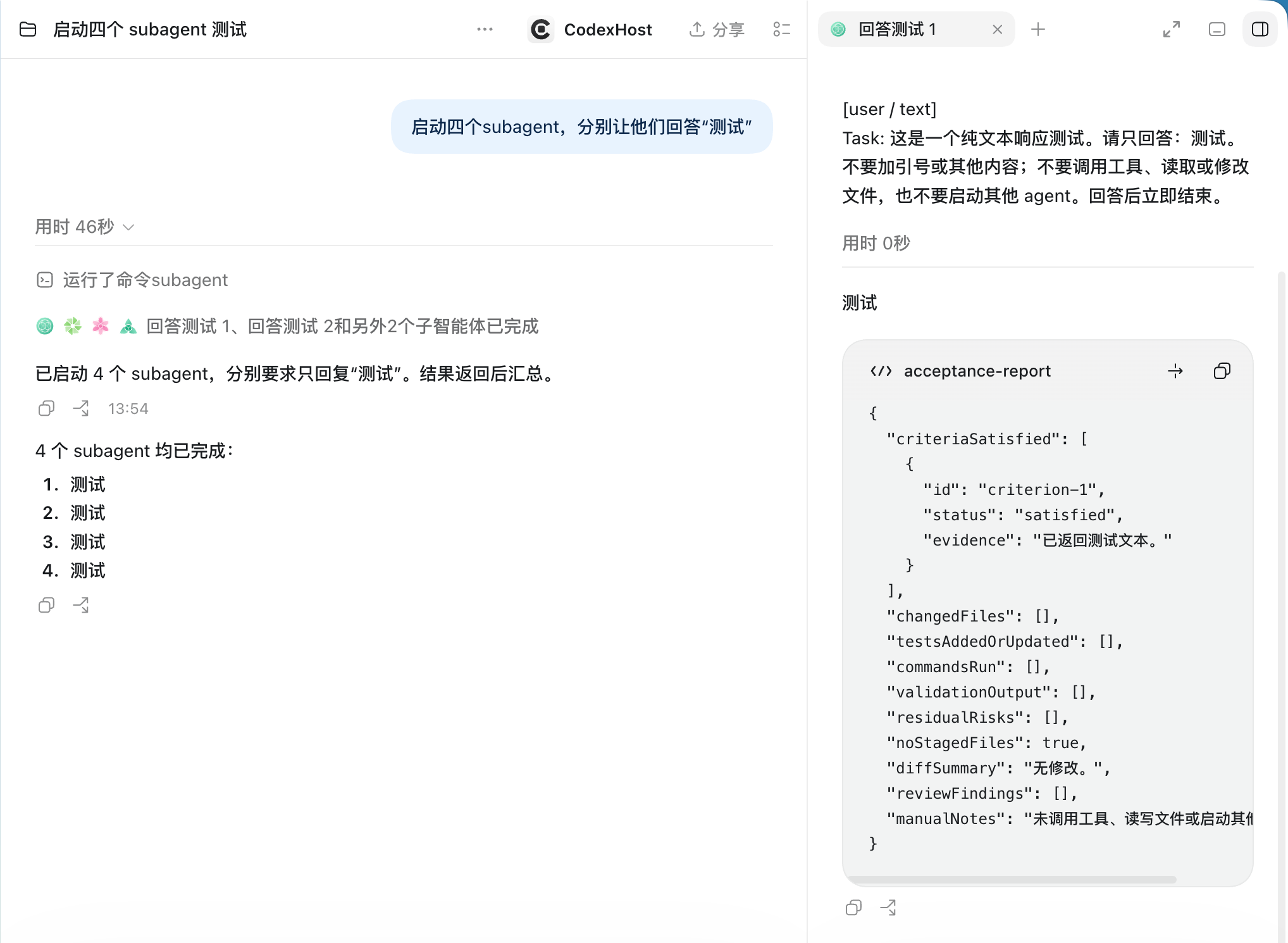
|
Remote development 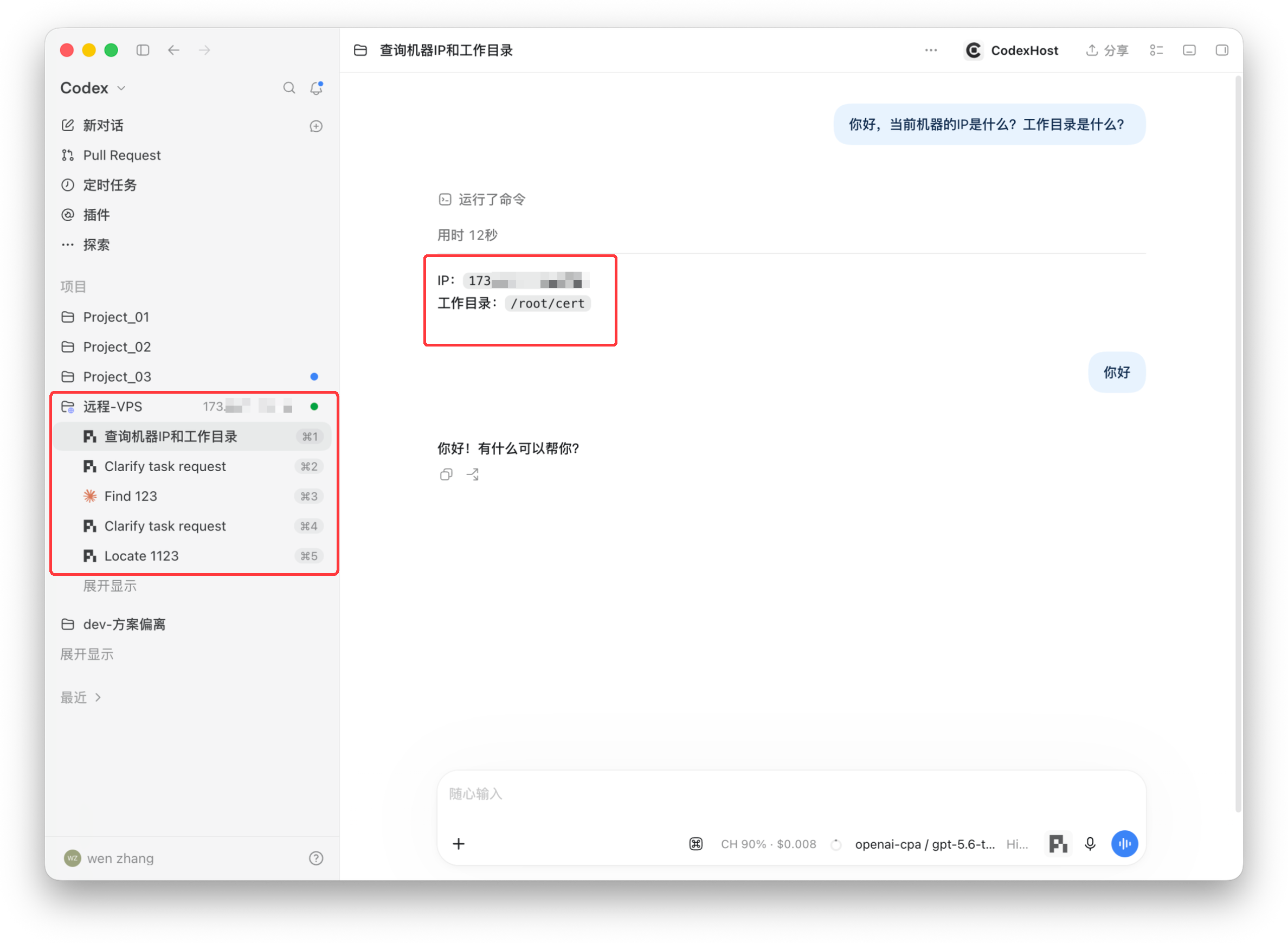
|
|
Usage at a glance 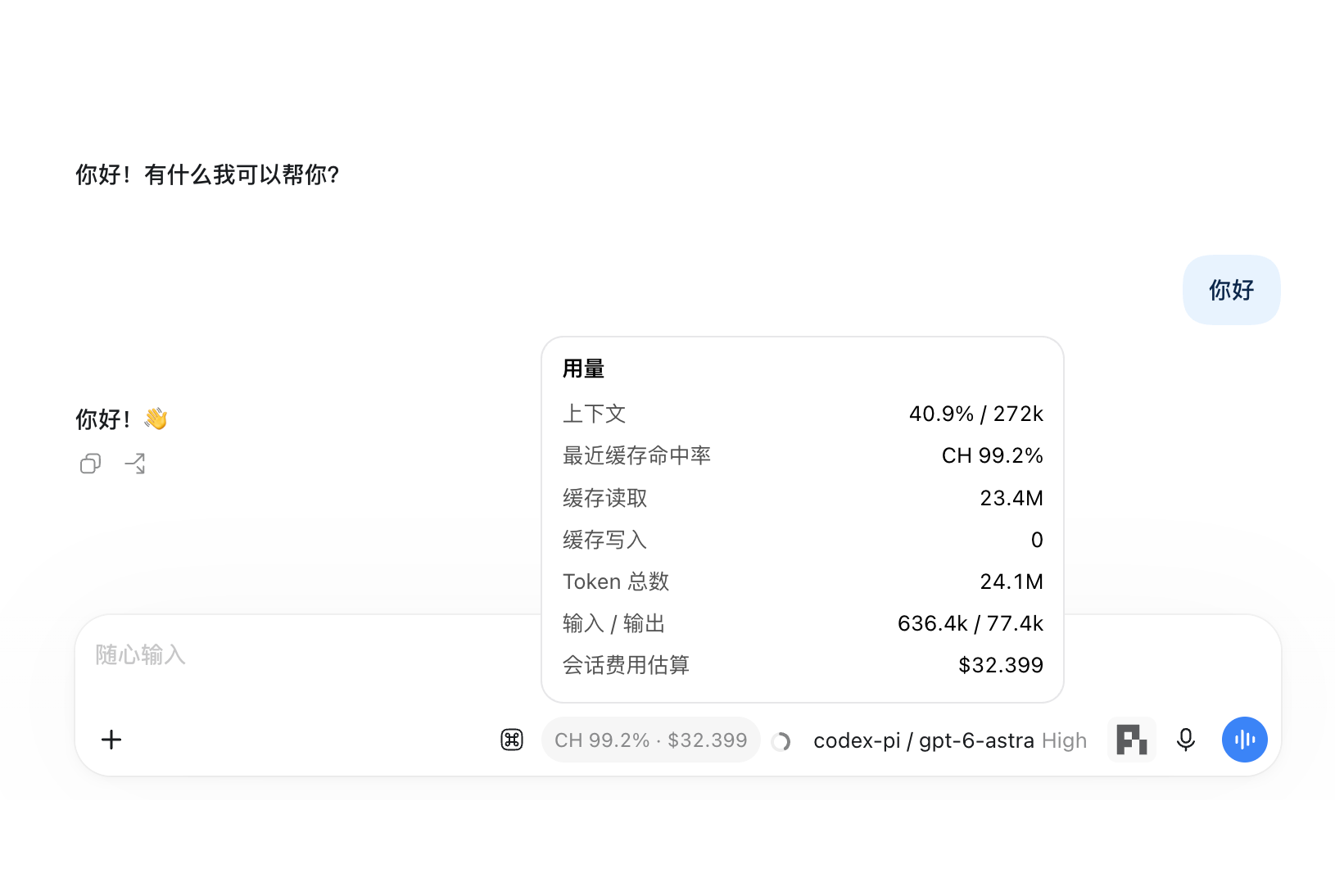
|
One-click account import 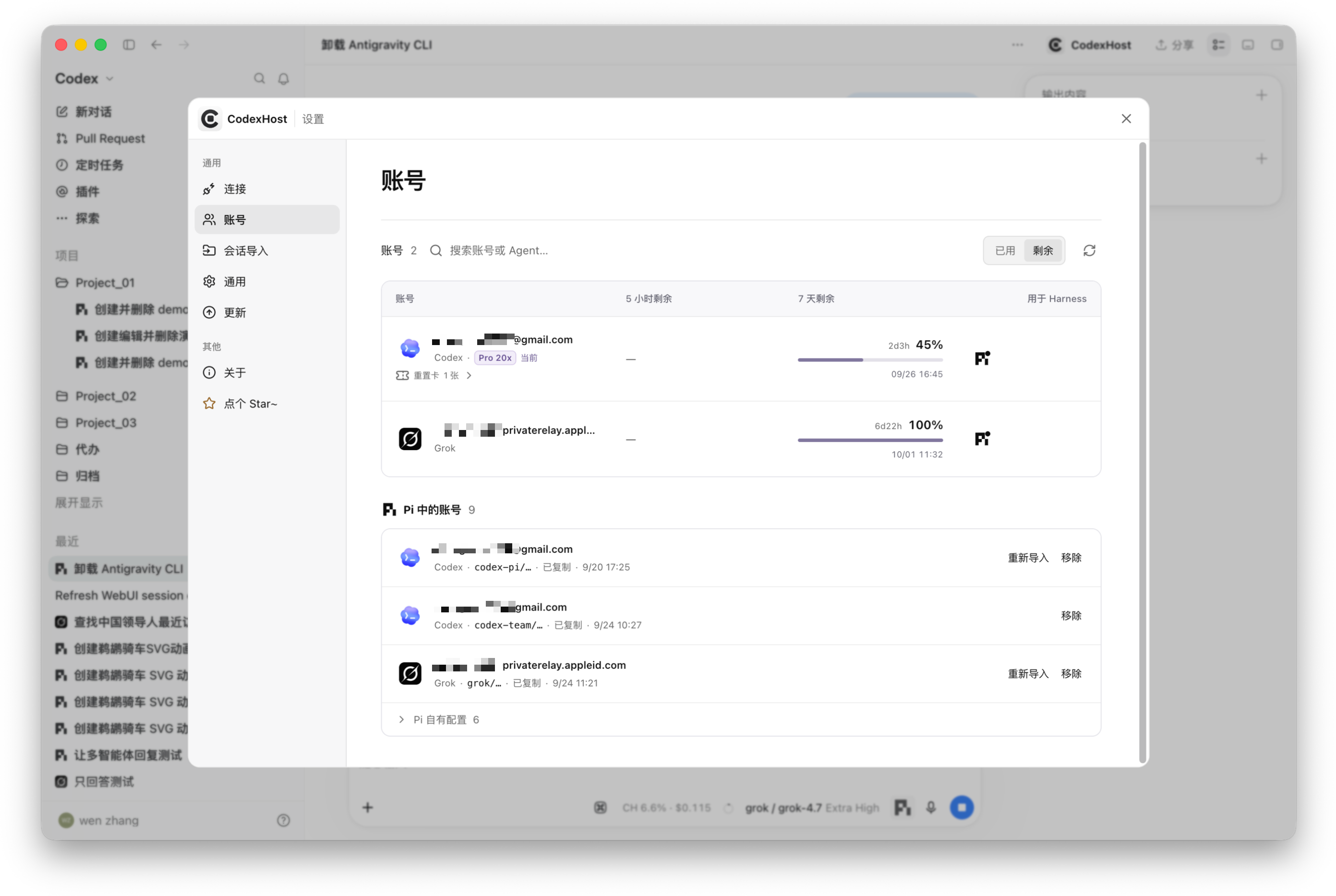
|
|
Mermaid diagram rendering 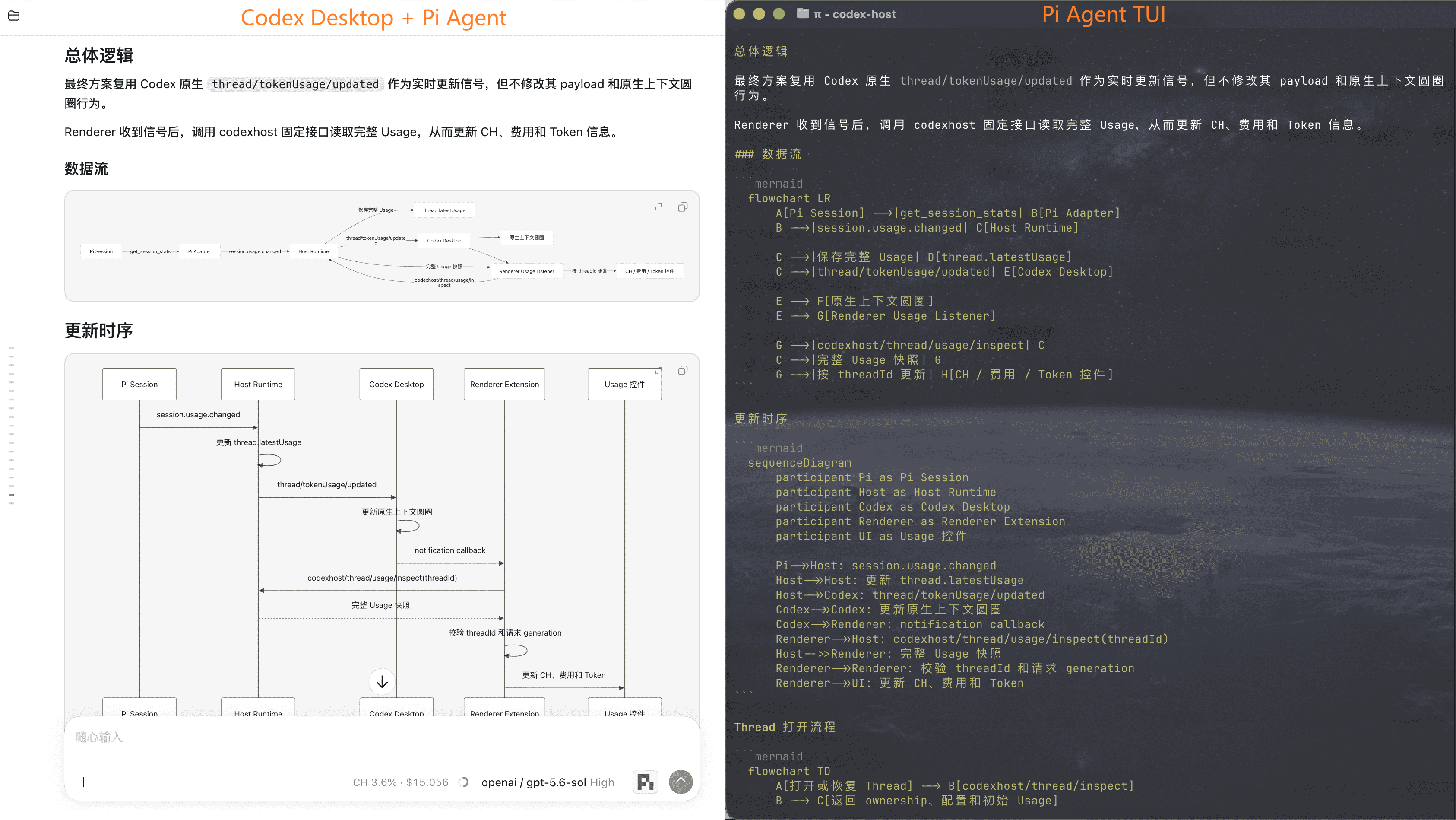
| |
Every Harness gets Codex Desktop's native Edit Diff, Fork, message editing, and slash commands.
| Capability |  |  |  |  |  |  |  |  |  |  |  |  |  |
|---|---|---|---|---|---|---|---|---|---|---|---|---|---|
| Streaming responses | ✅ | ✅ | ✅ | ✅ | ✅ | ✅ | ✅ | ✅ | ✅ | ✅ | ✅ | ✅ | ✅ |
| Tool status | ✅ | ✅ | ✅ | ✅ | ✅ | ✅ | ✅ | ✅ | ✅ | ✅ | ✅ | ✅ | ✅ |
| Edit Diff | ✅ | ✅ | ✅ | ✅ | ✅ | ✅ | ✅ | ✅ | ✅ | ✅ | ✅ | ✅ | ✅ |
| Questions / cancellation | ✅ | ✅ | ✅ | ✅ | ✅ | ✅ | ✅ | ✅ | ✅ | ✅ | ✅ | ✅ | ✅ |
| Model / Thinking selection | ✅ | ✅ | ✅ | ✅ | ✅ | ✅ | ✅ | ✅ | ✅ | ✅ | ✅ | ✅ | ✅ |
| Tool approvals | ✅ | ✅ | ✅ | ✅ | ✅ | ✅ | — | ✅ | ✅ | ✅ | ✅ | ✅ | ✅ |
| Permission modes | — | ✅ | ✅ | ✅ | ✅ | ✅ | ✅ | ✅ | ✅ | ✅ | ✅ | ✅ | ✅ |
| Cross-Agent task collaboration | ✅ | ✅ | ✅ | ✅ | ✅ | ✅ | ✅ | ✅ | — | ✅ | ✅ | ✅ | ✅ |
| Usage | ✅ | ✅ | ✅ | ✅ | ✅ | ✅ | ✅ | ✅ | ✅ | — | ✅ | ✅ | ✅ |
| Fork | ✅ | ✅ | ✅ | ✅ | ✅ | ✅ | ✅ | ✅ | ✅ | ✅ | ✅ | ✅ | ◐ |
| Context compaction | ✅ | ✅ | ✅ | ✅ | ✅ | ✅ | — | ✅ | ✅ | — | ✅ | ✅ | ✅ |
| Slash commands | ✅ | ✅ | ✅ | ✅ | ✅ | ✅ | ✅ | ✅ | ✅ | ✅ | ✅ | ✅ | ✅ |
| Edit previous message | ✅ | ✅ | ✅ | ✅ | ✅ | ✅ | ✅ | ✅ | ✅ | ✅ | ✅ | ✅ | ✅ |
Type # in the chat input to choose an Agent to delegate a task to, or to find commands and skills available for the selected Harness.
Ask the current Agent to hand off a self-contained task to another Harness. For example:
Have
#claude-codereview this change on its own and flag any compatibility risks.Have
#pifigure out why this test is flaky.Have
#ompimplement this feature while I keep working on the docs.Have
#opencodeverify this fix in a separate Thread and run the related tests.
CodexHost spins up a separate Native Session in the target Harness. It shows up in the Codex Desktop conversation list, so you can open it anytime to check progress or pick up the conversation.
Drive Harnesses on another machine from your local Codex Desktop: tasks run remotely, the UI stays local. Both machines need the same codexhost version.
| Remote machine | How to connect |
|---|---|
| macOS / Linux | SSH |
| Windows | Remote Control (experimental) |
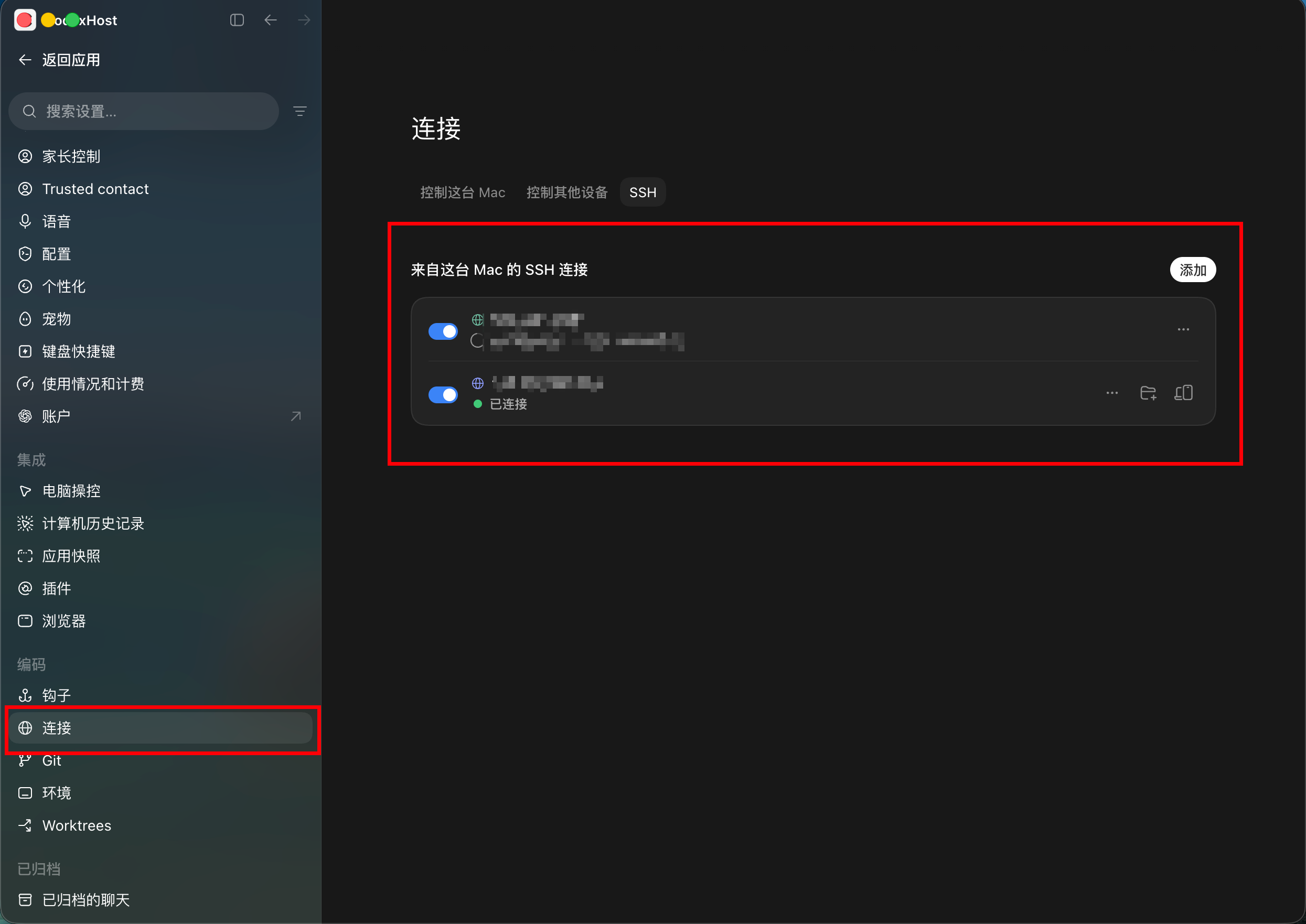
Before you start, add the remote machine in Codex Desktop under Settings → Connections → SSH. Your local machine can run macOS, Linux, or Windows.
Install and start codexhost on the remote machine:
npm install -g @codexhost/cli
codexhost remote install
codexhost remote start
codexhost remote status
On your local machine, launch Codex Desktop through codexhost and open the SSH workspace.
Pick a Harness from the composer's Agent / Model selector.
SSH setup, diagnostics, and uninstall →
Use Harnesses on a Windows machine from another computer, built on the pairing and sign-in of Codex Desktop's official Remote Control.
Before you start, make sure official Remote Control can already run Codex tasks. No public services or ports are opened, and Harness credentials never leave the Windows machine.
Most multi-agent clients build their own chat UI and plug Harnesses in through a common protocol.
CodexHost does it differently:
|
微信交流群 Scan the QR code to join our WeChat group and chat about CodexHost.
|

|
Please read the contributing guide before opening an issue or PR. See repository maintenance automation for PR title labels, CI summaries, and pre-release checks.
Requirements: the official Codex Desktop, Node.js 22.19+ or 24, and Rust.
git clone https://github.com/BytePioneer-AI/codex-host
cd codex-host
npm ci
npm start
To run the current source with a specific runtime version, use npm start 0.12.0 (prereleases such as 0.13.0-rc.1 are also accepted). Host status, console version and update-check version reporting use this value. Without a version argument the version remains <workspace-version>-dev; npm start 0.12.0 -- --no-build reuses artifacts after building once. The override lasts for this launch and does not modify version files or publish packages. Source installations still lack packaged self-update resources; remote npm installation downloads the published package with that version, not the local source.
Using Pi as an example, here is how a single request flows from left to right: Desktop → shared layer → Pi plugin → native process.
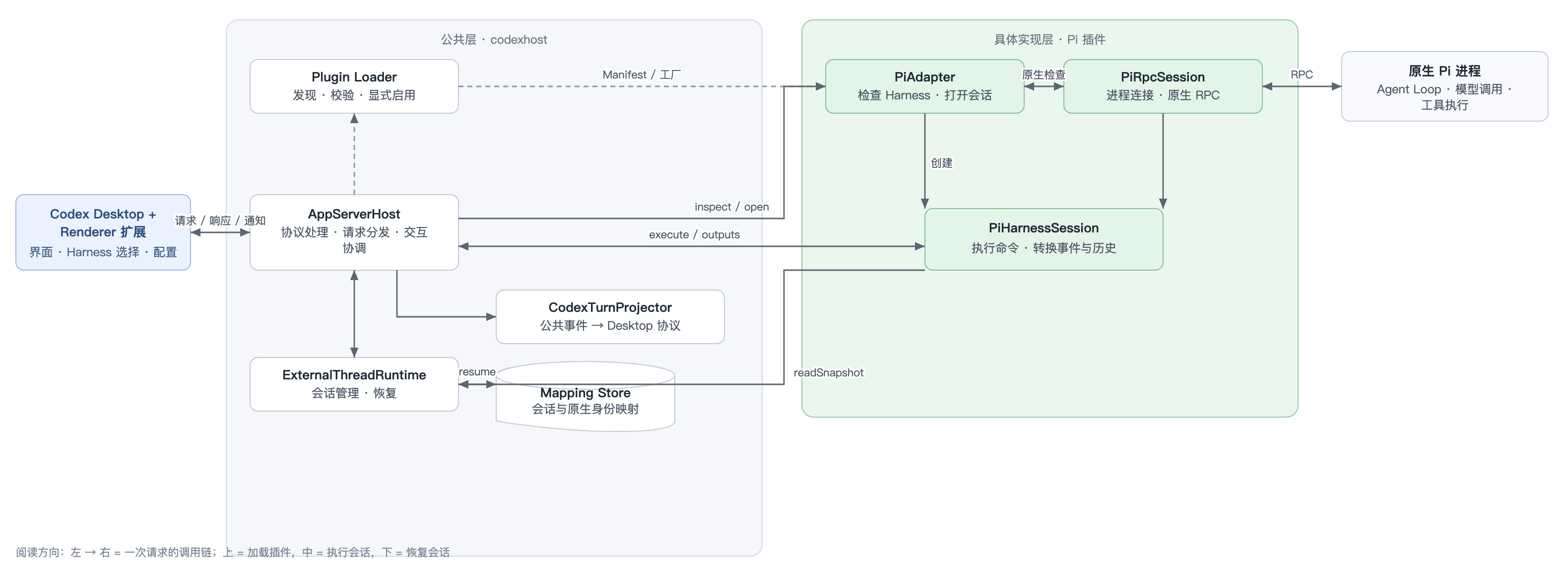
Most of the work is implementing the plugin's Manifest, factory, Adapter, and Session, plus the native communication and translation logic. The Renderer still has some hard-coded wiring, so full Desktop integration takes extra work.
Tip: point your coding Agent at the in-repo codexhost-add-harness Skill. It covers plugin structure, the shared Adapter interface, capability implementation, and testing requirements.
Thanks to everyone who has contributed to CodexHost.
440 followers · starred Sep 2026
715 followers · starred Sep 2026
45 followers · starred Sep 2026
933 followers · starred Aug 2026
Run Pi and Claude Code directly in Codex Desktop. 在 Codex Desktop 中直接运行 Pi 和 Claude Code。
TypeScript
2,853
1,697 commits
updated Oct 13, 2026
Run Pi and other Harnesses inside Codex Desktop
We believe Codex Desktop offers the best desktop development experience today.
But Codex isn't the only great Agent Harness — Claude Code and Pi are great too.
CodexHost lets you run other Harnesses natively inside Codex Desktop and have them work together.
⭐ If CodexHost is useful to you, please give it a star! ⭐
Download · Cross-Agent Collaboration · Remote · 微信交流群 · 简体中文 · 한국어
| Thanks to 星链AI (Xinglian AI) for sponsoring this project! Xinglian AI provides a stable, efficient API relay service for AI coding tools such as Codex and CodexHost, with quick access to mainstream AI models: stable routes · fast responses · multi-model compatibility · ready to use out of the box. It cuts the cost of configuring and switching APIs, so you can focus on coding. Try it now → |
| Thanks to VibeAPI for sponsoring this project! Built for power developers and teams, VibeAPI provides unified access to mainstream AI models, focusing on the Codex and Claude series with a self-managed, traceable account pool. It offers ultra-fast time to first token, 99.9% SLA availability, and cache hit rates of 95%+. Human technical support is available 24/7, with corporate invoicing and enterprise partnerships fully supported. Grab some cyber goodies → |
Scan with WeChat · Any amount is appreciated, and every bit of support means a lot.
CodexHost is free and open source. Sponsorship helps cover the real costs of keeping it going:
❤️ Thank you for your support ❤️
No more switching apps: Pi, Claude Code, Grok Build, and ten-plus other Harnesses all run right inside the same Codex Desktop window.
https://github.com/user-attachments/assets/c48192d7-23ff-4f6e-b61a-6345a655bb76
Option 1: npm (macOS / Windows / Linux)
npm install -g @codexhost/cli
codexhost
Option 2: Installer (macOS / Windows)
Grab the installer for your platform from Releases.
Linux is supported on x64 and ARM64. See the Linux guide.
Run codexhost update to check for the latest release and prepare an upgrade from your terminal. Quit Codex Desktop first if an upgrade is available. Once preparation completes, the background updater installs it and restarts codexhost. An up-to-date installation exits without changes.
codexhost does not start, or Codex opens without codexhost features
Run codexhost console (Windows: Start Menu → "codexhost console") to open the local console at http://127.0.0.1:4399/. It shows why the last start failed, the Codex Desktop version, Host Runtime logs, and can update codexhost while Codex is not running. It starts together with codexhost: installer launches open it in your browser, and terminal launches print its address.
macOS: "App can't be verified" on first launch
xattr -dr com.apple.quarantine /Applications/codexhost.app
Windows: using a portable Codex Desktop
Point CODEXHOST_INSTALL_ROOT at the folder where you extracted Codex Desktop:
[Environment]::SetEnvironmentVariable("CODEXHOST_INSTALL_ROOT", "D:\CodexPortable", "User")
Quit Codex Desktop completely, open a new terminal, and run codexhost.
|
Full workspace
| |
|
Diff review panel
|
Fork from any message
|
|
Delegate to other Agents with #
|
Tool calls and thinking
|
|
Visible Subagents
|
Remote development
|
|
Usage at a glance
|
One-click account import
|
|
Mermaid diagram rendering
| |
Every Harness gets Codex Desktop's native Edit Diff, Fork, message editing, and slash commands.
| Capability | | | | | | | | | | | | | |
|---|---|---|---|---|---|---|---|---|---|---|---|---|---|
| Streaming responses | ✅ | ✅ | ✅ | ✅ | ✅ | ✅ | ✅ | ✅ | ✅ | ✅ | ✅ | ✅ | ✅ |
| Tool status | ✅ | ✅ | ✅ | ✅ | ✅ | ✅ | ✅ | ✅ | ✅ | ✅ | ✅ | ✅ | ✅ |
| Edit Diff | ✅ | ✅ | ✅ | ✅ | ✅ | ✅ | ✅ | ✅ | ✅ | ✅ | ✅ | ✅ | ✅ |
| Questions / cancellation | ✅ | ✅ | ✅ | ✅ | ✅ | ✅ | ✅ | ✅ | ✅ | ✅ | ✅ | ✅ | ✅ |
| Model / Thinking selection | ✅ | ✅ | ✅ | ✅ | ✅ | ✅ | ✅ | ✅ | ✅ | ✅ | ✅ | ✅ | ✅ |
| Tool approvals | ✅ | ✅ | ✅ | ✅ | ✅ | ✅ | — | ✅ | ✅ | ✅ | ✅ | ✅ | ✅ |
| Permission modes | — | ✅ | ✅ | ✅ | ✅ | ✅ | ✅ | ✅ | ✅ | ✅ | ✅ | ✅ | ✅ |
| Cross-Agent task collaboration | ✅ | ✅ | ✅ | ✅ | ✅ | ✅ | ✅ | ✅ | — | ✅ | ✅ | ✅ | ✅ |
| Usage | ✅ | ✅ | ✅ | ✅ | ✅ | ✅ | ✅ | ✅ | ✅ | — | ✅ | ✅ | ✅ |
| Fork | ✅ | ✅ | ✅ | ✅ | ✅ | ✅ | ✅ | ✅ | ✅ | ✅ | ✅ | ✅ | ◐ |
| Context compaction | ✅ | ✅ | ✅ | ✅ | ✅ | ✅ | — | ✅ | ✅ | — | ✅ | ✅ | ✅ |
| Slash commands | ✅ | ✅ | ✅ | ✅ | ✅ | ✅ | ✅ | ✅ | ✅ | ✅ | ✅ | ✅ | ✅ |
| Edit previous message | ✅ | ✅ | ✅ | ✅ | ✅ | ✅ | ✅ | ✅ | ✅ | ✅ | ✅ | ✅ | ✅ |
Type # in the chat input to choose an Agent to delegate a task to, or to find commands and skills available for the selected Harness.
Ask the current Agent to hand off a self-contained task to another Harness. For example:
Have
#claude-codereview this change on its own and flag any compatibility risks.Have
#pifigure out why this test is flaky.Have
#ompimplement this feature while I keep working on the docs.Have
#opencodeverify this fix in a separate Thread and run the related tests.
CodexHost spins up a separate Native Session in the target Harness. It shows up in the Codex Desktop conversation list, so you can open it anytime to check progress or pick up the conversation.
Drive Harnesses on another machine from your local Codex Desktop: tasks run remotely, the UI stays local. Both machines need the same codexhost version.
| Remote machine | How to connect |
|---|---|
| macOS / Linux | SSH |
| Windows | Remote Control (experimental) |
Before you start, add the remote machine in Codex Desktop under Settings → Connections → SSH. Your local machine can run macOS, Linux, or Windows.
Install and start codexhost on the remote machine:
npm install -g @codexhost/cli
codexhost remote install
codexhost remote start
codexhost remote status
On your local machine, launch Codex Desktop through codexhost and open the SSH workspace.
Pick a Harness from the composer's Agent / Model selector.
SSH setup, diagnostics, and uninstall →
Use Harnesses on a Windows machine from another computer, built on the pairing and sign-in of Codex Desktop's official Remote Control.
Before you start, make sure official Remote Control can already run Codex tasks. No public services or ports are opened, and Harness credentials never leave the Windows machine.
Most multi-agent clients build their own chat UI and plug Harnesses in through a common protocol.
CodexHost does it differently:
|
微信交流群 Scan the QR code to join our WeChat group and chat about CodexHost.
|
|
Please read the contributing guide before opening an issue or PR. See repository maintenance automation for PR title labels, CI summaries, and pre-release checks.
Requirements: the official Codex Desktop, Node.js 22.19+ or 24, and Rust.
git clone https://github.com/BytePioneer-AI/codex-host
cd codex-host
npm ci
npm start
To run the current source with a specific runtime version, use npm start 0.12.0 (prereleases such as 0.13.0-rc.1 are also accepted). Host status, console version and update-check version reporting use this value. Without a version argument the version remains <workspace-version>-dev; npm start 0.12.0 -- --no-build reuses artifacts after building once. The override lasts for this launch and does not modify version files or publish packages. Source installations still lack packaged self-update resources; remote npm installation downloads the published package with that version, not the local source.
Using Pi as an example, here is how a single request flows from left to right: Desktop → shared layer → Pi plugin → native process.
Most of the work is implementing the plugin's Manifest, factory, Adapter, and Session, plus the native communication and translation logic. The Renderer still has some hard-coded wiring, so full Desktop integration takes extra work.
Tip: point your coding Agent at the in-repo codexhost-add-harness Skill. It covers plugin structure, the shared Adapter interface, capability implementation, and testing requirements.
Thanks to everyone who has contributed to CodexHost.
440 followers · starred Sep 2026
715 followers · starred Sep 2026
45 followers · starred Sep 2026
933 followers · starred Aug 2026



