[!WARNING] This project is no longer actively maintained.
I started Flare in high school as a proof of concept to show that a Raycast-compatible launcher could exist on Linux. It was a fun experiment, but between school, burnout, and honestly just moving on to other things, I no longer have the time or energy to keep it going.
To everyone who starred, shared, or contributed: thank you. The response to this project genuinely blew me away.
Looking back, I consider Flare a success, not for what it became, but for what it taught me. The biggest lesson is probably to always dogfood your projects. I never used Flare as my daily driver, and that disconnect showed. I also went in with a lot of naïvete and made some architectural decisions I'd do very differently today.
If you're looking for an actively maintained alternative, check out Vicinae.
An open-source, Raycast-compatible launcher for Linux.
For more background on this project, I have a post here.
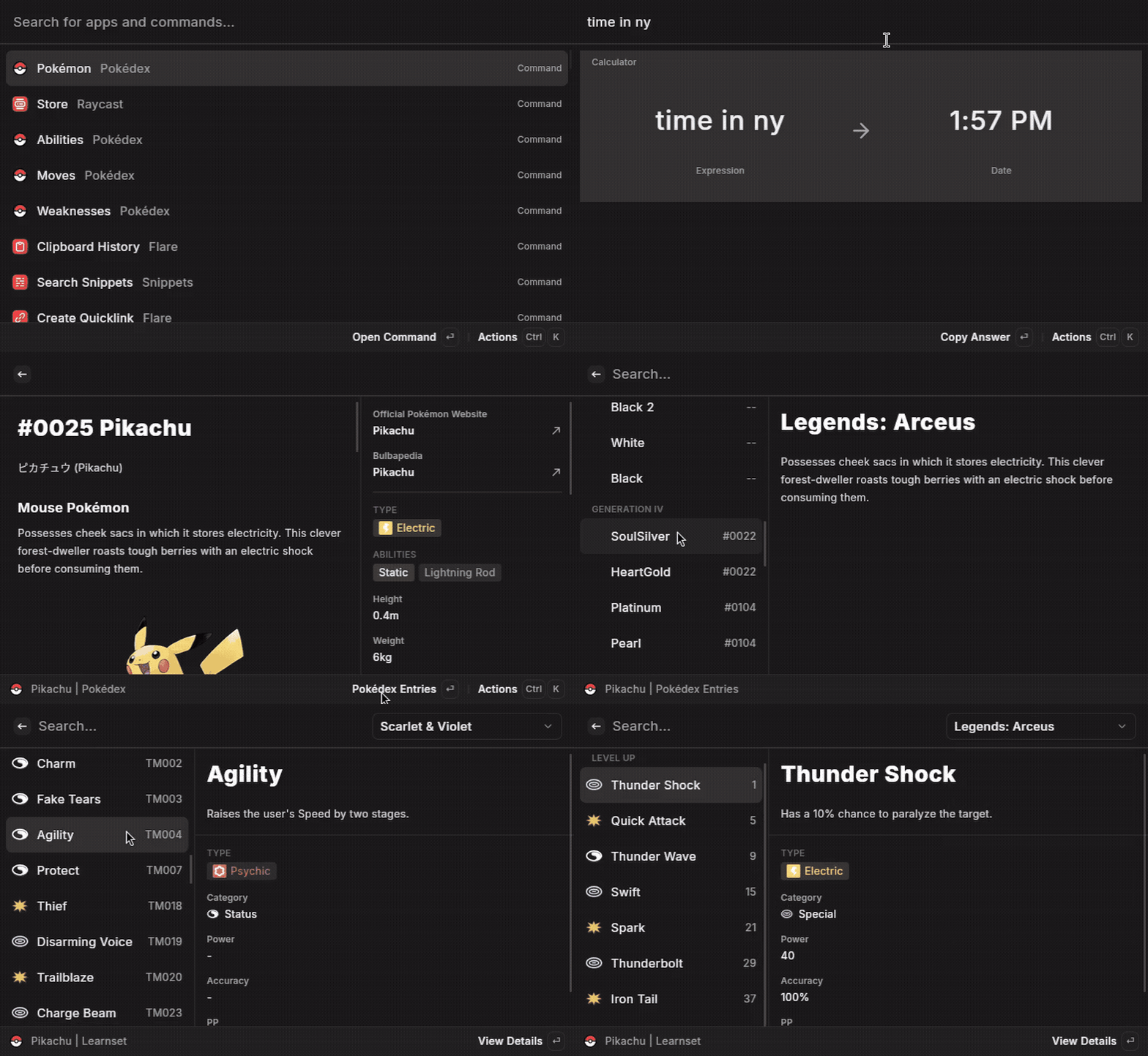
Disclaimer: This is a hobby project and is not affiliated with, nor endorsed by, the official Raycast team.
This launcher aims to recreate most of Raycast's core features on Linux:
While the goal is to support a wide range of Raycast extensions, there are some inherent limitations due to the differences between macOS and Linux. Common reasons an extension might not work include:
runAppleScript), hardcoded paths (/Applications/), or specific system libraries that do not exist on Linux.You can download the latest release from the GitHub Releases page.
Currently, only an .AppImage is provided. After downloading, make it executable:
chmod +x <downloaded-file-name>.AppImage
./<downloaded-file-name>.AppImage
This will open a long-running process in the background. To toggle the visibility of the window, simply run it again.
Depending on your environment, you may be able to bind the script to a hotkey. For example, on Hyprland:
bind = ALT, Space, exec, /path/to/flare.AppImage
The application requires glibc version 2.38, which is installed by default on Ubuntu 24.04, Fedora 40, and recent versions of Arch Linux.
Wayland users: For the global snippet expansion feature to work, the application needs permission to read keyboard events. The recommended and most secure method is to add a udev rule.
Create the udev rule file:
sudo nano /etc/udev/rules.d/99-flare.rules
Add the following line to the file: This rule grants the user at the physical console access to keyboard devices.
KERNEL=="event*", ENV{ID_INPUT_KEYBOARD}=="1", TAG+="uaccess"
Reload the udev rules to apply the changes:
sudo udevadm control --reload-rules && sudo udevadm trigger
If you prefer to build the project from its source code, you'll need to set up the development environment.
rustup.pnpm is the package manager for this project (npm i -g pnpm).Clone the repository:
git clone https://github.com/ByteAtATime/flare.git
cd flare
Install dependencies: This project uses a pnpm workspace. Install all dependencies from the root directory.
pnpm install
Build the Node.js sidecar binary: This step compiles the JavaScript plugin host into a binary that Tauri can execute.
pnpm --filter sidecar build
Compile SoulverCore Wrapper: This step compiles the wrapper around SoulverCore into a shared object file.
swift build -c release --package-path src-tauri/SoulverWrapper
Run in development mode:
This command will launch the Tauri application with hot-reloading for the frontend. Note that you may need to tweak LD_LIBRARY_PATH to point to the SoulverWrapper.
export LD_LIBRARY_PATH="$(pwd)/src-tauri/SoulverWrapper/Vendor/SoulverCore-linux:$(pwd)/src-tauri/SoulverWrapper/.build/release"
pnpm tauri dev
This project stands on the shoulders of giants:
This project is licensed under the MIT License.
(top 24 of 34)
744 followers · starred Jul 2025
2,346 followers · starred Jul 2025
889 followers · starred Jul 2025
85 followers · starred Jul 2025
[!WARNING] This project is no longer actively maintained.
I started Flare in high school as a proof of concept to show that a Raycast-compatible launcher could exist on Linux. It was a fun experiment, but between school, burnout, and honestly just moving on to other things, I no longer have the time or energy to keep it going.
To everyone who starred, shared, or contributed: thank you. The response to this project genuinely blew me away.
Looking back, I consider Flare a success, not for what it became, but for what it taught me. The biggest lesson is probably to always dogfood your projects. I never used Flare as my daily driver, and that disconnect showed. I also went in with a lot of naïvete and made some architectural decisions I'd do very differently today.
If you're looking for an actively maintained alternative, check out Vicinae.
An open-source, Raycast-compatible launcher for Linux.
For more background on this project, I have a post here.
Disclaimer: This is a hobby project and is not affiliated with, nor endorsed by, the official Raycast team.
This launcher aims to recreate most of Raycast's core features on Linux:
While the goal is to support a wide range of Raycast extensions, there are some inherent limitations due to the differences between macOS and Linux. Common reasons an extension might not work include:
runAppleScript), hardcoded paths (/Applications/), or specific system libraries that do not exist on Linux.You can download the latest release from the GitHub Releases page.
Currently, only an .AppImage is provided. After downloading, make it executable:
chmod +x <downloaded-file-name>.AppImage
./<downloaded-file-name>.AppImage
This will open a long-running process in the background. To toggle the visibility of the window, simply run it again.
Depending on your environment, you may be able to bind the script to a hotkey. For example, on Hyprland:
bind = ALT, Space, exec, /path/to/flare.AppImage
The application requires glibc version 2.38, which is installed by default on Ubuntu 24.04, Fedora 40, and recent versions of Arch Linux.
Wayland users: For the global snippet expansion feature to work, the application needs permission to read keyboard events. The recommended and most secure method is to add a udev rule.
Create the udev rule file:
sudo nano /etc/udev/rules.d/99-flare.rules
Add the following line to the file: This rule grants the user at the physical console access to keyboard devices.
KERNEL=="event*", ENV{ID_INPUT_KEYBOARD}=="1", TAG+="uaccess"
Reload the udev rules to apply the changes:
sudo udevadm control --reload-rules && sudo udevadm trigger
If you prefer to build the project from its source code, you'll need to set up the development environment.
rustup.pnpm is the package manager for this project (npm i -g pnpm).Clone the repository:
git clone https://github.com/ByteAtATime/flare.git
cd flare
Install dependencies: This project uses a pnpm workspace. Install all dependencies from the root directory.
pnpm install
Build the Node.js sidecar binary: This step compiles the JavaScript plugin host into a binary that Tauri can execute.
pnpm --filter sidecar build
Compile SoulverCore Wrapper: This step compiles the wrapper around SoulverCore into a shared object file.
swift build -c release --package-path src-tauri/SoulverWrapper
Run in development mode:
This command will launch the Tauri application with hot-reloading for the frontend. Note that you may need to tweak LD_LIBRARY_PATH to point to the SoulverWrapper.
export LD_LIBRARY_PATH="$(pwd)/src-tauri/SoulverWrapper/Vendor/SoulverCore-linux:$(pwd)/src-tauri/SoulverWrapper/.build/release"
pnpm tauri dev
This project stands on the shoulders of giants:
This project is licensed under the MIT License.
(top 24 of 34)
744 followers · starred Jul 2025
2,346 followers · starred Jul 2025
889 followers · starred Jul 2025
85 followers · starred Jul 2025



