
See what people are saying
README
JSON Viewer for macOS

A fast, lightweight, native macOS application recreating and elevating the classic online JSON Viewer and Formatter (jsonviewer.stack.hu).



-purple?style=flat-square)

📸 Overview & Split Mode
Experience real-time JSON editing and hierarchical exploration side-by-side:
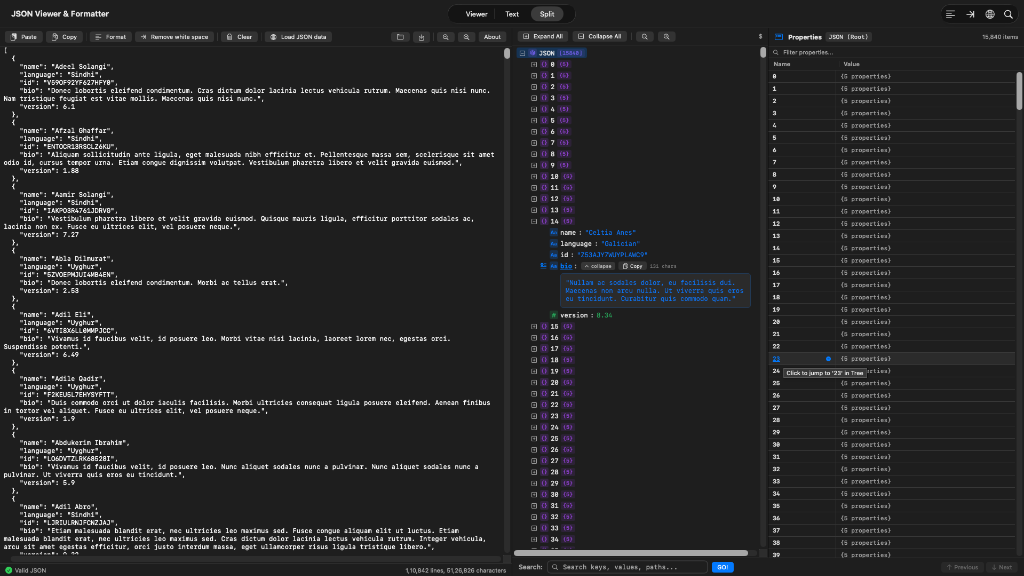 Split Mode: Monospace Editor (left), Tree Hierarchy with full-width expanded text (center), and Interactive Property Inspector with jump navigation (right).
✨ Features & Walkthrough
1. Hierarchical Tree Viewer with Expandable Full-Width Text
Explore deep JSON structures with collapsible nodes, color-coded type badges, and dynamic full-width multi-line textareas for large text fields:
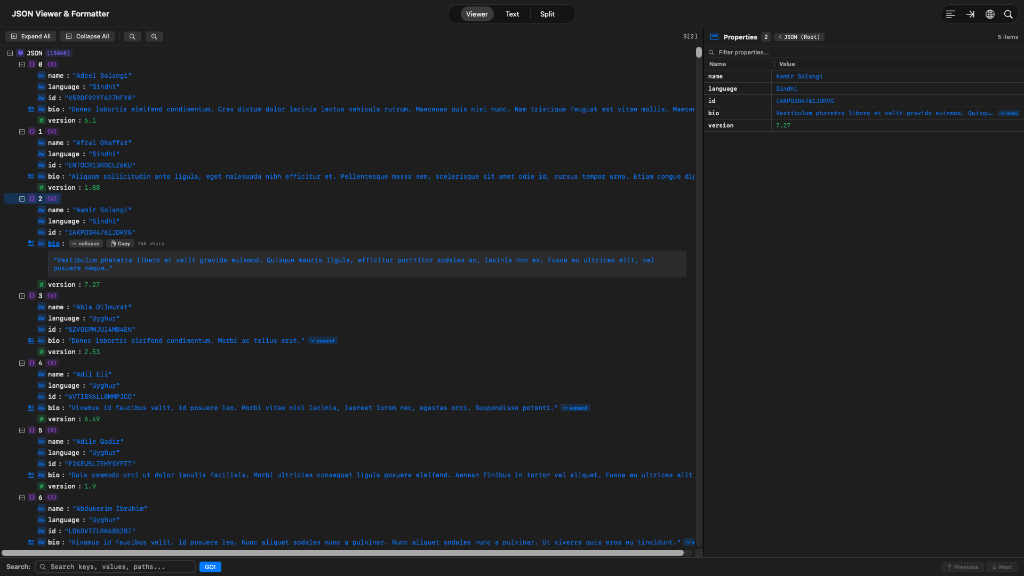
- 🏷️ Type Badges matching
jsonviewer.stack.hu:- 🔵 String (
key : "value") - 🟢 Number (
key : 123) - 🟡 Boolean (
key : true) - 🔴 Null (
key : null) - 🟣 Object / Array (
key {N}/key [N])
- 🔵 String (
- 📖 Expandable Big Text:
- Automatic detection for long strings (> 40 characters or newlines).
- Visual cue badge
[ ▾ expand ]andtext.badge.plusicon. - Full-Width Responsive Textarea: Stretches across the full width of the tree panel and wraps smoothly.
- Includes a quick Copy button with animated "Copied!" confirmation, character count badge, and native text selection (
.textSelection(.enabled)).
- 🖱️ Context Menus: Right-click any tree node to Expand, Expand All, Collapse, Collapse All, Copy Value, Copy Key, Copy JSON Path (e.g.
$.users[0].address.city), or Copy Subtree as JSON.
2. Interactive Property Inspector & Jump Navigation
Inspect element properties in a 2-column table with click-to-jump tree synchronization:
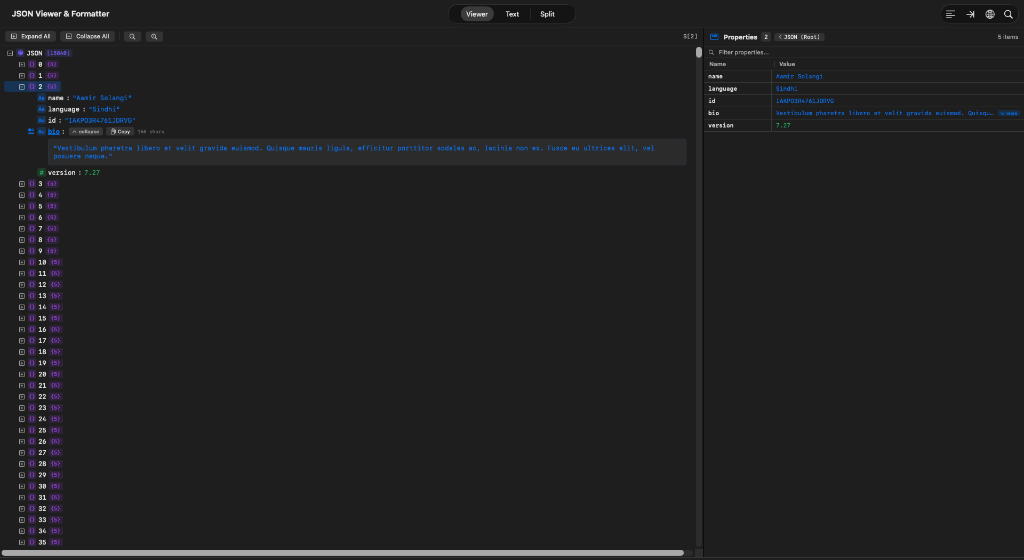
- 🔗 Clickable Property Names: Clicking on any property name in the grid (e.g.
23orname) instantly jumps to, selects, and scrolls to that element in the tree. - ⚡ Auto-Reveal: Ancestor nodes of target items are automatically unfolded in the tree view.
- 🧭 Breadcrumb Navigation: Header back button
[ < Parent ]allows easy navigation back up the object tree. - 🔍 In-Grid Search Filter: Quickly filter through thousands of properties in large objects.
- 📐 Expandable Grid Values: Built-in
[ ▾ more ]/[ ▴ less ]toggles for long values within grid cells.
3. Native Text Editor & Transformations (Middle Tab)
A full-featured code editor with instant syntax feedback and rich serialization tools:
- ⚡ Editor Actions & Transformations:
- Format (Beautify): Prettifies JSON with configured indentation (2 spaces, 4 spaces, tabs).
- Minify: Compresses JSON to a single line without spaces.
- Stringify: Serializes JSON or text into an escaped JSON string literal with forward slash escaping (
\/) and quote escaping (\"). - Unescape: Unwraps stringified JSON or decode escape characters (
\/,\",\\,\n) back into clean formatted JSON. - Multi-Format Copy: Copy as Beautified JSON, Minified JSON, Stringified JSON, or Python Object literal.
- Paste / Clear: Fast clipboard integration and buffer reset.
- 🛡️ Syntax Validation: Real-time error detection reporting exact line and column numbers.
- 📊 Status Bar: Real-time line and character counter.
- 📁 Native macOS File Handling: Open (
Cmd+O) and Save (Cmd+S).jsonfiles.
4. Multi-Format Copy & Python Dictionary Serialization
Copy your JSON in whatever format you need directly from the Viewer toolbar, Text Editor, or context menus:
- 📋 Copy Beautified JSON: Configurable indentation (2-space, 4-space, tabs).
- ⚡ Copy Minified JSON: Single-line compact JSON.
- 🔤 Copy as Stringified JSON: Escaped string literal with quotes (
\") and forward slashes (\/). - 🐍 Copy as Python Dictionary: Native Python dictionary/list representation using
True,False,None, and single-quoted strings. - 🔄 Automatic Python Dictionary to JSON Conversion: Paste or type any Python dictionary into the editor (
{'key': 'value', 'flag': True, 'empty': None}) and it is automatically converted into valid, formatted JSON.
5. Settings Page & Keyboard Shortcuts Cheatsheet
- ⚙️ Settings (
⌘,): Configure indentation (2 spaces, 4 spaces, tabs), forward slash escaping (\/), alphabetical key sorting, auto-unwrapping of stringified JSON, editor font size, and word wrapping. - ⌨️ Keyboard Shortcuts Cheatsheet (
?): Press ? anytime outside text fields or ⌘ ? anywhere to open a beautiful categorized shortcuts overlay with instant search.
⚡ Performance & Scale
- Virtualized Rendering: High-performance lazy row rendering capable of smoothly navigating datasets with 15,840+ items and 5MB+ payloads with zero UI lag.
- Pure Swift Engine: Zero third-party runtime dependencies; built exclusively with AppKit and SwiftUI.
📦 Installation (Pre-built App)
- Download
JSONViewer-macOS.zipfrom the GitHub Releases. - Double-click the downloaded
.zipfile to extractJSONViewer.app. - Drag
JSONViewer.appinto your/Applicationsfolder.
[!NOTE] First-time Opening on macOS (Gatekeeper): Since this is an open-source application without an Apple Developer ID certificate:
- Right-click (or Control-click)
JSONViewer.appand select Open, then click Open in the prompt.- Alternatively, run this command once in Terminal:
xattr -cr /Applications/JSONViewer.app
🚀 Building and Running from Source
Prerequisites
- macOS 13.0 (Ventura) or later
- Xcode Command Line Tools (
xcode-select --install)
Quick Run via Swift PM
swift run
Build & Install to /Applications
./build_app.sh install
This compiles the release binary, creates the iconset, code-signs the app, installs it to /Applications/JSONViewer.app, and launches it.
Build macOS App Bundle
./build_app.sh run
This builds build.noindex/JSONViewer.app and launches it.
Run Automated Test Suite
swift run JSONViewerTests
⌨️ Keyboard Shortcuts
| Shortcut | Action |
|---|---|
| ? or ⌘ ? | Show Keyboard Shortcuts Cheatsheet Modal |
| / | Focus Search Bar (Quick Jump) |
| ⌘ F | Find in JSON / Focus Search Bar |
| Enter | Find Next Match (in Search Field) |
| ⇧ Enter | Find Previous Match / Reverse (in Search Field) |
| ⌘ G | Find Next Match (Global) |
| ⌘ ⇧ G | Find Previous Match (Global) |
| ⌘ , | Open Settings / Preferences Dialog |
| ⌘ 1 | Switch to Viewer Tab |
| ⌘ 2 | Switch to Text Editor Tab |
| ⌘ 3 | Switch to Split View Tab |
| ⌘ ⌥ P | Toggle Properties Panel (Show / Hide) |
| ⌘ K | Clear Editor |
| ⌘ ⌥ C | Copy as Python Dictionary |
| ⌘ E | Expand All Tree Nodes |
| ⌘ ⇧ E | Collapse All Tree Nodes |
| ⌘ + | Zoom In Font Size |
| ⌘ - | Zoom Out Font Size |
| ⌘ 0 | Reset Font Size to Default (12pt) |
| ⌘ O | Open JSON File |
| ⌘ S | Save JSON File |
| Esc | Dismiss Shortcuts / Search Bar |
📜 Credits
Inspired by the original online JSON Viewer and Formatter by Gabor Turi.
Rebuilt natively for macOS in modern Swift.
Similar repos


Languages
Rust
63.8%
Swift
35.4%
See what people are saying
README
JSON Viewer for macOS
A fast, lightweight, native macOS application recreating and elevating the classic online JSON Viewer and Formatter (jsonviewer.stack.hu).
📸 Overview & Split Mode
Experience real-time JSON editing and hierarchical exploration side-by-side:
Split Mode: Monospace Editor (left), Tree Hierarchy with full-width expanded text (center), and Interactive Property Inspector with jump navigation (right).
✨ Features & Walkthrough
1. Hierarchical Tree Viewer with Expandable Full-Width Text
Explore deep JSON structures with collapsible nodes, color-coded type badges, and dynamic full-width multi-line textareas for large text fields:
- 🏷️ Type Badges matching
jsonviewer.stack.hu:- 🔵 String (
key : "value") - 🟢 Number (
key : 123) - 🟡 Boolean (
key : true) - 🔴 Null (
key : null) - 🟣 Object / Array (
key {N}/key [N])
- 🔵 String (
- 📖 Expandable Big Text:
- Automatic detection for long strings (> 40 characters or newlines).
- Visual cue badge
[ ▾ expand ]andtext.badge.plusicon. - Full-Width Responsive Textarea: Stretches across the full width of the tree panel and wraps smoothly.
- Includes a quick Copy button with animated "Copied!" confirmation, character count badge, and native text selection (
.textSelection(.enabled)).
- 🖱️ Context Menus: Right-click any tree node to Expand, Expand All, Collapse, Collapse All, Copy Value, Copy Key, Copy JSON Path (e.g.
$.users[0].address.city), or Copy Subtree as JSON.
2. Interactive Property Inspector & Jump Navigation
Inspect element properties in a 2-column table with click-to-jump tree synchronization:
- 🔗 Clickable Property Names: Clicking on any property name in the grid (e.g.
23orname) instantly jumps to, selects, and scrolls to that element in the tree. - ⚡ Auto-Reveal: Ancestor nodes of target items are automatically unfolded in the tree view.
- 🧭 Breadcrumb Navigation: Header back button
[ < Parent ]allows easy navigation back up the object tree. - 🔍 In-Grid Search Filter: Quickly filter through thousands of properties in large objects.
- 📐 Expandable Grid Values: Built-in
[ ▾ more ]/[ ▴ less ]toggles for long values within grid cells.
3. Native Text Editor & Transformations (Middle Tab)
A full-featured code editor with instant syntax feedback and rich serialization tools:
- ⚡ Editor Actions & Transformations:
- Format (Beautify): Prettifies JSON with configured indentation (2 spaces, 4 spaces, tabs).
- Minify: Compresses JSON to a single line without spaces.
- Stringify: Serializes JSON or text into an escaped JSON string literal with forward slash escaping (
\/) and quote escaping (\"). - Unescape: Unwraps stringified JSON or decode escape characters (
\/,\",\\,\n) back into clean formatted JSON. - Multi-Format Copy: Copy as Beautified JSON, Minified JSON, Stringified JSON, or Python Object literal.
- Paste / Clear: Fast clipboard integration and buffer reset.
- 🛡️ Syntax Validation: Real-time error detection reporting exact line and column numbers.
- 📊 Status Bar: Real-time line and character counter.
- 📁 Native macOS File Handling: Open (
Cmd+O) and Save (Cmd+S).jsonfiles.
4. Multi-Format Copy & Python Dictionary Serialization
Copy your JSON in whatever format you need directly from the Viewer toolbar, Text Editor, or context menus:
- 📋 Copy Beautified JSON: Configurable indentation (2-space, 4-space, tabs).
- ⚡ Copy Minified JSON: Single-line compact JSON.
- 🔤 Copy as Stringified JSON: Escaped string literal with quotes (
\") and forward slashes (\/). - 🐍 Copy as Python Dictionary: Native Python dictionary/list representation using
True,False,None, and single-quoted strings. - 🔄 Automatic Python Dictionary to JSON Conversion: Paste or type any Python dictionary into the editor (
{'key': 'value', 'flag': True, 'empty': None}) and it is automatically converted into valid, formatted JSON.
5. Settings Page & Keyboard Shortcuts Cheatsheet
- ⚙️ Settings (
⌘,): Configure indentation (2 spaces, 4 spaces, tabs), forward slash escaping (\/), alphabetical key sorting, auto-unwrapping of stringified JSON, editor font size, and word wrapping. - ⌨️ Keyboard Shortcuts Cheatsheet (
?): Press ? anytime outside text fields or ⌘ ? anywhere to open a beautiful categorized shortcuts overlay with instant search.
⚡ Performance & Scale
- Virtualized Rendering: High-performance lazy row rendering capable of smoothly navigating datasets with 15,840+ items and 5MB+ payloads with zero UI lag.
- Pure Swift Engine: Zero third-party runtime dependencies; built exclusively with AppKit and SwiftUI.
📦 Installation (Pre-built App)
- Download
JSONViewer-macOS.zipfrom the GitHub Releases. - Double-click the downloaded
.zipfile to extractJSONViewer.app. - Drag
JSONViewer.appinto your/Applicationsfolder.
[!NOTE] First-time Opening on macOS (Gatekeeper): Since this is an open-source application without an Apple Developer ID certificate:
- Right-click (or Control-click)
JSONViewer.appand select Open, then click Open in the prompt.- Alternatively, run this command once in Terminal:
xattr -cr /Applications/JSONViewer.app
🚀 Building and Running from Source
Prerequisites
- macOS 13.0 (Ventura) or later
- Xcode Command Line Tools (
xcode-select --install)
Quick Run via Swift PM
swift run
Build & Install to /Applications
./build_app.sh install
This compiles the release binary, creates the iconset, code-signs the app, installs it to /Applications/JSONViewer.app, and launches it.
Build macOS App Bundle
./build_app.sh run
This builds build.noindex/JSONViewer.app and launches it.
Run Automated Test Suite
swift run JSONViewerTests
⌨️ Keyboard Shortcuts
| Shortcut | Action |
|---|---|
| ? or ⌘ ? | Show Keyboard Shortcuts Cheatsheet Modal |
| / | Focus Search Bar (Quick Jump) |
| ⌘ F | Find in JSON / Focus Search Bar |
| Enter | Find Next Match (in Search Field) |
| ⇧ Enter | Find Previous Match / Reverse (in Search Field) |
| ⌘ G | Find Next Match (Global) |
| ⌘ ⇧ G | Find Previous Match (Global) |
| ⌘ , | Open Settings / Preferences Dialog |
| ⌘ 1 | Switch to Viewer Tab |
| ⌘ 2 | Switch to Text Editor Tab |
| ⌘ 3 | Switch to Split View Tab |
| ⌘ ⌥ P | Toggle Properties Panel (Show / Hide) |
| ⌘ K | Clear Editor |
| ⌘ ⌥ C | Copy as Python Dictionary |
| ⌘ E | Expand All Tree Nodes |
| ⌘ ⇧ E | Collapse All Tree Nodes |
| ⌘ + | Zoom In Font Size |
| ⌘ - | Zoom Out Font Size |
| ⌘ 0 | Reset Font Size to Default (12pt) |
| ⌘ O | Open JSON File |
| ⌘ S | Save JSON File |
| Esc | Dismiss Shortcuts / Search Bar |
📜 Credits
Inspired by the original online JSON Viewer and Formatter by Gabor Turi.
Rebuilt natively for macOS in modern Swift.
Similar repos
Languages
Rust
63.8%
Swift
35.4%