Header only minimalist interface to graphics, inspired by the olden days of mode 13h
C++
252
62 commits
updated Mar 29, 2026

Thirteen is a header-only C++ library that initializes a window and gives you a pointer to RGBA uint8 pixels to write to, which are copied to the screen every time you call Render().
It is inspired by the simplicity of the Mode 13h days where you initialized the graphics mode and then started writing pixels directly to the screen. Just include the header, initialize, and start drawing!
Platforms Supported:
#define THIRTEEN_IMPLEMENTATION // This define must be set in one cpp file to create the implementation.
#include "thirteen.h"

int main()
{
    unsigned char* pixels = Thirteen::Init(800, 600);
    if (!pixels)
        return 1;

    unsigned int frameIndex = 0;

    // Go until window is closed or escape is pressed
    while (Thirteen::Render() && !Thirteen::GetKey(VK_ESCAPE))
    {
        // Write to pixels (RGBA format, 4 bytes per pixel)
        for (int i = 0; i < 800 * 600 * 4; i += 4)
        {
            pixels[i + 0] = 255; // Red
            pixels[i + 1] = unsigned char(frameIndex);   // Green
            pixels[i + 2] = unsigned char(frameIndex / 2);   // Blue
            pixels[i + 3] = 255; // Alpha
        }
        frameIndex++;
    }

    Thirteen::Shutdown();
    return 0;
}
How to build examples:
libX11-devel mesa-libGL-devel on RPM-based distros)Web:
for each example:
emcc main.cpp -std=c++17 -I. \
  --use-port=emdawnwebgpu \
  -sASYNCIFY \
  -sALLOW_MEMORY_GROWTH=1 \
  -o simple.html
Then run a local web server and open simple.html in a WebGPU-enabled browser.
A basic example showing the fundamentals of Thirteen. View source code

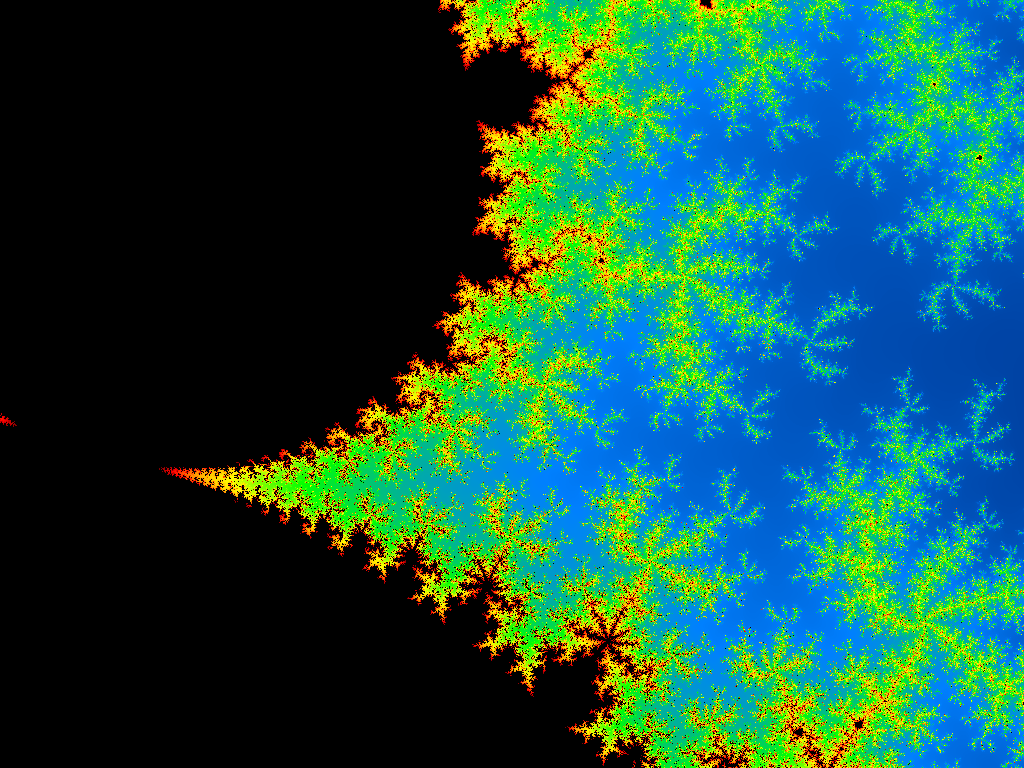
A Mandelbrot set fractal visualizer with interactive navigation. View source code
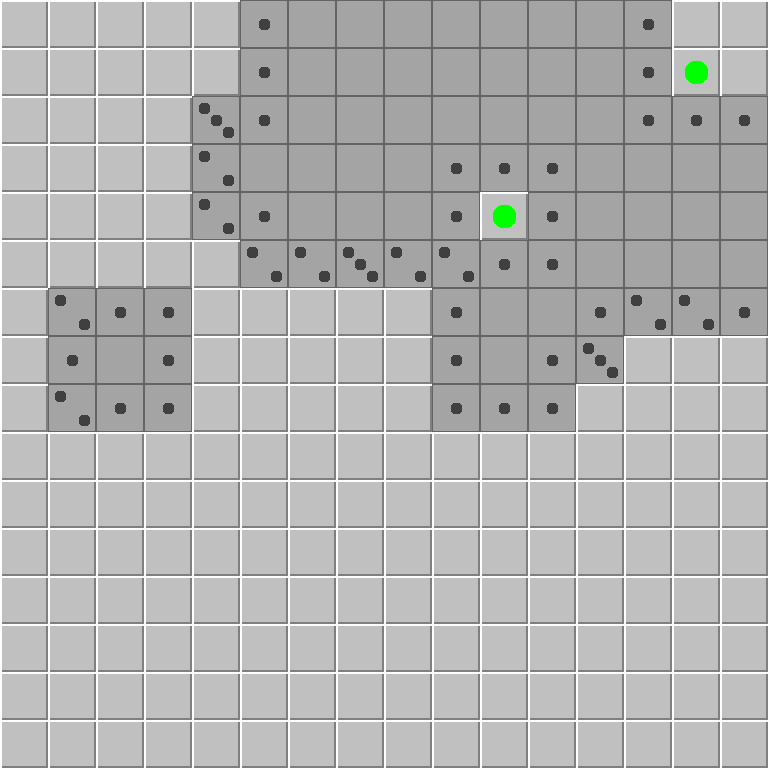
A classic Minesweeper game implementation. View source code
uint8* Init(uint32 width = 1024, uint32 height = 768, bool fullscreen = false)Initializes the window and DirectX 12 renderer.
Parameters:
width - Width of the rendering surface in pixels (default: 1024)height - Height of the rendering surface in pixels (default: 768)fullscreen - Whether to start in fullscreen mode (default: false)Returns: Pointer to the pixel buffer (RGBA format, 4 bytes per pixel) on success, or nullptr on failure.
bool Render()Processes window messages, updates input state, tracks frame timing, and copies the pixel buffer to the screen.
Returns: true to continue rendering, false when the application should quit (e.g., window closed).
void Shutdown()Cleans up all DirectX resources and destroys the window. Call this before exiting your application.
void SetVSync(bool enabled)Enables or disables vertical synchronization.
Parameters:
enabled - true to enable vsync (limit to monitor refresh rate), false to disablebool GetVSync()Returns: true if vsync is enabled, false otherwise.
void SetFullscreen(bool fullscreen)Switches between windowed and fullscreen mode.
Parameters:
fullscreen - true to switch to fullscreen (borderless window), false for windowed modebool GetFullscreen()Returns: true if currently in fullscreen mode, false if windowed.
uint32 GetWidth()Returns: The current width of the rendering surface in pixels.
uint32 GetHeight()Returns: The current height of the rendering surface in pixels.
uint8* SetSize(uint32 width, uint32 height)Resizes the rendering surface to the specified dimensions. This changes the window size, recreates internal DirectX buffers and reallocates the pixel buffer.
Parameters:
width - New width in pixelsheight - New height in pixelsReturns: Pointer to the pixel buffer (which may be different from the pointer returned by Init()) on success, or nullptr if the resize failed.
Note: Always use the returned pointer as the pixel buffer address may change after resizing.
void SetApplicationName(const char* name)Sets the application name displayed in the window title bar (along with FPS).
Parameters:
name - The name to display in the title bardouble GetDeltaTime()Returns: The duration of the previous frame in seconds. Useful for frame-independent movement and animation.
void GetMousePosition(int& x, int& y)Gets the current mouse position relative to the window.
Parameters:
x - Reference to store the X coordinate in pixelsy - Reference to store the Y coordinate in pixelsvoid GetMousePositionLastFrame(int& x, int& y)Gets the mouse position from the previous frame.
Parameters:
x - Reference to store the X coordinate in pixelsy - Reference to store the Y coordinate in pixelsbool GetMouseButton(int button)Checks if a mouse button is currently pressed.
Parameters:
button - Button to check: 0 = left, 1 = right, 2 = middleReturns: true if the button is currently pressed.
bool GetMouseButtonLastFrame(int button)Checks if a mouse button was pressed in the previous frame.
Parameters:
button - Button to check: 0 = left, 1 = right, 2 = middleReturns: true if the button was pressed in the previous frame.
bool GetKey(int keyCode)Checks if a keyboard key is currently pressed.
Parameters:
keyCode - Windows virtual key code (e.g., VK_ESCAPE, VK_SPACE, 'A', etc.)Returns: true if the key is currently pressed.
bool GetKeyLastFrame(int keyCode)Checks if a keyboard key was pressed in the previous frame.
Parameters:
keyCode - Windows virtual key codeReturns: true if the key was pressed in the previous frame.
Controller input currently uses XInput and is available on Windows builds only. On all other platforms, you can call the functions but it will always report that no buttons are pressed, the triggers are at 0, and the thumbsticks are at (0,0).
Supported controller indices are 0 to 3.
Controller button bit flags used with GetControllerButton() and GetControllerButtonLastFrame():
ControllerButton::DPadUpControllerButton::DPadDownControllerButton::DPadLeftControllerButton::DPadRightControllerButton::StartControllerButton::BackControllerButton::LeftThumbControllerButton::RightThumbControllerButton::LeftShoulderControllerButton::RightShoulderControllerButton::AControllerButton::BControllerButton::XControllerButton::Ybool GetControllerButton(int controllerIndex, ControllerButton button)Checks if a controller button is currently pressed.
Parameters:
controllerIndex - Controller index (0 to 3)button - Button flag from ControllerButtonReturns: true if pressed, false otherwise.
bool GetControllerButtonLastFrame(int controllerIndex, ControllerButton button)Checks if a controller button was pressed in the previous frame.
Parameters:
controllerIndex - Controller index (0 to 3)button - Button flag from ControllerButtonReturns: true if pressed in the previous frame, false otherwise.
float GetControllerTrigger(int controllerIndex, bool left)Gets the current normalized trigger value.
Parameters:
controllerIndex - Controller index (0 to 3)left - true for left trigger, false for right triggerReturns: Trigger value in the range [0, 1].
float GetControllerTriggerLastFrame(int controllerIndex, bool left)Gets the previous-frame normalized trigger value.
Parameters:
controllerIndex - Controller index (0 to 3)left - true for left trigger, false for right triggerReturns: Trigger value in the range [0, 1] from the previous frame.
void GetControllerThumbstick(int controllerIndex, bool left, float& x, float& y)Gets the current normalized thumbstick vector.
Parameters:
controllerIndex - Controller index (0 to 3)left - true for left stick, false for right stickx - Receives the X axis valuey - Receives the Y axis valueNotes:
[-1, 1].0.void GetControllerThumbstickLastFrame(int controllerIndex, bool left, float& x, float& y)Gets the previous-frame normalized thumbstick vector.
Parameters:
controllerIndex - Controller index (0 to 3)left - true for left stick, false for right stickx - Receives the X axis valuey - Receives the Y axis valueNotes:
[-1, 1].0.To detect a single key press or button click (not held down), compare current and previous frame states:
// Detect key just pressed this frame
bool keyPressed = Thirteen::GetKey(VK_SPACE) && !Thirteen::GetKeyLastFrame(VK_SPACE);

// Detect key just released this frame
bool keyReleased = !Thirteen::GetKey(VK_SPACE) && Thirteen::GetKeyLastFrame(VK_SPACE);

// Same pattern works for mouse buttons
bool clicked = Thirteen::GetMouseButton(0) && !Thirteen::GetMouseButtonLastFrame(0);
Alan Wolfe - API, examples and Win32/DX12 implementation
Francesco Carucci - MacOS/Metal and WASM/WebGPU implementation
Nikita Lisitsa - Linux/X11+OpenGL implementation
Chris Cascioli - GetWindowHandle() and warning cleanup
Any contribution to this library earns you a spot in the credits, so feel free to add your name to this list as part of any submitted PR. Also add your name to the top of thirteen.h so the two places stay synchronized. Thank you for your contributions!
744 followers · starred Feb 2026
120 followers · starred Feb 2026
15 followers · starred Feb 2026
92 followers · starred Feb 2026
Header only minimalist interface to graphics, inspired by the olden days of mode 13h
C++
252
62 commits
updated Mar 29, 2026
Thirteen is a header-only C++ library that initializes a window and gives you a pointer to RGBA uint8 pixels to write to, which are copied to the screen every time you call Render().
It is inspired by the simplicity of the Mode 13h days where you initialized the graphics mode and then started writing pixels directly to the screen. Just include the header, initialize, and start drawing!
Platforms Supported:
#define THIRTEEN_IMPLEMENTATION // This define must be set in one cpp file to create the implementation.
#include "thirteen.h"

int main()
{
    unsigned char* pixels = Thirteen::Init(800, 600);
    if (!pixels)
        return 1;

    unsigned int frameIndex = 0;

    // Go until window is closed or escape is pressed
    while (Thirteen::Render() && !Thirteen::GetKey(VK_ESCAPE))
    {
        // Write to pixels (RGBA format, 4 bytes per pixel)
        for (int i = 0; i < 800 * 600 * 4; i += 4)
        {
            pixels[i + 0] = 255; // Red
            pixels[i + 1] = unsigned char(frameIndex);   // Green
            pixels[i + 2] = unsigned char(frameIndex / 2);   // Blue
            pixels[i + 3] = 255; // Alpha
        }
        frameIndex++;
    }

    Thirteen::Shutdown();
    return 0;
}
How to build examples:
libX11-devel mesa-libGL-devel on RPM-based distros)Web:
for each example:
emcc main.cpp -std=c++17 -I. \
  --use-port=emdawnwebgpu \
  -sASYNCIFY \
  -sALLOW_MEMORY_GROWTH=1 \
  -o simple.html
Then run a local web server and open simple.html in a WebGPU-enabled browser.
A basic example showing the fundamentals of Thirteen. View source code
A Mandelbrot set fractal visualizer with interactive navigation. View source code
A classic Minesweeper game implementation. View source code
uint8* Init(uint32 width = 1024, uint32 height = 768, bool fullscreen = false)Initializes the window and DirectX 12 renderer.
Parameters:
width - Width of the rendering surface in pixels (default: 1024)height - Height of the rendering surface in pixels (default: 768)fullscreen - Whether to start in fullscreen mode (default: false)Returns: Pointer to the pixel buffer (RGBA format, 4 bytes per pixel) on success, or nullptr on failure.
bool Render()Processes window messages, updates input state, tracks frame timing, and copies the pixel buffer to the screen.
Returns: true to continue rendering, false when the application should quit (e.g., window closed).
void Shutdown()Cleans up all DirectX resources and destroys the window. Call this before exiting your application.
void SetVSync(bool enabled)Enables or disables vertical synchronization.
Parameters:
enabled - true to enable vsync (limit to monitor refresh rate), false to disablebool GetVSync()Returns: true if vsync is enabled, false otherwise.
void SetFullscreen(bool fullscreen)Switches between windowed and fullscreen mode.
Parameters:
fullscreen - true to switch to fullscreen (borderless window), false for windowed modebool GetFullscreen()Returns: true if currently in fullscreen mode, false if windowed.
uint32 GetWidth()Returns: The current width of the rendering surface in pixels.
uint32 GetHeight()Returns: The current height of the rendering surface in pixels.
uint8* SetSize(uint32 width, uint32 height)Resizes the rendering surface to the specified dimensions. This changes the window size, recreates internal DirectX buffers and reallocates the pixel buffer.
Parameters:
width - New width in pixelsheight - New height in pixelsReturns: Pointer to the pixel buffer (which may be different from the pointer returned by Init()) on success, or nullptr if the resize failed.
Note: Always use the returned pointer as the pixel buffer address may change after resizing.
void SetApplicationName(const char* name)Sets the application name displayed in the window title bar (along with FPS).
Parameters:
name - The name to display in the title bardouble GetDeltaTime()Returns: The duration of the previous frame in seconds. Useful for frame-independent movement and animation.
void GetMousePosition(int& x, int& y)Gets the current mouse position relative to the window.
Parameters:
x - Reference to store the X coordinate in pixelsy - Reference to store the Y coordinate in pixelsvoid GetMousePositionLastFrame(int& x, int& y)Gets the mouse position from the previous frame.
Parameters:
x - Reference to store the X coordinate in pixelsy - Reference to store the Y coordinate in pixelsbool GetMouseButton(int button)Checks if a mouse button is currently pressed.
Parameters:
button - Button to check: 0 = left, 1 = right, 2 = middleReturns: true if the button is currently pressed.
bool GetMouseButtonLastFrame(int button)Checks if a mouse button was pressed in the previous frame.
Parameters:
button - Button to check: 0 = left, 1 = right, 2 = middleReturns: true if the button was pressed in the previous frame.
bool GetKey(int keyCode)Checks if a keyboard key is currently pressed.
Parameters:
keyCode - Windows virtual key code (e.g., VK_ESCAPE, VK_SPACE, 'A', etc.)Returns: true if the key is currently pressed.
bool GetKeyLastFrame(int keyCode)Checks if a keyboard key was pressed in the previous frame.
Parameters:
keyCode - Windows virtual key codeReturns: true if the key was pressed in the previous frame.
Controller input currently uses XInput and is available on Windows builds only. On all other platforms, you can call the functions but it will always report that no buttons are pressed, the triggers are at 0, and the thumbsticks are at (0,0).
Supported controller indices are 0 to 3.
Controller button bit flags used with GetControllerButton() and GetControllerButtonLastFrame():
ControllerButton::DPadUpControllerButton::DPadDownControllerButton::DPadLeftControllerButton::DPadRightControllerButton::StartControllerButton::BackControllerButton::LeftThumbControllerButton::RightThumbControllerButton::LeftShoulderControllerButton::RightShoulderControllerButton::AControllerButton::BControllerButton::XControllerButton::Ybool GetControllerButton(int controllerIndex, ControllerButton button)Checks if a controller button is currently pressed.
Parameters:
controllerIndex - Controller index (0 to 3)button - Button flag from ControllerButtonReturns: true if pressed, false otherwise.
bool GetControllerButtonLastFrame(int controllerIndex, ControllerButton button)Checks if a controller button was pressed in the previous frame.
Parameters:
controllerIndex - Controller index (0 to 3)button - Button flag from ControllerButtonReturns: true if pressed in the previous frame, false otherwise.
float GetControllerTrigger(int controllerIndex, bool left)Gets the current normalized trigger value.
Parameters:
controllerIndex - Controller index (0 to 3)left - true for left trigger, false for right triggerReturns: Trigger value in the range [0, 1].
float GetControllerTriggerLastFrame(int controllerIndex, bool left)Gets the previous-frame normalized trigger value.
Parameters:
controllerIndex - Controller index (0 to 3)left - true for left trigger, false for right triggerReturns: Trigger value in the range [0, 1] from the previous frame.
void GetControllerThumbstick(int controllerIndex, bool left, float& x, float& y)Gets the current normalized thumbstick vector.
Parameters:
controllerIndex - Controller index (0 to 3)left - true for left stick, false for right stickx - Receives the X axis valuey - Receives the Y axis valueNotes:
[-1, 1].0.void GetControllerThumbstickLastFrame(int controllerIndex, bool left, float& x, float& y)Gets the previous-frame normalized thumbstick vector.
Parameters:
controllerIndex - Controller index (0 to 3)left - true for left stick, false for right stickx - Receives the X axis valuey - Receives the Y axis valueNotes:
[-1, 1].0.To detect a single key press or button click (not held down), compare current and previous frame states:
// Detect key just pressed this frame
bool keyPressed = Thirteen::GetKey(VK_SPACE) && !Thirteen::GetKeyLastFrame(VK_SPACE);

// Detect key just released this frame
bool keyReleased = !Thirteen::GetKey(VK_SPACE) && Thirteen::GetKeyLastFrame(VK_SPACE);

// Same pattern works for mouse buttons
bool clicked = Thirteen::GetMouseButton(0) && !Thirteen::GetMouseButtonLastFrame(0);
Alan Wolfe - API, examples and Win32/DX12 implementation
Francesco Carucci - MacOS/Metal and WASM/WebGPU implementation
Nikita Lisitsa - Linux/X11+OpenGL implementation
Chris Cascioli - GetWindowHandle() and warning cleanup
Any contribution to this library earns you a spot in the credits, so feel free to add your name to this list as part of any submitted PR. Also add your name to the top of thirteen.h so the two places stay synchronized. Thank you for your contributions!
744 followers · starred Feb 2026
120 followers · starred Feb 2026
15 followers · starred Feb 2026
92 followers · starred Feb 2026



