
Offline provenance validation and regression checks for Docling JSON
Python
1
4 commits
updated Oct 1, 2026
See what people are saying
README
docling-guard
Catch broken source spans and extraction losses in Docling JSON before they reach a search index.
On the 15 real Docling exports in the Docling project's own test suite,1 docling-guard passes 12 clean and flags 3 with a provenance span that runs past its source text, all from the same dehyphenation pattern reported in docling-project/docling#4217. The synthetic regression fixture in docling-guard demo reproduces one such case in isolation.2


Why
Document conversion can return a JSON object even when important details are wrong. A Docling issue reports source spans extending past the extracted text after dehyphenation. Another report describes text from one table column extending over the next column. A downstream RAG or document pipeline may only notice the damage after indexing.
docling-guard checks the exported structure and compares a candidate export with a known baseline. It does not run OCR or load model weights.
Install
Python 3.10 or newer:
python3 -m pip install git+https://github.com/Arthur031221/docling-guard.git
From a local checkout, run python3 -m pip install ..
Quick start
Create two safe synthetic exports, then compare them:
ROOT=$(docling-guard demo)
docling-guard check "$ROOT/after.json"
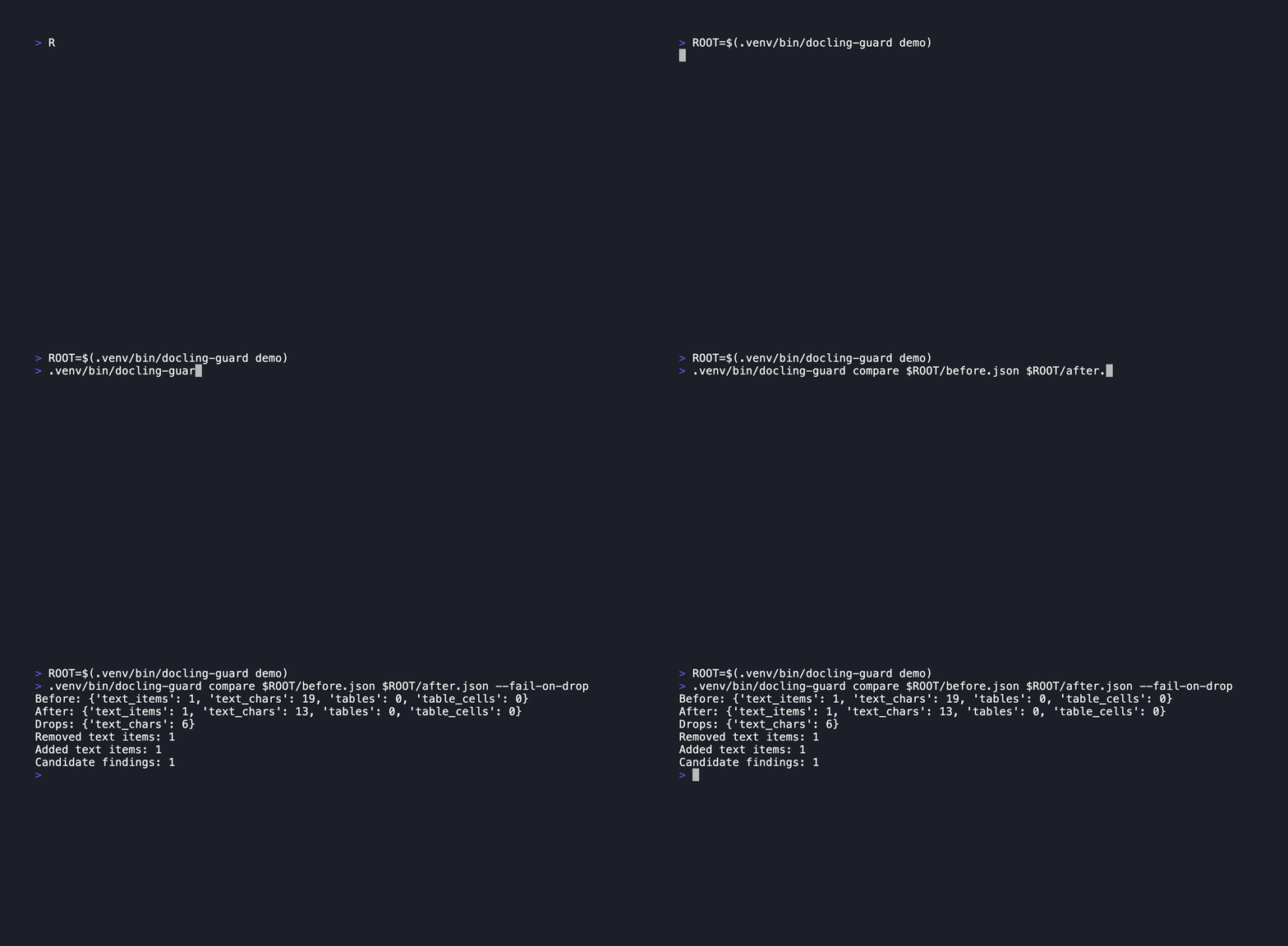
docling-guard compare "$ROOT/before.json" "$ROOT/after.json" --fail-on-drop
The first command reports an invalid charspan. The second shows the lost text and returns status 2 because the candidate also has a structural error. Both commands are read-only. Use a real Docling JSON export instead of the fixture after you have tried the demo. Docling's current CLI can produce one with docling convert input.pdf --to json --output ./exports.
How it works
check validates each text provenance span against its final text length. It checks table-cell grid bounds, grid collisions, and horizontal overlap between single-column cell boxes on the same row. A horizontal overlap is a warning because some layouts may require review rather than automatic rejection.
compare reports counts for text items, normalized text characters, tables, and table cells before and after a converter change. It also compares the multiset of exact whitespace-normalized text items. A changed segmentation can appear as removed and added items even when the document meaning is unchanged, so review the samples before treating a diff as a regression.
Comparison
| Option | What it does | What it does not do |
|---|---|---|
| Docling JSON export | Preserves document structure and table spans | Does not compare two exports for this workflow |
git diff --no-index | Shows raw JSON changes | Does not identify invalid spans or summarize extraction loss |
docling-guard | Validates source spans and cell geometry, then summarizes changes | Does not judge semantic OCR accuracy |
Command reference
docling-guard demo
docling-guard check DOCUMENT.json [--json] [--fail-on-warning]
docling-guard compare BEFORE.json AFTER.json [--json] [--fail-on-drop]
check exits 0 when no errors are found, 1 for warnings only with --fail-on-warning, and 2 for invalid input or structural errors. compare exits 0 by default if the candidate has no structural errors, 1 for a detected count decrease with --fail-on-drop, and 2 for invalid input or candidate structural errors. --json emits a machine-readable report suitable for CI.
Limits and FAQ
- Inputs must be Docling JSON exports with
textsandtablesarrays. Other OCR JSON formats are not accepted in this release. - A charspan is checked against
origwhen present, since Docling strips enumeration markers like"b. "fromtextbut keeps them inorig. Checking againsttextinstead, as version 0.1.0 did, flagged this on most enumerated items in the real-document sample and is why that release was not measured against real exports. - Each input file is capped at 64 MiB to keep memory use predictable. Larger exports need a streaming reader in a later release.
- A table with more than 2,000 valid cells skips pairwise overlap checks and reports
geometry_skipped. Bounds are still checked. - The table-box rule checks horizontal coordinates and may warn on a legitimate unusual layout. It is not proof of extraction failure.
comparedoes not align pages or match semantically equivalent wording. It catches missing content and exact text changes, not every OCR error.- This tool never sends document contents to a service. It reads local files only.
Related projects
- papercompass: If you feed arXiv PDFs through Docling before indexing them, this checks the export first.
- receiptwise: A different local extraction pipeline that a similar regression check could cover.
- labexplain: Same idea applied to lab reports: extract locally, check the extraction before you trust it.
Contributing and license
See CONTRIBUTING.md. MIT, copyright 2026 Arthur.
Footnotes
-
Measured on 2026-10-01 against the 15 JSON files in
docling-project/doclingat commitd6f03078ad364108df3e7e82e8f0dcc3fd7f39ea, pathtests/data/pdf/groundtruth/(arXiv papers, a newspaper interview, a technical handbook, right-to-left documents, and tables). Three of the fixtures are committed intests/data/real/with provenance inSOURCES.md; runscripts/measure_real_documents.shto reproduce the full 15-document count. Checking a real document still requires running Docling yourself to produce the JSON;docling-guarddoes not run Docling. ↩ -
docling-guard demowrites one 19-character baseline text item and a 13-character candidate text item with a[0, 15]provenance span. The difference is 6 characters, and the candidate span exceeds the text by 2. Run the commands above to reproduce the results. ↩
Similar repos


Languages
Python
95.0%
Shell
5.0%
Offline provenance validation and regression checks for Docling JSON
Python
1
4 commits
updated Oct 1, 2026
See what people are saying
README
docling-guard
Catch broken source spans and extraction losses in Docling JSON before they reach a search index.
On the 15 real Docling exports in the Docling project's own test suite,1 docling-guard passes 12 clean and flags 3 with a provenance span that runs past its source text, all from the same dehyphenation pattern reported in docling-project/docling#4217. The synthetic regression fixture in docling-guard demo reproduces one such case in isolation.2
Why
Document conversion can return a JSON object even when important details are wrong. A Docling issue reports source spans extending past the extracted text after dehyphenation. Another report describes text from one table column extending over the next column. A downstream RAG or document pipeline may only notice the damage after indexing.
docling-guard checks the exported structure and compares a candidate export with a known baseline. It does not run OCR or load model weights.
Install
Python 3.10 or newer:
python3 -m pip install git+https://github.com/Arthur031221/docling-guard.git
From a local checkout, run python3 -m pip install ..
Quick start
Create two safe synthetic exports, then compare them:
ROOT=$(docling-guard demo)
docling-guard check "$ROOT/after.json"
docling-guard compare "$ROOT/before.json" "$ROOT/after.json" --fail-on-drop
The first command reports an invalid charspan. The second shows the lost text and returns status 2 because the candidate also has a structural error. Both commands are read-only. Use a real Docling JSON export instead of the fixture after you have tried the demo. Docling's current CLI can produce one with docling convert input.pdf --to json --output ./exports.
How it works
check validates each text provenance span against its final text length. It checks table-cell grid bounds, grid collisions, and horizontal overlap between single-column cell boxes on the same row. A horizontal overlap is a warning because some layouts may require review rather than automatic rejection.
compare reports counts for text items, normalized text characters, tables, and table cells before and after a converter change. It also compares the multiset of exact whitespace-normalized text items. A changed segmentation can appear as removed and added items even when the document meaning is unchanged, so review the samples before treating a diff as a regression.
Comparison
| Option | What it does | What it does not do |
|---|---|---|
| Docling JSON export | Preserves document structure and table spans | Does not compare two exports for this workflow |
git diff --no-index | Shows raw JSON changes | Does not identify invalid spans or summarize extraction loss |
docling-guard | Validates source spans and cell geometry, then summarizes changes | Does not judge semantic OCR accuracy |
Command reference
docling-guard demo
docling-guard check DOCUMENT.json [--json] [--fail-on-warning]
docling-guard compare BEFORE.json AFTER.json [--json] [--fail-on-drop]
check exits 0 when no errors are found, 1 for warnings only with --fail-on-warning, and 2 for invalid input or structural errors. compare exits 0 by default if the candidate has no structural errors, 1 for a detected count decrease with --fail-on-drop, and 2 for invalid input or candidate structural errors. --json emits a machine-readable report suitable for CI.
Limits and FAQ
- Inputs must be Docling JSON exports with
textsandtablesarrays. Other OCR JSON formats are not accepted in this release. - A charspan is checked against
origwhen present, since Docling strips enumeration markers like"b. "fromtextbut keeps them inorig. Checking againsttextinstead, as version 0.1.0 did, flagged this on most enumerated items in the real-document sample and is why that release was not measured against real exports. - Each input file is capped at 64 MiB to keep memory use predictable. Larger exports need a streaming reader in a later release.
- A table with more than 2,000 valid cells skips pairwise overlap checks and reports
geometry_skipped. Bounds are still checked. - The table-box rule checks horizontal coordinates and may warn on a legitimate unusual layout. It is not proof of extraction failure.
comparedoes not align pages or match semantically equivalent wording. It catches missing content and exact text changes, not every OCR error.- This tool never sends document contents to a service. It reads local files only.
Related projects
- papercompass: If you feed arXiv PDFs through Docling before indexing them, this checks the export first.
- receiptwise: A different local extraction pipeline that a similar regression check could cover.
- labexplain: Same idea applied to lab reports: extract locally, check the extraction before you trust it.
Contributing and license
See CONTRIBUTING.md. MIT, copyright 2026 Arthur.
Footnotes
-
Measured on 2026-10-01 against the 15 JSON files in
docling-project/doclingat commitd6f03078ad364108df3e7e82e8f0dcc3fd7f39ea, pathtests/data/pdf/groundtruth/(arXiv papers, a newspaper interview, a technical handbook, right-to-left documents, and tables). Three of the fixtures are committed intests/data/real/with provenance inSOURCES.md; runscripts/measure_real_documents.shto reproduce the full 15-document count. Checking a real document still requires running Docling yourself to produce the JSON;docling-guarddoes not run Docling. ↩ -
docling-guard demowrites one 19-character baseline text item and a 13-character candidate text item with a[0, 15]provenance span. The difference is 6 characters, and the candidate span exceeds the text by 2. Run the commands above to reproduce the results. ↩
Similar repos
Languages
Python
95.0%
Shell
5.0%