
Explain which CORS preflight check rejects a browser request
JavaScript
0
4 commits
updated Oct 2, 2026
See what people are saying
README

corswhy
Find which response header rejects a browser's CORS preflight before you change server code.


⚡ Quickstart • 🔍 How it works • 📖 Examples • 💬 FAQ
[!TIP] With the included demo server running, inspect its 401 route without a global install. Requires Node.js 20 or newer:
npx --yes github:Arthur031221/corswhy http://127.0.0.1:18765/auth --origin http://localhost:5173 --method POST --header authorization,content-type --credentials include
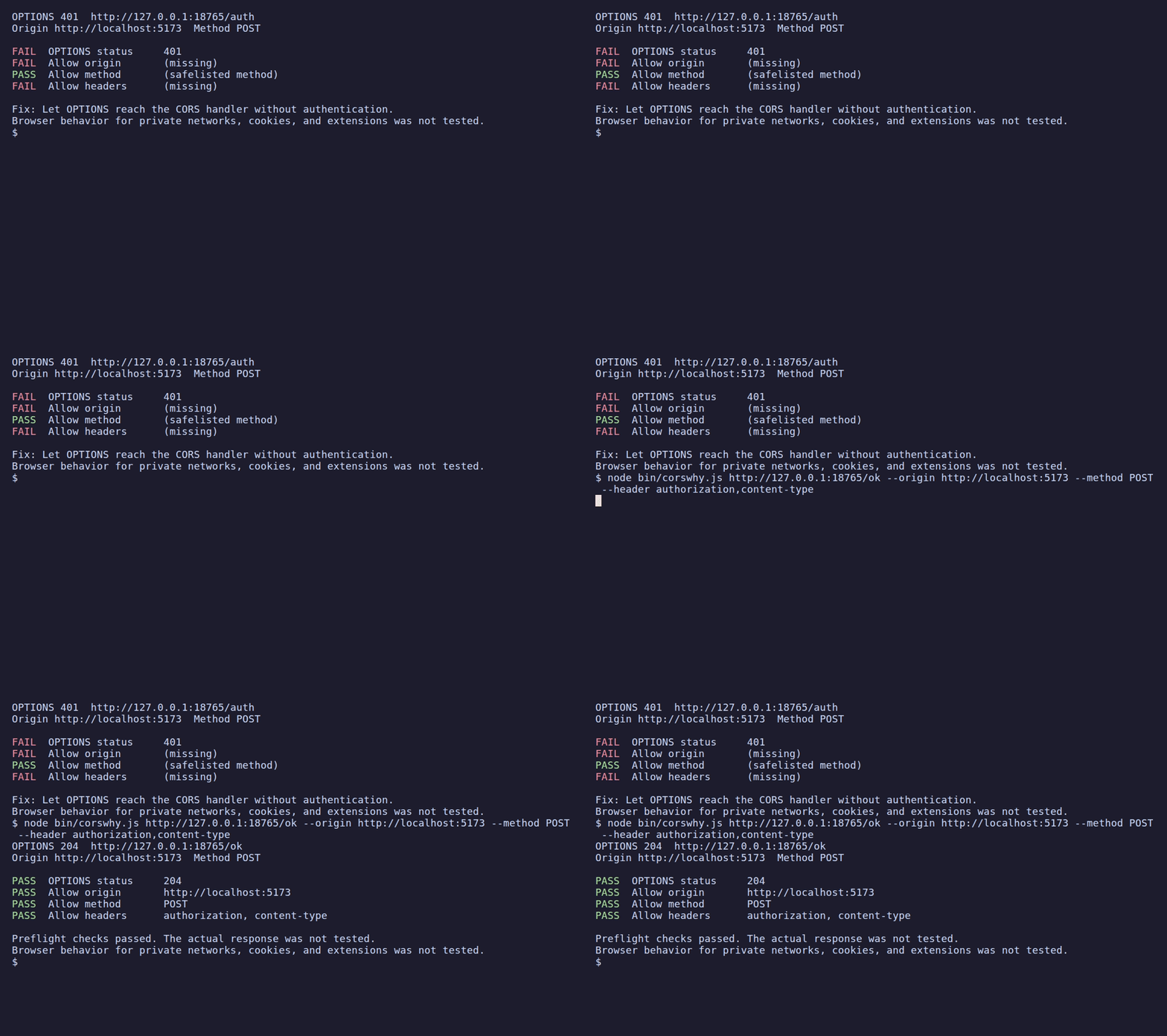
Why corswhy
Browsers send an OPTIONS preflight before some cross-origin requests. If authentication blocks OPTIONS, or a response does not allow the requested origin or headers, the browser reports a generic CORS error before the actual request reaches your handler.
A raw OPTIONS response shows headers but leaves you to compare them with the browser's origin, method, and requested headers. corswhy runs those checks and reports which one failed, with a repair hint, before you change server code.
Features
- 🔎 Checks the preflight response: Reports the status, allowed origin, credentials when requested, method, and requested headers.
- 📨 Sends browser preflight fields: Includes
Origin,Access-Control-Request-Method, and the header names supplied with--header. - 🛑 Sends only OPTIONS: It never sends the actual request or a request body.
- ⚡ Skips unnecessary probes: A GET, HEAD, or POST without named unsafe headers needs no preflight, so corswhy sends nothing.
- 🧾 Explains failed checks: Shows each check and a repair hint for the first failure.
- 🗂 Supports scripts: Use
--jsonfor a structured report.
Quickstart
Requires Node.js 20 or newer. From a checkout, install with npm install -g .. To run from GitHub without a global install, use npx github:Arthur031221/corswhy before the URL and options shown below.
With a local API at http://localhost:8000/api that returns 401 to OPTIONS, run:
corswhy http://localhost:8000/api \
  --origin http://localhost:5173 \
  --method POST \
  --header authorization,content-type \
  --credentials include
OPTIONS 401  http://localhost:8000/api
Origin http://localhost:5173  Method POST

FAIL  OPTIONS status     401
FAIL  Allow origin       (missing)
FAIL  Allow credentials  (missing)
PASS  Allow method       (safelisted method)
FAIL  Allow headers      (missing)

Fix: Let OPTIONS reach the CORS handler without authentication.
Browser behavior for private networks, cookies, and extensions was not tested.
Examples
Start the included fixture server in another terminal:
node demo/server.js
Its /ok route returns the required CORS response headers. A GET without named unsafe headers does not need a preflight, so corswhy sends no request.
Passing preflight
|
No preflight needed
|
How it works
corswhy sends OPTIONS with Origin, Access-Control-Request-Method, and, when supplied, the names in Access-Control-Request-Headers. It checks the response status, allowed origin, credentials when requested, method, and headers. It does not send POST, PUT, DELETE, or a request body.
| Tool | What it does | Where corswhy differs |
|---|---|---|
curl with an OPTIONS request | Sends manually chosen headers and displays the raw response. | corswhy builds the browser preflight fields and evaluates the CORS response against the supplied inputs. |
| Browser DevTools | Shows requests and responses from an actual browser flow. | corswhy probes the supplied URL, origin, method, and header names, then summarizes the preflight checks. |
The checks follow the Fetch standard's CORS protocol. The MDN preflight guide explains why browsers send OPTIONS before certain cross-origin requests.
Options
| Option | Meaning |
|---|---|
--origin ORIGIN | Required browser origin, such as http://localhost:5173 |
--method METHOD | Actual request method, default GET |
--header NAMES | Names from Access-Control-Request-Headers |
--credentials MODE | omit, same-origin, or include, default omit |
--timeout MS | OPTIONS timeout, default 5000 |
--json | Structured report for an issue or script |
--no-color | Plain terminal output |
--header takes the names shown in a browser's Access-Control-Request-Headers request header. For a JSON POST, include content-type; for a bearer token, include authorization. Separate names with commas or repeat the option.
For a cross-origin request, same-origin behaves like omit for the CORS response checks. The preflight request itself never includes cookies. Use include if the browser's request uses credentials: 'include'.
FAQ
Does corswhy send the actual request?
No. It sends an OPTIONS request only. It does not send POST, PUT, DELETE, or a request body.
Does a passing report guarantee that my application request will work?
No. The verdict covers the supplied OPTIONS exchange. It does not test the actual response, browser cookie policy, private network access, service workers, browser extensions, preflight caching, or differences caused by browser-generated headers. A passing report means the supplied preflight checks passed, not that the full application request will succeed.
When does corswhy send nothing?
A GET, HEAD, or POST without named unsafe headers does not need a preflight, so corswhy sends no request in that case.
How do credentials affect the check?
For a cross-origin request, same-origin behaves like omit for CORS response checks. The preflight request itself never includes cookies. Use include if the browser request uses credentials: 'include'.
Local demo and tests
Run npm test for the local HTTP fixtures. bash demo/render.sh records the GIF with VHS and stops its local server before exiting. The fixture server exposes /auth, which returns OPTIONS 401, and /ok, which returns the required CORS response headers.
Contributing
See CONTRIBUTING.md for local development. To report an issue, open an issue.
License
MIT licensed. See LICENSE.
Similar repos


Languages
JavaScript
89.2%
HTML
10.8%
Explain which CORS preflight check rejects a browser request
JavaScript
0
4 commits
updated Oct 2, 2026
See what people are saying
README
corswhy
Find which response header rejects a browser's CORS preflight before you change server code.
⚡ Quickstart • 🔍 How it works • 📖 Examples • 💬 FAQ
[!TIP] With the included demo server running, inspect its 401 route without a global install. Requires Node.js 20 or newer:
npx --yes github:Arthur031221/corswhy http://127.0.0.1:18765/auth --origin http://localhost:5173 --method POST --header authorization,content-type --credentials include
Why corswhy
Browsers send an OPTIONS preflight before some cross-origin requests. If authentication blocks OPTIONS, or a response does not allow the requested origin or headers, the browser reports a generic CORS error before the actual request reaches your handler.
A raw OPTIONS response shows headers but leaves you to compare them with the browser's origin, method, and requested headers. corswhy runs those checks and reports which one failed, with a repair hint, before you change server code.
Features
- 🔎 Checks the preflight response: Reports the status, allowed origin, credentials when requested, method, and requested headers.
- 📨 Sends browser preflight fields: Includes
Origin,Access-Control-Request-Method, and the header names supplied with--header. - 🛑 Sends only OPTIONS: It never sends the actual request or a request body.
- ⚡ Skips unnecessary probes: A GET, HEAD, or POST without named unsafe headers needs no preflight, so corswhy sends nothing.
- 🧾 Explains failed checks: Shows each check and a repair hint for the first failure.
- 🗂 Supports scripts: Use
--jsonfor a structured report.
Quickstart
Requires Node.js 20 or newer. From a checkout, install with npm install -g .. To run from GitHub without a global install, use npx github:Arthur031221/corswhy before the URL and options shown below.
With a local API at http://localhost:8000/api that returns 401 to OPTIONS, run:
corswhy http://localhost:8000/api \
  --origin http://localhost:5173 \
  --method POST \
  --header authorization,content-type \
  --credentials include
OPTIONS 401  http://localhost:8000/api
Origin http://localhost:5173  Method POST

FAIL  OPTIONS status     401
FAIL  Allow origin       (missing)
FAIL  Allow credentials  (missing)
PASS  Allow method       (safelisted method)
FAIL  Allow headers      (missing)

Fix: Let OPTIONS reach the CORS handler without authentication.
Browser behavior for private networks, cookies, and extensions was not tested.
Examples
Start the included fixture server in another terminal:
node demo/server.js
Its /ok route returns the required CORS response headers. A GET without named unsafe headers does not need a preflight, so corswhy sends no request.
Passing preflight
|
No preflight needed
|
How it works
corswhy sends OPTIONS with Origin, Access-Control-Request-Method, and, when supplied, the names in Access-Control-Request-Headers. It checks the response status, allowed origin, credentials when requested, method, and headers. It does not send POST, PUT, DELETE, or a request body.
| Tool | What it does | Where corswhy differs |
|---|---|---|
curl with an OPTIONS request | Sends manually chosen headers and displays the raw response. | corswhy builds the browser preflight fields and evaluates the CORS response against the supplied inputs. |
| Browser DevTools | Shows requests and responses from an actual browser flow. | corswhy probes the supplied URL, origin, method, and header names, then summarizes the preflight checks. |
The checks follow the Fetch standard's CORS protocol. The MDN preflight guide explains why browsers send OPTIONS before certain cross-origin requests.
Options
| Option | Meaning |
|---|---|
--origin ORIGIN | Required browser origin, such as http://localhost:5173 |
--method METHOD | Actual request method, default GET |
--header NAMES | Names from Access-Control-Request-Headers |
--credentials MODE | omit, same-origin, or include, default omit |
--timeout MS | OPTIONS timeout, default 5000 |
--json | Structured report for an issue or script |
--no-color | Plain terminal output |
--header takes the names shown in a browser's Access-Control-Request-Headers request header. For a JSON POST, include content-type; for a bearer token, include authorization. Separate names with commas or repeat the option.
For a cross-origin request, same-origin behaves like omit for the CORS response checks. The preflight request itself never includes cookies. Use include if the browser's request uses credentials: 'include'.
FAQ
Does corswhy send the actual request?
No. It sends an OPTIONS request only. It does not send POST, PUT, DELETE, or a request body.
Does a passing report guarantee that my application request will work?
No. The verdict covers the supplied OPTIONS exchange. It does not test the actual response, browser cookie policy, private network access, service workers, browser extensions, preflight caching, or differences caused by browser-generated headers. A passing report means the supplied preflight checks passed, not that the full application request will succeed.
When does corswhy send nothing?
A GET, HEAD, or POST without named unsafe headers does not need a preflight, so corswhy sends no request in that case.
How do credentials affect the check?
For a cross-origin request, same-origin behaves like omit for CORS response checks. The preflight request itself never includes cookies. Use include if the browser request uses credentials: 'include'.
Local demo and tests
Run npm test for the local HTTP fixtures. bash demo/render.sh records the GIF with VHS and stops its local server before exiting. The fixture server exposes /auth, which returns OPTIONS 401, and /ok, which returns the required CORS response headers.
Contributing
See CONTRIBUTING.md for local development. To report an issue, open an issue.
License
MIT licensed. See LICENSE.
Similar repos
Languages
JavaScript
89.2%
HTML
10.8%