The provider's own price, right inside your chat. Make video, images and voice with 400+ Vercel AI Gateway models (Veo, Kling, Seedance, Nano Banana, GPT Image) from Claude, ChatGPT or any MCP app. Your own copy, your own credits, no markup.
See the code

One click, and you are done.
Vercel copies this repo to your account, makes your private storage and asks for one secret. Your copy then walks you through the rest.




What you can make · How it works · Get started · What it costs · Tools · Keep it safe
The provider's own price, right inside your chat. No markup, no subscription, no API key. Add this connector to Claude, ChatGPT or any MCP app and it can make pictures, video and voice with 400+ models on Vercel AI Gateway: Veo, Kling, Seedance, Nano Banana, GPT Image, FLUX and more. You run your own copy on your own Vercel account, so every call is paid from your own Gateway credits at the price the provider sets.
 A real chat on claude.ai, October 2026: a picture for $0.007, then a five-second video for $0.09 (HeyGen Video 1). Waiting while models work is sped up. See the demo.
Ask in plain words. Your chat does the thinking and the writing with everything it already knows about you; the connector makes the pictures, the video and the voice.
Shoot a short film"Write a one-minute sci-fi short, storyboard it, then film every scene with sound." Your chat writes the script and plans each shot. The connector draws the storyboard and films the scenes. generate_image start_video get_video10 scenes with sound: $12.00 on Veo 3.1 Fast |
Write and illustrate a book"Write a 12-chapter bedtime story about a fox who collects stars, and paint every chapter in watercolour." Your chat writes the story. The connector paints the cover and a picture for each chapter, in one style. generate_image edit_image12 pictures: $1.61 on Nano Banana Pro |
Turn it into an audiobook"Read chapter one aloud in a warm, slow voice, like a bedtime story." The connector narrates the text and hands back an audio file you can play right in the chat. generate_speechA 2,000-word chapter: about $0.33 on TTS-1 HD |
Shoot a product"Take this photo of my mug, put it on white marble in morning light, then make a slow turntable clip." The connector edits your own photo into new shots, then films a short clip from the best one. edit_image start_video get_video4 shots and a 5-second clip: $0.66 on FLUX Kontext Pro and Veo 3.1 Fast |
Make anyone dance"Make the character in this picture do the dance in this video." The connector copies the moves from a reference video onto your character, frame by frame. motion_control get_videoA 10-second dance: $1.26 on Kling 3.0 Motion Control |
Run a month of posts"Plan 30 days of posts for my bakery, write the captions, and make a picture for each day." Your chat plans the month. The connector makes a picture for every day and vertical clips for the big ones. generate_image start_video get_video30 pictures and 8 clips: $10.43 on Nano Banana Pro and Veo 3.1 Fast |
Turn a recording into notes"Transcribe this meeting with timestamps, then give me the decisions and who owns what." The connector writes down every word; your chat turns it into notes, subtitles or a translation. transcribeA 20-minute recording: $0.12 on Whisper |
Pick the right model"Which video model is cheapest for an 8-second clip that still looks good?" The connector lists every model with its AI Gateway catalog price, so your chat can choose for you, or compare a few side by side. list_models check_creditsFree reading the catalog costs nothing |
Costs are AI Gateway catalog prices from October 2026, for the example quantities shown. They are examples, not quotes: the provider's bill can differ from the catalog (see What it costs), and each call reports what it actually cost. Ask list_models for today's catalog.
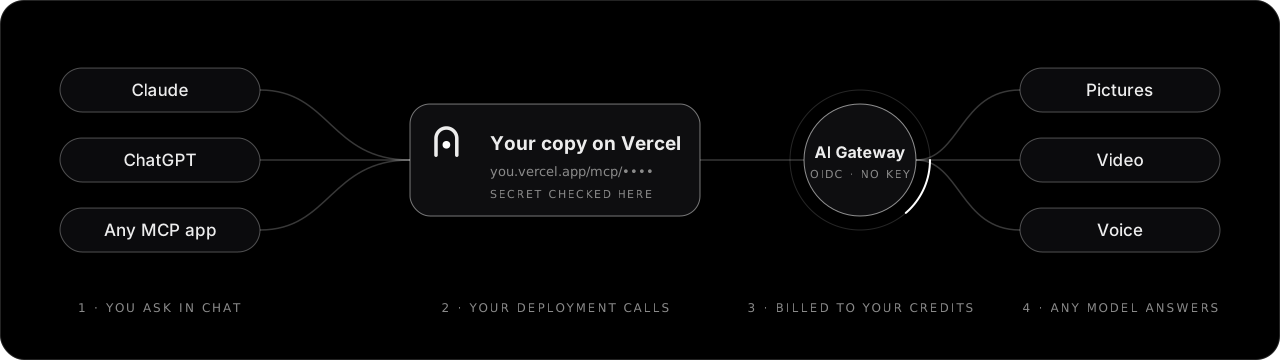
What is MCP? The Model Context Protocol is how chat apps plug in outside tools. This project is one of those tools: once you add its link, your chat app can make things with any model on AI Gateway.
You need a Vercel account and a GitHub, GitLab or Bitbucket account.
1. DeployClick the button. Vercel copies the repo and makes your private storage. Your new page then makes your secret. Choose Set up with your agent: copy one prompt into Claude with the Vercel connector and it adds the secret's fingerprint (and storage, if missing) and redeploys. Or choose Set up manually and follow the steps. |
2. Open your copyGo to |
3. Add it to your chatIn Claude: Settings → Connectors → Add custom connector, paste the link. ChatGPT and others take it as a custom MCP server. |
Then set a spend budget in the Vercel dashboard (AI Gateway → Budgets). It is the real limit on what your link can ever spend.
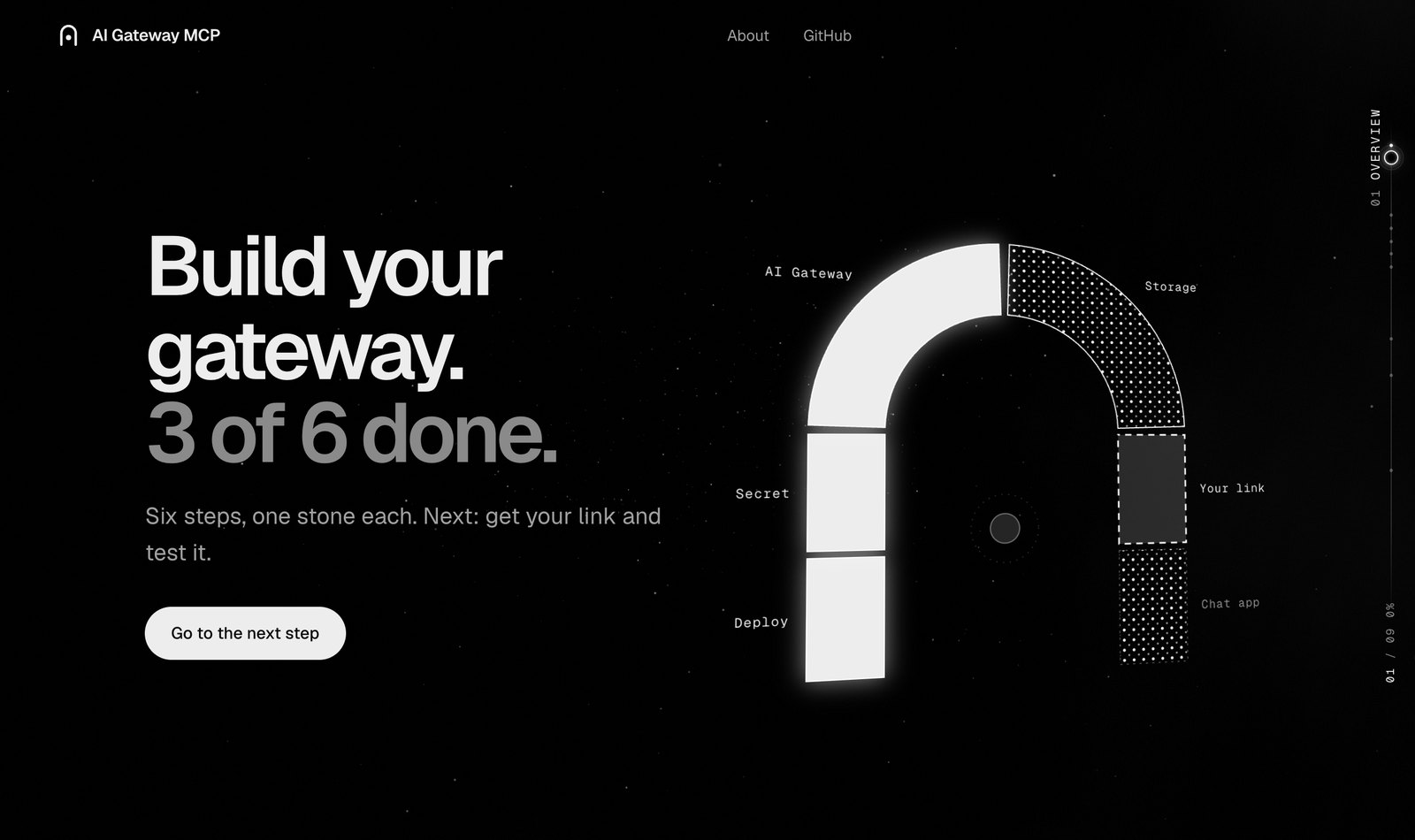
Open your copy and it shows where you are: an arch of six stones, one per step. Set stones glow, the next one breathes, and clicking a stone opens its step.
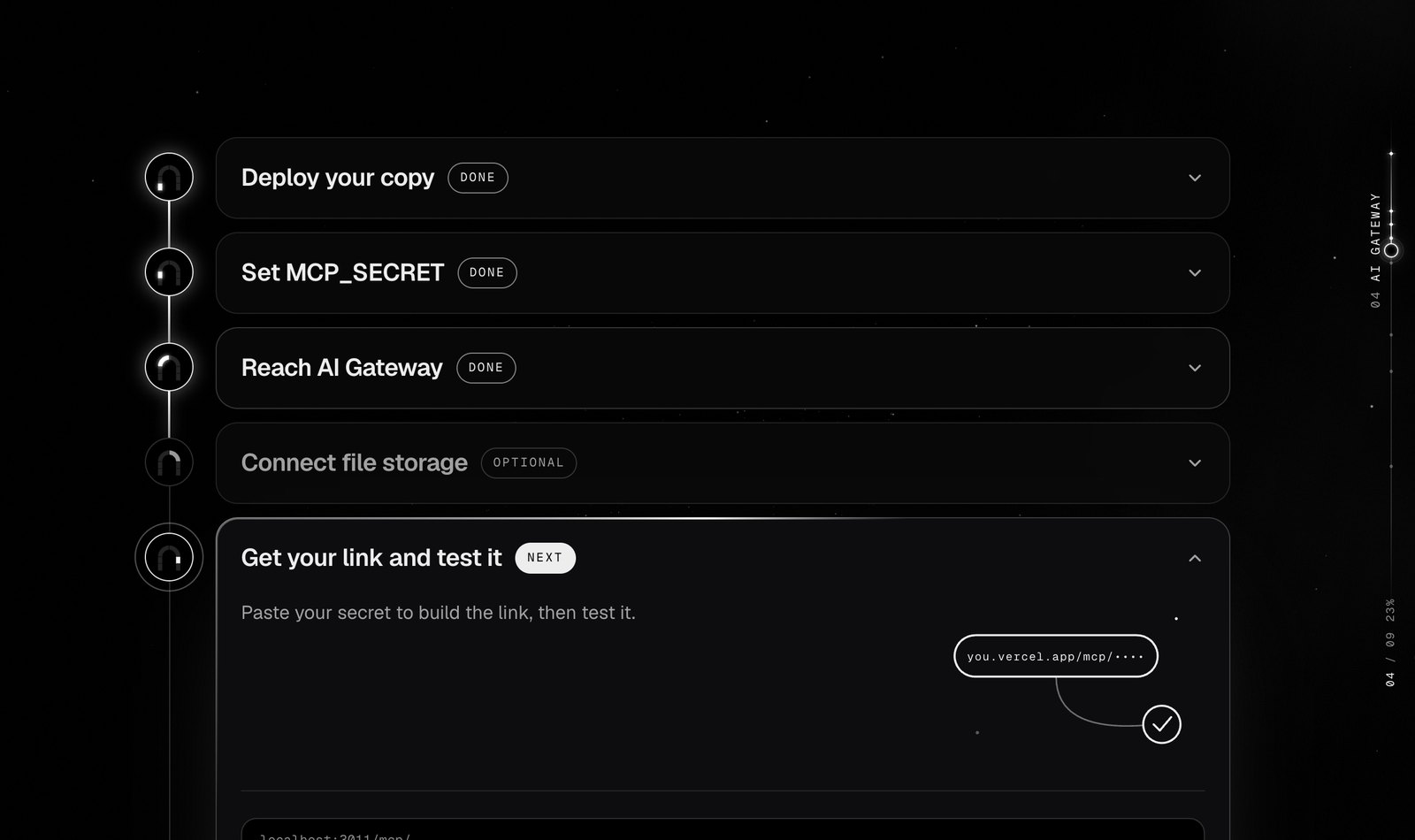
One step at a time. Done steps fold away and the next one opens with exactly what to do. |
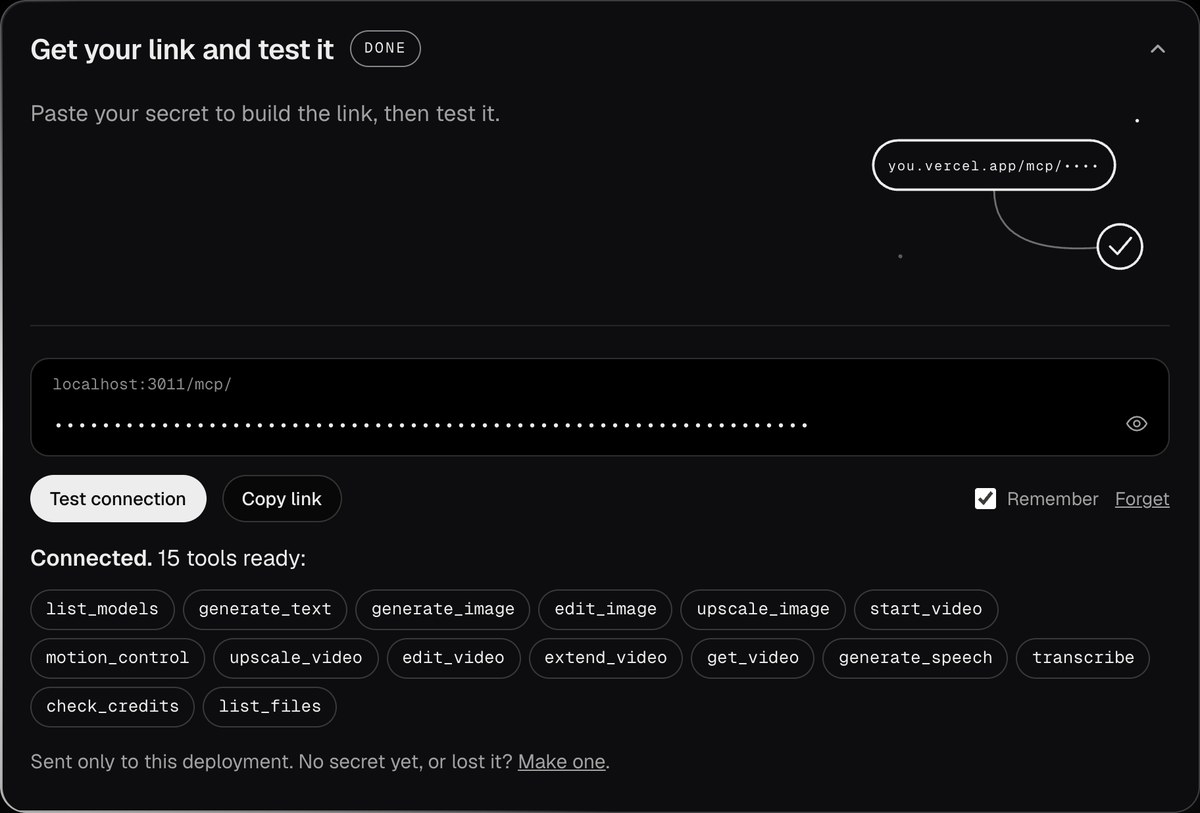
Your link, tested. In the browser that made your secret it's checked by itself; anywhere else, paste it once and test it. Open on your phone shows a QR code that opens your page on your phone with the secret already saved. Claude on your phone needs none of this: connectors added on claude.ai show up there by themselves. |
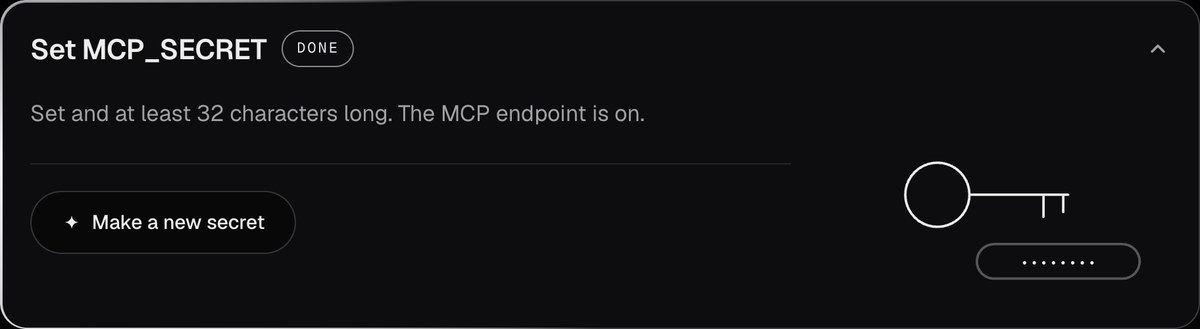
A secret that never leaves your browser. Made and saved there the moment you reach the step, with your link ready to copy. Vercel only gets its fingerprint ( |
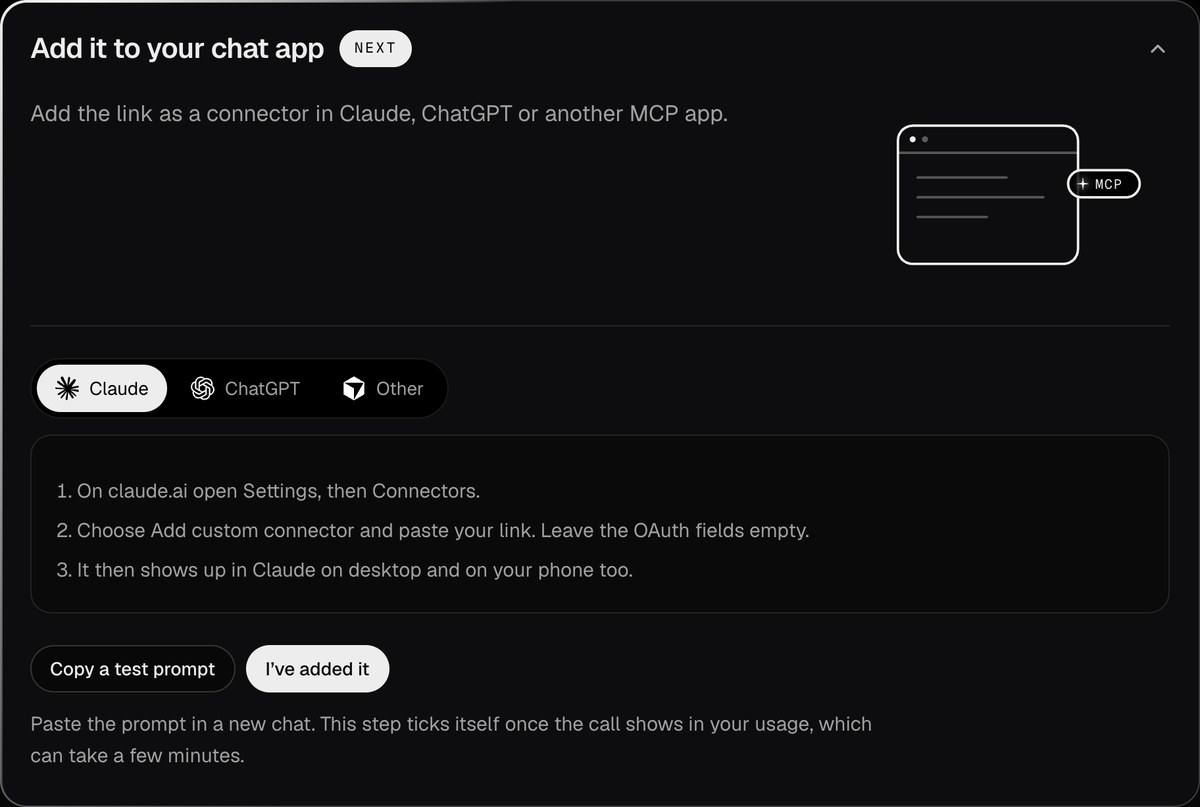
Into your chat app. Steps for Claude, ChatGPT and any other MCP app, and a test prompt to try it. |
Once every step is done, the guide steps aside for good. From then on your page opens on the brand and goes straight to your usage. If anything comes undone later (say MCP_SECRET_SHA256 is removed), the guide comes back by itself.

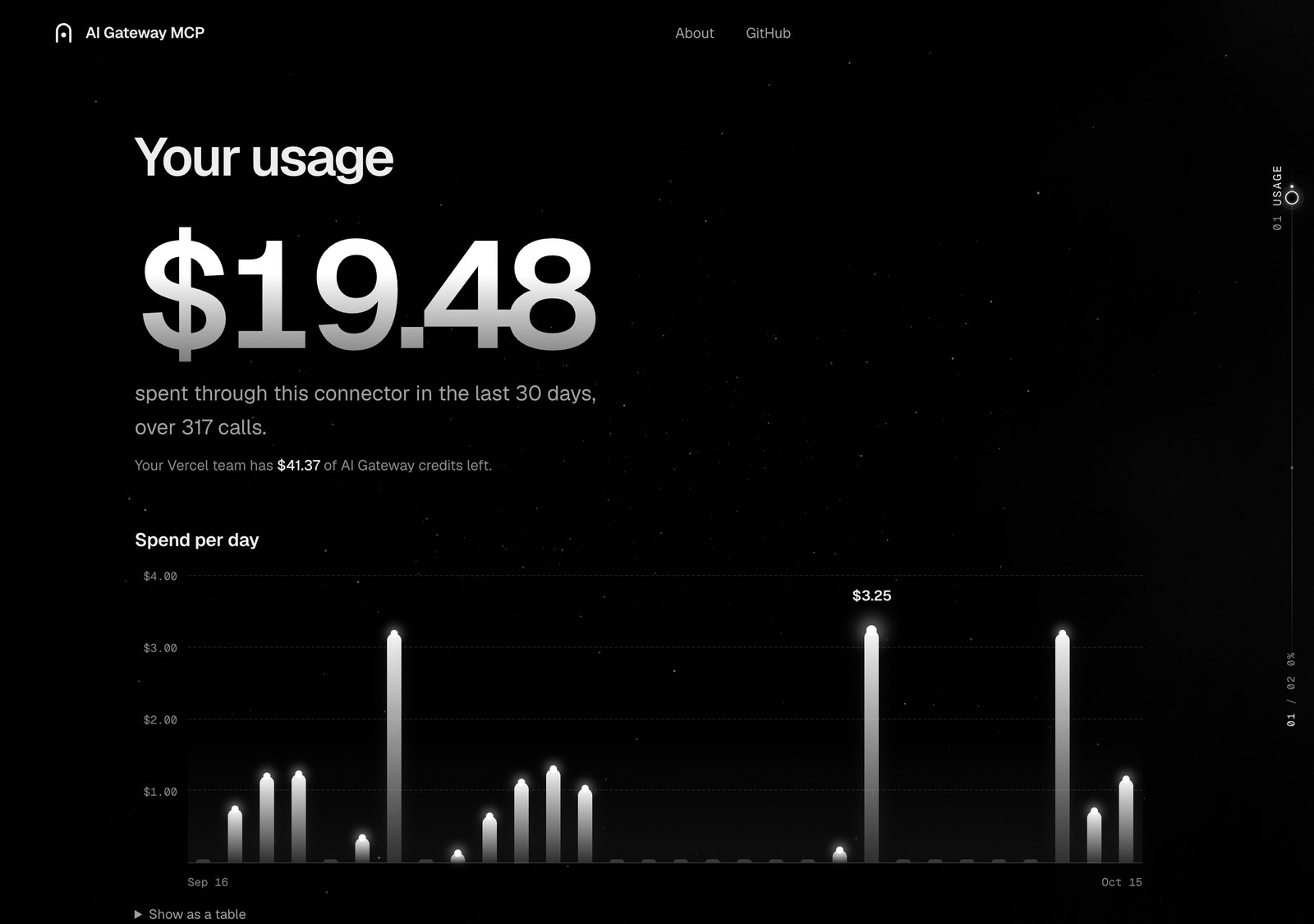
Your usage, unlocked with your secret (shown here with sample numbers): what this connector spent, day by day, by model and by chat app.
Nothing from this project: it is free and MIT licensed, with no plan and no fee. You pay what each provider charges, with no markup, through your own AI Gateway credits, and every Vercel team gets free monthly credits for a set of models. In Vercel's words (AI Gateway pricing):
AI Gateway charges no markup and no platform fee on tokens. You pay the provider's list price on a pay-as-you-go basis.
| You ask for | Model | Catalog price |
|---|---|---|
| A picture | recraft/recraft-v4.1-flash | $0.007 |
| A picture | google/gemini-3-pro-image (Nano Banana Pro) | $0.134 |
| An edit of your own photo | bfl/flux-kontext-pro | $0.04 |
| 8 seconds of video, with sound | google/veo-3.1-fast-generate-001 | $1.20 |
| 10 seconds of motion copied onto a character | klingai/kling-v3.0-motion-control | $1.26 |
| 1,000 words read aloud | openai/tts-1-hd | about $0.17 |
| An hour of speech written down | openai/whisper-1 | $0.36 |
From the AI Gateway catalog, October 2026. The catalog is a guide, not the bill: the provider's charge can differ. In October 2026 bfl/flux-3-image was listed at $0.024 for a 1024x1024 picture while Black Forest Labs billed $0.048 (passed on with no surcharge); the catalog has since been corrected. Each call reports its actual cost; ask list_models for today's catalog.
This project is not made by or affiliated with Vercel. Version 1 means you run your own copy, so setup is as short as I could make it: the goal is for everyone to use AI at the price providers actually set.
Your chat app picks these for you; you never have to name them. Every tool returns readable errors that name the model: unknown model, not enough credits, video not on your plan, provider errors.
Picturesgenerate_image makes images from words, with image models (FLUX, GPT Image, Recraft) and image-capable LLMs (Nano Banana).edit_image changes your own images: remove a background, restyle, extend the canvas, combine several.upscale_image makes an image sharper and larger (Topaz).
|
Videostart_video films from words, from a picture, from a first to a last frame, or with your characters as references, with sound if you like.motion_control copies the moves in a video onto a character (Kling).edit_video, extend_video change or continue a clip (Grok Imagine).upscale_video sharpens and enlarges a clip (Topaz).get_video fetches any of them when ready.
|
Voicegenerate_speech reads text aloud for narration and voice-overs (OpenAI, Gemini, Fish Audio, MAI Voice).transcribe writes down the speech in an audio or video file, with timestamps if you like.
|
Models and your accountlist_models lists every model with its AI Gateway catalog price.generate_text asks another model for text, to compare answers.check_credits shows your credits and this connector's spend.list_files finds the pictures, videos and audio you made before.
|
| Tool | What it does |
|---|---|
list_models({ type?, query? }) | Lists the models in the AI Gateway catalog with their type (text, image, video, speech, transcription), capabilities (t2v, i2v, …) and catalog price. |
generate_text({ model, prompt, system?, max_tokens?, file_urls? }) | Generates text. Returns the text plus its cost when AI Gateway reports one. With file_urls (https links to images, videos, audio or PDFs, up to 10 files and 20 MB in total) the model reads them too, e.g. google/gemini-3.5-flash-lite summarizing a video. Pick a model tagged vision, video-input, audio-input or file-input in list_models. |
generate_image({ model, prompt, size_or_aspect?, n?, estimate_only? }) | Works with image models (bfl/flux-2-pro, openai/gpt-image-2, …) and image-capable LLMs (google/gemini-3-pro-image). Images come back inline, and as expiring links when Blob is connected. Models that take only exact sizes (Recraft, OpenAI) get the nearest size for a ratio like 16:9, and the reply says which. |
edit_image({ model, prompt, image_urls, mask_url?, size_or_aspect?, n?, estimate_only? }) | Changes existing images from an instruction. Works with edit-capable image models (bfl/flux-kontext-pro, openai/gpt-image-2, …) and image-capable LLMs. Takes https links; links this server returned work too, because it downloads the inputs itself. |
upscale_image({ image_url, model?, prompt?, estimate_only? }) | Makes an image sharper and larger. Uses topaz/wonder-3.5 unless you name another model. |
start_video({ model, prompt, image_url?, end_image_url?, reference_urls?, duration?, aspect_ratio?, resolution?, sound?, estimate_only? }) | Starts a video job and returns a job_id right away: text-to-video, image-to-video, first-to-last frame, or reference-to-video with up to 4 pictures or clips of your characters. resolution (480p, 720p, 1080p, 4k) picks the size and price on Seedance, Grok Imagine Video, Veo and Wan 2.5–2.7. If the model can't make that resolution or length, nothing starts: the reply says what it offers and which models can, with each one's shortest clip and price. |
motion_control({ image_url, video_url, prompt?, orientation?, quality?, keep_sound?, estimate_only? }) | Makes the character in a picture move like the person in a reference video (Kling motion control). |
upscale_video({ video_url, resolution?, model?, estimate_only? }) | Makes a video sharper and larger and cleans up noise (Topaz Proteus by default). |
edit_video({ video_url, prompt, estimate_only? }) | Changes an existing video from an instruction (Grok Imagine Video, up to 720p). |
extend_video({ video_url, prompt, duration?, estimate_only? }) | Continues a video from its last frame (Grok Imagine Video). |
estimate_only: true | On the image and video tools: returns the price from the AI Gateway catalog instead of running. Nothing is generated or charged. Often a range, because resolution or audio is left to the model's defaults; token-priced models (e.g. openai/gpt-image-2, Seedance 2) have no estimate. The provider can bill more than the catalog price: bfl/flux-3-image was once listed at half of what was billed. |
get_video({ job_id }) | For every video tool above: reports whether the job is still generating. When it finishes, the video is saved to your Blob store and you get an expiring link; call it again later for a fresh one. |
generate_speech({ model, text, voice?, instructions?, speed?, language?, format? }) | Turns text into speech (openai/tts-1-hd, google/gemini-3.8-flash-tts, fish-audio/s2-pro, …). The audio comes back inline and as an expiring link. |
transcribe({ model, audio_url, timestamps? }) | Turns speech in an audio or video file (up to 25 MB) into text, optionally with timestamps. |
check_credits() | Shows the team's AI Gateway credits and what this connector spent in the last 30 days. The spend part needs AI Gateway's usage report, which Vercel offers on paid plans only; on Hobby it says so, and each reply still shows what that call cost. |
list_files({ kind?, limit? }) | Lists the pictures, videos and audio this connector made, newest first, with fresh expiring links. |
Inline viewer. In chat apps that support MCP Apps (Claude on the web, desktop and phone), generate_image, edit_image, upscale_image, get_video and list_files show their result right in the conversation: a picture grid, a video player and audio players, with Download, Upscale and Extend. Upscale and Extend ask the chat to run the tool, so nothing is spent behind your back. Other apps get the same pictures and links as plain content. If the Claude desktop app shows "Unable to reach AI Gateway" where the viewer should be after you change the connector URL (for example after rotating the secret), quit it fully (Cmd+Q on a Mac) and open it again.
MAX_VIDEO_SECONDS, MAX_IMAGES_PER_CALL, MAX_SPEECH_CHARACTERS, ALLOWED_MODELS), but only Vercel's budget limits your total spend. Tools that start from your own video (motion_control, upscale_video, edit_video) follow its length, which the per-call caps cannot see.MCP_SECRET) and redeploy. The old URL stops working right away, and any unfinished video jobs are abandoned./mcp/ (for example, by IP). Do not turn on Attack Challenge Mode for it: Claude's and ChatGPT's servers cannot solve the challenge, so your connector would stop working.SIGNED_URL_TTL_HOURS).POST /api/stats checks it in constant time and answers 404 otherwise. Remembering the secret in a browser lets anyone using that browser see your usage; "Forget" removes it.Your connector link is your deployment's address plus the secret. The setup page builds it in your browser:
https://<your-project>.vercel.app/mcp/<your-secret>
The secret is a random value of at least 32 characters. The Deploy button doesn't ask for it: a fresh copy starts with the endpoint off, and its setup page makes one in your browser and remembers it there, so your link is filled in after the redeploy.
Vercel never gets the secret itself, only its SHA-256 fingerprint as MCP_SECRET_SHA256. A fingerprint can't be turned back into the secret, so anyone who can read your environment variables, or the chat you pasted the setup prompt into, still can't use your connector. The other side of this: Vercel can't show you your secret either. If you lose the browser that holds it (and it isn't in your phone or your chat app's connector settings), make a new one and redeploy.
To do it yourself: make a secret with openssl rand -hex 32, and set MCP_SECRET_SHA256 to the output of printf %s '<your-secret>' | shasum -a 256 (the hex part). For local development a plain MCP_SECRET=<your-secret> is simpler; the fingerprint wins when both are set. Use URL-safe characters only; hex is ideal.
A random 64-character hex secret holds 256 bits: guessing it over the network is not possible in practice, and every wrong guess gets the same 404 as any unknown URL, compared in constant time. Secrets typed by hand are the weak spot, so the endpoint also stays off when the secret has fewer than 8 different characters or repeats one short block (aaaa…, passwordpassword…).
claude.ai custom connectors only support OAuth or no auth, and they can't send custom headers, so the secret goes in the URL path. If no secret is set (or a plain MCP_SECRET is shorter than 32 characters, or the fingerprint isn't 64 hex characters), the MCP endpoint is disabled. A wrong secret gets the same 404 page as any unknown URL.
| Variable | Default | Purpose |
|---|---|---|
MCP_SECRET_SHA256 | none (this or MCP_SECRET required) | SHA-256 fingerprint (hex) of the secret in the connector URL. Set by the setup page; wins over MCP_SECRET. |
MCP_SECRET | none | The secret itself, at least 32 characters. Simpler for local development. |
MAX_VIDEO_SECONDS | 8 | Longest video start_video and extend_video accept. |
MAX_IMAGES_PER_CALL | 4 | Highest n that generate_image and edit_image accept. |
MAX_SPEECH_CHARACTERS | 5000 | Longest text generate_speech accepts in one call. |
ALLOWED_MODELS | empty (all models) | Comma-separated allowlist of model ids. |
SIGNED_URL_TTL_HOURS | 24 | How long file links stay valid. The maximum is 168 (7 days). |
AI_GATEWAY_API_KEY | unset | Optional. Use it for local development. When set, it replaces the OIDC token. |
Vercel sets the Blob variables (BLOB_STORE_ID, plus BLOB_READ_WRITE_TOKEN as a fallback) and VERCEL_OIDC_TOKEN automatically when the store is connected. Without a Blob store, text, pictures and voice still work inline; video and file links need one. Create a private Blob store under the project's Storage tab, connect it and redeploy. The setup page links there.
npm install
vercel link && vercel env pull   # pulls MCP_SECRET_SHA256, Blob and a 12-hour OIDC token into .env.local
# or put AI_GATEWAY_API_KEY=... and MCP_SECRET=... in .env.local
npm run dev
Test the server with the MCP Inspector:
npx @modelcontextprotocol/inspector@latest
Choose Streamable HTTP and connect to http://localhost:3000/mcp/<MCP_SECRET>.
The same tools also run over stdio, for local MCP clients and for directories that start the server to list its tools (Glama does this). Your deployment does not use it.
npm run build:stdio   # bundles scripts/stdio.ts into dist/stdio.mjs
AI_GATEWAY_API_KEY=... MCP_SECRET=... node dist/stdio.mjs
A stdio server is a process you start yourself, so it has no secret check: it spends whatever Gateway key it is given. MCP_SECRET only signs video job ids there. Listing the tools needs no variables at all.
Two development-only addresses preview states you cannot reach without a deployment: /?preview-open shows the page as it looks once setup is done, and /?sample-stats fills the usage with sample numbers.
/ checks the deployment live and guides each step, then hides the guide once every required step is done (a gateway-open cookie, ignored whenever a server check fails). Black and white, drawn in code, with motion that rests finished under reduced motion. /setup redirects there.ai-gateway-mcp, tool:<name>, client:<app>, the app guessed from its User-Agent). The setup page reads AI Gateway's own spend report filtered by those tags, so there is no database. The report is a paid-plan feature: on Hobby, Vercel answers 403 and the page says so instead (credits still show). Keeping our own log in Blob was ruled out: Hobby includes 2,000 Blob advanced operations a month, and going over blocks Blob for 30 days.ui://gateway-mcp/media.html, built from ui/ by scripts/build-ui.mjs (esbuild, before dev, build and typecheck). Its CSP allows https://*.blob.vercel-storage.com for images and media.mcp-handler v2, and model calls go through the AI SDK with the AI Gateway provider.proxy.ts rejects a wrong secret before routing by rewriting it to the standard 404 page. The route handler then checks the secret again, in constant time.job_id holds the model and the AI Gateway job id, signed with a key derived from the fingerprint (or MCP_SECRET) and only accepted from callers holding the secret, so it can't be forged.MIT
The provider's own price, right inside your chat. Make video, images and voice with 400+ Vercel AI Gateway models (Veo, Kling, Seedance, Nano Banana, GPT Image) from Claude, ChatGPT or any MCP app. Your own copy, your own credits, no markup.
See the code
One click, and you are done.
Vercel copies this repo to your account, makes your private storage and asks for one secret. Your copy then walks you through the rest.
What you can make · How it works · Get started · What it costs · Tools · Keep it safe
The provider's own price, right inside your chat. No markup, no subscription, no API key. Add this connector to Claude, ChatGPT or any MCP app and it can make pictures, video and voice with 400+ models on Vercel AI Gateway: Veo, Kling, Seedance, Nano Banana, GPT Image, FLUX and more. You run your own copy on your own Vercel account, so every call is paid from your own Gateway credits at the price the provider sets.
A real chat on claude.ai, October 2026: a picture for $0.007, then a five-second video for $0.09 (HeyGen Video 1). Waiting while models work is sped up. See the demo.
Ask in plain words. Your chat does the thinking and the writing with everything it already knows about you; the connector makes the pictures, the video and the voice.
Shoot a short film"Write a one-minute sci-fi short, storyboard it, then film every scene with sound." Your chat writes the script and plans each shot. The connector draws the storyboard and films the scenes. generate_image start_video get_video10 scenes with sound: $12.00 on Veo 3.1 Fast |
Write and illustrate a book"Write a 12-chapter bedtime story about a fox who collects stars, and paint every chapter in watercolour." Your chat writes the story. The connector paints the cover and a picture for each chapter, in one style. generate_image edit_image12 pictures: $1.61 on Nano Banana Pro |
Turn it into an audiobook"Read chapter one aloud in a warm, slow voice, like a bedtime story." The connector narrates the text and hands back an audio file you can play right in the chat. generate_speechA 2,000-word chapter: about $0.33 on TTS-1 HD |
Shoot a product"Take this photo of my mug, put it on white marble in morning light, then make a slow turntable clip." The connector edits your own photo into new shots, then films a short clip from the best one. edit_image start_video get_video4 shots and a 5-second clip: $0.66 on FLUX Kontext Pro and Veo 3.1 Fast |
Make anyone dance"Make the character in this picture do the dance in this video." The connector copies the moves from a reference video onto your character, frame by frame. motion_control get_videoA 10-second dance: $1.26 on Kling 3.0 Motion Control |
Run a month of posts"Plan 30 days of posts for my bakery, write the captions, and make a picture for each day." Your chat plans the month. The connector makes a picture for every day and vertical clips for the big ones. generate_image start_video get_video30 pictures and 8 clips: $10.43 on Nano Banana Pro and Veo 3.1 Fast |
Turn a recording into notes"Transcribe this meeting with timestamps, then give me the decisions and who owns what." The connector writes down every word; your chat turns it into notes, subtitles or a translation. transcribeA 20-minute recording: $0.12 on Whisper |
Pick the right model"Which video model is cheapest for an 8-second clip that still looks good?" The connector lists every model with its AI Gateway catalog price, so your chat can choose for you, or compare a few side by side. list_models check_creditsFree reading the catalog costs nothing |
Costs are AI Gateway catalog prices from October 2026, for the example quantities shown. They are examples, not quotes: the provider's bill can differ from the catalog (see What it costs), and each call reports what it actually cost. Ask list_models for today's catalog.
What is MCP? The Model Context Protocol is how chat apps plug in outside tools. This project is one of those tools: once you add its link, your chat app can make things with any model on AI Gateway.
You need a Vercel account and a GitHub, GitLab or Bitbucket account.
1. DeployClick the button. Vercel copies the repo and makes your private storage. Your new page then makes your secret. Choose Set up with your agent: copy one prompt into Claude with the Vercel connector and it adds the secret's fingerprint (and storage, if missing) and redeploys. Or choose Set up manually and follow the steps. |
2. Open your copyGo to |
3. Add it to your chatIn Claude: Settings → Connectors → Add custom connector, paste the link. ChatGPT and others take it as a custom MCP server. |
Then set a spend budget in the Vercel dashboard (AI Gateway → Budgets). It is the real limit on what your link can ever spend.
Open your copy and it shows where you are: an arch of six stones, one per step. Set stones glow, the next one breathes, and clicking a stone opens its step.
|
One step at a time. Done steps fold away and the next one opens with exactly what to do. |
Your link, tested. In the browser that made your secret it's checked by itself; anywhere else, paste it once and test it. Open on your phone shows a QR code that opens your page on your phone with the secret already saved. Claude on your phone needs none of this: connectors added on claude.ai show up there by themselves. |
|
A secret that never leaves your browser. Made and saved there the moment you reach the step, with your link ready to copy. Vercel only gets its fingerprint ( |
Into your chat app. Steps for Claude, ChatGPT and any other MCP app, and a test prompt to try it. |
Once every step is done, the guide steps aside for good. From then on your page opens on the brand and goes straight to your usage. If anything comes undone later (say MCP_SECRET_SHA256 is removed), the guide comes back by itself.
Your usage, unlocked with your secret (shown here with sample numbers): what this connector spent, day by day, by model and by chat app.
Nothing from this project: it is free and MIT licensed, with no plan and no fee. You pay what each provider charges, with no markup, through your own AI Gateway credits, and every Vercel team gets free monthly credits for a set of models. In Vercel's words (AI Gateway pricing):
AI Gateway charges no markup and no platform fee on tokens. You pay the provider's list price on a pay-as-you-go basis.
| You ask for | Model | Catalog price |
|---|---|---|
| A picture | recraft/recraft-v4.1-flash | $0.007 |
| A picture | google/gemini-3-pro-image (Nano Banana Pro) | $0.134 |
| An edit of your own photo | bfl/flux-kontext-pro | $0.04 |
| 8 seconds of video, with sound | google/veo-3.1-fast-generate-001 | $1.20 |
| 10 seconds of motion copied onto a character | klingai/kling-v3.0-motion-control | $1.26 |
| 1,000 words read aloud | openai/tts-1-hd | about $0.17 |
| An hour of speech written down | openai/whisper-1 | $0.36 |
From the AI Gateway catalog, October 2026. The catalog is a guide, not the bill: the provider's charge can differ. In October 2026 bfl/flux-3-image was listed at $0.024 for a 1024x1024 picture while Black Forest Labs billed $0.048 (passed on with no surcharge); the catalog has since been corrected. Each call reports its actual cost; ask list_models for today's catalog.
This project is not made by or affiliated with Vercel. Version 1 means you run your own copy, so setup is as short as I could make it: the goal is for everyone to use AI at the price providers actually set.
Your chat app picks these for you; you never have to name them. Every tool returns readable errors that name the model: unknown model, not enough credits, video not on your plan, provider errors.
Picturesgenerate_image makes images from words, with image models (FLUX, GPT Image, Recraft) and image-capable LLMs (Nano Banana).edit_image changes your own images: remove a background, restyle, extend the canvas, combine several.upscale_image makes an image sharper and larger (Topaz).
|
Videostart_video films from words, from a picture, from a first to a last frame, or with your characters as references, with sound if you like.motion_control copies the moves in a video onto a character (Kling).edit_video, extend_video change or continue a clip (Grok Imagine).upscale_video sharpens and enlarges a clip (Topaz).get_video fetches any of them when ready.
|
Voicegenerate_speech reads text aloud for narration and voice-overs (OpenAI, Gemini, Fish Audio, MAI Voice).transcribe writes down the speech in an audio or video file, with timestamps if you like.
|
Models and your accountlist_models lists every model with its AI Gateway catalog price.generate_text asks another model for text, to compare answers.check_credits shows your credits and this connector's spend.list_files finds the pictures, videos and audio you made before.
|
| Tool | What it does |
|---|---|
list_models({ type?, query? }) | Lists the models in the AI Gateway catalog with their type (text, image, video, speech, transcription), capabilities (t2v, i2v, …) and catalog price. |
generate_text({ model, prompt, system?, max_tokens?, file_urls? }) | Generates text. Returns the text plus its cost when AI Gateway reports one. With file_urls (https links to images, videos, audio or PDFs, up to 10 files and 20 MB in total) the model reads them too, e.g. google/gemini-3.5-flash-lite summarizing a video. Pick a model tagged vision, video-input, audio-input or file-input in list_models. |
generate_image({ model, prompt, size_or_aspect?, n?, estimate_only? }) | Works with image models (bfl/flux-2-pro, openai/gpt-image-2, …) and image-capable LLMs (google/gemini-3-pro-image). Images come back inline, and as expiring links when Blob is connected. Models that take only exact sizes (Recraft, OpenAI) get the nearest size for a ratio like 16:9, and the reply says which. |
edit_image({ model, prompt, image_urls, mask_url?, size_or_aspect?, n?, estimate_only? }) | Changes existing images from an instruction. Works with edit-capable image models (bfl/flux-kontext-pro, openai/gpt-image-2, …) and image-capable LLMs. Takes https links; links this server returned work too, because it downloads the inputs itself. |
upscale_image({ image_url, model?, prompt?, estimate_only? }) | Makes an image sharper and larger. Uses topaz/wonder-3.5 unless you name another model. |
start_video({ model, prompt, image_url?, end_image_url?, reference_urls?, duration?, aspect_ratio?, resolution?, sound?, estimate_only? }) | Starts a video job and returns a job_id right away: text-to-video, image-to-video, first-to-last frame, or reference-to-video with up to 4 pictures or clips of your characters. resolution (480p, 720p, 1080p, 4k) picks the size and price on Seedance, Grok Imagine Video, Veo and Wan 2.5–2.7. If the model can't make that resolution or length, nothing starts: the reply says what it offers and which models can, with each one's shortest clip and price. |
motion_control({ image_url, video_url, prompt?, orientation?, quality?, keep_sound?, estimate_only? }) | Makes the character in a picture move like the person in a reference video (Kling motion control). |
upscale_video({ video_url, resolution?, model?, estimate_only? }) | Makes a video sharper and larger and cleans up noise (Topaz Proteus by default). |
edit_video({ video_url, prompt, estimate_only? }) | Changes an existing video from an instruction (Grok Imagine Video, up to 720p). |
extend_video({ video_url, prompt, duration?, estimate_only? }) | Continues a video from its last frame (Grok Imagine Video). |
estimate_only: true | On the image and video tools: returns the price from the AI Gateway catalog instead of running. Nothing is generated or charged. Often a range, because resolution or audio is left to the model's defaults; token-priced models (e.g. openai/gpt-image-2, Seedance 2) have no estimate. The provider can bill more than the catalog price: bfl/flux-3-image was once listed at half of what was billed. |
get_video({ job_id }) | For every video tool above: reports whether the job is still generating. When it finishes, the video is saved to your Blob store and you get an expiring link; call it again later for a fresh one. |
generate_speech({ model, text, voice?, instructions?, speed?, language?, format? }) | Turns text into speech (openai/tts-1-hd, google/gemini-3.8-flash-tts, fish-audio/s2-pro, …). The audio comes back inline and as an expiring link. |
transcribe({ model, audio_url, timestamps? }) | Turns speech in an audio or video file (up to 25 MB) into text, optionally with timestamps. |
check_credits() | Shows the team's AI Gateway credits and what this connector spent in the last 30 days. The spend part needs AI Gateway's usage report, which Vercel offers on paid plans only; on Hobby it says so, and each reply still shows what that call cost. |
list_files({ kind?, limit? }) | Lists the pictures, videos and audio this connector made, newest first, with fresh expiring links. |
Inline viewer. In chat apps that support MCP Apps (Claude on the web, desktop and phone), generate_image, edit_image, upscale_image, get_video and list_files show their result right in the conversation: a picture grid, a video player and audio players, with Download, Upscale and Extend. Upscale and Extend ask the chat to run the tool, so nothing is spent behind your back. Other apps get the same pictures and links as plain content. If the Claude desktop app shows "Unable to reach AI Gateway" where the viewer should be after you change the connector URL (for example after rotating the secret), quit it fully (Cmd+Q on a Mac) and open it again.
MAX_VIDEO_SECONDS, MAX_IMAGES_PER_CALL, MAX_SPEECH_CHARACTERS, ALLOWED_MODELS), but only Vercel's budget limits your total spend. Tools that start from your own video (motion_control, upscale_video, edit_video) follow its length, which the per-call caps cannot see.MCP_SECRET) and redeploy. The old URL stops working right away, and any unfinished video jobs are abandoned./mcp/ (for example, by IP). Do not turn on Attack Challenge Mode for it: Claude's and ChatGPT's servers cannot solve the challenge, so your connector would stop working.SIGNED_URL_TTL_HOURS).POST /api/stats checks it in constant time and answers 404 otherwise. Remembering the secret in a browser lets anyone using that browser see your usage; "Forget" removes it.Your connector link is your deployment's address plus the secret. The setup page builds it in your browser:
https://<your-project>.vercel.app/mcp/<your-secret>
The secret is a random value of at least 32 characters. The Deploy button doesn't ask for it: a fresh copy starts with the endpoint off, and its setup page makes one in your browser and remembers it there, so your link is filled in after the redeploy.
Vercel never gets the secret itself, only its SHA-256 fingerprint as MCP_SECRET_SHA256. A fingerprint can't be turned back into the secret, so anyone who can read your environment variables, or the chat you pasted the setup prompt into, still can't use your connector. The other side of this: Vercel can't show you your secret either. If you lose the browser that holds it (and it isn't in your phone or your chat app's connector settings), make a new one and redeploy.
To do it yourself: make a secret with openssl rand -hex 32, and set MCP_SECRET_SHA256 to the output of printf %s '<your-secret>' | shasum -a 256 (the hex part). For local development a plain MCP_SECRET=<your-secret> is simpler; the fingerprint wins when both are set. Use URL-safe characters only; hex is ideal.
A random 64-character hex secret holds 256 bits: guessing it over the network is not possible in practice, and every wrong guess gets the same 404 as any unknown URL, compared in constant time. Secrets typed by hand are the weak spot, so the endpoint also stays off when the secret has fewer than 8 different characters or repeats one short block (aaaa…, passwordpassword…).
claude.ai custom connectors only support OAuth or no auth, and they can't send custom headers, so the secret goes in the URL path. If no secret is set (or a plain MCP_SECRET is shorter than 32 characters, or the fingerprint isn't 64 hex characters), the MCP endpoint is disabled. A wrong secret gets the same 404 page as any unknown URL.
| Variable | Default | Purpose |
|---|---|---|
MCP_SECRET_SHA256 | none (this or MCP_SECRET required) | SHA-256 fingerprint (hex) of the secret in the connector URL. Set by the setup page; wins over MCP_SECRET. |
MCP_SECRET | none | The secret itself, at least 32 characters. Simpler for local development. |
MAX_VIDEO_SECONDS | 8 | Longest video start_video and extend_video accept. |
MAX_IMAGES_PER_CALL | 4 | Highest n that generate_image and edit_image accept. |
MAX_SPEECH_CHARACTERS | 5000 | Longest text generate_speech accepts in one call. |
ALLOWED_MODELS | empty (all models) | Comma-separated allowlist of model ids. |
SIGNED_URL_TTL_HOURS | 24 | How long file links stay valid. The maximum is 168 (7 days). |
AI_GATEWAY_API_KEY | unset | Optional. Use it for local development. When set, it replaces the OIDC token. |
Vercel sets the Blob variables (BLOB_STORE_ID, plus BLOB_READ_WRITE_TOKEN as a fallback) and VERCEL_OIDC_TOKEN automatically when the store is connected. Without a Blob store, text, pictures and voice still work inline; video and file links need one. Create a private Blob store under the project's Storage tab, connect it and redeploy. The setup page links there.
npm install
vercel link && vercel env pull   # pulls MCP_SECRET_SHA256, Blob and a 12-hour OIDC token into .env.local
# or put AI_GATEWAY_API_KEY=... and MCP_SECRET=... in .env.local
npm run dev
Test the server with the MCP Inspector:
npx @modelcontextprotocol/inspector@latest
Choose Streamable HTTP and connect to http://localhost:3000/mcp/<MCP_SECRET>.
The same tools also run over stdio, for local MCP clients and for directories that start the server to list its tools (Glama does this). Your deployment does not use it.
npm run build:stdio   # bundles scripts/stdio.ts into dist/stdio.mjs
AI_GATEWAY_API_KEY=... MCP_SECRET=... node dist/stdio.mjs
A stdio server is a process you start yourself, so it has no secret check: it spends whatever Gateway key it is given. MCP_SECRET only signs video job ids there. Listing the tools needs no variables at all.
Two development-only addresses preview states you cannot reach without a deployment: /?preview-open shows the page as it looks once setup is done, and /?sample-stats fills the usage with sample numbers.
/ checks the deployment live and guides each step, then hides the guide once every required step is done (a gateway-open cookie, ignored whenever a server check fails). Black and white, drawn in code, with motion that rests finished under reduced motion. /setup redirects there.ai-gateway-mcp, tool:<name>, client:<app>, the app guessed from its User-Agent). The setup page reads AI Gateway's own spend report filtered by those tags, so there is no database. The report is a paid-plan feature: on Hobby, Vercel answers 403 and the page says so instead (credits still show). Keeping our own log in Blob was ruled out: Hobby includes 2,000 Blob advanced operations a month, and going over blocks Blob for 30 days.ui://gateway-mcp/media.html, built from ui/ by scripts/build-ui.mjs (esbuild, before dev, build and typecheck). Its CSP allows https://*.blob.vercel-storage.com for images and media.mcp-handler v2, and model calls go through the AI SDK with the AI Gateway provider.proxy.ts rejects a wrong secret before routing by rewriting it to the standard 404 page. The route handler then checks the secret again, in constant time.job_id holds the model and the AI Gateway job id, signed with a key derived from the fingerprint (or MCP_SECRET) and only accepted from callers holding the secret, so it can't be forged.MIT



