Give your AI agent its own cursor: an MCP server that reads Mac windows as numbered text and presses controls through accessibility
See the codeA local MCP server for macOS that lets any AI agent see and operate desktop apps as numbered text, through the accessibility tree.
See it work: recorded runs you can step through, and the benchmark
pc_click index:"e7". The result says what changed on screen, so the agent does not need a second look.YouxPC is a fork of Ghost OS by Ghostwright (MIT). The accessibility engine, recipes and the original tool set are theirs. This fork is not affiliated with or endorsed by them. What changed is listed below.
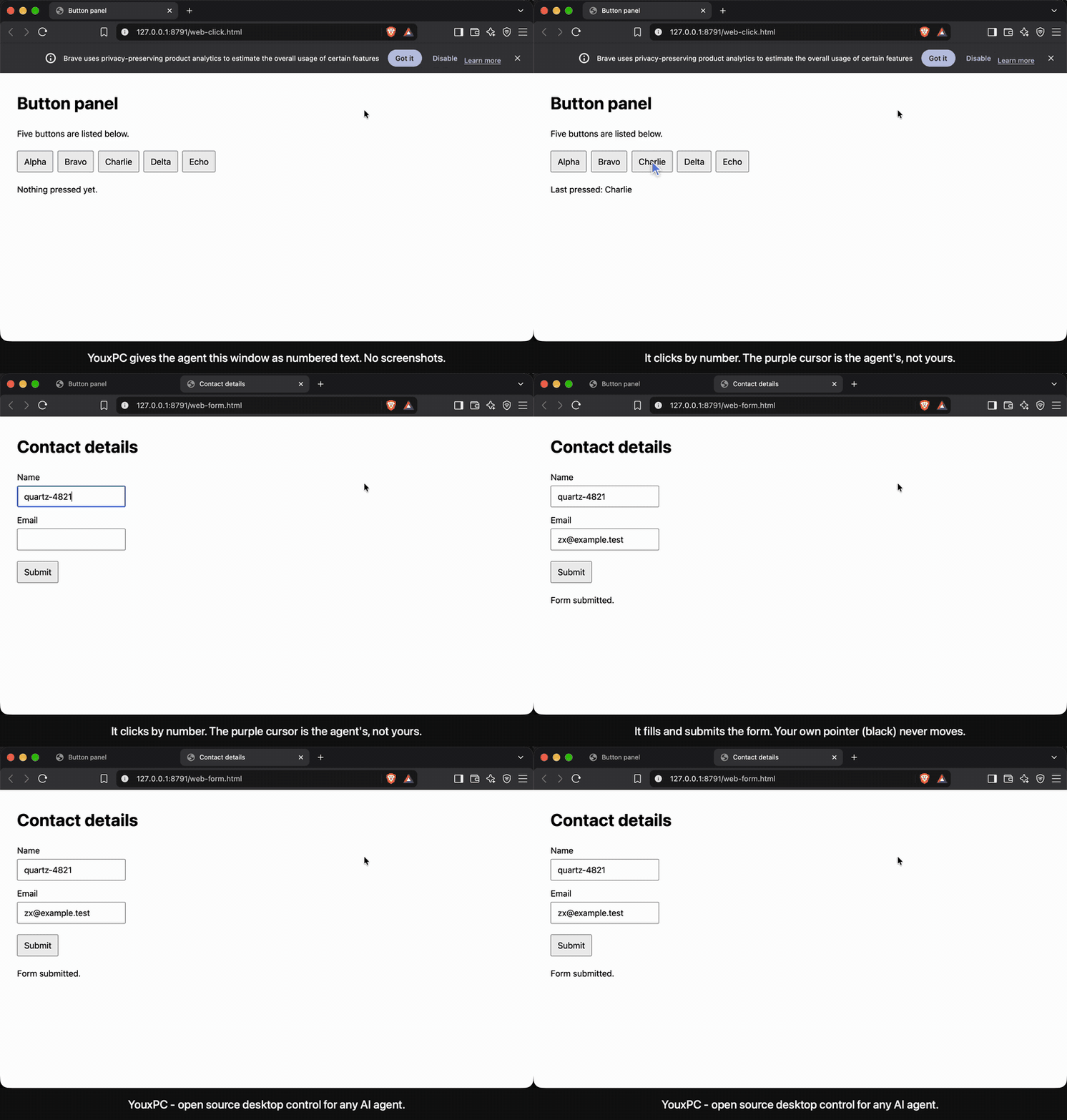
The purple cursor is the agent's. The black one is the real pointer; it does not move. The clip is one unedited take.
A page with five buttons, open in a browser that is in the background:
pc_snapshot app:"Brave Browser"
Brave Browser — "Button panel - Brave"
web "Button panel"
  [e14] button "Alpha"
  [e15] button "Bravo"
  [e16] button "Charlie"
  [e17] button "Delta"
  [e18] button "Echo"
pc_click index:"e17"
{"method": "ax-focus-space", "pointer": "virtual", "element": "Delta",
 "changes": "~ [e17] button \"Delta\" (focused)\n+ \"Last pressed: Delta\""}
The browser stayed in the background and the pointer did not move. Numbers stay the same across snapshots while an element keeps its role and name. After the first snapshot of a window, later ones return only what was added (+), removed (-) or changed (~).
Requires macOS 14 or later. The installer downloads the latest release (Apple silicon), checks it against its published checksum and puts youxpc in ~/.local/bin. It is a short script; read it first if you like.
curl -fsSL https://raw.githubusercontent.com/Ar5en1c/youxpc/main/install.sh | bash
claude mcp add --scope user youxpc -- ~/.local/bin/youxpc mcp
Or build it yourself (needs Xcode 26 for Swift 6.2; this is also the way on an Intel Mac):
git clone https://github.com/Ar5en1c/youxpc.git
cd youxpc
swift build -c release
claude mcp add --scope user youxpc -- "$(pwd)/.build/release/youxpc" mcp
The release binary is not notarized by Apple. Installed with the script above or built from source it runs normally; a copy downloaded through a browser would be blocked by Gatekeeper.
For other clients, register the same command (/path/to/youxpc mcp) as a stdio MCP server.
macOS asks for two permissions: Accessibility and Screen Recording. They are granted to the app that launches the server (your terminal, editor or agent app), not to the youxpc binary. youxpc status shows whether both are in place.
Three profiles, chosen with YOUXPC_TOOLS:
| Profile | Tools | Fixed context | For |
|---|---|---|---|
simple | 6: pc_look, pc_click, pc_type, pc_key, pc_scroll, pc_do | about 1,000 tokens | Lowest token use; an experiment for small models |
| default | 16 core tools | about 3,200 tokens | Most agents |
full | Everything, plus the long guide | about 9,000 tokens | Recipes, vision, learning mode |
Core tools: pc_snapshot, pc_click, pc_type, pc_do, pc_press, pc_hotkey, pc_scroll, pc_drag, pc_hover, pc_read, pc_screenshot, pc_state, pc_focus, pc_wait, pc_recipes, pc_run. pc_terminal appears when you approve terminal commands.
In the simple profile every action answers with one line of outcome followed by the screen as it is now, the app is remembered after the first pc_look, and a browser's page is listed without its toolbar. The model never has to decide to look again or apply a diff.
A model turn takes seconds; an accessibility press takes a fraction of one. In the benchmark about nine tenths of a run was the model deciding, one call at a time. pc_do lets one decision carry several actions:
pc_do steps:[{"click":"4"},{"click":"7"},{"click":"Multiply"},{"click":"1"},{"click":"9"},{"click":"Equals"}]
1. click 4: ok
2. click 7: ok
3. click Multiply: ok
4. click 1: ok
5. click 9: ok
6. click Equals: ok
Changes:
+ "47 × 19"
+ "893"
- "0"
click, type (with into), key, scroll or wait. Steps run in order and stop at the first failure; the answer says which step failed and that the rest were not run.e (e7). Anything else is a name, looked up on the screen as it is at that step, so a step can name something an earlier step made appear. The step waits up to 1.5 s for that name to show up.An id belongs to one element for the whole session. If six rows each have an "Approve" button and the first row goes away, the other five keep their ids. An id whose element is gone is retired, not handed to a neighbour: using it fails with a message, it does not press something else.
A table is listed one row at a time, each row headed by its first text:
table
  row "Marlow Quist"
    "Platform"
    [e16] button "Approve"
    [e17] button "Reject"
A click or type by a name that several controls share is refused, with each candidate's id and row, instead of acting on the first one.
Every result has a pointer field saying which path was used.
| Target | Delivery | Your pointer | App in front? |
|---|---|---|---|
| Native buttons, menus, checkboxes, tabs | Accessibility press | Untouched | No |
| Buttons and links inside a web page | Accessibility focus, then Space or Return posted to the browser's process | Untouched | No |
| Text fields | Value set through accessibility, or keys posted to the app's process | Untouched | No |
| Plain keys, Shift and Ctrl chords | Posted to the app's process | Untouched | Best effort |
| Cmd and Option shortcuts | Through the frontmost app, after focus is confirmed | Untouched | Yes |
| Canvas, games, custom-drawn UI, right and double clicks | Real mouse events | Jumps, then returns | Yes |
Keystrokes are always addressed to a specific process. They cannot land in whatever app happens to be in front.
An overlay cursor shows where the agent is acting and fades after a few idle seconds. YOUXPC_CURSOR=off hides it.
~/.youxpc/logs/receipts.jsonl: the tool, the target, the outcome, the delivery path, the duration and how much the screen changed. Typed text is not kept unless you ask for it. youxpc receipts prints the log.YOUXPC_NEVER_PRESS=Send,Delete,Pay refuses clicks on controls whose name contains one of those words, and Return or Space while such a control has focus. The agent is told to stop and ask you. It prevents the common accident; it is not a boundary (a form can still be submitted with Return from a text field, and unnamed controls cannot be matched).$ youxpc receipts
04:59:58 aa9855ae ok pc_snapshot Google Chrome (111ms)
05:00:00 aa9855ae ok pc_click [9] -> YouxAI Apply Agent / Has access to this site pointer:virtual +28 -1 ~0 (1588ms)
05:00:00 aa9855ae FAIL pc_snapshot Terminal error: 'Terminal' (com.apple.Terminal) is blocked by the YouxPC app policy because it is a terminal. (21ms)
05:00:02 aa9855ae ok pc_terminal run `bc -q` (1918ms)
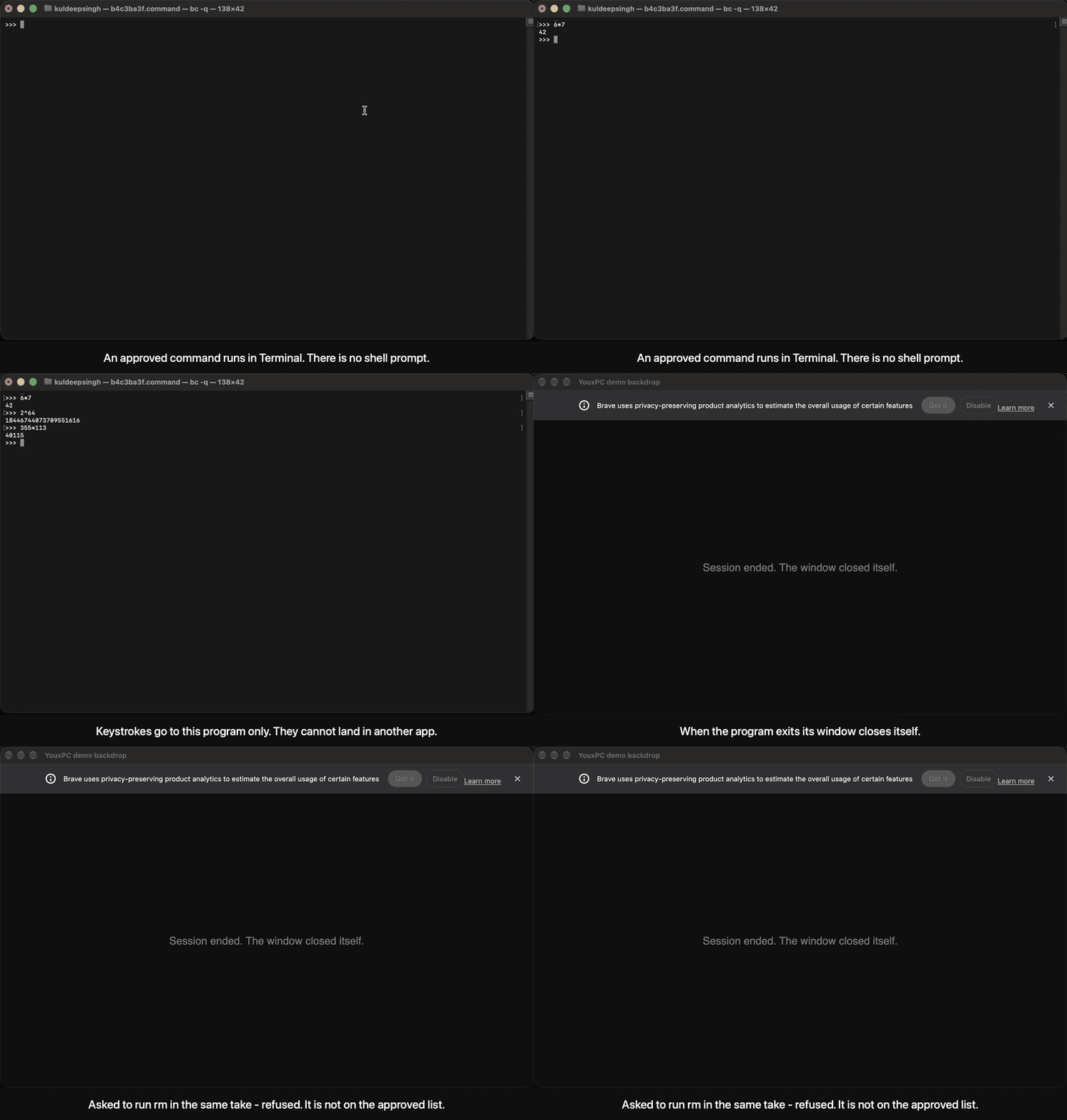
Terminals are blocked by the app policy. pc_terminal is the one way in, and it exists only when you list approved commands:
YOUXPC_TERMINAL_COMMANDS=opencode,npm test,git status
;, | and $() are plain text.An approved program can still do whatever it is able to do. Approving an agent CLI means the driving agent can ask it for anything that CLI permits. YOUXPC_TERMINAL_SANDBOX=on runs each command under a macOS sandbox profile that denies file writes outside the working directory and temp directories.
Set these in the env of the MCP server entry.
| Variable | Effect |
|---|---|
YOUXPC_TOOLS | simple, unset (core) or full |
YOUXPC_ALLOW_APPS | Comma-separated bundle IDs. When set, only these apps may be used |
YOUXPC_DENY_APPS | Bundle IDs added to the default block list |
YOUXPC_APP_POLICY=off | Disable app checks |
YOUXPC_NEVER_PRESS | Comma-separated words. Controls named with one of them are never pressed |
YOUXPC_RECEIPTS | standard (default), full (also keeps typed text) or off |
YOUXPC_TERMINAL_COMMANDS | Approved commands; enables pc_terminal |
YOUXPC_TERMINAL_SANDBOX=on | Write-jail for terminal commands |
YOUXPC_TERMINAL_SANDBOX_WRITE | Extra writable paths for the sandbox |
YOUXPC_TERMINAL_SANDBOX_NETWORK=off | Deny network to sandboxed commands |
YOUXPC_TERMINAL_IDLE_HOURS | Stop and close sessions unused this long (default 12) |
YOUXPC_INLINE_CHANGES=off | Do not attach screen changes to action results |
YOUXPC_KEYBOARD=global | Send keys to the frontmost app instead of a specific process |
YOUXPC_CURSOR=off | Hide the overlay cursor |
YOUXPC_POINTER_RETURN=off | Leave the pointer where a real click happened |
YOUXPC_LEARNING=on | Enable learning mode |
YOUXPC_CDP=on | Allow use of Chrome's debug port |
YOUXPC_VISION_URL, YOUXPC_VISION_PORT | Optional local vision sidecar, loopback only |
Seventeen desktop tasks on one M1 Mac: ten short ones (Calculator, TextEdit, web pages in Brave) and seven harder ones (rows of identical buttons, a seven-field form, a confirm dialog, tabs, late-arriving content). The same model drove each tool stack, so only the tools differ. Three trials per task with Claude Haiku 5.5:
| Tool stack | Runs passed | Total time | Tool calls | Tokens |
|---|---|---|---|---|
| YouxPC, default profile | 51 of 51 | 629 s | 216 | 2,110,340 |
| YouxPC, simple profile | 51 of 51 | 638 s | 189 | 1,413,032 |
| Ghost OS 2.2.1 (upstream) | 46 of 51 | 1,176 s | 699 | 9,007,227 |
pc_do: one model decision carries several actions.Against other free tools, same model and tasks, three trials each, all at default settings:
| Tool | Runs passed | Total time | Tool calls | Tokens |
|---|---|---|---|---|
| YouxPC, default profile | 50 of 51 | 630 s | 216 | 2,050,398 |
| Cua Driver 0.35.2 | 51 of 51 | 1,287 s | 441 | 23,902,869 |
Peekaboo 4.9.2, --allow-foreground | 41 of 51 | 1,897 s | 819 | 43,644,540 |
| Playwright MCP 0.0.83, web tasks only | 39 of 39 | 448 s | 243 | 2,309,907 |
| YouxPC on those web tasks | 38 of 39 | 465 s | 184 | 1,674,039 |
Cua Driver was as reliable (it passed every run); YouxPC took 51% less time and read 91% fewer tokens.
Playwright MCP and YouxPC are about level on web pages. Playwright drives its own headless browser and cannot reach desktop apps or a real browser's toolbar.
Peekaboo passed every desktop-app run and struggled with buttons inside web pages; its server is background-only unless started with that flag.
YouxPC's one failure was the model clicking Approve where Reject was asked for.
The other tools ran as installed, untuned; YouxPC has been worked over on these tasks.
With a second model (gpt-6-luna through the Codex CLI, one trial, an earlier build): YouxPC 14 of 17 in 348 s and 49 tool calls, Ghost OS 13 of 17 in 929 s and 178.
Not measured: Codex's own computer use (it needs per-app approval and the runs were unattended). Small local models were tried and none was reliable; the best passed 4 of 10.
Method, per-task results, every failure explained and how to reproduce: bench/RESULTS.md.
pc_snapshot: a numbered, compact tree with stable numbers and a changes-only mode, read with one batched accessibility call per element.pc_do: several actions in one call, with waiting for named targets and for menus built in.MIT. Upstream copyright is retained. Built on Ghost OS by Ghostwright and AXorcist by Peter Steinberger. Maintained by Kuldeep Singh.
Give your AI agent its own cursor: an MCP server that reads Mac windows as numbered text and presses controls through accessibility
See the codeA local MCP server for macOS that lets any AI agent see and operate desktop apps as numbered text, through the accessibility tree.
See it work: recorded runs you can step through, and the benchmark
pc_click index:"e7". The result says what changed on screen, so the agent does not need a second look.YouxPC is a fork of Ghost OS by Ghostwright (MIT). The accessibility engine, recipes and the original tool set are theirs. This fork is not affiliated with or endorsed by them. What changed is listed below.
The purple cursor is the agent's. The black one is the real pointer; it does not move. The clip is one unedited take.
A page with five buttons, open in a browser that is in the background:
pc_snapshot app:"Brave Browser"
Brave Browser — "Button panel - Brave"
web "Button panel"
  [e14] button "Alpha"
  [e15] button "Bravo"
  [e16] button "Charlie"
  [e17] button "Delta"
  [e18] button "Echo"
pc_click index:"e17"
{"method": "ax-focus-space", "pointer": "virtual", "element": "Delta",
 "changes": "~ [e17] button \"Delta\" (focused)\n+ \"Last pressed: Delta\""}
The browser stayed in the background and the pointer did not move. Numbers stay the same across snapshots while an element keeps its role and name. After the first snapshot of a window, later ones return only what was added (+), removed (-) or changed (~).
Requires macOS 14 or later. The installer downloads the latest release (Apple silicon), checks it against its published checksum and puts youxpc in ~/.local/bin. It is a short script; read it first if you like.
curl -fsSL https://raw.githubusercontent.com/Ar5en1c/youxpc/main/install.sh | bash
claude mcp add --scope user youxpc -- ~/.local/bin/youxpc mcp
Or build it yourself (needs Xcode 26 for Swift 6.2; this is also the way on an Intel Mac):
git clone https://github.com/Ar5en1c/youxpc.git
cd youxpc
swift build -c release
claude mcp add --scope user youxpc -- "$(pwd)/.build/release/youxpc" mcp
The release binary is not notarized by Apple. Installed with the script above or built from source it runs normally; a copy downloaded through a browser would be blocked by Gatekeeper.
For other clients, register the same command (/path/to/youxpc mcp) as a stdio MCP server.
macOS asks for two permissions: Accessibility and Screen Recording. They are granted to the app that launches the server (your terminal, editor or agent app), not to the youxpc binary. youxpc status shows whether both are in place.
Three profiles, chosen with YOUXPC_TOOLS:
| Profile | Tools | Fixed context | For |
|---|---|---|---|
simple | 6: pc_look, pc_click, pc_type, pc_key, pc_scroll, pc_do | about 1,000 tokens | Lowest token use; an experiment for small models |
| default | 16 core tools | about 3,200 tokens | Most agents |
full | Everything, plus the long guide | about 9,000 tokens | Recipes, vision, learning mode |
Core tools: pc_snapshot, pc_click, pc_type, pc_do, pc_press, pc_hotkey, pc_scroll, pc_drag, pc_hover, pc_read, pc_screenshot, pc_state, pc_focus, pc_wait, pc_recipes, pc_run. pc_terminal appears when you approve terminal commands.
In the simple profile every action answers with one line of outcome followed by the screen as it is now, the app is remembered after the first pc_look, and a browser's page is listed without its toolbar. The model never has to decide to look again or apply a diff.
A model turn takes seconds; an accessibility press takes a fraction of one. In the benchmark about nine tenths of a run was the model deciding, one call at a time. pc_do lets one decision carry several actions:
pc_do steps:[{"click":"4"},{"click":"7"},{"click":"Multiply"},{"click":"1"},{"click":"9"},{"click":"Equals"}]
1. click 4: ok
2. click 7: ok
3. click Multiply: ok
4. click 1: ok
5. click 9: ok
6. click Equals: ok
Changes:
+ "47 × 19"
+ "893"
- "0"
click, type (with into), key, scroll or wait. Steps run in order and stop at the first failure; the answer says which step failed and that the rest were not run.e (e7). Anything else is a name, looked up on the screen as it is at that step, so a step can name something an earlier step made appear. The step waits up to 1.5 s for that name to show up.An id belongs to one element for the whole session. If six rows each have an "Approve" button and the first row goes away, the other five keep their ids. An id whose element is gone is retired, not handed to a neighbour: using it fails with a message, it does not press something else.
A table is listed one row at a time, each row headed by its first text:
table
  row "Marlow Quist"
    "Platform"
    [e16] button "Approve"
    [e17] button "Reject"
A click or type by a name that several controls share is refused, with each candidate's id and row, instead of acting on the first one.
Every result has a pointer field saying which path was used.
| Target | Delivery | Your pointer | App in front? |
|---|---|---|---|
| Native buttons, menus, checkboxes, tabs | Accessibility press | Untouched | No |
| Buttons and links inside a web page | Accessibility focus, then Space or Return posted to the browser's process | Untouched | No |
| Text fields | Value set through accessibility, or keys posted to the app's process | Untouched | No |
| Plain keys, Shift and Ctrl chords | Posted to the app's process | Untouched | Best effort |
| Cmd and Option shortcuts | Through the frontmost app, after focus is confirmed | Untouched | Yes |
| Canvas, games, custom-drawn UI, right and double clicks | Real mouse events | Jumps, then returns | Yes |
Keystrokes are always addressed to a specific process. They cannot land in whatever app happens to be in front.
An overlay cursor shows where the agent is acting and fades after a few idle seconds. YOUXPC_CURSOR=off hides it.
~/.youxpc/logs/receipts.jsonl: the tool, the target, the outcome, the delivery path, the duration and how much the screen changed. Typed text is not kept unless you ask for it. youxpc receipts prints the log.YOUXPC_NEVER_PRESS=Send,Delete,Pay refuses clicks on controls whose name contains one of those words, and Return or Space while such a control has focus. The agent is told to stop and ask you. It prevents the common accident; it is not a boundary (a form can still be submitted with Return from a text field, and unnamed controls cannot be matched).$ youxpc receipts
04:59:58 aa9855ae ok pc_snapshot Google Chrome (111ms)
05:00:00 aa9855ae ok pc_click [9] -> YouxAI Apply Agent / Has access to this site pointer:virtual +28 -1 ~0 (1588ms)
05:00:00 aa9855ae FAIL pc_snapshot Terminal error: 'Terminal' (com.apple.Terminal) is blocked by the YouxPC app policy because it is a terminal. (21ms)
05:00:02 aa9855ae ok pc_terminal run `bc -q` (1918ms)
Terminals are blocked by the app policy. pc_terminal is the one way in, and it exists only when you list approved commands:
YOUXPC_TERMINAL_COMMANDS=opencode,npm test,git status
;, | and $() are plain text.An approved program can still do whatever it is able to do. Approving an agent CLI means the driving agent can ask it for anything that CLI permits. YOUXPC_TERMINAL_SANDBOX=on runs each command under a macOS sandbox profile that denies file writes outside the working directory and temp directories.
Set these in the env of the MCP server entry.
| Variable | Effect |
|---|---|
YOUXPC_TOOLS | simple, unset (core) or full |
YOUXPC_ALLOW_APPS | Comma-separated bundle IDs. When set, only these apps may be used |
YOUXPC_DENY_APPS | Bundle IDs added to the default block list |
YOUXPC_APP_POLICY=off | Disable app checks |
YOUXPC_NEVER_PRESS | Comma-separated words. Controls named with one of them are never pressed |
YOUXPC_RECEIPTS | standard (default), full (also keeps typed text) or off |
YOUXPC_TERMINAL_COMMANDS | Approved commands; enables pc_terminal |
YOUXPC_TERMINAL_SANDBOX=on | Write-jail for terminal commands |
YOUXPC_TERMINAL_SANDBOX_WRITE | Extra writable paths for the sandbox |
YOUXPC_TERMINAL_SANDBOX_NETWORK=off | Deny network to sandboxed commands |
YOUXPC_TERMINAL_IDLE_HOURS | Stop and close sessions unused this long (default 12) |
YOUXPC_INLINE_CHANGES=off | Do not attach screen changes to action results |
YOUXPC_KEYBOARD=global | Send keys to the frontmost app instead of a specific process |
YOUXPC_CURSOR=off | Hide the overlay cursor |
YOUXPC_POINTER_RETURN=off | Leave the pointer where a real click happened |
YOUXPC_LEARNING=on | Enable learning mode |
YOUXPC_CDP=on | Allow use of Chrome's debug port |
YOUXPC_VISION_URL, YOUXPC_VISION_PORT | Optional local vision sidecar, loopback only |
Seventeen desktop tasks on one M1 Mac: ten short ones (Calculator, TextEdit, web pages in Brave) and seven harder ones (rows of identical buttons, a seven-field form, a confirm dialog, tabs, late-arriving content). The same model drove each tool stack, so only the tools differ. Three trials per task with Claude Haiku 5.5:
| Tool stack | Runs passed | Total time | Tool calls | Tokens |
|---|---|---|---|---|
| YouxPC, default profile | 51 of 51 | 629 s | 216 | 2,110,340 |
| YouxPC, simple profile | 51 of 51 | 638 s | 189 | 1,413,032 |
| Ghost OS 2.2.1 (upstream) | 46 of 51 | 1,176 s | 699 | 9,007,227 |
pc_do: one model decision carries several actions.Against other free tools, same model and tasks, three trials each, all at default settings:
| Tool | Runs passed | Total time | Tool calls | Tokens |
|---|---|---|---|---|
| YouxPC, default profile | 50 of 51 | 630 s | 216 | 2,050,398 |
| Cua Driver 0.35.2 | 51 of 51 | 1,287 s | 441 | 23,902,869 |
Peekaboo 4.9.2, --allow-foreground | 41 of 51 | 1,897 s | 819 | 43,644,540 |
| Playwright MCP 0.0.83, web tasks only | 39 of 39 | 448 s | 243 | 2,309,907 |
| YouxPC on those web tasks | 38 of 39 | 465 s | 184 | 1,674,039 |
Cua Driver was as reliable (it passed every run); YouxPC took 51% less time and read 91% fewer tokens.
Playwright MCP and YouxPC are about level on web pages. Playwright drives its own headless browser and cannot reach desktop apps or a real browser's toolbar.
Peekaboo passed every desktop-app run and struggled with buttons inside web pages; its server is background-only unless started with that flag.
YouxPC's one failure was the model clicking Approve where Reject was asked for.
The other tools ran as installed, untuned; YouxPC has been worked over on these tasks.
With a second model (gpt-6-luna through the Codex CLI, one trial, an earlier build): YouxPC 14 of 17 in 348 s and 49 tool calls, Ghost OS 13 of 17 in 929 s and 178.
Not measured: Codex's own computer use (it needs per-app approval and the runs were unattended). Small local models were tried and none was reliable; the best passed 4 of 10.
Method, per-task results, every failure explained and how to reproduce: bench/RESULTS.md.
pc_snapshot: a numbered, compact tree with stable numbers and a changes-only mode, read with one batched accessibility call per element.pc_do: several actions in one call, with waiting for named targets and for menus built in.MIT. Upstream copyright is retained. Built on Ghost OS by Ghostwright and AXorcist by Peter Steinberger. Maintained by Kuldeep Singh.



