
A local-first VS Code extension for Flutter workspace security scanning, diagnostics, AI-assisted analysis, external scanner integration, finding correlation, RAG workspace intelligence, and JSON, SARIF, and PDF report generation.
TypeScript
0
24 commits
updated Sep 23, 2026
See what people are saying
README
Aqiron Security
Aqiron Security is a VS Code extension for local security scanning and security-focused workspace analysis. The repository contains the extension host, its webview, and a private TypeScript core runtime that the extension starts as a separate Node.js process.
Current status
This repository is version 0.0.1 and is under active development. Workspace operations currently require a Flutter workspace. The implementation is local-first; visible UI or command paths should not be interpreted as evidence of a hosted Aqiron service, Jira integration, dynamic analysis, public report sharing, or automatic workspace-wide remediation.
What Aqiron currently does
- Scans a supported current file or Flutter workspace.
- Publishes findings as VS Code diagnostics and in the Aqiron sidebar.
- Runs native pattern-based rules for selected Dart, Python, Android XML, and Dockerfile patterns.
- Integrates optional Betterleaks, MobSF, OSV-Scanner, Semgrep OSS, and Trivy scanners when their required tools or services are available.
- Normalizes and correlates findings, builds a relationship graph, and generates JSON, SARIF, and PDF report artifacts under
.aqiron-security/reports/. - Provides optional Ollama or OpenRouter AI operations and a workspace RAG index.
- Applies the currently implemented file-level quick fixes for a small set of deterministic findings.
External scanners and AI providers are optional. Missing scanners report an unavailable status instead of being treated as successful scans. Review AI output before using it for security decisions.
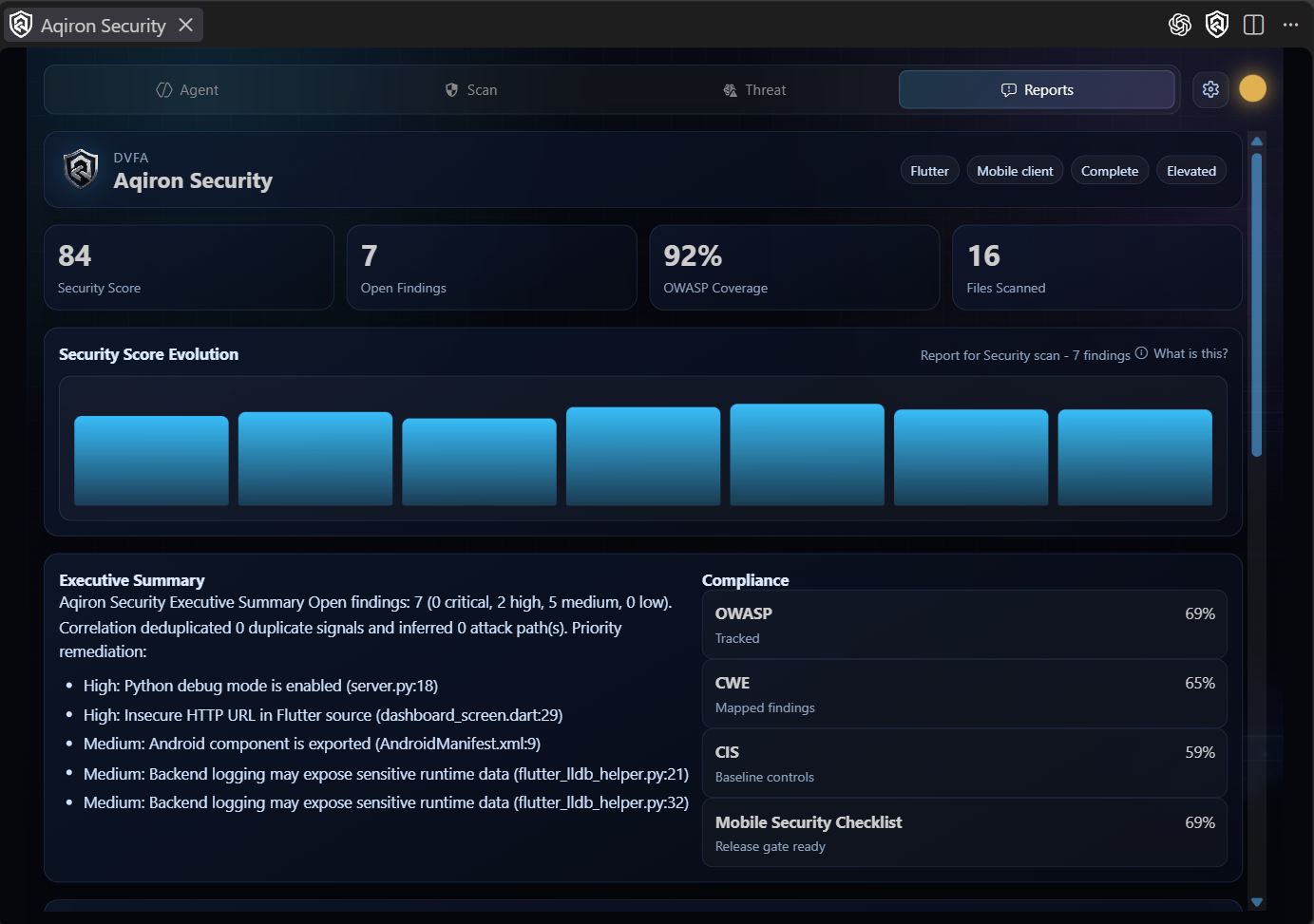
Screenshots
Agent
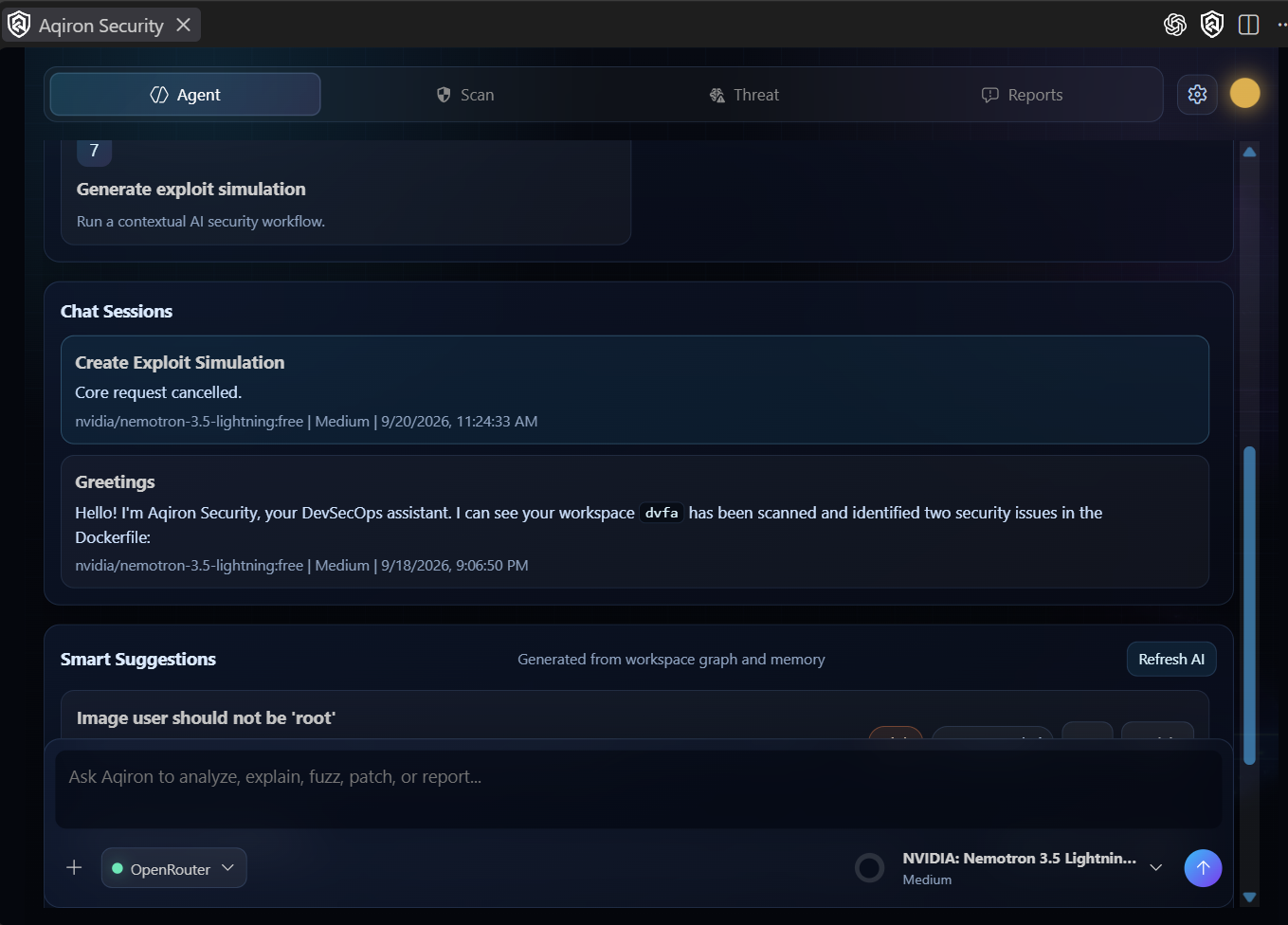
Scan
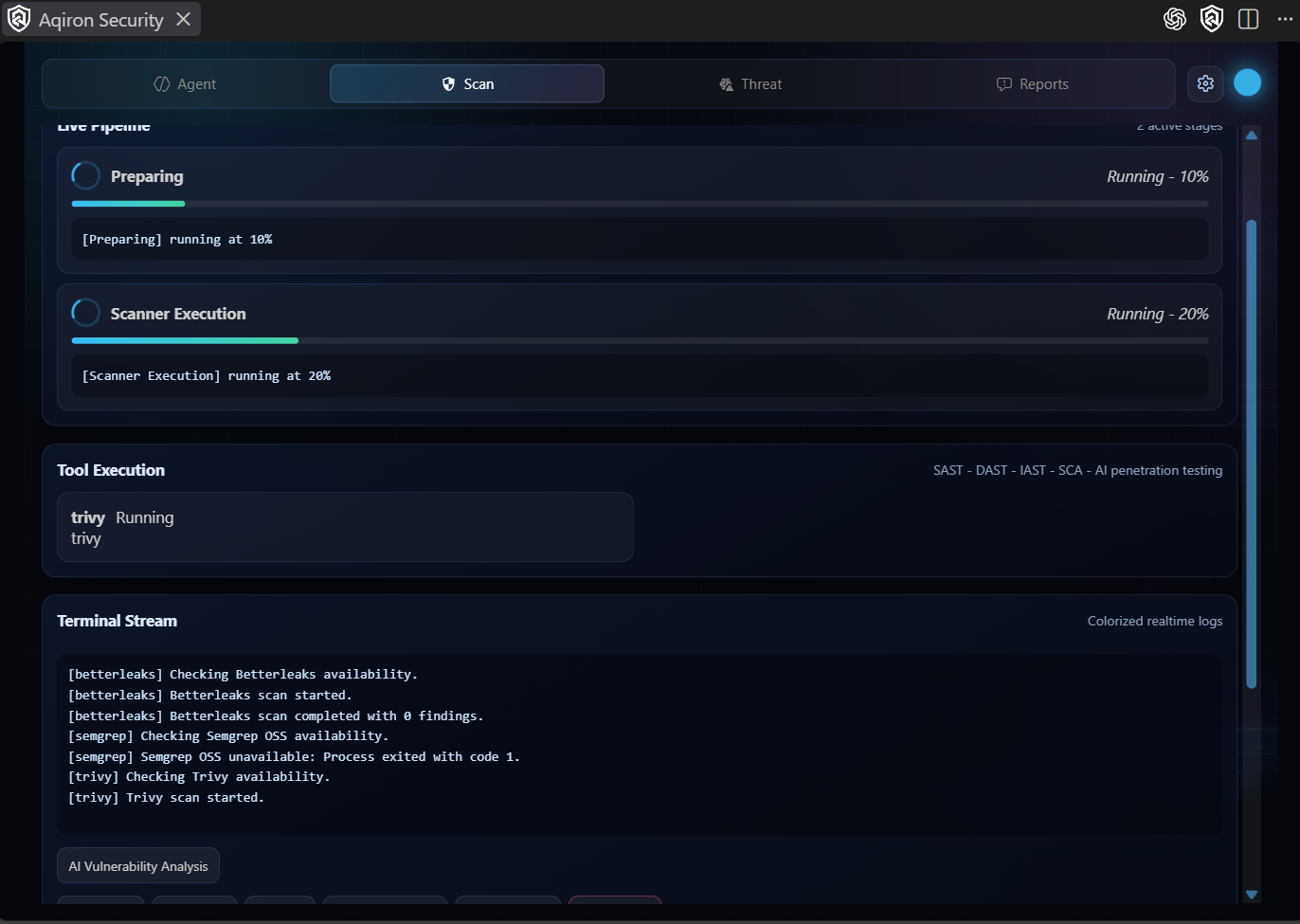
Threats
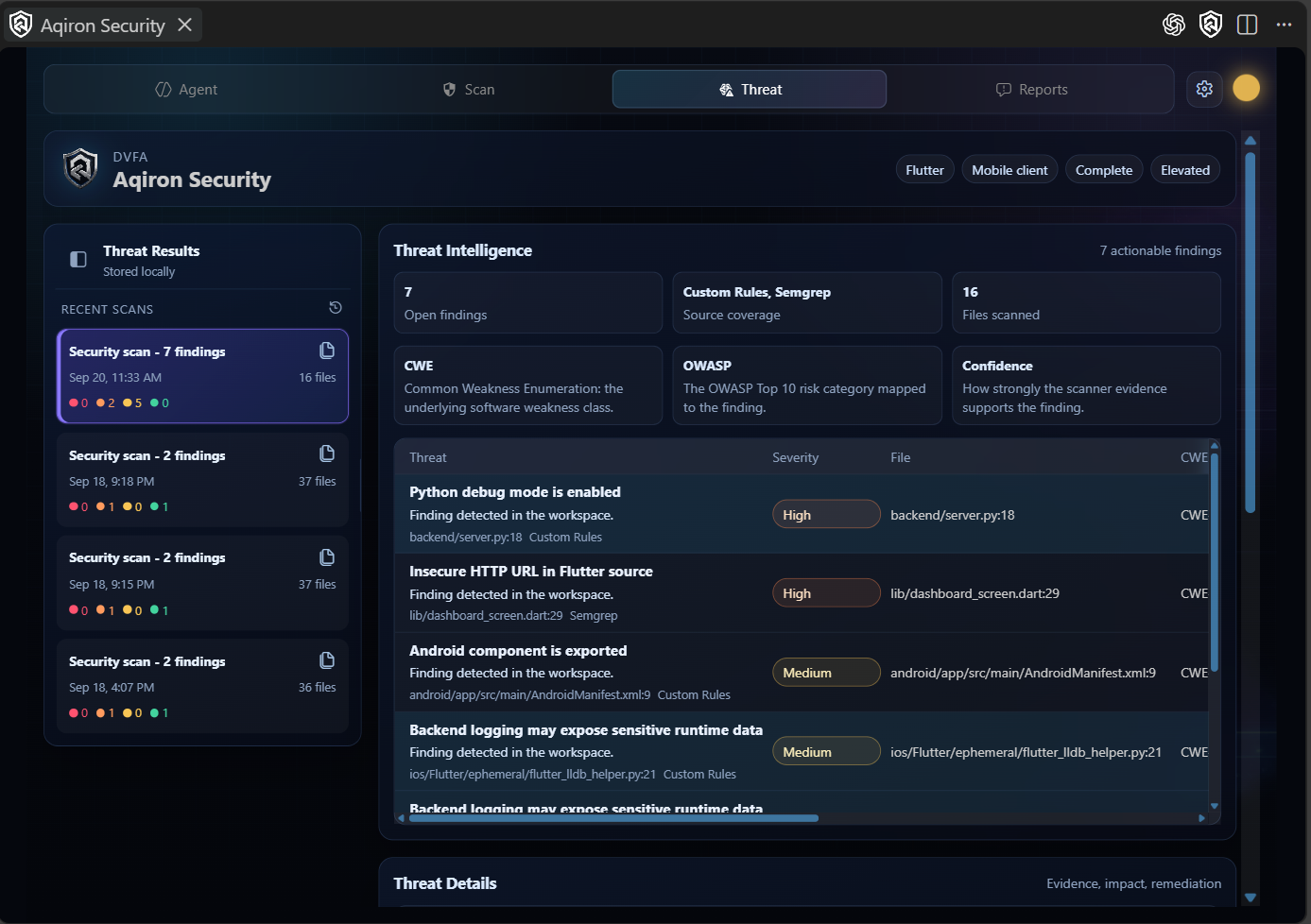
Reports
Requirements
- VS Code
^1.118.0. - Node.js and npm compatible with
package.jsonandpackage-lock.json. - A trusted Flutter workspace for workspace scans and RAG operations.
- Optional scanner executables or services: Betterleaks, OSV-Scanner, Semgrep, Trivy, and MobSF.
- Optional Ollama or OpenRouter configuration for AI operations.
Development quickstart
Run these commands from the repository root:
npm ci
npm run compile
npm test
npm run package
For interactive extension development, open the repository in VS Code, press F5, and use the Run Extension configuration to launch an Extension Development Host. npm run watch starts the TypeScript and esbuild watchers in parallel.
The main validation commands are also available independently:
npm run check-types
npm run lint
npm test compiles test output, builds the extension, runs linting, and launches the VS Code test CLI. Tests are under src/test/.
Commands and settings
The extension contributes commands for opening the sidebar, scanning a workspace or current file, refreshing scans, explaining issues, opening the security agent, analyzing a workspace, and managing the RAG index. The exact command IDs and settings are authoritative in package.json.
Important settings include aqiron-security.enableQuickFixes, excludeFolders, enableRealtimeScan, scanGeneratedFiles, maxFileSizeKB, mobsfBaseUrl, mobsfApiKey, and customRules.
Architecture
VS Code extension host (`src/`)
  ├─ commands, diagnostics, sidebar/webview, settings, AI/RAG services
  ├─ current-file scanning and VS Code integration
  └─ CoreClient ── newline-delimited JSON over stdin/stdout ──┐
                                                              │
private core runtime (`packages/core/`)                      │
  ├─ native rules and optional scanner adapters                │
  ├─ finding normalization, correlation, graph, and reports    │
  ├─ AI and RAG services                                       │
  └─ filesystem, process, network, and credential adapters    │
                                                              └─ `dist/core-runtime.js`
src/ is the VS Code host and user interface. packages/core/ is marked private and is bundled into dist/core-runtime.js; it is not currently published as a standalone npm package. src/core/CoreClient starts the runtime, performs the protocol handshake, forwards events, and exposes runtime operations to the extension.
For the detailed implementation view, see ARCHITECTURE_DIAGRAMS.md, TECHNICAL_REVERSE_ENGINEERING.md, and AQIRON_SECURITY_RAG.md.
Repository tour
| Path | Purpose |
|---|---|
src/ | VS Code extension host, commands, diagnostics, webview, AI, RAG, scanners, and tests. |
packages/core/ | Private core runtime and shared security services. |
assets/ | UI images, icons, logos, backgrounds, and generated visual assets. |
resources/ | Extension branding assets referenced by package.json. |
.github/ | Issue templates and the pull-request template. |
.vscode/ | Shared launch, task, extension recommendation, and workspace settings. |
scripts/ | Repository helper scripts. |
.aqiron-security/ | Generated workspace reports, RAG data, and threat history; keep local. |
package.json | Extension manifest, commands, settings, dependencies, and scripts. |
packages/core/package.json | Private core package metadata. |
esbuild.js | Extension, core-runtime, and webview bundling. |
tsconfig.json | TypeScript configuration. |
.gitignore | Ignored local and generated content. |
.vscodeignore | Files excluded from the packaged VS Code extension. |
LICENSE | Mozilla Public License 2.0 text. |
CHANGELOG.md, ROADMAP.md, CONTRIBUTING.md, SECURITY.md, CODE_OF_CONDUCT.md | Project history, roadmap, contribution, security, and community documentation. |
Generated output, dependencies, downloaded test runtimes, and workspace-specific .aqiron-security/ data are not source files and should not be committed.
Known limitations
- Workspace scans are currently limited to Flutter workspaces at the extension boundary.
- Pattern-based rules can miss data-flow issues or produce false positives.
- External scanner results depend on local tools, server configuration, network access, and tool versions.
- AI operations depend on the configured provider and may send selected workspace context to that provider.
- YARA, cloud orchestration, executable fuzzing, dynamic sandbox analysis, Jira integration, public report sharing, and automatic workspace-wide remediation are not current implemented capabilities.
Contributing
Read CONTRIBUTING.md before opening a pull request. Run the documented validation commands and describe security-relevant changes clearly. Security vulnerabilities should be reported using SECURITY.md, not a public issue.
Roadmap
The evidence-based roadmap is in ROADMAP.md. It distinguishes current implementation from work that still requires design, implementation, validation, or maintainer decisions.
License and trademark
This repository includes the Mozilla Public License 2.0 in LICENSE. The private packages/core package is not a separately published npm package.
“Aqiron” and “Aqiron Security” are project names. This README does not grant trademark rights; permitted uses and any trademark policy require owner or legal review.
Contributors

24 commits
Similar repos


Languages
TypeScript
92.6%
CSS
7.0%
A local-first VS Code extension for Flutter workspace security scanning, diagnostics, AI-assisted analysis, external scanner integration, finding correlation, RAG workspace intelligence, and JSON, SARIF, and PDF report generation.
TypeScript
0
24 commits
updated Sep 23, 2026
See what people are saying
README
Aqiron Security
Aqiron Security is a VS Code extension for local security scanning and security-focused workspace analysis. The repository contains the extension host, its webview, and a private TypeScript core runtime that the extension starts as a separate Node.js process.
Current status
This repository is version 0.0.1 and is under active development. Workspace operations currently require a Flutter workspace. The implementation is local-first; visible UI or command paths should not be interpreted as evidence of a hosted Aqiron service, Jira integration, dynamic analysis, public report sharing, or automatic workspace-wide remediation.
What Aqiron currently does
- Scans a supported current file or Flutter workspace.
- Publishes findings as VS Code diagnostics and in the Aqiron sidebar.
- Runs native pattern-based rules for selected Dart, Python, Android XML, and Dockerfile patterns.
- Integrates optional Betterleaks, MobSF, OSV-Scanner, Semgrep OSS, and Trivy scanners when their required tools or services are available.
- Normalizes and correlates findings, builds a relationship graph, and generates JSON, SARIF, and PDF report artifacts under
.aqiron-security/reports/. - Provides optional Ollama or OpenRouter AI operations and a workspace RAG index.
- Applies the currently implemented file-level quick fixes for a small set of deterministic findings.
External scanners and AI providers are optional. Missing scanners report an unavailable status instead of being treated as successful scans. Review AI output before using it for security decisions.
Screenshots
Agent
Scan
Threats
Reports
Requirements
- VS Code
^1.118.0. - Node.js and npm compatible with
package.jsonandpackage-lock.json. - A trusted Flutter workspace for workspace scans and RAG operations.
- Optional scanner executables or services: Betterleaks, OSV-Scanner, Semgrep, Trivy, and MobSF.
- Optional Ollama or OpenRouter configuration for AI operations.
Development quickstart
Run these commands from the repository root:
npm ci
npm run compile
npm test
npm run package
For interactive extension development, open the repository in VS Code, press F5, and use the Run Extension configuration to launch an Extension Development Host. npm run watch starts the TypeScript and esbuild watchers in parallel.
The main validation commands are also available independently:
npm run check-types
npm run lint
npm test compiles test output, builds the extension, runs linting, and launches the VS Code test CLI. Tests are under src/test/.
Commands and settings
The extension contributes commands for opening the sidebar, scanning a workspace or current file, refreshing scans, explaining issues, opening the security agent, analyzing a workspace, and managing the RAG index. The exact command IDs and settings are authoritative in package.json.
Important settings include aqiron-security.enableQuickFixes, excludeFolders, enableRealtimeScan, scanGeneratedFiles, maxFileSizeKB, mobsfBaseUrl, mobsfApiKey, and customRules.
Architecture
VS Code extension host (`src/`)
  ├─ commands, diagnostics, sidebar/webview, settings, AI/RAG services
  ├─ current-file scanning and VS Code integration
  └─ CoreClient ── newline-delimited JSON over stdin/stdout ──┐
                                                              │
private core runtime (`packages/core/`)                      │
  ├─ native rules and optional scanner adapters                │
  ├─ finding normalization, correlation, graph, and reports    │
  ├─ AI and RAG services                                       │
  └─ filesystem, process, network, and credential adapters    │
                                                              └─ `dist/core-runtime.js`
src/ is the VS Code host and user interface. packages/core/ is marked private and is bundled into dist/core-runtime.js; it is not currently published as a standalone npm package. src/core/CoreClient starts the runtime, performs the protocol handshake, forwards events, and exposes runtime operations to the extension.
For the detailed implementation view, see ARCHITECTURE_DIAGRAMS.md, TECHNICAL_REVERSE_ENGINEERING.md, and AQIRON_SECURITY_RAG.md.
Repository tour
| Path | Purpose |
|---|---|
src/ | VS Code extension host, commands, diagnostics, webview, AI, RAG, scanners, and tests. |
packages/core/ | Private core runtime and shared security services. |
assets/ | UI images, icons, logos, backgrounds, and generated visual assets. |
resources/ | Extension branding assets referenced by package.json. |
.github/ | Issue templates and the pull-request template. |
.vscode/ | Shared launch, task, extension recommendation, and workspace settings. |
scripts/ | Repository helper scripts. |
.aqiron-security/ | Generated workspace reports, RAG data, and threat history; keep local. |
package.json | Extension manifest, commands, settings, dependencies, and scripts. |
packages/core/package.json | Private core package metadata. |
esbuild.js | Extension, core-runtime, and webview bundling. |
tsconfig.json | TypeScript configuration. |
.gitignore | Ignored local and generated content. |
.vscodeignore | Files excluded from the packaged VS Code extension. |
LICENSE | Mozilla Public License 2.0 text. |
CHANGELOG.md, ROADMAP.md, CONTRIBUTING.md, SECURITY.md, CODE_OF_CONDUCT.md | Project history, roadmap, contribution, security, and community documentation. |
Generated output, dependencies, downloaded test runtimes, and workspace-specific .aqiron-security/ data are not source files and should not be committed.
Known limitations
- Workspace scans are currently limited to Flutter workspaces at the extension boundary.
- Pattern-based rules can miss data-flow issues or produce false positives.
- External scanner results depend on local tools, server configuration, network access, and tool versions.
- AI operations depend on the configured provider and may send selected workspace context to that provider.
- YARA, cloud orchestration, executable fuzzing, dynamic sandbox analysis, Jira integration, public report sharing, and automatic workspace-wide remediation are not current implemented capabilities.
Contributing
Read CONTRIBUTING.md before opening a pull request. Run the documented validation commands and describe security-relevant changes clearly. Security vulnerabilities should be reported using SECURITY.md, not a public issue.
Roadmap
The evidence-based roadmap is in ROADMAP.md. It distinguishes current implementation from work that still requires design, implementation, validation, or maintainer decisions.
License and trademark
This repository includes the Mozilla Public License 2.0 in LICENSE. The private packages/core package is not a separately published npm package.
“Aqiron” and “Aqiron Security” are project names. This README does not grant trademark rights; permitted uses and any trademark policy require owner or legal review.
Similar repos
Contributors
24 commits
Languages
TypeScript
92.6%
CSS
7.0%