
Claude Code mod: Alt+E / Alt+Shift+E step the effort level without a transcript row; the footer shows model and level
TypeScript
1
1 commits
updated Sep 28, 2026
See what people are saying
README
effort-cycle
A Claude Code mod that changes the effort level from the keyboard, without leaving a row in the transcript:
- Alt+E steps the effort up: low → medium → high → xhigh → max, stopping at max.
- Alt+Shift+E steps it down, stopping at low.
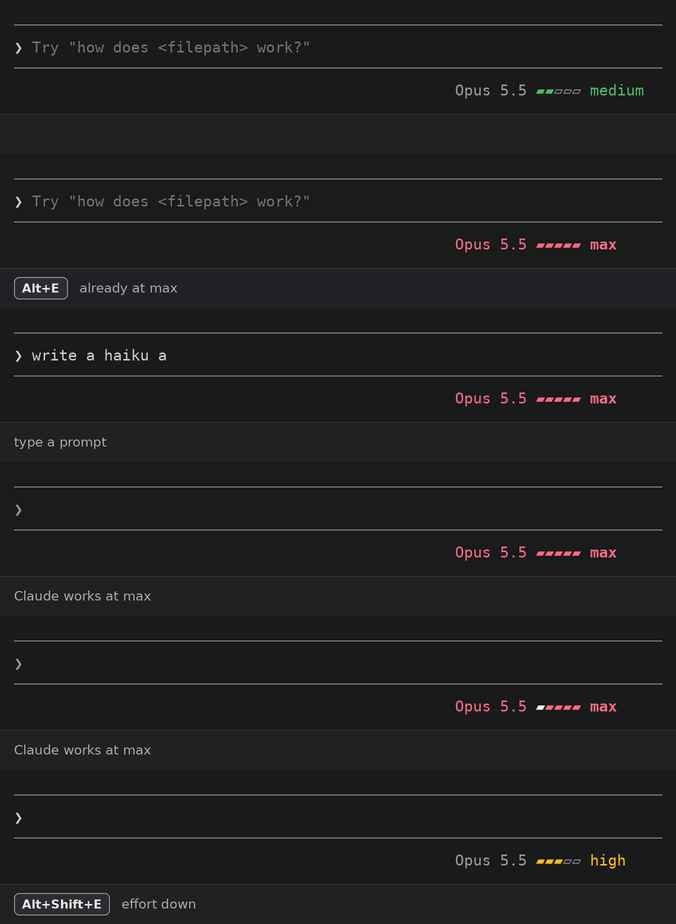
- The footer shows the model and level as they change, as a meter colored
cool to hot (gray, green, yellow, orange, red, by theme color), the blocks a
press fills or empties lit for a moment:
Opus 5.5 ▰▰▰▱▱ high. A press past either end lights the level's word. At max the model name turns red too, and while Claude works a light sweeps across the bar.
The level applies to the main thread's model requests. Subagents keep Claude
Code's own level. Changing effort Claude Code's way (/effort, the Alt+P
picker) takes over again from the next request.
Mods (plugins of function hooks) are an early-access Claude Code API that changes between releases. This one is built and tested against Claude Code 2.1.283.
Install
-
Install it from the anerco marketplace, in Claude Code:
/plugin marketplace add Anerco/plugins
/plugin install effort-cycle@anerco
Or, to work on it, clone the repo and load the folder with
claude --plugin-dir <folder>, or in every session throughCLAUDE_CODE_PLUGIN_DIRSin theenvblock of~/.claude/settings.json. -
Bind the keys in
~/.claude/keybindings.json:{ "bindings": [ { "context": "Global", "bindings": { "meta+e": "strip:jump9", "meta+shift+e": "strip:jump8" } } ] }A mod cannot own a key. It can only borrow one of Claude Code's own keybinding actions, so the mod listens for
strip:jump9(up) andstrip:jump8(down). Any modified key or chord works; a bare letter does not.On macOS, Option+E types an accent unless the terminal sends Option as Meta: in Terminal.app turn on Use Option as Meta key (Settings → Profiles → Keyboard), in iTerm2 set Left Option key to Esc+ (Settings → Profiles → Keys), in Ghostty set
macos-option-as-alt = true. Or bind a ctrl chord instead.
Settings
/config lists five toggles, Effort keys: include low through include
max, all on by default. The keys step only through the levels that are on,
for every model. The values are stored in ~/.claude/settings.json under
pluginConfigs, under the plugin's key (effort-cycle@anerco when installed from the marketplace).
Known issues
- The spinner can show a different level from the footer (#1). The footer is the level the requests go out with; the spinner reads Claude Code's own state, which a mod cannot change.
- The level is not kept after a restart. An Alt+E pick lasts for the session. A mod cannot write settings, so it cannot save the level the way the Alt+P picker does.
- Ultracode is not a step. It is a separate on/off switch that works at
any level (
/effort ultracode on), and the plugin API exposes no way to switch it.
Develop
claude plugin validate .
claude plugin test .
Run /plugin-types .claude-plugin/types in a Claude Code session to write the
API declarations an editor and tsc type the mod against. They are generated
per Claude Code build and are not committed.
License
MIT
Similar repos


Languages
TypeScript
100.0%
Claude Code mod: Alt+E / Alt+Shift+E step the effort level without a transcript row; the footer shows model and level
TypeScript
1
1 commits
updated Sep 28, 2026
See what people are saying
README
effort-cycle
A Claude Code mod that changes the effort level from the keyboard, without leaving a row in the transcript:
- Alt+E steps the effort up: low → medium → high → xhigh → max, stopping at max.
- Alt+Shift+E steps it down, stopping at low.
- The footer shows the model and level as they change, as a meter colored
cool to hot (gray, green, yellow, orange, red, by theme color), the blocks a
press fills or empties lit for a moment:
Opus 5.5 ▰▰▰▱▱ high. A press past either end lights the level's word. At max the model name turns red too, and while Claude works a light sweeps across the bar.
The level applies to the main thread's model requests. Subagents keep Claude
Code's own level. Changing effort Claude Code's way (/effort, the Alt+P
picker) takes over again from the next request.
Mods (plugins of function hooks) are an early-access Claude Code API that changes between releases. This one is built and tested against Claude Code 2.1.283.
Install
-
Install it from the anerco marketplace, in Claude Code:
/plugin marketplace add Anerco/plugins
/plugin install effort-cycle@anerco
Or, to work on it, clone the repo and load the folder with
claude --plugin-dir <folder>, or in every session throughCLAUDE_CODE_PLUGIN_DIRSin theenvblock of~/.claude/settings.json. -
Bind the keys in
~/.claude/keybindings.json:{ "bindings": [ { "context": "Global", "bindings": { "meta+e": "strip:jump9", "meta+shift+e": "strip:jump8" } } ] }A mod cannot own a key. It can only borrow one of Claude Code's own keybinding actions, so the mod listens for
strip:jump9(up) andstrip:jump8(down). Any modified key or chord works; a bare letter does not.On macOS, Option+E types an accent unless the terminal sends Option as Meta: in Terminal.app turn on Use Option as Meta key (Settings → Profiles → Keyboard), in iTerm2 set Left Option key to Esc+ (Settings → Profiles → Keys), in Ghostty set
macos-option-as-alt = true. Or bind a ctrl chord instead.
Settings
/config lists five toggles, Effort keys: include low through include
max, all on by default. The keys step only through the levels that are on,
for every model. The values are stored in ~/.claude/settings.json under
pluginConfigs, under the plugin's key (effort-cycle@anerco when installed from the marketplace).
Known issues
- The spinner can show a different level from the footer (#1). The footer is the level the requests go out with; the spinner reads Claude Code's own state, which a mod cannot change.
- The level is not kept after a restart. An Alt+E pick lasts for the session. A mod cannot write settings, so it cannot save the level the way the Alt+P picker does.
- Ultracode is not a step. It is a separate on/off switch that works at
any level (
/effort ultracode on), and the plugin API exposes no way to switch it.
Develop
claude plugin validate .
claude plugin test .
Run /plugin-types .claude-plugin/types in a Claude Code session to write the
API declarations an editor and tsc type the mod against. They are generated
per Claude Code build and are not committed.
License
MIT
Similar repos
Languages
TypeScript
100.0%