
Headless Windows 11 execution sandbox for AI agents. Typed Rust control plane over KVM/QEMU with an append-only audit journal and strict capability boundary.
Rust
0
1 commits
updated Sep 16, 2026
README
WVM — a headless execution sandbox for AI agents
Drive Windows 11 from a Linux terminal over a typed, hostile-peer-guarded JSON protocol.
A Rust control plane that lets a program or an agent drive a Windows VM as a typed tool: launch processes, capture screenshots, inject input, move files, snapshot and restore. Headless by default, every operation through a capability boundary and an append-only journal.
Give your agent a Windows guest instead of your host machine.
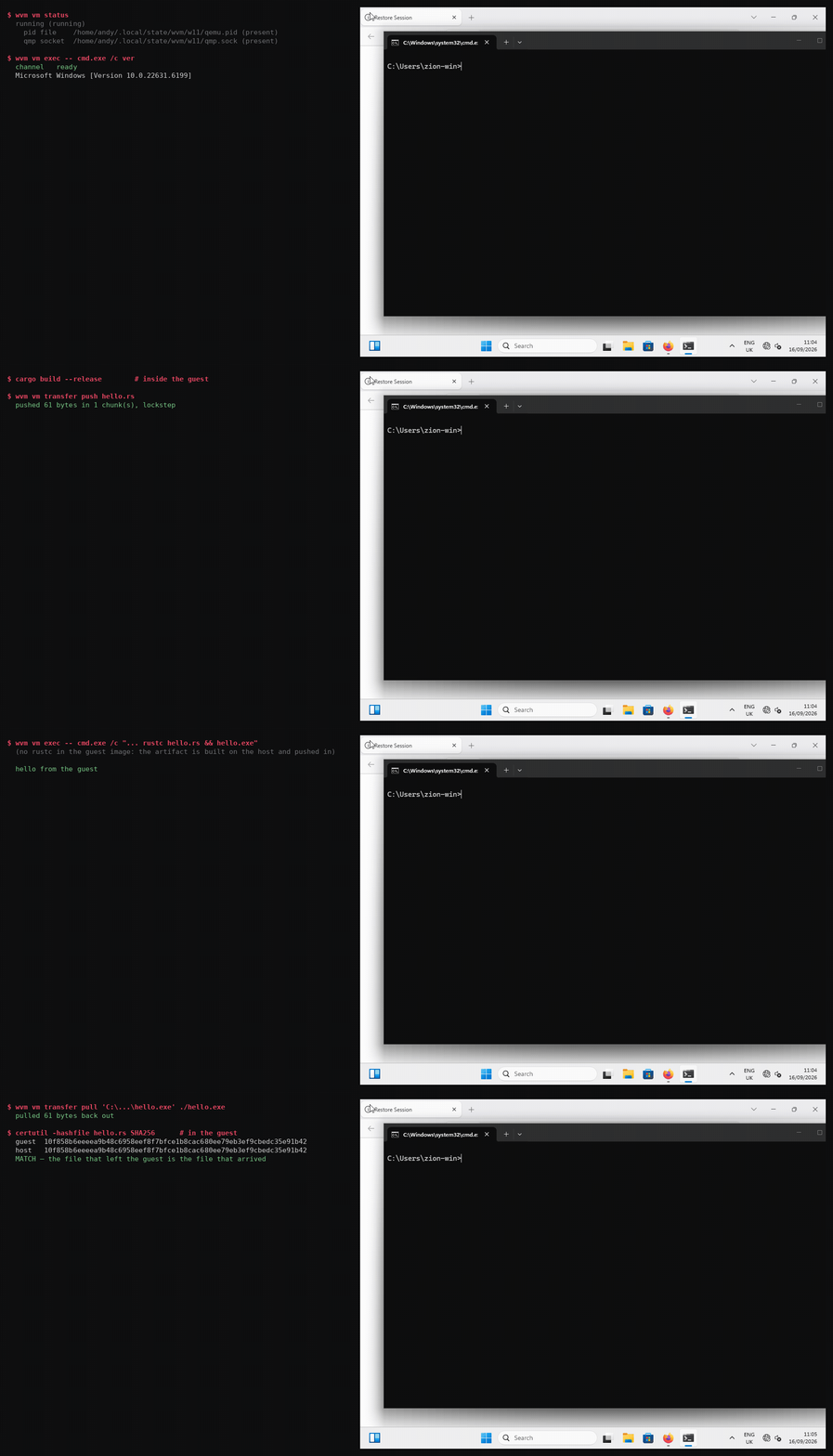
Left: the typed protocol. Right: the same guest, live, receiving the transfer and running the code.
Both halves are real — the GIF is rendered from the actual commands by
scripts/make-demo-gif.py, so it cannot drift from the code or show anything the tool did not do.
It is not a desktop-integration layer. That space is well served — WinBoat (22.8k stars), WinPodX, winapps, LinOffice all put individual Windows windows on a Linux desktop via FreeRDP and RemoteApp. WVM exists for the case they do not cover: an agent or a program driving a Windows guest over a typed protocol, headless, with an auditable capability boundary.
Status: every verb implemented and verified against a live guest — exec, capture, input,
transfer push, transfer pull, and snapshots (save, restore, list, delete). Nothing in the
protocol is a stub.
The one command to run first
Before installing anything, watch the capability boundary work:
python3 examples/wvm_client.py boundary
Daemon started with the grant: inspect only

  hello      -> handshake accepted; peer reports: no guest channel yet (M3 not started)
  inspect    -> inventory: os='host (no guest channel yet)', 0 drive(s), 0 app(s)
  capture    -> REFUSED
  lifecycle  -> REFUSED
  exec       -> REFUSED

Every ungranted verb was refused. The grant held.
That runs on this machine with nothing but Python installed. It starts a real daemon with a deliberately narrow grant, then tries to exceed it four times — and the refusals are the product.
examples/wvm_client.py is also a second, independent implementation of the wire format, stdlib
only. A protocol with one implementation has no way to notice that its own encoder and decoder
disagree; two implementations surface that immediately.
What works, verified
Driven from Linux, over the control channel, with no console, no keyboard and no guest-side agent:
hello    ->  {"status":"ready","protocol_version":1,"guest":"Windows (wvm-guest 0.1.0)"}

exec     ->  {"result":"process_output","outcome":"exited","code":0,
              "stdout":"\r\nMicrosoft Windows [Version 10.0.22631.2715]\r\n",
              "elapsed_ms":37}

capture  ->  a 1024x768 PNG of the live desktop, 608 distinct colours

input    ->  clicked (336,397) on the Firefox new tab page; Wikipedia loaded

transfer ->  1 MiB pushed in and pulled back, byte-identical both ways
A process launched inside Windows, its output captured, returned to the host. A screenshot of the real desktop. A click that lands where you aimed. And an artifact the guest produced, extracted and hash-verified — which is the difference between a sandbox and a roach motel.
| Protocol + framing | length-prefixed JSON, 4-byte big-endian, hostile-peer guard |
| Capability boundary | enforced at request construction, denials journalled |
| Audit journal | append-only JSON Lines, requests and denials at equal weight |
| QEMU supervision | start, suspend, shutdown, status, serial log |
| Windows install | tiny11, driven by keyboard injection alone, headless |
| Guest networking | e1000e (in-box driver), 10.0.2.15 |
| Guest service | Windows service, StartServiceCtrlDispatcher, auto-restart |
| Exec | launch, capture stdout/stderr, caller-supplied timeout, exit status |
| Exec cleanup | a timeout kills the whole process tree, not just the direct child |
| Capture | PNG of the live desktop, geometry assertion |
| Input | absolute pointer moves and clicks, UK-correct keys and text |
| Transfer | push and pull, chunked in lockstep, confined to a guest staging root |
| Snapshots | save and restore live, RAM included — the guest rolls back, still running |
What the guest refuses, and why that is the answer
One verb is answered with a refusal rather than an implementation, and the refusal is permanent:
lifecyclefrom inside the guest. Snapshots are a hypervisor capability. The machine state lives in QEMU and the guest has no view of its own hypervisor, so this can never work from that side — it is not "not written yet".
The distinction is deliberate and tested. A caller told "not implemented" would reasonably retry
after an upgrade; a caller told the truth stops asking and uses wvm vm snapshot on the host, which
the message names. The protocol keeps the verb so the boundary is discoverable by asking, rather
than by a connection timing out.
Verifying it yourself
./scripts/verify-all.sh              # everything, against a live guest
./scripts/verify-all.sh --offline    # only what needs no guest
./scripts/verify-all.sh --list       # what runs, and why
Twelve probes, and a result with three states rather than two: passed, failed, and could not run. That last one is not a pass. A probe that never executed has verified nothing, and conflating the two is how a build ships on the strength of a check that did not happen.
Every bug in this project's history was found by one of these, and every false claim was caught by one — so they are wired together rather than left to whoever remembers to run them.
Known gaps, recorded rather than hidden
- A request that ignores its deadline no longer holds the channel. Requests run under a fifteen minute backstop and connections are served on their own threads, so a wedged request is abandoned and the listener stays reachable (D-015). What is still true: the abandoned work is not cancelled — Rust cannot safely cancel arbitrary code, so the worker runs to completion. The channel is released; the guest's resources are not. A timeout reply says so rather than implying a clean stop.
- The tree-kill has a microseconds-wide window. The child is assigned to its job object
immediately after
spawn, so there is a moment where a process exists outside the job. Closing it needsCREATE_SUSPENDED+AssignProcessToJobObject+ResumeThread, whichstd::processdoes not expose. Named rather than described away — see D-013. - A guest without a display cannot be captured. Capture runs against the QEMU framebuffer on the host, so it needs QEMU to be rendering. That is inherent, not a bug — and it is why capture is host-side at all (see D-009).
- Snapshots need the VM running, and stop it briefly. A save freezes the guest CPUs for a few seconds while state is written — measured at ~6.5s on a 3.4 GiB machine. The QMP control channel is silent during that window, which is why any client read timeout shorter than the pause fails intermittently. The job loop here reads with a 60s timeout for exactly that reason.
- Snapshot size is the RAM, not the delta.
my-snapreports 3.37 GiB because it holds the machine's memory as well as its disk. That is what makes a restore a rollback rather than a disk revert, and it is also why snapshots are worth deleting when they are no longer needed. - Input cannot reach every widget. A page-level overlay that fights synthetic focus may take focus and still ignore injected keys. Ordinary Windows controls and browser chrome accept input reliably; this is recorded as an observed boundary rather than explained away.
Quickstart
This walks from a bare Linux host to driving a Windows guest. It takes about an hour, most of it the Windows install.
0. What you need
- Linux host with KVM.
/dev/kvmmust be openable by your user. On many distributions this needs you in thekvmgroup; check withtest -r /dev/kvm && test -w /dev/kvm && echo ok. - QEMU 8 or newer, Rust 1.70+, and cargo.
- A Windows ISO. Tiny11 is recommended and is what this project is developed against — see Why Tiny11 for the reasoning and where to get it.
- The virtio-win driver ISO, from
https://fedorapeople.org/groups/virt/virtio-win/direct-downloads/stable-virtio/virtio-win.iso. You need this even though the guest ends up needing no virtio drivers at runtime: it is what makes the OS disk visible to Windows Setup. - ~40 GB free disk (a 64 GiB sparse disk and a Windows install).
1. Check the host can run this
cargo run --release -p wvm-host -- doctor
This reports KVM, QEMU, the cross-compile target and the toolchain, and it attempts each operation rather than inspecting metadata. If it says something is missing, fix that first — every later step assumes it.
2. Cross-compile the guest agent
rustup target add x86_64-pc-windows-gnu
cargo build --release --target x86_64-pc-windows-gnu -p wvm-guest
You need x86_64-w64-mingw32-gcc installed as the linker. On Debian/Ubuntu:
sudo apt install gcc-mingw-w64-x86-64. The result is
target/x86_64-pc-windows-gnu/release/wvm-guest.exe, a little under 600 KB. It links only against
core Windows DLLs — KERNEL32, msvcrt, ntdll, WS2_32 — so it needs no Visual C++
redistributable in the guest.
3. Generate the VM configuration
./scripts/prepare-install.sh --iso /path/to/tiny11.iso
This writes two files under ~/wvm/: install.toml (the installer ISO attached) and wvm.toml
(the long-lived profile, no installer). Read them. They are the whole VM definition and they are
short.
4. Install Windows, headless
wvm vm cmdline --config ~/wvm/install.toml   # read the command line before running it
wvm vm start   --config ~/wvm/install.toml --timeout 300
wvm vm log     --config ~/wvm/install.toml --lines 60
Windows Setup will not see the disk on the first screen. That is expected and it is the
catch-22: the OS disk is on virtio-blk for speed, and Setup needs
a driver it can only load from a disc on a bus it can already read. When Setup offers no disk,
click Load driver → Browse → the driver disc → viostor → w11 → amd64. The disk appears.
Complete the install through the GUI. Watch it with a window if you prefer:
python3 scripts/vm-with-display.py --display gtk ~/wvm/install.toml
5. Boot the installed guest
./scripts/start-windows.sh              # windowed
./scripts/start-windows.sh --headless   # no display
./scripts/vm-health.sh                  # is anything actually wrong?
6. Install the guest service
Inside the guest, in an elevated PowerShell:
sc.exe create wvm-guest binPath= "C:\Program Files\wvm\wvm-guest.exe" --service start= auto
sc.exe start  wvm-guest
sc.exe query  wvm-guest
scripts/install-guest-service.ps1 does this plus the firewall rule, and is the path to prefer —
copy the binary and the script into the guest, then run the script elevated. Full detail, including
how to get files into the guest, is in docs/WINDOWS-INSTALL-STATUS.md.
Note sc.exe, not sc: in PowerShell sc is an alias for Set-Content and will fail with a
confusing "positional parameter" error.
7. Drive it
python3 scripts/talk-to-guest.py hello
python3 scripts/talk-to-guest.py exec -- cmd.exe /c ver

# the host binary also does capture, input and file transfer
wvm vm capture  --config ~/wvm/wvm.toml --out /tmp/screen.png --expect 1024x768
wvm vm input    click --config ~/wvm/wvm.toml 336 397
wvm vm input    text  --config ~/wvm/wvm.toml 'hello from the host'

# move a file in, and get an artifact back out
wvm vm transfer push --config ~/wvm/wvm.toml ./payload.bin 'C:\ProgramData\wvm\staging\payload.bin'
wvm vm transfer pull --config ~/wvm/wvm.toml 'C:\ProgramData\wvm\staging\result.bin' ./result.bin

# snapshot before letting something risky run, and roll back after
wvm vm snapshot save before-install --config ~/wvm/wvm.toml
wvm vm snapshot list               --config ~/wvm/wvm.toml
wvm vm snapshot restore before-install --config ~/wvm/wvm.toml
A snapshot takes the machine's memory as well as its disk, so a restore returns the guest to the state it was in — running, with its windows open — not just to an earlier disk image. That is the difference between undoing something and reinstalling it.
Note the argument order for pull: the names are written for a push, so they invert. SOURCE
is the guest file being fetched and GUEST_PATH is the host destination. Getting it
backwards sends your local path to the guest, which refuses it as outside its staging root — an
error that looks like a boundary problem rather than a swapped argument.
Why Tiny11
Tiny11 is Windows 11 Pro with the consumer surface stripped out. Around 3 GB installed, versus 20 GB+ for a stock ISO once telemetry, Edge components and the background service set are included.
Tiny11 was chosen for an agent sandbox specifically, not for novelty:
- Everything the control plane needs is present. Win32 APIs, the Service Control Manager, and the interactive Session 1 desktop subsystem. Those are the parts that matter, and none of them are removed.
- Less to move and less to watch. For an ephemeral sandbox, baseline memory footprint and I/O latency matter more than features nobody will use.
- Fewer background services means fewer things that can fire mid-operation, and a shorter boot.
The trade is that Tiny11 is a community build rather than an official Microsoft image. For a disposable sandbox that is the right trade; for anything holding data you care about, install from an official ISO and expect a larger, slower guest.
Verified against: Microsoft Windows [Version 10.0.22631.2715] — the string the guest returns
from exec -- cmd.exe /c ver, which is the honest way to confirm what you actually built.
The virtio storage catch-22
Windows Setup cannot see the OS disk, because that disk is on virtio-blk for speed and Setup has
no virtio driver yet. So a second disc carries the driver.
The driver disc must be on a bus Setup can already read — AHCI, not virtio. Attaching the driver
disc to a virtio controller is a genuine circular dependency: Setup cannot read the disc that
contains the driver that would let it read a disc. The symptom is "No device drivers were found"
with nothing but Boot(X:) to browse, which looks like a broken image rather than a bus mismatch.
OS disk          virtio-blk          fast, invisible to Setup until the driver loads
driver ISO       AHCI port 0         readable by Setup, because AHCI is in-box
installer ISO    AHCI port 1         a separate port, not a second unit on the first
Both discs need separate AHCI ports. One IDE unit cannot carry two CD-ROMs on q35.
Full detail, including how each of these was found, is in docs/WINDOWS-INSTALL-STATUS.md.
Execution modes
Headless (the default)
No display is attached and the framebuffer is not instantiated. This is the primitive: a typed, auditable channel with no UI in the loop.
./scripts/start-windows.sh --headless
python3 scripts/talk-to-guest.py exec -- cmd.exe /c ver
Lower memory footprint, faster boot, and nothing in the loop that a human is expected to read. Use this for agent execution. Capture still works here — it reads the framebuffer QEMU is rendering even when no window is shown.
Windowed (visual telemetry)
Attach a display when you want to watch what the agent is doing — absolute pointer positioning, a UI that did not respond as expected, a guest mid-boot.
./scripts/start-windows.sh                    # GTK window on the host
python3 scripts/vm-with-display.py --display vnc ~/wvm/wvm.toml
For VNC, point Remmina (or any viewer) at 127.0.0.1:5900 — bound to loopback, no password, so do
not forward that port. --display sdl also works if GTK misbehaves under your compositor.
--vnc-port N moves it if 5900 is taken.
Working in the guest by hand
Watching is the small half of this. The display is a real interactive session, so you can also take the keyboard and do the things an agent should not be trusted to do unattended: run an installer that wants a licence click, log into a Microsoft account, set a password, install a driver, or debug the app your agent is failing to drive.
Three things make that practical:
Type into it. Send keystrokes to the guest's console without a display attached at all — useful when you want to hand-type one command into a headless VM:
python3 scripts/qmp_input.py <socket> text "winget install --id Git.Git"
python3 scripts/qmp_input.py <socket> key ret
Screenshot without watching. wvm vm capture returns a PNG of whatever the desktop currently
shows, so a script can record what happened rather than a human having to sit there.
Paste a command from the host. Type it in the window, or use Run (Meta+R) when you want a
clean single command rather than a shell prompt.
Practicalities worth knowing, each learned the hard way:
- The guest runs a UK keyboard layout. If yours differs, characters arrive shifted — quote marks and backslashes are the usual casualties.
Ctrl+Alt+Greleases the mouse only if a grab is active. The generated command line uses a plain-display gtkwith nograb-on-hover, so nothing grabs and there is nothing to release. If you add a grab option yourself, that is the key that frees it.- UAC prompts need a real click. Driving them through emulated input is unreliable, and when a prompt is waiting the agent's commands will appear to hang with no visible reason.
You will see the exact desktop the agent is manipulating, because input arrives as emulated USB
hardware (usb-tablet) rather than through any Windows API, and the guest's own Session 1 desktop
renders it. That indirection is what makes headless input work at all — see
why input is emulated hardware.
Two more things that will bite you
Both are covered above; they are repeated here because they cost the most time and each presents as something else entirely.
A firmware mismatch is silent. An unbootable disk under the wrong firmware produces no error —
the firmware just shows its boot menu, which looks like "the install failed". wvm vm start reads
the partition table and refuses a mismatch by name rather than letting you debug a symptom.
A TCP connect to the guest port proves nothing. QEMU's user-mode networking completes the
handshake on the host's behalf and only then attempts delivery, so a connect succeeds against a
guest with nothing listening. Use scripts/talk-to-guest.py, which exchanges real frames and says
so in its output.
Why input is emulated hardware
This is the design decision that makes most of the tool possible, so it is worth stating plainly.
A Windows service cannot inject input into the desktop. Services run in session 0, an
isolated session with no desktop, and SendInput from there cannot reach session 1 where the user
(and any GUI application) lives. The only supported route is CreateProcessAsUser with
lpDesktop = "winsta0\default", which needs SE_TCB_NAME and spawns a process per event.
Emulated hardware has no such restriction. Input sent over QMP arrives as PS/2 and USB device events, and the Windows kernel delivers those to whichever session owns the active console — session 1. No Windows API is involved, so the isolation boundary never applies.
The same reasoning applies to screen capture. The guest cannot screenshot its own desktop from session 0, so capture reads QEMU's framebuffer on the host instead (D-009).
Practical consequences:
inputandcaptureneed QEMU running. They are host-side operations.- A guest with no display device cannot be captured at all — honestly reported, rather than returning a black image that looks like a dark screen.
- Absolute pointer positioning needs a
usb-tableton a USB controller. Without one QEMU exposes only a relative mouse, and a coordinate cannot be expressed at all.
Full reasoning in docs/DECISIONS.md D-009, D-010 and D-011.
Why the odd decisions
Recorded so they are not re-litigated. Full reasoning in docs/DECISIONS.md.
- TCP, not virtio-vsock (D-002). Windows has no native
AF_VSOCK; the virtio-winviosockdriver was withheld for years and only entered the release at build 285, with a field failure mode ofConnection reset by peer. Both shipping projects in this space rejected it. - Headless by default (D-004). The plane must work with no display attached.
- A diagnostic attempts the operation (D-005).
/dev/kvmreported as inaccessible because the user was not in thekvmgroup — while an ACL made it openable. Metadata lied; attempting the open told the truth. - e1000e, not virtio-net. virtio-net is faster and needs a driver installed inside the guest before any adapter exists. On a fresh install the guest enumerated no network interface while every host-side check reported healthy — the forward was bound, the device was attached, and a TCP connect succeeded. e1000e uses the Windows in-box driver.
- Capture on the host, not in the guest (D-009). Session 0 isolation, as above.
- Transfers are chunked at 256 KiB (see
wvm-guest/src/fsio.rs). Not because the frame limit requires it — frames carry up to 64 MiB — but because one frame per file means the whole file in memory on both sides at once, and a transfer that dies halfway would be indistinguishable from a small successful one. - The keymap is measured, never derived (D-011). It was written for a US keyboard on a UK guest, and each wrong entry presented as a different fault: a bad quote looked like a permissions problem, a bad backslash looked like a missing driver.
Layout
wvm-ipc/     wire protocol and framing — shared by host and guest, so they cannot desync
wvm-host/    the Linux daemon: CLI, QEMU supervision, control socket, policy gate, journal
wvm-guest/   the Windows service: transport, dispatch, Win32 execution, path containment
docs/        design record — decisions, verified environment, build plan, install status, origin
scripts/     tooling, each written for a specific failure that cost time
examples/    a dependency-free Python client, and an executable demonstration of the gate
Licence
MIT.
Contributors

1 commits
See what people are saying
Similar repos


Languages
Rust
68.7%
Python
19.8%
Shell
7.8%
PowerShell
2.4%
Batchfile
1.3%
Headless Windows 11 execution sandbox for AI agents. Typed Rust control plane over KVM/QEMU with an append-only audit journal and strict capability boundary.
Rust
0
1 commits
updated Sep 16, 2026
README
WVM — a headless execution sandbox for AI agents
Drive Windows 11 from a Linux terminal over a typed, hostile-peer-guarded JSON protocol.
A Rust control plane that lets a program or an agent drive a Windows VM as a typed tool: launch processes, capture screenshots, inject input, move files, snapshot and restore. Headless by default, every operation through a capability boundary and an append-only journal.
Give your agent a Windows guest instead of your host machine.
Left: the typed protocol. Right: the same guest, live, receiving the transfer and running the code.
Both halves are real — the GIF is rendered from the actual commands by
scripts/make-demo-gif.py, so it cannot drift from the code or show anything the tool did not do.
It is not a desktop-integration layer. That space is well served — WinBoat (22.8k stars), WinPodX, winapps, LinOffice all put individual Windows windows on a Linux desktop via FreeRDP and RemoteApp. WVM exists for the case they do not cover: an agent or a program driving a Windows guest over a typed protocol, headless, with an auditable capability boundary.
Status: every verb implemented and verified against a live guest — exec, capture, input,
transfer push, transfer pull, and snapshots (save, restore, list, delete). Nothing in the
protocol is a stub.
The one command to run first
Before installing anything, watch the capability boundary work:
python3 examples/wvm_client.py boundary
Daemon started with the grant: inspect only

  hello      -> handshake accepted; peer reports: no guest channel yet (M3 not started)
  inspect    -> inventory: os='host (no guest channel yet)', 0 drive(s), 0 app(s)
  capture    -> REFUSED
  lifecycle  -> REFUSED
  exec       -> REFUSED

Every ungranted verb was refused. The grant held.
That runs on this machine with nothing but Python installed. It starts a real daemon with a deliberately narrow grant, then tries to exceed it four times — and the refusals are the product.
examples/wvm_client.py is also a second, independent implementation of the wire format, stdlib
only. A protocol with one implementation has no way to notice that its own encoder and decoder
disagree; two implementations surface that immediately.
What works, verified
Driven from Linux, over the control channel, with no console, no keyboard and no guest-side agent:
hello    ->  {"status":"ready","protocol_version":1,"guest":"Windows (wvm-guest 0.1.0)"}

exec     ->  {"result":"process_output","outcome":"exited","code":0,
              "stdout":"\r\nMicrosoft Windows [Version 10.0.22631.2715]\r\n",
              "elapsed_ms":37}

capture  ->  a 1024x768 PNG of the live desktop, 608 distinct colours

input    ->  clicked (336,397) on the Firefox new tab page; Wikipedia loaded

transfer ->  1 MiB pushed in and pulled back, byte-identical both ways
A process launched inside Windows, its output captured, returned to the host. A screenshot of the real desktop. A click that lands where you aimed. And an artifact the guest produced, extracted and hash-verified — which is the difference between a sandbox and a roach motel.
| Protocol + framing | length-prefixed JSON, 4-byte big-endian, hostile-peer guard |
| Capability boundary | enforced at request construction, denials journalled |
| Audit journal | append-only JSON Lines, requests and denials at equal weight |
| QEMU supervision | start, suspend, shutdown, status, serial log |
| Windows install | tiny11, driven by keyboard injection alone, headless |
| Guest networking | e1000e (in-box driver), 10.0.2.15 |
| Guest service | Windows service, StartServiceCtrlDispatcher, auto-restart |
| Exec | launch, capture stdout/stderr, caller-supplied timeout, exit status |
| Exec cleanup | a timeout kills the whole process tree, not just the direct child |
| Capture | PNG of the live desktop, geometry assertion |
| Input | absolute pointer moves and clicks, UK-correct keys and text |
| Transfer | push and pull, chunked in lockstep, confined to a guest staging root |
| Snapshots | save and restore live, RAM included — the guest rolls back, still running |
What the guest refuses, and why that is the answer
One verb is answered with a refusal rather than an implementation, and the refusal is permanent:
lifecyclefrom inside the guest. Snapshots are a hypervisor capability. The machine state lives in QEMU and the guest has no view of its own hypervisor, so this can never work from that side — it is not "not written yet".
The distinction is deliberate and tested. A caller told "not implemented" would reasonably retry
after an upgrade; a caller told the truth stops asking and uses wvm vm snapshot on the host, which
the message names. The protocol keeps the verb so the boundary is discoverable by asking, rather
than by a connection timing out.
Verifying it yourself
./scripts/verify-all.sh              # everything, against a live guest
./scripts/verify-all.sh --offline    # only what needs no guest
./scripts/verify-all.sh --list       # what runs, and why
Twelve probes, and a result with three states rather than two: passed, failed, and could not run. That last one is not a pass. A probe that never executed has verified nothing, and conflating the two is how a build ships on the strength of a check that did not happen.
Every bug in this project's history was found by one of these, and every false claim was caught by one — so they are wired together rather than left to whoever remembers to run them.
Known gaps, recorded rather than hidden
- A request that ignores its deadline no longer holds the channel. Requests run under a fifteen minute backstop and connections are served on their own threads, so a wedged request is abandoned and the listener stays reachable (D-015). What is still true: the abandoned work is not cancelled — Rust cannot safely cancel arbitrary code, so the worker runs to completion. The channel is released; the guest's resources are not. A timeout reply says so rather than implying a clean stop.
- The tree-kill has a microseconds-wide window. The child is assigned to its job object
immediately after
spawn, so there is a moment where a process exists outside the job. Closing it needsCREATE_SUSPENDED+AssignProcessToJobObject+ResumeThread, whichstd::processdoes not expose. Named rather than described away — see D-013. - A guest without a display cannot be captured. Capture runs against the QEMU framebuffer on the host, so it needs QEMU to be rendering. That is inherent, not a bug — and it is why capture is host-side at all (see D-009).
- Snapshots need the VM running, and stop it briefly. A save freezes the guest CPUs for a few seconds while state is written — measured at ~6.5s on a 3.4 GiB machine. The QMP control channel is silent during that window, which is why any client read timeout shorter than the pause fails intermittently. The job loop here reads with a 60s timeout for exactly that reason.
- Snapshot size is the RAM, not the delta.
my-snapreports 3.37 GiB because it holds the machine's memory as well as its disk. That is what makes a restore a rollback rather than a disk revert, and it is also why snapshots are worth deleting when they are no longer needed. - Input cannot reach every widget. A page-level overlay that fights synthetic focus may take focus and still ignore injected keys. Ordinary Windows controls and browser chrome accept input reliably; this is recorded as an observed boundary rather than explained away.
Quickstart
This walks from a bare Linux host to driving a Windows guest. It takes about an hour, most of it the Windows install.
0. What you need
- Linux host with KVM.
/dev/kvmmust be openable by your user. On many distributions this needs you in thekvmgroup; check withtest -r /dev/kvm && test -w /dev/kvm && echo ok. - QEMU 8 or newer, Rust 1.70+, and cargo.
- A Windows ISO. Tiny11 is recommended and is what this project is developed against — see Why Tiny11 for the reasoning and where to get it.
- The virtio-win driver ISO, from
https://fedorapeople.org/groups/virt/virtio-win/direct-downloads/stable-virtio/virtio-win.iso. You need this even though the guest ends up needing no virtio drivers at runtime: it is what makes the OS disk visible to Windows Setup. - ~40 GB free disk (a 64 GiB sparse disk and a Windows install).
1. Check the host can run this
cargo run --release -p wvm-host -- doctor
This reports KVM, QEMU, the cross-compile target and the toolchain, and it attempts each operation rather than inspecting metadata. If it says something is missing, fix that first — every later step assumes it.
2. Cross-compile the guest agent
rustup target add x86_64-pc-windows-gnu
cargo build --release --target x86_64-pc-windows-gnu -p wvm-guest
You need x86_64-w64-mingw32-gcc installed as the linker. On Debian/Ubuntu:
sudo apt install gcc-mingw-w64-x86-64. The result is
target/x86_64-pc-windows-gnu/release/wvm-guest.exe, a little under 600 KB. It links only against
core Windows DLLs — KERNEL32, msvcrt, ntdll, WS2_32 — so it needs no Visual C++
redistributable in the guest.
3. Generate the VM configuration
./scripts/prepare-install.sh --iso /path/to/tiny11.iso
This writes two files under ~/wvm/: install.toml (the installer ISO attached) and wvm.toml
(the long-lived profile, no installer). Read them. They are the whole VM definition and they are
short.
4. Install Windows, headless
wvm vm cmdline --config ~/wvm/install.toml   # read the command line before running it
wvm vm start   --config ~/wvm/install.toml --timeout 300
wvm vm log     --config ~/wvm/install.toml --lines 60
Windows Setup will not see the disk on the first screen. That is expected and it is the
catch-22: the OS disk is on virtio-blk for speed, and Setup needs
a driver it can only load from a disc on a bus it can already read. When Setup offers no disk,
click Load driver → Browse → the driver disc → viostor → w11 → amd64. The disk appears.
Complete the install through the GUI. Watch it with a window if you prefer:
python3 scripts/vm-with-display.py --display gtk ~/wvm/install.toml
5. Boot the installed guest
./scripts/start-windows.sh              # windowed
./scripts/start-windows.sh --headless   # no display
./scripts/vm-health.sh                  # is anything actually wrong?
6. Install the guest service
Inside the guest, in an elevated PowerShell:
sc.exe create wvm-guest binPath= "C:\Program Files\wvm\wvm-guest.exe" --service start= auto
sc.exe start  wvm-guest
sc.exe query  wvm-guest
scripts/install-guest-service.ps1 does this plus the firewall rule, and is the path to prefer —
copy the binary and the script into the guest, then run the script elevated. Full detail, including
how to get files into the guest, is in docs/WINDOWS-INSTALL-STATUS.md.
Note sc.exe, not sc: in PowerShell sc is an alias for Set-Content and will fail with a
confusing "positional parameter" error.
7. Drive it
python3 scripts/talk-to-guest.py hello
python3 scripts/talk-to-guest.py exec -- cmd.exe /c ver

# the host binary also does capture, input and file transfer
wvm vm capture  --config ~/wvm/wvm.toml --out /tmp/screen.png --expect 1024x768
wvm vm input    click --config ~/wvm/wvm.toml 336 397
wvm vm input    text  --config ~/wvm/wvm.toml 'hello from the host'

# move a file in, and get an artifact back out
wvm vm transfer push --config ~/wvm/wvm.toml ./payload.bin 'C:\ProgramData\wvm\staging\payload.bin'
wvm vm transfer pull --config ~/wvm/wvm.toml 'C:\ProgramData\wvm\staging\result.bin' ./result.bin

# snapshot before letting something risky run, and roll back after
wvm vm snapshot save before-install --config ~/wvm/wvm.toml
wvm vm snapshot list               --config ~/wvm/wvm.toml
wvm vm snapshot restore before-install --config ~/wvm/wvm.toml
A snapshot takes the machine's memory as well as its disk, so a restore returns the guest to the state it was in — running, with its windows open — not just to an earlier disk image. That is the difference between undoing something and reinstalling it.
Note the argument order for pull: the names are written for a push, so they invert. SOURCE
is the guest file being fetched and GUEST_PATH is the host destination. Getting it
backwards sends your local path to the guest, which refuses it as outside its staging root — an
error that looks like a boundary problem rather than a swapped argument.
Why Tiny11
Tiny11 is Windows 11 Pro with the consumer surface stripped out. Around 3 GB installed, versus 20 GB+ for a stock ISO once telemetry, Edge components and the background service set are included.
Tiny11 was chosen for an agent sandbox specifically, not for novelty:
- Everything the control plane needs is present. Win32 APIs, the Service Control Manager, and the interactive Session 1 desktop subsystem. Those are the parts that matter, and none of them are removed.
- Less to move and less to watch. For an ephemeral sandbox, baseline memory footprint and I/O latency matter more than features nobody will use.
- Fewer background services means fewer things that can fire mid-operation, and a shorter boot.
The trade is that Tiny11 is a community build rather than an official Microsoft image. For a disposable sandbox that is the right trade; for anything holding data you care about, install from an official ISO and expect a larger, slower guest.
Verified against: Microsoft Windows [Version 10.0.22631.2715] — the string the guest returns
from exec -- cmd.exe /c ver, which is the honest way to confirm what you actually built.
The virtio storage catch-22
Windows Setup cannot see the OS disk, because that disk is on virtio-blk for speed and Setup has
no virtio driver yet. So a second disc carries the driver.
The driver disc must be on a bus Setup can already read — AHCI, not virtio. Attaching the driver
disc to a virtio controller is a genuine circular dependency: Setup cannot read the disc that
contains the driver that would let it read a disc. The symptom is "No device drivers were found"
with nothing but Boot(X:) to browse, which looks like a broken image rather than a bus mismatch.
OS disk          virtio-blk          fast, invisible to Setup until the driver loads
driver ISO       AHCI port 0         readable by Setup, because AHCI is in-box
installer ISO    AHCI port 1         a separate port, not a second unit on the first
Both discs need separate AHCI ports. One IDE unit cannot carry two CD-ROMs on q35.
Full detail, including how each of these was found, is in docs/WINDOWS-INSTALL-STATUS.md.
Execution modes
Headless (the default)
No display is attached and the framebuffer is not instantiated. This is the primitive: a typed, auditable channel with no UI in the loop.
./scripts/start-windows.sh --headless
python3 scripts/talk-to-guest.py exec -- cmd.exe /c ver
Lower memory footprint, faster boot, and nothing in the loop that a human is expected to read. Use this for agent execution. Capture still works here — it reads the framebuffer QEMU is rendering even when no window is shown.
Windowed (visual telemetry)
Attach a display when you want to watch what the agent is doing — absolute pointer positioning, a UI that did not respond as expected, a guest mid-boot.
./scripts/start-windows.sh                    # GTK window on the host
python3 scripts/vm-with-display.py --display vnc ~/wvm/wvm.toml
For VNC, point Remmina (or any viewer) at 127.0.0.1:5900 — bound to loopback, no password, so do
not forward that port. --display sdl also works if GTK misbehaves under your compositor.
--vnc-port N moves it if 5900 is taken.
Working in the guest by hand
Watching is the small half of this. The display is a real interactive session, so you can also take the keyboard and do the things an agent should not be trusted to do unattended: run an installer that wants a licence click, log into a Microsoft account, set a password, install a driver, or debug the app your agent is failing to drive.
Three things make that practical:
Type into it. Send keystrokes to the guest's console without a display attached at all — useful when you want to hand-type one command into a headless VM:
python3 scripts/qmp_input.py <socket> text "winget install --id Git.Git"
python3 scripts/qmp_input.py <socket> key ret
Screenshot without watching. wvm vm capture returns a PNG of whatever the desktop currently
shows, so a script can record what happened rather than a human having to sit there.
Paste a command from the host. Type it in the window, or use Run (Meta+R) when you want a
clean single command rather than a shell prompt.
Practicalities worth knowing, each learned the hard way:
- The guest runs a UK keyboard layout. If yours differs, characters arrive shifted — quote marks and backslashes are the usual casualties.
Ctrl+Alt+Greleases the mouse only if a grab is active. The generated command line uses a plain-display gtkwith nograb-on-hover, so nothing grabs and there is nothing to release. If you add a grab option yourself, that is the key that frees it.- UAC prompts need a real click. Driving them through emulated input is unreliable, and when a prompt is waiting the agent's commands will appear to hang with no visible reason.
You will see the exact desktop the agent is manipulating, because input arrives as emulated USB
hardware (usb-tablet) rather than through any Windows API, and the guest's own Session 1 desktop
renders it. That indirection is what makes headless input work at all — see
why input is emulated hardware.
Two more things that will bite you
Both are covered above; they are repeated here because they cost the most time and each presents as something else entirely.
A firmware mismatch is silent. An unbootable disk under the wrong firmware produces no error —
the firmware just shows its boot menu, which looks like "the install failed". wvm vm start reads
the partition table and refuses a mismatch by name rather than letting you debug a symptom.
A TCP connect to the guest port proves nothing. QEMU's user-mode networking completes the
handshake on the host's behalf and only then attempts delivery, so a connect succeeds against a
guest with nothing listening. Use scripts/talk-to-guest.py, which exchanges real frames and says
so in its output.
Why input is emulated hardware
This is the design decision that makes most of the tool possible, so it is worth stating plainly.
A Windows service cannot inject input into the desktop. Services run in session 0, an
isolated session with no desktop, and SendInput from there cannot reach session 1 where the user
(and any GUI application) lives. The only supported route is CreateProcessAsUser with
lpDesktop = "winsta0\default", which needs SE_TCB_NAME and spawns a process per event.
Emulated hardware has no such restriction. Input sent over QMP arrives as PS/2 and USB device events, and the Windows kernel delivers those to whichever session owns the active console — session 1. No Windows API is involved, so the isolation boundary never applies.
The same reasoning applies to screen capture. The guest cannot screenshot its own desktop from session 0, so capture reads QEMU's framebuffer on the host instead (D-009).
Practical consequences:
inputandcaptureneed QEMU running. They are host-side operations.- A guest with no display device cannot be captured at all — honestly reported, rather than returning a black image that looks like a dark screen.
- Absolute pointer positioning needs a
usb-tableton a USB controller. Without one QEMU exposes only a relative mouse, and a coordinate cannot be expressed at all.
Full reasoning in docs/DECISIONS.md D-009, D-010 and D-011.
Why the odd decisions
Recorded so they are not re-litigated. Full reasoning in docs/DECISIONS.md.
- TCP, not virtio-vsock (D-002). Windows has no native
AF_VSOCK; the virtio-winviosockdriver was withheld for years and only entered the release at build 285, with a field failure mode ofConnection reset by peer. Both shipping projects in this space rejected it. - Headless by default (D-004). The plane must work with no display attached.
- A diagnostic attempts the operation (D-005).
/dev/kvmreported as inaccessible because the user was not in thekvmgroup — while an ACL made it openable. Metadata lied; attempting the open told the truth. - e1000e, not virtio-net. virtio-net is faster and needs a driver installed inside the guest before any adapter exists. On a fresh install the guest enumerated no network interface while every host-side check reported healthy — the forward was bound, the device was attached, and a TCP connect succeeded. e1000e uses the Windows in-box driver.
- Capture on the host, not in the guest (D-009). Session 0 isolation, as above.
- Transfers are chunked at 256 KiB (see
wvm-guest/src/fsio.rs). Not because the frame limit requires it — frames carry up to 64 MiB — but because one frame per file means the whole file in memory on both sides at once, and a transfer that dies halfway would be indistinguishable from a small successful one. - The keymap is measured, never derived (D-011). It was written for a US keyboard on a UK guest, and each wrong entry presented as a different fault: a bad quote looked like a permissions problem, a bad backslash looked like a missing driver.
Layout
wvm-ipc/     wire protocol and framing — shared by host and guest, so they cannot desync
wvm-host/    the Linux daemon: CLI, QEMU supervision, control socket, policy gate, journal
wvm-guest/   the Windows service: transport, dispatch, Win32 execution, path containment
docs/        design record — decisions, verified environment, build plan, install status, origin
scripts/     tooling, each written for a specific failure that cost time
examples/    a dependency-free Python client, and an executable demonstration of the gate
Licence
MIT.
See what people are saying
Similar repos
Contributors
1 commits
Languages
Rust
68.7%
Python
19.8%
Shell
7.8%
PowerShell
2.4%
Batchfile
1.3%