
README
ATLAS
ATLAS is a desktop app that lets you describe a software product in plain language and then turns that request into a working delivery flow. Instead of manually setting up a repo, picking tools, writing every first draft, and coordinating each implementation step yourself, you open ATLAS, describe what you want, and let the system plan and build it for you.
What It Does
ATLAS is built for people who want to go from an idea to a usable product with less setup friction.
- You describe one concrete request.
- ATLAS creates or selects the project context.
- The system plans the work, runs the build flow, and tracks progress.
- You monitor the session from the desktop interface instead of stitching everything together by hand.
How To Use It
- Download the latest ATLAS release, extract it, and launch the desktop app from the included
ATLAS.exe. - Start a new session from the home screen.
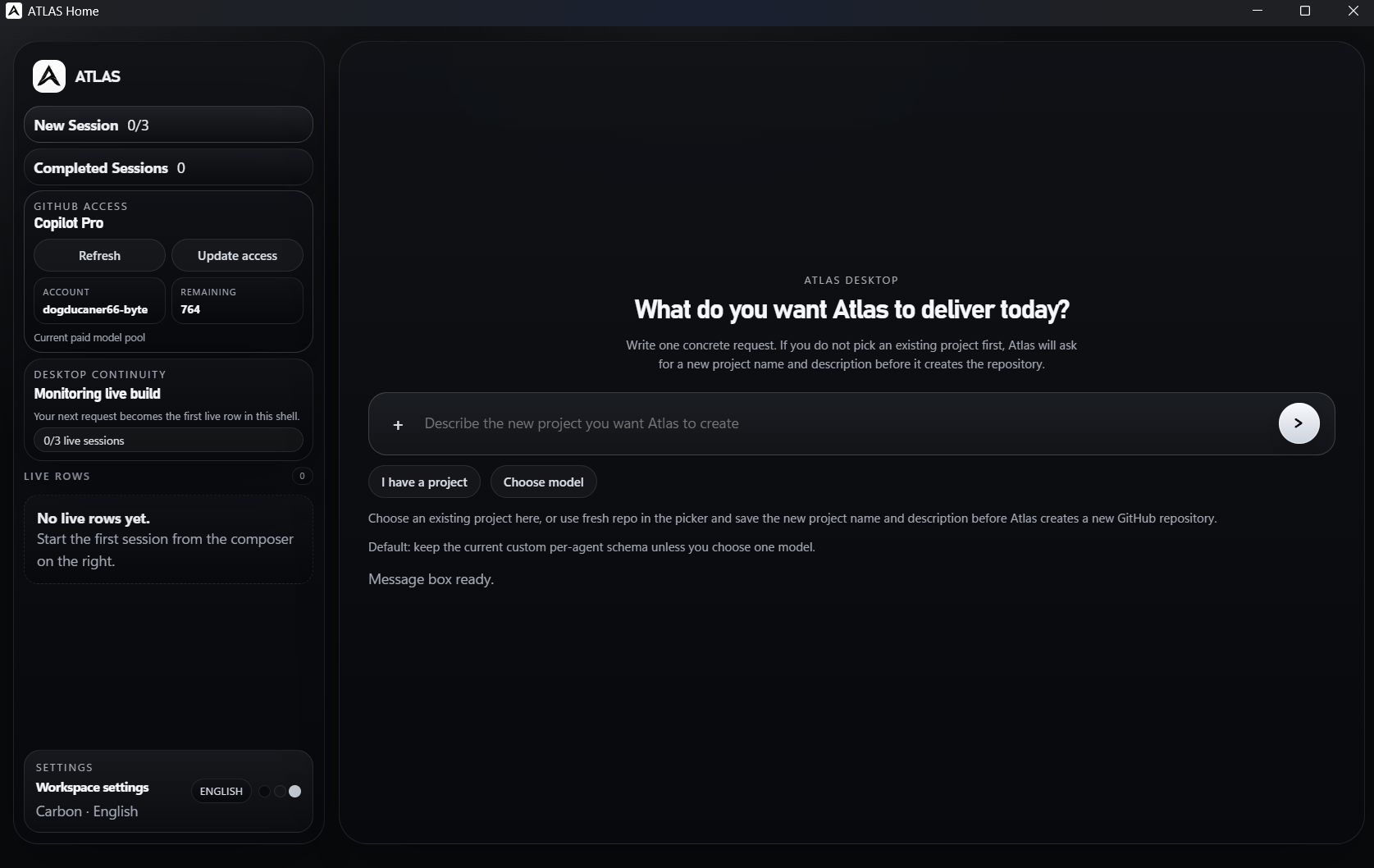
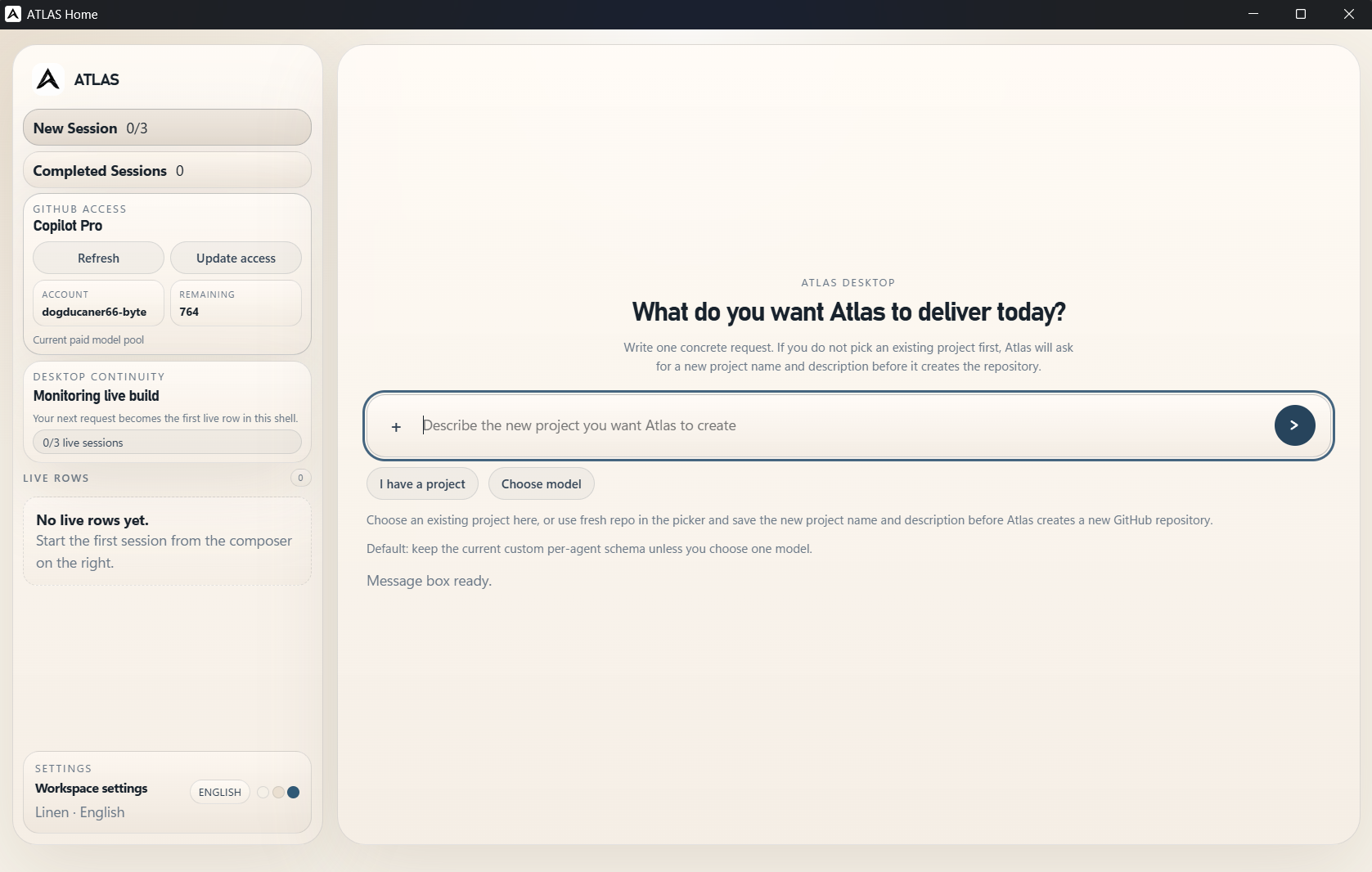
- Type a direct request for the product you want ATLAS to deliver.
- If you already have a project, attach it from the picker. If not, ATLAS will ask for the new project name and description before it creates the repository.
- Watch the live build row and completed sessions area as the system works through the request.
Dark Desktop View
Light Desktop View
Example Delivery
One example request asked ATLAS to use the real General Assembly Pizza website as the design reference: gapizza.com. ATLAS followed that reference and produced a working restaurant landing page that closely recreates the requested visual design, showing how the system can build faithful web designs from a supplied reference or similar designs in the same direction.
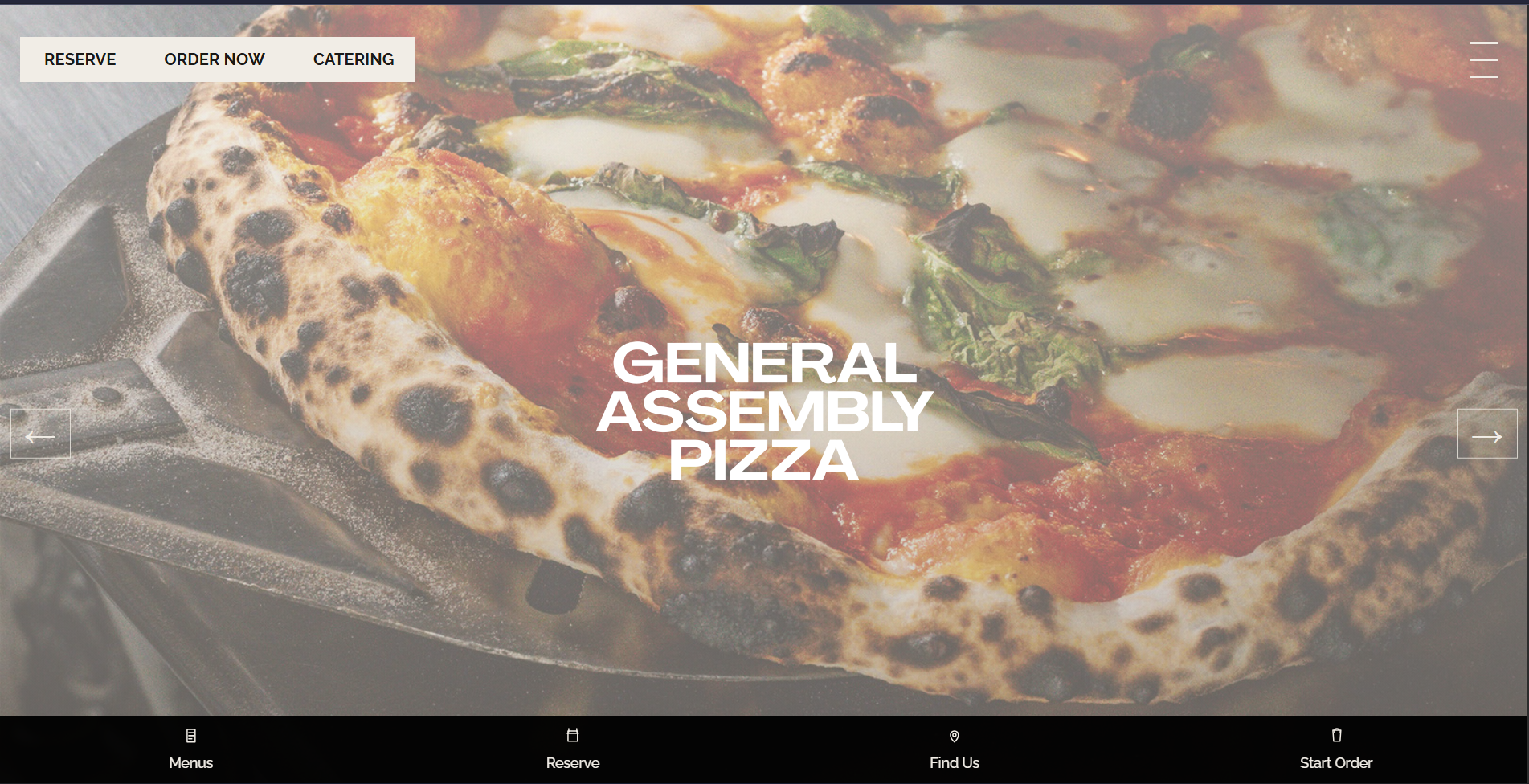
This is the core promise of ATLAS: you ask for a concrete outcome, and the system turns that request into a real build artifact you can inspect, refine, and ship.
Development Status
ATLAS is currently under active development.
This implies the following:
- Architectural boundaries and worker behaviors remain subject to controlled evolution.
- Selected decision mechanisms are recalibrated at regular intervals.
- The system is explicitly designed to increase capability, reliability, and safety on a per-cycle basis.
In practical terms, this repository should be viewed less as a finalized product showcase and more as a continuously operating R&D environment.
How ATLAS Works Internally
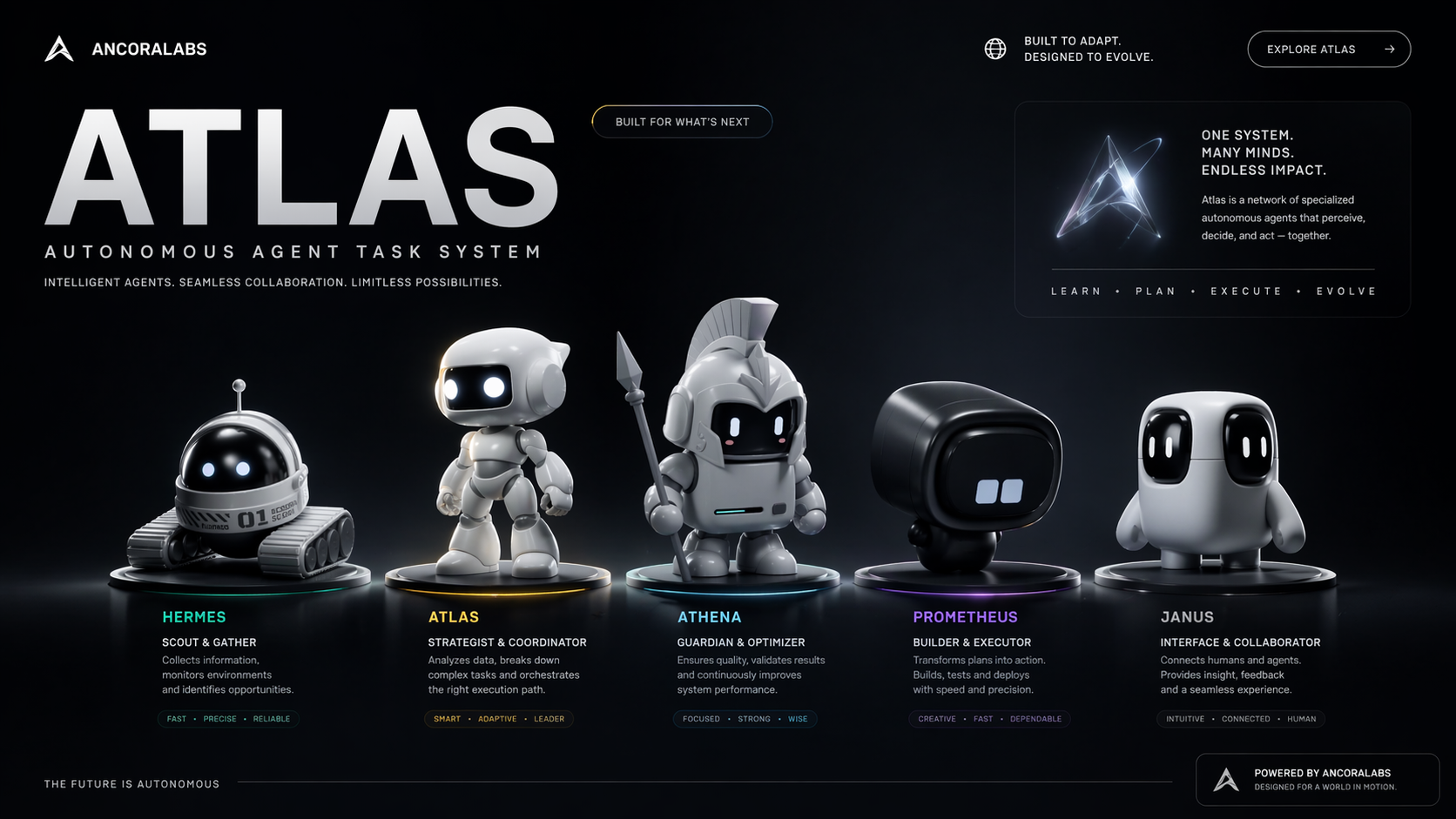
Behind the desktop UI, ATLAS runs as a governed multi-agent delivery system. Different roles handle planning, execution, review, observability, and iterative improvement so the product request can move through a controlled build cycle instead of a one-shot script.
The Agent Roster
Leadership Layer
Janus — CEO Supervisor
Maintains strategic direction and adjudicates high-impact prioritization decisions.
Interprets cycle state, constrains escalation growth, and enforces directional coherence
to prevent strategic drift across autonomous cycles.
Prometheus — Evolution Architect
Performs deep repository analysis to identify self-improvement opportunities and
produces a structured, dependency-aware execution plan. Balances advancement pressure
against implementation feasibility and consolidation requirements.
Athena — Reviewer
Executes adversarial review of plans and implementations, validates assumptions,
and functions as a quality and governance gate prior to major progression events.
Research Layer
Research Scout — Knowledge Hunter
Conducts structured open-internet reconnaissance for high-value technical knowledge,
emerging patterns, and implementation-relevant practices for autonomous agent systems.
Returns raw research artifacts for downstream synthesis.
Research Synthesizer — Knowledge Organizer
Transforms Scout artifacts into topic-organized, decision-ready synthesis outputs.
Reduces informational noise, preserves high-signal findings, and supplies planning
layers with higher-quality strategic inputs.
Worker Layer
Evolution Worker — Codebase Improver
Focuses on runtime evolution, refactoring, and structural capability improvements
across core system components.
quality-worker — Test Specialist
Owns verification depth, behavioral validation, and regression prevention.
Treats passing checks as a baseline control, not as final evidence of adequacy.
governance-worker — Policy Enforcer
Enforces policy conformance, state governance, and auditability requirements.
Maintains traceable decision lineage and record integrity as a discipline backbone.
infrastructure-worker — Foundation Layer
Handles orchestration plumbing, deployment pathways, containerized runtime
infrastructure, and operational continuity mechanics.
integration-worker — Connector
Coordinates inter-component compatibility and validates communication reliability
across subsystem boundaries.
observation-worker — Signal Collector
Collects telemetry, health indicators, and runtime signals, then performs anomaly
detection and early warning escalation when pattern behavior deviates.
ATLAS Mindset
ATLAS is ambitious not because it is static or flawless, but because it is capable of institutional learning under iterative constraints. Its objective is not one-shot perfection; its objective is progressive gains in robustness, intelligence, and autonomy across successive operational cycles.
ATLAS Desktop Shell
ATLAS now launches inside a native Electron window instead of opening a localhost page in the default browser. The desktop shell keeps the root workspace route authoritative, stores a session-bound workspace brief under state\atlas\desktop_sessions\, and reopens the same live workspace window instead of presenting a separate startup product mode. Repeat launches reuse the same desktop instance, restore the existing window, and keep the last session, workspace draft, and window bounds beside the packaged app.
For normal use, download the latest ATLAS release, extract the release archive, and open the included ATLAS.exe.
Development commands such as ATLAS.cmd start, npm run atlas:open, and npm run atlas:desktop:package are intended for local development and packaging from source.
If you are building the portable app yourself, use ATLAS.cmd package to emit the Windows app folder with the root executable at dist\ATLAS\ATLAS.exe.
Contributors


Similar repos


Languages
TypeScript
99.3%
README
ATLAS
ATLAS is a desktop app that lets you describe a software product in plain language and then turns that request into a working delivery flow. Instead of manually setting up a repo, picking tools, writing every first draft, and coordinating each implementation step yourself, you open ATLAS, describe what you want, and let the system plan and build it for you.
What It Does
ATLAS is built for people who want to go from an idea to a usable product with less setup friction.
- You describe one concrete request.
- ATLAS creates or selects the project context.
- The system plans the work, runs the build flow, and tracks progress.
- You monitor the session from the desktop interface instead of stitching everything together by hand.
How To Use It
- Download the latest ATLAS release, extract it, and launch the desktop app from the included
ATLAS.exe. - Start a new session from the home screen.
- Type a direct request for the product you want ATLAS to deliver.
- If you already have a project, attach it from the picker. If not, ATLAS will ask for the new project name and description before it creates the repository.
- Watch the live build row and completed sessions area as the system works through the request.
Dark Desktop View
Light Desktop View
Example Delivery
One example request asked ATLAS to use the real General Assembly Pizza website as the design reference: gapizza.com. ATLAS followed that reference and produced a working restaurant landing page that closely recreates the requested visual design, showing how the system can build faithful web designs from a supplied reference or similar designs in the same direction.
This is the core promise of ATLAS: you ask for a concrete outcome, and the system turns that request into a real build artifact you can inspect, refine, and ship.
Development Status
ATLAS is currently under active development.
This implies the following:
- Architectural boundaries and worker behaviors remain subject to controlled evolution.
- Selected decision mechanisms are recalibrated at regular intervals.
- The system is explicitly designed to increase capability, reliability, and safety on a per-cycle basis.
In practical terms, this repository should be viewed less as a finalized product showcase and more as a continuously operating R&D environment.
How ATLAS Works Internally
Behind the desktop UI, ATLAS runs as a governed multi-agent delivery system. Different roles handle planning, execution, review, observability, and iterative improvement so the product request can move through a controlled build cycle instead of a one-shot script.
The Agent Roster
Leadership Layer
Janus — CEO Supervisor
Maintains strategic direction and adjudicates high-impact prioritization decisions.
Interprets cycle state, constrains escalation growth, and enforces directional coherence
to prevent strategic drift across autonomous cycles.
Prometheus — Evolution Architect
Performs deep repository analysis to identify self-improvement opportunities and
produces a structured, dependency-aware execution plan. Balances advancement pressure
against implementation feasibility and consolidation requirements.
Athena — Reviewer
Executes adversarial review of plans and implementations, validates assumptions,
and functions as a quality and governance gate prior to major progression events.
Research Layer
Research Scout — Knowledge Hunter
Conducts structured open-internet reconnaissance for high-value technical knowledge,
emerging patterns, and implementation-relevant practices for autonomous agent systems.
Returns raw research artifacts for downstream synthesis.
Research Synthesizer — Knowledge Organizer
Transforms Scout artifacts into topic-organized, decision-ready synthesis outputs.
Reduces informational noise, preserves high-signal findings, and supplies planning
layers with higher-quality strategic inputs.
Worker Layer
Evolution Worker — Codebase Improver
Focuses on runtime evolution, refactoring, and structural capability improvements
across core system components.
quality-worker — Test Specialist
Owns verification depth, behavioral validation, and regression prevention.
Treats passing checks as a baseline control, not as final evidence of adequacy.
governance-worker — Policy Enforcer
Enforces policy conformance, state governance, and auditability requirements.
Maintains traceable decision lineage and record integrity as a discipline backbone.
infrastructure-worker — Foundation Layer
Handles orchestration plumbing, deployment pathways, containerized runtime
infrastructure, and operational continuity mechanics.
integration-worker — Connector
Coordinates inter-component compatibility and validates communication reliability
across subsystem boundaries.
observation-worker — Signal Collector
Collects telemetry, health indicators, and runtime signals, then performs anomaly
detection and early warning escalation when pattern behavior deviates.
ATLAS Mindset
ATLAS is ambitious not because it is static or flawless, but because it is capable of institutional learning under iterative constraints. Its objective is not one-shot perfection; its objective is progressive gains in robustness, intelligence, and autonomy across successive operational cycles.
ATLAS Desktop Shell
ATLAS now launches inside a native Electron window instead of opening a localhost page in the default browser. The desktop shell keeps the root workspace route authoritative, stores a session-bound workspace brief under state\atlas\desktop_sessions\, and reopens the same live workspace window instead of presenting a separate startup product mode. Repeat launches reuse the same desktop instance, restore the existing window, and keep the last session, workspace draft, and window bounds beside the packaged app.
For normal use, download the latest ATLAS release, extract the release archive, and open the included ATLAS.exe.
Development commands such as ATLAS.cmd start, npm run atlas:open, and npm run atlas:desktop:package are intended for local development and packaging from source.
If you are building the portable app yourself, use ATLAS.cmd package to emit the Windows app folder with the root executable at dist\ATLAS\ATLAS.exe.
Similar repos
Contributors
Languages
TypeScript
99.3%