
High Performance reverse tunnel engine in Go, built for edge ⇄ origin server setups
See the codeREADME
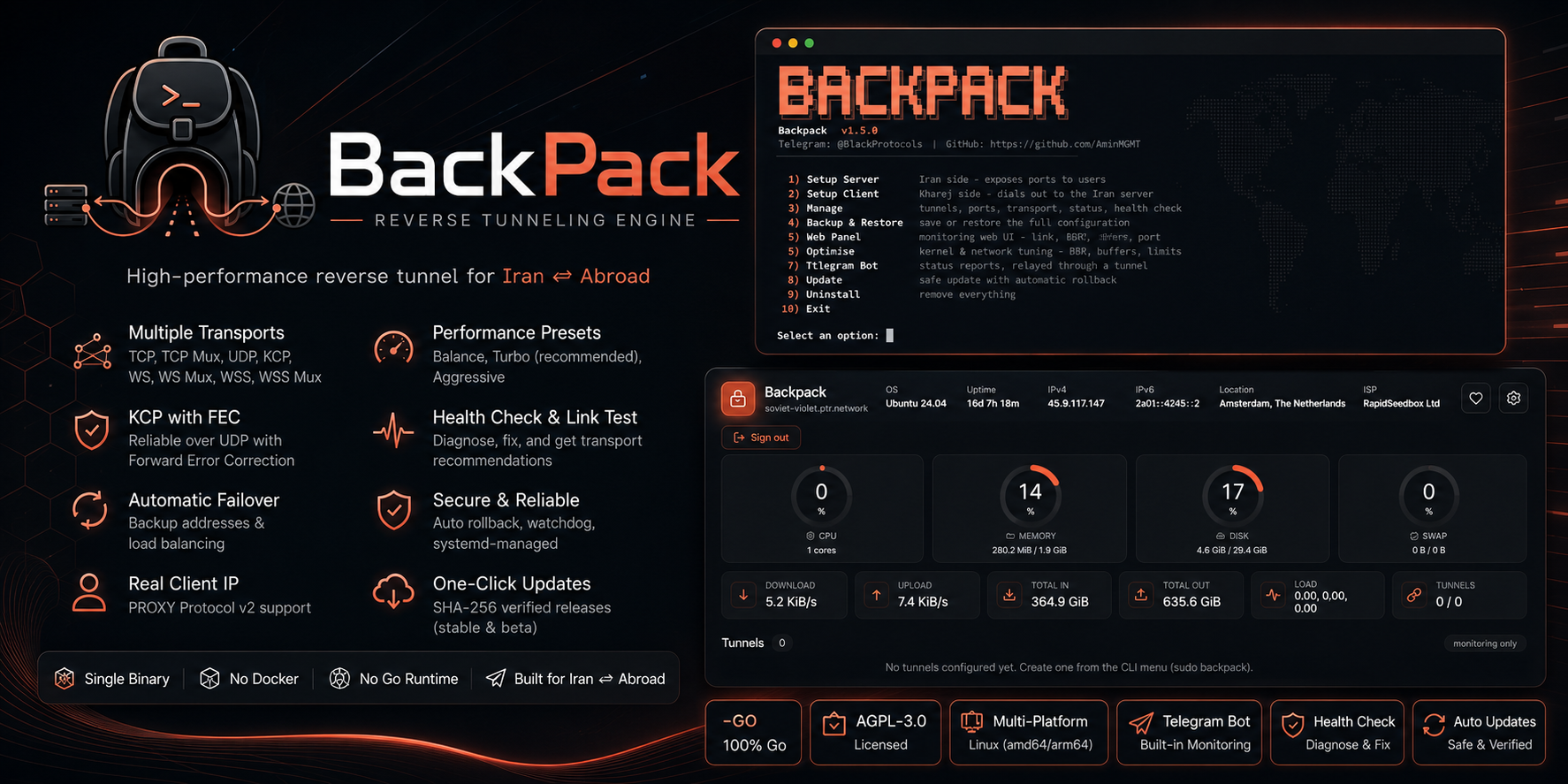
Backpack 🎒


Backpack is a high-performance tunnel engine written entirely in Go, purpose-built for Iran ⇄ abroad (kharej) server setups. One self-contained binary with an interactive CLI and a secured web dashboard — run and manage everything with or without a terminal.
It carries a tunnel three ways: reverse (kharej dials Iran), direct (Iran dials out), and a full IP tunnel that puts both servers on one private network.
📘 Setup tutorials · 📚 Documentation · 🇮🇷 راهنمای فارسی · Telegram Channel · Telegram Group
How it works
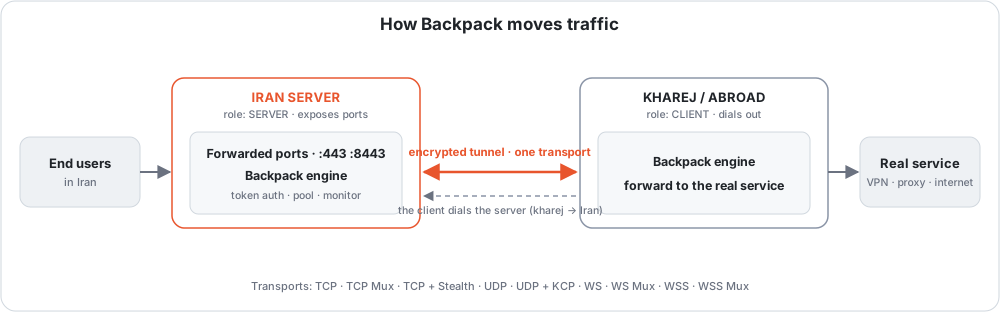
  end users ──▶  IRAN server  ══ tunnel ══▶  KHAREJ server  ──▶  real service
                 "Setup Iran"                 "Setup Kharej"
                 exposes the ports            dials out to Iran
An end user connects to a forwarded port on the Iran server; the engine carries it through one transport to the kharej client, which hands it to the real service. In the reverse tunnel above the connection is dialed by the client (kharej → Iran), so the far side needs no open inbound port.
Three shapes
The ports never move: Iran exposes them, kharej holds the real service. What changes is who reaches out first, and what the tunnel carries.
| Who dials | What it carries | Use it when | |
|---|---|---|---|
| Reverse | kharej → Iran | forwarded ports | the usual case — Iran can accept an inbound connection |
| Direct | Iran → kharej | a private network, and forwarded ports over it | an inbound connection to Iran does not get through |
Both are built from Setup Iran and Setup Kharej: pick the machine you are on, and the wizard asks which direction you want and writes the config itself.
A direct tunnel is a full IP tunnel — an interface on each host carrying whole IP packets, wrapped in Backpack's own GRE inside a Noise session and handed to one of three carriers. It measures its own MTU once it is up, which is the setting that fails worst when it is wrong.
Install
One command as root on the VPS. It downloads the prebuilt release for your architecture, verifies it against the published checksum, installs it, and opens the menu:
bash <(curl -fsSL https://raw.githubusercontent.com/AminMGMT/BackPack/main/install.sh)
Reopen the menu any time with sudo backpack.
No internet on the server? There is a full offline path — copy one archive over and go. Building from source works as a fallback too. → Installing Backpack
Quick start
Get the roles right first — this is the one thing people trip on:
| Server | Where | Menu option | Why |
|---|---|---|---|
| Iran | entry point | 1. Setup Iran | It exposes the ports; users connect to the Iran IP. |
| Kharej | exit / origin | 2. Setup Kharej | It dials the Iran server and forwards to the real service. |
Always set up the Iran server first — the client needs the Iran address and the token the server generates.
# on the IRAN server
sudo backpack   →  1. Setup Iran
#   transport → tunnel port → name → COPY THE TOKEN → exposed ports
#   → UDP? → preset (Turbo) → done

# on the KHAREJ server
sudo backpack   →  2. Setup Kharej
#   same transport → Iran IP + same tunnel port → name → SAME TOKEN
#   → same preset → done
Then Manage → Status to see both ends, and Manage → Health Check if anything
looks wrong — it prints a fix under each problem.
→ Before you start covers the roles, the token, the port mapping and the firewall in full. Every transport then has its own step-by-step page.
Pick a transport
Thirteen to choose from, so you match the route instead of fighting it. Not sure? Manage → Link Test measures your actual route and recommends one.
| Transport | Reach for it when | Guide |
|---|---|---|
| TCP | you are not sure — this is the starting point | → |
| TCP Mux | the service opens many short connections | → |
| TCP + Stealth | filtering is heavy — Noise-encrypted, no fingerprint at all | → |
| TCP + PCK | TCP connects then stalls, resets or is throttled | → |
| UDP + KCP + FEC | gaming or a lossy route — always-on error correction | → |
| UDP + QUIC | you want to test an encrypted, self-tuning UDP carrier | → |
| WS / WS Mux | only HTTP gets through, or you want a CDN in front | → |
| WSS / WSS Mux | it should look like an ordinary HTTPS website | → |
| xDi (ICMP) | TCP and UDP are filtered but ping works | → |
Every transport explained → docs/transports.md
The path blocks or counts by source address? That is IP Spoofing, and it is a carrier of the direct tunnel rather than one of the transports above — see docs/ip-spoofing.md.
Filtered or dirty server? TCP + Stealth or WSS get the tunnel through DPI — proven in the field. An IP blocked at the network layer, or a "dirty" exit, is a clean-IP or CDN-edge matter rather than a transport one — see when a server is filtered or dirty.
Why Backpack?
- UDP on any forwarded port — Xray/3x-ui, Shadowsocks, WireGuard, DNS and games, on every transport, with one switch. How
- No fingerprint — Stealth looks like random bytes; WSS dials with a real Chrome TLS handshake and answers every probe with a decoy website.
- Gaming-grade UDP — KCP with always-on FEC repairs loss instead of waiting for a retransmit, plus multi-exit failover that steers to the healthiest server as routes degrade.
- Nothing left broken — updates and edits that break a tunnel revert themselves, and a watchdog restarts a dropped tunnel within ~1 minute from its own service.
- It tells you what is wrong — Health Check prints a fix under each problem; Link Test measures the route and recommends a transport and its timers.
- Telegram from Iran — status and alerts reach Telegram by going out through a tunnel peer, choosing the tunnel itself and moving when one dies.
- Offline installer — install or update with no internet at all.
The full feature list
Performance — four presets (Balance, Turbo, Aggressive, and Throughput on KCP) fill in every tuning value at once; Optimize applies kernel/network tuning (BBR + fq, buffer ceilings, file limits); Link Test derives the liveness timers from your real round trip.
Reliability — automatic failover to backup addresses, with health scoring
(rtt + 2·jitter + 20·loss%) or load balancing across all of them; self-healing
watchdog; automatic rollback; systemd services that survive reboots.
Security — the token never travels in the clear on an encrypted transport (Stealth and KCP derive keys from it, WSS binds the credential to the TLS session); PROXY protocol v2 for real client IPs; per-tunnel connection and bandwidth caps; login-protected dashboard; SHA-256 verified downloads, and anything unverifiable is refused rather than installed.
Management — an interactive CLI where every option explains itself; setup checks the address you give it (CDN in front, AAAA records); CDN-edge dialing; JSON logging; auto-refresh every N hours; a built-in SOCKS5/HTTP proxy so the tunnel exit can be its own backend.
Monitoring — web dashboard on port 7777 with live CPU/RAM/disk/traffic and per-tunnel status, ping and logs; metrics including KCP retransmits, loss and FEC repairs, kept across restarts; Telegram alerts with a recovery message for each.
Maintenance — one-file backup of every tunnel, the panel password, Telegram settings, TLS certificates and the schedule; verified updates on a stable or beta channel.
Documentation
| 📘 Tutorials | Step-by-step setup, one page per transport — every question the wizard asks, with the answer to give |
| 📚 Docs | Reference: what each part is, and every setting it has |
| 🖥 CLI menu reference | Every option in every menu, including the advanced Fine Tune settings |
| 🔀 Transports | All thirteen, compared and explained |
| 🎭 IP Spoofing | The forged-source carrier, setting by setting |
| 📡 Forwarded UDP | Read this if UDP does not pass through |
Both sections are also summarised in Persian at the bottom of every page.
Screenshots
| CLI menu | Web panel |
|---|---|
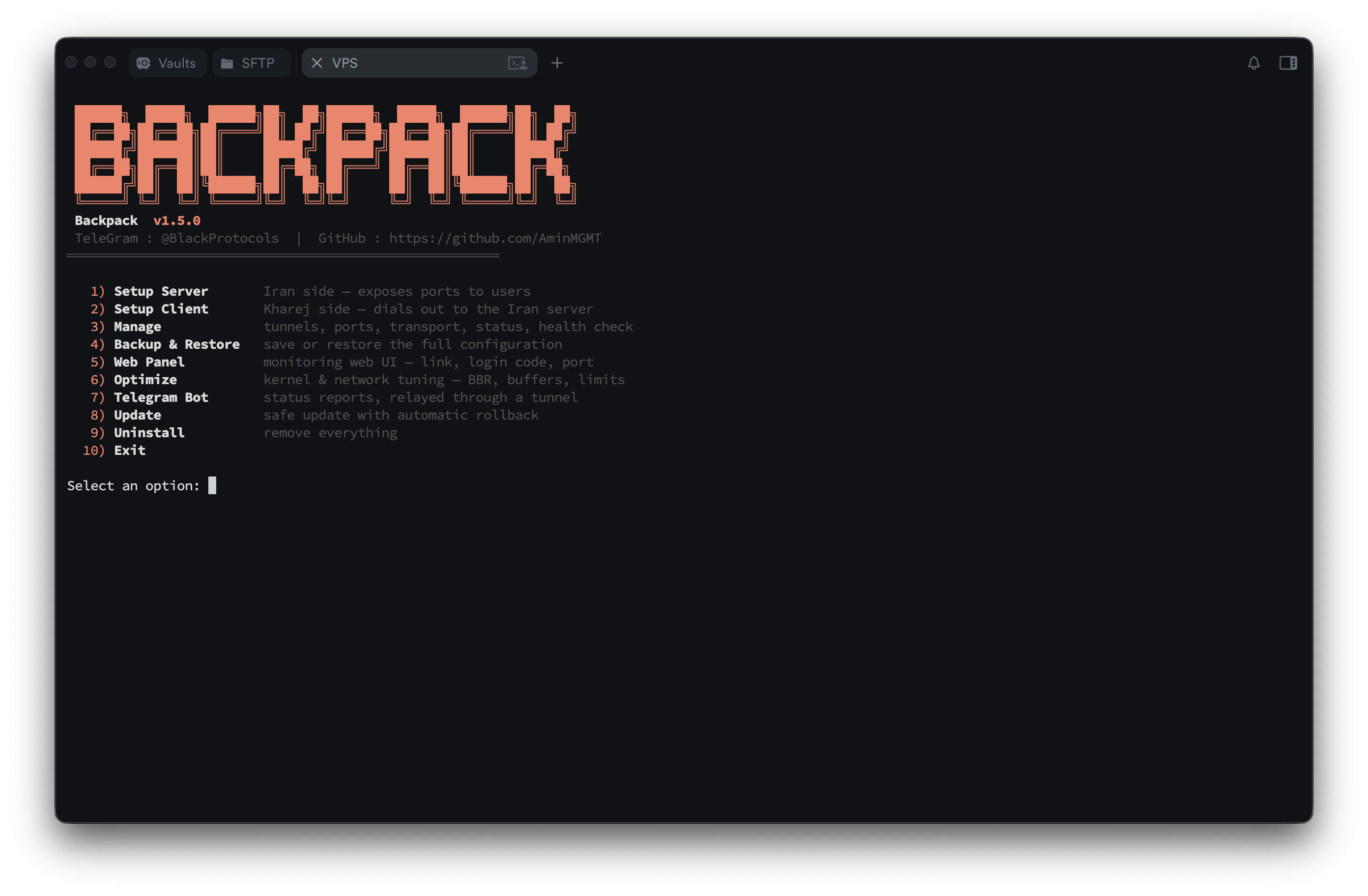 | 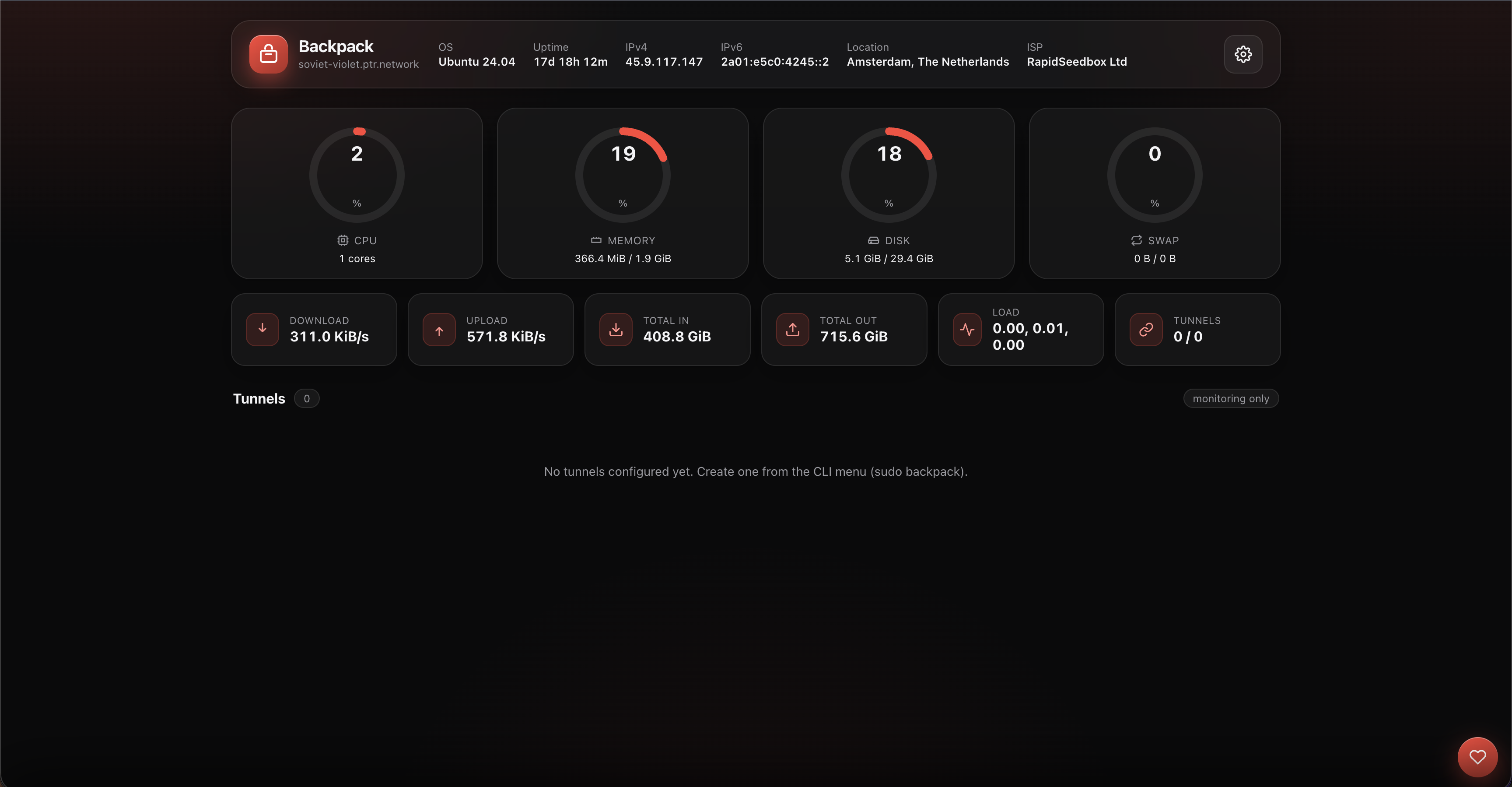 |
| Tunnel management | Telegram bot |
|---|---|
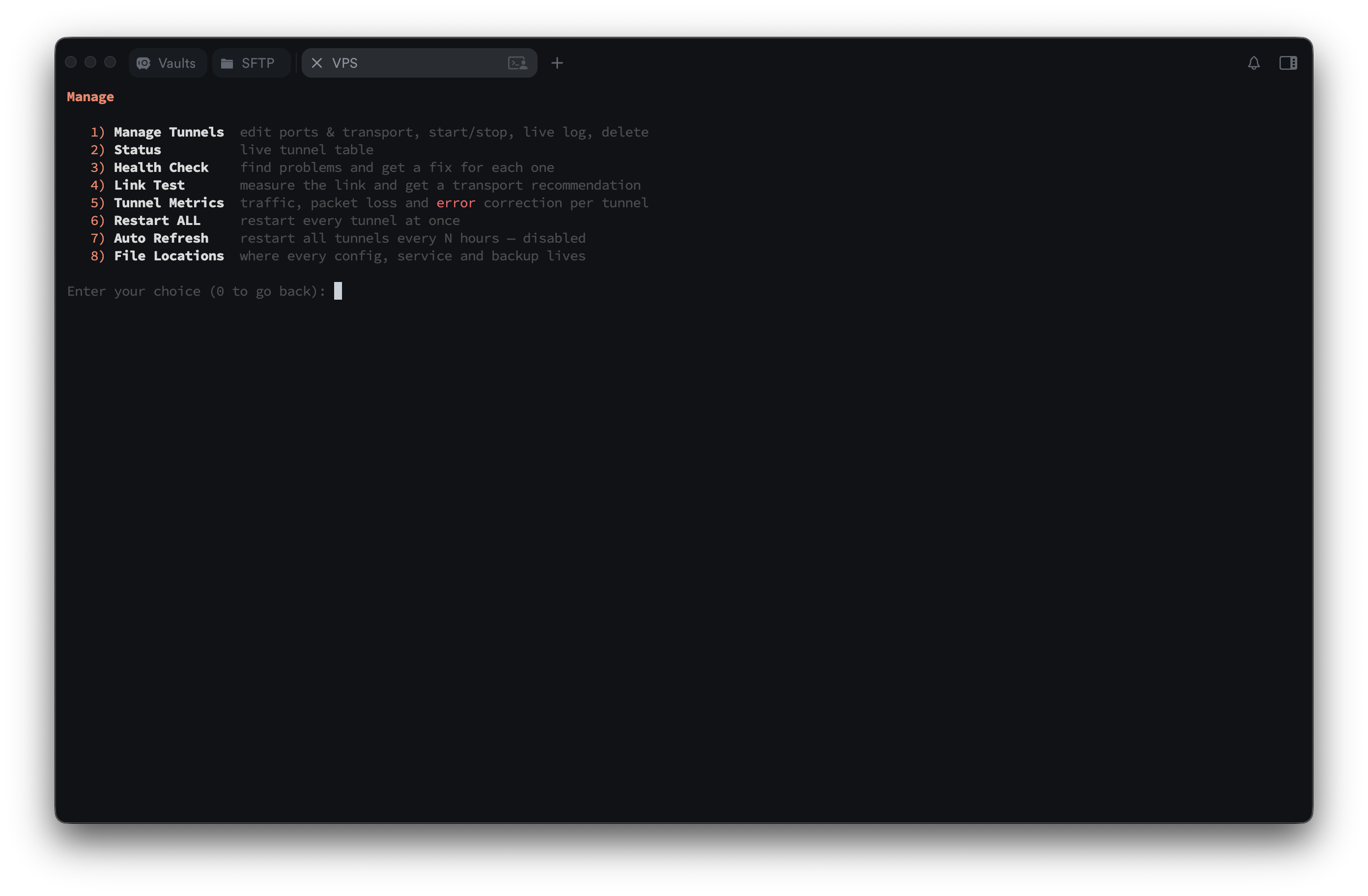 | 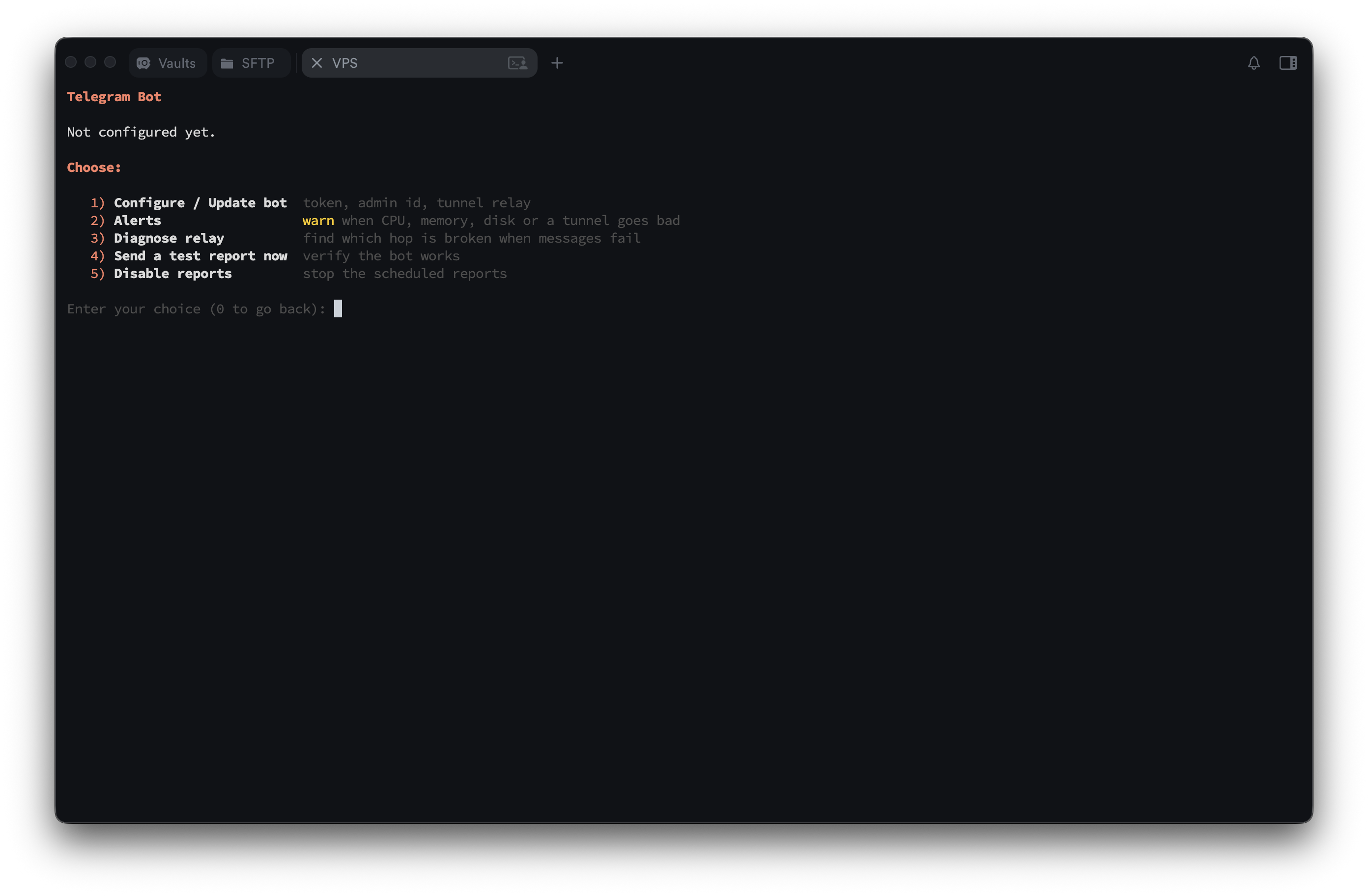 |
Support & donate
If Backpack helps you, a star or a small tip is appreciated. 🙏
- Telegram channel: @BlackProtocols
- Telegram Group: @BlackProtocolsGroup
| Coin | Address |
|---|---|
| Tron (TRX) | TTzuUAtsEsrLgNpFVLNTyLVJVRRFNWESYc |
| USDT (BEP20) | 0xc112AE9bfF7c59dEcFb34E988A397848D3093E82 |
| Toncoin (TON) | UQD9g40QubAICJ6zPqegtCY7s-joMx2DB8aIqA0xF1aHoCDs |
License
Copyright © 2026 Amin Mohammadi (AminMGMT). Released under the GNU Affero General Public License v3.0 (AGPL-3.0) — see LICENSE and NOTICE.
Contributors

141 commits
Similar repos


Languages
Go
82.2%
JavaScript
7.8%
CSS
6.0%
HTML
3.6%
High Performance reverse tunnel engine in Go, built for edge ⇄ origin server setups
See the codeREADME
Backpack 🎒
Backpack is a high-performance tunnel engine written entirely in Go, purpose-built for Iran ⇄ abroad (kharej) server setups. One self-contained binary with an interactive CLI and a secured web dashboard — run and manage everything with or without a terminal.
It carries a tunnel three ways: reverse (kharej dials Iran), direct (Iran dials out), and a full IP tunnel that puts both servers on one private network.
📘 Setup tutorials · 📚 Documentation · 🇮🇷 راهنمای فارسی · Telegram Channel · Telegram Group
How it works
  end users ──▶  IRAN server  ══ tunnel ══▶  KHAREJ server  ──▶  real service
                 "Setup Iran"                 "Setup Kharej"
                 exposes the ports            dials out to Iran
An end user connects to a forwarded port on the Iran server; the engine carries it through one transport to the kharej client, which hands it to the real service. In the reverse tunnel above the connection is dialed by the client (kharej → Iran), so the far side needs no open inbound port.
Three shapes
The ports never move: Iran exposes them, kharej holds the real service. What changes is who reaches out first, and what the tunnel carries.
| Who dials | What it carries | Use it when | |
|---|---|---|---|
| Reverse | kharej → Iran | forwarded ports | the usual case — Iran can accept an inbound connection |
| Direct | Iran → kharej | a private network, and forwarded ports over it | an inbound connection to Iran does not get through |
Both are built from Setup Iran and Setup Kharej: pick the machine you are on, and the wizard asks which direction you want and writes the config itself.
A direct tunnel is a full IP tunnel — an interface on each host carrying whole IP packets, wrapped in Backpack's own GRE inside a Noise session and handed to one of three carriers. It measures its own MTU once it is up, which is the setting that fails worst when it is wrong.
Install
One command as root on the VPS. It downloads the prebuilt release for your architecture, verifies it against the published checksum, installs it, and opens the menu:
bash <(curl -fsSL https://raw.githubusercontent.com/AminMGMT/BackPack/main/install.sh)
Reopen the menu any time with sudo backpack.
No internet on the server? There is a full offline path — copy one archive over and go. Building from source works as a fallback too. → Installing Backpack
Quick start
Get the roles right first — this is the one thing people trip on:
| Server | Where | Menu option | Why |
|---|---|---|---|
| Iran | entry point | 1. Setup Iran | It exposes the ports; users connect to the Iran IP. |
| Kharej | exit / origin | 2. Setup Kharej | It dials the Iran server and forwards to the real service. |
Always set up the Iran server first — the client needs the Iran address and the token the server generates.
# on the IRAN server
sudo backpack   →  1. Setup Iran
#   transport → tunnel port → name → COPY THE TOKEN → exposed ports
#   → UDP? → preset (Turbo) → done

# on the KHAREJ server
sudo backpack   →  2. Setup Kharej
#   same transport → Iran IP + same tunnel port → name → SAME TOKEN
#   → same preset → done
Then Manage → Status to see both ends, and Manage → Health Check if anything
looks wrong — it prints a fix under each problem.
→ Before you start covers the roles, the token, the port mapping and the firewall in full. Every transport then has its own step-by-step page.
Pick a transport
Thirteen to choose from, so you match the route instead of fighting it. Not sure? Manage → Link Test measures your actual route and recommends one.
| Transport | Reach for it when | Guide |
|---|---|---|
| TCP | you are not sure — this is the starting point | → |
| TCP Mux | the service opens many short connections | → |
| TCP + Stealth | filtering is heavy — Noise-encrypted, no fingerprint at all | → |
| TCP + PCK | TCP connects then stalls, resets or is throttled | → |
| UDP + KCP + FEC | gaming or a lossy route — always-on error correction | → |
| UDP + QUIC | you want to test an encrypted, self-tuning UDP carrier | → |
| WS / WS Mux | only HTTP gets through, or you want a CDN in front | → |
| WSS / WSS Mux | it should look like an ordinary HTTPS website | → |
| xDi (ICMP) | TCP and UDP are filtered but ping works | → |
Every transport explained → docs/transports.md
The path blocks or counts by source address? That is IP Spoofing, and it is a carrier of the direct tunnel rather than one of the transports above — see docs/ip-spoofing.md.
Filtered or dirty server? TCP + Stealth or WSS get the tunnel through DPI — proven in the field. An IP blocked at the network layer, or a "dirty" exit, is a clean-IP or CDN-edge matter rather than a transport one — see when a server is filtered or dirty.
Why Backpack?
- UDP on any forwarded port — Xray/3x-ui, Shadowsocks, WireGuard, DNS and games, on every transport, with one switch. How
- No fingerprint — Stealth looks like random bytes; WSS dials with a real Chrome TLS handshake and answers every probe with a decoy website.
- Gaming-grade UDP — KCP with always-on FEC repairs loss instead of waiting for a retransmit, plus multi-exit failover that steers to the healthiest server as routes degrade.
- Nothing left broken — updates and edits that break a tunnel revert themselves, and a watchdog restarts a dropped tunnel within ~1 minute from its own service.
- It tells you what is wrong — Health Check prints a fix under each problem; Link Test measures the route and recommends a transport and its timers.
- Telegram from Iran — status and alerts reach Telegram by going out through a tunnel peer, choosing the tunnel itself and moving when one dies.
- Offline installer — install or update with no internet at all.
The full feature list
Performance — four presets (Balance, Turbo, Aggressive, and Throughput on KCP) fill in every tuning value at once; Optimize applies kernel/network tuning (BBR + fq, buffer ceilings, file limits); Link Test derives the liveness timers from your real round trip.
Reliability — automatic failover to backup addresses, with health scoring
(rtt + 2·jitter + 20·loss%) or load balancing across all of them; self-healing
watchdog; automatic rollback; systemd services that survive reboots.
Security — the token never travels in the clear on an encrypted transport (Stealth and KCP derive keys from it, WSS binds the credential to the TLS session); PROXY protocol v2 for real client IPs; per-tunnel connection and bandwidth caps; login-protected dashboard; SHA-256 verified downloads, and anything unverifiable is refused rather than installed.
Management — an interactive CLI where every option explains itself; setup checks the address you give it (CDN in front, AAAA records); CDN-edge dialing; JSON logging; auto-refresh every N hours; a built-in SOCKS5/HTTP proxy so the tunnel exit can be its own backend.
Monitoring — web dashboard on port 7777 with live CPU/RAM/disk/traffic and per-tunnel status, ping and logs; metrics including KCP retransmits, loss and FEC repairs, kept across restarts; Telegram alerts with a recovery message for each.
Maintenance — one-file backup of every tunnel, the panel password, Telegram settings, TLS certificates and the schedule; verified updates on a stable or beta channel.
Documentation
| 📘 Tutorials | Step-by-step setup, one page per transport — every question the wizard asks, with the answer to give |
| 📚 Docs | Reference: what each part is, and every setting it has |
| 🖥 CLI menu reference | Every option in every menu, including the advanced Fine Tune settings |
| 🔀 Transports | All thirteen, compared and explained |
| 🎭 IP Spoofing | The forged-source carrier, setting by setting |
| 📡 Forwarded UDP | Read this if UDP does not pass through |
Both sections are also summarised in Persian at the bottom of every page.
Screenshots
| CLI menu | Web panel |
|---|---|
| |
| Tunnel management | Telegram bot |
|---|---|
| |
Support & donate
If Backpack helps you, a star or a small tip is appreciated. 🙏
- Telegram channel: @BlackProtocols
- Telegram Group: @BlackProtocolsGroup
| Coin | Address |
|---|---|
| Tron (TRX) | TTzuUAtsEsrLgNpFVLNTyLVJVRRFNWESYc |
| USDT (BEP20) | 0xc112AE9bfF7c59dEcFb34E988A397848D3093E82 |
| Toncoin (TON) | UQD9g40QubAICJ6zPqegtCY7s-joMx2DB8aIqA0xF1aHoCDs |
License
Copyright © 2026 Amin Mohammadi (AminMGMT). Released under the GNU Affero General Public License v3.0 (AGPL-3.0) — see LICENSE and NOTICE.
Similar repos
Contributors
141 commits
Languages
Go
82.2%
JavaScript
7.8%
CSS
6.0%
HTML
3.6%