
A c++ trainable semantic segmentation library based on libtorch (pytorch c++). Backbone: VGG, ResNet, ResNext. Architecture: FPN, U-Net, PAN, LinkNet, PSPNet, DeepLab-V3, DeepLab-V3+ by now.
C++
460
107 commits
updated Dec 7, 2023
README
English | 中文

C++ library with Neural Networks for Image
Segmentation based on LibTorch.
⭐Please give a star if this project helps you.⭐
The main features of this library are:
- High level API (just a line to create a neural network)
- 7 models architectures for binary and multi class segmentation (including legendary Unet)
- 15 available encoders
- All encoders have pre-trained weights for faster and better convergence
- 35% or more inference speed boost compared with pytorch cuda, same speed for cpu. (Unet tested in rtx 2070s).
📚 Libtorch Tutorials 📚
Visit Libtorch Tutorials Project if you want to know more about Libtorch Segment library.
📋 Table of content
- Quick start
- Examples
- Train your own data
- Models
- Installation
- Thanks
- To do list
- Citing
- License
- Related repository
⏳ Quick start
1. Create your first Segmentation model with Libtorch Segment
A resnet34 trochscript file is provided here. Segmentation model is just a LibTorch torch::nn::Module, which can be created as easy as:
#include "Segmentor.h"
auto model = UNet(1, /*num of classes*/
                  "resnet34", /*encoder name, could be resnet50 or others*/
                  "path to resnet34.pt"/*weight path pretrained on ImageNet, it is produced by torchscript*/
                  );
- see table with available model architectures
- see table with available encoders and their corresponding weights
2. Generate your own pretrained weights
All encoders have pretrained weights. Preparing your data the same way as during weights pre-training may give your better results (higher metric score and faster convergence). And you can also train only the decoder and segmentation head while freeze the backbone.
import torch
from torchvision import models

# resnet34 for example
model = models.resnet34(pretrained=True)
model.eval()
var=torch.ones((1,3,224,224))
traced_script_module = torch.jit.trace(model, var)
traced_script_module.save("resnet34.pt")
Congratulations! You are done! Now you can train your model with your favorite backbone and segmentation framework.
💡 Examples
- Training model for person segmentation using images from PASCAL VOC Dataset. "voc_person_seg" dir contains 32 json labels and their corresponding jpeg images for training and 8 json labels with corresponding images for validation.
Segmentor<FPN> segmentor;
segmentor.Initialize(0/*gpu id, -1 for cpu*/,
                    512/*resize width*/,
                    512/*resize height*/,
                    {"background","person"}/*class name dict, background included*/,
                    "resnet34"/*backbone name*/,
                    "your path to resnet34.pt");
segmentor.Train(0.0003/*initial leaning rate*/,
                300/*training epochs*/,
                4/*batch size*/,
                "your path to voc_person_seg",
                ".jpg"/*image type*/,
                "your path to save segmentor.pt");
- Predicting test. A segmentor.pt file is provided in the project here. It is trained through a FPN with ResNet34 backbone for a few epochs. You can directly test the segmentation result through:
cv::Mat image = cv::imread("your path to voc_person_seg\\val\\2007_004000.jpg");
Segmentor<FPN> segmentor;
segmentor.Initialize(0,512,512,{"background","person"},
                      "resnet34","your path to resnet34.pt");
segmentor.LoadWeight("segmentor.pt"/*the saved .pt path*/);
segmentor.Predict(image,"person"/*class name for showing*/);
the predicted result shows as follow:

🧑🚀 Train your own data
- Create your own dataset. Using labelme through "pip install" and label your images. Split the output json files and images into folders just like below:
Dataset
├── train
│   ├── xxx.json
│   ├── xxx.jpg
│   └......
├── val
│   ├── xxxx.json
│   ├── xxxx.jpg
│   └......
- Training or testing. Just like the example of "voc_person_seg", replace "voc_person_seg" with your own dataset path.
- Refer to training tricks to improve your final training performance.
📦 Models
Architectures
- Unet [paper]
- FPN [paper]
- PAN [paper]
- PSPNet [paper]
- LinkNet [paper]
- DeepLabV3 [paper]
- DeepLabV3+ [paper]
Encoders
- ResNet
- ResNext
- VGG
The following is a list of supported encoders in the Libtorch Segment. All the encoders weights can be generated through torchvision except resnest. Select the appropriate family of encoders and click to expand the table and select a specific encoder and its pre-trained weights.
ResNet
| Encoder | Weights | Params, M |
|---|---|---|
| resnet18 | imagenet | 11M |
| resnet34 | imagenet | 21M |
| resnet50 | imagenet | 23M |
| resnet101 | imagenet | 42M |
| resnet152 | imagenet | 58M |
ResNeXt
| Encoder | Weights | Params, M |
|---|---|---|
| resnext50_32x4d | imagenet | 22M |
| resnext101_32x8d | imagenet | 86M |
ResNeSt
| Encoder | Weights | Params, M |
|---|---|---|
| timm-resnest14d | imagenet | 8M |
| timm-resnest26d | imagenet | 15M |
| timm-resnest50d | imagenet | 25M |
| timm-resnest101e | imagenet | 46M |
| timm-resnest200e | imagenet | 68M |
| timm-resnest269e | imagenet | 108M |
| timm-resnest50d_4s2x40d | imagenet | 28M |
| timm-resnest50d_1s4x24d | imagenet | 23M |
SE-Net
| Encoder | Weights | Params, M |
|---|---|---|
| senet154 | imagenet | 113M |
| se_resnet50 | imagenet | 26M |
| se_resnet101 | imagenet | 47M |
| se_resnet152 | imagenet | 64M |
| se_resnext50_32x4d | imagenet | 25M |
| se_resnext101_32x4d | imagenet | 46M |
VGG
| Encoder | Weights | Params, M |
|---|---|---|
| vgg11 | imagenet | 9M |
| vgg11_bn | imagenet | 9M |
| vgg13 | imagenet | 9M |
| vgg13_bn | imagenet | 9M |
| vgg16 | imagenet | 14M |
| vgg16_bn | imagenet | 14M |
| vgg19 | imagenet | 20M |
| vgg19_bn | imagenet | 20M |
🛠 Installation
Dependency:
Windows:
Configure the environment for libtorch development. Visual studio and Qt Creator are verified for libtorch1.7x release.
Linux && MacOS:
Install libtorch and opencv.
For libtorch, follow the official pytorch c++ tutorials here.
For opencv, follow the official opencv install steps here.
If you have already configured them both, congratulations!!! Download the pretrained weight here and a demo .pt file here into weights.
Building shared or static library -DBUILD_SHARED=<TRUE/FALSE>:
export Torch_DIR='/path/to/libtorch'
cd build
cmake -DBUILD_SHARED=TRUE ..
make
sudo make install
Building tests:
cd test
mkdir build && cd build
cmake ..
make
./resnet34 ../../voc_person_seg/val/2007_003747.jpg ../../weights/resnet34.pt ../../weights/segmentor.pt
⏳ ToDo
- More segmentation architectures and backbones
- UNet++ [paper]
- ResNest
- Se-Net
- ...
- Data augmentations
- Random horizontal flip
- Random vertical flip
- Random scale rotation
- ...
- Training tricks
- Combined dice and cross entropy loss
- Freeze backbone
- Multi step learning rate schedule
- ...
🤝 Thanks
By now, these projects helps a lot.
📝 Citing
@misc{Chunyu:2021,
  Author = {Chunyu Dong},
  Title = {Libtorch Segment},
  Year = {2021},
  Publisher = {GitHub},
  Journal = {GitHub repository},
  Howpublished = {\url{https://github.com/AllentDan/SegmentationCpp}}
}
🛡️ License
Project is distributed under MIT License.
Related repository
Based on libtorch, I released following repositories:
Last but not least, don't forget your star...
Feel free to commit issues or pull requests, contributors wanted.
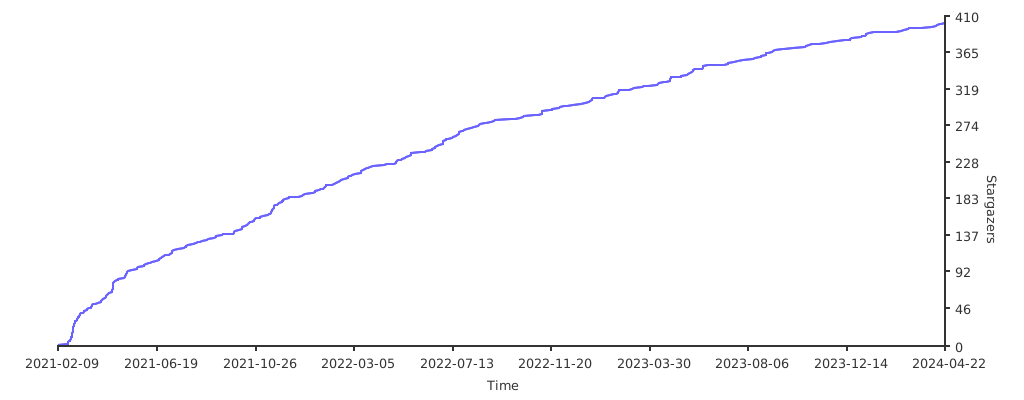
Similar repos


Languages
C++
97.3%
C
2.3%
A c++ trainable semantic segmentation library based on libtorch (pytorch c++). Backbone: VGG, ResNet, ResNext. Architecture: FPN, U-Net, PAN, LinkNet, PSPNet, DeepLab-V3, DeepLab-V3+ by now.
C++
460
107 commits
updated Dec 7, 2023
README
English | 中文
C++ library with Neural Networks for Image
Segmentation based on LibTorch.
⭐Please give a star if this project helps you.⭐
The main features of this library are:
- High level API (just a line to create a neural network)
- 7 models architectures for binary and multi class segmentation (including legendary Unet)
- 15 available encoders
- All encoders have pre-trained weights for faster and better convergence
- 35% or more inference speed boost compared with pytorch cuda, same speed for cpu. (Unet tested in rtx 2070s).
📚 Libtorch Tutorials 📚
Visit Libtorch Tutorials Project if you want to know more about Libtorch Segment library.
📋 Table of content
- Quick start
- Examples
- Train your own data
- Models
- Installation
- Thanks
- To do list
- Citing
- License
- Related repository
⏳ Quick start
1. Create your first Segmentation model with Libtorch Segment
A resnet34 trochscript file is provided here. Segmentation model is just a LibTorch torch::nn::Module, which can be created as easy as:
#include "Segmentor.h"
auto model = UNet(1, /*num of classes*/
                  "resnet34", /*encoder name, could be resnet50 or others*/
                  "path to resnet34.pt"/*weight path pretrained on ImageNet, it is produced by torchscript*/
                  );
- see table with available model architectures
- see table with available encoders and their corresponding weights
2. Generate your own pretrained weights
All encoders have pretrained weights. Preparing your data the same way as during weights pre-training may give your better results (higher metric score and faster convergence). And you can also train only the decoder and segmentation head while freeze the backbone.
import torch
from torchvision import models

# resnet34 for example
model = models.resnet34(pretrained=True)
model.eval()
var=torch.ones((1,3,224,224))
traced_script_module = torch.jit.trace(model, var)
traced_script_module.save("resnet34.pt")
Congratulations! You are done! Now you can train your model with your favorite backbone and segmentation framework.
💡 Examples
- Training model for person segmentation using images from PASCAL VOC Dataset. "voc_person_seg" dir contains 32 json labels and their corresponding jpeg images for training and 8 json labels with corresponding images for validation.
Segmentor<FPN> segmentor;
segmentor.Initialize(0/*gpu id, -1 for cpu*/,
                    512/*resize width*/,
                    512/*resize height*/,
                    {"background","person"}/*class name dict, background included*/,
                    "resnet34"/*backbone name*/,
                    "your path to resnet34.pt");
segmentor.Train(0.0003/*initial leaning rate*/,
                300/*training epochs*/,
                4/*batch size*/,
                "your path to voc_person_seg",
                ".jpg"/*image type*/,
                "your path to save segmentor.pt");
- Predicting test. A segmentor.pt file is provided in the project here. It is trained through a FPN with ResNet34 backbone for a few epochs. You can directly test the segmentation result through:
cv::Mat image = cv::imread("your path to voc_person_seg\\val\\2007_004000.jpg");
Segmentor<FPN> segmentor;
segmentor.Initialize(0,512,512,{"background","person"},
                      "resnet34","your path to resnet34.pt");
segmentor.LoadWeight("segmentor.pt"/*the saved .pt path*/);
segmentor.Predict(image,"person"/*class name for showing*/);
the predicted result shows as follow:
🧑🚀 Train your own data
- Create your own dataset. Using labelme through "pip install" and label your images. Split the output json files and images into folders just like below:
Dataset
├── train
│   ├── xxx.json
│   ├── xxx.jpg
│   └......
├── val
│   ├── xxxx.json
│   ├── xxxx.jpg
│   └......
- Training or testing. Just like the example of "voc_person_seg", replace "voc_person_seg" with your own dataset path.
- Refer to training tricks to improve your final training performance.
📦 Models
Architectures
- Unet [paper]
- FPN [paper]
- PAN [paper]
- PSPNet [paper]
- LinkNet [paper]
- DeepLabV3 [paper]
- DeepLabV3+ [paper]
Encoders
- ResNet
- ResNext
- VGG
The following is a list of supported encoders in the Libtorch Segment. All the encoders weights can be generated through torchvision except resnest. Select the appropriate family of encoders and click to expand the table and select a specific encoder and its pre-trained weights.
ResNet
| Encoder | Weights | Params, M |
|---|---|---|
| resnet18 | imagenet | 11M |
| resnet34 | imagenet | 21M |
| resnet50 | imagenet | 23M |
| resnet101 | imagenet | 42M |
| resnet152 | imagenet | 58M |
ResNeXt
| Encoder | Weights | Params, M |
|---|---|---|
| resnext50_32x4d | imagenet | 22M |
| resnext101_32x8d | imagenet | 86M |
ResNeSt
| Encoder | Weights | Params, M |
|---|---|---|
| timm-resnest14d | imagenet | 8M |
| timm-resnest26d | imagenet | 15M |
| timm-resnest50d | imagenet | 25M |
| timm-resnest101e | imagenet | 46M |
| timm-resnest200e | imagenet | 68M |
| timm-resnest269e | imagenet | 108M |
| timm-resnest50d_4s2x40d | imagenet | 28M |
| timm-resnest50d_1s4x24d | imagenet | 23M |
SE-Net
| Encoder | Weights | Params, M |
|---|---|---|
| senet154 | imagenet | 113M |
| se_resnet50 | imagenet | 26M |
| se_resnet101 | imagenet | 47M |
| se_resnet152 | imagenet | 64M |
| se_resnext50_32x4d | imagenet | 25M |
| se_resnext101_32x4d | imagenet | 46M |
VGG
| Encoder | Weights | Params, M |
|---|---|---|
| vgg11 | imagenet | 9M |
| vgg11_bn | imagenet | 9M |
| vgg13 | imagenet | 9M |
| vgg13_bn | imagenet | 9M |
| vgg16 | imagenet | 14M |
| vgg16_bn | imagenet | 14M |
| vgg19 | imagenet | 20M |
| vgg19_bn | imagenet | 20M |
🛠 Installation
Dependency:
Windows:
Configure the environment for libtorch development. Visual studio and Qt Creator are verified for libtorch1.7x release.
Linux && MacOS:
Install libtorch and opencv.
For libtorch, follow the official pytorch c++ tutorials here.
For opencv, follow the official opencv install steps here.
If you have already configured them both, congratulations!!! Download the pretrained weight here and a demo .pt file here into weights.
Building shared or static library -DBUILD_SHARED=<TRUE/FALSE>:
export Torch_DIR='/path/to/libtorch'
cd build
cmake -DBUILD_SHARED=TRUE ..
make
sudo make install
Building tests:
cd test
mkdir build && cd build
cmake ..
make
./resnet34 ../../voc_person_seg/val/2007_003747.jpg ../../weights/resnet34.pt ../../weights/segmentor.pt
⏳ ToDo
- More segmentation architectures and backbones
- UNet++ [paper]
- ResNest
- Se-Net
- ...
- Data augmentations
- Random horizontal flip
- Random vertical flip
- Random scale rotation
- ...
- Training tricks
- Combined dice and cross entropy loss
- Freeze backbone
- Multi step learning rate schedule
- ...
🤝 Thanks
By now, these projects helps a lot.
📝 Citing
@misc{Chunyu:2021,
  Author = {Chunyu Dong},
  Title = {Libtorch Segment},
  Year = {2021},
  Publisher = {GitHub},
  Journal = {GitHub repository},
  Howpublished = {\url{https://github.com/AllentDan/SegmentationCpp}}
}
🛡️ License
Project is distributed under MIT License.
Related repository
Based on libtorch, I released following repositories:
Last but not least, don't forget your star...
Feel free to commit issues or pull requests, contributors wanted.
Similar repos
Languages
C++
97.3%
C
2.3%