Vue large screen adaptive component vue大屏自适应组件
TypeScript
1,287
21 commits
updated Nov 12, 2024
If you are using React, move to r-scale-screen
English | 简体中文
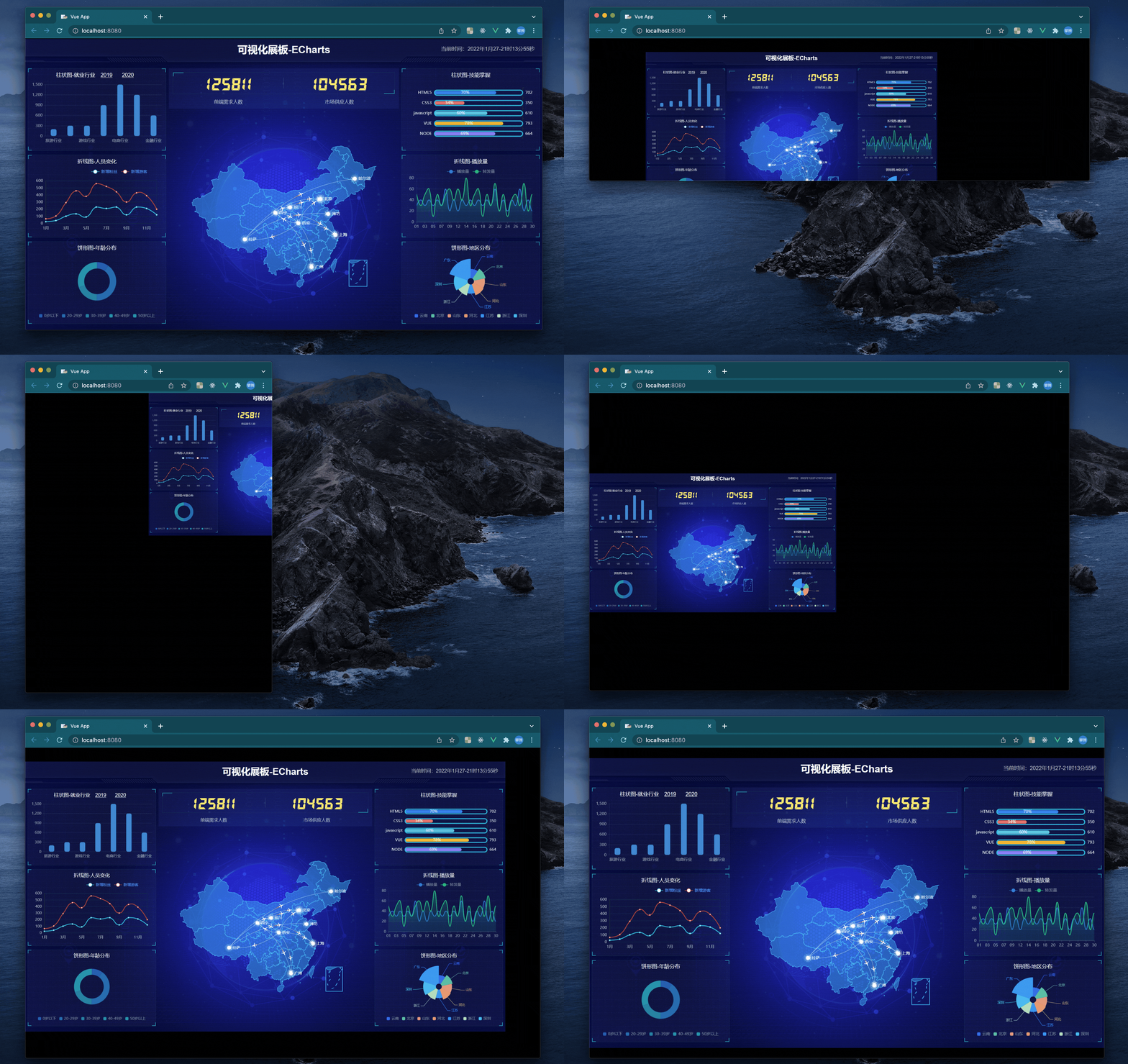
Large-screen adaptive container component, which can be used for large-screen project development, realizes screen adaptation, and can be adaptive according to width, height, and width and height ratios, and full-screen adaptation
In version 2.2.0 +, we support both vue > = v3 or > = 2.7, if your project is vue 2.6 version below, then use 1 x version
npm install v-scale-screen
# or
yarn add v-scale-screen
In vue2, we use plugin export, so we need Vue.use() to register
// main.js
import Vue from 'vue'
import VScaleScreen from 'v-scale-screen'

Vue.use(VScaleScreen)
<template>
  <v-scale-screen width="1920" height="1080">
    <div>
      <v-chart>....</v-chart>
      <v-chart>....</v-chart>
      <v-chart>....</v-chart>
      <v-chart>....</v-chart>
      <v-chart>....</v-chart>
    </div>
  </v-scale-screen>
</template>
Note: Please set
bodystyle tooverflow: hidden;when using
We export as components in vue 3
<template>
  <v-scale-screen width="1920" height="1080">
    <div>
      <v-chart>....</v-chart>
      <v-chart>....</v-chart>
      <v-chart>....</v-chart>
      <v-chart>....</v-chart>
      <v-chart>....</v-chart>
    </div>
  </v-scale-screen>
</template>

<script>
import { defineComponent } from 'vue'
import VScaleScreen from 'v-scale-screen'

export default defineComponent({
  name: 'Demo',
  components: {
    VScaleScreen
  }
})
</script>
| Property | Description | Type | Default |
|---|---|---|---|
| width | Large screen width | Number or String | 1920 |
| height | Large screen height | Number or String | 1080 |
| autoScale | Adaptive configuration, when configured as a boolean type, it is to enable or disable the adaptive configuration. When configured as an object, if x is true, the x-axis generates a margin; when y is true, the y-axis generates a margin. This configuration is enabled when the full screen is enabled fail | Boolean or {x:boolean,y:boolean} | true |
| delay | Window resize delay time | Number | 500 |
| fullScreen | Full-screen self-adaptive, there will be a stretching effect when this configuration item is enabled, and auto Scale will be invalid. It is not recommended to enable it if it is not necessary | Boolean | false |
| boxStyle | Modify the container style, such as the side background color when displaying in the center, conforming to the Vue two-way binding style standard format | Object | null |
| wrapperStyle | Modify the adaptive area style to conform to the Vue two-way binding style standard format | Object | null |
| bodyOverflowHidden | After enabling, the body style will be automatically set to overflow: hidden | Boolean | true |
Vue large screen adaptive component vue大屏自适应组件
TypeScript
1,287
21 commits
updated Nov 12, 2024
If you are using React, move to r-scale-screen
English | 简体中文
Large-screen adaptive container component, which can be used for large-screen project development, realizes screen adaptation, and can be adaptive according to width, height, and width and height ratios, and full-screen adaptation
In version 2.2.0 +, we support both vue > = v3 or > = 2.7, if your project is vue 2.6 version below, then use 1 x version
npm install v-scale-screen
# or
yarn add v-scale-screen
In vue2, we use plugin export, so we need Vue.use() to register
// main.js
import Vue from 'vue'
import VScaleScreen from 'v-scale-screen'

Vue.use(VScaleScreen)
<template>
  <v-scale-screen width="1920" height="1080">
    <div>
      <v-chart>....</v-chart>
      <v-chart>....</v-chart>
      <v-chart>....</v-chart>
      <v-chart>....</v-chart>
      <v-chart>....</v-chart>
    </div>
  </v-scale-screen>
</template>
Note: Please set
bodystyle tooverflow: hidden;when using
We export as components in vue 3
<template>
  <v-scale-screen width="1920" height="1080">
    <div>
      <v-chart>....</v-chart>
      <v-chart>....</v-chart>
      <v-chart>....</v-chart>
      <v-chart>....</v-chart>
      <v-chart>....</v-chart>
    </div>
  </v-scale-screen>
</template>

<script>
import { defineComponent } from 'vue'
import VScaleScreen from 'v-scale-screen'

export default defineComponent({
  name: 'Demo',
  components: {
    VScaleScreen
  }
})
</script>
| Property | Description | Type | Default |
|---|---|---|---|
| width | Large screen width | Number or String | 1920 |
| height | Large screen height | Number or String | 1080 |
| autoScale | Adaptive configuration, when configured as a boolean type, it is to enable or disable the adaptive configuration. When configured as an object, if x is true, the x-axis generates a margin; when y is true, the y-axis generates a margin. This configuration is enabled when the full screen is enabled fail | Boolean or {x:boolean,y:boolean} | true |
| delay | Window resize delay time | Number | 500 |
| fullScreen | Full-screen self-adaptive, there will be a stretching effect when this configuration item is enabled, and auto Scale will be invalid. It is not recommended to enable it if it is not necessary | Boolean | false |
| boxStyle | Modify the container style, such as the side background color when displaying in the center, conforming to the Vue two-way binding style standard format | Object | null |
| wrapperStyle | Modify the adaptive area style to conform to the Vue two-way binding style standard format | Object | null |
| bodyOverflowHidden | After enabling, the body style will be automatically set to overflow: hidden | Boolean | true |



