
An experiment exploring a simpler way to interact with AI, inspired by the Macintosh of 1984.
See the codeSee what people are saying
README
English
STANISLAS — The m.A.I.cintosh
What if AI had been imagined in 1984?
One function. One icon. One click.
STANISLAS is an experiment built around a simple idea:
what if we approached artificial intelligence through the principles of an interface imagined in 1984?
At a time when personal computing was becoming more accessible, the Macintosh introduced a more direct way of interacting with a computer: windows, icons, menus and clearly defined actions.
Today, AI has become incredibly powerful, but using it often still starts with a blank box:
“What should I ask it?”
STANISLAS explores another approach:
“What do you want to do?”
The goal is not to claim a new technological invention, but simply to turn this idea into a concrete experience.
One function. One icon. One click.
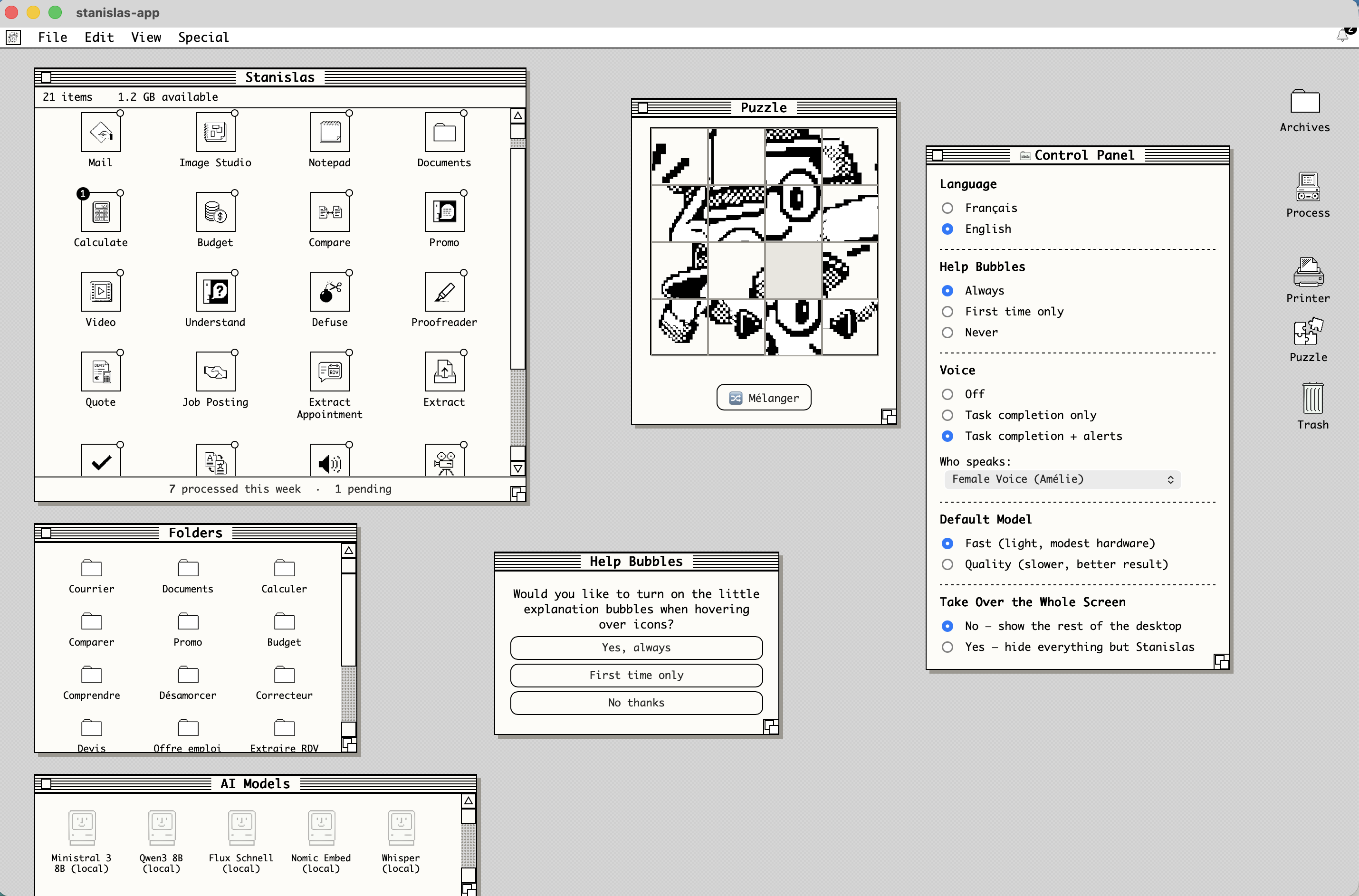
STANISLAS brings together AI functions through an interface inspired by the Macintosh of 1984.
Mail, documents, correction, translation, transcription, information extraction, image creation, video, chat and other tools are presented as directly accessible icons.
The idea is simple:
fewer prompts to write, more actions that are immediately understandable.
Free, local and no account
STANISLAS is free to use.
An Internet connection is required to download and install the application.
Once installed, local functions can be used without an Internet connection.
- Free
- No subscription
- No mandatory account
- No cloud service connection required for local functions
- Data processed locally stays on your computer
The principle is simple:
your data stays with you.
Why 1984?
1984 is not an attempt to recreate the original Macintosh.
It is a starting point.
At that time, graphical interfaces were already exploring ways to make computing more accessible by turning complex operations into understandable objects and actions.
STANISLAS takes that idea as a thought experiment:
What might an AI interface look like if it had been designed around that same philosophy of simplicity?
An experiment, not a revolution
STANISLAS is first and foremost a reflection turned into a concrete project.
It is not an attempt to claim that this is the definitive new way of using AI.
It is simply a question:
What if some AI tasks could be as simple as clicking an icon?
System requirements
For a good experience, we recommend:
- Mac with Apple M1 chip or later
- or a recent PC
- 16 GB RAM
Download
Mac and PC versions are available from the project website.
Official website: maicinstosh.eu
Source code
STANISLAS is publicly available on GitHub so that anyone can explore the project and understand how it works.
Repository: github.com/Alcaviggia/Stanislas
Français
STANISLAS — The m.A.I.cintosh
Et si l’IA avait été imaginée en 1984 ?
Une fonction. Une icône. Un clic.
STANISLAS est une expérience autour d’une idée simple :
et si nous abordions l’intelligence artificielle avec les codes d’une interface imaginée en 1984 ?
À une époque où l’informatique personnelle devenait progressivement accessible, le Macintosh proposait une manière plus directe d’utiliser un ordinateur : fenêtres, icônes, menus et actions clairement identifiées.
Aujourd’hui, l’IA est devenue extrêmement puissante, mais son utilisation commence encore souvent par une question :
« Que dois-je lui demander ? »
STANISLAS explore une autre approche :
« Que voulez-vous faire ? »
L’objectif n’est pas de prétendre avoir inventé une nouvelle technologie, mais simplement de transformer cette réflexion en une expérience concrète.
Une fonction. Une icône. Un clic.
STANISLAS rassemble des fonctions d’IA directement accessibles depuis une interface inspirée du Macintosh de 1984.
Courrier, documents, correction, traduction, transcription, extraction d’informations, création d’images, vidéo, chat et autres outils sont présentés sous forme d’icônes.
L’idée est simple :
moins de questions à formuler, plus d’actions directement compréhensibles.
Gratuit, local et sans compte
STANISLAS est proposé gratuitement.
Une connexion Internet est nécessaire pour télécharger et installer l’application.
Une fois installées, les fonctions locales peuvent être utilisées sans connexion Internet.
- Gratuit
- Pas d’abonnement
- Pas de compte obligatoire
- Pas de connexion à un service cloud pour utiliser les fonctions locales
- Les données traitées localement restent sur votre ordinateur
La philosophie est simple :
vos données restent chez vous.
Pourquoi 1984 ?
1984 n’est pas ici une volonté de reproduire le Macintosh original.
C’est un point de départ.
À cette époque, les interfaces graphiques cherchaient déjà à rendre l’informatique plus accessible en transformant des opérations complexes en objets et actions compréhensibles.
STANISLAS reprend cette idée comme exercice de réflexion :
À quoi pourrait ressembler une interface d’IA si elle avait été pensée avec cette philosophie de simplicité ?
Une expérience, pas une révolution
STANISLAS est avant tout une réflexion devenue un projet concret.
Il ne s’agit pas de prétendre avoir trouvé la nouvelle manière définitive d’utiliser l’IA.
Il s’agit simplement de poser une question :
Et si on pouvait rendre certaines utilisations de l’IA aussi simples que cliquer sur une icône ?
Configuration
Pour fonctionner dans de bonnes conditions, nous recommandons :
- Mac avec puce Apple M1 ou ultérieure
- ou PC récent
- 16 Go de RAM
Télécharger
Les versions Mac et PC sont disponibles depuis le site du projet.
Site officiel : maicinstosh.eu
Code source
STANISLAS est publié publiquement sur GitHub afin que chacun puisse consulter le projet et comprendre son fonctionnement.
Dépôt : github.com/Alcaviggia/Stanislas


An experiment exploring a simpler way to interact with AI, inspired by the Macintosh of 1984.
See the codeSee what people are saying
README
English
STANISLAS — The m.A.I.cintosh
What if AI had been imagined in 1984?
One function. One icon. One click.
STANISLAS is an experiment built around a simple idea:
what if we approached artificial intelligence through the principles of an interface imagined in 1984?
At a time when personal computing was becoming more accessible, the Macintosh introduced a more direct way of interacting with a computer: windows, icons, menus and clearly defined actions.
Today, AI has become incredibly powerful, but using it often still starts with a blank box:
“What should I ask it?”
STANISLAS explores another approach:
“What do you want to do?”
The goal is not to claim a new technological invention, but simply to turn this idea into a concrete experience.
One function. One icon. One click.
STANISLAS brings together AI functions through an interface inspired by the Macintosh of 1984.
Mail, documents, correction, translation, transcription, information extraction, image creation, video, chat and other tools are presented as directly accessible icons.
The idea is simple:
fewer prompts to write, more actions that are immediately understandable.
Free, local and no account
STANISLAS is free to use.
An Internet connection is required to download and install the application.
Once installed, local functions can be used without an Internet connection.
- Free
- No subscription
- No mandatory account
- No cloud service connection required for local functions
- Data processed locally stays on your computer
The principle is simple:
your data stays with you.
Why 1984?
1984 is not an attempt to recreate the original Macintosh.
It is a starting point.
At that time, graphical interfaces were already exploring ways to make computing more accessible by turning complex operations into understandable objects and actions.
STANISLAS takes that idea as a thought experiment:
What might an AI interface look like if it had been designed around that same philosophy of simplicity?
An experiment, not a revolution
STANISLAS is first and foremost a reflection turned into a concrete project.
It is not an attempt to claim that this is the definitive new way of using AI.
It is simply a question:
What if some AI tasks could be as simple as clicking an icon?
System requirements
For a good experience, we recommend:
- Mac with Apple M1 chip or later
- or a recent PC
- 16 GB RAM
Download
Mac and PC versions are available from the project website.
Official website: maicinstosh.eu
Source code
STANISLAS is publicly available on GitHub so that anyone can explore the project and understand how it works.
Repository: github.com/Alcaviggia/Stanislas
Français
STANISLAS — The m.A.I.cintosh
Et si l’IA avait été imaginée en 1984 ?
Une fonction. Une icône. Un clic.
STANISLAS est une expérience autour d’une idée simple :
et si nous abordions l’intelligence artificielle avec les codes d’une interface imaginée en 1984 ?
À une époque où l’informatique personnelle devenait progressivement accessible, le Macintosh proposait une manière plus directe d’utiliser un ordinateur : fenêtres, icônes, menus et actions clairement identifiées.
Aujourd’hui, l’IA est devenue extrêmement puissante, mais son utilisation commence encore souvent par une question :
« Que dois-je lui demander ? »
STANISLAS explore une autre approche :
« Que voulez-vous faire ? »
L’objectif n’est pas de prétendre avoir inventé une nouvelle technologie, mais simplement de transformer cette réflexion en une expérience concrète.
Une fonction. Une icône. Un clic.
STANISLAS rassemble des fonctions d’IA directement accessibles depuis une interface inspirée du Macintosh de 1984.
Courrier, documents, correction, traduction, transcription, extraction d’informations, création d’images, vidéo, chat et autres outils sont présentés sous forme d’icônes.
L’idée est simple :
moins de questions à formuler, plus d’actions directement compréhensibles.
Gratuit, local et sans compte
STANISLAS est proposé gratuitement.
Une connexion Internet est nécessaire pour télécharger et installer l’application.
Une fois installées, les fonctions locales peuvent être utilisées sans connexion Internet.
- Gratuit
- Pas d’abonnement
- Pas de compte obligatoire
- Pas de connexion à un service cloud pour utiliser les fonctions locales
- Les données traitées localement restent sur votre ordinateur
La philosophie est simple :
vos données restent chez vous.
Pourquoi 1984 ?
1984 n’est pas ici une volonté de reproduire le Macintosh original.
C’est un point de départ.
À cette époque, les interfaces graphiques cherchaient déjà à rendre l’informatique plus accessible en transformant des opérations complexes en objets et actions compréhensibles.
STANISLAS reprend cette idée comme exercice de réflexion :
À quoi pourrait ressembler une interface d’IA si elle avait été pensée avec cette philosophie de simplicité ?
Une expérience, pas une révolution
STANISLAS est avant tout une réflexion devenue un projet concret.
Il ne s’agit pas de prétendre avoir trouvé la nouvelle manière définitive d’utiliser l’IA.
Il s’agit simplement de poser une question :
Et si on pouvait rendre certaines utilisations de l’IA aussi simples que cliquer sur une icône ?
Configuration
Pour fonctionner dans de bonnes conditions, nous recommandons :
- Mac avec puce Apple M1 ou ultérieure
- ou PC récent
- 16 Go de RAM
Télécharger
Les versions Mac et PC sont disponibles depuis le site du projet.
Site officiel : maicinstosh.eu
Code source
STANISLAS est publié publiquement sur GitHub afin que chacun puisse consulter le projet et comprendre son fonctionnement.
Dépôt : github.com/Alcaviggia/Stanislas
Similar repos
Languages
HTML
58.5%
Python
40.7%