Unlock Google 11's Gemini "Rambler" Natural Voice Dictation & AI Writing Tools on ANY Android phone. No root required.
Java
759
16 commits
updated Oct 13, 2026
Supercharged Gboard Mod featuring Google Pixel 11 series's Rambler Voice Typing, AI Writing Assistant & Writing Tools V2 [No Root].
-00C853?style=for-the-badge&logo=android&logoColor=white)
-FF6F00?style=for-the-badge&logo=google&logoColor=white)
-2979FF?style=for-the-badge&logo=android&logoColor=white)





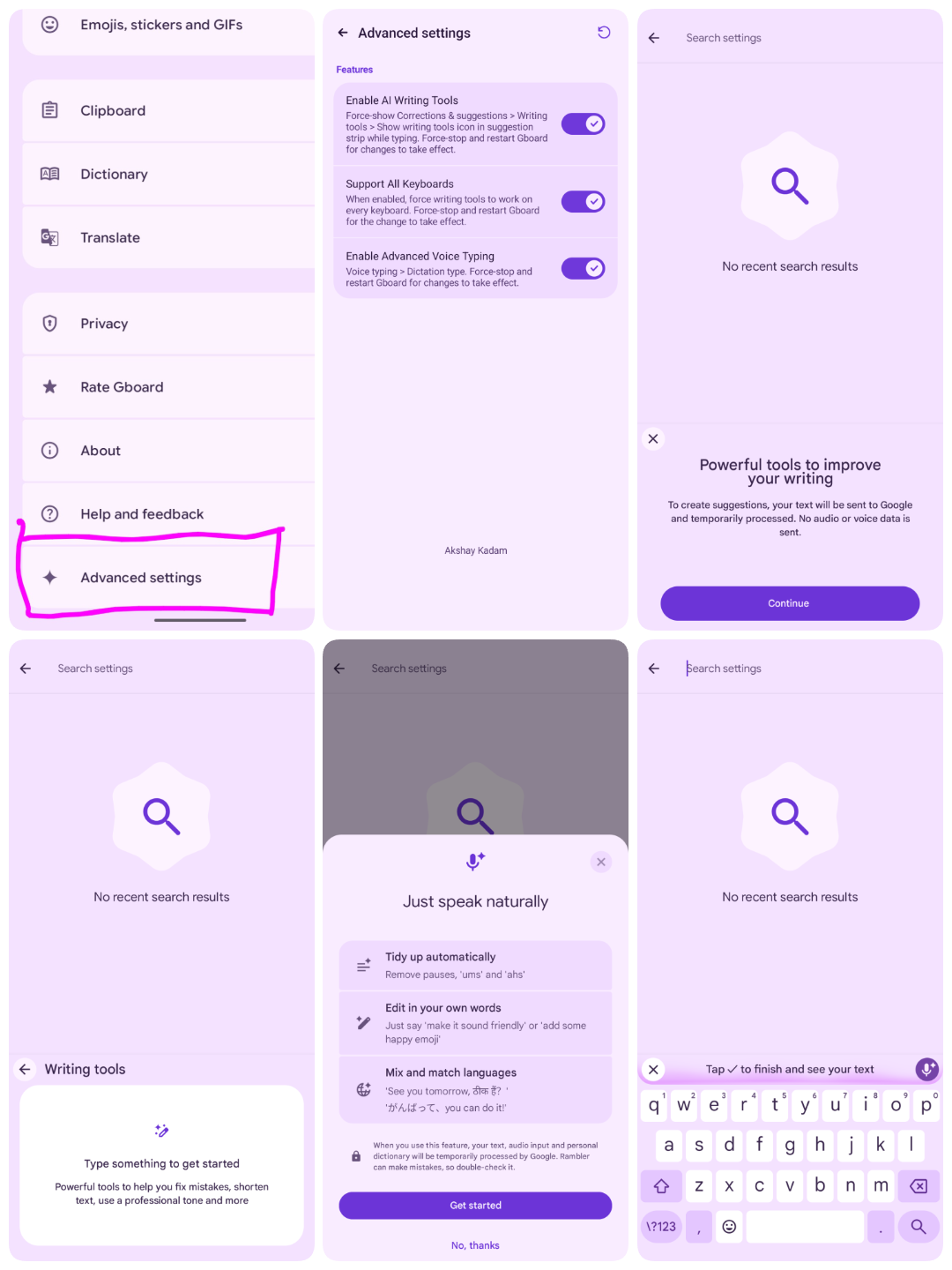
PixelBoard is a sleek, ultra-clean enhancement of Google's flagship keyboard. Tailored for pure productivity, PixelBoard strips away unnecessary bloatware and focuses strictly on powerhouse capabilities: Gemini Rambler Natural Voice Dictation, AI Writing Assistant, Writing Tools V2 Gating, Device-Gated Inference Backend Selection, and Automatic Zero-Restart Instant Activation.
PixelBoard is engineered with an independent coexistence package ID (com.akshaykadam.pixelboard), allowing you to install and use it side-by-side with your factory Gboard without replacing, uninstalling, or risking system keyboard stability.
Traditional voice-to-text transcribes every hesitation literally. PixelBoard unlocks Google's state-of-the-art Rambler model:
GoogleAsrService) as soon as the keyboard is hidden, eliminating screen-off battery drain (#3).Access Google's Gemini-driven writing suite directly above your keys across any app:
On supported devices (such as Google Pixel 8 Pro / 9 series), choose your preferred inference pipeline directly under Advanced Settings:
GBOARD_SERVER (Google Cloud Server Inference)PRIVATE_INFERENCE_AICORE (On-Device Private Android AICore)PRIVATE_INFERENCE_ASTREA (On-Device Astrea Framework)↻) button solely as a convenience tool, but manual restarts are no longer mandatory.PixelBoard alongside stock Google Keyboard.[!NOTE] Google Pixel Device Requirement: New advanced features (such as Writing Tools V2 and the On-Device AI Inference Backend Selector) are available only on Google Pixel devices (e.g., Pixel 8 Pro / Pixel 9 series) due to system AICore and hardware model requirements. On non-Pixel Android devices, these specific options are automatically hidden or gated to ensure complete stability, while core features like Gemini Rambler Natural Voice Typing, AI Proofread, and Tone Rewriting work across all supported devices.
Follow these quick steps to activate Google's Gemini-powered Rambler natural voice typing:
⚙️) icon in the keyboard suggestion strip, or go to Android Settings > System > Languages & input > On-screen keyboard > PixelBoard.↻) button remains available as an optional manual fallback if ever needed.[!TIP] Thanks to recent runtime enhancements, Rambler dictation initializes dynamically on the fly. You can immediately tap the microphone icon without needing to restart Gboard or kill the app process!
Google's AI Writing Tools allow you to proofread, rephrase, and adjust the tone of any text on the fly.
PixelBoard features a clean, minimal preference screen modeled directly after the native Material You Gboard UI:
GBOARD_SERVER, PRIVATE_INFERENCE_AICORE, and PRIVATE_INFERENCE_ASTREA.↻): Optional one-tap process reload utility in the toolbar if you ever want to force a refresh, though all settings and toggles now apply automatically in real time..apk in your notification drawer or File Manager (e.g., Files by Google).Connect your Android phone via USB with USB Debugging enabled:
adb install -r output/PixelBoard.apk
You can patch your stock Gboard APK directly on your phone using Morphe Manager:
PixelBoard.mpp as the patch source.[!TIP] You can also add PixelBoard as a custom auto-updating patch source in Morphe Manager by adding:
https://raw.githubusercontent.com/Akshayykadam/PixelBoard/main/patches-bundle.json
GBoardMod/
├── README.md                  # Project documentation & direct download links
├── build.sh                   # 1-click automated build & patching script (100% offline)
├── options.json               # Patch configuration profile
├── patches/
│   ├── PixelBoard.mpp         # Pre-bundled offline patch pack (~1.4 MB)
│   └── patches-bundle.json    # Morphe Manager repository metadata
├── input/
│   └── gboard.apk             # Base stock Gboard APK (v18.4.1 Release, ~122 MB)
├── output/
│   ├── PixelBoard.apk         # Compiled APK (local build output / hosted on GitHub Releases)
│   └── patching-result.json   # Patch verification report
├── tools/
│   ├── patcher.jar            # Standalone patch compiler CLI (Java 21)
│   └── patcher-data/          # Signing keystore & local storage
├── LICENSE                    # GNU General Public License v3.0
└── pixelboard-patches/        # PixelBoard patch source repository (Kotlin/Smali)
    ├── gradle/
    ├── patches/               # Patch definitions & Kotlin bytecode modifications
    └── extensions/            # Extension APK bytecode & runtime hooks
Place your stock Gboard APK at input/gboard.apk, then run:
./build.sh
This runs completely offline using the pre-bundled patches/PixelBoard.mpp and tools/patcher.jar. It automatically patches, aligns, and signs output/PixelBoard.apk.
If you modify any Smali or Kotlin patch code inside pixelboard-patches/:
./build.sh --rebuild
This recompiles the .mpp patch pack using Gradle and immediately applies it to the stock APK.
Verify patch bytecode transformations and contract integrity:
cd pixelboard-patches
JAVA_HOME=/opt/homebrew/opt/openjdk@21 ./gradlew test
java -jar tools/patcher.jar patch \
  --patches=patches/PixelBoard.mpp \
  --options-file=options.json \
  --striplibs=arm64-v8a \
  -o=output/PixelBoard.apk \
  -r=output/patching-result.json \
  input/gboard.apk
| Property | Requirement |
|---|---|
| Target Package | com.google.android.inputmethod.latin |
| Primary Base Version | 18.4.1.985164140-release-arm64-v8a (Recommended) |
| Compatible Versions | 18.4.1.985164140-beta-arm64-v8a18.3.1.977415014-release-arm64-v8a |
| Architecture | arm64-v8a |
| Android Version | Android 10 (API 29) through Android 16 Preview |
| Root Required | No (Standalone side-by-side coexistence) |
[!NOTE] Google Pixel Device Support: The new v18.4 features (Writing Tools V2 and On-Device Private AICore / Astrea inference) are available only on Google Pixel devices. Core Rambler Natural Voice Typing, AI Writing Assistant, proofreading, and tone rewrite work across all Android devices.
Akshay Kadam
Special thanks and sincere appreciation to:
GoogleAsrService persistence (#3) and the offline language pack download loop (#5).[!CAUTION] PLEASE READ THIS LEGAL DISCLAIMER CAREFULLY BEFORE DOWNLOADING, COMPILING, OR USING THIS SOFTWARE.
1,259 followers · starred Oct 2026
157 followers · starred Oct 2026
223 followers · starred Sep 2026
Unlock Google 11's Gemini "Rambler" Natural Voice Dictation & AI Writing Tools on ANY Android phone. No root required.
Java
759
16 commits
updated Oct 13, 2026
Supercharged Gboard Mod featuring Google Pixel 11 series's Rambler Voice Typing, AI Writing Assistant & Writing Tools V2 [No Root].
PixelBoard is a sleek, ultra-clean enhancement of Google's flagship keyboard. Tailored for pure productivity, PixelBoard strips away unnecessary bloatware and focuses strictly on powerhouse capabilities: Gemini Rambler Natural Voice Dictation, AI Writing Assistant, Writing Tools V2 Gating, Device-Gated Inference Backend Selection, and Automatic Zero-Restart Instant Activation.
PixelBoard is engineered with an independent coexistence package ID (com.akshaykadam.pixelboard), allowing you to install and use it side-by-side with your factory Gboard without replacing, uninstalling, or risking system keyboard stability.
Traditional voice-to-text transcribes every hesitation literally. PixelBoard unlocks Google's state-of-the-art Rambler model:
GoogleAsrService) as soon as the keyboard is hidden, eliminating screen-off battery drain (#3).Access Google's Gemini-driven writing suite directly above your keys across any app:
On supported devices (such as Google Pixel 8 Pro / 9 series), choose your preferred inference pipeline directly under Advanced Settings:
GBOARD_SERVER (Google Cloud Server Inference)PRIVATE_INFERENCE_AICORE (On-Device Private Android AICore)PRIVATE_INFERENCE_ASTREA (On-Device Astrea Framework)↻) button solely as a convenience tool, but manual restarts are no longer mandatory.PixelBoard alongside stock Google Keyboard.[!NOTE] Google Pixel Device Requirement: New advanced features (such as Writing Tools V2 and the On-Device AI Inference Backend Selector) are available only on Google Pixel devices (e.g., Pixel 8 Pro / Pixel 9 series) due to system AICore and hardware model requirements. On non-Pixel Android devices, these specific options are automatically hidden or gated to ensure complete stability, while core features like Gemini Rambler Natural Voice Typing, AI Proofread, and Tone Rewriting work across all supported devices.
Follow these quick steps to activate Google's Gemini-powered Rambler natural voice typing:
⚙️) icon in the keyboard suggestion strip, or go to Android Settings > System > Languages & input > On-screen keyboard > PixelBoard.↻) button remains available as an optional manual fallback if ever needed.[!TIP] Thanks to recent runtime enhancements, Rambler dictation initializes dynamically on the fly. You can immediately tap the microphone icon without needing to restart Gboard or kill the app process!
Google's AI Writing Tools allow you to proofread, rephrase, and adjust the tone of any text on the fly.
PixelBoard features a clean, minimal preference screen modeled directly after the native Material You Gboard UI:
GBOARD_SERVER, PRIVATE_INFERENCE_AICORE, and PRIVATE_INFERENCE_ASTREA.↻): Optional one-tap process reload utility in the toolbar if you ever want to force a refresh, though all settings and toggles now apply automatically in real time..apk in your notification drawer or File Manager (e.g., Files by Google).Connect your Android phone via USB with USB Debugging enabled:
adb install -r output/PixelBoard.apk
You can patch your stock Gboard APK directly on your phone using Morphe Manager:
PixelBoard.mpp as the patch source.[!TIP] You can also add PixelBoard as a custom auto-updating patch source in Morphe Manager by adding:
https://raw.githubusercontent.com/Akshayykadam/PixelBoard/main/patches-bundle.json
GBoardMod/
├── README.md                  # Project documentation & direct download links
├── build.sh                   # 1-click automated build & patching script (100% offline)
├── options.json               # Patch configuration profile
├── patches/
│   ├── PixelBoard.mpp         # Pre-bundled offline patch pack (~1.4 MB)
│   └── patches-bundle.json    # Morphe Manager repository metadata
├── input/
│   └── gboard.apk             # Base stock Gboard APK (v18.4.1 Release, ~122 MB)
├── output/
│   ├── PixelBoard.apk         # Compiled APK (local build output / hosted on GitHub Releases)
│   └── patching-result.json   # Patch verification report
├── tools/
│   ├── patcher.jar            # Standalone patch compiler CLI (Java 21)
│   └── patcher-data/          # Signing keystore & local storage
├── LICENSE                    # GNU General Public License v3.0
└── pixelboard-patches/        # PixelBoard patch source repository (Kotlin/Smali)
    ├── gradle/
    ├── patches/               # Patch definitions & Kotlin bytecode modifications
    └── extensions/            # Extension APK bytecode & runtime hooks
Place your stock Gboard APK at input/gboard.apk, then run:
./build.sh
This runs completely offline using the pre-bundled patches/PixelBoard.mpp and tools/patcher.jar. It automatically patches, aligns, and signs output/PixelBoard.apk.
If you modify any Smali or Kotlin patch code inside pixelboard-patches/:
./build.sh --rebuild
This recompiles the .mpp patch pack using Gradle and immediately applies it to the stock APK.
Verify patch bytecode transformations and contract integrity:
cd pixelboard-patches
JAVA_HOME=/opt/homebrew/opt/openjdk@21 ./gradlew test
java -jar tools/patcher.jar patch \
  --patches=patches/PixelBoard.mpp \
  --options-file=options.json \
  --striplibs=arm64-v8a \
  -o=output/PixelBoard.apk \
  -r=output/patching-result.json \
  input/gboard.apk
| Property | Requirement |
|---|---|
| Target Package | com.google.android.inputmethod.latin |
| Primary Base Version | 18.4.1.985164140-release-arm64-v8a (Recommended) |
| Compatible Versions | 18.4.1.985164140-beta-arm64-v8a18.3.1.977415014-release-arm64-v8a |
| Architecture | arm64-v8a |
| Android Version | Android 10 (API 29) through Android 16 Preview |
| Root Required | No (Standalone side-by-side coexistence) |
[!NOTE] Google Pixel Device Support: The new v18.4 features (Writing Tools V2 and On-Device Private AICore / Astrea inference) are available only on Google Pixel devices. Core Rambler Natural Voice Typing, AI Writing Assistant, proofreading, and tone rewrite work across all Android devices.
Akshay Kadam
Special thanks and sincere appreciation to:
GoogleAsrService persistence (#3) and the offline language pack download loop (#5).[!CAUTION] PLEASE READ THIS LEGAL DISCLAIMER CAREFULLY BEFORE DOWNLOADING, COMPILING, OR USING THIS SOFTWARE.
1,259 followers · starred Oct 2026
157 followers · starred Oct 2026
223 followers · starred Sep 2026