
This repository contains ScholarQABench data and evaluation pipeline.
See the codeREADME
ScholarQABench
This repository contains ScholarQABench evaluation script and data, which provides a holistic evaluation platform to test LLMs' abilities to assist researchers to conduct scientific literature synthesis. This work is from the OpenScholar project. See details in our manuscript.
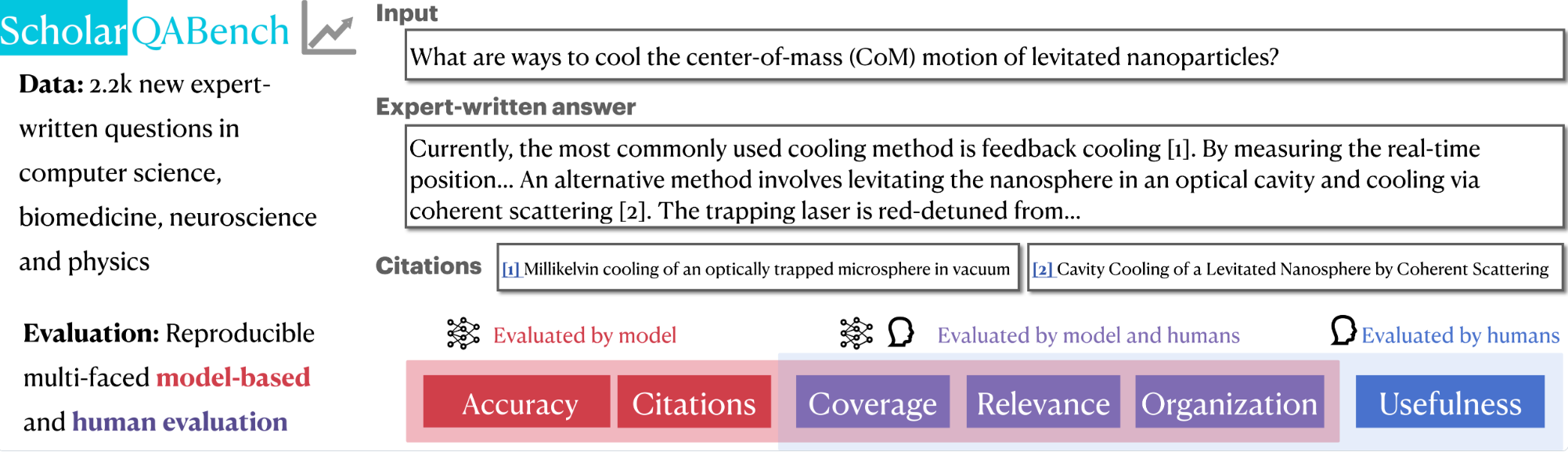
Table of Contents
Overview and Installation
Setup
conda create -n sb_env python=3.10.0
conda activate sb_env
pip install -r requirements.txt
python -m nltk.downloader punkt_tab
Repository Organizations
- data: provides relevant data files.
-
scholar_cs: includes ScholarQA-CS (Computer Science) data files
output_snippets.jsonl: Contains the questions with system responses for eval (and some other metadata used to generate the test cases but not required for subsequent runs). Should not require further modification.test_configs_snippets.json: A collection of test cases in json format with associated rubrics for each question. Each question has its own test case and rubrics. Should not require further modification.qa_metadata_all.jsonl: Metadata file that was used to bootstrap this utility. Should not require further modification.src_answers: Directory containing sample system responses from 4 systems.
-
scholar_multi: includes ScholarQA-Multi (Multi-domain; CS, Bio and Physics) data files
-
scholar_bio: includes ScholarQA-Bio (Biomedicine) data files
-
scholar_neuro: includes ScholarQA-Neuro (Neuroscience) data files
-
single_paper_tasks: includes SciFact, PubmedQA and QASA.
scifact_test.jsonl: a jsonlines file includes the SciFact task data. Each item consists ofinput(original claim),answer(answer label,trueorfalse), andgold_ctx(a list of dictionary where each item consists oftitleandtext).gold_ctxwill not be used during evaluation except for oracle gold context evaluation.pubmed_test.jsonl: a jsonlines file includes the PubMed task data. Each item consists ofinput(original question),answer(answer label,yesorno), andgold_ctx(a list of dictionary where each item consists oftitleandtext).gold_ctxwill not be used during evaluation except for oracle gold context evaluation.qasa_test.jsonl: a jsonlines file includes the QASA task data. Each item consists ofinput(question),answer(long-form answer),ctxs(a list of dictionary items for the full paper data) andgold_ctxs(a list of dictionary items where each item consists oftitleandtextfor gold contexts).gold_ctxswill not be used during evaluation except for oracle gold context evaluation.
-
- scripts: provides evaluation scripts for each evaluation aspects
- rubric_eval.py: a script to run rubric based evaluations for ScholarQA-CS.
- citation_correctness_eval.py: a script to run citations as well as string-matching-based correctness evaluations for single-paper tasks.
- prometheus_eval.py: a script to evaluate organization, relevance and coverage, based on five-scale rubrics in rubrics
- rubrics: rubrics for
prometheus_eval.
The availability of annotations, as well as overview of the annotations are summarized below. Note that ScholarQA-Bench does not provide training data.
| Dataset | Input | Output | Label Available | Evaluation Metrics |
|---|---|---|---|---|
ScholarQA-SciFact | claim | true or false | ✅ | accuracy, citations_short |
ScholarQA-PubmedQA | question | yes or no | ✅ | accuracy, citations_short |
ScholarQA-QASA | question | long-form | ✅ | rouge-l, citations |
ScholarQA-CS | question | long-form | ✅ (rubrics) | rubrics, citations |
ScholarQA-Multi | question | long-form | ✅ | prometheus, citations |
ScholarQA-Bio | question | long-form | citations | |
ScholarQA-Neuro | question | long-form | citations |
Evaluations
After you run model inferences, run evaluations for each task and aspects using the following scripts.
Your answer files for all tasks are expected to format in the following way (`json``)
[
{"input": query (str), "output": final_model_output (str), "ctxs: citations (list of    dict, where each dict has text )}, ...
]
Citation Accuracy (All tasks)
Short-form generation (SciFact, PubMedQA)
python scripts/citation_correctness_eval.py --f PATH_TO_YOUR_PREDICTION_FILE --citations_short
Long-form generation (QASA, ScholarQA-*)
python scripts/citation_correctness_eval.py --f PATH_TO_YOUR_PREDICTION_FILE --citations
String-based Correctness (SciFact, PubmedQA, QASA)
To run string matching based evaluations, run the following commands:
SciFact and PubMedQA (accuracy)
python scripts/citation_correctness_eval.py --f PATH_TO_YOUR_PREDICTION_FILE --match
QASA (ROUGE-L)
python scripts/citation_correctness_eval.py --f PATH_TO_YOUR_PREDICTION_FILE
Rubric-based Correctness (ScholarQA-CS)
Convert the output file
To run eval for your system, first setup the prediction file with the system answers to be evaluated as per following requirement:
A jsonl file with fields case_id and answer_text (See example file) -
case_idcorresponds to the identifier of the question for which the response is to be evaluated, map the question text with the case_id intest_configs_snippets.jsonanswer_textis the system answer (along with citations and excerpts, if applicable) in plain text
Run evaluation
Once the prediction json file is ready, save it a new directory run the eval script as follows (You can save as many system response files under a directory, they will be picked together for eval):
export OPENAI_API_KEY=<openai key>
python scripts/rubric_eval.py \
    --qa-dir data/scholarqa_cs/src_answers \
    --test-config data/scholarqa_cs/test_configs_snippets.json \
    --rubrics --snippets \
    --src-names <optional comma-separated src names prefixes of prediction files with .jsonl, if not given all the files will be picked>
Note: To evaluate only using rubrics, remove --snippets parameter and vice-versa to use only snippets.
Acknowledgements: The original code of ScholarQA-CS is available at allenai/multidoc_qa_eval.
Prometheus for Coverage, Relevance and Organization (ScholarQA-CS)
Coverage and Organization
python scripts/prometheus_eval.py \
    --batch_process_dir YOUR_PREDICTION_FILE_PATH \
    --output_path OUTPUT_DIR_NAME \
    --rubric_path rubrics/prometheus_rubrics_v8.json \
    --instruction "Answer the question related to the most recent scientific literature." \
    --model prometheus-eval/prometheus-bgb-8x7b-v2.0 \
    --load_vllm \
    --top_n 10 \
    -f data/scholarqa_multi/human_answers.json \
    --aspects organization coverage relevance
Relevance
We use prometheus-eval/prometheus-8x7b-v2.0 for relevance, due to unstable performance of prometheus-eval/prometheus-bgb-8x7b-v2.0 for relevance.
python scripts/prometheus_eval.py \
    --batch_process_dir YOUR_PREDICTION_FILE_PATH \
    --output_path OUTPUT_DIR_NAME \
    --rubric_path rubrics/prometheus_rubrics_v8.json \
    --instruction "Answer the question related to the most recent scientific literature." \
    --model prometheus-eval/prometheus-8x7b-v2.0 \
    --load_vllm \
    --top_n 10 \
    -f data/scholar_multi/human_answers.json \
    --aspects relevance
License
The aggregate test cases, sample system answers under data/src_answers and other files under data directory are released under ODC-BY license.
By downloading this data you acknowledge that you have read and agreed to all the terms in this license.
For constituent datasets, also go through the individual licensing requirements, as applicable.
Notes
- The reference rubrics and expert-written answers were created by domain experts between July and September 2024. While we do not discourage the use of retrieval systems that surface papers published after this period, please note that such systems may access information unavailable to the original annotators, potentially affecting comparability with the provided references.
Citations
@article{openscholar,
  title={{OpenScholar}: Synthesizing Scientific Literature with Retrieval-Augmented Language Models},
  author={Asai, Akari and He*, Jacqueline and Shao*, Rulin and Shi, Weijia and Singh, Amanpreet and Chang, Joseph Chee  and Lo,  Kyle and Soldaini, Luca and Feldman, Tian, Sergey and Mike, D’arcy and Wadden, David and Latzke, Matt and Minyang and Ji, Pan and Liu, Shengyan and Tong, Hao and Wu, Bohao and Xiong, Yanyu and Zettlemoyer, Luke and Weld, Dan and Neubig, Graham and Downey, Doug and Yih, Wen-tau and Koh, Pang Wei and Hajishirzi, Hannaneh},
  journal={Arxiv},
  year={2024},
}
Significant stargazers

712 followers · starred Feb 2025
Similar repos




This repository contains ScholarQABench data and evaluation pipeline.
See the codeREADME
ScholarQABench
This repository contains ScholarQABench evaluation script and data, which provides a holistic evaluation platform to test LLMs' abilities to assist researchers to conduct scientific literature synthesis. This work is from the OpenScholar project. See details in our manuscript.
Table of Contents
Overview and Installation
Setup
conda create -n sb_env python=3.10.0
conda activate sb_env
pip install -r requirements.txt
python -m nltk.downloader punkt_tab
Repository Organizations
- data: provides relevant data files.
-
scholar_cs: includes ScholarQA-CS (Computer Science) data files
output_snippets.jsonl: Contains the questions with system responses for eval (and some other metadata used to generate the test cases but not required for subsequent runs). Should not require further modification.test_configs_snippets.json: A collection of test cases in json format with associated rubrics for each question. Each question has its own test case and rubrics. Should not require further modification.qa_metadata_all.jsonl: Metadata file that was used to bootstrap this utility. Should not require further modification.src_answers: Directory containing sample system responses from 4 systems.
-
scholar_multi: includes ScholarQA-Multi (Multi-domain; CS, Bio and Physics) data files
-
scholar_bio: includes ScholarQA-Bio (Biomedicine) data files
-
scholar_neuro: includes ScholarQA-Neuro (Neuroscience) data files
-
single_paper_tasks: includes SciFact, PubmedQA and QASA.
scifact_test.jsonl: a jsonlines file includes the SciFact task data. Each item consists ofinput(original claim),answer(answer label,trueorfalse), andgold_ctx(a list of dictionary where each item consists oftitleandtext).gold_ctxwill not be used during evaluation except for oracle gold context evaluation.pubmed_test.jsonl: a jsonlines file includes the PubMed task data. Each item consists ofinput(original question),answer(answer label,yesorno), andgold_ctx(a list of dictionary where each item consists oftitleandtext).gold_ctxwill not be used during evaluation except for oracle gold context evaluation.qasa_test.jsonl: a jsonlines file includes the QASA task data. Each item consists ofinput(question),answer(long-form answer),ctxs(a list of dictionary items for the full paper data) andgold_ctxs(a list of dictionary items where each item consists oftitleandtextfor gold contexts).gold_ctxswill not be used during evaluation except for oracle gold context evaluation.
-
- scripts: provides evaluation scripts for each evaluation aspects
- rubric_eval.py: a script to run rubric based evaluations for ScholarQA-CS.
- citation_correctness_eval.py: a script to run citations as well as string-matching-based correctness evaluations for single-paper tasks.
- prometheus_eval.py: a script to evaluate organization, relevance and coverage, based on five-scale rubrics in rubrics
- rubrics: rubrics for
prometheus_eval.
The availability of annotations, as well as overview of the annotations are summarized below. Note that ScholarQA-Bench does not provide training data.
| Dataset | Input | Output | Label Available | Evaluation Metrics |
|---|---|---|---|---|
ScholarQA-SciFact | claim | true or false | ✅ | accuracy, citations_short |
ScholarQA-PubmedQA | question | yes or no | ✅ | accuracy, citations_short |
ScholarQA-QASA | question | long-form | ✅ | rouge-l, citations |
ScholarQA-CS | question | long-form | ✅ (rubrics) | rubrics, citations |
ScholarQA-Multi | question | long-form | ✅ | prometheus, citations |
ScholarQA-Bio | question | long-form | citations | |
ScholarQA-Neuro | question | long-form | citations |
Evaluations
After you run model inferences, run evaluations for each task and aspects using the following scripts.
Your answer files for all tasks are expected to format in the following way (`json``)
[
{"input": query (str), "output": final_model_output (str), "ctxs: citations (list of    dict, where each dict has text )}, ...
]
Citation Accuracy (All tasks)
Short-form generation (SciFact, PubMedQA)
python scripts/citation_correctness_eval.py --f PATH_TO_YOUR_PREDICTION_FILE --citations_short
Long-form generation (QASA, ScholarQA-*)
python scripts/citation_correctness_eval.py --f PATH_TO_YOUR_PREDICTION_FILE --citations
String-based Correctness (SciFact, PubmedQA, QASA)
To run string matching based evaluations, run the following commands:
SciFact and PubMedQA (accuracy)
python scripts/citation_correctness_eval.py --f PATH_TO_YOUR_PREDICTION_FILE --match
QASA (ROUGE-L)
python scripts/citation_correctness_eval.py --f PATH_TO_YOUR_PREDICTION_FILE
Rubric-based Correctness (ScholarQA-CS)
Convert the output file
To run eval for your system, first setup the prediction file with the system answers to be evaluated as per following requirement:
A jsonl file with fields case_id and answer_text (See example file) -
case_idcorresponds to the identifier of the question for which the response is to be evaluated, map the question text with the case_id intest_configs_snippets.jsonanswer_textis the system answer (along with citations and excerpts, if applicable) in plain text
Run evaluation
Once the prediction json file is ready, save it a new directory run the eval script as follows (You can save as many system response files under a directory, they will be picked together for eval):
export OPENAI_API_KEY=<openai key>
python scripts/rubric_eval.py \
    --qa-dir data/scholarqa_cs/src_answers \
    --test-config data/scholarqa_cs/test_configs_snippets.json \
    --rubrics --snippets \
    --src-names <optional comma-separated src names prefixes of prediction files with .jsonl, if not given all the files will be picked>
Note: To evaluate only using rubrics, remove --snippets parameter and vice-versa to use only snippets.
Acknowledgements: The original code of ScholarQA-CS is available at allenai/multidoc_qa_eval.
Prometheus for Coverage, Relevance and Organization (ScholarQA-CS)
Coverage and Organization
python scripts/prometheus_eval.py \
    --batch_process_dir YOUR_PREDICTION_FILE_PATH \
    --output_path OUTPUT_DIR_NAME \
    --rubric_path rubrics/prometheus_rubrics_v8.json \
    --instruction "Answer the question related to the most recent scientific literature." \
    --model prometheus-eval/prometheus-bgb-8x7b-v2.0 \
    --load_vllm \
    --top_n 10 \
    -f data/scholarqa_multi/human_answers.json \
    --aspects organization coverage relevance
Relevance
We use prometheus-eval/prometheus-8x7b-v2.0 for relevance, due to unstable performance of prometheus-eval/prometheus-bgb-8x7b-v2.0 for relevance.
python scripts/prometheus_eval.py \
    --batch_process_dir YOUR_PREDICTION_FILE_PATH \
    --output_path OUTPUT_DIR_NAME \
    --rubric_path rubrics/prometheus_rubrics_v8.json \
    --instruction "Answer the question related to the most recent scientific literature." \
    --model prometheus-eval/prometheus-8x7b-v2.0 \
    --load_vllm \
    --top_n 10 \
    -f data/scholar_multi/human_answers.json \
    --aspects relevance
License
The aggregate test cases, sample system answers under data/src_answers and other files under data directory are released under ODC-BY license.
By downloading this data you acknowledge that you have read and agreed to all the terms in this license.
For constituent datasets, also go through the individual licensing requirements, as applicable.
Notes
- The reference rubrics and expert-written answers were created by domain experts between July and September 2024. While we do not discourage the use of retrieval systems that surface papers published after this period, please note that such systems may access information unavailable to the original annotators, potentially affecting comparability with the provided references.
Citations
@article{openscholar,
  title={{OpenScholar}: Synthesizing Scientific Literature with Retrieval-Augmented Language Models},
  author={Asai, Akari and He*, Jacqueline and Shao*, Rulin and Shi, Weijia and Singh, Amanpreet and Chang, Joseph Chee  and Lo,  Kyle and Soldaini, Luca and Feldman, Tian, Sergey and Mike, D’arcy and Wadden, David and Latzke, Matt and Minyang and Ji, Pan and Liu, Shengyan and Tong, Hao and Wu, Bohao and Xiong, Yanyu and Zettlemoyer, Luke and Weld, Dan and Neubig, Graham and Downey, Doug and Yih, Wen-tau and Koh, Pang Wei and Hajishirzi, Hannaneh},
  journal={Arxiv},
  year={2024},
}
Similar repos
Significant stargazers
712 followers · starred Feb 2025