
[NeurIPS 24] MoE Jetpack: From Dense Checkpoints to Adaptive Mixture of Experts for Vision Tasks
See the codeREADME
MoE Jetpack
From Dense Checkpoints to Adaptive Mixture of Experts for Vision Tasks
Xingkui Zhu*, Yiran Guan*, Dingkang Liang, Yuchao Chen, Yuliang Liu✉, Xiang Bai
Huazhong University of Science and Technology
* Equal Contribution ✉ Corresponding Author
If you like our project, please give us a star ⭐ on GitHub for the latest update.
📣 News
- 2024.09.26: MoE Jetpack has been accepted by NeurIPS 2024. 🎉
- 2024.06.07: MoE Jetpack paper released. 🔥
⭐️ Highlights
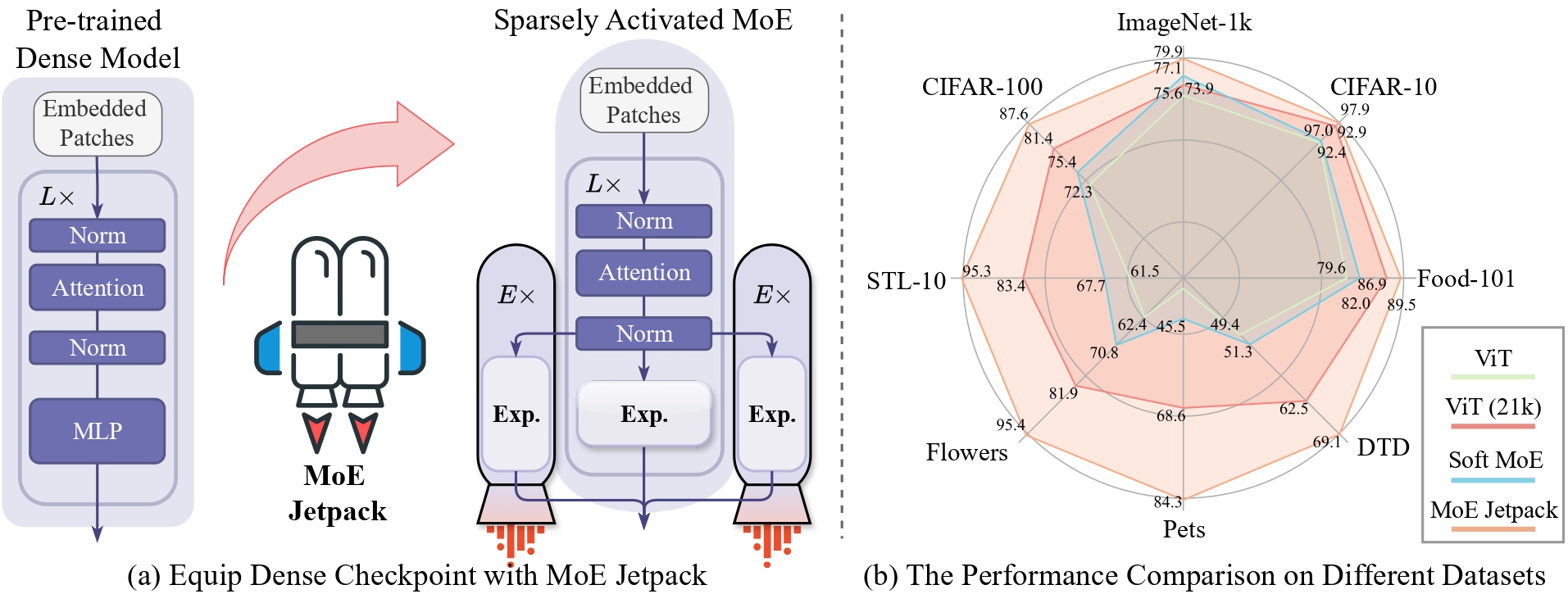
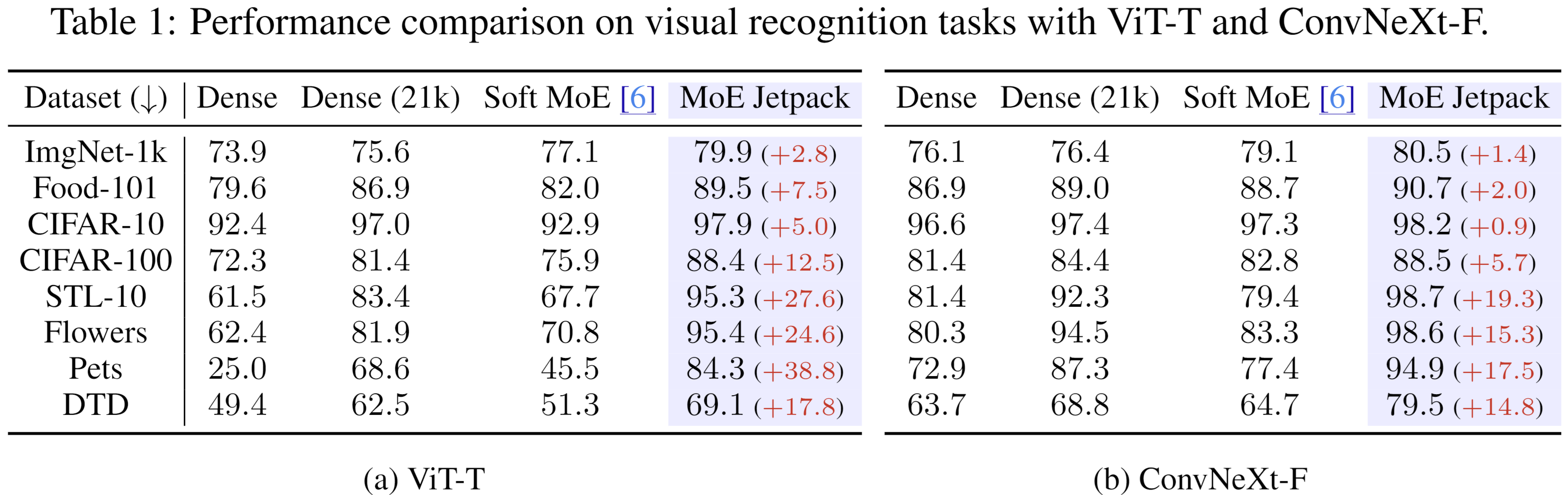
- 🔥 Strong performance. MoE Jetpack boosts accuracy across multiple vision tasks, outperforming both dense and Soft MoE models.
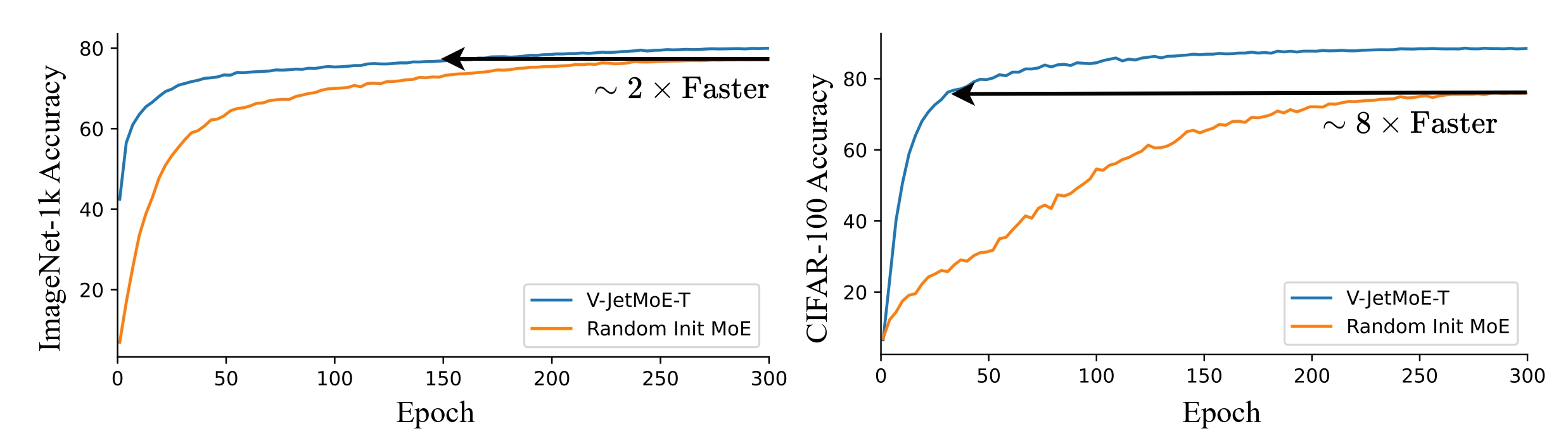
- ⚡ Fast Convergence. Leveraging checkpoint recycling, MoE Jetpack speeds up convergence, achieving target accuracies significantly faster than training from scratch.
-
🤝 Strong generalization. MoE Jetpack achieves significant performance improvements on both Transformer and CNN across 8 downstream vision datasets.
-
😮 Running Efficiency. We provide an efficient implementation of expert parallelization, whereby the FLOPs and training wall time remain nearly identical to those of a dense model.
⚡ Overview
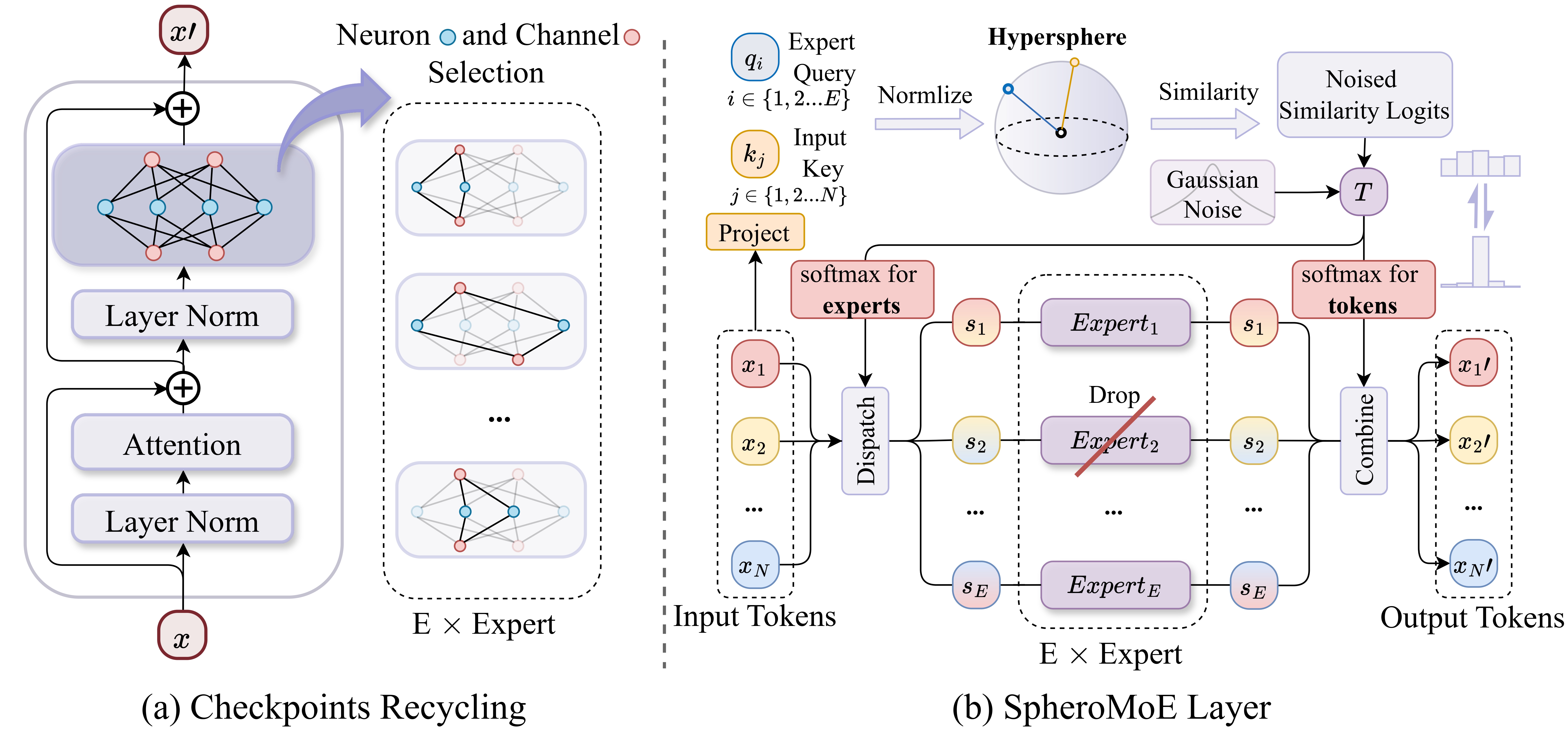
We present MoE Jetpack, a framework that fine-tunes pre-trained dense models into Mixture of Experts with checkpoint recycling and SpheroMoE layers, improving convergence speed, accuracy, and computational efficiency across several downstream vision tasks.
📦 Download URL
| File Type | Description | Download Link (Google Drive) |
|---|---|---|
| Checkpoint Recycling | Sampling from Dense Checkpoints to Initialize MoE Weights | |
| Dense Checkpoint (ViT-T) | Pre-trained ViT-T weights on ImageNet-21k for checkpoint recycling | 🤗 ViT-T Weights |
| Dense Checkpoint (ViT-S) | Pre-trained ViT-S weights on ImageNet-21k for checkpoint recycling | 🤗 ViT-S Weights |
| MoE Jetpack Init Weights | Initialized weights using checkpoint recycling (ViT-T/ViT-S) | MoE Init Weights |
| MoE Jetpack | Fine-tuning initialized SpheroMoE on ImageNet-1k | |
| Config | Config file for fine-tuning SpheroMoE model using checkpoint recycling weights | MoE Jetpack Config |
| Fine-tuning Logs | Logs from fine-tuning SpheroMoE | MoE Jetpack Logs |
| MoE Jetpack Weights | Final weights after fine-tuning on ImageNet-1K | MoE Jetpack Weights |
📊 Main Results
Comparisons between MoE Jetpack, Densely activated ViT, and Soft MoE
🚀 Getting Started
🔧 Installation
Follow these steps to set up the environment for MoE Jetpack:
1. Install PyTorch v2.1.0 with CUDA 12.1
pip install torch==2.1.0 torchvision==0.16.0 torchaudio==2.1.0 --index-url https://download.pytorch.org/whl/cu121
2. Install MMCV 2.1.0
pip install mmcv==2.1.0 -f https://download.openmmlab.com/mmcv/dist/cu121/torch2.1/index.html
3. Install MoE Jetpack
Clone the repository and install it:
git clone https://github.com/Adlith/MoE-Jetpack.git
cd path/to/MoE-Jetpack
pip install -U openmim && mim install -e .
For more details and prepare datasets, refer to MMPretrain Installation
4. Install Additional Dependencies
pip install timm einops entmax python-louvain scikit-learn pymetis
Now you're ready to run MoE Jetpack!
📁 Project Directory Structure
Below is an overview of the MoE Jetpack project structure with descriptions of the key components:
MoE-Jetpack/
│
├── data/
│   ├── imagenet/
│   │   ├── train/
│   │   ├── val/
│   │   └── ...
│   └── ...
│
├── moejet/                          # Main project folder
│   ├── configs/                     # Configuration files
│   │   └── timm/
│   │       ├── vit_tiny_dual_moe_timm_21k_ft.py
│   │       └── ...
│   │
│   ├── models/                      # Contains the model definition files
│   │   └── ...
│   │
│   ├── tools/
│   │   └── gen_ViT_MoE_weight.py    # Script to convert ViT dense checkpoints into MoE format
│   │
│   │
│   ├── weights/                     # Folder for storing pre-trained weights
│   │   └── gen_weight/              # MoE initialization weights go here
│   │       └── ...
│   │
│   └── ...                          # Other project-related files and folders
│
├── README.md                        # Project readme and documentation
└── ...
🗝️ Training & Validating
1. Initialize MoE Weights (Checkpoint Recycling)
Run the following script to initialize the MoE weights from pre-trained ViT weights:
python moejet/tools/gen_ViT_MoE_weight.py
2. Start Training
- The training and testing code is built on MMPretrain. Please refer to the Training Documentation for more details.
# For example, to train MoE Jet on ImageNet-1K, use:

CUDA_VISIBLE_DEVICES=0,1,2,3 PORT=29500 ./tools/dist_train.sh moejet/configs/timm/vit_tiny_dual_moe_timm_21k_ft.py 4
By default, we use 4 GPUs with a batch size of 256 per GPU. Gradient accumulation simulates a total batch size of 4096.
To customize hyperparameters, modify the relevant settings in the configuration file.
🖊️ Citation
@article{zhu2024moe,
  title={MoE Jetpack: From Dense Checkpoints to Adaptive Mixture of Experts for Vision Tasks},
  author={Xingkui Zhu, Yiran Guan, Dingkang Liang, Yuchao Chen, Yuliang Liu, Xiang Bai},
  journal={Proceedings of Advances in Neural Information Processing Systems},
  year={2024}
  }
👍 Acknowledgement
We thank the following great works and open-source repositories:


Similar repos


Languages
Python
98.1%
Cuda
1.1%
[NeurIPS 24] MoE Jetpack: From Dense Checkpoints to Adaptive Mixture of Experts for Vision Tasks
See the codeREADME
MoE Jetpack
From Dense Checkpoints to Adaptive Mixture of Experts for Vision Tasks
Xingkui Zhu*, Yiran Guan*, Dingkang Liang, Yuchao Chen, Yuliang Liu✉, Xiang Bai
Huazhong University of Science and Technology
* Equal Contribution ✉ Corresponding Author
If you like our project, please give us a star ⭐ on GitHub for the latest update.
📣 News
- 2024.09.26: MoE Jetpack has been accepted by NeurIPS 2024. 🎉
- 2024.06.07: MoE Jetpack paper released. 🔥
⭐️ Highlights
- 🔥 Strong performance. MoE Jetpack boosts accuracy across multiple vision tasks, outperforming both dense and Soft MoE models.
- ⚡ Fast Convergence. Leveraging checkpoint recycling, MoE Jetpack speeds up convergence, achieving target accuracies significantly faster than training from scratch.
-
🤝 Strong generalization. MoE Jetpack achieves significant performance improvements on both Transformer and CNN across 8 downstream vision datasets.
-
😮 Running Efficiency. We provide an efficient implementation of expert parallelization, whereby the FLOPs and training wall time remain nearly identical to those of a dense model.
⚡ Overview
We present MoE Jetpack, a framework that fine-tunes pre-trained dense models into Mixture of Experts with checkpoint recycling and SpheroMoE layers, improving convergence speed, accuracy, and computational efficiency across several downstream vision tasks.
📦 Download URL
| File Type | Description | Download Link (Google Drive) |
|---|---|---|
| Checkpoint Recycling | Sampling from Dense Checkpoints to Initialize MoE Weights | |
| Dense Checkpoint (ViT-T) | Pre-trained ViT-T weights on ImageNet-21k for checkpoint recycling | 🤗 ViT-T Weights |
| Dense Checkpoint (ViT-S) | Pre-trained ViT-S weights on ImageNet-21k for checkpoint recycling | 🤗 ViT-S Weights |
| MoE Jetpack Init Weights | Initialized weights using checkpoint recycling (ViT-T/ViT-S) | MoE Init Weights |
| MoE Jetpack | Fine-tuning initialized SpheroMoE on ImageNet-1k | |
| Config | Config file for fine-tuning SpheroMoE model using checkpoint recycling weights | MoE Jetpack Config |
| Fine-tuning Logs | Logs from fine-tuning SpheroMoE | MoE Jetpack Logs |
| MoE Jetpack Weights | Final weights after fine-tuning on ImageNet-1K | MoE Jetpack Weights |
📊 Main Results
Comparisons between MoE Jetpack, Densely activated ViT, and Soft MoE
🚀 Getting Started
🔧 Installation
Follow these steps to set up the environment for MoE Jetpack:
1. Install PyTorch v2.1.0 with CUDA 12.1
pip install torch==2.1.0 torchvision==0.16.0 torchaudio==2.1.0 --index-url https://download.pytorch.org/whl/cu121
2. Install MMCV 2.1.0
pip install mmcv==2.1.0 -f https://download.openmmlab.com/mmcv/dist/cu121/torch2.1/index.html
3. Install MoE Jetpack
Clone the repository and install it:
git clone https://github.com/Adlith/MoE-Jetpack.git
cd path/to/MoE-Jetpack
pip install -U openmim && mim install -e .
For more details and prepare datasets, refer to MMPretrain Installation
4. Install Additional Dependencies
pip install timm einops entmax python-louvain scikit-learn pymetis
Now you're ready to run MoE Jetpack!
📁 Project Directory Structure
Below is an overview of the MoE Jetpack project structure with descriptions of the key components:
MoE-Jetpack/
│
├── data/
│   ├── imagenet/
│   │   ├── train/
│   │   ├── val/
│   │   └── ...
│   └── ...
│
├── moejet/                          # Main project folder
│   ├── configs/                     # Configuration files
│   │   └── timm/
│   │       ├── vit_tiny_dual_moe_timm_21k_ft.py
│   │       └── ...
│   │
│   ├── models/                      # Contains the model definition files
│   │   └── ...
│   │
│   ├── tools/
│   │   └── gen_ViT_MoE_weight.py    # Script to convert ViT dense checkpoints into MoE format
│   │
│   │
│   ├── weights/                     # Folder for storing pre-trained weights
│   │   └── gen_weight/              # MoE initialization weights go here
│   │       └── ...
│   │
│   └── ...                          # Other project-related files and folders
│
├── README.md                        # Project readme and documentation
└── ...
🗝️ Training & Validating
1. Initialize MoE Weights (Checkpoint Recycling)
Run the following script to initialize the MoE weights from pre-trained ViT weights:
python moejet/tools/gen_ViT_MoE_weight.py
2. Start Training
- The training and testing code is built on MMPretrain. Please refer to the Training Documentation for more details.
# For example, to train MoE Jet on ImageNet-1K, use:

CUDA_VISIBLE_DEVICES=0,1,2,3 PORT=29500 ./tools/dist_train.sh moejet/configs/timm/vit_tiny_dual_moe_timm_21k_ft.py 4
By default, we use 4 GPUs with a batch size of 256 per GPU. Gradient accumulation simulates a total batch size of 4096.
To customize hyperparameters, modify the relevant settings in the configuration file.
🖊️ Citation
@article{zhu2024moe,
  title={MoE Jetpack: From Dense Checkpoints to Adaptive Mixture of Experts for Vision Tasks},
  author={Xingkui Zhu, Yiran Guan, Dingkang Liang, Yuchao Chen, Yuliang Liu, Xiang Bai},
  journal={Proceedings of Advances in Neural Information Processing Systems},
  year={2024}
  }
👍 Acknowledgement
We thank the following great works and open-source repositories:
Similar repos
Languages
Python
98.1%
Cuda
1.1%