
Project from CS221 - Natural Language Processing, VNU-UIT
Python
1
16 commits
updated Dec 26, 2025
README
CS221 - Đồ án: INSTRUCTOR Embedding
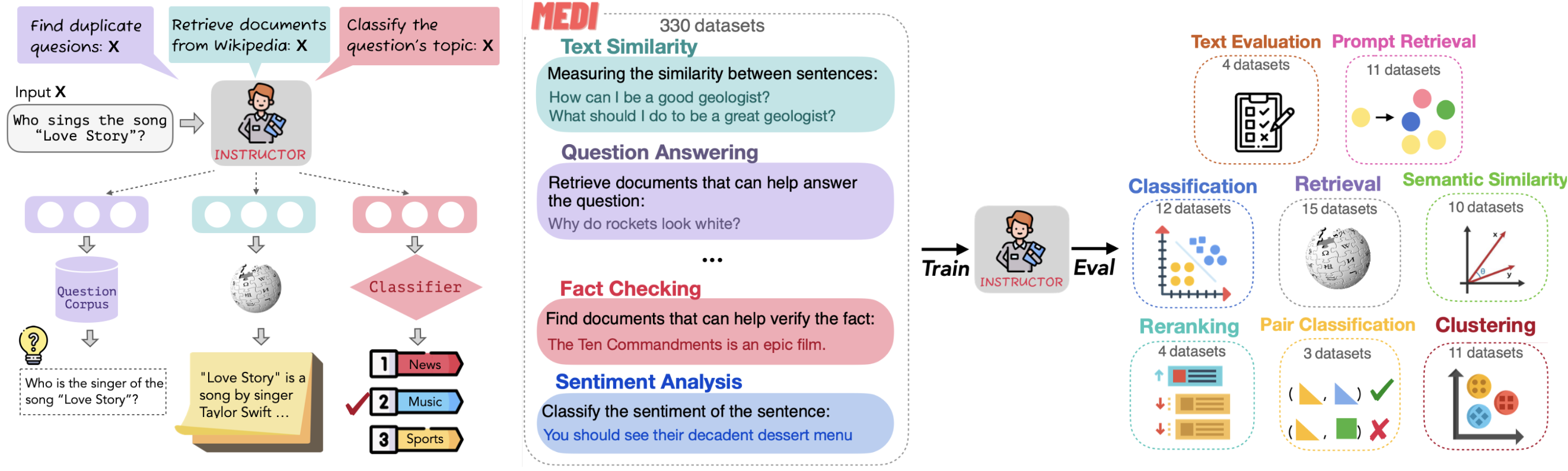
📚 Giới thiệu
Đồ án này nghiên cứu và triển khai paper "One Embedder, Any Task: Instruction-Finetuned Text Embeddings" (INSTRUCTOR) - một mô hình text embedding có thể tạo ra embeddings tùy biến cho bất kỳ task nào chỉ bằng cách cung cấp instruction phù hợp.
📄 Thông tin Paper
| Tên paper | One Embedder, Any Task: Instruction-Finetuned Text Embeddings |
| Tác giả | Hongjin Su, Weijia Shi, Jungo Kasai, Yizhong Wang, Yushi Hu, Mari Ostendorf, Wen-tau Yih, Noah A. Smith, Luke Zettlemoyer, Tao Yu |
| Tổ chức | University of Washington, University of Hong Kong, Meta AI, Allen Institute for AI |
| Năm | 2022 |
| Link | arXiv / ACL 2023 Findings |
🎯 Ý tưởng chính
INSTRUCTOR giải quyết vấn đề: "Làm sao để một mô hình embedding duy nhất có thể hoạt động tốt trên nhiều tasks khác nhau?"
Giải pháp: Instruction-Finetuned Embeddings
Thay vì train nhiều mô hình cho từng task, INSTRUCTOR sử dụng instructions để mô tả mục đích của task mà model cần thực hiện:
# Instruction mô tả MỤC ĐÍCH TASK, không phải bổ sung ý nghĩa cho text
["Represent the question for retrieving documents:", "What is machine learning?"]
["Represent the document for retrieval:", "Machine learning is a subset of AI..."]
["Represent the sentence for classification:", "This movie is great!"]
Template Instruction
Represent the [domain] [text_type] for [task_objective]:
- text_type: Loại văn bản (sentence, document, question, query...)
- task_objective: Mục tiêu task (classification, retrieval, clustering...)
- domain (tùy chọn): Lĩnh vực (science, finance, news...)
⚠️ Lưu ý quan trọng: Instruction KHÔNG phải để bổ sung ngữ nghĩa cho text (ví dụ: "Apple là công ty" vs "Apple là trái cây"). Instruction là để mô tả task mà model cần thực hiện, giúp model biết cách tạo embedding phù hợp cho task đó.
🏗️ Cấu trúc dự án
CS221/
├── README.md                   # File này
├── instructor-embedding/       # Source code chính
│   ├── demo.ipynb              # Notebook demo chính
│   ├── app.py                  # Flask web server
│   ├── demo_data.json          # Preset demo data
│   ├── demo.ipynb              # Notebook demo: GTR-T5 vs INSTRUCTOR
│   ├── train.py                # Script huấn luyện
│   ├── requirements.txt        # Dependencies
│   ├── requirements_web.txt    # Web app dependencies
│   ├── setup.py                # Package setup
│   ├── instructor.png          # Hình minh họa kiến trúc
│   │
│   ├── templates/              # Frontend templates
│   │   └── index.html          # Web UI (Bootstrap + Chart.js)
│   │
│   ├── InstructorEmbedding/    # Core module
│   │   ├── __init__.py
│   │   └── instructor.py       # INSTRUCTOR model class
│   │
│   ├── input/                  # Training data
│   │   └── medi-data.json      # MEDI dataset (chỉ dùng để train)
│   │   └── medi-data.json      # MEDI dataset (1.4M+ samples)
│   │
│   └── evaluation/             # Evaluation tools
│       ├── MTEB/               # MTEB benchmark
│       ├── prompt_retrieval/   # Prompt retrieval evaluation
│       └── text_evaluation/    # Text evaluation
🚀 Cài đặt
1. Clone repository
git clone https://github.com/AdamNbz/CS221.git
cd CS221/instructor-embedding
2. Tạo môi trường ảo với Conda
# Tạo environment mới với Python 3.9
conda create -n instructor python=3.9 -y

# Kích hoạt environment
conda activate instructor

# (Tùy chọn) Cài đặt CUDA toolkit nếu dùng GPU
conda install pytorch pytorch-cuda=11.8 -c pytorch -c nvidia -y
💡 Tip: Sử dụng Python 3.8-3.10 để đảm bảo tương thích với các dependencies.
3. Cài đặt dependencies
pip install -r requirements.txt
pip install -e .
4. Kiểm tra cài đặt
from InstructorEmbedding import INSTRUCTOR
from sentence_transformers import SentenceTransformer

# Load INSTRUCTOR pretrained
model = INSTRUCTOR('hkunlp/instructor-large')

# Load GTR-T5 backbone (để so sánh)
gtr_model = SentenceTransformer('sentence-transformers/gtr-t5-large')
💻 Hướng dẫn sử dụng
So sánh GTR-T5 vs INSTRUCTOR
from InstructorEmbedding import INSTRUCTOR
from sentence_transformers import SentenceTransformer
from sklearn.metrics.pairwise import cosine_similarity

# Load models
gtr_model = SentenceTransformer('sentence-transformers/gtr-t5-large')  # Backbone
instructor_model = INSTRUCTOR('hkunlp/instructor-large')  # Pretrained with instruction

# Dữ liệu mẫu
query = "How do neural networks learn?"
documents = [
    "Neural networks are inspired by the human brain.",
    "The Eiffel Tower is located in Paris, France.",
]

# GTR-T5: Encode text thuần (không instruction)
query_emb_gtr = gtr_model.encode([query])
doc_embs_gtr = gtr_model.encode(documents)

# INSTRUCTOR: Encode với instruction mô tả task
query_instruction = "Represent the question for retrieving supporting documents:"
doc_instruction = "Represent the document for retrieval:"

query_emb_inst = instructor_model.encode([[query_instruction, query]])
doc_embs_inst = instructor_model.encode([[doc_instruction, doc] for doc in documents])

# So sánh similarity
print("GTR-T5:", cosine_similarity(query_emb_gtr, doc_embs_gtr))
print("INSTRUCTOR:", cosine_similarity(query_emb_inst, doc_embs_inst))
Task-Specific Instructions (chỉ INSTRUCTOR có khả năng này)
text = "Machine learning is transforming how we analyze data"

# GTR-T5: Chỉ tạo 1 embedding duy nhất
emb_gtr = gtr_model.encode([text])

# INSTRUCTOR: Cùng text, instruction khác → embedding khác
task_instructions = {
    "retrieval": "Represent the question for retrieving relevant documents:",
    "classification": "Represent the sentence for classification:",
    "clustering": "Represent the sentence for clustering:",
}

for task, instruction in task_instructions.items():
    emb = instructor_model.encode([[instruction, text]])
    print(f"{task}: shape={emb.shape}")
Information Retrieval với INSTRUCTOR
import numpy as np

query = [["Represent the question for retrieving documents:", "What is machine learning?"]]
documents = [
    ["Represent the document for retrieval:", "Machine learning is a subset of AI..."],
    ["Represent the document for retrieval:", "The weather is sunny today..."],
    ["Represent the document for retrieval:", "Deep learning uses neural networks..."]
]

query_emb = instructor_model.encode(query)
doc_emb = instructor_model.encode(documents)

# Tìm document liên quan nhất
similarities = cosine_similarity(query_emb, doc_emb)
best_match = np.argmax(similarities)
print(f"Best match: Document {best_match}")
📊 Demo Notebook
File demo.ipynb so sánh GTR-T5 (backbone, không instruction) với INSTRUCTOR (pretrained, có instruction):
Phần 1: Demo với dữ liệu mẫu
| Demo | Mô tả |
|---|---|
| 📦 Load Models | Load GTR-T5 và INSTRUCTOR pretrained |
| 🔍 Demo 1: Document Retrieval | So sánh GTR-T5 vs INSTRUCTOR trên task retrieval với heatmap visualization |
| 🎯 Demo 2: Task-Specific Instructions | Cùng text, instruction cho task khác nhau → embedding khác nhau (chỉ INSTRUCTOR có khả năng này) |
| 📚 Demo 3: Retrieval Performance | Test retrieval trên corpus lớn hơn |
| 📊 Demo 4: Clustering | So sánh clustering với metrics (ARI, Silhouette) và t-SNE visualization |
Phần 2: Demo với dữ liệu MEDI thực tế
| Demo | Mô tả |
|---|---|
| 📁 Load MEDI Data | Load 50,000 samples từ bộ dữ liệu MEDI-data.json |
| ⚡ Triplet Comparison | So sánh margin (sim_pos - sim_neg) giữa GTR-T5 và INSTRUCTOR |
| 📈 Retrieval Metrics | Đánh giá Recall@K, MRR trên nhiều task types |
| 📊 Per-Task Analysis | Phân tích chi tiết hiệu quả theo từng loại task |
Kết luận từ Demo:
| Model | Approach | Kết quả |
|---|---|---|
| GTR-T5 | Encode text thuần, không hiểu instruction | Baseline performance |
| INSTRUCTOR | Encode [instruction, text], hiểu task context | Accuracy, Margin, Recall đều cao hơn |
One Embedder, Any Task: INSTRUCTOR vượt trội GTR-T5 nhờ instruction giúp model tạo embedding phù hợp với từng task cụ thể.
🌐 Web Demo Application
Ngoài notebook, dự án còn cung cấp Web Demo với giao diện trực quan để demo các tính năng của INSTRUCTOR.
🚀 Quick Start
# Di chuyển vào thư mục
cd instructor-embedding

# Cài đặt dependencies
pip install flask numpy torch scikit-learn sentence-transformers InstructorEmbedding

# Chạy server
python app.py

# Mở trình duyệt tại http://localhost:5000
✨ Tính năng Demo
| Tab | Mô tả | So sánh |
|---|---|---|
| 🔍 Document Retrieval | Tìm kiếm document phù hợp với query | INSTRUCTOR (có instruction) vs GTR-T5 (không instruction) |
| 🎯 Task Embeddings | Xem embedding thay đổi theo instruction | Cùng text, khác instruction → khác embedding |
| 📊 Clustering | Phân cụm văn bản với t-SNE visualization | So sánh Silhouette Score giữa 2 model |
| 📐 Similarity Comparison | So sánh độ tương đồng giữa các câu | Xem cosine similarity của cả 2 model |
📦 Demo Data
Ứng dụng sử dụng demo_data.json với toy data được tạo riêng cho demo (KHÔNG dùng medi-data.json - file đó chỉ để train model):
- 5 demos cho Document Retrieval (Science, Technology, History...)
- 5 demos cho Task Embeddings (Retrieval, Classification, Clustering...)
- 4 demos cho Clustering (News Topics, Sentiment, Academic, Mixed)
- 6 demos cho Triplet Evaluation (các loại semantic relationship)
- 6 demos cho Similarity Comparison (Synonyms, Antonyms, Paraphrase...)
💡 Cách sử dụng
- Chọn preset: Mỗi tab có dropdown để chọn demo data có sẵn
- Nhấn Load: Tự động điền dữ liệu vào các input fields
- Nhấn Run: Chạy demo và xem kết quả so sánh
- Thử nghiệm: Có thể sửa input để thử các trường hợp khác
🏗️ Kiến trúc
instructor-embedding/
├── app.py              # Flask backend server
├── demo_data.json      # Preset demo data
├── requirements_web.txt # Web dependencies
└── templates/
    └── index.html      # Frontend UI (Bootstrap + Chart.js)
🧪 Demo Evaluation (MTEB)
Phần này hướng dẫn chạy MTEB evaluation để đo chất lượng embeddings (retrieval / STS / classification, ...).
1) Cài đặt MTEB (trong repo)
Trước tiên hãy hoàn tất phần Cài đặt ở trên (
pip install -r requirements.txtvàpip install -e .).
# Từ thư mục instructor-embedding (root của project)
cd evaluation/MTEB

# Cài MTEB dạng editable (theo cấu trúc repo)
pip install -e .

# Các dependencies bổ sung cho MTEB
pip install beir evaluate==0.2.0
2) Chạy evaluation
Cú pháp cơ bản
cd evaluation/MTEB

python examples/evaluate_model.py   --model_name <model_name_or_checkpoint>   --output_dir <output_directory>   --task_name <mteb_task_name>   --result_file <result_path_or_directory>
Tham số
| Tham số | Bắt buộc | Mô tả | Mặc định |
|---|---|---|---|
--model_name | Có | Tên model HF hoặc đường dẫn checkpoint | None |
--output_dir | Có | Thư mục lưu kết quả chi tiết | None |
--task_name | Có | Tên task MTEB cần evaluate | None |
--result_file | Có | Nơi lưu kết quả tổng hợp (file/dir) | None |
--cache_dir | Không | Thư mục cache models/datasets | None |
--split | Không | Split của dataset (test/dev/train) | test |
--batch_size | Không | Batch size cho inference | 128 |
--device | Không | Device chạy (cuda/cpu) | auto |
--prompt | Không | Custom prompt instruction | None |
3) Ví dụ nhanh (ArguAna)
cd evaluation/MTEB

python examples/evaluate_model.py   --model_name hkunlp/instructor-large   --output_dir outputs/arguAna   --task_name ArguAna   --result_file results/arguAna
Kết quả thường nằm ở:
outputs/arguAna/ArguAna.json: kết quả chi tiết dạng JSONresults/arguAna/: thư mục kết quả tổng hợp
4) Chạy nhiều tasks (tuần tự)
cd evaluation/MTEB

python examples/evaluate_model.py   --model_name hkunlp/instructor-large   --output_dir outputs   --task_name ArguAna   --result_file results

python examples/evaluate_model.py   --model_name hkunlp/instructor-large   --output_dir outputs   --task_name FiQA2018   --result_file results

python examples/evaluate_model.py   --model_name hkunlp/instructor-large   --output_dir outputs   --task_name SICK-R   --result_file results
5) Evaluate checkpoint tự train
cd evaluation/MTEB

python examples/evaluate_model.py   --model_name /path/to/your/checkpoint-1000   --output_dir outputs/my_model   --task_name ArguAna   --result_file results/my_model   --cache_dir /path/to/cache
📈 Kết quả đánh giá
Benchmark: MTEB (Massive Text Embedding Benchmark)
INSTRUCTOR đạt State-of-the-Art trên 70+ embedding tasks:
| Model | MTEB Avg. Score | Parameters |
|---|---|---|
| instructor-base | 55.9 | 110M |
| instructor-large | 58.4 | 335M |
| instructor-xl | 58.8 | 1.5B |
Kết quả từ Demo Notebook (GTR-T5 vs INSTRUCTOR)
| Metric | GTR-T5 (Backbone) | INSTRUCTOR (Pretrained) | Improvement |
|---|---|---|---|
| Triplet Accuracy | ~70-80% | ~85-95% | +10-15% |
| Average Margin | ~0.05 | ~0.15 | +0.10 |
| Clustering Silhouette | Lower | Higher | Varies |
| Retrieval MRR | Baseline | Higher | Varies by task |
Kết quả cụ thể tùy thuộc vào dữ liệu test. Xem chi tiết trong
demo.ipynb.
🔧 Huấn luyện mô hình
Dữ liệu huấn luyện: MEDI
Multitask Embeddings Data with Instructions:
- 1,435,000 training examples từ 330 datasets
- Mỗi sample gồm:
query,pos(positive),neg(negative) - Format:
[instruction, text]cho mỗi phần - Sources: Super-NaturalInstructions, Sentence-Transformers, KILT, MedMCQA
Chạy huấn luyện
cd instructor-embedding

python train.py \
    --model_name_or_path sentence-transformers/gtr-t5-large \
    --output_dir ./output \
    --cache_dir ./input \
    --max_source_length 512 \
    --num_train_epochs 10 \
    --save_steps 500 \
    --cl_temperature 0.1 \
    --warmup_ratio 0.1 \
    --learning_rate 2e-5 \
    --overwrite_output_dir \
    --max_examples {n}
💡 Lưu ý:
--max_examples {n}giới hạn số lượng training samples để giảm thời gian training, với n là số lượng samples.
📖 Tài liệu tham khảo
-
Paper gốc: One Embedder, Any Task: Instruction-Finetuned Text Embeddings
-
Project page: instructor-embedding.github.io
-
HuggingFace Models:
-
GitHub chính thức: HKUNLP/instructor-embedding
📝 Citation
@inproceedings{INSTRUCTOR,
  title={One Embedder, Any Task: Instruction-Finetuned Text Embeddings},
  author={Su, Hongjin and Shi, Weijia and Kasai, Jungo and Wang, Yizhong and Hu, Yushi and Ostendorf, Mari and Yih, Wen-tau and Smith, Noah A. and Zettlemoyer, Luke and Yu, Tao},
  url={https://arxiv.org/abs/2212.09741},
  year={2022},
}
👥 Thông tin đồ án
| Môn học | CS221 - Xử lý ngôn ngữ tự nhiên |
| Repository | github.com/AdamNbz/CS221 |
Contributors

14 commits

2 commits
Similar repos




Languages
Python
65.2%
Jupyter Notebook
28.4%
HTML
6.4%
Project from CS221 - Natural Language Processing, VNU-UIT
Python
1
16 commits
updated Dec 26, 2025
README
CS221 - Đồ án: INSTRUCTOR Embedding
📚 Giới thiệu
Đồ án này nghiên cứu và triển khai paper "One Embedder, Any Task: Instruction-Finetuned Text Embeddings" (INSTRUCTOR) - một mô hình text embedding có thể tạo ra embeddings tùy biến cho bất kỳ task nào chỉ bằng cách cung cấp instruction phù hợp.
📄 Thông tin Paper
| Tên paper | One Embedder, Any Task: Instruction-Finetuned Text Embeddings |
| Tác giả | Hongjin Su, Weijia Shi, Jungo Kasai, Yizhong Wang, Yushi Hu, Mari Ostendorf, Wen-tau Yih, Noah A. Smith, Luke Zettlemoyer, Tao Yu |
| Tổ chức | University of Washington, University of Hong Kong, Meta AI, Allen Institute for AI |
| Năm | 2022 |
| Link | arXiv / ACL 2023 Findings |
🎯 Ý tưởng chính
INSTRUCTOR giải quyết vấn đề: "Làm sao để một mô hình embedding duy nhất có thể hoạt động tốt trên nhiều tasks khác nhau?"
Giải pháp: Instruction-Finetuned Embeddings
Thay vì train nhiều mô hình cho từng task, INSTRUCTOR sử dụng instructions để mô tả mục đích của task mà model cần thực hiện:
# Instruction mô tả MỤC ĐÍCH TASK, không phải bổ sung ý nghĩa cho text
["Represent the question for retrieving documents:", "What is machine learning?"]
["Represent the document for retrieval:", "Machine learning is a subset of AI..."]
["Represent the sentence for classification:", "This movie is great!"]
Template Instruction
Represent the [domain] [text_type] for [task_objective]:
- text_type: Loại văn bản (sentence, document, question, query...)
- task_objective: Mục tiêu task (classification, retrieval, clustering...)
- domain (tùy chọn): Lĩnh vực (science, finance, news...)
⚠️ Lưu ý quan trọng: Instruction KHÔNG phải để bổ sung ngữ nghĩa cho text (ví dụ: "Apple là công ty" vs "Apple là trái cây"). Instruction là để mô tả task mà model cần thực hiện, giúp model biết cách tạo embedding phù hợp cho task đó.
🏗️ Cấu trúc dự án
CS221/
├── README.md                   # File này
├── instructor-embedding/       # Source code chính
│   ├── demo.ipynb              # Notebook demo chính
│   ├── app.py                  # Flask web server
│   ├── demo_data.json          # Preset demo data
│   ├── demo.ipynb              # Notebook demo: GTR-T5 vs INSTRUCTOR
│   ├── train.py                # Script huấn luyện
│   ├── requirements.txt        # Dependencies
│   ├── requirements_web.txt    # Web app dependencies
│   ├── setup.py                # Package setup
│   ├── instructor.png          # Hình minh họa kiến trúc
│   │
│   ├── templates/              # Frontend templates
│   │   └── index.html          # Web UI (Bootstrap + Chart.js)
│   │
│   ├── InstructorEmbedding/    # Core module
│   │   ├── __init__.py
│   │   └── instructor.py       # INSTRUCTOR model class
│   │
│   ├── input/                  # Training data
│   │   └── medi-data.json      # MEDI dataset (chỉ dùng để train)
│   │   └── medi-data.json      # MEDI dataset (1.4M+ samples)
│   │
│   └── evaluation/             # Evaluation tools
│       ├── MTEB/               # MTEB benchmark
│       ├── prompt_retrieval/   # Prompt retrieval evaluation
│       └── text_evaluation/    # Text evaluation
🚀 Cài đặt
1. Clone repository
git clone https://github.com/AdamNbz/CS221.git
cd CS221/instructor-embedding
2. Tạo môi trường ảo với Conda
# Tạo environment mới với Python 3.9
conda create -n instructor python=3.9 -y

# Kích hoạt environment
conda activate instructor

# (Tùy chọn) Cài đặt CUDA toolkit nếu dùng GPU
conda install pytorch pytorch-cuda=11.8 -c pytorch -c nvidia -y
💡 Tip: Sử dụng Python 3.8-3.10 để đảm bảo tương thích với các dependencies.
3. Cài đặt dependencies
pip install -r requirements.txt
pip install -e .
4. Kiểm tra cài đặt
from InstructorEmbedding import INSTRUCTOR
from sentence_transformers import SentenceTransformer

# Load INSTRUCTOR pretrained
model = INSTRUCTOR('hkunlp/instructor-large')

# Load GTR-T5 backbone (để so sánh)
gtr_model = SentenceTransformer('sentence-transformers/gtr-t5-large')
💻 Hướng dẫn sử dụng
So sánh GTR-T5 vs INSTRUCTOR
from InstructorEmbedding import INSTRUCTOR
from sentence_transformers import SentenceTransformer
from sklearn.metrics.pairwise import cosine_similarity

# Load models
gtr_model = SentenceTransformer('sentence-transformers/gtr-t5-large')  # Backbone
instructor_model = INSTRUCTOR('hkunlp/instructor-large')  # Pretrained with instruction

# Dữ liệu mẫu
query = "How do neural networks learn?"
documents = [
    "Neural networks are inspired by the human brain.",
    "The Eiffel Tower is located in Paris, France.",
]

# GTR-T5: Encode text thuần (không instruction)
query_emb_gtr = gtr_model.encode([query])
doc_embs_gtr = gtr_model.encode(documents)

# INSTRUCTOR: Encode với instruction mô tả task
query_instruction = "Represent the question for retrieving supporting documents:"
doc_instruction = "Represent the document for retrieval:"

query_emb_inst = instructor_model.encode([[query_instruction, query]])
doc_embs_inst = instructor_model.encode([[doc_instruction, doc] for doc in documents])

# So sánh similarity
print("GTR-T5:", cosine_similarity(query_emb_gtr, doc_embs_gtr))
print("INSTRUCTOR:", cosine_similarity(query_emb_inst, doc_embs_inst))
Task-Specific Instructions (chỉ INSTRUCTOR có khả năng này)
text = "Machine learning is transforming how we analyze data"

# GTR-T5: Chỉ tạo 1 embedding duy nhất
emb_gtr = gtr_model.encode([text])

# INSTRUCTOR: Cùng text, instruction khác → embedding khác
task_instructions = {
    "retrieval": "Represent the question for retrieving relevant documents:",
    "classification": "Represent the sentence for classification:",
    "clustering": "Represent the sentence for clustering:",
}

for task, instruction in task_instructions.items():
    emb = instructor_model.encode([[instruction, text]])
    print(f"{task}: shape={emb.shape}")
Information Retrieval với INSTRUCTOR
import numpy as np

query = [["Represent the question for retrieving documents:", "What is machine learning?"]]
documents = [
    ["Represent the document for retrieval:", "Machine learning is a subset of AI..."],
    ["Represent the document for retrieval:", "The weather is sunny today..."],
    ["Represent the document for retrieval:", "Deep learning uses neural networks..."]
]

query_emb = instructor_model.encode(query)
doc_emb = instructor_model.encode(documents)

# Tìm document liên quan nhất
similarities = cosine_similarity(query_emb, doc_emb)
best_match = np.argmax(similarities)
print(f"Best match: Document {best_match}")
📊 Demo Notebook
File demo.ipynb so sánh GTR-T5 (backbone, không instruction) với INSTRUCTOR (pretrained, có instruction):
Phần 1: Demo với dữ liệu mẫu
| Demo | Mô tả |
|---|---|
| 📦 Load Models | Load GTR-T5 và INSTRUCTOR pretrained |
| 🔍 Demo 1: Document Retrieval | So sánh GTR-T5 vs INSTRUCTOR trên task retrieval với heatmap visualization |
| 🎯 Demo 2: Task-Specific Instructions | Cùng text, instruction cho task khác nhau → embedding khác nhau (chỉ INSTRUCTOR có khả năng này) |
| 📚 Demo 3: Retrieval Performance | Test retrieval trên corpus lớn hơn |
| 📊 Demo 4: Clustering | So sánh clustering với metrics (ARI, Silhouette) và t-SNE visualization |
Phần 2: Demo với dữ liệu MEDI thực tế
| Demo | Mô tả |
|---|---|
| 📁 Load MEDI Data | Load 50,000 samples từ bộ dữ liệu MEDI-data.json |
| ⚡ Triplet Comparison | So sánh margin (sim_pos - sim_neg) giữa GTR-T5 và INSTRUCTOR |
| 📈 Retrieval Metrics | Đánh giá Recall@K, MRR trên nhiều task types |
| 📊 Per-Task Analysis | Phân tích chi tiết hiệu quả theo từng loại task |
Kết luận từ Demo:
| Model | Approach | Kết quả |
|---|---|---|
| GTR-T5 | Encode text thuần, không hiểu instruction | Baseline performance |
| INSTRUCTOR | Encode [instruction, text], hiểu task context | Accuracy, Margin, Recall đều cao hơn |
One Embedder, Any Task: INSTRUCTOR vượt trội GTR-T5 nhờ instruction giúp model tạo embedding phù hợp với từng task cụ thể.
🌐 Web Demo Application
Ngoài notebook, dự án còn cung cấp Web Demo với giao diện trực quan để demo các tính năng của INSTRUCTOR.
🚀 Quick Start
# Di chuyển vào thư mục
cd instructor-embedding

# Cài đặt dependencies
pip install flask numpy torch scikit-learn sentence-transformers InstructorEmbedding

# Chạy server
python app.py

# Mở trình duyệt tại http://localhost:5000
✨ Tính năng Demo
| Tab | Mô tả | So sánh |
|---|---|---|
| 🔍 Document Retrieval | Tìm kiếm document phù hợp với query | INSTRUCTOR (có instruction) vs GTR-T5 (không instruction) |
| 🎯 Task Embeddings | Xem embedding thay đổi theo instruction | Cùng text, khác instruction → khác embedding |
| 📊 Clustering | Phân cụm văn bản với t-SNE visualization | So sánh Silhouette Score giữa 2 model |
| 📐 Similarity Comparison | So sánh độ tương đồng giữa các câu | Xem cosine similarity của cả 2 model |
📦 Demo Data
Ứng dụng sử dụng demo_data.json với toy data được tạo riêng cho demo (KHÔNG dùng medi-data.json - file đó chỉ để train model):
- 5 demos cho Document Retrieval (Science, Technology, History...)
- 5 demos cho Task Embeddings (Retrieval, Classification, Clustering...)
- 4 demos cho Clustering (News Topics, Sentiment, Academic, Mixed)
- 6 demos cho Triplet Evaluation (các loại semantic relationship)
- 6 demos cho Similarity Comparison (Synonyms, Antonyms, Paraphrase...)
💡 Cách sử dụng
- Chọn preset: Mỗi tab có dropdown để chọn demo data có sẵn
- Nhấn Load: Tự động điền dữ liệu vào các input fields
- Nhấn Run: Chạy demo và xem kết quả so sánh
- Thử nghiệm: Có thể sửa input để thử các trường hợp khác
🏗️ Kiến trúc
instructor-embedding/
├── app.py              # Flask backend server
├── demo_data.json      # Preset demo data
├── requirements_web.txt # Web dependencies
└── templates/
    └── index.html      # Frontend UI (Bootstrap + Chart.js)
🧪 Demo Evaluation (MTEB)
Phần này hướng dẫn chạy MTEB evaluation để đo chất lượng embeddings (retrieval / STS / classification, ...).
1) Cài đặt MTEB (trong repo)
Trước tiên hãy hoàn tất phần Cài đặt ở trên (
pip install -r requirements.txtvàpip install -e .).
# Từ thư mục instructor-embedding (root của project)
cd evaluation/MTEB

# Cài MTEB dạng editable (theo cấu trúc repo)
pip install -e .

# Các dependencies bổ sung cho MTEB
pip install beir evaluate==0.2.0
2) Chạy evaluation
Cú pháp cơ bản
cd evaluation/MTEB

python examples/evaluate_model.py   --model_name <model_name_or_checkpoint>   --output_dir <output_directory>   --task_name <mteb_task_name>   --result_file <result_path_or_directory>
Tham số
| Tham số | Bắt buộc | Mô tả | Mặc định |
|---|---|---|---|
--model_name | Có | Tên model HF hoặc đường dẫn checkpoint | None |
--output_dir | Có | Thư mục lưu kết quả chi tiết | None |
--task_name | Có | Tên task MTEB cần evaluate | None |
--result_file | Có | Nơi lưu kết quả tổng hợp (file/dir) | None |
--cache_dir | Không | Thư mục cache models/datasets | None |
--split | Không | Split của dataset (test/dev/train) | test |
--batch_size | Không | Batch size cho inference | 128 |
--device | Không | Device chạy (cuda/cpu) | auto |
--prompt | Không | Custom prompt instruction | None |
3) Ví dụ nhanh (ArguAna)
cd evaluation/MTEB

python examples/evaluate_model.py   --model_name hkunlp/instructor-large   --output_dir outputs/arguAna   --task_name ArguAna   --result_file results/arguAna
Kết quả thường nằm ở:
outputs/arguAna/ArguAna.json: kết quả chi tiết dạng JSONresults/arguAna/: thư mục kết quả tổng hợp
4) Chạy nhiều tasks (tuần tự)
cd evaluation/MTEB

python examples/evaluate_model.py   --model_name hkunlp/instructor-large   --output_dir outputs   --task_name ArguAna   --result_file results

python examples/evaluate_model.py   --model_name hkunlp/instructor-large   --output_dir outputs   --task_name FiQA2018   --result_file results

python examples/evaluate_model.py   --model_name hkunlp/instructor-large   --output_dir outputs   --task_name SICK-R   --result_file results
5) Evaluate checkpoint tự train
cd evaluation/MTEB

python examples/evaluate_model.py   --model_name /path/to/your/checkpoint-1000   --output_dir outputs/my_model   --task_name ArguAna   --result_file results/my_model   --cache_dir /path/to/cache
📈 Kết quả đánh giá
Benchmark: MTEB (Massive Text Embedding Benchmark)
INSTRUCTOR đạt State-of-the-Art trên 70+ embedding tasks:
| Model | MTEB Avg. Score | Parameters |
|---|---|---|
| instructor-base | 55.9 | 110M |
| instructor-large | 58.4 | 335M |
| instructor-xl | 58.8 | 1.5B |
Kết quả từ Demo Notebook (GTR-T5 vs INSTRUCTOR)
| Metric | GTR-T5 (Backbone) | INSTRUCTOR (Pretrained) | Improvement |
|---|---|---|---|
| Triplet Accuracy | ~70-80% | ~85-95% | +10-15% |
| Average Margin | ~0.05 | ~0.15 | +0.10 |
| Clustering Silhouette | Lower | Higher | Varies |
| Retrieval MRR | Baseline | Higher | Varies by task |
Kết quả cụ thể tùy thuộc vào dữ liệu test. Xem chi tiết trong
demo.ipynb.
🔧 Huấn luyện mô hình
Dữ liệu huấn luyện: MEDI
Multitask Embeddings Data with Instructions:
- 1,435,000 training examples từ 330 datasets
- Mỗi sample gồm:
query,pos(positive),neg(negative) - Format:
[instruction, text]cho mỗi phần - Sources: Super-NaturalInstructions, Sentence-Transformers, KILT, MedMCQA
Chạy huấn luyện
cd instructor-embedding

python train.py \
    --model_name_or_path sentence-transformers/gtr-t5-large \
    --output_dir ./output \
    --cache_dir ./input \
    --max_source_length 512 \
    --num_train_epochs 10 \
    --save_steps 500 \
    --cl_temperature 0.1 \
    --warmup_ratio 0.1 \
    --learning_rate 2e-5 \
    --overwrite_output_dir \
    --max_examples {n}
💡 Lưu ý:
--max_examples {n}giới hạn số lượng training samples để giảm thời gian training, với n là số lượng samples.
📖 Tài liệu tham khảo
-
Paper gốc: One Embedder, Any Task: Instruction-Finetuned Text Embeddings
-
Project page: instructor-embedding.github.io
-
HuggingFace Models:
-
GitHub chính thức: HKUNLP/instructor-embedding
📝 Citation
@inproceedings{INSTRUCTOR,
  title={One Embedder, Any Task: Instruction-Finetuned Text Embeddings},
  author={Su, Hongjin and Shi, Weijia and Kasai, Jungo and Wang, Yizhong and Hu, Yushi and Ostendorf, Mari and Yih, Wen-tau and Smith, Noah A. and Zettlemoyer, Luke and Yu, Tao},
  url={https://arxiv.org/abs/2212.09741},
  year={2022},
}
👥 Thông tin đồ án
| Môn học | CS221 - Xử lý ngôn ngữ tự nhiên |
| Repository | github.com/AdamNbz/CS221 |
Similar repos
Contributors
14 commits
2 commits
Languages
Python
65.2%
Jupyter Notebook
28.4%
HTML
6.4%