
Japanese Video AI Subtitler & Synchronized Cinema Player
JavaScript
0
10 commits
updated Oct 5, 2026
See what people are saying
README
🎌 NihonSub (日本サブ)







Japanese Video AI Subtitler & Synchronized Cinema Player
Fast, vocalization-aware Japanese speech recognition powered by Whisper Large-v3, paired with contextual LLM translation (English & Hindi), silence-detection chunking for long media, and an interactive synchronized video player.
📸 Screenshots
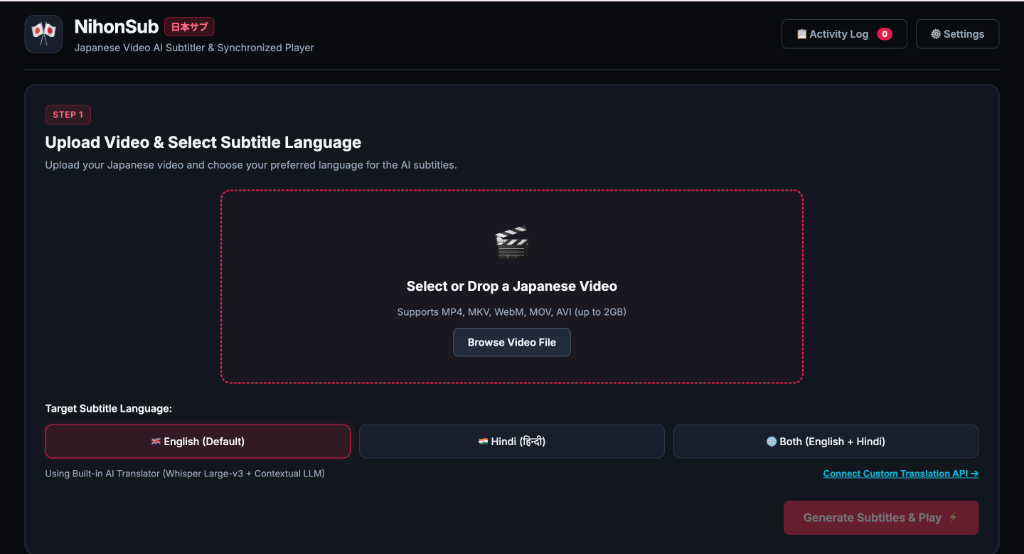
1️⃣ Step 1: Upload Video & Select Language Options
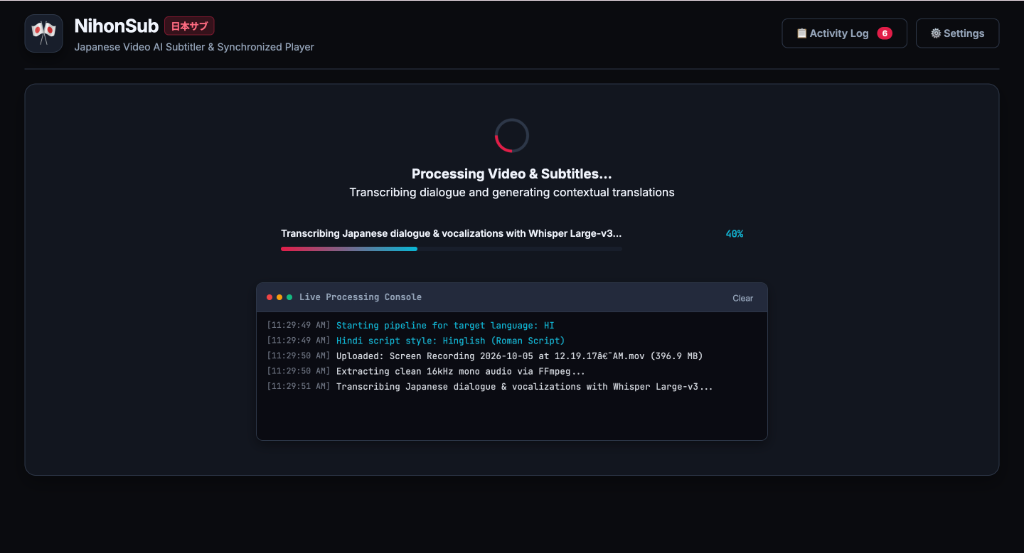
⚙️ Real-Time Transcription & Activity Console
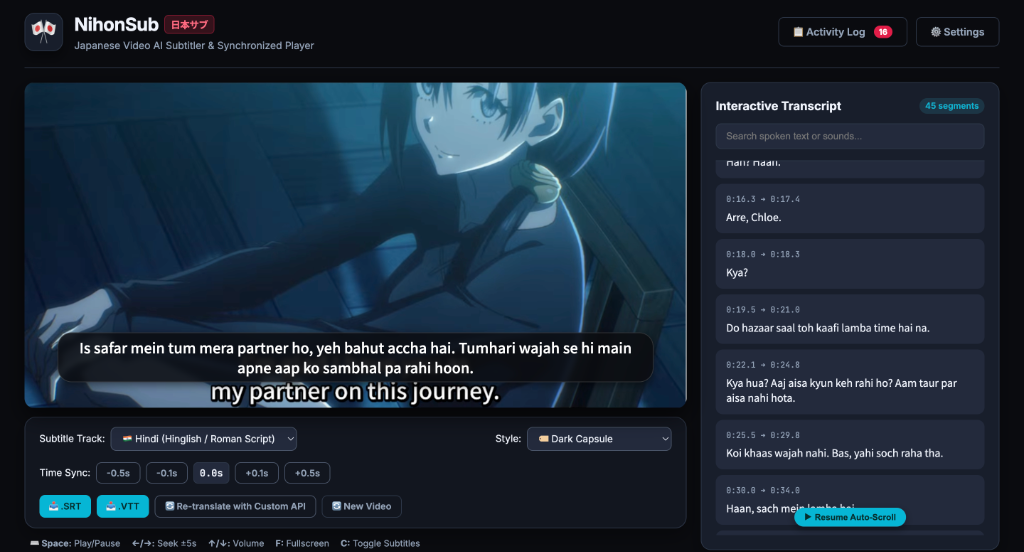
2️⃣ Step 2: Synchronized Cinema Player & Interactive Transcript
✨ Features
- 🎙️ Acoustic Vocalization Capture: Captures natural Japanese dialogue, non-verbal vocal markers, sighs, grunts, moans, and emotional nuances that standard transcription tools often strip out.
- ✂️ Lossless Silence-Detection Chunking: Automatically analyzes waveforms with FFmpeg for natural pause intervals (
-30dB,d >= 0.5s) for audio files longer than 10 minutes, preventing rate-limit issues and preserving sentence flow without mid-word cuts. - 🌐 Expressive Contextual Translation:
- English: Conversational dialogue with preserved emotion and subtitle action tags.
- Hindi (हिन्दी / Hinglish):
- Devanagari (देवनागरी): Standard native Hindi script (e.g. "नमस्ते, आप कैसे हैं?").
- Hinglish (Roman Script): Casual Roman alphabet conversational texting style (e.g. "Namaste, aap kaise hain?").
- Bilingual Tracks: Dual Japanese + English / Hindi / Hinglish display for language learners.
- ⚡ Automatic Rate Limit Fallback:
- If Groq encounters an HTTP 429 rate limit during heavy batch translation, the engine automatically routes translation to OpenRouter (DeepSeek) or backs off gracefully.
- 🔌 Custom Translation API / Agent Support: Connect your own OpenAI-compatible
/chat/completionsendpoint (local Ollama, vLLM, custom agents, or proprietary LLMs) directly from the in-app UI. - 🎬 Cinema Player & Interactive Transcript:
- Live clickable transcript with keyword search and auto-scroll following video timecodes.
- Cinema subtitle overlays with customizable styling (Transparent, Capsule, Classic Yellow Box).
- WebVTT and SubRip (
.SRT) instant exports. - Fullscreen support with native
::cuerendering.
🛠️ Architecture
[Japanese Video File]
        │
        ▼ (FFmpeg Extraction)
[16kHz Mono Audio (Whisper Optimized)]
        │
        ├── If Duration > 10m ──► [Silence Detection Chunking]
        │                                 │
        ▼                                 ▼
[Groq Whisper Large-v3 API] ◄─────────────┘
        │
        ▼
[Japanese Dialogue & Timestamped Segments]
        │
        ▼ (Batch LLM Translation Pipeline)
[Groq LLaMA 3.3 / OpenRouter DeepSeek / Custom API]
        │
        ▼
[WebVTT & SRT Subtitles + Interactive Cinema Player]
📋 Prerequisites
- Node.js (v18.0.0 or higher recommended)
- FFmpeg & FFprobe:
- macOS (via Homebrew):
brew install ffmpeg - Ubuntu / Debian:
sudo apt update && sudo apt install ffmpeg - Windows (via Scoop or Chocolatey):
scoop install ffmpeg
# or
choco install ffmpeg
- macOS (via Homebrew):
- Groq API Key: Get a free API key at console.groq.com.
- OpenRouter API Key (Optional): For automatic rate-limit fallback at openrouter.ai.
🚀 Quick Start
1. Clone the Repository
git clone https://github.com/your-username/nihonsub.git
cd nihonsub
2. Install Dependencies
npm install
3. Configure Environment Variables
Copy .env.example to .env:
cp .env.example .env
Open .env and set your credentials:
PORT=3000
GROQ_API_KEY=gsk_your_groq_api_key_here
OPENROUTER_API_KEY=sk-or-v1_optional_openrouter_key
4. Run the Application
You can use the startup script:
chmod +x run.sh
./run.sh
Or start directly with npm:
npm start
Open your browser at http://localhost:3000.
⌨️ Keyboard Shortcuts
| Shortcut | Action |
|---|---|
| Space | Play / Pause video |
| ← / → | Seek backward / forward 5 seconds |
| ↑ / ↓ | Increase / decrease volume |
| F | Toggle Fullscreen |
| C | Toggle Subtitles On / Off |
📁 Project Structure
├── audioExtractor.js      # FFmpeg audio conversion, metadata & silence-detection chunker
├── transcriber.js         # Whisper Large-v3 client & multi-chunk coordinator
├── translator.js          # Contextual LLM translation pipeline with rate-limit fallback
├── subtitleGenerator.js   # WebVTT, SRT, and bilingual track compiler
├── server.js              # Express API server with NDJSON streaming telemetry
├── public/                # Frontend Web UI (HTML5, Vanilla JS, CSS3 Cinema Theme)
│   ├── index.html         # Main app markup & cinema player layout
│   ├── style.css          # Responsive styling, fullscreen ::cue, animations
│   └── app.js             # Player controls, SSE telemetry, transcript auto-scroll
├── storage/               # Ephemeral storage (uploads, audio, subtitles - gitignored)
├── run.sh                 # Linux / macOS quick startup script
└── package.json           # Node.js project manifest & dependencies
📄 License
MIT License. Feel free to use and modify for your personal and commercial projects.
Similar repos


Japanese Video AI Subtitler & Synchronized Cinema Player
JavaScript
0
10 commits
updated Oct 5, 2026
See what people are saying
README
🎌 NihonSub (日本サブ)
Japanese Video AI Subtitler & Synchronized Cinema Player
Fast, vocalization-aware Japanese speech recognition powered by Whisper Large-v3, paired with contextual LLM translation (English & Hindi), silence-detection chunking for long media, and an interactive synchronized video player.
📸 Screenshots
1️⃣ Step 1: Upload Video & Select Language Options
⚙️ Real-Time Transcription & Activity Console
2️⃣ Step 2: Synchronized Cinema Player & Interactive Transcript
✨ Features
- 🎙️ Acoustic Vocalization Capture: Captures natural Japanese dialogue, non-verbal vocal markers, sighs, grunts, moans, and emotional nuances that standard transcription tools often strip out.
- ✂️ Lossless Silence-Detection Chunking: Automatically analyzes waveforms with FFmpeg for natural pause intervals (
-30dB,d >= 0.5s) for audio files longer than 10 minutes, preventing rate-limit issues and preserving sentence flow without mid-word cuts. - 🌐 Expressive Contextual Translation:
- English: Conversational dialogue with preserved emotion and subtitle action tags.
- Hindi (हिन्दी / Hinglish):
- Devanagari (देवनागरी): Standard native Hindi script (e.g. "नमस्ते, आप कैसे हैं?").
- Hinglish (Roman Script): Casual Roman alphabet conversational texting style (e.g. "Namaste, aap kaise hain?").
- Bilingual Tracks: Dual Japanese + English / Hindi / Hinglish display for language learners.
- ⚡ Automatic Rate Limit Fallback:
- If Groq encounters an HTTP 429 rate limit during heavy batch translation, the engine automatically routes translation to OpenRouter (DeepSeek) or backs off gracefully.
- 🔌 Custom Translation API / Agent Support: Connect your own OpenAI-compatible
/chat/completionsendpoint (local Ollama, vLLM, custom agents, or proprietary LLMs) directly from the in-app UI. - 🎬 Cinema Player & Interactive Transcript:
- Live clickable transcript with keyword search and auto-scroll following video timecodes.
- Cinema subtitle overlays with customizable styling (Transparent, Capsule, Classic Yellow Box).
- WebVTT and SubRip (
.SRT) instant exports. - Fullscreen support with native
::cuerendering.
🛠️ Architecture
[Japanese Video File]
        │
        ▼ (FFmpeg Extraction)
[16kHz Mono Audio (Whisper Optimized)]
        │
        ├── If Duration > 10m ──► [Silence Detection Chunking]
        │                                 │
        ▼                                 ▼
[Groq Whisper Large-v3 API] ◄─────────────┘
        │
        ▼
[Japanese Dialogue & Timestamped Segments]
        │
        ▼ (Batch LLM Translation Pipeline)
[Groq LLaMA 3.3 / OpenRouter DeepSeek / Custom API]
        │
        ▼
[WebVTT & SRT Subtitles + Interactive Cinema Player]
📋 Prerequisites
- Node.js (v18.0.0 or higher recommended)
- FFmpeg & FFprobe:
- macOS (via Homebrew):
brew install ffmpeg - Ubuntu / Debian:
sudo apt update && sudo apt install ffmpeg - Windows (via Scoop or Chocolatey):
scoop install ffmpeg
# or
choco install ffmpeg
- macOS (via Homebrew):
- Groq API Key: Get a free API key at console.groq.com.
- OpenRouter API Key (Optional): For automatic rate-limit fallback at openrouter.ai.
🚀 Quick Start
1. Clone the Repository
git clone https://github.com/your-username/nihonsub.git
cd nihonsub
2. Install Dependencies
npm install
3. Configure Environment Variables
Copy .env.example to .env:
cp .env.example .env
Open .env and set your credentials:
PORT=3000
GROQ_API_KEY=gsk_your_groq_api_key_here
OPENROUTER_API_KEY=sk-or-v1_optional_openrouter_key
4. Run the Application
You can use the startup script:
chmod +x run.sh
./run.sh
Or start directly with npm:
npm start
Open your browser at http://localhost:3000.
⌨️ Keyboard Shortcuts
| Shortcut | Action |
|---|---|
| Space | Play / Pause video |
| ← / → | Seek backward / forward 5 seconds |
| ↑ / ↓ | Increase / decrease volume |
| F | Toggle Fullscreen |
| C | Toggle Subtitles On / Off |
📁 Project Structure
├── audioExtractor.js      # FFmpeg audio conversion, metadata & silence-detection chunker
├── transcriber.js         # Whisper Large-v3 client & multi-chunk coordinator
├── translator.js          # Contextual LLM translation pipeline with rate-limit fallback
├── subtitleGenerator.js   # WebVTT, SRT, and bilingual track compiler
├── server.js              # Express API server with NDJSON streaming telemetry
├── public/                # Frontend Web UI (HTML5, Vanilla JS, CSS3 Cinema Theme)
│   ├── index.html         # Main app markup & cinema player layout
│   ├── style.css          # Responsive styling, fullscreen ::cue, animations
│   └── app.js             # Player controls, SSE telemetry, transcript auto-scroll
├── storage/               # Ephemeral storage (uploads, audio, subtitles - gitignored)
├── run.sh                 # Linux / macOS quick startup script
└── package.json           # Node.js project manifest & dependencies
📄 License
MIT License. Feel free to use and modify for your personal and commercial projects.