
YingMusic-Singer-Plus: Controllable Singing Voice Synthesis with Flexible Lyric Manipulation and Annotation-free Melody Guidance
Python
114
16 commits
updated Apr 12, 2026
README
🎤 YingMusic-Singer-Plus: Controllable Singing Voice Synthesis with Flexible Lyric Manipulation and Annotation-free Melody Guidance












Chunbo Hao1,2 · Junjie Zheng2 · Guobin Ma1 · Yuepeng Jiang1 · Huakang Chen1 · Wenjie Tian1 · Gongyu Chen2 · Zihao Chen2 · Lei Xie1
1 Audio, Speech and Language Processing Group (ASLP@NPU), School of Computer Science, Northwestern Polytechnical University, China
2 AI Lab, GiantNetwork, China
🎥 Demo Video
YingMusic-Singer-Plus Demo, narration voiceover provided by VoiceSculptor. Click the badge below to jump to watch the demo video:
| YouTube | Bilibili |
|---|---|
 | |
📖 Introduction
YingMusic-Singer-Plus is a fully diffusion-based singing voice synthesis model that enables melody-controllable singing voice editing with flexible lyric manipulation, requiring no manual alignment or precise phoneme annotation.
Given only three inputs — an optional timbre reference, a melody-providing singing clip, and modified lyrics — YingMusic-Singer-Plus synthesizes high-fidelity singing voices at 44.1 kHz while faithfully preserving the original melody.

Overall architecture of YingMusic-Singer-Plus. Left: SFT training pipeline. Right: GRPO training pipeline.
✨ Key Features
- Annotation-free: No manual lyric-MIDI alignment required at inference
- Flexible lyric manipulation: Supports 6 editing types — partial/full changes, insertion, deletion, translation (CN↔EN), and code-switching
- Strong melody preservation: CKA-based melody alignment loss + GRPO-based optimization
- Bilingual: Unified IPA tokenizer for both Chinese and English
- High fidelity: 44.1 kHz stereo output via Stable Audio 2 VAE
🚀 Quick Start
Option 1: Install from Scratch
# We strongly recommend uv for faster dependency resolution.
uv venv --python 3.10
source .venv/bin/activate  # On Windows: .venv\Scripts\activate
uv pip install -r requirements.txt

# If you are in CN, use the USTC mirror for faster downloads:
uv pip install -r requirements.txt -i https://mirrors.ustc.edu.cn/pypi/simple

# Alternatively, conda is also supported:
conda create -n YingMusic-Singer-Plus python=3.10
conda activate YingMusic-Singer-Plus
pip install uv
uv pip install -r requirements.txt

# If you are in CN:
uv pip install -r requirements.txt -i https://mirrors.ustc.edu.cn/pypi/simple
Option 2: Pre-built Environment
Conda
- Download and install Miniconda from https://repo.anaconda.com/miniconda/ for your platform. Verify with
conda --version. - Download the pre-built environment package for your setup from the table below.
- Navigate to your Conda
envs/directory and create a folder namedYingMusic-Singer-Plus. - Move the downloaded package into that folder and extract it:
tar -xvf <package_name>
uv
- Install uv via
pip install uvor follow the official instructions. - Download the pre-built environment package for your setup from the table below.
- Extract the package and activate the environment:
   tar -xvf <package_name>
   source .venv/bin/activate  # On Windows: .venv\Scripts\activate
| CPU Architecture | GPU | OS | Type | Download |
|---|---|---|---|---|
| AMD64 | NVIDIA | Linux | Conda | Coming soon |
| AMD64 | NVIDIA | Linux | uv | Coming soon |
| AMD64 | NVIDIA | Windows | uv | Coming soon |
Option 3: Docker
Build the image:
docker build -t YingMusic-Singer-Plus .
🎵 Inference
Option 1: Online Demo (HuggingFace Space)
Visit https://huggingface.co/spaces/ASLP-lab/YingMusic-Singer-Plus to try the model instantly in your browser.
Option 2: Local Gradio App (same as online demo)
python app_local.py
Option 3: Command-line Inference
python infer.py \
    --ref_audio examples/hf_space/melody_control/melody_control_ZH_02_timbre.wav \
    --melody_audio examples/hf_space/melody_control/melody_control_ZH_02_melody.wav \
    --ref_text "就让你|在别人怀里|快乐" \
    --target_text "Missing you in my mind|missing you in my heart" \
    --output output/melody_control_zh_missing_you.wav
Enable vocal separation and accompaniment mixing:
python infer.py \
    --ref_audio examples/hf_space/lyric_edit/SingEdit_EN_01.wav \
    --melody_audio examples/hf_space/lyric_edit/SingEdit_EN_01.wav \
    --ref_text "can you tell my heart is speaking|my eyes will give you clues" \
    --target_text "can you spot the moon is grinning|my lips will show you hints" \
    --separate_vocals \
    --mix_accompaniment \
    --output output/lyric_edit_en_moon_grinning.wav
Option 4: Batch Inference
Note: All audio fed to the model must be pure vocal tracks (no accompaniment). If your inputs contain accompaniment, run vocal separation first using
src/third_party/MusicSourceSeparationTraining/inference_api.py.
The input JSONL file should contain one JSON object per line, formatted as follows:
{
    "id": "lyric_edit_en_moon_grinning",
    "melody_ref_path": "examples/hf_space/lyric_edit/SingEdit_EN_01.wav",
    "gen_text": "can you spot the moon is grinning|my lips will show you hints",
    "timbre_ref_path": "examples/hf_space/lyric_edit/SingEdit_EN_01.wav",
    "timbre_ref_text": "can you tell my heart is speaking|my eyes will give you clues"
}
python batch_infer.py \
    --input_type jsonl \
    --input_path /path/to/input.jsonl \
    --output_dir /path/to/output \
    --ckpt_path /path/to/ckpts \
    --num_gpus 4
Multi-process inference on LyricEditBench (melody control) — the test set will be downloaded automatically:
python inference_mp.py \
    --input_type lyric_edit_bench_melody_control \
    --output_dir path/to/LyricEditBench_melody_control \
    --ckpt_path ASLP-lab/YingMusic-Singer-Plus \
    --num_gpus 8
Multi-process inference on LyricEditBench (singing edit):
python inference_mp.py \
    --input_type lyric_edit_bench_sing_edit \
    --output_dir path/to/LyricEditBench_sing_edit \
    --ckpt_path ASLP-lab/YingMusic-Singer-Plus \
    --num_gpus 8
🏗️ Model Architecture
YingMusic-Singer-Plus consists of four core components:
| Component | Description |
|---|---|
| VAE | Stable Audio 2 encoder/decoder; downsamples stereo 44.1 kHz audio by 2048× |
| Melody Extractor | Encoder of a pretrained MIDI extraction model (SOME); captures disentangled melody information |
| IPA Tokenizer | Converts Chinese & English lyrics into a unified phoneme sequence with sentence-level alignment |
| DiT-based CFM | Conditional flow matching backbone following F5-TTS (22 layers, 16 heads, hidden dim 1024) |
Total parameters: ~727.3M (453.6M CFM + 156.1M VAE + 117.6M Melody Extractor)
📊 LyricEditBench
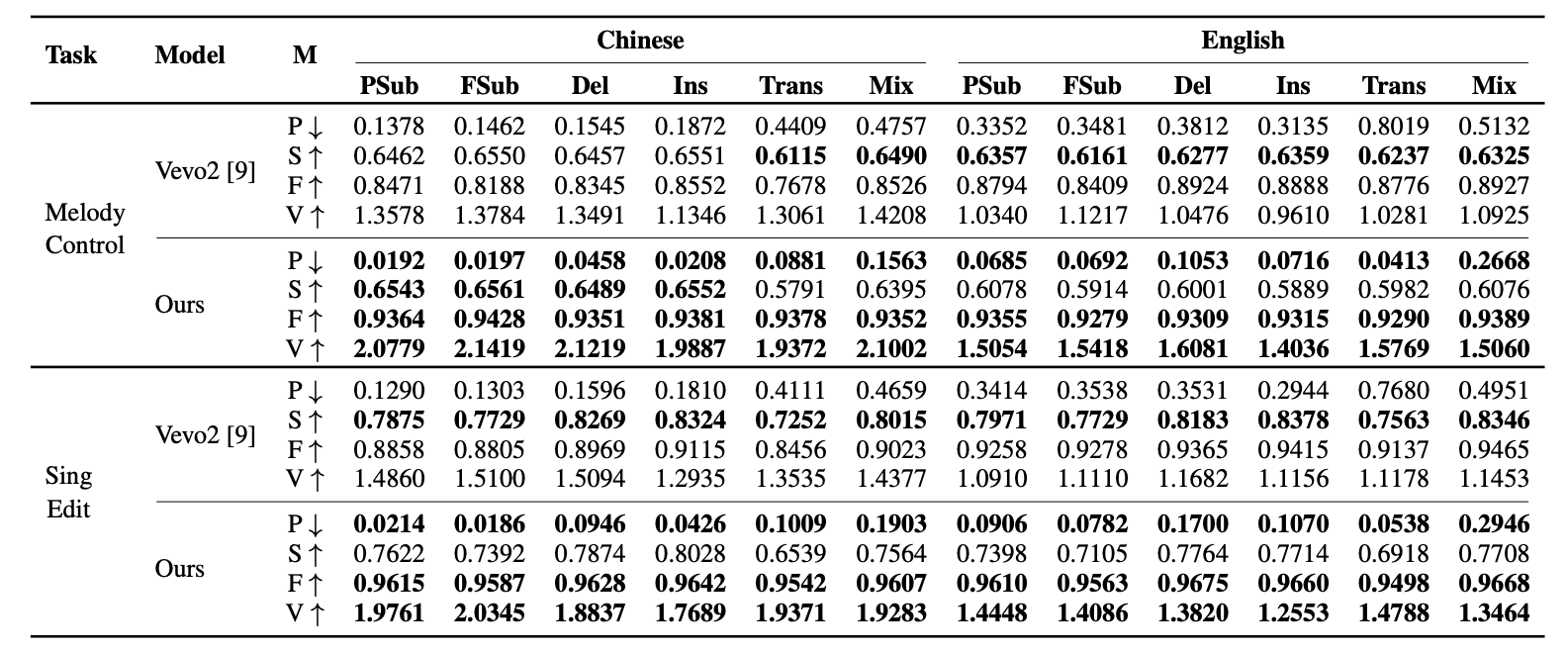
We introduce LyricEditBench, the first benchmark for melody-preserving lyric modification evaluation, built on GTSinger. The dataset is available on HuggingFace at https://huggingface.co/datasets/ASLP-lab/LyricEditBench.
Results
Table 2: Comparison with Baseline Model on LyricEditBench across Task Types in Table 1 and Languages. Metrics (M): P: PER, S: SIM, F: F0-CORR, V: VS are detailed in Section 3. Best results are Bold.
🙏 Acknowledgements
This work builds upon the following open-source projects:
- F5-TTS — DiT-based CFM backbone
- Stable Audio 2 — VAE architecture
- SOME — Melody Extractor
- DiffRhythm — Sentence-level alignment strategy
- GTSinger — Benchmark base corpus
- Emilia — TTS pretraining data
📄 License
The code and model weights in this project are licensed under CC BY 4.0, except for the following:
The VAE model weights and inference code (in src/YingMusic-Singer/utils/stable-audio-tools) are derived from Stable Audio Open by Stability AI, and are licensed under the Stability AI Community License.
✉️ Contact Us
If you are interested in leaving a message to our work, feel free to email cbhao@mail.nwpu.edu.cn or lxie@nwpu.edu.cn
You’re welcome to join our WeChat group for technical discussions, updates.

Star History



Similar repos




Languages
Python
99.3%
YingMusic-Singer-Plus: Controllable Singing Voice Synthesis with Flexible Lyric Manipulation and Annotation-free Melody Guidance
Python
114
16 commits
updated Apr 12, 2026
README
🎤 YingMusic-Singer-Plus: Controllable Singing Voice Synthesis with Flexible Lyric Manipulation and Annotation-free Melody Guidance
Chunbo Hao1,2 · Junjie Zheng2 · Guobin Ma1 · Yuepeng Jiang1 · Huakang Chen1 · Wenjie Tian1 · Gongyu Chen2 · Zihao Chen2 · Lei Xie1
1 Audio, Speech and Language Processing Group (ASLP@NPU), School of Computer Science, Northwestern Polytechnical University, China
2 AI Lab, GiantNetwork, China
🎥 Demo Video
YingMusic-Singer-Plus Demo, narration voiceover provided by VoiceSculptor. Click the badge below to jump to watch the demo video:
| YouTube | Bilibili |
|---|---|
| |
📖 Introduction
YingMusic-Singer-Plus is a fully diffusion-based singing voice synthesis model that enables melody-controllable singing voice editing with flexible lyric manipulation, requiring no manual alignment or precise phoneme annotation.
Given only three inputs — an optional timbre reference, a melody-providing singing clip, and modified lyrics — YingMusic-Singer-Plus synthesizes high-fidelity singing voices at 44.1 kHz while faithfully preserving the original melody.
Overall architecture of YingMusic-Singer-Plus. Left: SFT training pipeline. Right: GRPO training pipeline.
✨ Key Features
- Annotation-free: No manual lyric-MIDI alignment required at inference
- Flexible lyric manipulation: Supports 6 editing types — partial/full changes, insertion, deletion, translation (CN↔EN), and code-switching
- Strong melody preservation: CKA-based melody alignment loss + GRPO-based optimization
- Bilingual: Unified IPA tokenizer for both Chinese and English
- High fidelity: 44.1 kHz stereo output via Stable Audio 2 VAE
🚀 Quick Start
Option 1: Install from Scratch
# We strongly recommend uv for faster dependency resolution.
uv venv --python 3.10
source .venv/bin/activate  # On Windows: .venv\Scripts\activate
uv pip install -r requirements.txt

# If you are in CN, use the USTC mirror for faster downloads:
uv pip install -r requirements.txt -i https://mirrors.ustc.edu.cn/pypi/simple

# Alternatively, conda is also supported:
conda create -n YingMusic-Singer-Plus python=3.10
conda activate YingMusic-Singer-Plus
pip install uv
uv pip install -r requirements.txt

# If you are in CN:
uv pip install -r requirements.txt -i https://mirrors.ustc.edu.cn/pypi/simple
Option 2: Pre-built Environment
Conda
- Download and install Miniconda from https://repo.anaconda.com/miniconda/ for your platform. Verify with
conda --version. - Download the pre-built environment package for your setup from the table below.
- Navigate to your Conda
envs/directory and create a folder namedYingMusic-Singer-Plus. - Move the downloaded package into that folder and extract it:
tar -xvf <package_name>
uv
- Install uv via
pip install uvor follow the official instructions. - Download the pre-built environment package for your setup from the table below.
- Extract the package and activate the environment:
   tar -xvf <package_name>
   source .venv/bin/activate  # On Windows: .venv\Scripts\activate
| CPU Architecture | GPU | OS | Type | Download |
|---|---|---|---|---|
| AMD64 | NVIDIA | Linux | Conda | Coming soon |
| AMD64 | NVIDIA | Linux | uv | Coming soon |
| AMD64 | NVIDIA | Windows | uv | Coming soon |
Option 3: Docker
Build the image:
docker build -t YingMusic-Singer-Plus .
🎵 Inference
Option 1: Online Demo (HuggingFace Space)
Visit https://huggingface.co/spaces/ASLP-lab/YingMusic-Singer-Plus to try the model instantly in your browser.
Option 2: Local Gradio App (same as online demo)
python app_local.py
Option 3: Command-line Inference
python infer.py \
    --ref_audio examples/hf_space/melody_control/melody_control_ZH_02_timbre.wav \
    --melody_audio examples/hf_space/melody_control/melody_control_ZH_02_melody.wav \
    --ref_text "就让你|在别人怀里|快乐" \
    --target_text "Missing you in my mind|missing you in my heart" \
    --output output/melody_control_zh_missing_you.wav
Enable vocal separation and accompaniment mixing:
python infer.py \
    --ref_audio examples/hf_space/lyric_edit/SingEdit_EN_01.wav \
    --melody_audio examples/hf_space/lyric_edit/SingEdit_EN_01.wav \
    --ref_text "can you tell my heart is speaking|my eyes will give you clues" \
    --target_text "can you spot the moon is grinning|my lips will show you hints" \
    --separate_vocals \
    --mix_accompaniment \
    --output output/lyric_edit_en_moon_grinning.wav
Option 4: Batch Inference
Note: All audio fed to the model must be pure vocal tracks (no accompaniment). If your inputs contain accompaniment, run vocal separation first using
src/third_party/MusicSourceSeparationTraining/inference_api.py.
The input JSONL file should contain one JSON object per line, formatted as follows:
{
    "id": "lyric_edit_en_moon_grinning",
    "melody_ref_path": "examples/hf_space/lyric_edit/SingEdit_EN_01.wav",
    "gen_text": "can you spot the moon is grinning|my lips will show you hints",
    "timbre_ref_path": "examples/hf_space/lyric_edit/SingEdit_EN_01.wav",
    "timbre_ref_text": "can you tell my heart is speaking|my eyes will give you clues"
}
python batch_infer.py \
    --input_type jsonl \
    --input_path /path/to/input.jsonl \
    --output_dir /path/to/output \
    --ckpt_path /path/to/ckpts \
    --num_gpus 4
Multi-process inference on LyricEditBench (melody control) — the test set will be downloaded automatically:
python inference_mp.py \
    --input_type lyric_edit_bench_melody_control \
    --output_dir path/to/LyricEditBench_melody_control \
    --ckpt_path ASLP-lab/YingMusic-Singer-Plus \
    --num_gpus 8
Multi-process inference on LyricEditBench (singing edit):
python inference_mp.py \
    --input_type lyric_edit_bench_sing_edit \
    --output_dir path/to/LyricEditBench_sing_edit \
    --ckpt_path ASLP-lab/YingMusic-Singer-Plus \
    --num_gpus 8
🏗️ Model Architecture
YingMusic-Singer-Plus consists of four core components:
| Component | Description |
|---|---|
| VAE | Stable Audio 2 encoder/decoder; downsamples stereo 44.1 kHz audio by 2048× |
| Melody Extractor | Encoder of a pretrained MIDI extraction model (SOME); captures disentangled melody information |
| IPA Tokenizer | Converts Chinese & English lyrics into a unified phoneme sequence with sentence-level alignment |
| DiT-based CFM | Conditional flow matching backbone following F5-TTS (22 layers, 16 heads, hidden dim 1024) |
Total parameters: ~727.3M (453.6M CFM + 156.1M VAE + 117.6M Melody Extractor)
📊 LyricEditBench
We introduce LyricEditBench, the first benchmark for melody-preserving lyric modification evaluation, built on GTSinger. The dataset is available on HuggingFace at https://huggingface.co/datasets/ASLP-lab/LyricEditBench.
Results
Table 2: Comparison with Baseline Model on LyricEditBench across Task Types in Table 1 and Languages. Metrics (M): P: PER, S: SIM, F: F0-CORR, V: VS are detailed in Section 3. Best results are Bold.
🙏 Acknowledgements
This work builds upon the following open-source projects:
- F5-TTS — DiT-based CFM backbone
- Stable Audio 2 — VAE architecture
- SOME — Melody Extractor
- DiffRhythm — Sentence-level alignment strategy
- GTSinger — Benchmark base corpus
- Emilia — TTS pretraining data
📄 License
The code and model weights in this project are licensed under CC BY 4.0, except for the following:
The VAE model weights and inference code (in src/YingMusic-Singer/utils/stable-audio-tools) are derived from Stable Audio Open by Stability AI, and are licensed under the Stability AI Community License.
✉️ Contact Us
If you are interested in leaving a message to our work, feel free to email cbhao@mail.nwpu.edu.cn or lxie@nwpu.edu.cn
You’re welcome to join our WeChat group for technical discussions, updates.
Star History
Similar repos
Languages
Python
99.3%