A CAN-Analysing Tool for all platform
See the code
CANBus monitoring for the modern man!
Monitor, analyse, diagnose, simulate and test CAN, CAN FD and LIN buses — on Linux, Windows and macOS, with any adapter python-can supports, or without hardware on a virtual bus.
Documentation · Quick start · Downloads · Changelog
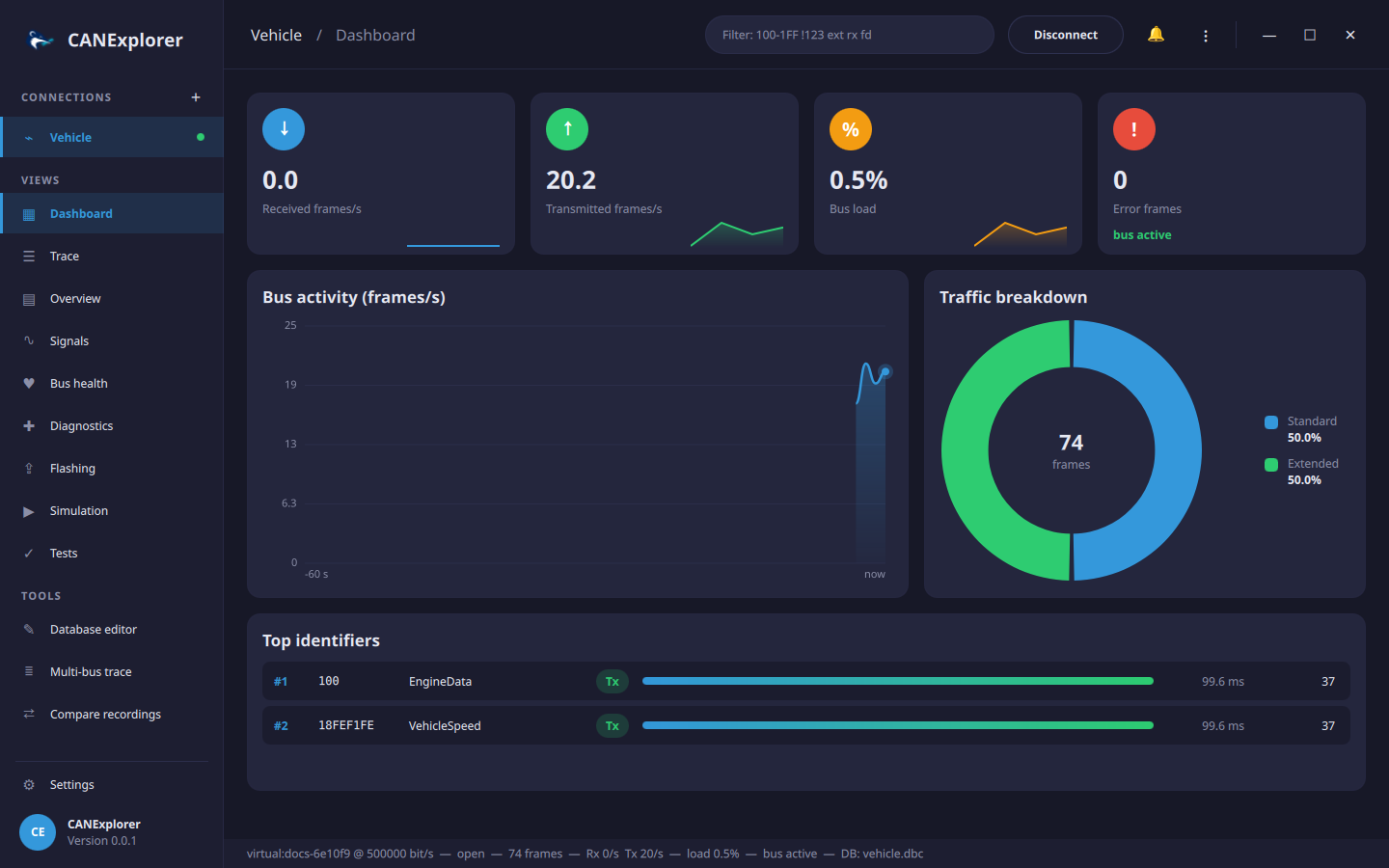
Monitoring and analysis
100-1FF !123 ext rx fd, search by text, data pattern or signal condition, and bookmarkscan-server shares the interfaces of e.g. a Raspberry Pi in a vehicle over the networkRecording and replay
EngineData.EngineSpeed > 6000, keeping the time before and after the eventSignal databases
Diagnostics and protocols
Simulation and test automation
can-test, with HTML, JUnit and Markdown reports for CI; parametrised test cases and requirement
traceabilityWorkspace
See the documentation for a guide to every feature.
Download the installer for your platform from the releases: a
setup.exe for Windows, an AppImage or .deb for Linux and a .dmg for macOS (Apple silicon). Portable zip
archives are attached as well. No Python installation is needed.
With uv and Python 3.10 or newer:
git clone https://github.com/AKJ7/CANExplorer.git
cd CANExplorer
uv sync                  # Add --extra mf4 for ASAM MF4 log files (installs asammdf, numpy and pandas)
uv run canexplorer
On Linux, uv run canexplorer --install-desktop-entry adds CANExplorer with its icon to the application menu.
CANExplorer supports every interface of python-can 4.6. Install the vendor's driver for your adapter; the supported interfaces page lists the drivers, CAN FD support and the Linux kernel drivers.
| Interface | Hardware | Platforms |
|---|---|---|
SocketCAN (socketcan) | Any adapter with a Linux kernel driver: PEAK, Kvaser, candleLight/gs_usb (CANable), ETAS ES58x, 8devices, EMS, esd, MCP2515/MCP251xFD (Raspberry Pi hats), virtual vcan; LIN through sllin | Linux |
PEAK PCAN (pcan) | PCAN-USB, PCAN-USB FD, PCAN-PCI(e), PCAN-LAN | Windows, Linux, macOS |
Vector (vector) | VN16xx, VN56xx and other XL Driver Library devices, Vector virtual channels | Windows |
Kvaser (kvaser) | Leaf, U100, Memorator, USBcan | Windows, Linux |
IXXAT (ixxat) | HMS IXXAT USB-to-CAN, CAN-IB | Windows |
ETAS (etas) | ES581, ES582, ES584, ES891 (BOA) | Windows |
Intrepid neoVI (neovi) ¹ | neoVI, ValueCAN, RAD-Galaxy | Windows, Linux, macOS |
NI-XNET (nixnet) ¹ | National Instruments NI-XNET devices | Windows |
NI-CAN (nican) | National Instruments NI-CAN devices | Windows |
SYS TEC (systec) | USB-CANmodul | Windows |
8devices USB2CAN (usb2can) | USB2CAN (Korlan) | Windows |
Thorsis isCAN (iscan) | isCAN | Windows |
Neousys (neousys) | CAN ports of Neousys industrial computers | Windows, Linux |
CANalyst-II (canalystii) ¹ | Chuangxin CANalyst-II | Windows, Linux, macOS |
CANtact (cantact) ¹ | CANtact, CANable | Windows, Linux, macOS |
gs_usb (gs_usb) ¹ | candleLight/gs_usb firmware adapters through libusb | Windows, Linux, macOS |
slcan (slcan) | Lawicel CANUSB, CANable (slcan firmware), USBtin and other serial slcan adapters | Windows, Linux, macOS |
python-can serial (serial) | Adapters with python-can's serial protocol | Windows, Linux, macOS |
Robotell (robotell) | Robotell USB-CAN | Windows, Linux, macOS |
Seeed Studio (seeedstudio) | USB-CAN Analyzer | Windows, Linux, macOS |
socketcand (socketcand) | SocketCAN buses of another Linux computer, over the network | Windows, Linux, macOS |
CANExplorer remote (canexplorer_remote) | Buses shared by can-server on another computer, e.g. a Raspberry Pi | Windows, Linux, macOS |
UDP multicast (udp_multicast) ¹ | A software bus between computers over UDP multicast | Windows, Linux, macOS |
Virtual (virtual) | A software bus inside CANExplorer, no hardware needed | Windows, Linux, macOS |
¹ Needs Python packages that the installers do not include: run from source with uv sync --extra drivers.
Run the example ECU tests against the example engine simulation on a virtual bus:
uv run can-test examples/testing/vehicle_tests.py \
    --database examples/simulation/vehicle.dbc \
    --simulation examples/simulation/engine_simulation.py \
    --report report.html
In the application, connect to a VirtualBus, load examples/simulation/vehicle.dbc and run
engine_simulation.py in the Simulation view; the
quick start walks through it.
| Command | Purpose |
|---|---|
uv run canexplorer | The application. Options such as --log_level DEBUG, or CANEXPLORER_* environment variables |
uv run can-test SCRIPT … | Run ECU test scripts on a bus; exit code and HTML/JUnit reports for CI |
uv run can-db-convert IN OUT | Convert signal databases, e.g. vehicle.dbc vehicle.dbf, or one bus with system.arxml powertrain.dbc --bus Powertrain |
uv run pytest                                  # Tests (headless Qt, python-can virtual buses)
uv run ruff check . && uv run black --check .  # Lint and formatting
uv run --group docs mkdocs serve               # Documentation preview on http://127.0.0.1:8000
uv run python packaging/build.py --archive     # Standalone bundle in dist/ (--backend nuitka to compile)
uv run python packaging/installer.py           # Installers of the platform in dist/installers
The core (can_explorer/core) is Qt-independent asyncio code; can_explorer/gui adapts it to the QML interface
in can_explorer/gui/qt, and Qt and asyncio share one event loop through
qasync. The
development guide covers the architecture, testing,
packaging and contributing.
MIT, as declared in pyproject.toml.
A CAN-Analysing Tool for all platform
See the code
CANBus monitoring for the modern man!
Monitor, analyse, diagnose, simulate and test CAN, CAN FD and LIN buses — on Linux, Windows and macOS, with any adapter python-can supports, or without hardware on a virtual bus.
Documentation · Quick start · Downloads · Changelog
Monitoring and analysis
100-1FF !123 ext rx fd, search by text, data pattern or signal condition, and bookmarkscan-server shares the interfaces of e.g. a Raspberry Pi in a vehicle over the networkRecording and replay
EngineData.EngineSpeed > 6000, keeping the time before and after the eventSignal databases
Diagnostics and protocols
Simulation and test automation
can-test, with HTML, JUnit and Markdown reports for CI; parametrised test cases and requirement
traceabilityWorkspace
See the documentation for a guide to every feature.
Download the installer for your platform from the releases: a
setup.exe for Windows, an AppImage or .deb for Linux and a .dmg for macOS (Apple silicon). Portable zip
archives are attached as well. No Python installation is needed.
With uv and Python 3.10 or newer:
git clone https://github.com/AKJ7/CANExplorer.git
cd CANExplorer
uv sync                  # Add --extra mf4 for ASAM MF4 log files (installs asammdf, numpy and pandas)
uv run canexplorer
On Linux, uv run canexplorer --install-desktop-entry adds CANExplorer with its icon to the application menu.
CANExplorer supports every interface of python-can 4.6. Install the vendor's driver for your adapter; the supported interfaces page lists the drivers, CAN FD support and the Linux kernel drivers.
| Interface | Hardware | Platforms |
|---|---|---|
SocketCAN (socketcan) | Any adapter with a Linux kernel driver: PEAK, Kvaser, candleLight/gs_usb (CANable), ETAS ES58x, 8devices, EMS, esd, MCP2515/MCP251xFD (Raspberry Pi hats), virtual vcan; LIN through sllin | Linux |
PEAK PCAN (pcan) | PCAN-USB, PCAN-USB FD, PCAN-PCI(e), PCAN-LAN | Windows, Linux, macOS |
Vector (vector) | VN16xx, VN56xx and other XL Driver Library devices, Vector virtual channels | Windows |
Kvaser (kvaser) | Leaf, U100, Memorator, USBcan | Windows, Linux |
IXXAT (ixxat) | HMS IXXAT USB-to-CAN, CAN-IB | Windows |
ETAS (etas) | ES581, ES582, ES584, ES891 (BOA) | Windows |
Intrepid neoVI (neovi) ¹ | neoVI, ValueCAN, RAD-Galaxy | Windows, Linux, macOS |
NI-XNET (nixnet) ¹ | National Instruments NI-XNET devices | Windows |
NI-CAN (nican) | National Instruments NI-CAN devices | Windows |
SYS TEC (systec) | USB-CANmodul | Windows |
8devices USB2CAN (usb2can) | USB2CAN (Korlan) | Windows |
Thorsis isCAN (iscan) | isCAN | Windows |
Neousys (neousys) | CAN ports of Neousys industrial computers | Windows, Linux |
CANalyst-II (canalystii) ¹ | Chuangxin CANalyst-II | Windows, Linux, macOS |
CANtact (cantact) ¹ | CANtact, CANable | Windows, Linux, macOS |
gs_usb (gs_usb) ¹ | candleLight/gs_usb firmware adapters through libusb | Windows, Linux, macOS |
slcan (slcan) | Lawicel CANUSB, CANable (slcan firmware), USBtin and other serial slcan adapters | Windows, Linux, macOS |
python-can serial (serial) | Adapters with python-can's serial protocol | Windows, Linux, macOS |
Robotell (robotell) | Robotell USB-CAN | Windows, Linux, macOS |
Seeed Studio (seeedstudio) | USB-CAN Analyzer | Windows, Linux, macOS |
socketcand (socketcand) | SocketCAN buses of another Linux computer, over the network | Windows, Linux, macOS |
CANExplorer remote (canexplorer_remote) | Buses shared by can-server on another computer, e.g. a Raspberry Pi | Windows, Linux, macOS |
UDP multicast (udp_multicast) ¹ | A software bus between computers over UDP multicast | Windows, Linux, macOS |
Virtual (virtual) | A software bus inside CANExplorer, no hardware needed | Windows, Linux, macOS |
¹ Needs Python packages that the installers do not include: run from source with uv sync --extra drivers.
Run the example ECU tests against the example engine simulation on a virtual bus:
uv run can-test examples/testing/vehicle_tests.py \
    --database examples/simulation/vehicle.dbc \
    --simulation examples/simulation/engine_simulation.py \
    --report report.html
In the application, connect to a VirtualBus, load examples/simulation/vehicle.dbc and run
engine_simulation.py in the Simulation view; the
quick start walks through it.
| Command | Purpose |
|---|---|
uv run canexplorer | The application. Options such as --log_level DEBUG, or CANEXPLORER_* environment variables |
uv run can-test SCRIPT … | Run ECU test scripts on a bus; exit code and HTML/JUnit reports for CI |
uv run can-db-convert IN OUT | Convert signal databases, e.g. vehicle.dbc vehicle.dbf, or one bus with system.arxml powertrain.dbc --bus Powertrain |
uv run pytest                                  # Tests (headless Qt, python-can virtual buses)
uv run ruff check . && uv run black --check .  # Lint and formatting
uv run --group docs mkdocs serve               # Documentation preview on http://127.0.0.1:8000
uv run python packaging/build.py --archive     # Standalone bundle in dist/ (--backend nuitka to compile)
uv run python packaging/installer.py           # Installers of the platform in dist/installers
The core (can_explorer/core) is Qt-independent asyncio code; can_explorer/gui adapts it to the QML interface
in can_explorer/gui/qt, and Qt and asyncio share one event loop through
qasync. The
development guide covers the architecture, testing,
packaging and contributing.
MIT, as declared in pyproject.toml.



