
README

Can you trust your AI radiologist?
Probing the reliability of
multimodal medical foundation models
Mohammad Shahab Sepehri, Zalan Fabian, Maryam Soltanolkotabi, Mahdi Soltanolkotabi
| 🤗 Hugging Face | 📄 Paper | 🌐 Blog |

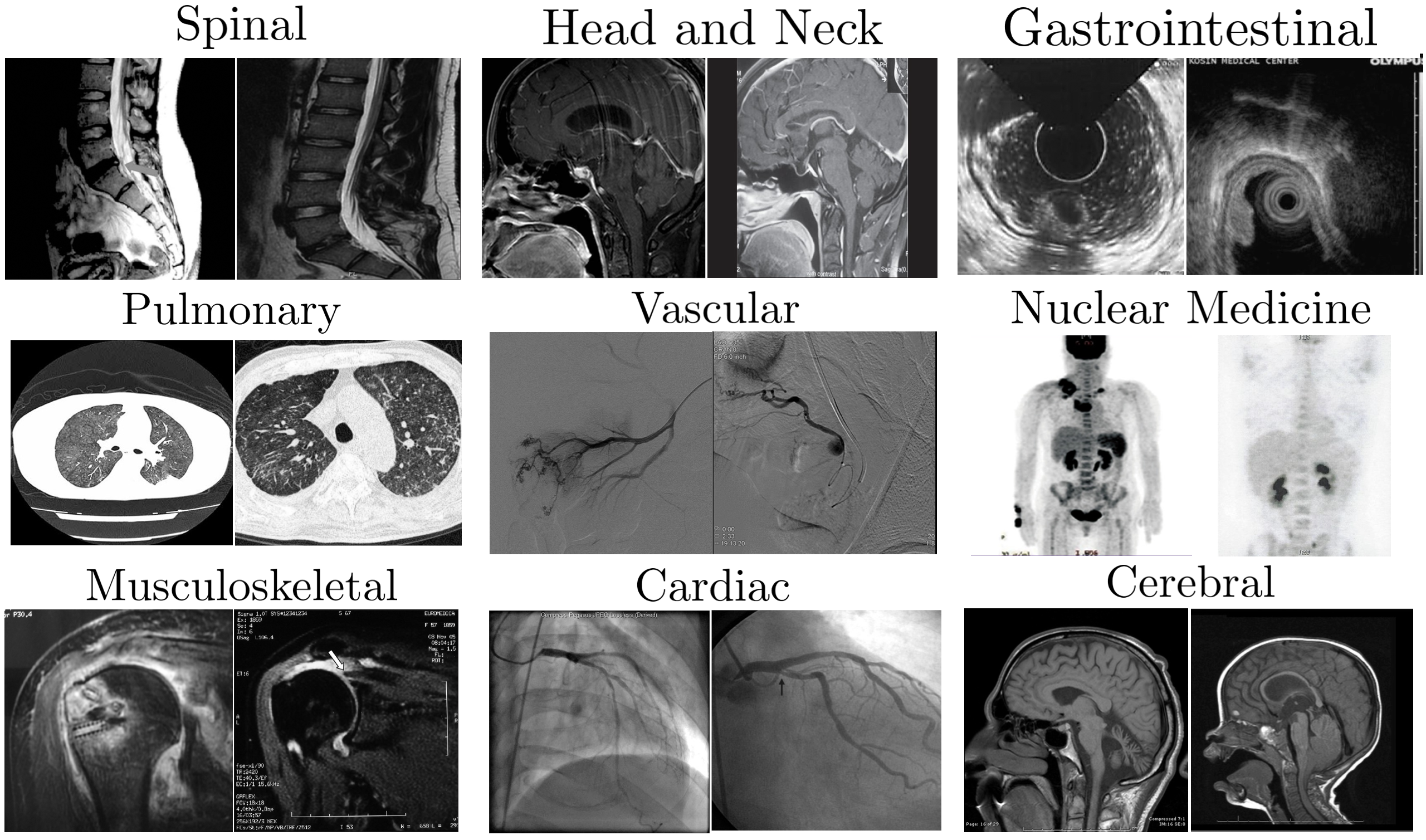
MediConfusion is a challenging medical Visual Question Answering (VQA) benchmark dataset, that probes the failure modes of medical Multimodal Large Language Models (MLLMs) from a vision perspective. We reveal that state-of-the-art models are easily confused by image pairs that are otherwise visually dissimilar and clearly distinct for medical experts. These are some examples of confusing image pairs from the ROCO radiology dataset:
Our benchmark consists of 176 confusing pairs. A confusing pair is a set of two images that share the same question and corresponding answer options, but the correct answer is different for the images.
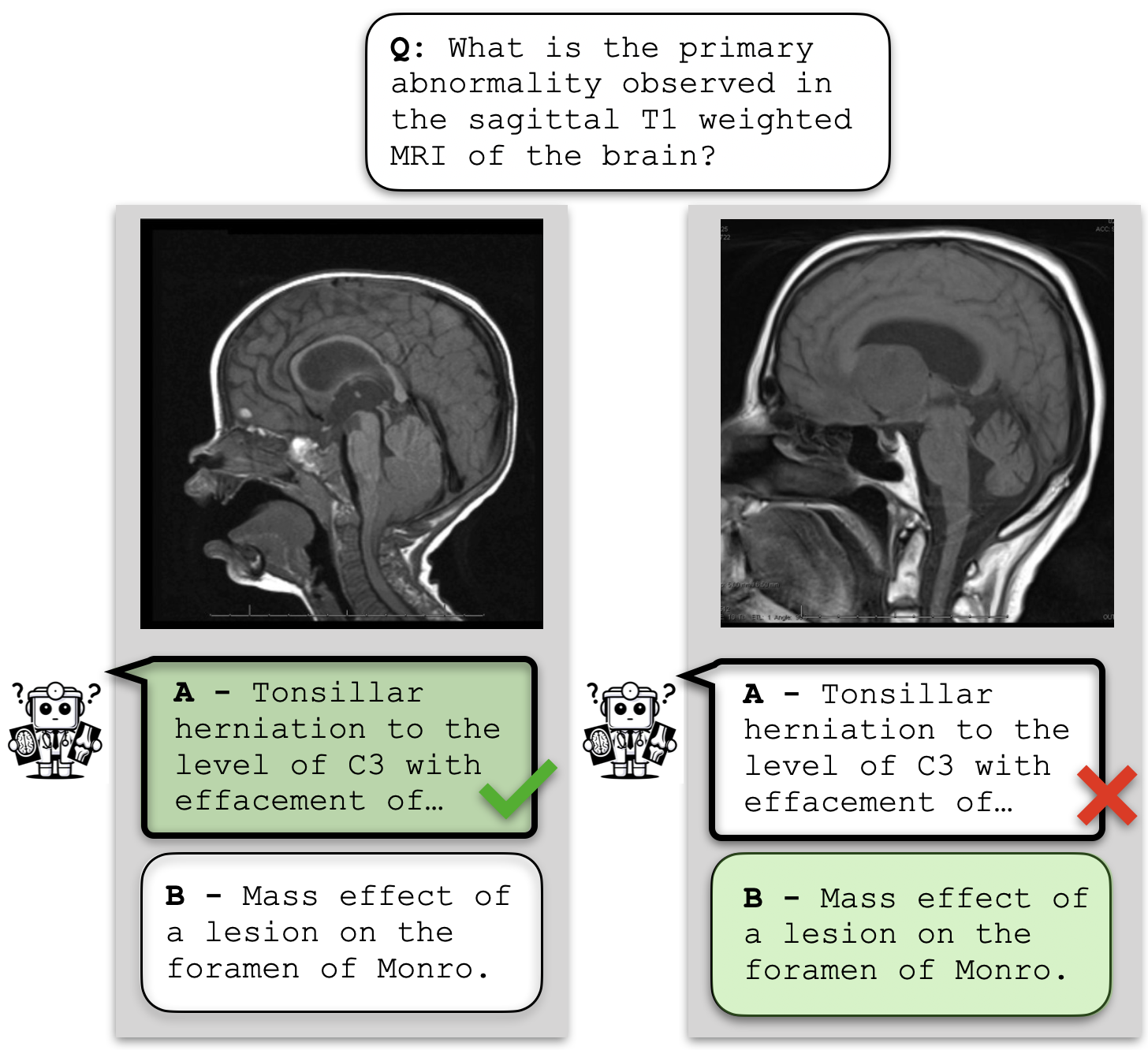
We evaluate models based on their ability to answer both questions correctly within a confusing pair, which we call set accuracy. This metric indicates how well models can tell the two images apart, as a model that selects the same answer option for both images for all pairs will receive 0% set accuracy. We also report confusion, a metric that describes the proportion of confusing pairs where the model has chosen the same answer option for both images.
Strikingly, all available models (open-source or proprietary) achieve performance below random guessing on MediConfusion, raising serious concerns about the reliability of existing medical MLLMs for healthcare deployment.
📊 Leaderboard
| Rank | Model | Version | Set acc. (%) | Confusion (%) |
|---|---|---|---|---|
| 🏅️ | Gemini | 2.0 Pro | 29.55 | 61.93 |
| 🥈 | Random Guessing | - | 25.00 | 50.00 |
| 🥉 | GPT | o1 (release 20241217) | 24.43 | 70.52 |
| 4 | Gemini | 1.5 Pro | 19.89 | 58.52 |
| 5 | GPT | 4o (release 20240513) | 18.75 | 75.00 |
| 6 | Deepseek VL2 | - | 15.91 | 77.19 |
| 7 | Llama 3.2 | 90B-Vision-Instruct | 15.34 | 78.41 |
| 8 | InstructBLIP | Vicuna 7B | 12.50 | 80.35 |
| 9 | Molmo | 7B-D-0924 | 9.66 | 86.21 |
| 10 | LLaVA | v1.6-Mistral 7B | 9.09 | 85.80 |
| 11 | Claude | 3 Opus | 8.52 | 84.09 |
| 12 | BLIP-2 | Opt 2.7B | 6.82 | 86.93 |
| 13 | Molmo | 72B-0924 | 6.82 | 85.80 |
| 14 | RadFM | - | 5.68 | 85.80 |
| 15 | Janus | Pro 7B | 4.55 | 92.05 |
| 16 | Med-Flamingo | - | 4.55 | 98.30 |
| 17 | LLaVA-Med | v1.5-Mistral 7B | 1.14 | 97.16 |
Updates
- [2025/02/18] DeepSeek family added to the supported models.
- [2024/09/11] Molmo family added to the supported models.
- [2024/03/11] Llama 3.2 family added to the supported models.
📖 Table of Contents
🔧 Requirements
Create and activate a conda environment with the following command:
conda create -n "mediconfusion" python=3.10
conda activate mediconfusion
Use the following code to install requirements:
pip install -r requirements.txt
If you have any problem using the models, please follow the instructions below.
Data Download
The images in MediConfusion have to be downloaded directly from the source due to their license. To download all images (26 MB), use the following command:
python scripts/download.py
The images can also be downloaded directly from ROCO (set local_image_address to False). In this case, set data_path to the download folder when running the evaluation script (more details in Usage).
Open-source Models
LLaVA-Med: Follow the instructions here and installLLaVA-Med. Download the model from here and setmodel_pathin the config to its folder.LLaMA 3.2: To download this model you should get access by requesting in here. Then, add your token to the config. If you encountered CUDA memory error, setdevicetoauto.Molmo: If you encountered CUDA memory error, setdevicetoauto.LLaMA: Download the model from here and setLLaMa_PATHin theMedFlamingoconfig to its folder.MedFlamingo: Download the model from here and setCHECKPOINT_PATHin the config to its folder.RadFM: Download the model from here and setmodel_pathin the config to its folder.DeepSeek VL2: Follow the instalation from here.DeepSeek Janus: Follow instalation from here.
Proprietary Models
To use proprietary models, save your API keys in the root directory of the repo in a file named .env, including the keys as in the example below.
GEMINI_API_KEY=YOUR_KEY
AZURE_OPENAI_API_KEY=YOUR_KEY
AZURE_OPENAI_ENDPOINT=YOUR_KEY
ANTHROPIC_API_KEY=YOUR_KEY
Package Versions
Different MLLMs need different versions of the transformers package. Please use the following versions for each MLLM.
LLaVA-Med: Usetransformers==4.36.2RadFM: Usetransformers==4.28.1MedFlamingo: Usetransformers==4.44.2and installopen-flamingopackageGemini: You needpython>=3.9Molmo: Usetransformers==4.45.2DeepSeek: Usetransformers==4.38.2Other MLLMs: Usetransformers==4.44.2andpython>=3.8
🔰 Usage
Evaluation
Before using the code, make sure to follow the instructions in Requirements.
You can create/change model configurations in configs/MODEL_NAME/.
To use the evaluation code, use the following command:
python scripts/answering.py --mllm_name MODEL_NAME --mode MODE
The results will be saved in Results/MODEL_NAME/. You will see two files: one containing the final scores and one containing the answers provided by the model.
After runing answering.py you can print the results again with the command below:
python scripts/printing.py --mllm_name MODEL_NAME --mode MODE
Arguments
mode: This sets the evaluation method. Available options aregpt4(FF),mc(MC),greedy(GD), andprefix(PS). For proprietary models, you can only use the first two methods.mllm_name: This is the name of your desired MLLM. Available options aregpt(GPT-4o),gemini(Gemini 1.5 Pro),claude(Claude 3 Opus),llava(LLaVA),blip2(BLIP-2),intructblip(InstructBLIP),llava_med(LLaVA-Med),radfm(RadFM), andmed_flamingo(Med-Flamingo).model_args_path(default:configs/MLLM_NAME/vanilla.json): Path to the model's configuration file.tr(default: 3): Threshold used for FF evaluation to select an option. If the difference between assigned scores is at leasttr, we select the option with the higher score.resume_path(default:None): If your run is interrupted and you want to resume evaluation, you should set this argument to the path to the answers of the previous run.local_image_address(default:True): IfFlase, the code looks for the images based on their ROCO IDs. Otherwise, it looks for the images based on their local IDs.data_path(default:./data/images): Path to the images. If you download the images using our script, this is./data/images. If you are not using local addressing, this is the path to the ROCO.device(default:cuda): You can usecudaorcpu. ForLLaVA-Med, our code does not supportcpu.
📌 Citation
If you use this code or our dataset, please cite our paper.
@article{sepehri2024mediconfusion,
  title={MediConfusion: Can You Trust Your AI Radiologist? Probing the reliability of multimodal medical foundation models},
  author={Sepehri, Mohammad Shahab and Fabian, Zalan and Soltanolkotabi, Maryam and Soltanolkotabi, Mahdi},
  journal={arXiv preprint arXiv:2409.15477},
  year={2024}
}
Contributors

9 commits
Similar repos


Languages
Python
100.0%
README
Can you trust your AI radiologist?
Probing the reliability of
multimodal medical foundation models
Mohammad Shahab Sepehri, Zalan Fabian, Maryam Soltanolkotabi, Mahdi Soltanolkotabi
| 🤗 Hugging Face | 📄 Paper | 🌐 Blog |
MediConfusion is a challenging medical Visual Question Answering (VQA) benchmark dataset, that probes the failure modes of medical Multimodal Large Language Models (MLLMs) from a vision perspective. We reveal that state-of-the-art models are easily confused by image pairs that are otherwise visually dissimilar and clearly distinct for medical experts. These are some examples of confusing image pairs from the ROCO radiology dataset:
Our benchmark consists of 176 confusing pairs. A confusing pair is a set of two images that share the same question and corresponding answer options, but the correct answer is different for the images.
We evaluate models based on their ability to answer both questions correctly within a confusing pair, which we call set accuracy. This metric indicates how well models can tell the two images apart, as a model that selects the same answer option for both images for all pairs will receive 0% set accuracy. We also report confusion, a metric that describes the proportion of confusing pairs where the model has chosen the same answer option for both images.
Strikingly, all available models (open-source or proprietary) achieve performance below random guessing on MediConfusion, raising serious concerns about the reliability of existing medical MLLMs for healthcare deployment.
📊 Leaderboard
| Rank | Model | Version | Set acc. (%) | Confusion (%) |
|---|---|---|---|---|
| 🏅️ | Gemini | 2.0 Pro | 29.55 | 61.93 |
| 🥈 | Random Guessing | - | 25.00 | 50.00 |
| 🥉 | GPT | o1 (release 20241217) | 24.43 | 70.52 |
| 4 | Gemini | 1.5 Pro | 19.89 | 58.52 |
| 5 | GPT | 4o (release 20240513) | 18.75 | 75.00 |
| 6 | Deepseek VL2 | - | 15.91 | 77.19 |
| 7 | Llama 3.2 | 90B-Vision-Instruct | 15.34 | 78.41 |
| 8 | InstructBLIP | Vicuna 7B | 12.50 | 80.35 |
| 9 | Molmo | 7B-D-0924 | 9.66 | 86.21 |
| 10 | LLaVA | v1.6-Mistral 7B | 9.09 | 85.80 |
| 11 | Claude | 3 Opus | 8.52 | 84.09 |
| 12 | BLIP-2 | Opt 2.7B | 6.82 | 86.93 |
| 13 | Molmo | 72B-0924 | 6.82 | 85.80 |
| 14 | RadFM | - | 5.68 | 85.80 |
| 15 | Janus | Pro 7B | 4.55 | 92.05 |
| 16 | Med-Flamingo | - | 4.55 | 98.30 |
| 17 | LLaVA-Med | v1.5-Mistral 7B | 1.14 | 97.16 |
Updates
- [2025/02/18] DeepSeek family added to the supported models.
- [2024/09/11] Molmo family added to the supported models.
- [2024/03/11] Llama 3.2 family added to the supported models.
📖 Table of Contents
🔧 Requirements
Create and activate a conda environment with the following command:
conda create -n "mediconfusion" python=3.10
conda activate mediconfusion
Use the following code to install requirements:
pip install -r requirements.txt
If you have any problem using the models, please follow the instructions below.
Data Download
The images in MediConfusion have to be downloaded directly from the source due to their license. To download all images (26 MB), use the following command:
python scripts/download.py
The images can also be downloaded directly from ROCO (set local_image_address to False). In this case, set data_path to the download folder when running the evaluation script (more details in Usage).
Open-source Models
LLaVA-Med: Follow the instructions here and installLLaVA-Med. Download the model from here and setmodel_pathin the config to its folder.LLaMA 3.2: To download this model you should get access by requesting in here. Then, add your token to the config. If you encountered CUDA memory error, setdevicetoauto.Molmo: If you encountered CUDA memory error, setdevicetoauto.LLaMA: Download the model from here and setLLaMa_PATHin theMedFlamingoconfig to its folder.MedFlamingo: Download the model from here and setCHECKPOINT_PATHin the config to its folder.RadFM: Download the model from here and setmodel_pathin the config to its folder.DeepSeek VL2: Follow the instalation from here.DeepSeek Janus: Follow instalation from here.
Proprietary Models
To use proprietary models, save your API keys in the root directory of the repo in a file named .env, including the keys as in the example below.
GEMINI_API_KEY=YOUR_KEY
AZURE_OPENAI_API_KEY=YOUR_KEY
AZURE_OPENAI_ENDPOINT=YOUR_KEY
ANTHROPIC_API_KEY=YOUR_KEY
Package Versions
Different MLLMs need different versions of the transformers package. Please use the following versions for each MLLM.
LLaVA-Med: Usetransformers==4.36.2RadFM: Usetransformers==4.28.1MedFlamingo: Usetransformers==4.44.2and installopen-flamingopackageGemini: You needpython>=3.9Molmo: Usetransformers==4.45.2DeepSeek: Usetransformers==4.38.2Other MLLMs: Usetransformers==4.44.2andpython>=3.8
🔰 Usage
Evaluation
Before using the code, make sure to follow the instructions in Requirements.
You can create/change model configurations in configs/MODEL_NAME/.
To use the evaluation code, use the following command:
python scripts/answering.py --mllm_name MODEL_NAME --mode MODE
The results will be saved in Results/MODEL_NAME/. You will see two files: one containing the final scores and one containing the answers provided by the model.
After runing answering.py you can print the results again with the command below:
python scripts/printing.py --mllm_name MODEL_NAME --mode MODE
Arguments
mode: This sets the evaluation method. Available options aregpt4(FF),mc(MC),greedy(GD), andprefix(PS). For proprietary models, you can only use the first two methods.mllm_name: This is the name of your desired MLLM. Available options aregpt(GPT-4o),gemini(Gemini 1.5 Pro),claude(Claude 3 Opus),llava(LLaVA),blip2(BLIP-2),intructblip(InstructBLIP),llava_med(LLaVA-Med),radfm(RadFM), andmed_flamingo(Med-Flamingo).model_args_path(default:configs/MLLM_NAME/vanilla.json): Path to the model's configuration file.tr(default: 3): Threshold used for FF evaluation to select an option. If the difference between assigned scores is at leasttr, we select the option with the higher score.resume_path(default:None): If your run is interrupted and you want to resume evaluation, you should set this argument to the path to the answers of the previous run.local_image_address(default:True): IfFlase, the code looks for the images based on their ROCO IDs. Otherwise, it looks for the images based on their local IDs.data_path(default:./data/images): Path to the images. If you download the images using our script, this is./data/images. If you are not using local addressing, this is the path to the ROCO.device(default:cuda): You can usecudaorcpu. ForLLaVA-Med, our code does not supportcpu.
📌 Citation
If you use this code or our dataset, please cite our paper.
@article{sepehri2024mediconfusion,
  title={MediConfusion: Can You Trust Your AI Radiologist? Probing the reliability of multimodal medical foundation models},
  author={Sepehri, Mohammad Shahab and Fabian, Zalan and Soltanolkotabi, Maryam and Soltanolkotabi, Mahdi},
  journal={arXiv preprint arXiv:2409.15477},
  year={2024}
}
Similar repos
Contributors
9 commits
Languages
Python
100.0%