
Speculative Decoding Meets Quantization: Compatibility Evaluation and Hierarchical Framework Design
See the codeREADME
Speculative Decoding Meets Quantization: Compatibility Evaluation and Hierarchical Framework Design


Introduction
We present a systematic evaluation of the compatibility between speculative decoding and quantization.
We also propose a hierarchical speculative decoding framework for W4A16 models, achieving a 1.31$\times$ speedup over EAGLE-2.
And all experiments are implemented in C/CUDA.
Speedup
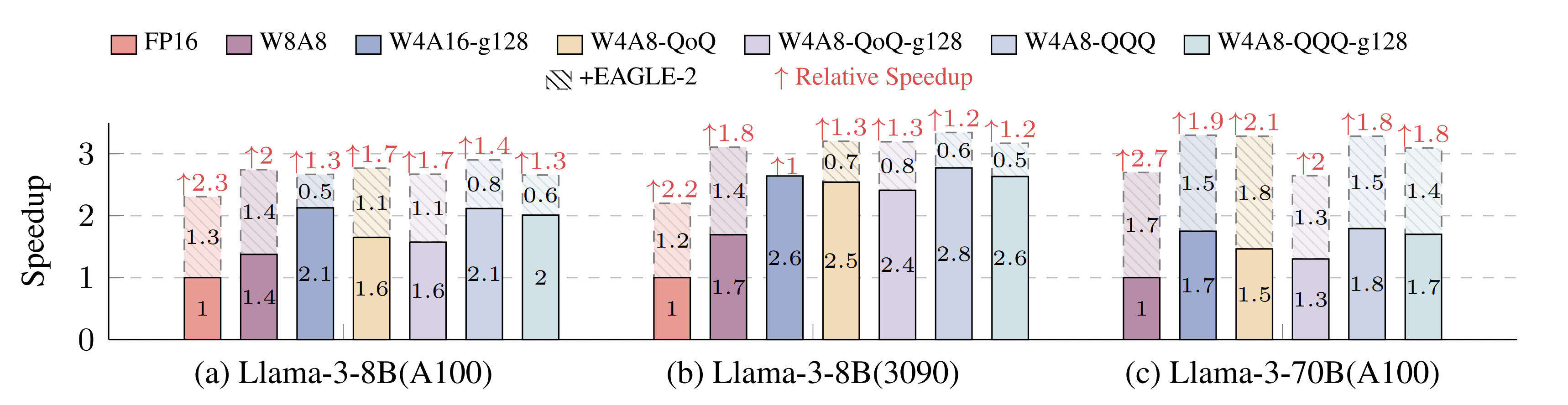
Speedup achieved by integrating Speculative Decoding and Quantization.
Installation from source
conda create -n specmquant python=3.11 && conda activate specmquant
# install pytorch for your platform, see https://pytorch.org
git clone https://github.com/AI9Stars/SpecMQuant --recursive && cd SpecMQuant
vim setup.py # change arch="80" to other code for your platform, see https://developer.nvidia.com/cuda-gpus#compute
pip install .
Evaluation
Model Preparation
Downloads the quantized model weights and corresponding EAGLE model into the models folder.
Or you can also choose one of the following external toolkits to quantize your model and then convert the resulting checkpoints.
1. Supported Toolkits & Precision
| Toolkit | Precison | Algorithm |
|---|---|---|
| AutoGPTQ | W4A16 | GPTQ |
| QQQ | W4A8 | QQQ |
| DeepCompressor | W8A8 | SmoothQuant |
| W4A8 | QoQ |
For AutoGPTQ, our framework is only compatible when
sym=Trueis set in the config, and if you setdesc_act=Truethen you should also setstatic_group=True.
2. Model Convert
For W4A16, W4A8-QQQ, W4A8-QQQ-g128 and W4A8-QoQ-g128, after quantizing with the above toolkits you need to convert the model checkpoints using the scripts in scripts/model_convert. And for the models applied with rotation method, you need to convert the eagle checkpoint using the scripts scripts/model_convert/convert_eagle_rotation.sh with the corresponding rotation matrix.
Run Evaluation
MT-Bench
All scripts for MT-Bench evaluation are located in the scripts/eval/mt_bench folder. Here we use Llama-3-8B-Instruct as an example:
# 1. Run evaluations
bash scripts/eval/mt_bench/llama3-8b-instruct/<precision>/run_baseline.sh
bash scripts/eval/mt_bench/llama3-8b-instruct/<precision>/run_eagle.sh

# 2. Evaluate speed
bash scripts/mt_bench/llama3-8b-instruct/speed_up.sh
Replace <precision> with one of: fp16, w4a16, w4a8-qqq, w4a8-qqq-g128, w4a8-qoq, or w4a8-qoq-g128.
Spec-Bench
Scripts for Spec-Bench evaluation in W4A16 Llama-3-70B-Instruct models are located in the scripts/eval/spec_bench folder.
# 1. Run evaluations
bash scripts/eval/spec_bench/llama3-70b-instruct-w4a16/run_baseline.sh
bash scripts/eval/spec_bench/llama3-70b-instruct-w4a16/run_spec.sh
bash scripts/eval/spec_bench/llama3-70b-instruct-w4a16/run_eagle.sh
bash scripts/eval/spec_bench/llama3-70b-instruct-w4a16/run_hierspec.sh


# 2. Evaluate speed
bash scripts/eval/spec_bench/llama3-70b-instruct-w4a16/speedup.sh
Performance evaluation
We provide the performance evaluation for gsm8k and human_eval.
# 1. Run evaluations
bash scripts/eval/<benchmark>/llama3-8b-instruct/<precision>/run_baseline.sh

# 2. Evaluate preformance
bash scripts/eval/<benchmark>/llama3-8b-instruct/check_correctness.sh
Replace <benchmark> with one of: gsm8k or human_eval.
Contributors
Acknowledgment
Our framework is based on https://github.com/thunlp/FR-Spec.
Our experiments are based on https://github.com/SafeAILab/EAGLE.
The CUDA quantization kernels in src/qgemm are borrowed from:
- W4A16 marlin kernel:https://github.com/vllm-project/vllm and https://github.com/IST-DASLab/marlin.
- W4A8-QQQ kernel: https://github.com/HandH1998/QQQ.
- W8A8 and W4A8-QoQ: https://github.com/mit-han-lab/omniserve.
The evaluation/ folder is modified base on https://github.com/hemingkx/Spec-Bench:
- The
evaluation/gsm8kfolder integrates part of the code from https://github.com/Guangxuan-Xiao/GSM8K-eval. - The
evaluation/humanevalfolder integrates part of the code from https://github.com/evalplus/evalplus.
The src/flash_attn/ folder is modified base on https://github.com/Dao-AILab/flash-attention/blob/v2.4.2/csrc/flash_attn.
Citation
@article{zhang2025specmqaunt,
  title={Speculative Decoding Meets Quantization: Compatibility Evaluation and Hierarchical Framework Design},
  author={Zhang, Yudi and Zhao, Weilin and Han, Xu and Zhao, Tiejun and Xu, Wang and Cao, Hailong and Zhu, Conghui},
  journal={arXiv preprint arXiv:2505.22179},
  year={2025}
}
Contributors

2 commits
Similar repos


Languages
Cuda
63.8%
Python
19.3%
C++
13.2%
Shell
3.7%
Speculative Decoding Meets Quantization: Compatibility Evaluation and Hierarchical Framework Design
See the codeREADME
Speculative Decoding Meets Quantization: Compatibility Evaluation and Hierarchical Framework Design
Introduction
We present a systematic evaluation of the compatibility between speculative decoding and quantization.
We also propose a hierarchical speculative decoding framework for W4A16 models, achieving a 1.31$\times$ speedup over EAGLE-2.
And all experiments are implemented in C/CUDA.
Speedup
Speedup achieved by integrating Speculative Decoding and Quantization.
Installation from source
conda create -n specmquant python=3.11 && conda activate specmquant
# install pytorch for your platform, see https://pytorch.org
git clone https://github.com/AI9Stars/SpecMQuant --recursive && cd SpecMQuant
vim setup.py # change arch="80" to other code for your platform, see https://developer.nvidia.com/cuda-gpus#compute
pip install .
Evaluation
Model Preparation
Downloads the quantized model weights and corresponding EAGLE model into the models folder.
Or you can also choose one of the following external toolkits to quantize your model and then convert the resulting checkpoints.
1. Supported Toolkits & Precision
| Toolkit | Precison | Algorithm |
|---|---|---|
| AutoGPTQ | W4A16 | GPTQ |
| QQQ | W4A8 | QQQ |
| DeepCompressor | W8A8 | SmoothQuant |
| W4A8 | QoQ |
For AutoGPTQ, our framework is only compatible when
sym=Trueis set in the config, and if you setdesc_act=Truethen you should also setstatic_group=True.
2. Model Convert
For W4A16, W4A8-QQQ, W4A8-QQQ-g128 and W4A8-QoQ-g128, after quantizing with the above toolkits you need to convert the model checkpoints using the scripts in scripts/model_convert. And for the models applied with rotation method, you need to convert the eagle checkpoint using the scripts scripts/model_convert/convert_eagle_rotation.sh with the corresponding rotation matrix.
Run Evaluation
MT-Bench
All scripts for MT-Bench evaluation are located in the scripts/eval/mt_bench folder. Here we use Llama-3-8B-Instruct as an example:
# 1. Run evaluations
bash scripts/eval/mt_bench/llama3-8b-instruct/<precision>/run_baseline.sh
bash scripts/eval/mt_bench/llama3-8b-instruct/<precision>/run_eagle.sh

# 2. Evaluate speed
bash scripts/mt_bench/llama3-8b-instruct/speed_up.sh
Replace <precision> with one of: fp16, w4a16, w4a8-qqq, w4a8-qqq-g128, w4a8-qoq, or w4a8-qoq-g128.
Spec-Bench
Scripts for Spec-Bench evaluation in W4A16 Llama-3-70B-Instruct models are located in the scripts/eval/spec_bench folder.
# 1. Run evaluations
bash scripts/eval/spec_bench/llama3-70b-instruct-w4a16/run_baseline.sh
bash scripts/eval/spec_bench/llama3-70b-instruct-w4a16/run_spec.sh
bash scripts/eval/spec_bench/llama3-70b-instruct-w4a16/run_eagle.sh
bash scripts/eval/spec_bench/llama3-70b-instruct-w4a16/run_hierspec.sh


# 2. Evaluate speed
bash scripts/eval/spec_bench/llama3-70b-instruct-w4a16/speedup.sh
Performance evaluation
We provide the performance evaluation for gsm8k and human_eval.
# 1. Run evaluations
bash scripts/eval/<benchmark>/llama3-8b-instruct/<precision>/run_baseline.sh

# 2. Evaluate preformance
bash scripts/eval/<benchmark>/llama3-8b-instruct/check_correctness.sh
Replace <benchmark> with one of: gsm8k or human_eval.
Contributors
Acknowledgment
Our framework is based on https://github.com/thunlp/FR-Spec.
Our experiments are based on https://github.com/SafeAILab/EAGLE.
The CUDA quantization kernels in src/qgemm are borrowed from:
- W4A16 marlin kernel:https://github.com/vllm-project/vllm and https://github.com/IST-DASLab/marlin.
- W4A8-QQQ kernel: https://github.com/HandH1998/QQQ.
- W8A8 and W4A8-QoQ: https://github.com/mit-han-lab/omniserve.
The evaluation/ folder is modified base on https://github.com/hemingkx/Spec-Bench:
- The
evaluation/gsm8kfolder integrates part of the code from https://github.com/Guangxuan-Xiao/GSM8K-eval. - The
evaluation/humanevalfolder integrates part of the code from https://github.com/evalplus/evalplus.
The src/flash_attn/ folder is modified base on https://github.com/Dao-AILab/flash-attention/blob/v2.4.2/csrc/flash_attn.
Citation
@article{zhang2025specmqaunt,
  title={Speculative Decoding Meets Quantization: Compatibility Evaluation and Hierarchical Framework Design},
  author={Zhang, Yudi and Zhao, Weilin and Han, Xu and Zhao, Tiejun and Xu, Wang and Cao, Hailong and Zhu, Conghui},
  journal={arXiv preprint arXiv:2505.22179},
  year={2025}
}
Similar repos
Contributors
2 commits
Languages
Cuda
63.8%
Python
19.3%
C++
13.2%
Shell
3.7%