
README
ScreenOps
Privacy-first ambient agentic workspace intelligence.
ScreenOps watches live work context in the browser, extracts one structured work intent locally, and sends only that JSON signal to a backend agent. The backend plans real Google Workspace actions, applies risk-based approval, and verifies the result.
Repository: https://github.com/9059Rohith/screenops-codex
Demo Link
Demo video: Link
Deploy
Live app: https://screenops-mvp.vercel.app/
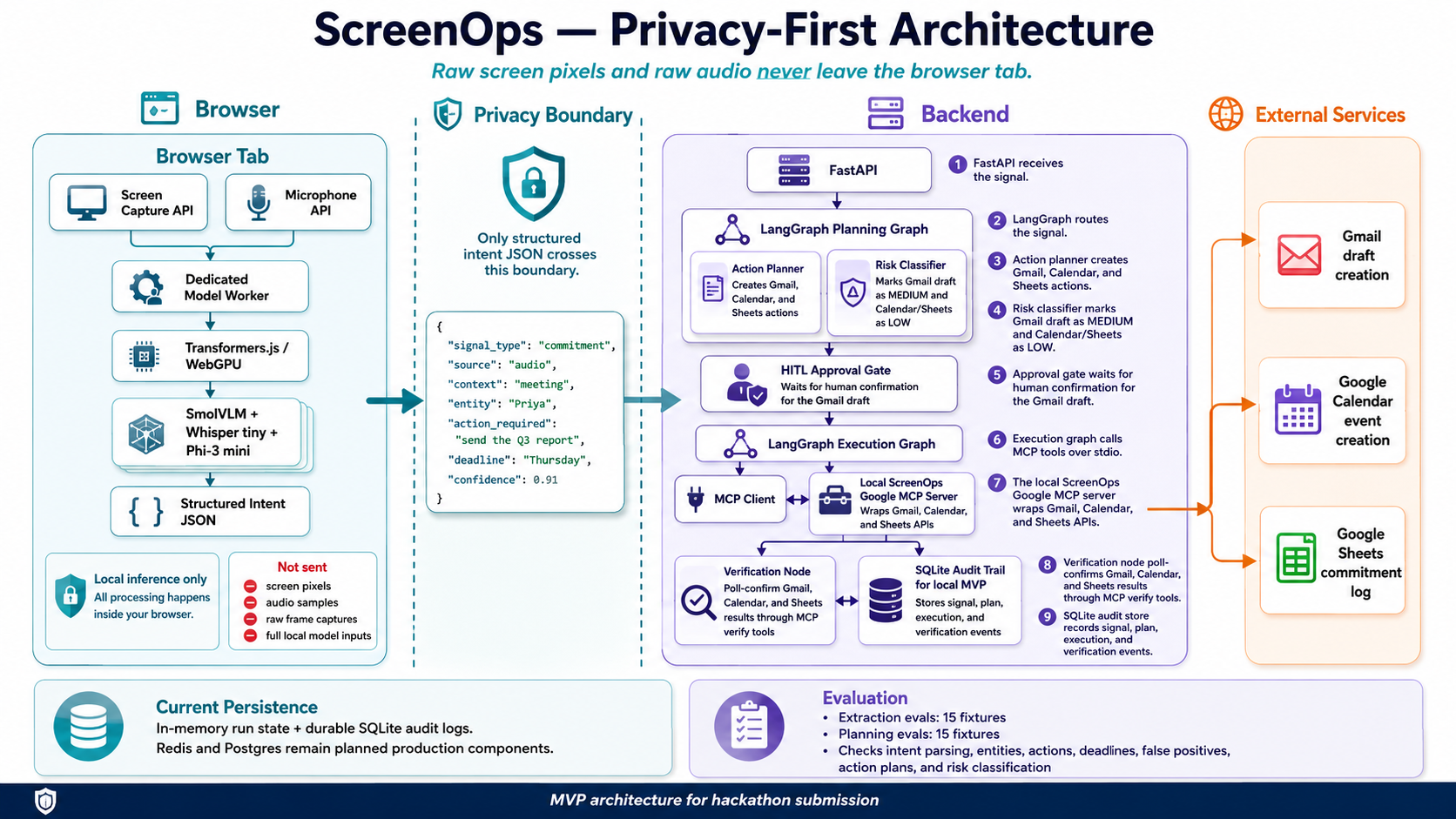
Privacy-First Architecture
Demo
In the demo, I share a real Discord screen with a message asking me to send the finalized Q3 performance report to Priya Nair by Thursday, including her email address. ScreenOps reads the screen locally, transcribes the related audio locally, and extracts one primary commitment. The Network tab is the privacy proof: no screen frame uploads, no audio file uploads, only the final structured intent JSON crosses the boundary. The backend receives that JSON, plans actions, classifies risk, waits for approval where needed, executes tools, verifies results, and records an audit trail.
Problem Statement
Problem Statement
Every workday is full of quiet commitments "I'll send you the report," "let's sync Thursday," "I'll follow up by EOD" made in meetings, chat threads, emails, and documents. None of them get automatically captured, so they live only in someone's memory until they're forgotten, missed, or chased down after the fact. In finance, healthcare, legal, HR, and enterprise operations, that's not a minor inconvenience; it's missed deadlines, compliance exposure, and eroded client trust.
The tools available today force teams to choose between two broken options. Traditional automation platforms require every workflow to be predefined by hand, so they're structurally incapable of noticing a commitment that was never explicitly configured. The newer generation of AI copilots solves that detection problem, but only by continuously streaming raw screen recordings and audio to cloud models which is disqualifying the moment the screen shows client financials, patient records, or privileged legal drafts.
That's the core tension no one has resolved: the screen is the single richest source of truth about what someone just committed to, and simultaneously the most sensitive data surface in the entire workplace. Solving "notice the commitment" without also solving "never expose the screen" isn't a partial solution it's not a solution at all for the industries that need this most.
ScreenOps is built to prove both halves can coexist: local, on-device intent extraction with zero raw screen or audio egress, paired with verified, risk-gated execution on the backend.
Solution Overview
ScreenOps keeps private sensing in the browser:
Browser tab
  Screen Capture API -> SmolVLM / local OCR
  Microphone or tab audio -> Whisper tiny
  Screen + audio fusion -> browser intent model
        |
        v
Structured intent JSON only
        |
        v
FastAPI backend
        |
        v
LangGraph agent
  route -> enrich -> plan -> classify risk -> approval -> execute -> verify
        |
        v
Python ScreenOps MCP stdio server
  Gmail draft
  Calendar reminder
  Sheets commitment log
Raw screen frames and raw audio do not leave the browser tab. The backend receives only the final structured intent JSON.
Key Features
- Live screen capture and microphone/audio capture in the browser.
- Browser-local inference with Transformers.js and WebGPU.
- SmolVLM screen understanding with local OCR fallback for noisy Discord captures.
- Whisper tiny transcription for meeting or tab audio.
- Browser intent extraction with screen-priority prompting and deterministic safety fallback.
- Intent signal schema with entity, action, deadline, confidence, source, recipient email, and session metadata.
- FastAPI backend with signal intake, approval, run lookup, auth status, and SSE event stream endpoints.
- LangGraph planning and execution workflow.
- Risk-based approval gate: low-risk Calendar/Sheets can auto-execute, medium-risk Gmail draft waits for approval.
- Python-based ScreenOps Google MCP server over stdio for Gmail, Calendar, Sheets, and verification tools.
- Google OAuth setup for real Workspace actions.
- SQLite audit persistence for local demo runs.
- Extraction and planning evals for repeatable validation.
Tech Stack
- Frontend: React, Vite, TypeScript
- Browser ML: Transformers.js, WebGPU, Tesseract.js OCR
- Local models:
HuggingFaceTB/SmolVLM-256M-Instructonnx-community/whisper-tiny.enHuggingFaceTB/SmolLM2-360M-Instruct
- Backend: FastAPI, Python
- Agent orchestration: LangGraph
- Tool execution: Python MCP server over stdio
- Workspace actions: Gmail API, Google Calendar API, Google Sheets API
- Local persistence: SQLite audit log
- Evals: TypeScript extraction evals and Python planning evals
Current Implementation Status
Implemented:
- React/Vite UI for live capture, model readiness, run trace, approval queue, and verified action results.
- Browser worker for local screen, audio, OCR, and intent inference.
- Backend signal API and LangGraph agent workflow.
- Python ScreenOps MCP stdio server for Google actions.
- Gmail draft creation with approval.
- Calendar event creation with relative deadline resolution in
Asia/Kolkata. - Sheets append to the configured commitment tracker.
- Poll-back verification for Gmail draft, Calendar event, and Sheets append.
- Modify/reject/approve controls for Gmail draft.
- SQLite audit event log.
- Extraction evals:
16/16passing. - Planning evals:
15/15passing. - Demo script, submission notes, AI usage documentation, and PRD status notes.
Partial or future work:
- Redis commitment memory.
- Postgres audit database for production.
- Generic third-party Google MCP binary integration. The deployed demo uses the Python ScreenOps MCP server because it is cross-platform, runs on Render without a Windows binary, and exposes the exact Gmail draft, Calendar create, Sheets append, and verification tools needed.
- GitHub MCP stretch workflow.
- Production packaging and enterprise auth.
Setup Instructions
Prerequisites:
- Windows machine with Chrome/Edge
- Python 3.12
- Node.js and npm
- Google Cloud OAuth desktop client
- Gmail, Calendar, Drive, and Sheets APIs enabled
Install backend dependencies:
python -m venv .venv
.\.venv\Scripts\python -m pip install -r backend\requirements.txt
Install frontend dependencies:
cd frontend
npm install
Run one-time Google OAuth:
cd ..
.\.venv\Scripts\python scripts\google_auth.py
Start the backend used by the frontend:
.\.venv\Scripts\python -m uvicorn app.main:app --app-dir backend --host 127.0.0.1 --port 8001
Start the frontend:
cd frontend
npm run dev
Open:
http://127.0.0.1:5173
Validation
Frontend build:
cd frontend
npm run build
Extraction evals:
cd frontend
npm run eval:extraction
Planning evals:
cd ..
.\.venv\Scripts\python scripts\run_evals.py
Latest verified local results:
- Frontend build passed.
- Extraction evals passed
16/16. - Planning evals passed
15/15. - Live API path on backend port
8001executed and verified Calendar and Sheets through MCP.
Codex / AI Usage
Codex/OpenAI was used meaningfully throughout the hackathon build:
- Ideation and PRD refinement.
- Architecture planning for privacy-first local inference plus backend action execution.
- Frontend implementation and UI iteration.
- Backend FastAPI, LangGraph, MCP, and Google API integration.
- Debugging WebGPU/Transformers.js model behavior.
- Debugging MCP subprocess execution on Windows.
- Writing extraction and planning evals.
- README, demo script, submission notes, and AI usage documentation.
Full AI usage documentation is in AI_USAGE.md.
Submission Materials
- Source code: this repository
- Submission summary: SUBMISSION.md
- AI usage: AI_USAGE.md
- Architecture notes: ARCHITECTURE.md
- PRD and status notes: docs/ScreenOps_PRD_v1.md
Security Notes
The repository intentionally excludes local secrets and runtime artifacts:
.env.screenops/- Google OAuth token files
- Google client secret JSON files
.venv/node_modules/- frontend build output
- local tool binaries
Use .env.example as the setup template.
Screenshots
1. Initial ScreenOps Dashboard
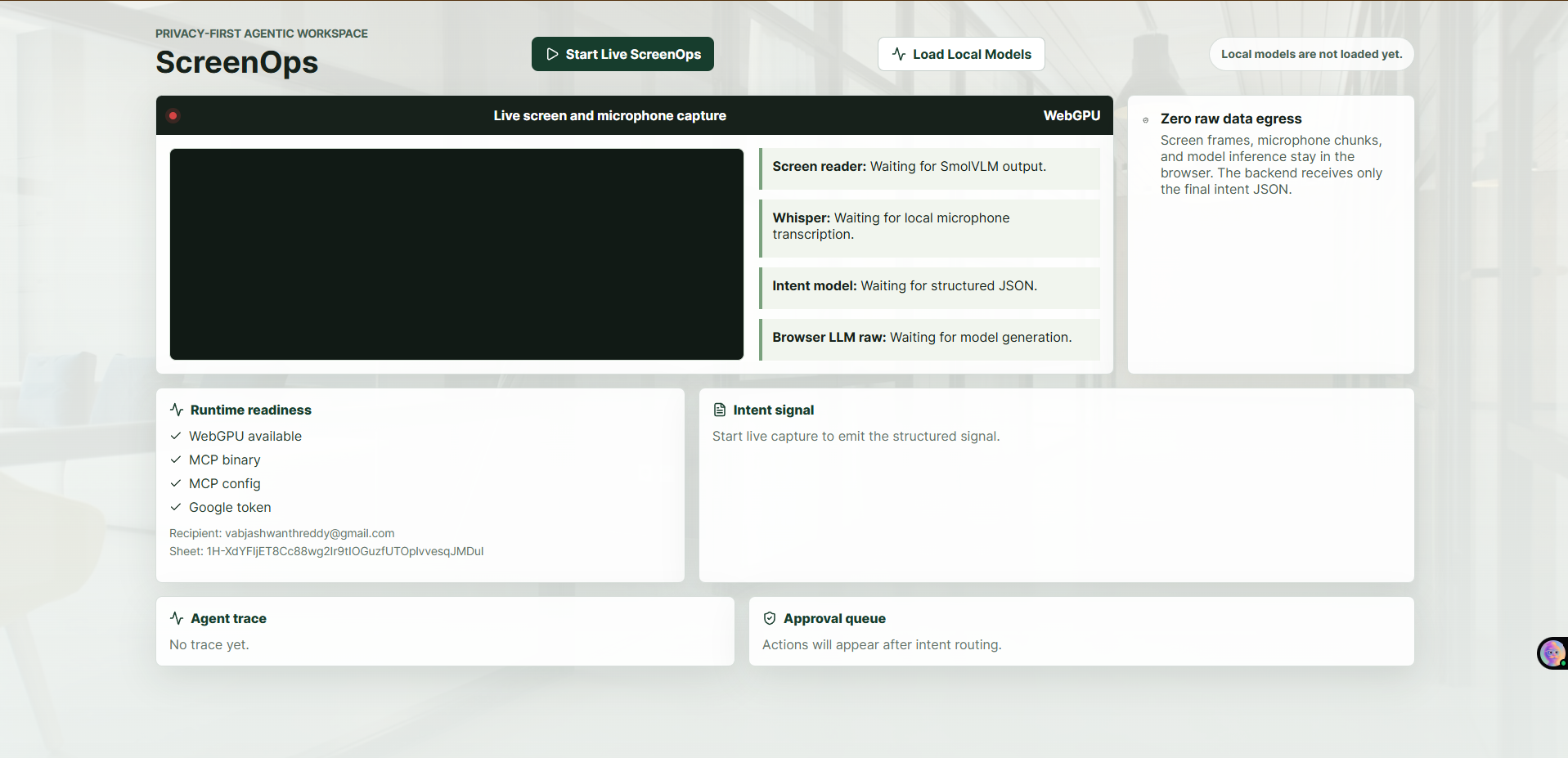
The app opens with WebGPU readiness, Google/MCP checks, the live capture panel, and empty intent/agent sections before capture starts.
2. Browser Screen Share Picker
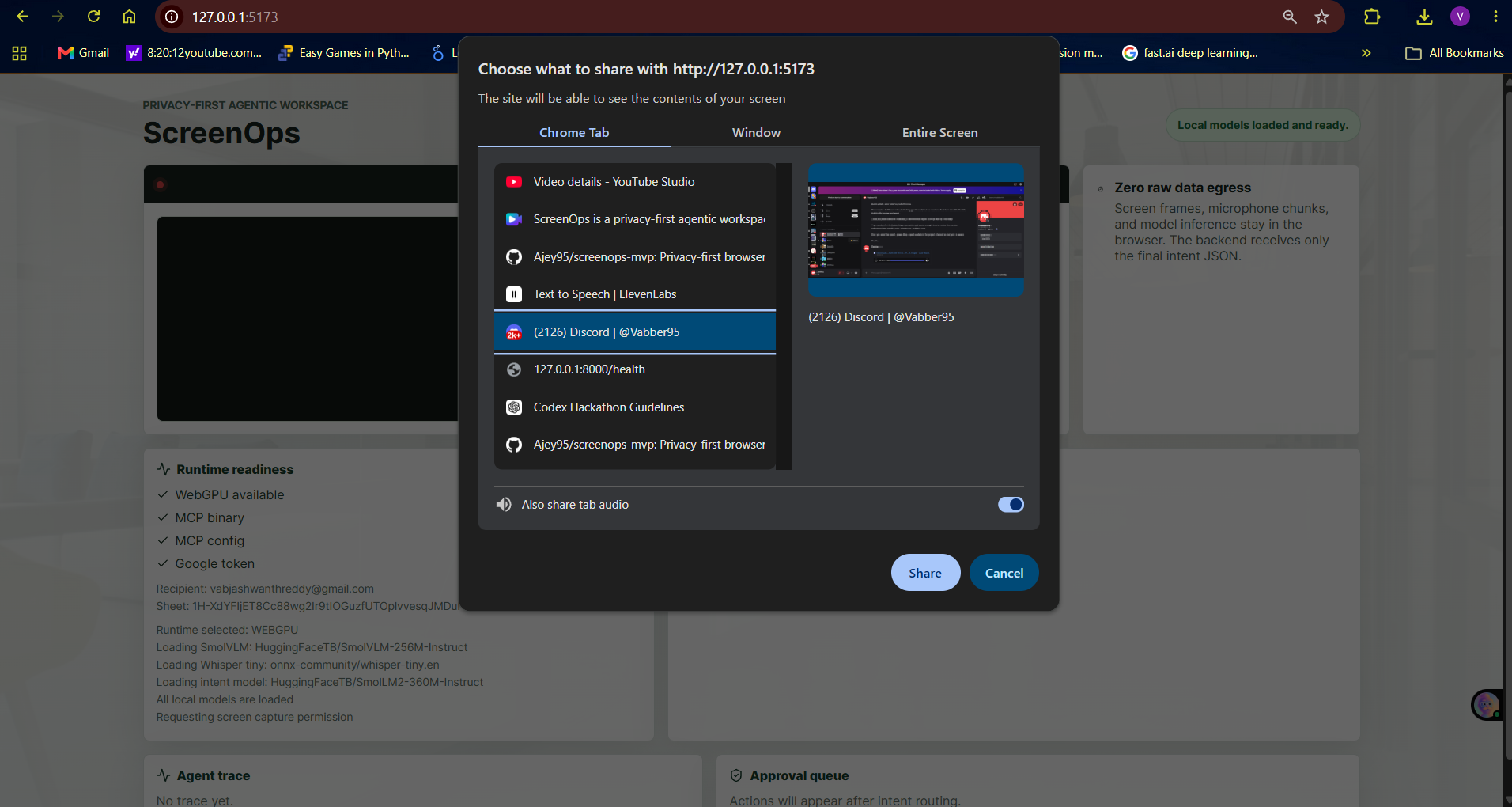
Chrome prompts for the Discord tab and tab audio sharing so ScreenOps can read the live workspace locally.
3. Discord Share Active
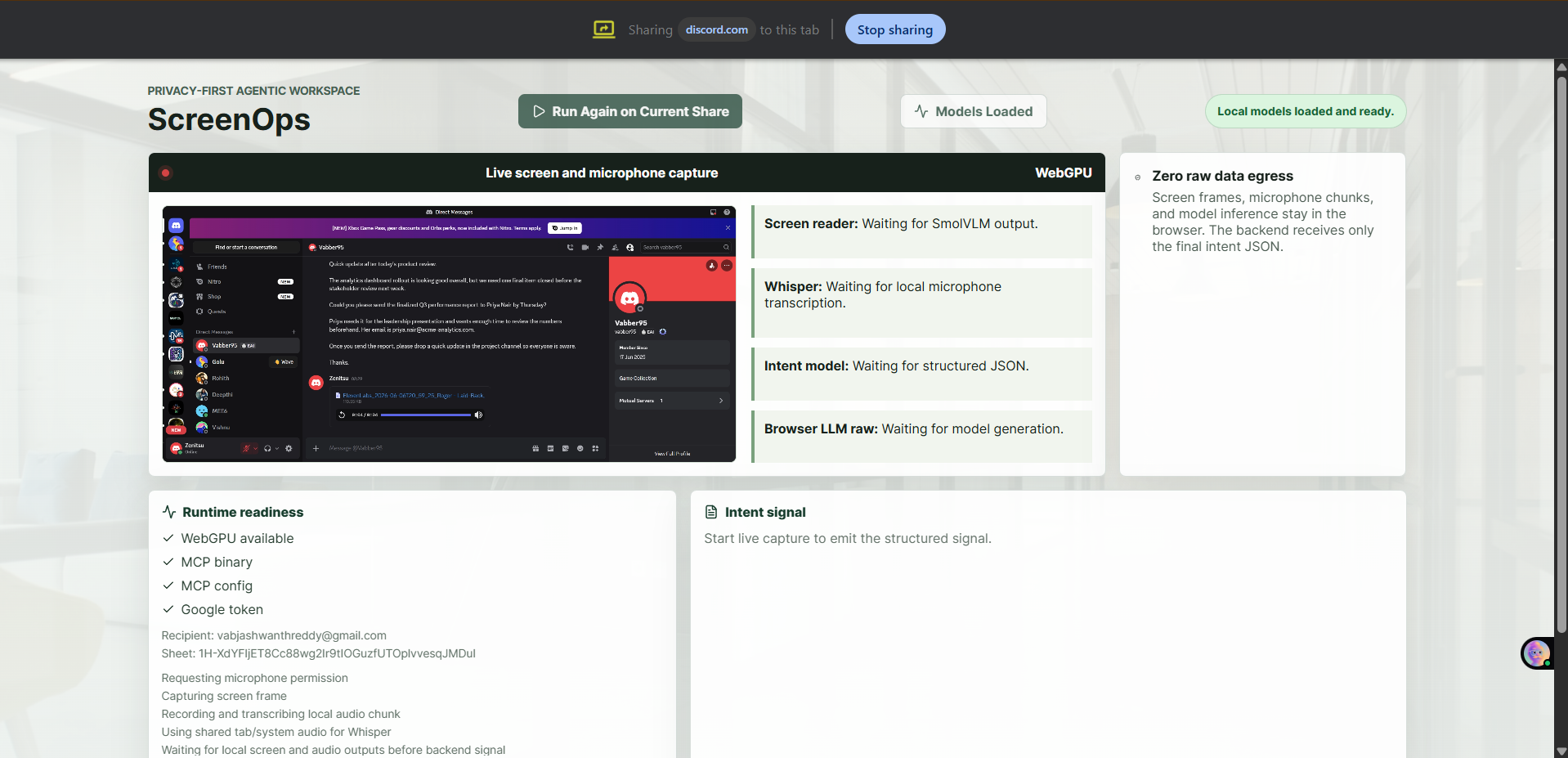
The Discord tab is actively shared into ScreenOps while local models are loaded and ready.
4. Local Model Outputs
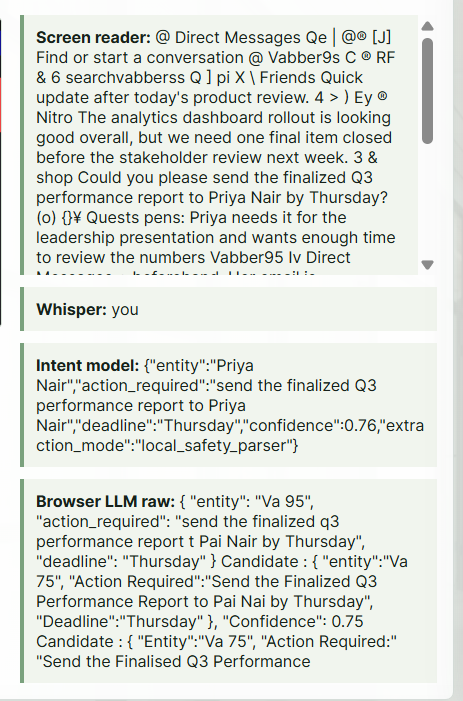
ScreenOps shows local screen reading, Whisper transcription, structured intent, and browser LLM raw output before backend action.
5. Intent Signal and Low-Risk Actions
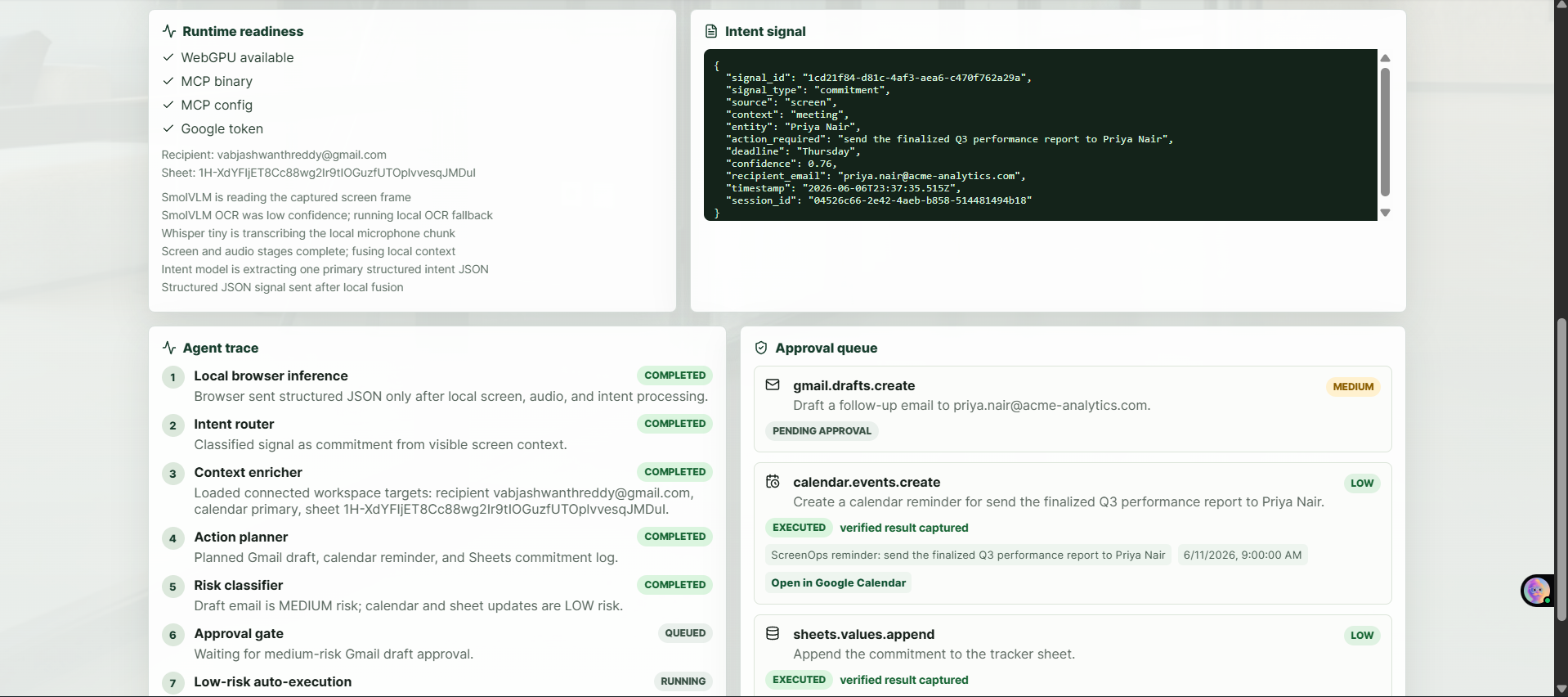
The backend receives only structured JSON, plans actions, and executes verified low-risk Calendar and Sheets steps.
6. Human Approval Queue
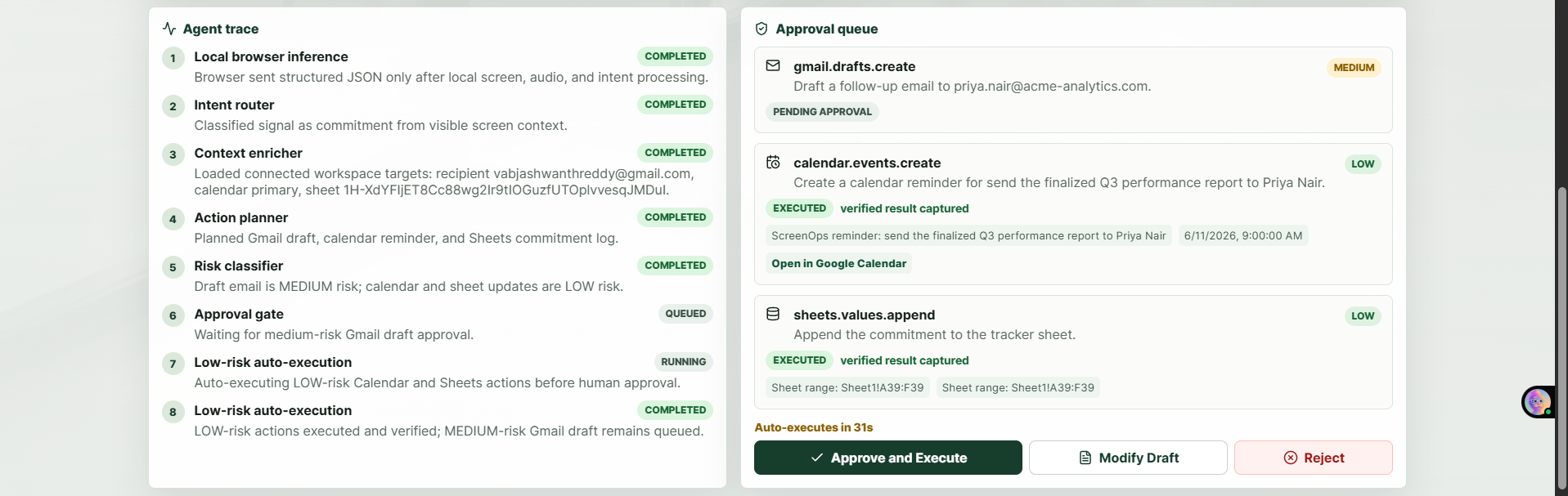
The Gmail draft remains pending as a medium-risk action while Calendar and Sheets are already verified.
7. Verified Gmail Draft
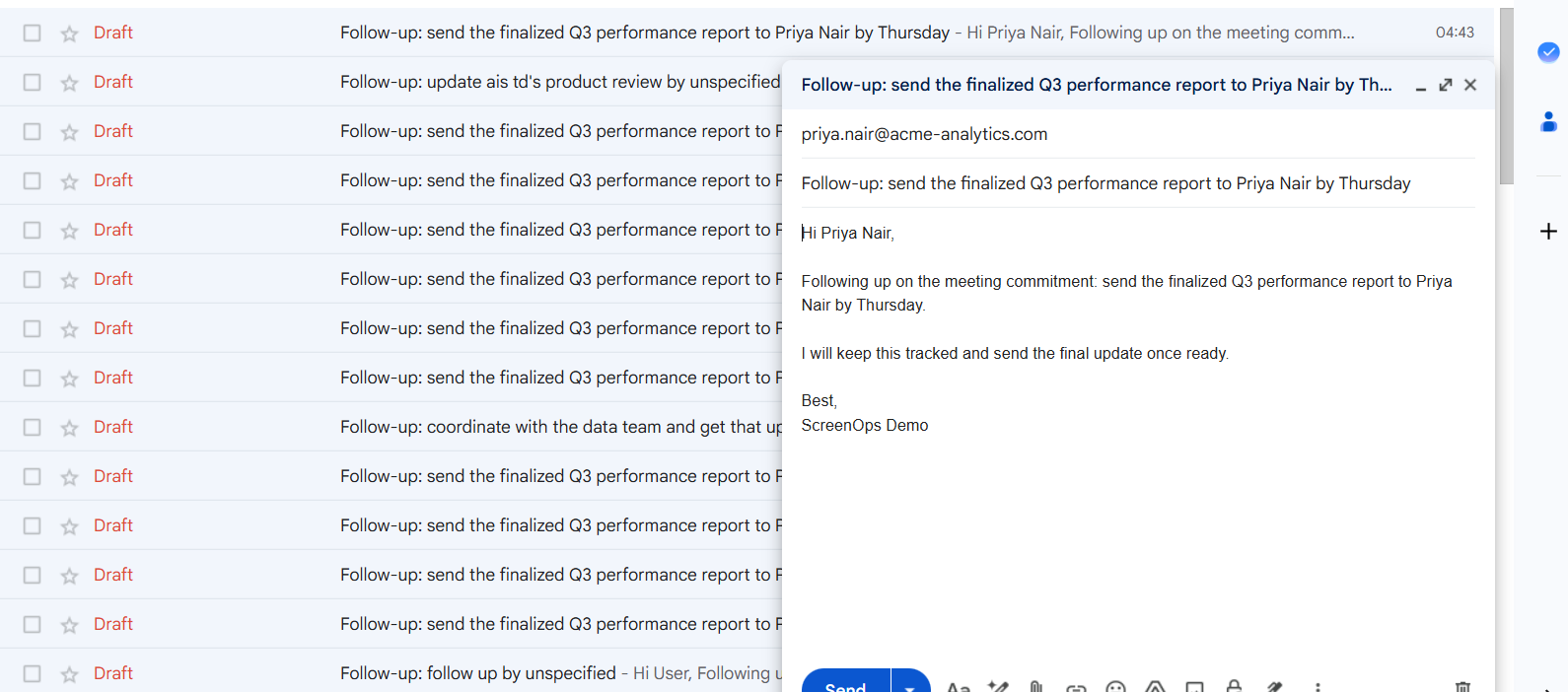
Gmail contains the generated draft addressed to Priya Nair with the extracted Q3 report follow-up.
8. Verified Calendar Event
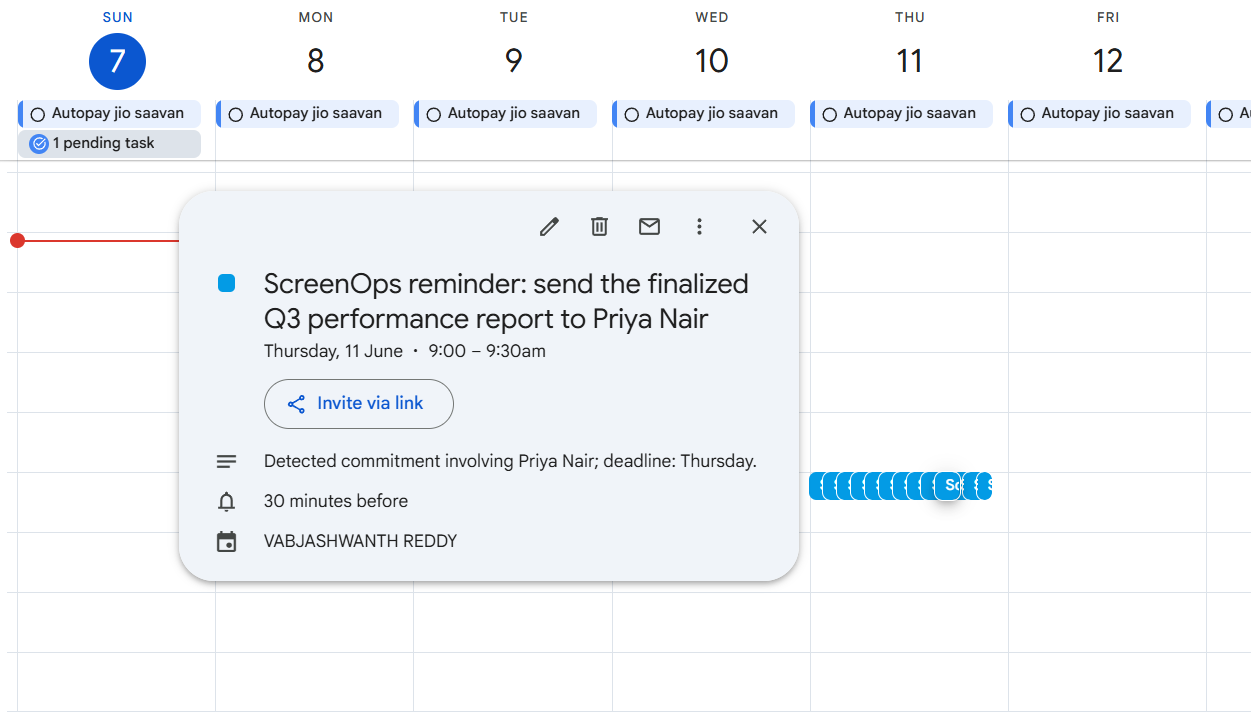
Google Calendar contains the ScreenOps reminder on Thursday, June 11 at 9:00 AM.
9. Verified Sheets Commitment Log
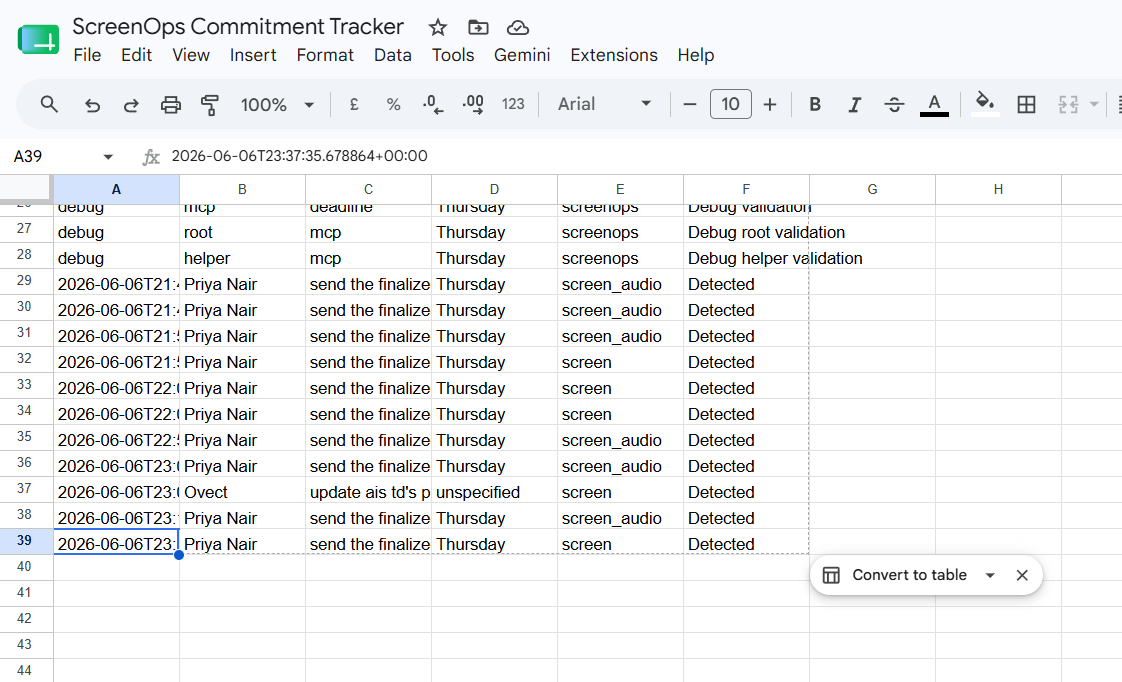
Google Sheets records the detected commitment with entity, action, deadline, source, and status.
10. Network Inspector Privacy Proof
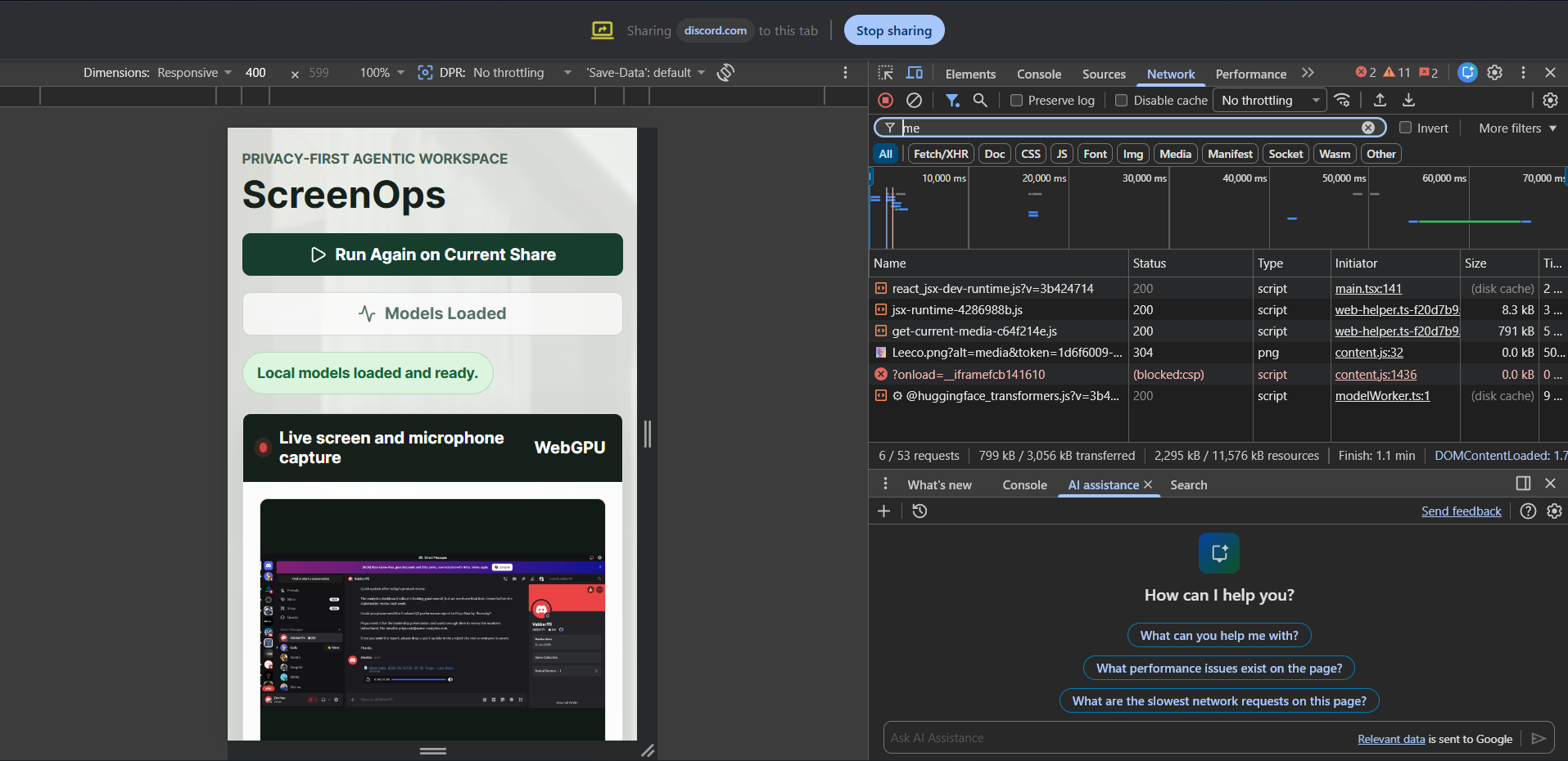
Chrome DevTools is open during live capture to show the network boundary: raw screen pixels, audio chunks, and local model inputs are not uploaded while ScreenOps runs browser-side inference.
Contributors

5 commits
Similar repos


Languages
TypeScript
48.6%
Python
43.0%
CSS
8.1%
README
ScreenOps
Privacy-first ambient agentic workspace intelligence.
ScreenOps watches live work context in the browser, extracts one structured work intent locally, and sends only that JSON signal to a backend agent. The backend plans real Google Workspace actions, applies risk-based approval, and verifies the result.
Repository: https://github.com/9059Rohith/screenops-codex
Demo Link
Demo video: Link
Deploy
Live app: https://screenops-mvp.vercel.app/
Privacy-First Architecture
Demo
In the demo, I share a real Discord screen with a message asking me to send the finalized Q3 performance report to Priya Nair by Thursday, including her email address. ScreenOps reads the screen locally, transcribes the related audio locally, and extracts one primary commitment. The Network tab is the privacy proof: no screen frame uploads, no audio file uploads, only the final structured intent JSON crosses the boundary. The backend receives that JSON, plans actions, classifies risk, waits for approval where needed, executes tools, verifies results, and records an audit trail.
Problem Statement
Problem Statement
Every workday is full of quiet commitments "I'll send you the report," "let's sync Thursday," "I'll follow up by EOD" made in meetings, chat threads, emails, and documents. None of them get automatically captured, so they live only in someone's memory until they're forgotten, missed, or chased down after the fact. In finance, healthcare, legal, HR, and enterprise operations, that's not a minor inconvenience; it's missed deadlines, compliance exposure, and eroded client trust.
The tools available today force teams to choose between two broken options. Traditional automation platforms require every workflow to be predefined by hand, so they're structurally incapable of noticing a commitment that was never explicitly configured. The newer generation of AI copilots solves that detection problem, but only by continuously streaming raw screen recordings and audio to cloud models which is disqualifying the moment the screen shows client financials, patient records, or privileged legal drafts.
That's the core tension no one has resolved: the screen is the single richest source of truth about what someone just committed to, and simultaneously the most sensitive data surface in the entire workplace. Solving "notice the commitment" without also solving "never expose the screen" isn't a partial solution it's not a solution at all for the industries that need this most.
ScreenOps is built to prove both halves can coexist: local, on-device intent extraction with zero raw screen or audio egress, paired with verified, risk-gated execution on the backend.
Solution Overview
ScreenOps keeps private sensing in the browser:
Browser tab
  Screen Capture API -> SmolVLM / local OCR
  Microphone or tab audio -> Whisper tiny
  Screen + audio fusion -> browser intent model
        |
        v
Structured intent JSON only
        |
        v
FastAPI backend
        |
        v
LangGraph agent
  route -> enrich -> plan -> classify risk -> approval -> execute -> verify
        |
        v
Python ScreenOps MCP stdio server
  Gmail draft
  Calendar reminder
  Sheets commitment log
Raw screen frames and raw audio do not leave the browser tab. The backend receives only the final structured intent JSON.
Key Features
- Live screen capture and microphone/audio capture in the browser.
- Browser-local inference with Transformers.js and WebGPU.
- SmolVLM screen understanding with local OCR fallback for noisy Discord captures.
- Whisper tiny transcription for meeting or tab audio.
- Browser intent extraction with screen-priority prompting and deterministic safety fallback.
- Intent signal schema with entity, action, deadline, confidence, source, recipient email, and session metadata.
- FastAPI backend with signal intake, approval, run lookup, auth status, and SSE event stream endpoints.
- LangGraph planning and execution workflow.
- Risk-based approval gate: low-risk Calendar/Sheets can auto-execute, medium-risk Gmail draft waits for approval.
- Python-based ScreenOps Google MCP server over stdio for Gmail, Calendar, Sheets, and verification tools.
- Google OAuth setup for real Workspace actions.
- SQLite audit persistence for local demo runs.
- Extraction and planning evals for repeatable validation.
Tech Stack
- Frontend: React, Vite, TypeScript
- Browser ML: Transformers.js, WebGPU, Tesseract.js OCR
- Local models:
HuggingFaceTB/SmolVLM-256M-Instructonnx-community/whisper-tiny.enHuggingFaceTB/SmolLM2-360M-Instruct
- Backend: FastAPI, Python
- Agent orchestration: LangGraph
- Tool execution: Python MCP server over stdio
- Workspace actions: Gmail API, Google Calendar API, Google Sheets API
- Local persistence: SQLite audit log
- Evals: TypeScript extraction evals and Python planning evals
Current Implementation Status
Implemented:
- React/Vite UI for live capture, model readiness, run trace, approval queue, and verified action results.
- Browser worker for local screen, audio, OCR, and intent inference.
- Backend signal API and LangGraph agent workflow.
- Python ScreenOps MCP stdio server for Google actions.
- Gmail draft creation with approval.
- Calendar event creation with relative deadline resolution in
Asia/Kolkata. - Sheets append to the configured commitment tracker.
- Poll-back verification for Gmail draft, Calendar event, and Sheets append.
- Modify/reject/approve controls for Gmail draft.
- SQLite audit event log.
- Extraction evals:
16/16passing. - Planning evals:
15/15passing. - Demo script, submission notes, AI usage documentation, and PRD status notes.
Partial or future work:
- Redis commitment memory.
- Postgres audit database for production.
- Generic third-party Google MCP binary integration. The deployed demo uses the Python ScreenOps MCP server because it is cross-platform, runs on Render without a Windows binary, and exposes the exact Gmail draft, Calendar create, Sheets append, and verification tools needed.
- GitHub MCP stretch workflow.
- Production packaging and enterprise auth.
Setup Instructions
Prerequisites:
- Windows machine with Chrome/Edge
- Python 3.12
- Node.js and npm
- Google Cloud OAuth desktop client
- Gmail, Calendar, Drive, and Sheets APIs enabled
Install backend dependencies:
python -m venv .venv
.\.venv\Scripts\python -m pip install -r backend\requirements.txt
Install frontend dependencies:
cd frontend
npm install
Run one-time Google OAuth:
cd ..
.\.venv\Scripts\python scripts\google_auth.py
Start the backend used by the frontend:
.\.venv\Scripts\python -m uvicorn app.main:app --app-dir backend --host 127.0.0.1 --port 8001
Start the frontend:
cd frontend
npm run dev
Open:
http://127.0.0.1:5173
Validation
Frontend build:
cd frontend
npm run build
Extraction evals:
cd frontend
npm run eval:extraction
Planning evals:
cd ..
.\.venv\Scripts\python scripts\run_evals.py
Latest verified local results:
- Frontend build passed.
- Extraction evals passed
16/16. - Planning evals passed
15/15. - Live API path on backend port
8001executed and verified Calendar and Sheets through MCP.
Codex / AI Usage
Codex/OpenAI was used meaningfully throughout the hackathon build:
- Ideation and PRD refinement.
- Architecture planning for privacy-first local inference plus backend action execution.
- Frontend implementation and UI iteration.
- Backend FastAPI, LangGraph, MCP, and Google API integration.
- Debugging WebGPU/Transformers.js model behavior.
- Debugging MCP subprocess execution on Windows.
- Writing extraction and planning evals.
- README, demo script, submission notes, and AI usage documentation.
Full AI usage documentation is in AI_USAGE.md.
Submission Materials
- Source code: this repository
- Submission summary: SUBMISSION.md
- AI usage: AI_USAGE.md
- Architecture notes: ARCHITECTURE.md
- PRD and status notes: docs/ScreenOps_PRD_v1.md
Security Notes
The repository intentionally excludes local secrets and runtime artifacts:
.env.screenops/- Google OAuth token files
- Google client secret JSON files
.venv/node_modules/- frontend build output
- local tool binaries
Use .env.example as the setup template.
Screenshots
1. Initial ScreenOps Dashboard
The app opens with WebGPU readiness, Google/MCP checks, the live capture panel, and empty intent/agent sections before capture starts.
2. Browser Screen Share Picker
Chrome prompts for the Discord tab and tab audio sharing so ScreenOps can read the live workspace locally.
3. Discord Share Active
The Discord tab is actively shared into ScreenOps while local models are loaded and ready.
4. Local Model Outputs
ScreenOps shows local screen reading, Whisper transcription, structured intent, and browser LLM raw output before backend action.
5. Intent Signal and Low-Risk Actions
The backend receives only structured JSON, plans actions, and executes verified low-risk Calendar and Sheets steps.
6. Human Approval Queue
The Gmail draft remains pending as a medium-risk action while Calendar and Sheets are already verified.
7. Verified Gmail Draft
Gmail contains the generated draft addressed to Priya Nair with the extracted Q3 report follow-up.
8. Verified Calendar Event
Google Calendar contains the ScreenOps reminder on Thursday, June 11 at 9:00 AM.
9. Verified Sheets Commitment Log
Google Sheets records the detected commitment with entity, action, deadline, source, and status.
10. Network Inspector Privacy Proof
Chrome DevTools is open during live capture to show the network boundary: raw screen pixels, audio chunks, and local model inputs are not uploaded while ScreenOps runs browser-side inference.
Similar repos
Contributors
5 commits
Languages
TypeScript
48.6%
Python
43.0%
CSS
8.1%