EDtunnel 是一个基于 Cloudflare Workers 和 Pages 的代理工具,支持多种协议和配置选项。 EDtunnel is a proxy tool based on Cloudflare Workers and Pages, supporting multiple protocols and configuration options.
See the code

A proxy tool based on Cloudflare Workers and Pages, supporting multiple protocols and configuration options.


/socks5://, /http://, /vless://)Copy _worker.js code from here
Or click the button below to deploy directly:
| Variable | Required | Example | Description |
|---|---|---|---|
UUID | No | Single: 12345678-1234-1234-1234-123456789012Multiple: uuid1,uuid2,uuid3 | User identification |
PROXYIP | No | 1.1.1.1 or example.comMultiple: 1.1.1.1:9443,2.2.2.2:8443 | Custom proxy IP and port |
SOCKS5 | No | user:pass@host:portMultiple: user1:pass1@host1:port1,user2:pass2@host2:port2 | SOCKS5 proxy configuration |
SOCKS5_RELAY | No | true or false | Enable SOCKS5 traffic relay |
TROJAN_PASSWORD | No | your-password | Trojan password (defaults to UUID if not set) |
VLESS_OUTBOUND | No | vless://uuid@host:port?type=ws&security=tls | VLESS outbound proxy URL |
PROXY_TIMEOUT | No | 1500 | Proxy connection timeout in ms (default: 1500) |
PROXY_FALLBACK | No | true or false | Fallback to direct connection if proxies fail (default: true) |
You can use URL query parameters to directly override environment variable configurations. These parameters have higher priority than environment variables. For security reasons, UUID cannot be set via URL query parameters.
| Query Parameter | Corresponding ENV | Example | Description |
|---|---|---|---|
proxyip | PROXYIP | ?proxyip=1.1.1.1:443 | Override proxy IP and port |
socks5 | SOCKS5 | ?socks5=user:pass@host:port | Override SOCKS5 proxy configuration |
http | - | ?http=user:pass@host:port | HTTP CONNECT proxy configuration |
vless | VLESS_OUTBOUND | ?vless=vless://uuid@host:port | Override VLESS outbound proxy |
globalproxy | - | ?globalproxy | Enable global proxy mode (route all traffic) |
You can also configure proxies directly in the URL path:
| Path Format | Example | Description |
|---|---|---|
/proxyip= | /proxyip=1.1.1.1:443 | Set proxy IP via path |
/socks5:// | /socks5://user:pass@host:port | SOCKS5 proxy via path |
/http:// | /http://user:pass@host:port | HTTP CONNECT proxy via path |
/vless:// | /vless://uuid@host:port?... | VLESS outbound via path |
/gvless= | /gvless=base64-encoded-url | VLESS outbound (global, base64 encoded) |
Security Note: UUID must be set via environment variables or configuration files, not through URL parameters, to prevent unauthorized identity modifications.
Temporarily change proxy IP:
https://your-domain.workers.dev/?proxyip=another-proxy-ip:port
Combine multiple parameters:
https://your-domain.workers.dev/?proxyip=1.1.1.1:443&socks5_relay=true
Apply to specific paths:
https://your-domain.workers.dev/sub/your-uuid?proxyip=1.1.1.1:443
?parameter=value. The question mark ? should not be URL encoded (%3F)./%3Fproxyip=value, this won't work correctly. Use /?proxyip=value instead.https://proxyip.edtunnel.best/ProxyIP:proxyport and click CheckProxy IP: true it's availablePROXYIP=211.230.110.231:50008Note: Proxy IPs with ports may not work on HTTP-only Cloudflare sites.
Set in wrangler.toml file (not recommended for public repositories)
[vars]
UUID = "your-uuid-here"
Set in Cloudflare Dashboard environment variables (recommended method)
All multiple configurations MUST use English comma(,) as separator, NOT Chinese comma(,)
Correct Examples:
# Multiple UUID
UUID=uuid1,uuid2,uuid3

# Multiple SOCKS5 proxies
SOCKS5=192.168.1.1:1080,192.168.1.2:1080

# Multiple PROXYIP
PROXYIP=1.1.1.1:443,2.2.2.2:443
Wrong Examples:
# Wrong: Using Chinese comma
UUID=uuid1,uuid2,uuid3

# Wrong: Using Chinese comma
SOCKS5=192.168.1.1:1080,192.168.1.2:1080
Use the following link for auto configuration:
https://sub.xf.free.hr/auto
https://your-domain.pages.dev/sub/[uuid]/sub/[uuid]EDtunnel now supports Trojan protocol alongside VLESS, with auto-detection:
TROJAN_PASSWORD is not set/sub/[uuid]As an alternative to SOCKS5, you can use HTTP CONNECT proxy:
# Via URL path
https://your-domain.workers.dev/http://user:pass@proxy-host:port/sub/uuid

# Via URL parameter
https://your-domain.workers.dev/?http=user:pass@proxy-host:port
Route traffic through an external VLESS server with full UDP support:
# Environment variable
VLESS_OUTBOUND=vless://uuid@remote-server:443?type=ws&security=tls&path=/ws

# Via URL path
https://your-domain.workers.dev/vless://uuid@host:port?type=ws&security=tls/sub/your-uuid

# Via URL parameter
https://your-domain.workers.dev/?vless=vless://uuid@host:port
You can configure multiple UUIDs in these ways:
Via environment variables:
UUID=uuid1,uuid2,uuid3
Via configuration file:
[vars]
UUID = "uuid1,uuid2,uuid3"
Supports the following formats:
host:portusername:password@host:portproxy1,proxy2,proxy3# Basic format
SOCKS5=192.168.1.1:1080
# With authentication
SOCKS5=user:pass@192.168.1.1:1080
# Multiple basic proxies
SOCKS5=192.168.1.1:1080,192.168.1.2:1080,192.168.1.3:1080

# Multiple proxies with authentication
SOCKS5=user1:pass1@host1:port1,user2:pass2@host2:port2

# Mixed format
SOCKS5=192.168.1.1:1080,user:pass@192.168.1.2:1080,192.168.1.3:1080
When multiple proxies are configured, the system will automatically perform load balancing:
Enable SOCKS5 global relay:
SOCKS5_RELAY=true
When configuring multiple proxy addresses, the system provides:
PROXY_TIMEOUT (default: 1500ms)PROXY_FALLBACK)# Configure timeout (milliseconds)
PROXY_TIMEOUT=2000
# Disable fallback to direct connection
PROXY_FALLBACK=false
Notes:
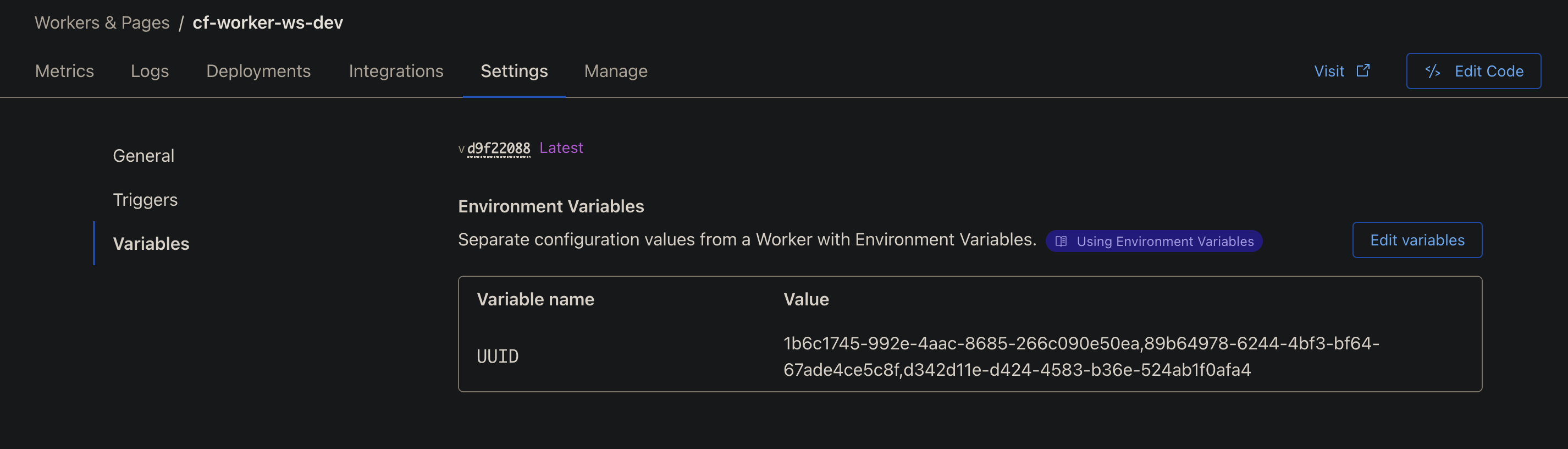
Configure environment variables in Workers settings page
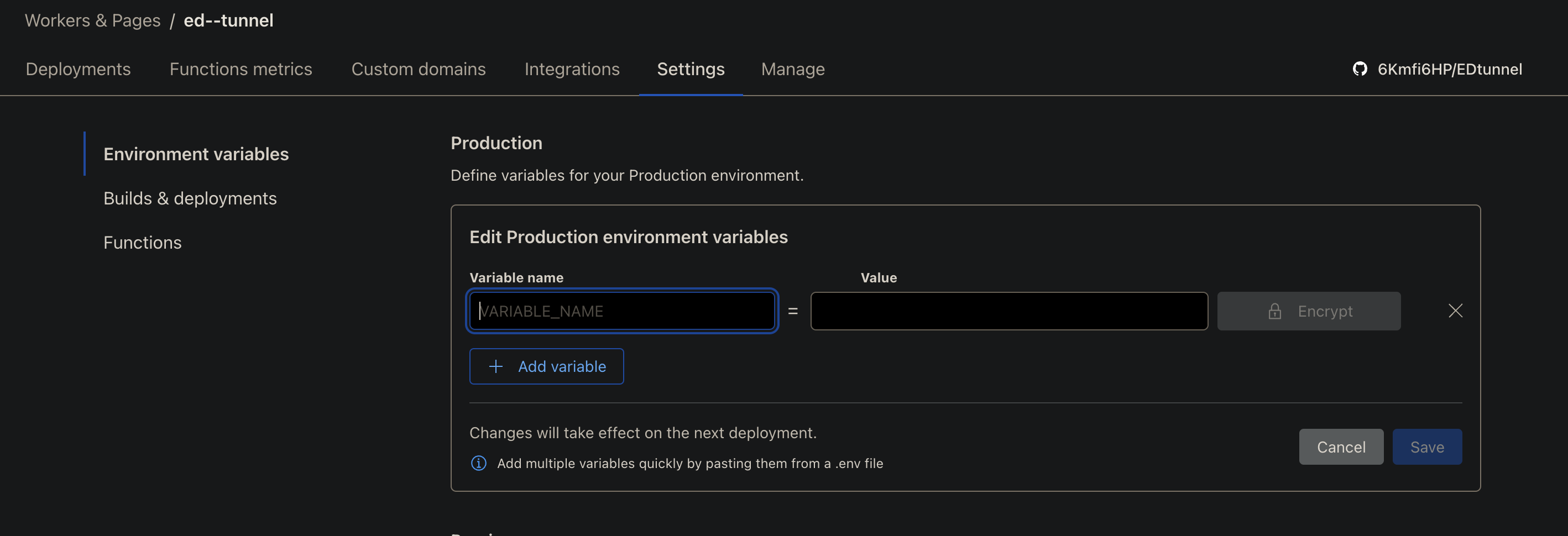
Configure environment variables in Pages settings page
Welcome Pull Requests to improve the project! Please ensure:
This project is licensed under the MIT License - see the LICENSE file for details
557 followers · starred Sep 2024
290 followers · starred Apr 2026
44 followers · starred Dec 2024
31 followers · starred Oct 2024
EDtunnel 是一个基于 Cloudflare Workers 和 Pages 的代理工具,支持多种协议和配置选项。 EDtunnel is a proxy tool based on Cloudflare Workers and Pages, supporting multiple protocols and configuration options.
See the code
A proxy tool based on Cloudflare Workers and Pages, supporting multiple protocols and configuration options.
/socks5://, /http://, /vless://)Copy _worker.js code from here
Or click the button below to deploy directly:
| Variable | Required | Example | Description |
|---|---|---|---|
UUID | No | Single: 12345678-1234-1234-1234-123456789012Multiple: uuid1,uuid2,uuid3 | User identification |
PROXYIP | No | 1.1.1.1 or example.comMultiple: 1.1.1.1:9443,2.2.2.2:8443 | Custom proxy IP and port |
SOCKS5 | No | user:pass@host:portMultiple: user1:pass1@host1:port1,user2:pass2@host2:port2 | SOCKS5 proxy configuration |
SOCKS5_RELAY | No | true or false | Enable SOCKS5 traffic relay |
TROJAN_PASSWORD | No | your-password | Trojan password (defaults to UUID if not set) |
VLESS_OUTBOUND | No | vless://uuid@host:port?type=ws&security=tls | VLESS outbound proxy URL |
PROXY_TIMEOUT | No | 1500 | Proxy connection timeout in ms (default: 1500) |
PROXY_FALLBACK | No | true or false | Fallback to direct connection if proxies fail (default: true) |
You can use URL query parameters to directly override environment variable configurations. These parameters have higher priority than environment variables. For security reasons, UUID cannot be set via URL query parameters.
| Query Parameter | Corresponding ENV | Example | Description |
|---|---|---|---|
proxyip | PROXYIP | ?proxyip=1.1.1.1:443 | Override proxy IP and port |
socks5 | SOCKS5 | ?socks5=user:pass@host:port | Override SOCKS5 proxy configuration |
http | - | ?http=user:pass@host:port | HTTP CONNECT proxy configuration |
vless | VLESS_OUTBOUND | ?vless=vless://uuid@host:port | Override VLESS outbound proxy |
globalproxy | - | ?globalproxy | Enable global proxy mode (route all traffic) |
You can also configure proxies directly in the URL path:
| Path Format | Example | Description |
|---|---|---|
/proxyip= | /proxyip=1.1.1.1:443 | Set proxy IP via path |
/socks5:// | /socks5://user:pass@host:port | SOCKS5 proxy via path |
/http:// | /http://user:pass@host:port | HTTP CONNECT proxy via path |
/vless:// | /vless://uuid@host:port?... | VLESS outbound via path |
/gvless= | /gvless=base64-encoded-url | VLESS outbound (global, base64 encoded) |
Security Note: UUID must be set via environment variables or configuration files, not through URL parameters, to prevent unauthorized identity modifications.
Temporarily change proxy IP:
https://your-domain.workers.dev/?proxyip=another-proxy-ip:port
Combine multiple parameters:
https://your-domain.workers.dev/?proxyip=1.1.1.1:443&socks5_relay=true
Apply to specific paths:
https://your-domain.workers.dev/sub/your-uuid?proxyip=1.1.1.1:443
?parameter=value. The question mark ? should not be URL encoded (%3F)./%3Fproxyip=value, this won't work correctly. Use /?proxyip=value instead.https://proxyip.edtunnel.best/ProxyIP:proxyport and click CheckProxy IP: true it's availablePROXYIP=211.230.110.231:50008Note: Proxy IPs with ports may not work on HTTP-only Cloudflare sites.
Set in wrangler.toml file (not recommended for public repositories)
[vars]
UUID = "your-uuid-here"
Set in Cloudflare Dashboard environment variables (recommended method)
All multiple configurations MUST use English comma(,) as separator, NOT Chinese comma(,)
Correct Examples:
# Multiple UUID
UUID=uuid1,uuid2,uuid3

# Multiple SOCKS5 proxies
SOCKS5=192.168.1.1:1080,192.168.1.2:1080

# Multiple PROXYIP
PROXYIP=1.1.1.1:443,2.2.2.2:443
Wrong Examples:
# Wrong: Using Chinese comma
UUID=uuid1,uuid2,uuid3

# Wrong: Using Chinese comma
SOCKS5=192.168.1.1:1080,192.168.1.2:1080
Use the following link for auto configuration:
https://sub.xf.free.hr/auto
https://your-domain.pages.dev/sub/[uuid]/sub/[uuid]EDtunnel now supports Trojan protocol alongside VLESS, with auto-detection:
TROJAN_PASSWORD is not set/sub/[uuid]As an alternative to SOCKS5, you can use HTTP CONNECT proxy:
# Via URL path
https://your-domain.workers.dev/http://user:pass@proxy-host:port/sub/uuid

# Via URL parameter
https://your-domain.workers.dev/?http=user:pass@proxy-host:port
Route traffic through an external VLESS server with full UDP support:
# Environment variable
VLESS_OUTBOUND=vless://uuid@remote-server:443?type=ws&security=tls&path=/ws

# Via URL path
https://your-domain.workers.dev/vless://uuid@host:port?type=ws&security=tls/sub/your-uuid

# Via URL parameter
https://your-domain.workers.dev/?vless=vless://uuid@host:port
You can configure multiple UUIDs in these ways:
Via environment variables:
UUID=uuid1,uuid2,uuid3
Via configuration file:
[vars]
UUID = "uuid1,uuid2,uuid3"
Supports the following formats:
host:portusername:password@host:portproxy1,proxy2,proxy3# Basic format
SOCKS5=192.168.1.1:1080
# With authentication
SOCKS5=user:pass@192.168.1.1:1080
# Multiple basic proxies
SOCKS5=192.168.1.1:1080,192.168.1.2:1080,192.168.1.3:1080

# Multiple proxies with authentication
SOCKS5=user1:pass1@host1:port1,user2:pass2@host2:port2

# Mixed format
SOCKS5=192.168.1.1:1080,user:pass@192.168.1.2:1080,192.168.1.3:1080
When multiple proxies are configured, the system will automatically perform load balancing:
Enable SOCKS5 global relay:
SOCKS5_RELAY=true
When configuring multiple proxy addresses, the system provides:
PROXY_TIMEOUT (default: 1500ms)PROXY_FALLBACK)# Configure timeout (milliseconds)
PROXY_TIMEOUT=2000
# Disable fallback to direct connection
PROXY_FALLBACK=false
Notes:
Configure environment variables in Workers settings page
Configure environment variables in Pages settings page
Welcome Pull Requests to improve the project! Please ensure:
This project is licensed under the MIT License - see the LICENSE file for details
557 followers · starred Sep 2024
290 followers · starred Apr 2026
44 followers · starred Dec 2024
31 followers · starred Oct 2024