
Self-hosted control plane for Vector: design pipelines, release versions, deploy to your hosts, and observe what runs. Apache-2.0. Unsigned developer preview.
See the codeSee what people are saying
README
Vectory
Design, ship and roll back Vector pipelines across your fleet, from one self-hosted dashboard.
Quickstart · Download · Docs · How it works · Compatibility

Vectory is an open-source control plane for Vector. Build a pipeline in your browser, publish it as an immutable version, and roll it out to the hosts you choose, with previews, canaries, schedules and rollback. A small agent on each host applies the change and reports what Vector is actually running.
Why Vectory
| A visual editor for real Vector | Schema-driven settings for all 128 component types of Vector 0.58, eight starter pipelines that pass Vector 0.58.0's own validation, VRL with sample tests, and YAML, TOML or JSON import and export. Publication checks the pipeline structure and uses an isolated Vector 0.58 validator where safe; configuration providers and other device-only checks run on each device before it applies. |
| Rollouts you can trust | Immutable versions with diffs, device and group targeting with a preview, canaries that advance only when devices confirm, schedules and one-step rollback. |
| Outbound-only agents | The agent dials out over TLS 1.3 with mutual TLS. Nothing on your hosts listens for Vectory. |
| Your data stays yours | Events flow from Vector to your destinations, never through Vectory. Supported credential fields use device-local vectory-secret:NAME references; headers and URLs require native Vector secret providers or host-managed environment references in full mode. |
| Guardrails built in | Roles, two-factor sign-in and an exportable audit log. Signed per-device configurations. A local policy on each host that the server can't widen. |
| Self-hosted, no strings | Docker Compose and SQLite. No cloud account, analytics or outside CDN. Apache-2.0. |
How it works
flowchart LR
  B["Your browser"] -->|"HTTPS 443"| P["TLS proxy"]
  subgraph S["Vectory server (Docker Compose)"]
    P --> V["vectory-server<br/>dashboard · API · help<br/>agent listener :8443<br/>SQLite"]
    V -->|"internal network only"| W["Validator<br/>isolated Vector 0.58"]
  end
  subgraph H["Each device"]
    A["vectory agent<br/>outbound HTTPS 8443<br/>mutual TLS"] -->|"starts · verifies · rolls back"| X["Vector 0.58"]
  end
  A --> V
  X -->|"your events"| D[("Your destinations")]
- Build a pipeline in the dashboard. An isolated Vector validates it.
- Publish an immutable version and deploy it to devices or groups: all at once, as a canary, or on a schedule.
- The agent fetches its signed configuration, validates it with Vector, applies it and confirms Vector is running it. If it fails, the agent restores the last working version.
Get started
Choose Docker on Windows, macOS or Linux, or install the prebuilt Linux server without Docker. Point a DNS name at the computer and choose your command. No source build is required.
Linux with Docker, after starting Docker Engine and Compose:
curl -fsSL --proto '=https' https://vectory.ahmadz.ai/install.sh -o vectory-install.sh &&
bash vectory-install.sh
macOS, after starting Docker Desktop:
curl -fsSL --proto '=https' https://vectory.ahmadz.ai/install-desktop.sh -o vectory-install.sh &&
bash vectory-install.sh
Windows, in PowerShell after starting Docker Desktop in Linux container mode:
curl.exe -fsSL --proto '=https' https://vectory.ahmadz.ai/install.ps1 -o vectory-install.ps1
if ($LASTEXITCODE -eq 0) {
  powershell.exe -NoProfile -ExecutionPolicy Bypass -File .\vectory-install.ps1
} else {
  throw 'Installer download failed'
}
Linux without Docker, on an x86-64 host with systemd 252 or later and cgroup v2:
curl -fsSL --proto '=https' \
  https://vectory.ahmadz.ai/install-native.sh -o vectory-install-native.sh &&
sudo bash vectory-install-native.sh
Enter your hostname. The installer verifies the release signature, starts Vectory and sets up automatic HTTPS. Docker installations also verify immutable GHCR image identities. The native Linux kit includes prebuilt server, validator, Vector, proxy and signature-verifier executables, with the validator isolated by systemd. Open the printed URL and create your first administrator with the one-time setup secret. No Git, Rust, Go, Node.js or compiler is needed.
The prebuilt server images are Linux x86-64. Apple silicon uses Docker Desktop's amd64 emulation after you confirm that choice; it does not download a native Arm server image. Allow inbound TCP 80 and 443 for HTTPS and 8443 from your managed devices. Keep Docker running and retain its named data and certificate volumes. The server guide covers prerequisites, configurable settings, certificate choices and compatibility limits.
Then open Devices → Add device. Copy the command for Linux, macOS or Windows, run it on a host with Vector 0.58.x installed, and paste the enrollment token when prompted. The agent download, certificate trust and service setup are handled for you. Tokens stay out of URLs and commands.
- Quickstart: server, first device and first pipeline.
- Server installation: custom certificates, offline use and operations.
- Compatibility: platforms and actual test coverage.
- Security model: roles, host permissions and signatures.
Want to inspect a configuration first? The Vector config builder and visualizer creates, imports, visualizes and exports YAML, JSON and TOML in your browser without an account.
The 0.2.1 release supplies prebuilt agents, server kits, image archives, checksums, Sigstore bundles, SBOMs and dependency scan results. Container images are available from GHCR by immutable digest. Release verification uses GitHub OIDC and Cosign; native OS trust prompts and the agent's runtime update signatures are separate mechanisms.
The same guides ship inside every server as a searchable, offline Help center at /help/.
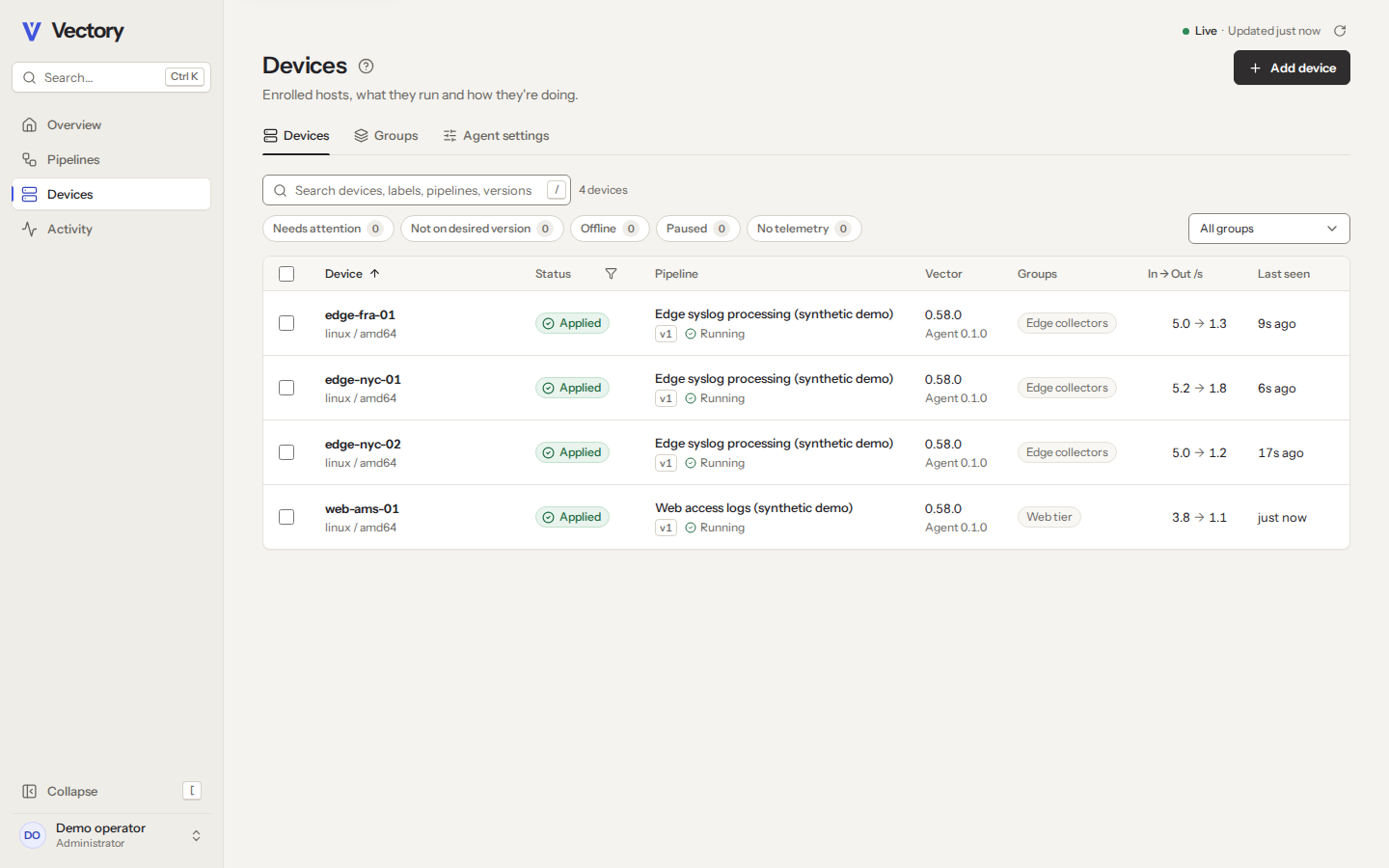 | 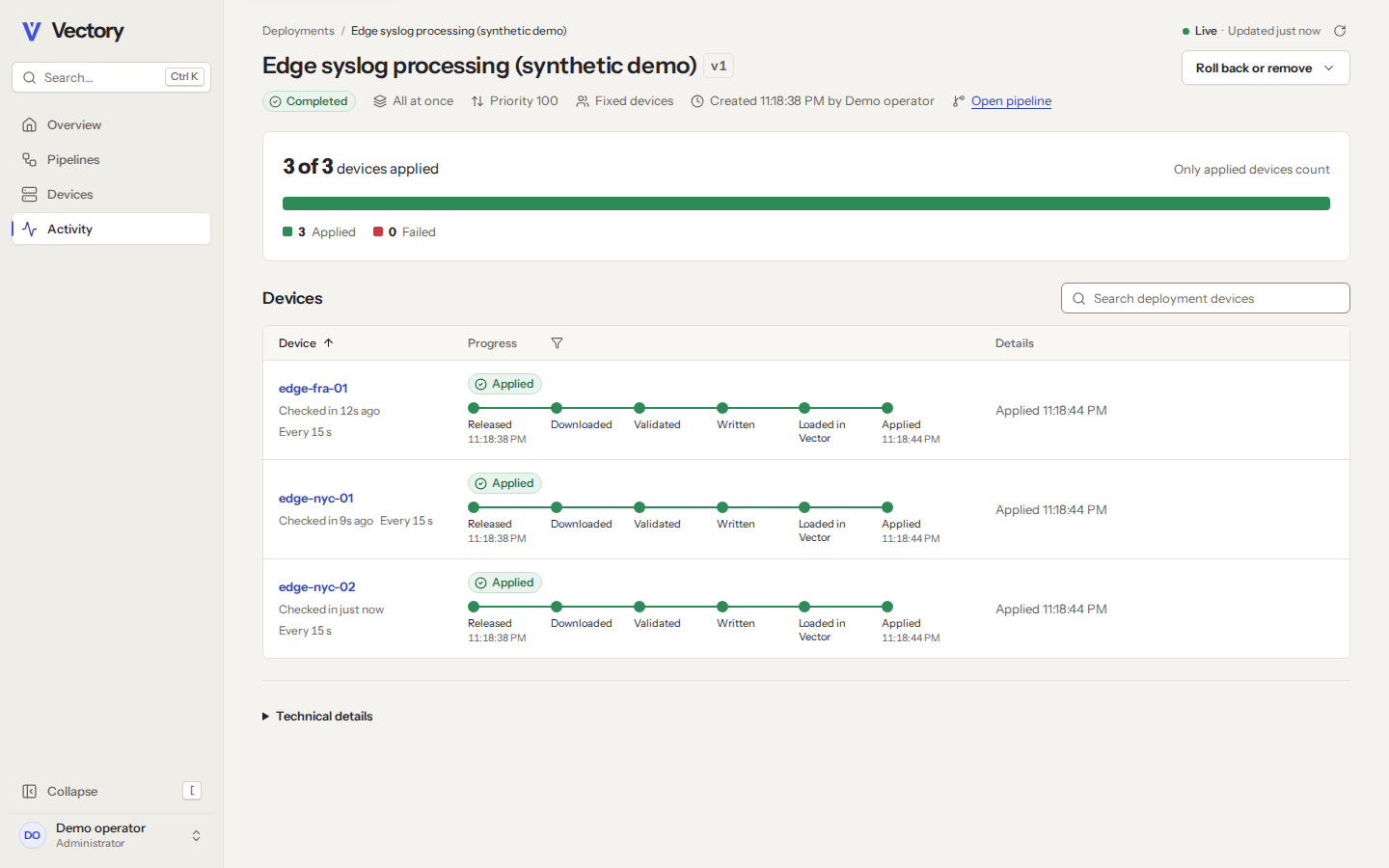 | 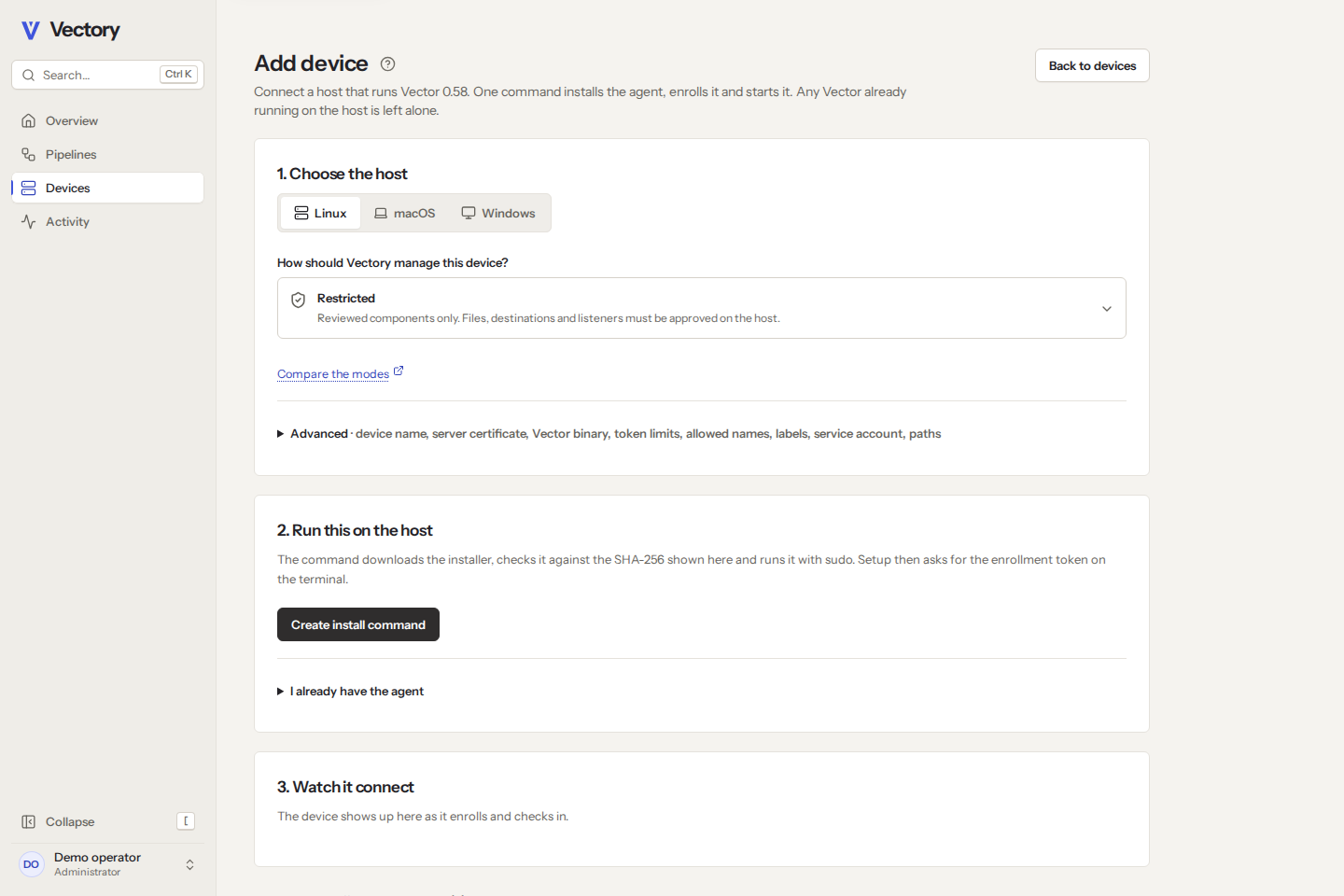 |
| Every device, and what it runs | Rollouts you can follow | Guided setup for each device |
Deployment and compatibility
Vectory runs the full build, publish, canary, apply and rollback workflow against real Vector 0.58.0 on Linux, macOS and Windows. CI tests the application, browser flows and isolated Compose stack. Tagged releases also run native operating-system service and update tests before images and downloads are published.
The Docker server uses Linux x86-64 images on Docker Engine or Docker Desktop, with local SQLite storage in its retained data volume. Apple silicon requires amd64 emulation. Agents ship for Linux x86-64 and Arm64, Intel and Apple silicon Macs, and Windows x86-64; Vector itself limits which hosts can run a managed pipeline. Cosign authenticates release artifacts and GHCR digests through the release workflow identity. It does not replace Windows Authenticode or Apple notarization, and it does not certify every customer's workload or host environment.
See Compatibility for the exact tested systems, Operational limits for remaining constraints, and the requirements checklist for the checks behind each requirement. Start new deployments with a canary and retain tested backups.
Develop
Vectory is a Rust (Axum, SQLite) server, a React and TypeScript dashboard, a Go agent and an Astro Starlight Help center. CONTRIBUTING.md lists the toolchain and how to run every test; docs/dev/DEVELOPMENT.md covers the local preview and the demo fleet.
| Folder | Contents |
|---|---|
server/ | API, agent listener, validator and vectory-admin |
dashboard/ | The web app and its browser tests |
agent/ | The vectory agent |
help-center/ | Help center build; its pages live in docs/user/ |
contracts/ | OpenAPI and agent protocol contracts |
vector-catalog/ | Vector 0.58 component metadata and fixtures |
deploy/, packaging/ | Docker Compose, container images and release tooling |
Contributing, security and license
Contributions are welcome: start with CONTRIBUTING.md. Report vulnerabilities privately as described in SECURITY.md. For project or business inquiries, contact 416rehman@ahmadz.ai. Vectory's own code is licensed under Apache-2.0.
Third-party components retain their licenses and copyright notices in NOTICE. The compiled documentation search includes GPL-covered code; its corresponding source and provenance are included in the release downloads and under /help/legal/ in the installed Help center. These source materials are optional for rebuilding. Installation uses the prebuilt kits.
Vectory is an independent project. It is not affiliated with or endorsed by Datadog or the Vector project.
Similar repos


Self-hosted control plane for Vector: design pipelines, release versions, deploy to your hosts, and observe what runs. Apache-2.0. Unsigned developer preview.
See the codeSee what people are saying
README
Vectory
Design, ship and roll back Vector pipelines across your fleet, from one self-hosted dashboard.
Quickstart · Download · Docs · How it works · Compatibility
Vectory is an open-source control plane for Vector. Build a pipeline in your browser, publish it as an immutable version, and roll it out to the hosts you choose, with previews, canaries, schedules and rollback. A small agent on each host applies the change and reports what Vector is actually running.
Why Vectory
| A visual editor for real Vector | Schema-driven settings for all 128 component types of Vector 0.58, eight starter pipelines that pass Vector 0.58.0's own validation, VRL with sample tests, and YAML, TOML or JSON import and export. Publication checks the pipeline structure and uses an isolated Vector 0.58 validator where safe; configuration providers and other device-only checks run on each device before it applies. |
| Rollouts you can trust | Immutable versions with diffs, device and group targeting with a preview, canaries that advance only when devices confirm, schedules and one-step rollback. |
| Outbound-only agents | The agent dials out over TLS 1.3 with mutual TLS. Nothing on your hosts listens for Vectory. |
| Your data stays yours | Events flow from Vector to your destinations, never through Vectory. Supported credential fields use device-local vectory-secret:NAME references; headers and URLs require native Vector secret providers or host-managed environment references in full mode. |
| Guardrails built in | Roles, two-factor sign-in and an exportable audit log. Signed per-device configurations. A local policy on each host that the server can't widen. |
| Self-hosted, no strings | Docker Compose and SQLite. No cloud account, analytics or outside CDN. Apache-2.0. |
How it works
flowchart LR
  B["Your browser"] -->|"HTTPS 443"| P["TLS proxy"]
  subgraph S["Vectory server (Docker Compose)"]
    P --> V["vectory-server<br/>dashboard · API · help<br/>agent listener :8443<br/>SQLite"]
    V -->|"internal network only"| W["Validator<br/>isolated Vector 0.58"]
  end
  subgraph H["Each device"]
    A["vectory agent<br/>outbound HTTPS 8443<br/>mutual TLS"] -->|"starts · verifies · rolls back"| X["Vector 0.58"]
  end
  A --> V
  X -->|"your events"| D[("Your destinations")]
- Build a pipeline in the dashboard. An isolated Vector validates it.
- Publish an immutable version and deploy it to devices or groups: all at once, as a canary, or on a schedule.
- The agent fetches its signed configuration, validates it with Vector, applies it and confirms Vector is running it. If it fails, the agent restores the last working version.
Get started
Choose Docker on Windows, macOS or Linux, or install the prebuilt Linux server without Docker. Point a DNS name at the computer and choose your command. No source build is required.
Linux with Docker, after starting Docker Engine and Compose:
curl -fsSL --proto '=https' https://vectory.ahmadz.ai/install.sh -o vectory-install.sh &&
bash vectory-install.sh
macOS, after starting Docker Desktop:
curl -fsSL --proto '=https' https://vectory.ahmadz.ai/install-desktop.sh -o vectory-install.sh &&
bash vectory-install.sh
Windows, in PowerShell after starting Docker Desktop in Linux container mode:
curl.exe -fsSL --proto '=https' https://vectory.ahmadz.ai/install.ps1 -o vectory-install.ps1
if ($LASTEXITCODE -eq 0) {
  powershell.exe -NoProfile -ExecutionPolicy Bypass -File .\vectory-install.ps1
} else {
  throw 'Installer download failed'
}
Linux without Docker, on an x86-64 host with systemd 252 or later and cgroup v2:
curl -fsSL --proto '=https' \
  https://vectory.ahmadz.ai/install-native.sh -o vectory-install-native.sh &&
sudo bash vectory-install-native.sh
Enter your hostname. The installer verifies the release signature, starts Vectory and sets up automatic HTTPS. Docker installations also verify immutable GHCR image identities. The native Linux kit includes prebuilt server, validator, Vector, proxy and signature-verifier executables, with the validator isolated by systemd. Open the printed URL and create your first administrator with the one-time setup secret. No Git, Rust, Go, Node.js or compiler is needed.
The prebuilt server images are Linux x86-64. Apple silicon uses Docker Desktop's amd64 emulation after you confirm that choice; it does not download a native Arm server image. Allow inbound TCP 80 and 443 for HTTPS and 8443 from your managed devices. Keep Docker running and retain its named data and certificate volumes. The server guide covers prerequisites, configurable settings, certificate choices and compatibility limits.
Then open Devices → Add device. Copy the command for Linux, macOS or Windows, run it on a host with Vector 0.58.x installed, and paste the enrollment token when prompted. The agent download, certificate trust and service setup are handled for you. Tokens stay out of URLs and commands.
- Quickstart: server, first device and first pipeline.
- Server installation: custom certificates, offline use and operations.
- Compatibility: platforms and actual test coverage.
- Security model: roles, host permissions and signatures.
Want to inspect a configuration first? The Vector config builder and visualizer creates, imports, visualizes and exports YAML, JSON and TOML in your browser without an account.
The 0.2.1 release supplies prebuilt agents, server kits, image archives, checksums, Sigstore bundles, SBOMs and dependency scan results. Container images are available from GHCR by immutable digest. Release verification uses GitHub OIDC and Cosign; native OS trust prompts and the agent's runtime update signatures are separate mechanisms.
The same guides ship inside every server as a searchable, offline Help center at /help/.
| | |
| Every device, and what it runs | Rollouts you can follow | Guided setup for each device |
Deployment and compatibility
Vectory runs the full build, publish, canary, apply and rollback workflow against real Vector 0.58.0 on Linux, macOS and Windows. CI tests the application, browser flows and isolated Compose stack. Tagged releases also run native operating-system service and update tests before images and downloads are published.
The Docker server uses Linux x86-64 images on Docker Engine or Docker Desktop, with local SQLite storage in its retained data volume. Apple silicon requires amd64 emulation. Agents ship for Linux x86-64 and Arm64, Intel and Apple silicon Macs, and Windows x86-64; Vector itself limits which hosts can run a managed pipeline. Cosign authenticates release artifacts and GHCR digests through the release workflow identity. It does not replace Windows Authenticode or Apple notarization, and it does not certify every customer's workload or host environment.
See Compatibility for the exact tested systems, Operational limits for remaining constraints, and the requirements checklist for the checks behind each requirement. Start new deployments with a canary and retain tested backups.
Develop
Vectory is a Rust (Axum, SQLite) server, a React and TypeScript dashboard, a Go agent and an Astro Starlight Help center. CONTRIBUTING.md lists the toolchain and how to run every test; docs/dev/DEVELOPMENT.md covers the local preview and the demo fleet.
| Folder | Contents |
|---|---|
server/ | API, agent listener, validator and vectory-admin |
dashboard/ | The web app and its browser tests |
agent/ | The vectory agent |
help-center/ | Help center build; its pages live in docs/user/ |
contracts/ | OpenAPI and agent protocol contracts |
vector-catalog/ | Vector 0.58 component metadata and fixtures |
deploy/, packaging/ | Docker Compose, container images and release tooling |
Contributing, security and license
Contributions are welcome: start with CONTRIBUTING.md. Report vulnerabilities privately as described in SECURITY.md. For project or business inquiries, contact 416rehman@ahmadz.ai. Vectory's own code is licensed under Apache-2.0.
Third-party components retain their licenses and copyright notices in NOTICE. The compiled documentation search includes GPL-covered code; its corresponding source and provenance are included in the release downloads and under /help/legal/ in the installed Help center. These source materials are optional for rebuilding. Installation uses the prebuilt kits.
Vectory is an independent project. It is not affiliated with or endorsed by Datadog or the Vector project.