
Native dictation and rewriting for Linux. At home on Omarchy, with editable drafts and independent providers.
See the codeSee what people are saying (1)
README
The most delightful dictation for Omarchy.
Speak freely, turn the result into a useful draft, and keep every original word. Mluva brings recording, editable rewrites and searchable history into a quiet native workspace that follows your desktop theme.
Install · Watch the intro · Choose your providers · Release notes
Meet Mluva
https://github.com/user-attachments/assets/ffac3582-3146-46f2-9244-2c28c5cbef26
72 seconds · Narrated by Daniel Vecera · Captions included. Video credits and demo notes.
From a thought to a finished draft
| Start with… | Make it useful |
|---|---|
| A rough idea | Dictate with F9. Scribe streams words while you speak; completed text copies to the clipboard. |
| Text you already have | Paste into a conversation, then choose Polish, Structure or your own instruction. |
| A note that needs shape | Enable Live rewrite while speaking. Grilling keeps useful questions above evolving notes; task spec, structured note and custom templates remain available. |
| A draft worth keeping | Edit originals and rewrites, save with Ctrl+S, and keep raw recognition available separately. |
| Work to return to | Find conversations through History, reuse saved prompts, and export Markdown or JSON. |
A calm place to work. Stable Live panes, restrained recording motion and subtle Markdown keep long notes readable. Ctrl+P finds actions; Ctrl+Enter sends a rewrite. Copy and scrolling preferences are yours to change.
Your choice of engines. Select speech and rewriting independently: ElevenLabs Scribe, Mluva-managed local speech models or a compatible transcription API; native Codex app-server or a LiteLLM/OpenAI-compatible service for rewriting. Availability, credentials and models are configured in Settings.
Live rewrite is opt-in and Experimental. It marks missing information, preserves manual edits and reconciles the draft with the final transcript when recording stops. Explore the features and their limits →
Install
Run the setup from a source checkout. On Omarchy Quattro, it installs the desktop dependencies, native application and shell plugin together. It shows the installation plan first; system packages may request your sudo password.
git clone --depth 1 https://github.com/1vecera/Mluva.git mluva
cd mluva
bash install.sh
Launch Mluva from the application menu, then choose your speech and rewrite providers. Cloud providers need an account and credentials; local recognition downloads its own model, with CPU support by default and optional NVIDIA GPU acceleration. Provider setup is separate from installing the app.
Install with an agent
Copy this prompt into your coding agent:
Install Mluva from https://github.com/1vecera/Mluva on this computer.
Use the repository's install.sh to install desktop dependencies and the native
app, including the mluva.dictation plugin on Omarchy Quattro. Inspect the setup
script, then run it with --yes. Preserve existing settings, conversations and
plugin customizations. If Mluva is running, ask me to quit it before upgrading.
Help me configure speech and rewriting with my chosen providers, installing
any required provider client and using existing credentials without revealing
them. Tell me how to launch Mluva and approve its recording shortcuts.
Other install paths: bash install.sh --app-only installs the native app without changing plugins. Fedora GNOME uses the same setup command, with the compatibility limits below. For a staged install or preinstalled dependencies, see the Linux guide.
Upgrading: quit Mluva, update the checkout with git pull --ff-only, and rerun bash install.sh. Existing plugin customizations are preserved; setup checks for conflicting changes before installing. If a later plugin operation fails, the native app remains installed and setup reports how to retry. Upgrades from 0.x migrate the old product identities and retain a private backup of settings, conversations, drafts and audio. See the migration guide for customized installations.
The Omarchy widget
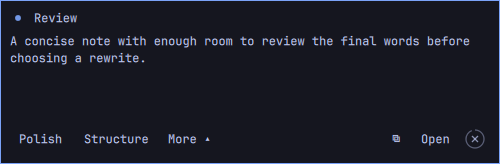
The floating widget starts with five preview lines while you speak. A bare light sits at top left and the timer at top right. Drag the text box or status row to move it, choose a lower-left/bottom/lower-right preset, or focus it and press Super+T on Omarchy to tile it. Floating mode keeps it above other windows; resizing gives the preview more room. The main app uses the same monospace text and bare header above its content. When you finish, rewrite, copy or open the note in the workspace. Hover, keyboard focus and active rewrites pause its configurable four-second dismissal. Shift+F9 reopens the latest conversation when configured.
Closing the main window keeps Mluva available; quit from the shell or application menu. The Omarchy guide covers dependencies, existing manual installs and removal.
Platform support
| Platform | Status |
|---|---|
| Omarchy · Hyprland · Quickshell | Primary, maintained platform. The dictation, rewrite and widget workflow is tested end to end and used daily by the maintainer. |
| Fedora · GNOME · Wayland | Compatibility is retained, but has not been tested for several releases. The last desktop acceptance used Fedora 44 and GNOME 50. |
Individual advanced features, including Live rewrite, Meeting mode and alternative provider routes, remain Experimental where indicated. Automatic insertion is off by default; clipboard delivery is the standard workflow. See the feature status and desktop requirements.
Your text and the cloud
- Speech and rewriting: your selected providers determine where processing happens. Local Whisper keeps recognition local; cloud speech sends audio to that provider. Rewriting sends the selected text to your rewrite provider.
- Local history: originals, completed rewrites and titles stay together in a local SQLite database. Rename, export or delete conversations. Automatic titles send up to 6,000 characters from each new conversation to the rewrite provider; disable them in Settings to use local labels.
- Incognito: no saved history or recovery audio, conversation rewriting or generated titles. Recognition still uses your selected speech provider; cancellation cannot recall audio already sent.
See the product contract for retention, recovery and privacy details.
Development
Mluva uses Python, GTK 4, Libadwaita and PipeWire, with a QML plugin for Omarchy. Start with the code map and focused checks or Linux guide.
make linux-test linux-shortcut-test
shellcheck install.sh linux/*.sh linux/tests/*.sh dev/*.sh linux/mluva-shell
Use the isolated development runner for UI verification. Bug reports should include the platform, reproduction steps and expected behavior. Keep private recordings, transcripts and credentials out of public issues.
Mluva means speech or manner of speaking in Czech, pronounced roughly “MLOO-vah.” Apache License 2.0 · Third-party notices · Changelog
Contributors

126 commits
Similar repos


Languages
Python
92.3%
Shell
2.8%
QML
2.6%
JavaScript
1.4%
Native dictation and rewriting for Linux. At home on Omarchy, with editable drafts and independent providers.
See the codeSee what people are saying (1)
README
The most delightful dictation for Omarchy.
Speak freely, turn the result into a useful draft, and keep every original word. Mluva brings recording, editable rewrites and searchable history into a quiet native workspace that follows your desktop theme.
Install · Watch the intro · Choose your providers · Release notes
Meet Mluva
https://github.com/user-attachments/assets/ffac3582-3146-46f2-9244-2c28c5cbef26
72 seconds · Narrated by Daniel Vecera · Captions included. Video credits and demo notes.
From a thought to a finished draft
| Start with… | Make it useful |
|---|---|
| A rough idea | Dictate with F9. Scribe streams words while you speak; completed text copies to the clipboard. |
| Text you already have | Paste into a conversation, then choose Polish, Structure or your own instruction. |
| A note that needs shape | Enable Live rewrite while speaking. Grilling keeps useful questions above evolving notes; task spec, structured note and custom templates remain available. |
| A draft worth keeping | Edit originals and rewrites, save with Ctrl+S, and keep raw recognition available separately. |
| Work to return to | Find conversations through History, reuse saved prompts, and export Markdown or JSON. |
A calm place to work. Stable Live panes, restrained recording motion and subtle Markdown keep long notes readable. Ctrl+P finds actions; Ctrl+Enter sends a rewrite. Copy and scrolling preferences are yours to change.
Your choice of engines. Select speech and rewriting independently: ElevenLabs Scribe, Mluva-managed local speech models or a compatible transcription API; native Codex app-server or a LiteLLM/OpenAI-compatible service for rewriting. Availability, credentials and models are configured in Settings.
Live rewrite is opt-in and Experimental. It marks missing information, preserves manual edits and reconciles the draft with the final transcript when recording stops. Explore the features and their limits →
Install
Run the setup from a source checkout. On Omarchy Quattro, it installs the desktop dependencies, native application and shell plugin together. It shows the installation plan first; system packages may request your sudo password.
git clone --depth 1 https://github.com/1vecera/Mluva.git mluva
cd mluva
bash install.sh
Launch Mluva from the application menu, then choose your speech and rewrite providers. Cloud providers need an account and credentials; local recognition downloads its own model, with CPU support by default and optional NVIDIA GPU acceleration. Provider setup is separate from installing the app.
Install with an agent
Copy this prompt into your coding agent:
Install Mluva from https://github.com/1vecera/Mluva on this computer.
Use the repository's install.sh to install desktop dependencies and the native
app, including the mluva.dictation plugin on Omarchy Quattro. Inspect the setup
script, then run it with --yes. Preserve existing settings, conversations and
plugin customizations. If Mluva is running, ask me to quit it before upgrading.
Help me configure speech and rewriting with my chosen providers, installing
any required provider client and using existing credentials without revealing
them. Tell me how to launch Mluva and approve its recording shortcuts.
Other install paths: bash install.sh --app-only installs the native app without changing plugins. Fedora GNOME uses the same setup command, with the compatibility limits below. For a staged install or preinstalled dependencies, see the Linux guide.
Upgrading: quit Mluva, update the checkout with git pull --ff-only, and rerun bash install.sh. Existing plugin customizations are preserved; setup checks for conflicting changes before installing. If a later plugin operation fails, the native app remains installed and setup reports how to retry. Upgrades from 0.x migrate the old product identities and retain a private backup of settings, conversations, drafts and audio. See the migration guide for customized installations.
The Omarchy widget
The floating widget starts with five preview lines while you speak. A bare light sits at top left and the timer at top right. Drag the text box or status row to move it, choose a lower-left/bottom/lower-right preset, or focus it and press Super+T on Omarchy to tile it. Floating mode keeps it above other windows; resizing gives the preview more room. The main app uses the same monospace text and bare header above its content. When you finish, rewrite, copy or open the note in the workspace. Hover, keyboard focus and active rewrites pause its configurable four-second dismissal. Shift+F9 reopens the latest conversation when configured.
Closing the main window keeps Mluva available; quit from the shell or application menu. The Omarchy guide covers dependencies, existing manual installs and removal.
Platform support
| Platform | Status |
|---|---|
| Omarchy · Hyprland · Quickshell | Primary, maintained platform. The dictation, rewrite and widget workflow is tested end to end and used daily by the maintainer. |
| Fedora · GNOME · Wayland | Compatibility is retained, but has not been tested for several releases. The last desktop acceptance used Fedora 44 and GNOME 50. |
Individual advanced features, including Live rewrite, Meeting mode and alternative provider routes, remain Experimental where indicated. Automatic insertion is off by default; clipboard delivery is the standard workflow. See the feature status and desktop requirements.
Your text and the cloud
- Speech and rewriting: your selected providers determine where processing happens. Local Whisper keeps recognition local; cloud speech sends audio to that provider. Rewriting sends the selected text to your rewrite provider.
- Local history: originals, completed rewrites and titles stay together in a local SQLite database. Rename, export or delete conversations. Automatic titles send up to 6,000 characters from each new conversation to the rewrite provider; disable them in Settings to use local labels.
- Incognito: no saved history or recovery audio, conversation rewriting or generated titles. Recognition still uses your selected speech provider; cancellation cannot recall audio already sent.
See the product contract for retention, recovery and privacy details.
Development
Mluva uses Python, GTK 4, Libadwaita and PipeWire, with a QML plugin for Omarchy. Start with the code map and focused checks or Linux guide.
make linux-test linux-shortcut-test
shellcheck install.sh linux/*.sh linux/tests/*.sh dev/*.sh linux/mluva-shell
Use the isolated development runner for UI verification. Bug reports should include the platform, reproduction steps and expected behavior. Keep private recordings, transcripts and credentials out of public issues.
Mluva means speech or manner of speaking in Czech, pronounced roughly “MLOO-vah.” Apache License 2.0 · Third-party notices · Changelog
Similar repos
Contributors
126 commits
Languages
Python
92.3%
Shell
2.8%
QML
2.6%
JavaScript
1.4%