Color effects manager for Razer devices for macOS. Supports High Sierra (10.13) to Monterey (12.0). Made by the community, based on openrazer.
JavaScript
2,574
409 commits
updated Apr 5, 2024
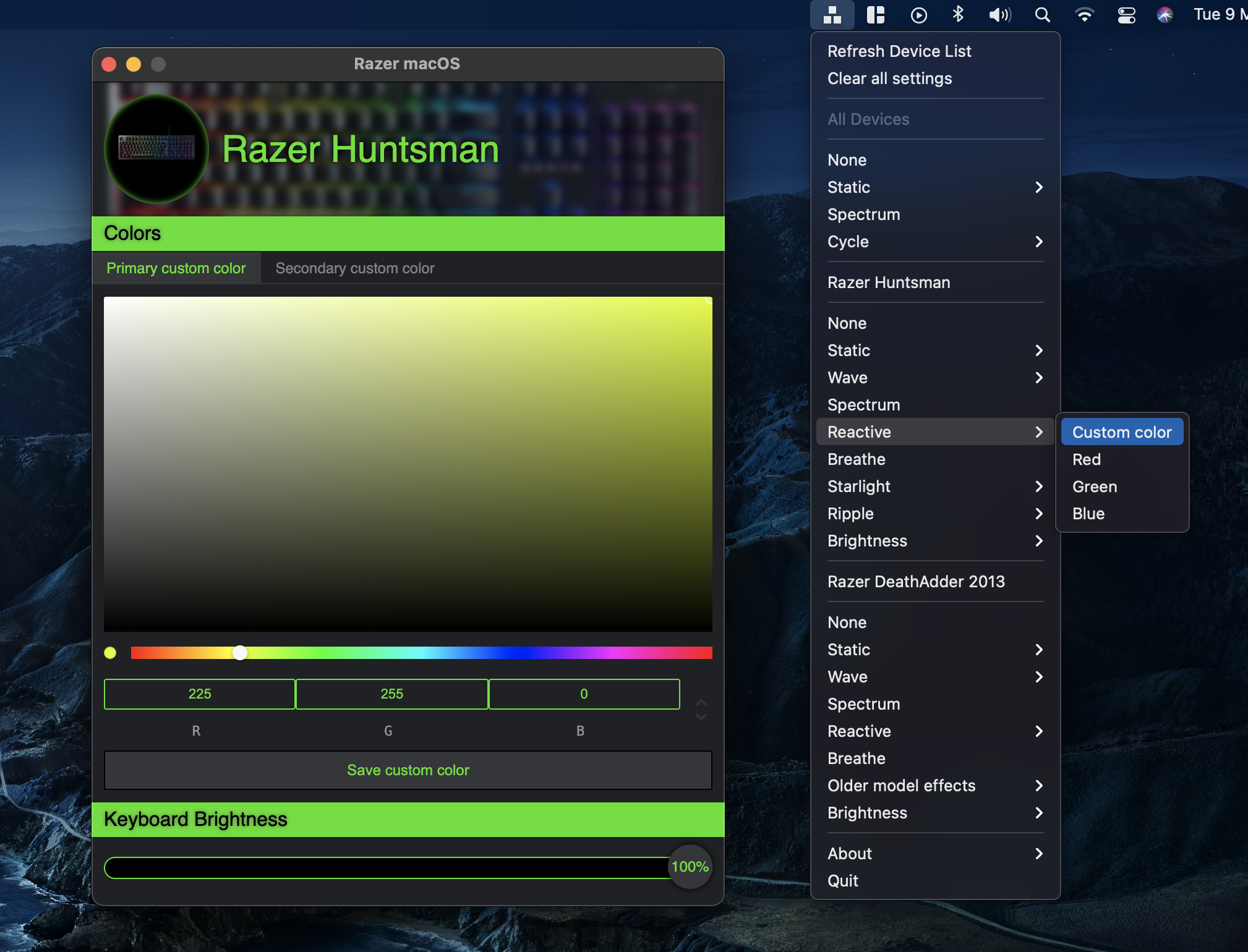
Open source color effects manager for Razer devices on macOS
Install by drag and drop to Applications. If you get a security warning when opening the app, you need to go to your Mac's "System Preferences", "Security and Privacy", "General" and click "Open" at the bottom to allow Razer macOS to run.
Please see FAQ section below if color changes are not working, otherwise open a new issue.
For a complete list of supported devices, please see openrazer.
Confirmed working for:
Keyboards:
Mice:
Mouse mats:
e-GPUs:
Headphones and stand:
Laptops:
Speakers:
Mugs:
Accessories:
Please feel free to open pull requests for new devices you have tested.
Q: Selecting a colour setting has no effect on my keyboard.
A: It is possible that a wrong on-board keyboard profile has been selected. Change to a different profile and try again. See your device manual for specific instructions on how to switch profiles.
Q: Menu says "No device found".
A: Use the "Refresh Device List" option, which can be found when pressing the Razer OS icon on the top menu bar.
Q: How do I customize and rebind keys?
You might find the Karabiner-elements tool helpful.
Ongoing new device support will be provided on a volunteer contribution basis, as it is difficult for someone who does not own the physical devices to be adding support and conducting tests.
git clone --recursive https://github.com/1kc/razer-macos.git
Ensure xcode command line tools are installed,
If you have a paid Apple Developer account, edit release.sh with your details.
Afterwards, to automatically build, sign, and/or notarize (if applicable,) run in Terminal: ./release.sh
Ad-hoc signing will be used if account information is left empty.
Or build manually:
Install node package dependencies:
yarn
Run development server:
yarn dev
During development, every time the driver code has been updated, a rebuild is required:
yarn rebuild
For building a distribution ready app and dmg:
yarn dist
Sign the universal package before moving to /Applications folder with ad-hoc signing:
codesign -s - --deep --force ./dist/mac-universal/Razer\ macOS.app
Project includes both hardware drivers and user interface.
Drivers are ported from the openrazer project for Linux. The goal is to support all devices from openrazer on macOS.
An Electron macOS menu bar app is used for the user interface. The C driver is exposed as a native Node.js addon using node-addon-api, which gets invoked by Electron at runtime to send packets to devices.
Adding support for new peripherals types requires porting from the openrazer project. See wiki.
Builds on work done by these amazing projects:
142 followers · starred Sep 2021
4,851 followers · starred May 2020
188 followers · starred Feb 2021
54 followers · starred Sep 2022
Color effects manager for Razer devices for macOS. Supports High Sierra (10.13) to Monterey (12.0). Made by the community, based on openrazer.
JavaScript
2,574
409 commits
updated Apr 5, 2024
Open source color effects manager for Razer devices on macOS
Install by drag and drop to Applications. If you get a security warning when opening the app, you need to go to your Mac's "System Preferences", "Security and Privacy", "General" and click "Open" at the bottom to allow Razer macOS to run.
Please see FAQ section below if color changes are not working, otherwise open a new issue.
For a complete list of supported devices, please see openrazer.
Confirmed working for:
Keyboards:
Mice:
Mouse mats:
e-GPUs:
Headphones and stand:
Laptops:
Speakers:
Mugs:
Accessories:
Please feel free to open pull requests for new devices you have tested.
Q: Selecting a colour setting has no effect on my keyboard.
A: It is possible that a wrong on-board keyboard profile has been selected. Change to a different profile and try again. See your device manual for specific instructions on how to switch profiles.
Q: Menu says "No device found".
A: Use the "Refresh Device List" option, which can be found when pressing the Razer OS icon on the top menu bar.
Q: How do I customize and rebind keys?
You might find the Karabiner-elements tool helpful.
Ongoing new device support will be provided on a volunteer contribution basis, as it is difficult for someone who does not own the physical devices to be adding support and conducting tests.
git clone --recursive https://github.com/1kc/razer-macos.git
Ensure xcode command line tools are installed,
If you have a paid Apple Developer account, edit release.sh with your details.
Afterwards, to automatically build, sign, and/or notarize (if applicable,) run in Terminal: ./release.sh
Ad-hoc signing will be used if account information is left empty.
Or build manually:
Install node package dependencies:
yarn
Run development server:
yarn dev
During development, every time the driver code has been updated, a rebuild is required:
yarn rebuild
For building a distribution ready app and dmg:
yarn dist
Sign the universal package before moving to /Applications folder with ad-hoc signing:
codesign -s - --deep --force ./dist/mac-universal/Razer\ macOS.app
Project includes both hardware drivers and user interface.
Drivers are ported from the openrazer project for Linux. The goal is to support all devices from openrazer on macOS.
An Electron macOS menu bar app is used for the user interface. The C driver is exposed as a native Node.js addon using node-addon-api, which gets invoked by Electron at runtime to send packets to devices.
Adding support for new peripherals types requires porting from the openrazer project. See wiki.
Builds on work done by these amazing projects:
142 followers · starred Sep 2021
4,851 followers · starred May 2020
188 followers · starred Feb 2021
54 followers · starred Sep 2022