
README
EmpaAva
An Open-source Agentic 3D-Avatar Empathetic Live Chatbot




EmpaAva is an open-source, live, agentic 3D-avatar chatbot for face-to-face empathetic interaction. It listens to a user, understands their words and emotion, plans a supportive response, and delivers it through synchronized emotional speech, facial motion, and photorealistic 3D-avatar rendering.
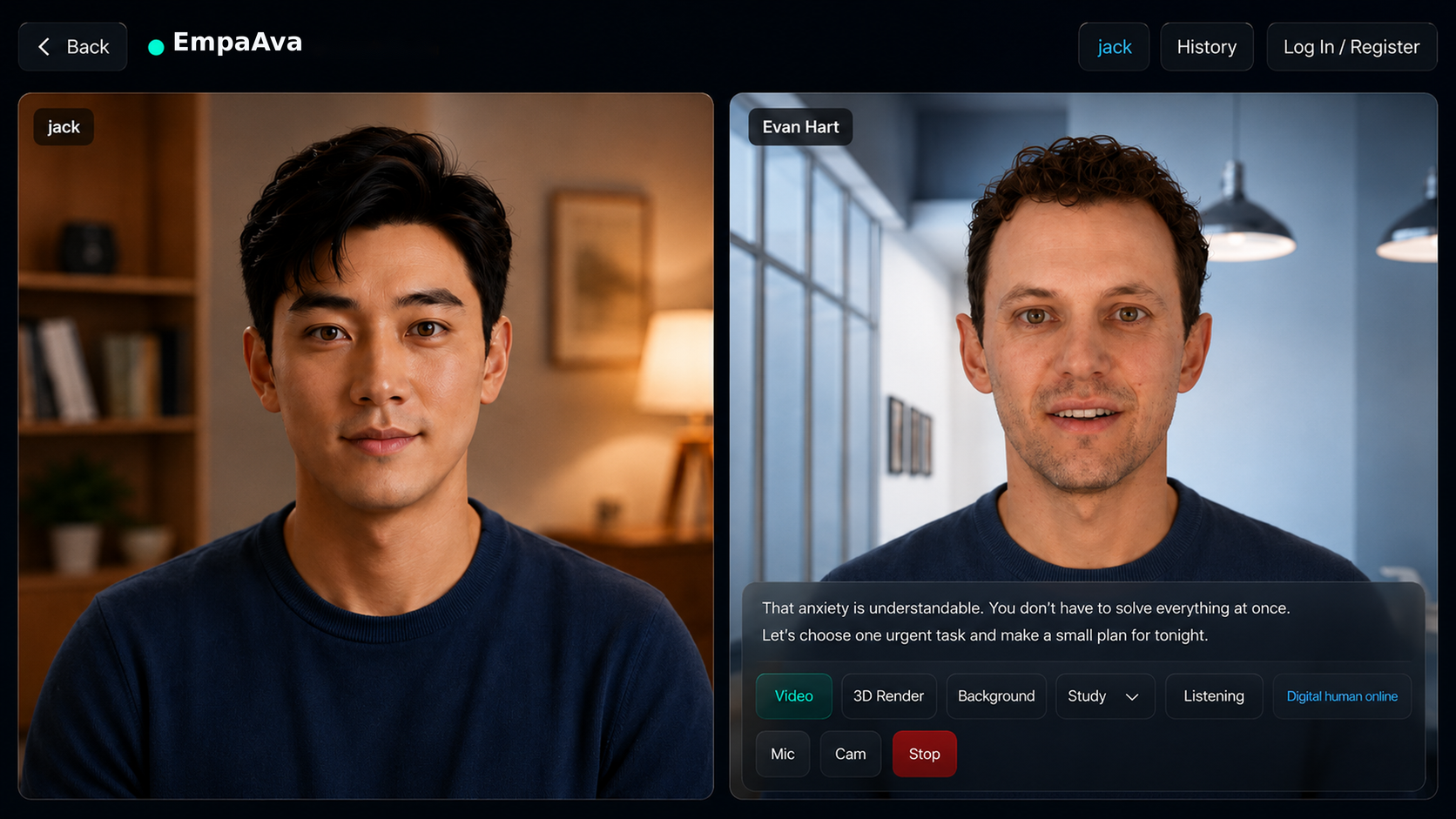
EmpaAva turns multimodal user input into a live, embodied empathetic response.
Contents
- Highlights
- News
- Demo
- Workflow
- Architecture
- Installation
- Models and Runtime
- Configuration and Documentation
- Acknowledgements
- Citation
- License and Responsible Use
Highlights
- Live multimodal interaction. Browser-based microphone and optional camera input support a natural video-call-like conversation loop.
- Tri-Agent Architecture. PerceptionAgent, ResponseAgent, and RenderAgent separate understanding, empathetic planning, and embodied generation into independently testable stages.
- Response Planning. A structured plan aligns the reply text, emotion, voice, avatar, expression, motion, and background around one empathetic intent.
- Embodied 3D responses. Emotional TTS, audio-driven FLAME motion, and 3D Gaussian rendering produce synchronized avatar videos and interactive assets.
- Inspectable and extensible. Human-readable state, manifests, and modular workers make every stage replaceable and easier to reproduce or ablate.
News
- 2026-07: EmpaAva project page, paper, and full system implementation are prepared for public release.
- 2026-07: The browser booth supports guest sessions, avatar and background selection, multimodal conversation history, playback, and export.
- 2026-07: The complete perception-to-rendering pipeline is available through a unified CLI and local worker services.
Demo
EmpaAva runs as a video-call-like emotional booth. A user selects a digital human, speaks naturally, and receives a rendered avatar response with emotional speech and synchronized facial motion. Each conversation turn can be replayed, inspected in the 3D viewer, or exported from the session history.
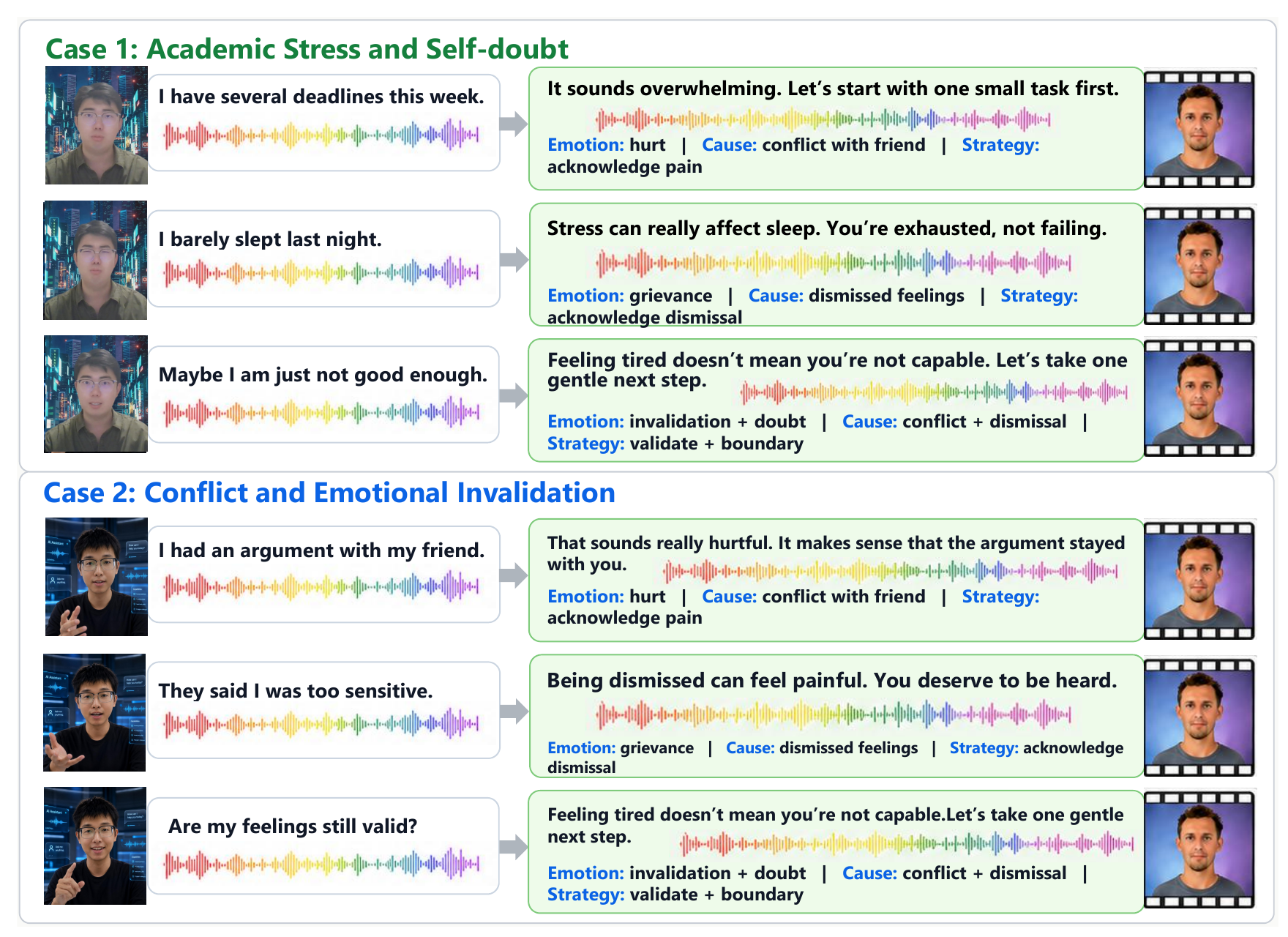
Qualitative multi-turn examples for academic stress and emotional invalidation.
Workflow
The browser handles entry, avatar setup, audio/video capture, response playback, 3D viewing, and conversation export as one continuous interaction.
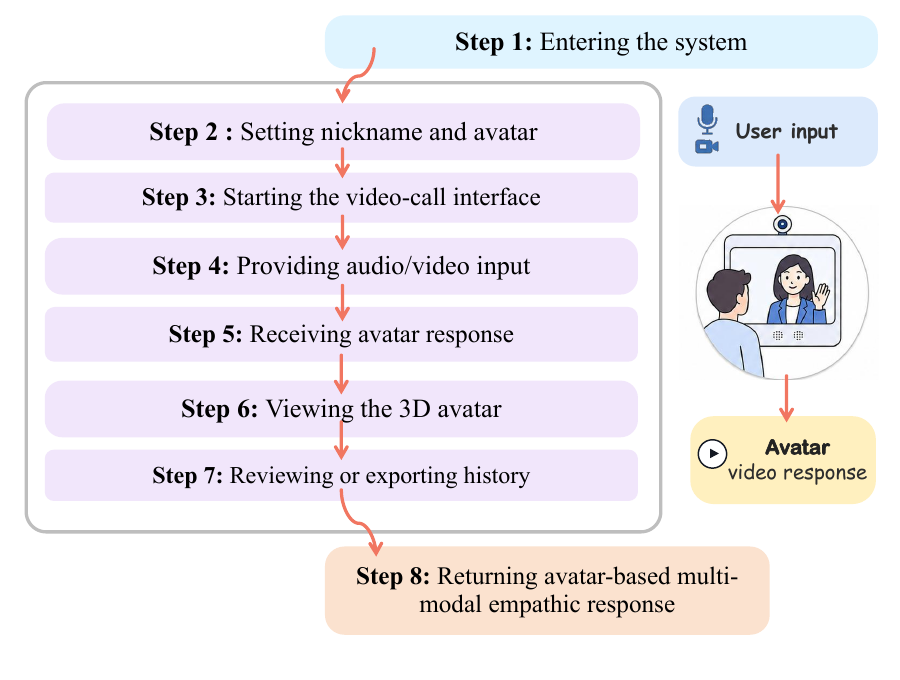
At runtime, each turn follows the same end-to-end path:
Audio + optional video
  -> speech recognition and emotion perception
  -> empathetic response planning
  -> emotional speech synthesis
  -> audio-driven facial motion
  -> FLAME and Gaussian motion merge
  -> photorealistic 3D-avatar rendering
  -> browser playback, history, and export
Architecture
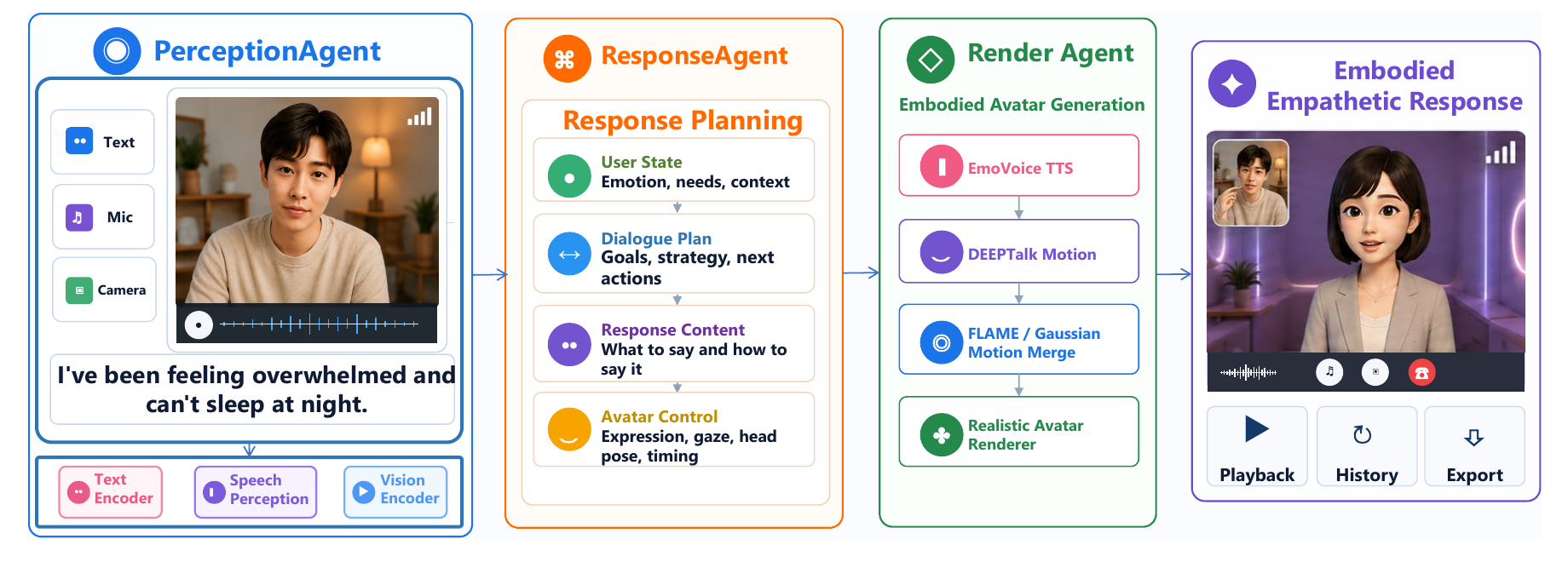
EmpaAva decomposes empathetic interaction into three cooperating agents:
- PerceptionAgent converts speech, acoustic emotion, optional visual context, and dialogue history into a structured representation of the user state.
- ResponseAgent reasons about the user's emotion, needs, and context, then produces a reply plan covering content, strategy, delivery, and avatar control.
- RenderAgent executes the plan with emotional TTS, DEEPTalk motion, FLAME/Gaussian parameter merging, and realistic avatar rendering.
The agents communicate through inspectable JSON state rather than opaque model interfaces, so perception, planning, speech, motion, and rendering components can be tested or replaced independently. See Agent Architecture for the full stage contracts.
Installation
For a reproducible UI/API smoke test from a fresh checkout, use the standard entry points below:
git clone https://github.com/1114531938/EmpaAva_System.git
cd EmpaAva_System
cp .env.example .env
bash scripts/setup.sh
python scripts/check_env.py
bash scripts/start_demo.sh
The default EMPAAVA_MODE=mock is explicitly limited to UI and API smoke
testing. It does not load the research models and is not full EmpaAva inference.
Stop it with bash scripts/stop_demo.sh.
Requirements
The complete avatar pipeline is intended for a Linux GPU server. A source-only checkout can run the documentation and lightweight web code, but rendering requires the separately published runtime assets.
| Requirement | Supported or expected configuration |
|---|---|
| Operating system | Ubuntu 20.04/22.04 or a compatible Linux distribution |
| Python | Python 3 for most workers; Python 3.8 for AvaMERG |
| GPU | NVIDIA H200 and A100 are supported and recommended; RTX 4090 24 GB is supported for inference with reduced resolution/concurrency when necessary |
| Container runtime | Apptainer or Singularity with NVIDIA GPU support |
| System tools | Git, Git LFS, curl, build tools, FFmpeg/FFprobe, Python venv support |
| Storage | Allow substantial space for checkpoints, the Gaussian container, caches, and outputs |
Install the basic Ubuntu packages:
sudo apt-get update
sudo apt-get install -y \
  git git-lfs curl build-essential ffmpeg \
  python3 python3-dev python3-venv python3-pip
git lfs install
Install the NVIDIA driver, CUDA runtime, and Apptainer separately according to
your host. Confirm that nvidia-smi and apptainer exec --nv ... can access the
GPU before starting the rendering worker. Full 3D Gaussian rendering cannot run
on CPU. Other NVIDIA GPUs should provide CUDA compute capability 8.0 or newer
and at least 24 GB VRAM; allow approximately 140 GB for environments, models,
caches, and outputs.
1. Clone the repository
git clone https://github.com/1114531938/EmpaAva_System.git
cd EmpaAva_System
Set a stable absolute project path and create the local configuration:
export AVATAR_SYSTEM_ROOT="$(pwd)"
export PROJECT_ROOT="$AVATAR_SYSTEM_ROOT"
cp config/runtime.env.example config/runtime.env
chmod 600 config/runtime.env
Edit config/runtime.env and set at least AVATAR_SYSTEM_ROOT, PROJECT_ROOT,
DEPB_ROOT, and the configured LLM provider credentials. Never commit this file.
set -a
source config/runtime.env
set +a
2. Restore models and runtime assets
Review the machine-readable model inventory and third-party terms first. It records each downloadable bundle's name, source, version, license summary, and disk requirements. Models with unknown or undocumented licenses are never downloaded automatically.
cat models/manifest.json
bash scripts/download_models.sh --accept-licenses
The standard downloader supports resumable transfers, a configurable cache
(EMPAAVA_CACHE_DIR), checksum verification, and safe repeated execution.
Model checkpoints, avatar point clouds, the Gaussian rendering container, and
other large runtime files are distributed through the
runtime-assets-2026-07-01
GitHub Release rather than Git:
bash scripts/download_runtime_assets.sh
The script downloads all archive parts, verifies their SHA-256 checksums, extracts them into the expected paths, and rebuilds missing Python environments. To restore assets without building environments, use:
AVATAR_RUNTIME_REBUILD_VENVS=0 bash scripts/download_runtime_assets.sh
3. Build or repair the Python environments
bash scripts/rebuild_runtime_venvs.sh
The default layout is:
runtime/cache/venvs/web
runtime/cache/venvs/perception
runtime/cache/venvs/deeptalk
integrations/avamerg/.avamerg38
integrations/emotivoice/.EmotiVoice
integrations/gaussian_avatar/.GSavatar_glibc
If Python 3.8 is not on PATH, specify both interpreters explicitly:
AVATAR_PYTHON3=/usr/bin/python3 \
AVATAR_PYTHON38=/usr/bin/python3.8 \
  bash scripts/rebuild_runtime_venvs.sh
4. Configure host paths and FFmpeg
The restored runtime normally provides cached FFmpeg binaries. To use the system installation instead:
export AVATAR_FFMPEG=/usr/bin/ffmpeg
export AVATAR_FFPROBE=/usr/bin/ffprobe
export DEPB_FFMPEG=/usr/bin/ffmpeg
If the repository is outside /scratch, expose its absolute path to Apptainer:
export APPTAINER_FLAGS="--nv -B $AVATAR_SYSTEM_ROOT:$AVATAR_SYSTEM_ROOT"
See Reproduction Setup for the full checkpoint inventory and all supported path overrides.
5. Verify the installation
Run the consolidated preflight first:
python scripts/check_env.py
It reports PASS, WARN, or FAIL for Python, CUDA, GPU access, FFmpeg,
model directories, configured ports, environment variables, third-party Python
modules, checkpoints, and write permissions. Resolve every FAIL before using
full mode.
bash scripts/avatar.sh --help

test -x runtime/cache/venvs/web/bin/python
test -x runtime/cache/venvs/perception/bin/python
test -x runtime/cache/venvs/deeptalk/bin/python
test -x integrations/avamerg/.avamerg38/bin/python
test -x integrations/emotivoice/.EmotiVoice/bin/python
test -x integrations/gaussian_avatar/.GSavatar_glibc/bin/python

test -f integrations/emotivoice/outputs/prompt_tts_open_source_joint/ckpt/g_00140000
test -f integrations/deeptalk/DEEPTalk/checkpoint/DEEPTalk/DEEPTalk.pth
test -f integrations/gaussian_avatar/media/306/point_cloud.ply
test -f integrations/gaussian_avatar/media/306/flame_param.npz
Every test command should exit successfully without printing output.
6. Start the system
The standard managed entry points are:
bash scripts/start_demo.sh
bash scripts/stop_demo.sh
They read .env and can be run repeatedly. In full mode the existing worker
service orchestration remains available through scripts/avatar.sh.
# Main studio UI
bash scripts/avatar.sh web

# EmpaAva booth UI; local workers start automatically by default
bash scripts/avatar.sh booth
Then open:
- Studio: http://localhost:7861/
- EmpaAva booth: http://localhost:7862/
Use DEPB_AUTO_START_WORKERS=0 to manage workers separately:
bash scripts/avatar.sh worker perception
bash scripts/avatar.sh worker avamerg
bash scripts/avatar.sh worker tts
bash scripts/avatar.sh worker deeptalk
bash scripts/avatar.sh worker gaussian
Check the services after startup:
curl -fsS http://127.0.0.1:7862/
curl -fsS http://127.0.0.1:8788/health
curl -fsS http://127.0.0.1:8789/health
curl -fsS http://127.0.0.1:8790/health
curl -fsS http://127.0.0.1:8791/health
curl -fsS http://127.0.0.1:8792/health
7. Run a CLI smoke test
The repository includes a one-second sample audio/video pair, so reviewers do not need a camera or microphone:
bash scripts/run_example.sh
In mock mode the expected result is
runtime/outputs/example/manifest.json, matching
examples/expected/mock_manifest.json; this is only a UI/API smoke test. In
full mode the same command sends examples/inputs/sample.wav and
examples/inputs/sample.mp4 through the complete pipeline.
PYTHONPATH=src runtime/cache/venvs/deeptalk/bin/python \
  -m avatar_system.pipeline.cli \
  --input_wav /path/to/input.wav \
  --input_video /path/to/optional_user_video.webm \
  --avatar_id 306 \
  --tts_speaker_id 6224 \
  --background study \
  --config src/avatar_system/pipeline_config.yaml
Outputs are written to runtime/outputs/<run_id>/, including stage state,
perception results, the reply plan, generated audio and motion, viewer assets,
and the final avatar video. Every run also writes a unified manifest.json
containing model versions, configuration, input and output files, elapsed time,
stage timing data, fallbacks, random seed, and exception information.
Common failures are usually caused by missing release assets, incompatible CUDA wheels, incorrect Apptainer bind paths, or environment variables that still point to the original machine. The troubleshooting checklist in Reproduction Setup covers each worker and required checkpoint.
Models and Runtime
EmpaAva connects specialized open-source models through local workers instead of treating the system as one end-to-end model.
| Stage | Default model or tool | Main output |
|---|---|---|
| Speech recognition | Whisper (small by default) | Transcript and ASR metadata |
| Speech emotion recognition | FunASR emotion2vec_plus_seed | Normalized acoustic emotion |
| Empathetic reasoning | AvaMERG / configured LLM backend | Reply content and response plan |
| Emotional speech | EmotiVoice | Synthesized response WAV |
| Facial motion | DEEPTalk | Frame-level FLAME motion |
| Motion integration | FLAME / Gaussian parameter merge | Render-ready motion sequence |
| Avatar generation | GaussianAvatar renderer | MP4 and interactive viewer assets |
Default local service ports are:
| Port | Service |
|---|---|
| 7861 | Main FastAPI studio |
| 7862 | EmpaAva booth |
| 8788 | EmotiVoice worker |
| 8789 | AvaMERG worker |
| 8790 | DEEPTalk worker |
| 8791 | Perception worker |
| 8792 | Gaussian render worker |
For health checks, worker contracts, and port overrides, see Services and Ports.
Configuration and Documentation
The main pipeline configuration is
src/avatar_system/pipeline_config.yaml.
Environment overrides and runtime path examples are documented in
config/runtime.env.example.
| Guide | Purpose |
|---|---|
| Project Structure | Repository layout and component ownership |
| Agent Architecture | Agent responsibilities, state, and stage contracts |
| Reproduction Setup | Environments, checkpoints, assets, and host setup |
| Services and Ports | Worker processes, URLs, and health checks |
| Aliyun Deployment | Server deployment and operational notes |
Runtime caches, checkpoints, containers, virtual environments, and generated
outputs belong under runtime/ or integration-specific ignored directories and
should not be committed.
Acknowledgements
EmpaAva is built on the contributions of the open-source research community. We thank the authors and maintainers of AvaMERG, EmotiVoice, DEEPTalk, GaussianAvatars, VHAP, Whisper, FunASR, FLAME, FastAPI, and ffmpeg. Please also cite the upstream models and datasets used in your experiments.
Citation
If you find EmpaAva useful in your research, please cite:
@misc{yang2026empaava,
  title        = {EmpaAva: An Open-source Agentic 3D-Avatar Empathetic Live Chatbot},
  author       = {Yang, Jie and Xu, Wenhao and Lin, Shuhui and Fei, Hao},
  year         = {2026},
  howpublished = {\url{https://github.com/1114531938/EmpaAva_System}}
}
License and Responsible Use
EmpaAva-authored source code is licensed under the Apache License 2.0; see LICENSE and NOTICE. This license does not relicense the third-party integrations, model weights, datasets, avatars, voices, or other assets included in or downloaded by the project.
| Component or asset | Governing terms |
|---|---|
| AvaMERG and DEEPTalk source | MIT License |
| EmotiVoice source and service | Apache-2.0 plus the bundled EmotiVoice User Agreement |
| GaussianAvatars and VHAP | CC BY-NC-SA 4.0; non-commercial restrictions apply |
| Gaussian Splatting code | Inria/MPII research and evaluation license; no commercial use without permission |
| ImageBind integration | CC BY-NC-SA 4.0 |
| Model checkpoints and datasets | Their respective upstream model cards, dataset licenses, and access agreements |
| Avatar identities, point clouds, images, and videos | Research-demo use only unless an asset-specific written grant says otherwise; no identity or publicity rights are granted |
| EmotiVoice speakers and generated speech | EmotiVoice Apache-2.0 license and User Agreement; users remain responsible for voice, content, and output rights |
The complete runnable system must satisfy all applicable terms; the most restrictive component or asset may therefore limit a deployment to research and non-commercial evaluation. See Third-Party Licenses for file-level details.
Use must also comply with the Responsible Use Policy, which prohibits deceptive impersonation, harassment, unauthorized cloning or use of a person's likeness or voice, privacy violations, and presenting EmpaAva as a medical or mental-health professional. This summary is not legal advice.
Similar repos


README
EmpaAva
An Open-source Agentic 3D-Avatar Empathetic Live Chatbot
EmpaAva is an open-source, live, agentic 3D-avatar chatbot for face-to-face empathetic interaction. It listens to a user, understands their words and emotion, plans a supportive response, and delivers it through synchronized emotional speech, facial motion, and photorealistic 3D-avatar rendering.
EmpaAva turns multimodal user input into a live, embodied empathetic response.
Contents
- Highlights
- News
- Demo
- Workflow
- Architecture
- Installation
- Models and Runtime
- Configuration and Documentation
- Acknowledgements
- Citation
- License and Responsible Use
Highlights
- Live multimodal interaction. Browser-based microphone and optional camera input support a natural video-call-like conversation loop.
- Tri-Agent Architecture. PerceptionAgent, ResponseAgent, and RenderAgent separate understanding, empathetic planning, and embodied generation into independently testable stages.
- Response Planning. A structured plan aligns the reply text, emotion, voice, avatar, expression, motion, and background around one empathetic intent.
- Embodied 3D responses. Emotional TTS, audio-driven FLAME motion, and 3D Gaussian rendering produce synchronized avatar videos and interactive assets.
- Inspectable and extensible. Human-readable state, manifests, and modular workers make every stage replaceable and easier to reproduce or ablate.
News
- 2026-07: EmpaAva project page, paper, and full system implementation are prepared for public release.
- 2026-07: The browser booth supports guest sessions, avatar and background selection, multimodal conversation history, playback, and export.
- 2026-07: The complete perception-to-rendering pipeline is available through a unified CLI and local worker services.
Demo
EmpaAva runs as a video-call-like emotional booth. A user selects a digital human, speaks naturally, and receives a rendered avatar response with emotional speech and synchronized facial motion. Each conversation turn can be replayed, inspected in the 3D viewer, or exported from the session history.
Qualitative multi-turn examples for academic stress and emotional invalidation.
Workflow
The browser handles entry, avatar setup, audio/video capture, response playback, 3D viewing, and conversation export as one continuous interaction.
At runtime, each turn follows the same end-to-end path:
Audio + optional video
  -> speech recognition and emotion perception
  -> empathetic response planning
  -> emotional speech synthesis
  -> audio-driven facial motion
  -> FLAME and Gaussian motion merge
  -> photorealistic 3D-avatar rendering
  -> browser playback, history, and export
Architecture
EmpaAva decomposes empathetic interaction into three cooperating agents:
- PerceptionAgent converts speech, acoustic emotion, optional visual context, and dialogue history into a structured representation of the user state.
- ResponseAgent reasons about the user's emotion, needs, and context, then produces a reply plan covering content, strategy, delivery, and avatar control.
- RenderAgent executes the plan with emotional TTS, DEEPTalk motion, FLAME/Gaussian parameter merging, and realistic avatar rendering.
The agents communicate through inspectable JSON state rather than opaque model interfaces, so perception, planning, speech, motion, and rendering components can be tested or replaced independently. See Agent Architecture for the full stage contracts.
Installation
For a reproducible UI/API smoke test from a fresh checkout, use the standard entry points below:
git clone https://github.com/1114531938/EmpaAva_System.git
cd EmpaAva_System
cp .env.example .env
bash scripts/setup.sh
python scripts/check_env.py
bash scripts/start_demo.sh
The default EMPAAVA_MODE=mock is explicitly limited to UI and API smoke
testing. It does not load the research models and is not full EmpaAva inference.
Stop it with bash scripts/stop_demo.sh.
Requirements
The complete avatar pipeline is intended for a Linux GPU server. A source-only checkout can run the documentation and lightweight web code, but rendering requires the separately published runtime assets.
| Requirement | Supported or expected configuration |
|---|---|
| Operating system | Ubuntu 20.04/22.04 or a compatible Linux distribution |
| Python | Python 3 for most workers; Python 3.8 for AvaMERG |
| GPU | NVIDIA H200 and A100 are supported and recommended; RTX 4090 24 GB is supported for inference with reduced resolution/concurrency when necessary |
| Container runtime | Apptainer or Singularity with NVIDIA GPU support |
| System tools | Git, Git LFS, curl, build tools, FFmpeg/FFprobe, Python venv support |
| Storage | Allow substantial space for checkpoints, the Gaussian container, caches, and outputs |
Install the basic Ubuntu packages:
sudo apt-get update
sudo apt-get install -y \
  git git-lfs curl build-essential ffmpeg \
  python3 python3-dev python3-venv python3-pip
git lfs install
Install the NVIDIA driver, CUDA runtime, and Apptainer separately according to
your host. Confirm that nvidia-smi and apptainer exec --nv ... can access the
GPU before starting the rendering worker. Full 3D Gaussian rendering cannot run
on CPU. Other NVIDIA GPUs should provide CUDA compute capability 8.0 or newer
and at least 24 GB VRAM; allow approximately 140 GB for environments, models,
caches, and outputs.
1. Clone the repository
git clone https://github.com/1114531938/EmpaAva_System.git
cd EmpaAva_System
Set a stable absolute project path and create the local configuration:
export AVATAR_SYSTEM_ROOT="$(pwd)"
export PROJECT_ROOT="$AVATAR_SYSTEM_ROOT"
cp config/runtime.env.example config/runtime.env
chmod 600 config/runtime.env
Edit config/runtime.env and set at least AVATAR_SYSTEM_ROOT, PROJECT_ROOT,
DEPB_ROOT, and the configured LLM provider credentials. Never commit this file.
set -a
source config/runtime.env
set +a
2. Restore models and runtime assets
Review the machine-readable model inventory and third-party terms first. It records each downloadable bundle's name, source, version, license summary, and disk requirements. Models with unknown or undocumented licenses are never downloaded automatically.
cat models/manifest.json
bash scripts/download_models.sh --accept-licenses
The standard downloader supports resumable transfers, a configurable cache
(EMPAAVA_CACHE_DIR), checksum verification, and safe repeated execution.
Model checkpoints, avatar point clouds, the Gaussian rendering container, and
other large runtime files are distributed through the
runtime-assets-2026-07-01
GitHub Release rather than Git:
bash scripts/download_runtime_assets.sh
The script downloads all archive parts, verifies their SHA-256 checksums, extracts them into the expected paths, and rebuilds missing Python environments. To restore assets without building environments, use:
AVATAR_RUNTIME_REBUILD_VENVS=0 bash scripts/download_runtime_assets.sh
3. Build or repair the Python environments
bash scripts/rebuild_runtime_venvs.sh
The default layout is:
runtime/cache/venvs/web
runtime/cache/venvs/perception
runtime/cache/venvs/deeptalk
integrations/avamerg/.avamerg38
integrations/emotivoice/.EmotiVoice
integrations/gaussian_avatar/.GSavatar_glibc
If Python 3.8 is not on PATH, specify both interpreters explicitly:
AVATAR_PYTHON3=/usr/bin/python3 \
AVATAR_PYTHON38=/usr/bin/python3.8 \
  bash scripts/rebuild_runtime_venvs.sh
4. Configure host paths and FFmpeg
The restored runtime normally provides cached FFmpeg binaries. To use the system installation instead:
export AVATAR_FFMPEG=/usr/bin/ffmpeg
export AVATAR_FFPROBE=/usr/bin/ffprobe
export DEPB_FFMPEG=/usr/bin/ffmpeg
If the repository is outside /scratch, expose its absolute path to Apptainer:
export APPTAINER_FLAGS="--nv -B $AVATAR_SYSTEM_ROOT:$AVATAR_SYSTEM_ROOT"
See Reproduction Setup for the full checkpoint inventory and all supported path overrides.
5. Verify the installation
Run the consolidated preflight first:
python scripts/check_env.py
It reports PASS, WARN, or FAIL for Python, CUDA, GPU access, FFmpeg,
model directories, configured ports, environment variables, third-party Python
modules, checkpoints, and write permissions. Resolve every FAIL before using
full mode.
bash scripts/avatar.sh --help

test -x runtime/cache/venvs/web/bin/python
test -x runtime/cache/venvs/perception/bin/python
test -x runtime/cache/venvs/deeptalk/bin/python
test -x integrations/avamerg/.avamerg38/bin/python
test -x integrations/emotivoice/.EmotiVoice/bin/python
test -x integrations/gaussian_avatar/.GSavatar_glibc/bin/python

test -f integrations/emotivoice/outputs/prompt_tts_open_source_joint/ckpt/g_00140000
test -f integrations/deeptalk/DEEPTalk/checkpoint/DEEPTalk/DEEPTalk.pth
test -f integrations/gaussian_avatar/media/306/point_cloud.ply
test -f integrations/gaussian_avatar/media/306/flame_param.npz
Every test command should exit successfully without printing output.
6. Start the system
The standard managed entry points are:
bash scripts/start_demo.sh
bash scripts/stop_demo.sh
They read .env and can be run repeatedly. In full mode the existing worker
service orchestration remains available through scripts/avatar.sh.
# Main studio UI
bash scripts/avatar.sh web

# EmpaAva booth UI; local workers start automatically by default
bash scripts/avatar.sh booth
Then open:
- Studio: http://localhost:7861/
- EmpaAva booth: http://localhost:7862/
Use DEPB_AUTO_START_WORKERS=0 to manage workers separately:
bash scripts/avatar.sh worker perception
bash scripts/avatar.sh worker avamerg
bash scripts/avatar.sh worker tts
bash scripts/avatar.sh worker deeptalk
bash scripts/avatar.sh worker gaussian
Check the services after startup:
curl -fsS http://127.0.0.1:7862/
curl -fsS http://127.0.0.1:8788/health
curl -fsS http://127.0.0.1:8789/health
curl -fsS http://127.0.0.1:8790/health
curl -fsS http://127.0.0.1:8791/health
curl -fsS http://127.0.0.1:8792/health
7. Run a CLI smoke test
The repository includes a one-second sample audio/video pair, so reviewers do not need a camera or microphone:
bash scripts/run_example.sh
In mock mode the expected result is
runtime/outputs/example/manifest.json, matching
examples/expected/mock_manifest.json; this is only a UI/API smoke test. In
full mode the same command sends examples/inputs/sample.wav and
examples/inputs/sample.mp4 through the complete pipeline.
PYTHONPATH=src runtime/cache/venvs/deeptalk/bin/python \
  -m avatar_system.pipeline.cli \
  --input_wav /path/to/input.wav \
  --input_video /path/to/optional_user_video.webm \
  --avatar_id 306 \
  --tts_speaker_id 6224 \
  --background study \
  --config src/avatar_system/pipeline_config.yaml
Outputs are written to runtime/outputs/<run_id>/, including stage state,
perception results, the reply plan, generated audio and motion, viewer assets,
and the final avatar video. Every run also writes a unified manifest.json
containing model versions, configuration, input and output files, elapsed time,
stage timing data, fallbacks, random seed, and exception information.
Common failures are usually caused by missing release assets, incompatible CUDA wheels, incorrect Apptainer bind paths, or environment variables that still point to the original machine. The troubleshooting checklist in Reproduction Setup covers each worker and required checkpoint.
Models and Runtime
EmpaAva connects specialized open-source models through local workers instead of treating the system as one end-to-end model.
| Stage | Default model or tool | Main output |
|---|---|---|
| Speech recognition | Whisper (small by default) | Transcript and ASR metadata |
| Speech emotion recognition | FunASR emotion2vec_plus_seed | Normalized acoustic emotion |
| Empathetic reasoning | AvaMERG / configured LLM backend | Reply content and response plan |
| Emotional speech | EmotiVoice | Synthesized response WAV |
| Facial motion | DEEPTalk | Frame-level FLAME motion |
| Motion integration | FLAME / Gaussian parameter merge | Render-ready motion sequence |
| Avatar generation | GaussianAvatar renderer | MP4 and interactive viewer assets |
Default local service ports are:
| Port | Service |
|---|---|
| 7861 | Main FastAPI studio |
| 7862 | EmpaAva booth |
| 8788 | EmotiVoice worker |
| 8789 | AvaMERG worker |
| 8790 | DEEPTalk worker |
| 8791 | Perception worker |
| 8792 | Gaussian render worker |
For health checks, worker contracts, and port overrides, see Services and Ports.
Configuration and Documentation
The main pipeline configuration is
src/avatar_system/pipeline_config.yaml.
Environment overrides and runtime path examples are documented in
config/runtime.env.example.
| Guide | Purpose |
|---|---|
| Project Structure | Repository layout and component ownership |
| Agent Architecture | Agent responsibilities, state, and stage contracts |
| Reproduction Setup | Environments, checkpoints, assets, and host setup |
| Services and Ports | Worker processes, URLs, and health checks |
| Aliyun Deployment | Server deployment and operational notes |
Runtime caches, checkpoints, containers, virtual environments, and generated
outputs belong under runtime/ or integration-specific ignored directories and
should not be committed.
Acknowledgements
EmpaAva is built on the contributions of the open-source research community. We thank the authors and maintainers of AvaMERG, EmotiVoice, DEEPTalk, GaussianAvatars, VHAP, Whisper, FunASR, FLAME, FastAPI, and ffmpeg. Please also cite the upstream models and datasets used in your experiments.
Citation
If you find EmpaAva useful in your research, please cite:
@misc{yang2026empaava,
  title        = {EmpaAva: An Open-source Agentic 3D-Avatar Empathetic Live Chatbot},
  author       = {Yang, Jie and Xu, Wenhao and Lin, Shuhui and Fei, Hao},
  year         = {2026},
  howpublished = {\url{https://github.com/1114531938/EmpaAva_System}}
}
License and Responsible Use
EmpaAva-authored source code is licensed under the Apache License 2.0; see LICENSE and NOTICE. This license does not relicense the third-party integrations, model weights, datasets, avatars, voices, or other assets included in or downloaded by the project.
| Component or asset | Governing terms |
|---|---|
| AvaMERG and DEEPTalk source | MIT License |
| EmotiVoice source and service | Apache-2.0 plus the bundled EmotiVoice User Agreement |
| GaussianAvatars and VHAP | CC BY-NC-SA 4.0; non-commercial restrictions apply |
| Gaussian Splatting code | Inria/MPII research and evaluation license; no commercial use without permission |
| ImageBind integration | CC BY-NC-SA 4.0 |
| Model checkpoints and datasets | Their respective upstream model cards, dataset licenses, and access agreements |
| Avatar identities, point clouds, images, and videos | Research-demo use only unless an asset-specific written grant says otherwise; no identity or publicity rights are granted |
| EmotiVoice speakers and generated speech | EmotiVoice Apache-2.0 license and User Agreement; users remain responsible for voice, content, and output rights |
The complete runnable system must satisfy all applicable terms; the most restrictive component or asset may therefore limit a deployment to research and non-commercial evaluation. See Third-Party Licenses for file-level details.
Use must also comply with the Responsible Use Policy, which prohibits deceptive impersonation, harassment, unauthorized cloning or use of a person's likeness or voice, privacy violations, and presenting EmpaAva as a medical or mental-health professional. This summary is not legal advice.