
A Windows-native modal terminal editor built around WASD navigation.
C++
1
17 commits
updated Oct 2, 2026
See what people are saying
README

Kiwi 🥝
A Windows-native modal terminal editor built around WASD navigation.




Download · Controls · Commands · Build
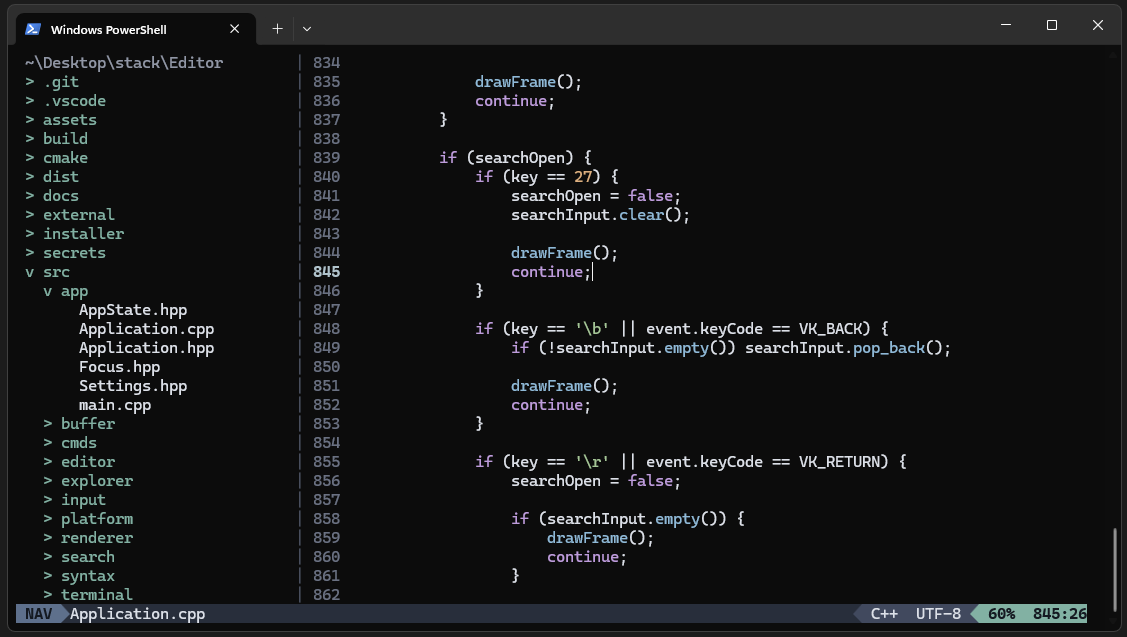
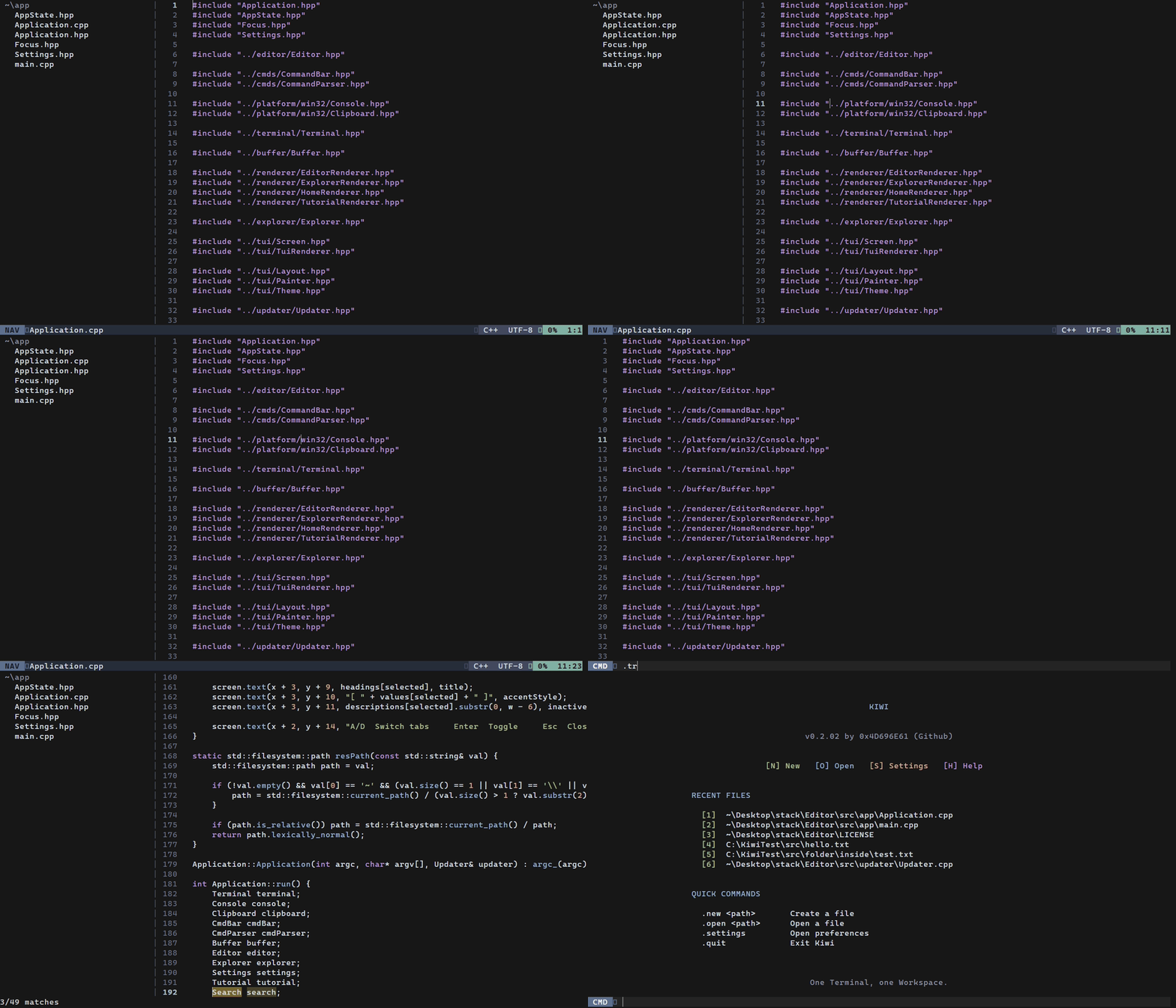
Demo recorded in a virtual terminal. UI rendering may differ slightly from the native Windows Terminal experience.
About
Kiwi is a terminal code editor built around keyboard navigation, modal editing, and a simple workspace.
It has its own terminal UI, file explorer, command system, recent files, configurable settings, and automatic updates.
Kiwi is currently in early development.
Features
- NAV and EDIT editing modes
- Built-in file explorer
- Simple and Tree explorer modes
- File and directory workspaces
- Recent files
- Text and line selection
- Clipboard support
- Word navigation
- In-file search with match highlighting
- Undo and redo
- Command bar
- Configurable UI settings
- Automatic updates
- Direct file and workspace opening from the command line
Installation
Download the Windows installer from the latest release.
After installation, Kiwi can check for new versions automatically. Available updates can be installed directly from the Home screen.
Controls
Kiwi uses two editor modes:
- NAV for navigation and commands
- EDIT for writing text
Press Space in NAV to enter EDIT.
Press and release Left Ctrl to return to NAV.
NAV
| Key | Action |
|---|---|
W | Move up |
A | Move left |
S | Move down |
D | Move right |
Space | Enter EDIT mode |
/ | Search current file |
n | Next search match |
N | Previous search match |
. | Open command bar |
1 | Undo |
2 | Redo |
qq | Previous word |
rr | Next word |
xx | Change word and enter EDIT |
v | Toggle selection |
Shift + V | Select current line |
cc | Copy current line |
cv | Copy selection |
ca | Paste |
Moving while a selection is active extends the selection.
EDIT
| Key | Action |
|---|---|
| Normal keys | Insert text |
Enter | New line |
Backspace | Delete character or merge lines |
Tab | Insert 4 spaces |
Left Ctrl | Return to NAV when released |
Explorer
| Key | Action |
|---|---|
W | Move up |
S | Move down |
Enter | Open file or directory |
Backspace | Go to parent directory |
. | Open command bar |
Left Ctrl + Space | Switch between Explorer and Editor |
In Tree mode, Enter expands or collapses directories.
Home
| Key | Action |
|---|---|
N | Create a new file |
O | Open a file |
S | Open Settings |
1 - 9 | Open a recent file |
. | Open command bar |
Settings
| Key | Action |
|---|---|
A / W | Previous setting |
D / S | Next setting |
Enter | Toggle setting |
Esc | Close Settings |
Current settings include:
- Simple or Tree explorer
- Explorer/Editor separator
- NAV block cursor
Commands
Press . to open the command bar.
Files
| Command | Action |
|---|---|
.new <path> | Create a new file |
.open <path> | Open a file |
.save / .s | Save |
.saveas <path> | Save to another path |
.del <path> / .delete <path> | Delete a file |
Workspace
| Command | Action |
|---|---|
.home | Return to Home |
.tree | Toggle the file explorer |
.settings | Open Settings |
Exit
| Command | Action |
|---|---|
.q / .quit | Quit |
.sq / .squit / .savequit | Save and quit |
.fq / .fquit / .forcequit | Force quit |
Normal quitting is blocked when the current file has unsaved changes.
Opening files
Launch Kiwi normally:
kiwi.exe
Open a file directly:
kiwi.exe .\main.cpp
Or open a directory as a workspace:
kiwi.exe .\MyProject
Building from source
Requirements
- Windows 11
- CMake 3.25+
- Ninja
- C++23-compatible compiler
- MSYS2 Clang64 recommended
Build
git clone https://github.com/0x4D696E61/Kiwi.git
cd Kiwi

cmake --preset debug
cmake --build --preset debug

.\build\debug\kiwi.exe
Updates
Kiwi checks for updates when it starts.
When an update is available, the Home screen displays:
Kiwi update available! [I] Install [L] Later
I downloads, verifies, and installs the update.
L dismisses the update for the current session.
License
Kiwi is licensed under the MIT License.
Author
Created by 0x4D696E61.
Similar repos


Languages
C++
97.0%
Inno Setup
1.8%
CMake
1.1%
A Windows-native modal terminal editor built around WASD navigation.
C++
1
17 commits
updated Oct 2, 2026
See what people are saying
README
Kiwi 🥝
A Windows-native modal terminal editor built around WASD navigation.
Download · Controls · Commands · Build
Demo recorded in a virtual terminal. UI rendering may differ slightly from the native Windows Terminal experience.
About
Kiwi is a terminal code editor built around keyboard navigation, modal editing, and a simple workspace.
It has its own terminal UI, file explorer, command system, recent files, configurable settings, and automatic updates.
Kiwi is currently in early development.
Features
- NAV and EDIT editing modes
- Built-in file explorer
- Simple and Tree explorer modes
- File and directory workspaces
- Recent files
- Text and line selection
- Clipboard support
- Word navigation
- In-file search with match highlighting
- Undo and redo
- Command bar
- Configurable UI settings
- Automatic updates
- Direct file and workspace opening from the command line
Installation
Download the Windows installer from the latest release.
After installation, Kiwi can check for new versions automatically. Available updates can be installed directly from the Home screen.
Controls
Kiwi uses two editor modes:
- NAV for navigation and commands
- EDIT for writing text
Press Space in NAV to enter EDIT.
Press and release Left Ctrl to return to NAV.
NAV
| Key | Action |
|---|---|
W | Move up |
A | Move left |
S | Move down |
D | Move right |
Space | Enter EDIT mode |
/ | Search current file |
n | Next search match |
N | Previous search match |
. | Open command bar |
1 | Undo |
2 | Redo |
qq | Previous word |
rr | Next word |
xx | Change word and enter EDIT |
v | Toggle selection |
Shift + V | Select current line |
cc | Copy current line |
cv | Copy selection |
ca | Paste |
Moving while a selection is active extends the selection.
EDIT
| Key | Action |
|---|---|
| Normal keys | Insert text |
Enter | New line |
Backspace | Delete character or merge lines |
Tab | Insert 4 spaces |
Left Ctrl | Return to NAV when released |
Explorer
| Key | Action |
|---|---|
W | Move up |
S | Move down |
Enter | Open file or directory |
Backspace | Go to parent directory |
. | Open command bar |
Left Ctrl + Space | Switch between Explorer and Editor |
In Tree mode, Enter expands or collapses directories.
Home
| Key | Action |
|---|---|
N | Create a new file |
O | Open a file |
S | Open Settings |
1 - 9 | Open a recent file |
. | Open command bar |
Settings
| Key | Action |
|---|---|
A / W | Previous setting |
D / S | Next setting |
Enter | Toggle setting |
Esc | Close Settings |
Current settings include:
- Simple or Tree explorer
- Explorer/Editor separator
- NAV block cursor
Commands
Press . to open the command bar.
Files
| Command | Action |
|---|---|
.new <path> | Create a new file |
.open <path> | Open a file |
.save / .s | Save |
.saveas <path> | Save to another path |
.del <path> / .delete <path> | Delete a file |
Workspace
| Command | Action |
|---|---|
.home | Return to Home |
.tree | Toggle the file explorer |
.settings | Open Settings |
Exit
| Command | Action |
|---|---|
.q / .quit | Quit |
.sq / .squit / .savequit | Save and quit |
.fq / .fquit / .forcequit | Force quit |
Normal quitting is blocked when the current file has unsaved changes.
Opening files
Launch Kiwi normally:
kiwi.exe
Open a file directly:
kiwi.exe .\main.cpp
Or open a directory as a workspace:
kiwi.exe .\MyProject
Building from source
Requirements
- Windows 11
- CMake 3.25+
- Ninja
- C++23-compatible compiler
- MSYS2 Clang64 recommended
Build
git clone https://github.com/0x4D696E61/Kiwi.git
cd Kiwi

cmake --preset debug
cmake --build --preset debug

.\build\debug\kiwi.exe
Updates
Kiwi checks for updates when it starts.
When an update is available, the Home screen displays:
Kiwi update available! [I] Install [L] Later
I downloads, verifies, and installs the update.
L dismisses the update for the current session.
License
Kiwi is licensed under the MIT License.
Author
Created by 0x4D696E61.
Similar repos
Languages
C++
97.0%
Inno Setup
1.8%
CMake
1.1%